






Ciaro Pro
Ciaro Pro – makes AI prompt commands work more efficiently and simply.
Tags:AI prompt instructionsWhat is Ciaro Pro?
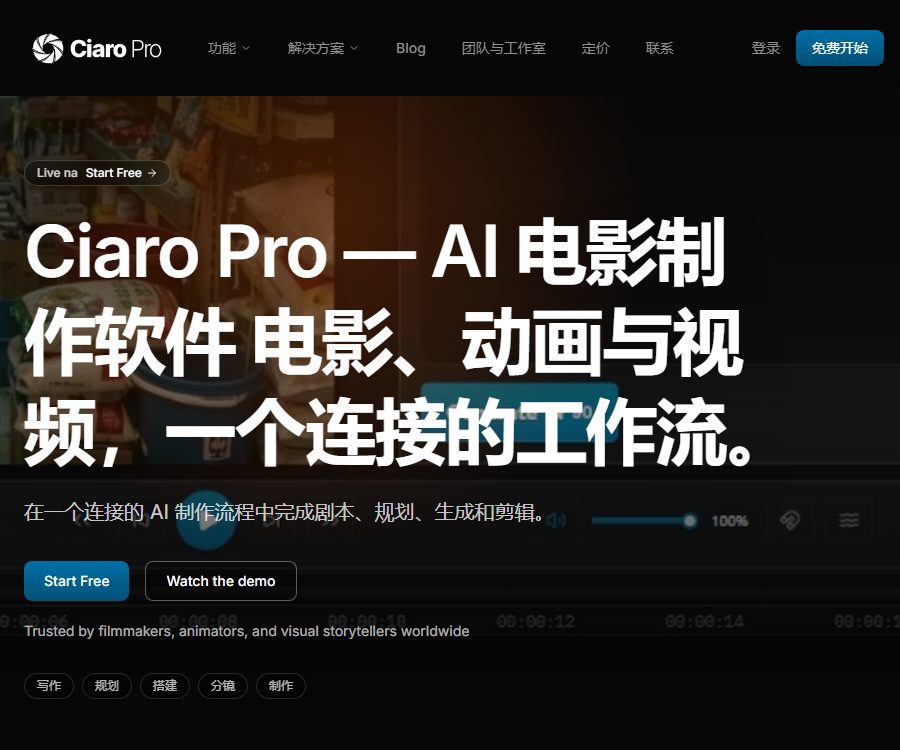
Ciaro Pro is an AI-based platform for creating films and animations, operated by the Swiss company TaleTech Studios AG. It evolved from Story-Boards.AI and was given a new name; it is designed for creators who need to develop complete narrative projects, rather than just generating unrelated short video clips.
The platform brings together the script, scenes, shots, characters, props, background, reference materials, generated media, and timeline within the same project. The director can move from text development to storyboard creation, video generation, editing, and delivery, thereby reducing the need to re-create context across different tools.
Current product status
| Project | Status verified | Actual meaning |
|---|---|---|
| Operating entity | TaleTech Studios AG | The terms are governed by Swiss law. |
| Brand status | Ciaro Pro | The original Story-Boards.AI has been upgraded to a full-fledged production platform. |
| Product format | Web application | Log in to the project workspace via the browser |
| Update status | Continuous release of versions | The release log includes backend, model, and API updates for 2026. |
| Free entry | Already provided | You can test a project without having to pay. |
| Native mobile apps | Not confirmed yet | No official app store page was found. |
The workflow from script to finished film
- Create a new project and write a script, or import existing script materials such as from Final Draft or PDF.
- Let the system identify the scenes, characters, and dialogue, after which manual adjustments can be made to the scene breakdown, character names, and story structure.
- Create references for characters, costumes, props, locations, and visual style in the concept workspace.
- Plan the shots according to the scenario, linking characters, backgrounds, props, shot distances, and movement intentions to specific shots.
- Generate or upload storyboard frames, and check the rhythm, continuity, and any missing shots in the storyboard view.
- Select the appropriate image or video model to convert the approved still frames and prompts into moving sequences.
- In the timeline, assemble shots, audio, and versions to complete editing, review, and output.
- Before publishing, check the requirements regarding copyright, portraits, audio, brands, facts, and AI content labeling, and then export the delivery files.
Screenplay and Story Analysis
- The script workspace supports writing in professional formats, and it is possible to import existing scripts as a starting point for a project.
- AI assistants can help analyze stories, break down scenes, modify text, and create shot suggestions, but any changes require approval from the creator.
- Multilingual script and scene detection has been continuously improved in the update logs; complex formats still need to be checked section by section during import preview.
- Free users can use the basic script workspace, but story analysis and the AI writing assistant are available starting from the Indie plan.
Conceptual design and character consistency
- Character tools allow for the predefined setting of appearance, clothing, posture, and reference images, enabling the reuse of character data in multiple scenes and shots.
- The props and backgrounds share a similar asset structure, which is suitable for creating a world view, a library of scenes, and reusable visual elements.
- Image prompts take into account the project’s style, character names, camera information, and reference materials, thereby reducing the need to describe everything from scratch each time.
- Consistency depends on the reference quality, the capabilities of the model, and manual screening; it is not possible to ensure that the details of the characters in different shots are exactly the same.
Lens planning and storyboard
- The conceptual view breaks down the shots according to different scenarios, and associates characters, props, backgrounds, and the intent behind each shot with the context of the script.
- The storyboard view displays scenes, shot statuses, and the production timeline in one place, making it easy to adjust the narrative order before creating the video.
- Users can create storyboard images using text, or they can upload sketches and reference images to refine them further.
- Free allows only one project and is suitable for testing processes; Indie and higher tiers offer an unlimited number of projects, making them more appropriate for ongoing creation.
Visual control and image editing
- Visual tools support sketches, pose detection, and GLB 3D references, which are used to control composition, character positions, and spatial relationships.
- Image editing includes local redrawing, image enlargement, scaling, cropping, and camera transformations, allowing key frames to be corrected before video generation begins.
- Basic image generation is available in all plans, while advanced image editing is available starting from the Pro plan.
- Reference images, sketches, and 3D assets must be owned by the user or authorized for use; uploading them does not automatically resolve any copyright issues.
Image and video models
| Type | Current model example | Key capabilities | Package tips |
|---|---|---|---|
| Image | Flux 2, Nano Banana, Nano Banana 2 | Realistic, based on extensive references, creation and editing | Image generation covers all options. |
| Image | QWEN, Seedream 4.5, Gen 4 | Text and interface details, style exploration, reference consistency | The specific consumption varies depending on the model and settings. |
| Video | Ray 3.2, Veo 3.1, Sora 2 | High-quality motion, dialogue, and original audio, along with longer, coherent segments. | Some models require Indie or higher tier. |
| Video | Gen 4.5, Kling 3, Seedance 2.5 | Video from images, multimodal references, audio, and clips up to 30 seconds long | High-quality output requires more points. |
| Video | HappyHorse 1.1 | Fast multi-modal video and native 1080p output | Based on the optional account model. |
The list of available models will be updated depending on the adaptation process; third-party models may have their names changed, their availability limited, or they may stop providing services. Before making a purchase, it is necessary to take into account the models available in the account, as well as the resolution, duration, audio quality, and the actual points required.
Video production, audio, and output
- The production workspace allows for video creation from footage, as well as for assembling clips within an AI-driven nonlinear editing timeline.
- Studio and higher tiers offer advanced video editing, music generation, voice tools, and team collaboration features.
- Some workflows support 4K, HDR, and EXR output; the actual capabilities depend on the model, scheme, and generation settings.
- LipSynch first processes the audio and the target performance, then generates lip-synced footage; explicit permission is required to use real human voices or portraits.
- The quality of the output, the coherence of the actions, the accuracy of the dialogue, and the details of the characters can vary; important scenes usually require multiple generations and subsequent edits.
Collaboration and asset management
| Ability | Personal plan | Studio | Enterprise |
|---|---|---|---|
| Number of projects | Indie and Pro Unlimited | Infinity | Infinity |
| Shared projects | Not available | Provide | Provide |
| Team workspaces and roles | Not available | Provide | Provide |
| Share roles, styles, and assets | Not available | Provide | Provide |
| Centralized billing and procurement | Not available | Not listed | Provide |
| Official approval, version rollback, and reporting | Not available | Not listed | Provided according to the enterprise plan |
The ownership of the materials and the scope of their use in collaborative projects must be agreed upon by the team itself. The platform does not handle disputes related to copyright, attribution, or commercial sharing among the co-creators.
How are points consumed?
- Points are used for computationally intensive tasks such as storyboard creation, video clipping, editing, and automation.
- According to available information, the lowest cost for images is around 2 credits, while the cost for short HD videos is around 70 credits; in addition, model fees may apply.
- The cost of the same task varies depending on the model, duration, resolution, number of references, editing operations, and quality mode.
- The handling of failed tasks, retries, and charges related to different models should be verified on the confirmation page; it is not possible to estimate the number of units produced based solely on monthly points.
- Pro allows the purchase of additional points, with the specific price varying depending on the subscription level.
Prices and packages
| Package | Price | Billing cycle | Core benefits or quota | Suitable for users |
|---|---|---|---|---|
| Free | 0 dollars | Long-term free account | 50 points per month, 1 project, basic image and video testing | First assessment process |
| Indie | $ | Monthly or annual settlement | 500 points per month, unlimited projects, script AI, storyboard and video generation | Independent creators |
| Pro | 49 dollars per month; the annual payment equates to 39 dollars per month. | Monthly or annual settlement | 1200 points per month, advanced image editing, integration, additional points available for purchase, developer API | High-frequency personal creation |
| Studio | $ | Monthly or annual settlement | 2500 points per month, team workspace, shared assets, advanced video and audio features | Production team |
| Enterprise | Custom quote | Contractual agreement | Custom seats and points, procurement settlement, extended APIs, Webhooks, implementation and support | Studios and institutions |
The annual payment page shows the cost on a monthly basis, but the payment is made on an annual basis; it is indicated that this option saves 20% compared to monthly payments. Regional taxes, currency, package options, and additional points are subject to the pricing specified within the application or in the sales quote.
Educational users can learn through free programs; they can also contact the team to obtain access to classes, shared resource libraries, and institutional billing options. Educational access is handled through a separate channel and should not be considered as a fixed public discount available to all students.
Subscription, cancellation, and refunds
- Paid subscriptions are automatically renewed on a monthly or annual basis as selected, and users should cancel them before the end of the current period.
- Once canceled, it can be used until the end of the current billing cycle; thereafter, the payment-related benefits will cease.
- There is a conflict in the refund section of the terms: one part states that valid reasons can be assessed on a case-by-case basis, while another part says that no refunds are provided for any purchased items or unused periods.
- When making a purchase, it is necessary to assess the risks on a non-refundable basis, and prior to making large annual payments or bulk purchases, it is essential to obtain written confirmation regarding any exceptions, taxes, and any errors in deductions.
- Price adjustments will be notified in advance; continuing to use the service may be considered as acceptance of the new prices.
API, Webhook, and open-source status
| Project | Current status | Precautions |
|---|---|---|
| Developer API | Available starting from Pro. | The public package lists the integrations and developer APIs. |
| Story Wizard API | Available now | Publish log records of stories, scripts, shots, and interface status information |
| Webhooks and automated extensions | Enterprise | The limit and scope of implementation are determined as per the contract. |
| SDK | Not yet made public | No documentation for the official client SDK was found. |
| Product source code | Not open source | No official product repository or open-source license was found. |
The ability to invoke certain workflows through API calls does not mean that one has access to the model weights, the platform’s source code, or an unlimited amount of automation capacity. Before developing integrations, it is necessary to understand the aspects related to authentication, point-based billing, concurrency, error retry mechanisms, data storage areas, and the terms related to third-party models.
Privacy and data storage
- The platform collects account information, scripts, images, audio, prompts, generated content, usage patterns, device details, location data, and subscription point information.
- The materials submitted to the generation function are transmitted to third-party models for image, video, audio, and lip-sync processing.
- Ciaro Pro states that it will not use submitted content or generated output to train its own models, but third-party suppliers may adopt different policies.
- The originally uploaded materials are deleted after processing within the own system; copies stored in third-party models are handled in accordance with the supplier’s own retention policies.
- Images, videos, and audio files are saved alongside the project and account; according to the privacy policy, they are retained for up to 12 months after the account is closed.
- Identity information can typically be retained for up to 7 years for legal or business purposes, while the data used can be kept for a maximum of 24 months.
- Data can be transferred across borders, including to the United States; policies provide safeguards such as standard contract clauses.
- Encryption is used for both transmitted and static data, along with access control, security assessments, and vulnerability testing.
There are differences in the criteria for data deletion: the terms state that user data is deleted within 30 days after the account is closed, while the privacy policy specifies a maximum period of 12 months for such deletion. Teams responsible for handling unpublished scripts and customer assets should obtain written confirmation of the actual date on which each type of data will be deleted before signing any contracts.
Copyright, commercial use, and compliance boundaries
- User-created scripts, stories, and written materials remain the property of the users; the platform does not claim ownership over them.
- The uploaded content is granted to the platform only a temporary, non-exclusive license necessary for analysis, transmission, and the provision of services.
- AI-generated images, videos, audio content, and lip-sync results are created by third-party models; their copyright status and exclusivity depend on local laws as well as the creative contributions of the individuals involved.
- The platform does not guarantee that the generated content has had its commercial rights cleared, nor does it guarantee that it is not similar to third-party works.
- For real-person portraits, voice cloning, deepfakes, and lip-syncing, explicit consent must be obtained, and respect must be shown for rights related to personality, publicity rights, as well as consumer protection rules.
- When publishing synthetic audio and video content in applicable regions, users are required to fulfill the obligations of disclosing and labeling AI-generated content.
- Music, fonts, trademarks, reference images, third-party scripts, and customer materials should all undergo separate authorization checks.
Suitable for users and typical use cases
- Independent director: Breaks the script down into shots, creates storyboards and preview videos, and then presents the creative direction to the team.
- Animation creators: Develop character, costume, prop, and background assets to maintain visual consistency across a series of content.
- Advertising and Brand Team: Creates a unified project record that includes scripts, shot lists, short videos, and the final delivery version.
- Production studio: Share assets via Studio, review footage, and coordinate the team’s timeline.
- Educational institutions: Instructors teach the entire process, from story development to storyboard creation and AI-based video production.
- Development partners: Integrate stories and generation tasks into their own workflows via Pro API or enterprise automation.
Advantages and limitations
| Aspect | Actual judgment |
|---|---|
| Process completeness | Scripts, assets, storyboards, generation, and timelines are connected within the same project. |
| Visual continuity | Roles and reference assets can be reused, but the model may still experience drift. |
| Model selection | There are a wide range of image and video models, and changes in suppliers can affect availability. |
| Free trial | 50 points per month can be used to verify a process, but only one project is allowed. |
| Production cost | The scoring rules are transparent down to the reference threshold; the overall cost of completing a task still depends on retries and the model used. |
| Team capabilities | Studio supports collaboration; formal approval and advanced governance are primarily available in enterprise solutions. |
| Development and integration | The Pro version comes with APIs and SDKs; the open-source license has not yet been made public. |
| Legal risks | The platform does not offer commercial rights clearance or copyright assurance. |
| Policy consistency | There is a conflict between the deadline for refunds and the deadline for deletion; written confirmation is required for significant purchases. |
Summary
Ciaro Pro is suitable for individuals and teams who wish to take a complete story from a script to storyboards, generated shots, and a final finished product. Its main advantage lies not only in the number of models available, but also in the ability to share characters, assets, shots, and the timeline within the same production context.
When making a purchase, one should choose the appropriate option based on the number of items, monthly points, image editing capabilities, team collaboration features, and API requirements, while also taking into account the costs associated with retries. Before commercial release, it is necessary to carry out manual quality checks, review the terms related to third-party models, obtain permissions for the used materials, get consent from real people involved, and add identifiers to the synthetic content.
Tools similar to Ciaro Pro




 Guigong Network Security Registration No. 45132202000164