






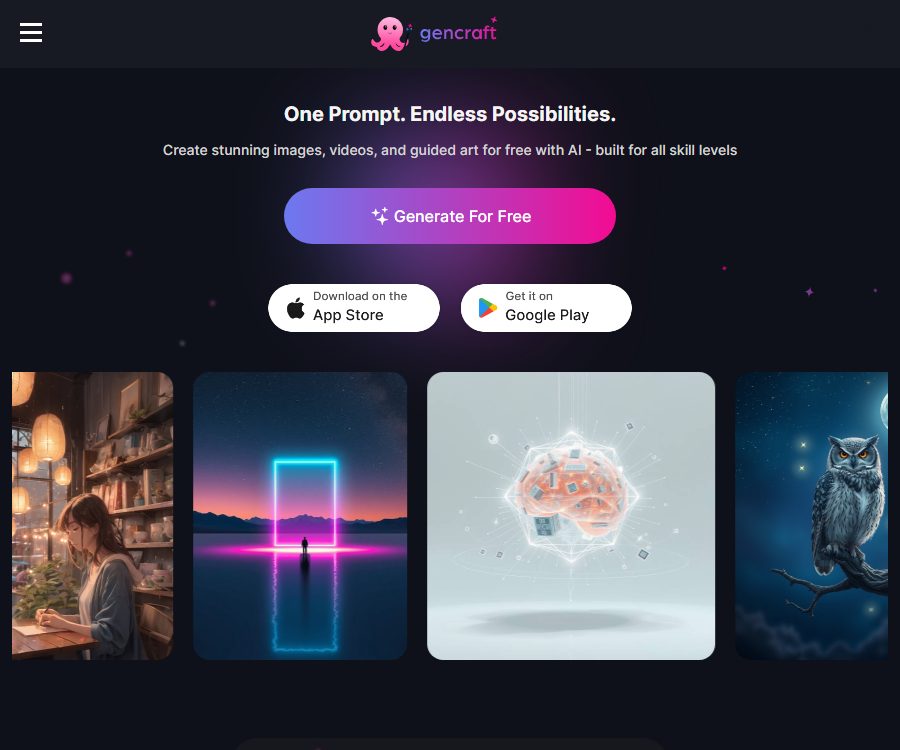
Gencraft
Gencraft makes AI prompt commands work more efficiently and simply.
Tags:AI prompt instructionsWhat is Gencraft?
Gencraft is an AI-powered platform for image and video creation, designed for ordinary creators, designers, and content teams. It can generate artistic works, photos, characters, expressions, and short videos based on textual descriptions or reference images.
The platform also offers partial modifications, creative remixing, community models, and the ability to train custom styles. Describing it as a prompt tool in the database is inaccurate; it functions more like an integrated AI visual studio.
The main functions of Gencraft
Text and reference image generation
- By entering natural language prompts and selecting a model, it is possible to generate illustrations, photos, avatars, and conceptual visuals.
- It is possible to upload images of people, sketches, or other reference images, so that the model can generate varied versions based on the original image.
- A variety of styles and models are available, suitable for different uses ranging from realistic photography to anime, fantasy, and design elements.
Image editing and creative remixing
- It is possible to modify specific areas of the image, without having to generate the entire picture from scratch each time.
- It supports editing scenes, creating characters, and remixing existing ideas, facilitating continuous iteration on the same theme.
- The generated results can be saved, downloaded, and shared, and they can also be posted on communities for other users to view.
AI video generation
- Short videos can be created using text or images, and different video models can be employed to achieve various motion effects.
- The speed of video generation, its duration, and the available models are influenced by the subscription level and the platform’s quotas.
- It is suitable for creating social media clips, dynamic concept diagrams, and lightweight marketing materials.
Custom style model
- Users can upload their own images to train custom models, so that new creations maintain a personal or brand-specific style.
- The training process displayed on the official website allows for the upload of up to 500 images.
- After completing the training, this model can be used continuously to create characters, product visuals, or a series of works in a consistent style.
Creation communities and inspiration discovery
- The platform provides access to browse works, creators, and community models.
- Users can view others’ prompts and the resulting creations, and use this as a basis to create new works.
- Before public release, it is necessary to check whether the work contains personal information, sensitive content, or materials that cannot be used.
Supported platforms
- Web page version
- iPhone and iPad apps
- Mac computers with Apple chips can run it seamlessly.
- Android apps
As of August 28, 2026, the App Store page for the United States requires iOS or iPadOS version 17.6 or higher. Mac devices powered by Apple chips need macOS version 14.6 or higher; specific compatibility details can be found in the app store itself.
Which users are it suitable for
- Illustration and concept creators: Quickly explore characters, scenes, and visual styles.
- Social media management: Creating profile pictures, accompanying images, emojis, and short video content.
- Brand and e-commerce team: Create product concept diagrams, advertising visuals, and content with a consistent style.
- Students and beginners: Get to know generative art through existing models and community works.
- Independent developers and creative teams: Use custom models to validate character or product design concepts.
Gencraft prices
Gencraft can be installed and registered for free, and some of its creation features can be tried out. The following are the reference prices for in-app purchases on the App Store in the United States, as verified on August 28, 2026.
| Project | Price | Billing method | Explanation |
|---|---|---|---|
| Starter Weekly | 3.99 dollars | Weekly subscription | Starter member benefits |
| Starter Monthly | 7.99 dollars | Monthly subscription | Starter member benefits |
| Pro Weekly | 9.99 dollars | Weekly subscription | Pro advanced features |
| Pro Monthly | 19.99 dollars | Monthly subscription | Pro advanced features |
| Custom Training | $ | Single in-app purchase | Custom model training |
| Train New 3.0 Model | $ | Single in-app purchase | Train the new 3.0 model |
Subscriptions are usually renewed automatically, and the process for canceling them varies depending on whether the purchase was made via a website, iOS, or Android. Regions, taxes, promotions, and package benefits may change; it is necessary to refer to the current payment page before making a purchase.
How to use Gencraft
- Register an account and choose the web version or mobile app to access the creation page.
- Select images, videos, characters, or other types of content.
- Create specific prompts that describe the subject, environment, composition, lighting, and style.
- Select the appropriate model or preset, and upload reference images if necessary.
- Create a draft and compare multiple versions to select the one with the most suitable composition and details.
- Use local editing, image transformation, or remixing features to make further modifications.
- Before downloading, check the resolution, details of the people, text, copyright, and terms of commercial use.
Suggestions for custom model training
- Use clear, consistent, and high-quality training images, with minimal watermarks and irrelevant backgrounds.
- The images should show different angles, expressions, and lighting conditions, while still maintaining the key features that need to be learned.
- Before training, verify the portrait rights and usage permissions of the uploaded materials.
- Do not delete the images that are being used for training, as this may affect the results of the model.
- First, test the model with a small amount of actual data to determine whether to proceed with training or to adjust the dataset.
Product advantages
- It covers images, videos, local editing, as well as the training of characters and custom models.
- It can be used on web pages, as well as on iOS and Android devices, making it suitable for creating content across different devices.
- It offers a large number of models, styles, and community-created works, with a low barrier to entry.
- Reference images and the local modification feature help maintain the creative direction and reduce redundant generation.
- Paid users can access more comprehensive models, videos, and the ability for custom training.
Usage restrictions and precautions
- AI may generate deformed limbs, incorrect text, or details that do not match the given instructions, and human oversight is required to filter these out.
- Works created by free users are stored for 30 days, and older works may be removed; Pro users enjoy permanent storage.
- The official help center states that images created during the paid period can be used for commercial purposes under certain conditions, but users still need to verify the rights related to the underlying materials, individuals, and brands.
- Public communities contain user-generated content, and not all of it is suitable for minors or commercial use.
- As of the verification date, no open-source license was found to be used for the Gencraft platform itself, nor was there any public API available for developers.
Frequently Asked Questions
Can Gencraft be used for free?
You can register for free and try out some of the generation features. Advanced models, videos, custom training, and other benefits may require a subscription or a one-time purchase.
Can Gencraft generate videos?
Yes. The platform offers a function for creating short videos using text or images; the actual models, quotas, and duration are specified on the account page.
Does Gencraft support training a personal style?
Supported. Users can upload images to train custom models; the process described on the official website allows for the upload of up to 500 training images.
Can the generated images be used for commercial purposes?
The official help center allows paid subscribers to use the images it generates for commercial purposes under certain conditions, but they are still responsible for verifying the references, portraits, trademarks, and other third-party rights involved.
Is Gencraft an open-source tool?
It is not a recognized open-source platform. It offers hosting services primarily through web pages and mobile applications, and no public developer API has been identified to date.
Tools similar to Gencraft




 Guigong Network Security Registration No. 45132202000164