






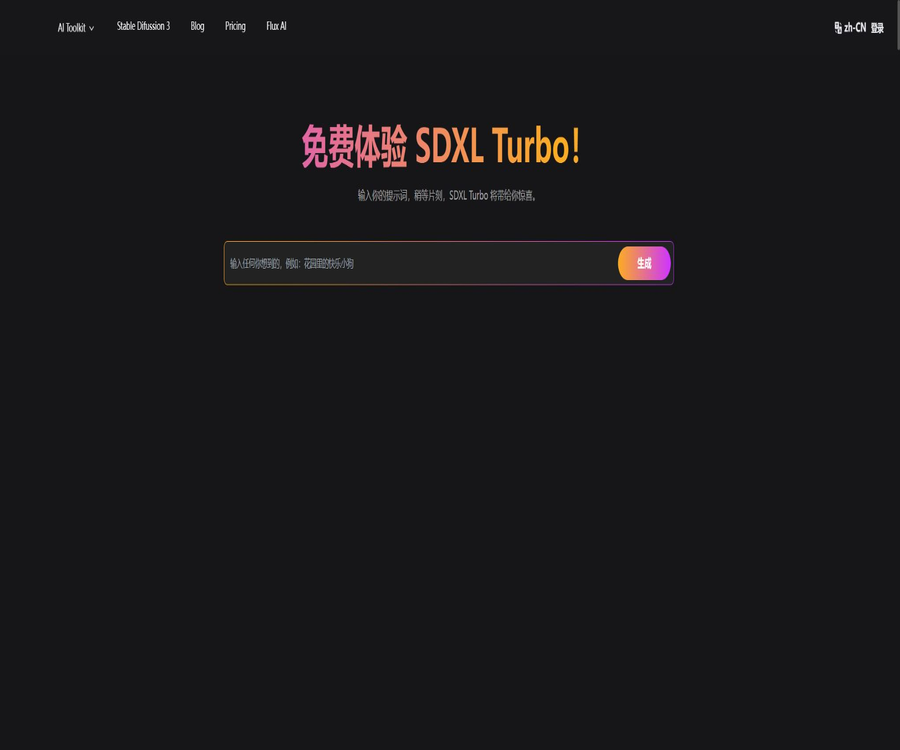
SDXL Turbo
SDXL Turbo, an intelligent tool focused on AI prompts
Tags:AI prompt instructionsWhat is SDXL Turbo Online?
SDXL Turbo Online is an online platform for AI-based image generation and editing, operated by InnoLeap AI LLC. Users can enter prompts in their browser, select models and image dimensions, generate images, and then resize them, edit them, or export them with a transparent background.
It is not the same as the SDXL Turbo model developed by Stability AI. The online platform currently offers models and tools such as Flux Tamarin, Super Anime, and visiCanvas; therefore, all the capabilities of the site cannot be attributed to SDXL Turbo.
What is the SDXL Turbo model?
SDXL Turbo is a high-speed text-to-image generation model developed by Stability AI by refining SDXL 1.0. It employs an adversarial diffusion distillation method to reduce the number of sampling steps required by traditional diffusion models from multiple steps to just 1 to 4 steps.
The official model card classifies it as a real-time image synthesis model, with a typical output resolution of 512×512 pixels. A smaller number of processing steps offers speed advantages, but when it comes to complex compositions, text, hands, and detailed control, its performance is usually not as stable as that of slower larger models.
Main functions of online platforms
- Enter text prompts to generate images.
- Use negative prompts to exclude elements that are not desired.
- Switch between multiple image models.
- Select 1:1, 3:4, 4:3, 9:16, or 16:9 aspect ratio.
- 1, 2, or 4 images are generated at a time; the exact number depends on the package chosen.
- Use Magic Erase to remove objects from images.
- Enlarge the image and improve the output size.
- Generate or export assets such as transparent PNG files.
- Use specialized tools such as pixel art, tattoos, stickers, and prompts through the AI Toolkit.
- Member photos remain private and free of the platform’s watermark.
Current generation parameters
| Parameters | Optional content | Usage suggestions |
|---|---|---|
| Model | Real-time options for pages such as Flux Tamarin, Super Anime, visiCanvas, etc. | Choose based on realistic, anime, or canvas tasks |
| Prompt | Subject, environment, style, composition, lighting, and details | Describe the core subject first, then add the visual requirements. |
| Negative prompt words | Objects, defects, and styles that are not desired | Avoid stacking descriptions that conflict with each other. |
| Image size | 1:1、3:4、4:3、9:16、16:9 | Select according to the purpose: profile picture, poster, short video, or banner. |
| Number of items generated | 1, 2, or 4 pieces | Batch processing consumes quota more quickly. |
| Results retained | The page indicates that the generated image is retained for 7 days. | Download it in a timely manner; don’t treat the platform as a long-term cloud storage solution. |
AI Image Generation Tutorial
- Log in to the platform and access the online generator.
- Select realistic, anime, or other available models based on the goal.
- Enter the subject, scene, action, shot, lighting, and style.
- List the defects that need to be avoided in the negative prompt.
- Select a format that matches the distribution channel.
- Set the number of images to be generated and check the remaining quota.
- After creation, compare the composition, details, text, and consistency of the characters.
- Continue processing using the erase, zoom, or transparent background tools.
- Download the required images within the 7-day retention period.
Prompt writing format
- First, write down the main object and its quantity to prevent the model from confusing the primary elements.
- Add scenes, time, weather, and background layers.
- It explains lens distance, angle, depth of field, and composition.
- Describe the direction of the light, color temperature, contrast, and atmosphere.
- Indicate the medium style, such as photography, illustration, anime, or pixels.
- Add constraints regarding material, surface, background, and brand for product images.
- When continuous characters are required, the key appearance descriptions and random seeds must be fixed.
- Keep the text short when generating it, and prepare to replace it manually later.
Advanced Editing Tutorial
- Open the generated image that needs to be modified.
- Choose tools such as Magic Erase, Upscale, or PNG.
- When erasing an object, apply the action precisely to the target area and properly cover the edges.
- Check the original image for any severe structural errors before zooming in.
- For tasks with a transparent background, special attention is paid to hair, glass, and the edges of shadows.
- Compare the results before and after editing to avoid texture repetition and visual illusions.
- Download the final version and keep the original image.
What use cases are suitable?
- Content creators create blogs, covers, and images for social media.
- Designers quickly explore concepts, colors, and compositional directions.
- Marketers create draft advertisements and preliminary visual designs for campaigns.
- Game and anime creators explore characters, scenes, and props.
- Teachers and students create supplementary illustrations for presentations.
- Independent sellers create background materials, stickers, and product concept images.
- Researchers experienced the real-time generation of the low-step diffusion model.
It is not very suitable for which tasks
- Final commercial designs that require precise wording, logos, and brand guidelines.
- A long series of content is required that consistently maintains the same details regarding the characters and products.
- Tasks that require genuine evidence, news photos, or medical images.
- Professional production requiring layers, vector paths, and pre-press color management.
- Workflows that generate assets but lack local backups must be preserved on a long-term basis.
- Regular website members who require public APIs, large-scale automation, or local private deployment.
Package price
The following shows the monthly equivalent of the annual payment as displayed on the price page for August 2026; the page indicates that an annual payment saves 50%. The amount may vary when switching to a monthly payment or when making a settlement, and taxes and promotions can also affect the final price.
| Package | Reference price for annual payment | Quick generation | Normal generation | Senior Editor |
|---|---|---|---|---|
| Free | $ | 10 times per day for the first 7 days | Regular queue | Once a day |
| Pro | $ | 1,000 times per month | No restrictions on normal processing | 30 times a day |
| Max | 10 dollars per month | 3,000 times per month | No restrictions on normal processing | 120 times a day |
Comparison of package features
| Functions | Free | Pro | Max |
|---|---|---|---|
| Generate an image once | 2 pieces | 4 pieces | 4 pieces |
| Concurrent tasks | 1 | 2 | 5 |
| Upscale | Includes | Includes | Includes |
| watermark | None | None | None |
| Website commercial license | Page tags include | Includes | Includes |
| Images are private. | Page tags include | Includes | Includes |
| AI Toolkit | 3 points per day | 20 points per day | 50 points per day |
The so-called “unlimited regular processing” is still typically subject to constraints such as server capacity, fair usage policies, and queueing rules. Once the fast processing quota is used up, the account may revert to free or regular processing mode; the actual settings will be indicated on the account page.
Payment, upgrades, and cancellation
- Payments are processed through Stripe, and the website claims that it does not store the full credit card details.
- It supports major credit cards as well as methods such as Apple Pay and Google Pay.
- Users can cancel their subscription in their account settings.
- The package can be upgraded or downgraded, and the effective date is as indicated on the billing page.
- Once the allocated quota is used up, further use of that specific number of quick requests is not possible.
- The website makes it clear that prices may increase in the future as the cost of the models rises.
- Before making a purchase, check whether to choose monthly or annual payment.
- The public page does not provide sufficient information regarding the unified refund guarantee; it is necessary to check the current terms first.
Image privacy and retention
The price page defines “private images” as those that can only be viewed by the account owner, and they are not displayed to other users. Non-private images may be included in the public gallery, but the page states that personal information will not be shown alongside them.
The generator also indicates that images are retained for only 7 days; therefore, privacy does not mean permanent storage. Users should download them promptly and avoid uploading sensitive, customer, or personal photos without permission.
- Download the important results immediately after generation.
- Do not treat the platform’s image library as a long-term asset management system.
- Obtain permission for the use and processing of the portrait before uploading a real-person photo.
- One does not want to have the privacy status of an account confirmed when it is displayed publicly.
- When deleting images, check whether the account offers the option to clean up historical records.
- The business team should verify the document retention policies, processing locations, and third-party models.
What should be taken into account regarding a website’s privacy policy?
The website’s privacy page states that only email addresses provided voluntarily by users are collected, but in reality account details, payment information, image generation data, and usage logs may involve additional service-related data. This description is rather brief and cannot replace a comprehensive assessment of data processing practices.
- The website states that it does not sell or trade email addresses.
- Required information may be shared with trusted third parties that assist in operating the services.
- Users can request access to, correction of, or deletion of their email data.
- The website states that cookies are not used to collect or store personal information.
- No network transmission or electronic storage can guarantee absolute security.
- The privacy policy can be updated, and important items should be reviewed again.
The difference between online platforms and model licenses
The \"Commercial License\" included in the website packages refers to the online service rights and benefits described by sdxlturbo.ai to its members. When downloading the SDXL Turbo model weights from Stability AI for self-deployment, the license provided by the model’s publisher applies; it is not possible to use the information provided for website members in place of it.
The current license page for Stability AI lists SDXL Turbo under the Community license category. The licenses associated with the model repository have changed over time; for commercial or hosted deployments, it is necessary to follow the terms specified in the model card and the original license document at the time of download.
| object | Provider | License determination |
|---|---|---|
| sdxlturbo.ai online service | InnoLeap AI LLC | Use according to the website’s package options, terms, and payment page. |
| SDXL Turbo model weights | Stability AI | Use according to the model card and the current licenses of Stability AI. |
| Stability AI generation model code | Stability AI | Follow the respective license requirements for the code and models in the GitHub repository. |
| Other models on the website | Providers of various models or platforms | The SDXL Turbo license cannot be inherited by default. |
SDXL Turbo for local use
Official models can be loaded using tools such as Hugging Face and Diffusers; the Stability AI repository containing generative-models can also serve as a reference. These models require significant storage space and memory, and thus a compatible GPU as well as a deep learning environment are necessary.
- Read the current model card, license, and acceptable use policy.
- Verify that the organization’s revenue sources, commercial uses, and hosting methods are in compliance with the licensing requirements.
- Prepare Python, PyTorch, Diffusers, and a GPU-compatible environment.
- Obtain the weights from Stability AI’s official model repository.
- 512×512 and 1 to 4 steps are used as the basic tests.
- Evaluate speed, video memory, image quality, accuracy, and security filtering.
- Add access control, auditing, logging, and content governance before production deployment.
Technical features
| Technical items | Explanation |
|---|---|
| Base model | Distilled from SDXL 1.0 |
| Training methods | Adversarial Diffusion Distillation |
| Sampling steps | Usually 1 to 4 steps |
| Typical resolution | 512×512 |
| Core advantages | Low latency, fast preview, and interactive generation |
| The main cost | Complex details, text, and instructions are handled in a manner that may be less effective compared to slower models. |
Copyright and security considerations
- Do not generate content that is illegal, fraudulent, harassing, hateful, or harmful.
- When real people are involved, avoid unauthorized impersonation and sensitive synthesis.
- Check for trademark, character, and work similarities before commercial release.
- Do not use the generated images to pass off as real news, evidence, or professional test results.
- Training data and model outputs may contain cultural and aesthetic biases.
- Retain prompt words, models, generation time, and manual review records.
- The availability of a model does not mean that each output it generates automatically has undisputed copyright.
Product advantages
- It can be used directly in a browser, without the need for a local graphics card or specific environmental settings.
- It supports prompt words, negative prompt words, models, and common image formats.
- It is possible to generate multiple images at once and process them concurrently.
- It integrates common editing functions such as erasing, zooming, and transparent backgrounds.
- The AI Toolkit covers a variety of specific image use cases.
- The pricing is low, and a large number of quick generation quotas are available.
- Member photos are private and free of watermarks.
- The official SDXL Turbo model and related research materials are available for developers to study in depth.
Usage restrictions and precautions
- sdxlturbo.ai is not the official website for Stability AI’s models.
- The current list of models available on the platform includes more than just SDXL Turbo.
- The free fast quota is available 10 times per day for the first 7 days only.
- The annual equivalent amount cannot be construed as payments that can be made on a monthly basis at any time.
- Even without restrictions on normal processing, there may still be constraints related to queuing and fair usage.
- The generated images are valid for only 7 days, so they need to be downloaded promptly.
- The website does not provide a public API, and subscriptions do not include access to such an API.
- AI still generates incorrect text, as well as issues with hand shapes, structure, and inconsistent details.
- The website’s privacy policy provides only a brief explanation regarding the data generated.
- Website commercial rights cannot replace model weight licenses.
- Local deployment requires powerful GPUs as well as strong capabilities in operation and maintenance as well as security management.
- The list of prices and models may change depending on the computing costs.
GitHub and the open-source status
Stability AI has made the generative-models repository available on GitHub, and it has released the SDXL Turbo model cards and weights on Hugging Face. It belongs to the ecosystem of open-weight models, but its use is subject to the Stability AI license and acceptable use policies.
The sdxlturbo.ai online platform does not have a complete source code repository that has been confirmed by its official website; therefore, it should be classified as a closed-source commercial service. The catalog should separately indicate whether the model weights are open-source or not, and that the platform itself is closed-source, rather than stating simply that everything is fully open-source.
Basic information
| field | Content |
|---|---|
| Website name | SDXL Turbo Online |
| Website operator | InnoLeap AI LLC |
| Model developer | Stability AI |
| Tool type | Online AI image generation and editing |
| Use the platform | Web page version |
| Price pattern | Free, Pro, and Max subscriptions |
| Whether API is provided | No |
| Is the website open source? | No |
| SDXL Turbo model | Open weights, subject to specific licensing requirements |
| Results retained | A page prompt is generated for 7 days. |
Recommendation score
4.1 / 5. SDXL Turbo Online offers a low price and a variety of tools for creation and editing, making it suitable for individuals who need to produce visual content quickly; however, the platform can be confused with official models, the information regarding privacy is rather limited, and there is no API available. Professional users should pay close attention to the service terms and model licenses.
Frequently Asked Questions
Is SDXL Turbo Online free?
A free version is available: 10 generations per day for the first 7 days, along with standard processing and one advanced edit per day. The rules for the free real-time service may change.
How much are the Pro and Max versions?
On the payment page for August 2026, it is shown that Pro costs $5 per month and Max costs $10 per month, with a savings of 50% indicated. The monthly payment amount will be based on the pricing displayed on the settlement page after making the selection.
How long are the generated images retained?
The message displayed on the current page indicates that the images are valid for 7 days, so users should download them as soon as possible. Private images cannot be considered to be stored permanently in the cloud.
Are APIs provided?
No. The price FAQ clearly states that the subscription does not include public APIs; the platform says that these may be made available in the future.
Can it be used for commercial purposes?
The website package labels indicate that a commercial license is included, but this applies only to the benefits related to online services. When downloading the SDXL Turbo model on your own, you must comply with Stability AI’s current licensing terms.
Why is SDXL Turbo fast?
It employs adversarial diffusion distillation to reduce the number of sampling steps required for generation to 1 to 4, making it suitable for real-time preview and interactive applications.
Is this website the official site of Stability AI?
No. The website is operated by InnoLeap AI LLC, while the SDXL Turbo model was developed by Stability AI.
Is SDXL Turbo open source?
The model weights and code are made available publicly, but they are subject to the Stability AI license; therefore, they should not be considered equivalent to traditional open-source software without any restrictions. The website itself is not open source.
Tools similar to SDXL Turbo




 Guigong Network Security Registration No. 45132202000164