






Banana Pro
Banana Pro, an intelligent tool focused on AI prompts
Tags:AI prompt instructionsWhat is Banana Pro?
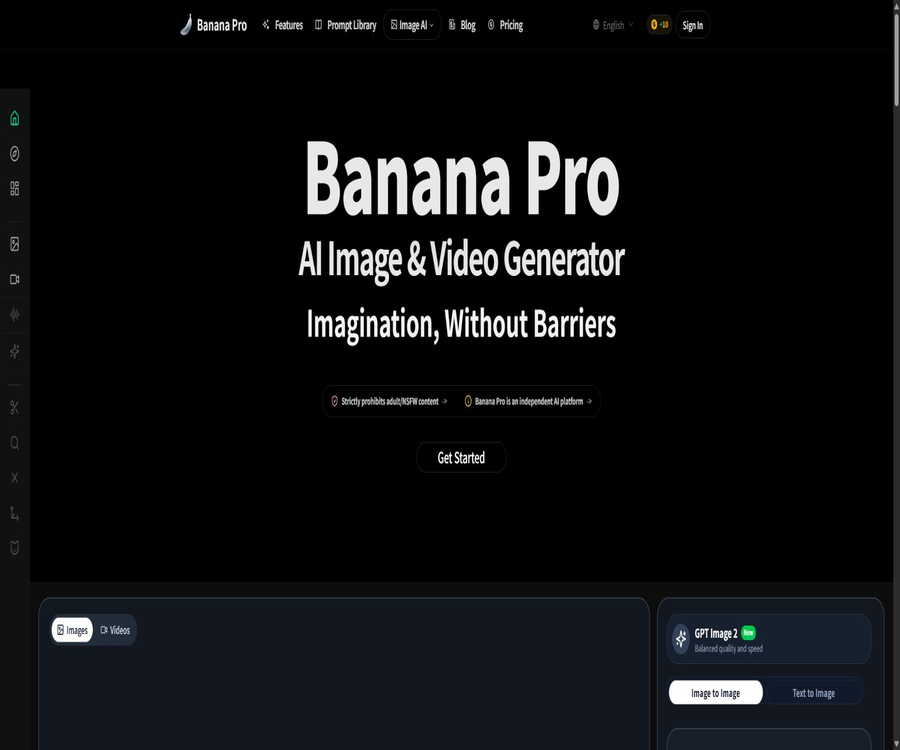
Banana Pro is an independent AI-powered platform for creating images and videos, operated by JollyStack LLC. It brings together a variety of third-party image and video models as well as workflow tools in a single web interface, offering capabilities for creation, editing, and project management to marketers, e-commerce professionals, designers, and content creators.
This platform is not an official product of Google, OpenAI, Midjourney, or any other company that develops models. Its name can be confused with Google’s Nano Banana Pro model; therefore, it is important to distinguish between \"third-party creation platforms\" and the \"underlying models\".
Core functions
1. Text-to-image generation and reference image creation
Users can enter a textual description to create new images, or they can upload JPG, PNG, or WebP files as references for image generation and editing. The size of the uploaded files is limited to 50MB; the actual number and size of reference images that can be used are determined by the model in question.
2. Multi-model image and video generation
The platform brings together GPT Image, Seedream, Midjourney-compatible services, as well as various video models in a single workspace. The list of available models changes depending on what is available; when making a choice, it is important to consider factors such as image quality, speed, energy consumption, and commercial usage terms.
3. Prompt translation and optimization
The editor offers functions for translating prompts and performing AI optimization, which enable turning simple ideas into more detailed descriptions of visuals. The results of such optimization serve only as a starting point; further adjustments are needed in terms of composition, style, wording, and negative constraints.
4. Consistency and natural language editing
The official website emphasizes consistency across multiple characters, reference images, and sequential scenes, and it allows for modification requests to be made in natural language. Actual consistency is influenced by the model, reference materials, posture changes, and generation parameters; therefore, complex projects still require manual screening and editing.
5. High-definition and multiple scale outputs
The generator offers common aspect ratios such as square, portrait, and landscape, with 1K, 2K, or 4K options available depending on the model. Resolution, processing cost, and output format need to be confirmed separately before each generation.
List of key capabilities
- Generate posters, illustrations, product images, as well as images of characters and scenes using natural language.
- Upload a reference image and adjust the subject, background, composition, lighting, or visual style.
- Invoke multiple image and video models within the same account and compare the results.
- Use prompt translation and optimization tools to refine the generation instructions.
- Choose proportions such as automatic, 1:1, 9:16, 16:9, 4:3, and 3:4.
- Generate 1K, 2K, or 4K images and high-resolution videos based on the model.
- Generate multiple versions in bulk and manage the outputs through a history record.
- Export watermark-free materials when the package and requirements are met.
Banana Pro Studio infinite canvas
Banana Pro Studio is a workspace with an infinite canvas designed for project-based creation. Users can place reference images, text, generated results, and video elements on the same canvas, using connection lines to show the origin and context of each version.
Studio workflow capabilities
- Create a separate project to store materials, prompts, results, and versions in one place.
- Add various nodes such as text insertion, reference image addition, image generation, and video generation.
- Link the reference to the output, so that subsequent nodes can build upon the existing creative context.
- Within the same creative pathway, switch between models, ratios, and image quality to make comparisons.
- Retain project history and branches to facilitate reviewing prompts and source materials.
- Continue with layer separation, PSD export, and further refinement in Photoshop.
- Use Studio Agent to obtain suggestions for the next step and parameters; this functionality is still under development.
Which users are it suitable for
- Marketers who need to create ad images, posters, and social media content quickly.
- E-commerce teams that generate batched product scene images, main images, and promotional visuals.
- Illustrators and video creators who need character designs, storyboards, and illustrations for sequential scenes.
- I hope to compare different generation models among various workspaces.
- A team is needed to prepare the content, including prompt words, reference images, and version paths.
- Business users who wish to handle high-volume tasks through APIs or bulk exports.
How to create the first image
- Create an account and verify the available points, target models, and output permissions.
- Select the text-to-image or reference image mode, and upload materials for which you have permission to use.
- Describe the subject, environment, composition, camera angle, lighting, style, and on-screen text.
- Select the ratio, resolution, file format, and number of items to generate.
- Generate a small number of low-cost versions to compare prompt adherence and visual quality.
- Continue to adjust the local content in natural language, keeping the version that satisfies you.
- Before downloading, check the image details, text, character features, and any risks related to third-party rights.
How to use Studio to complete a project
- Create a new project and define its purpose, dimensions, target audience, and brand guidelines.
- Place the reference materials, color palettes, and creative descriptions in the respective canvas nodes.
- Connect the relevant nodes to create a path from the reference and sketch to the final visual result.
- Use different models to generate multiple directions, and filter based on quality and cost.
- Continue to integrate the selected results into editing, layer, or video nodes.
- Check the version history and material rights before exporting the delivery files.
- When precise formatting is required, export an editable resource to finalize it in professional software.
Comparison of subscription prices and packages
Banana Pro uses a points system and offers monthly, annual payment options as well as one-time purchases of points. The table below shows the annual pricing and benefits listed on the official website at the time of this verification; the page indicates that prices may increase, so the actual amount to be paid should be based on the details shown on the checkout page.
| Package | Annual payment conversion | Annual points | Primary interests |
|---|---|---|---|
| Basic | $ | 1,800 | Standard speed, JPG/PNG format, 30 days of cloud storage, no watermark, no commercial license included |
| Pro | $ | 6,000 | Priority queue, batch generation, unlimited storage, commercial license |
| Max | $ | 18,000 | Faster generation, higher concurrency, advanced templates, commercial license |
| Ultra | $ | 36,000 | Highest priority, dedicated queue, API, batch export, team commercial license |
Monthly reference price
| Package | Monthly price | Suitable for |
|---|---|---|
| Basic | $ | Low-frequency individual creation and short-term experiences |
| Pro | $ | Individual creators who continuously produce commercial visuals |
| Max | $ | High-volume content creation and batch tasks |
| Ultra | $ | APIs, team permissions, and workflows for high concurrency are required. |
The official website also offers one-time credit packs, but the number of packs, their price, and expiration date must be checked in real time at the time of purchase. The amount of credits consumed to create images or videos depends on the model selected, the quality required, and the type of task; it is not possible to estimate the final output quantity based solely on the total credits available.
Points, renewal, and refund rules
- Paid subscriptions are automatically renewed by default, and users need to cancel them before the next renewal date.
- Unused points may expire according to the rules displayed at the time of purchase; they cannot be assumed to remain valid indefinitely.
- If the processing on the platform or at the upstream level fails, the system may automatically return the corresponding account points.
- Tasks that are blocked or removed due to violations of the content policy generally do not have their points refunded.
- After the initial purchase or renewal of a subscription, you can apply for a refund review within 14 days, where applicable.
- A one-time point package can be submitted for refund review within 7 days of purchase, provided that the points have not been used.
- Canceling a subscription only stops future renewals; it does not mean that the amounts already paid will be automatically refunded.
Commercial use and copyright
The Basic package clearly does not include a license for commercial use, while the Pro, Max, and Ultra versions offer either a commercial license or a team commercial license. However, the paid packages only cover the licensing aspects related to the platform; they do not automatically grant third parties rights to trademarks, characters, works, brands, or real-person portraits.
- Obtain the necessary authorization before using brand identifiers, well-known characters, or copyrighted works.
- Before uploading photos of customers, employees, or models, ensure that you have permission regarding their portraits and privacy.
- Do not use the results generated by similar existing works for commercial purposes.
- Save prompt phrases, reference materials, generation records, and the manual editing process.
- When required by law or the platform, it is disclosed that generative AI was used in the creation of the content.
- Reverse search, trademark verification, and manual quality inspection are carried out before the delivery to the customer.
Privacy and content security
The platform handles accounts, devices, usage, payments, prompts, image uploads, and the generation of metadata; it may also carry out content moderation either automatically or manually. The official website states that it does not sell or rent personal data, but it shares the information necessary to provide services with providers focused on hosting, payment processing, analysis, security, and model handling.
- Do not upload trade secrets, unreleased products, identification documents, or photos of unauthorized individuals.
- The history of generation and project materials may be stored in the cloud, and the retention period should be checked according to the package chosen.
- The platform strictly prohibits adult content, pornography, non-consensual private images, and content that sexualizes minors.
- It is prohibited to use real photos to create deepfakes that violate privacy rights, portrait rights, or personal rights.
- API keys are stored only on secure server sides; they should not be embedded in web pages or made public in the code.
- Before deleting an account or its data, download any legitimate works and records that need to be retained.
Product advantages
- Images, videos, multiple models, and project management are all gathered in one web page workspace.
- Infinite canvases and node connections are suitable for maintaining complex creation paths and version relationships.
- It supports prompt translation, optimization, and natural language editing, with a low entry barrier.
- It offers a variety of ratios, resolutions, and batch generation options.
- The premium paid package includes a commercial license, unlimited storage, and priority queue access.
- The Ultra package offers APIs and batch export capabilities, making it convenient for teams with high output levels to use it.
Usage restrictions and precautions
- The platform is a third-party aggregation service; it is not an official product of the manufacturer whose connectivity model it uses.
- The model, integration overhead, generation speed, and functional availability may change depending on the upstream services.
- The Basic package does not include a license for commercial use, and it is not suitable for direct use in commercial deliveries.
- The annual points are displayed based on the monthly quota, but the actual rules regarding their issuance and expiration must be confirmed prior to payment.
- Issues such as character consistency, text within images, and complex compositions can still exhibit significant errors.
- The output generated by AI is not guaranteed to be unique, nor is it guaranteed to be free of any copyright, trademark, or portrait-related disputes.
- Studio Agent and some advanced workflows are still under continuous improvement.
- Precise formatting, brand guidelines, and print delivery usually still require refinement using tools such as Photoshop.
API and open-source status
| Project | Current situation |
|---|---|
| Web page generator | Supports image and video generation, upload of reference images, and parameter setting. |
| Studio | Offers an infinite canvas, node-based workflow, project history, and multi-model creation. |
| Developer API | The Ultra package lists the API permissions; the completeness of the official documentation can be checked only after logging in. |
| GitHub | There are organization pages that use the brand name, but the open-source code for the core platform has not been found. |
| Is it open source? | No, the platform code, infrastructure, and interface are part of proprietary services. |
Basic information
| field | Content |
|---|---|
| Tool name | Banana Pro |
| Operator | JollyStack LLC. |
| Tool type | AI image and video generation, infinite canvas workflow |
| Input method | Text prompts, JPG, PNG, WebP reference images |
| Output capacity | Multiple-resolution images, high-definition videos, and project assets |
| Price pattern | Points-based monthly, annual payments, and one-time point packages |
| Whether API is provided | Yes, the Ultra package is available. |
| Is it open source? | No |
Recommendation score
4.1 / 5. Banana Pro is suitable for creators who wish to use various image and video models within a single canvas; the node and version management features of Studio are quite useful. However, it belongs to a third-party aggregation platform, so users need to carefully check the points system, commercial licensing terms, privacy policies, and the rights related to third parties.
Frequently Asked Questions
Is Banana Pro an official Google product?
No. The official terms specify that it is an independent platform, with no affiliation or official endorsement from Google, OpenAI, Midjourney, or other third-party model providers.
Can Banana Pro be used for free?
The official website provides a way to start creating for free, but the amount of free credits available and the specific restrictions are not fully detailed in the public price list; the amount displayed in the account after logging in should be taken as the reference.
Which package is suitable for commercial use?
In the current annual subscription plans, the Pro, Max, and Ultra versions include a commercial use license, while the Basic version does not include such a license. A commercial use license does not grant the right to use third-party characters, trademarks, works, or portraits.
Does Banana Pro support video generation?
Supported. Both the platform and the Studio list various video models, but the specific models, duration, resolution, and the amount of credits required change dynamically.
Can a subscription be refunded?
Subscriptions that meet the requirements can be submitted for review within 14 days of the initial purchase or renewal, while one-time point packages must be submitted within 7 days and before they are used. Approval still depends on the refund policy and applicable laws.
Is Banana Pro open source?
No. No official public source code for the core platform has been found; the brand’s GitHub page or third-party prompt projects do not indicate that the entire online service is open-source.
Tools similar to Banana Pro




 Guigong Network Security Registration No. 45132202000164