






AI Documents, Dashboards, Presentations & Websites
AI for Documents, Dashboards, Presentations & Websites: makes AI-powered slides and presentations more efficient and simpler to use
Tags:AI slides and presentationsWhat is ML Clever?
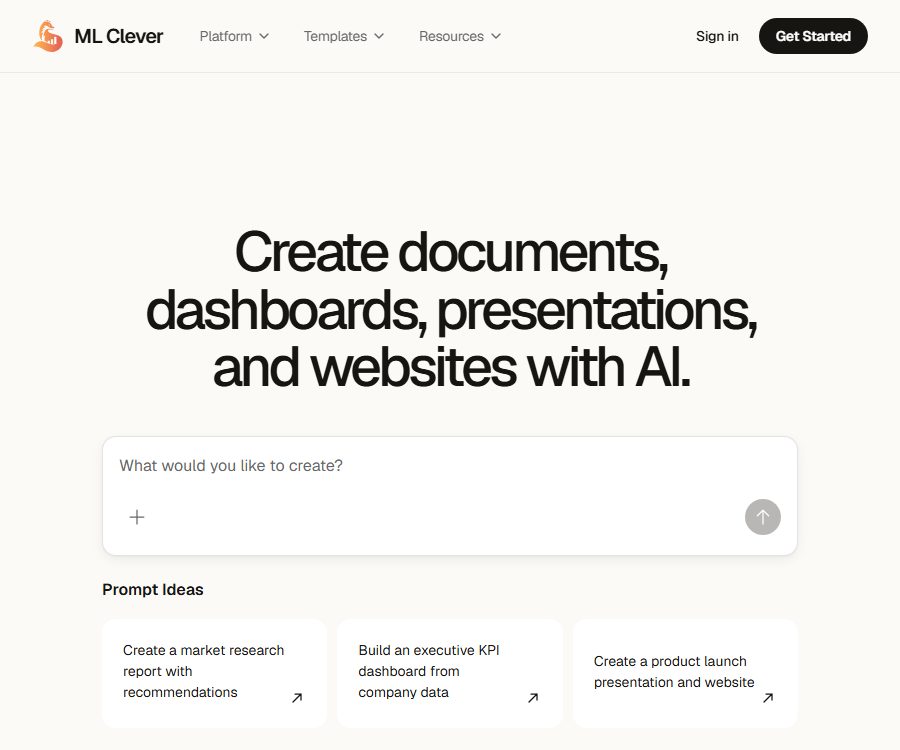
ML Clever is an AI-powered platform designed for creating commercial deliverables; it enables the conversion of prompts, files, research materials, and data into documents, presentations, dashboards, and websites. It emphasizes the entire process ranging from gathering evidence to structuring, analyzing, designing, and sharing the results.
The same work context can be converted into different formats, which reduces the need to copy content repeatedly between various office tools. Users can also modify the content, layout, theme, and individual sections within the editor.
Main functions
1. AI documents
The platform can generate research reports, memorandums, briefings, proposals, and updates for management, based on the available data. The output includes organized arguments, conclusions, and recommendations, rather than just a piece of text from a conversation.
2. AI presentation
Users can convert research and outlines into slides with a unified visual style, and generate speaker notes and citations. It is still necessary to check the facts, charts, and the amount of information on each page before publishing.
3. AI Dashboard
The platform can transform tables or business data into KPIs, charts, filters, comparisons, and textual insights. Dashboards are suitable for showing changes and their underlying reasons, but the definition of the metrics must be confirmed by business professionals.
4. AI websites
Users can create landing pages or full-scale business websites from business briefs, including copywriting, responsive layouts, and all the necessary pages. Before going live, it is necessary to set up a domain name, implement analytics, address privacy issues, add forms, and configure technical SEO settings.
5. Research and evidence integration
Plans starting with Creator offer Clever AI and real-time research capabilities, allowing current web content as well as uploaded files to be included in the deliverables. Important conclusions must be verified by referring back to the original sources.
6. Data analysis workflow
The platform enables the formulation of questions based on data, the conduct of analyses, and the creation of visual outputs suitable for business audiences. It is useful for exploration and reporting, but it is not equivalent to a full-fledged data warehouse or statistical auditing system.
7. Multi-format multiplexing
The same project content can be transformed into reports, slides, dashboards, and a website. This makes it easier to provide consistent information and recommendations to different audiences.
8. Templates and Playbooks
The official website provides documents, presentation templates, and dashboard templates, as well as playbooks covering market research, company analysis, go-to-market strategies, and pricing tactics. These templates are intended to speed up the initial setup process, but they still need to be adjusted to fit the actual business conditions.
9. Edit and Share
After it is generated, the content can be edited directly, individual chapters can be highlighted, the visual orientation can be adjusted, and the result can be shared. Before sharing it publicly, it is necessary to check the permissions, sensitive information, and the completeness of citations.
Which users are it suitable for
- Consulting teams that need to prepare research reports, management briefings, and business proposals.
- Operational teams that need to convert data into KPI dashboards and periodic reports.
- Startups that need to quickly prepare slides for financing, sales, or quarterly reviews.
- Marketing teams that need to generate documents, websites, and promotional materials from the same strategy.
- Companies that wish to establish reusable business analysis and delivery processes.
Price and version comparison
As of August 24, 2026, the official website lists four tiers: Starter, Creator, Studio, and Enterprise. Tokens are used for creating documents, presentations, dashboards, websites, research summaries, and performing data analysis; the prices and trial options are specified on the account billing page.
| Plan | Public price | Monthly Tokens | Primary positioning and capabilities |
|---|---|---|---|
| Starter | $ | 2000 | Lightweight model; reporting and export, presentation storyboards, KPI views, website, research summaries, and data analysis |
| Creator | $ | 20000 | Advanced models, Clever AI, and real-time research – suitable for individuals; a 7-day trial is available when applicable. |
| Studio | 100 dollars per month | 120000 shared | Advanced model, up to 5 seats available for sharing, suitable for teams |
| Enterprise | Custom quote | Customization | SSO, security audits, procurement support, dedicated Clever AI instances, dedicated support, and automation pilots |
Upgrades usually take effect immediately, while downgrades are scheduled for the next renewal. The website’s terms state that payment can be made on a monthly or annual basis; however, the price page currently shows only the monthly amount, and the annual pricing will be confirmed at the time of checkout.
Token rules
- Tokens are used for AI-generated content and related operations in the workspace.
- The Tokens included in the subscription are reset at the start of each cycle.
- Refunds are generally not available for tokens that have already been used.
- No refunds are available for Tokens obtained through recommendations or promotions.
- Enterprise allows for customized limits, carry-forward rules, and automated pilot programs to be negotiated.
- The actual consumption for different formats and models should be based on the records of account usage.
It should be confirmed before purchasing.
- How many Tokens are consumed per type of generation operation and for real-time research.
- Is the 7-day Creator trial available for the current account and region?
- Rules regarding role permissions and sharing quotas for the five-seat Studio.
- Whether unused tokens can be carried over and when they become invalid after cancellation.
- Are there any additional restrictions on the export format, website publication, domain names, and storage?
- Costs associated with Enterprise security audits, SSO, and the deployment of dedicated instances.
Tutorial on creating business documents
- Identify the audience, decision-making issues, delivery format, and deadline.
- Upload authorized files, forms, notes, and background information.
- List the questions that need to be answered, the criteria for judgment, and the constraints.
- Select the document format and generate the first version of the structure.
- Check whether the sources truly support each conclusion.
- Add data, risks, recommendations, and next steps section by section.
- Unify titles, terminology, numerical standards, and visual style.
- Have the business leader review the key assumptions.
- Delete sensitive information and check permissions before exporting or sharing.
Tutorial on creating dashboards
- First, define the business objectives and the KPIs that need to be monitored.
- Remove dates, currencies, units, null values, and duplicate records.
- Upload a table or provide data context that can be analyzed.
- The system is required to explain the formula for each indicator as well as the filtering criteria.
- Choose a chart that is suitable for showing trends, composition, distribution, or comparisons.
- Add quarter-on-quarter, year-on-year comparisons, target gaps, and explanations for anomalies.
- Use known samples to verify the aggregate values against the charts.
- Provide updates on the timing of the supplementary data, its source, and details regarding the methodology used.
- Test filtering, mobile layout, and access permissions before publication.
Create presentations and websites
- In a presentation, the core idea is established first, followed by the arrangement of background information, evidence, recommendations, and actions in order.
- Each slide should convey only one main message, in order to avoid including the entire content of the report on the slides.
- The website should first define its target audience, the desired conversion actions, and the page hierarchy.
- Check the rights to use the generated images, icons, and brand elements.
- Add form notices, cookies, a privacy policy, and accessible content to the website.
- Test the layout and links on desktop and mobile devices before making them public.
Product advantages
- A workspace covers documents, slides, dashboards, and websites.
- Files, data, and the current research can be linked to the deliverables.
- The same context can be reused in various formats tailored for different audiences.
- The generated content can be further edited, rather than merely allowing the copying of chat responses.
- It offers free plans as well as capacity levels suitable for individuals, teams, and businesses.
- Enterprise includes SSO, security auditing, and dedicated instance options.
Usage restrictions and precautions
- The facts, calculations, citations, and suggestions generated by AI may be incorrect or incomplete.
- 2,000 free tokens are only suitable for testing; complex deliverables may be exhausted quite quickly.
- The details regarding token consumption are not listed item by item on the public pricing page.
- Dashboard outputs cannot replace formal financial, statistical, or regulatory audits.
- Website generation does not mean that domain names, compliance requirements, and operational settings are automatically handled.
- The platform may modify, suspend, or terminate certain functions; it is therefore necessary to back up important data yourself.
- Sharing links publicly will increase the exposure of data, so permissions must be checked.
Privacy and security
The privacy policy states that the platform will process and store securely the files, datasets, prompts, and other workspace-related data uploaded by users; it also collects information such as names, email addresses, contact details, IP addresses, browser information, and interaction data. The company claims that it will not sell or rent out personal information, but it may share it with service providers and trusted partners.
The security policy covers transmission and static encryption, access control, cloud service providers, network segmentation, vulnerability assessment, and incident response. When making purchases, companies should still request concrete evidence regarding current certifications, sub-processors, data storage locations, as well as the timelines for data backup and deletion.
- Upload only the minimum amount of data required for the project.
- Remove direct identity information of customers, employees, and respondents.
- Check the access scope and search engine visibility before sharing publicly.
- Regularly export the deliverables and delete workspaces that are no longer needed.
- Enterprise users should include SSO, revocation of access upon departure, and audit logs in the scope of implementation.
Cancellation and refund
The terms of service state that cancellation can be done at any time; generally, the service is used until the end of the current billing period, and no refund is provided for the remaining time. The refund policy specifies that the Token and stored data may become invalid immediately after cancellation or at the end of the billing period, as determined by the platform. Therefore, it is necessary to export the data beforehand and confirm with support the exact time when validity will end.
Tokens that have been used to generate content or to perform operations in the workspace are generally non-refundable; exceptional cases are evaluated on a case-by-case basis. Promotional and referral tokens are not refundable under any circumstances.
API and open-source status
The official website does not disclose information regarding the developer APIs, SDKs, call endpoints, or the prices associated with these interfaces. Enterprise mentions automated pilot programs and dedicated instances, but these are part of negotiated solutions and cannot be considered as public API products.
No official open-source repository or source code license for the main ML Clever product was found. Users are able to export the generated results, but this does not mean that the platform’s editor, model orchestration tools, or backend services are open source.
Frequently Asked Questions
Is ML Clever free?
A permanent, free Starter plan is available, which includes 2,000 tokens per month as well as a lightweight model.
What is the difference between Creator and Studio?
Creator is intended for individuals and includes 20,000 Tokens; Studio is designed for teams of up to 5 people and provides 120,000 Tokens.
What can be generated?
Supports documents, presentations, dashboards, websites, research summaries, and data analysis workflows.
Will the token be carried over?
The public refund policy states that tokens are reset at the end of each subscription period, and no carryover is guaranteed for regular plans; Enterprise plans allow for negotiated rules regarding carryover.
Will the data still be there after cancellation?
The policy allows the platform to terminate access to tokens and storage immediately or at the end of the billing period; before doing so, it is necessary to export the relevant data and obtain confirmation from support.
Is ML Clever open source?
No. Currently, no official open-source code or license for the main platform has been found.
Summary
ML Clever is suitable for quickly converting sources, data, and research into editable business documents, slides, dashboards, and websites. When choosing a solution, it is important to take into account token consumption, the number of team members allowed, access to data in case of cancellation, and enterprise security requirements.
Tools similar to AI Documents, Dashboards, Presentations & Websites





 Guigong Network Security Registration No. 45132202000164