






KuXuan AI
Quickly create visually appealing articles, with synchronization across multiple platforms.
Tags:AI slides and presentationsWhat is Cool宣 AI?
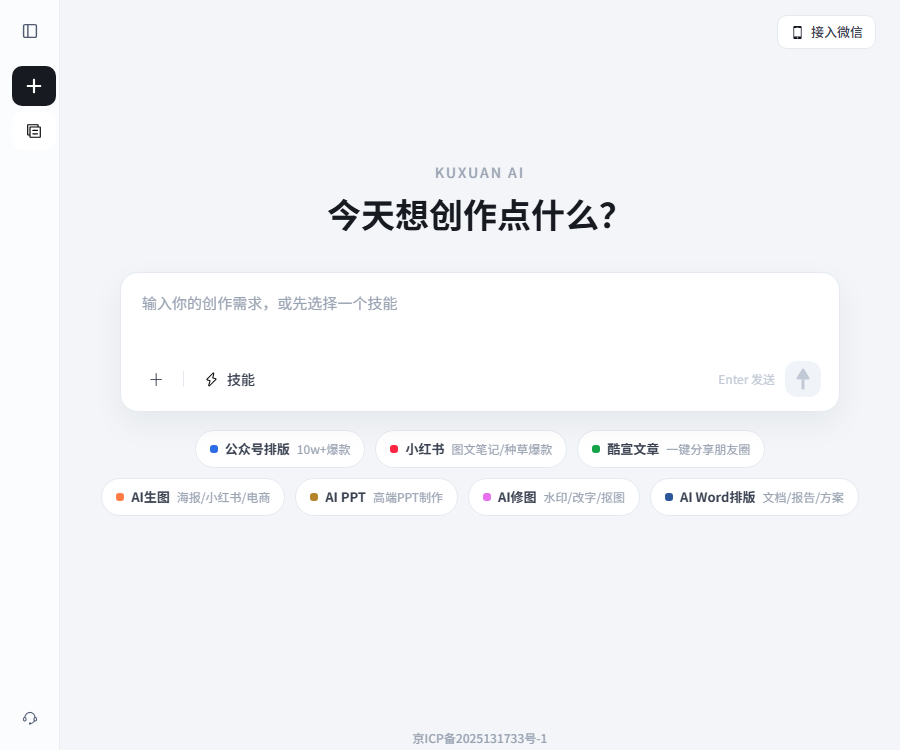
KuXuan AI is a universal AI intelligence platform for content creation; users can arrange office tasks and creative projects through conversations. The current version of this product is not only used for creating PPTs, but it also handles tasks related to official accounts, Xiaohongshu posts, articles, images, and Word documents.
The platform offers remote sandbox computers, custom skills, and file storage space, which are used to carry out multi-step tasks, reuse work methods, and save results. The full name of the company that operates this platform is not specified in the public agreements.
Current product capabilities
| Ability | Main inputs | Generate results | Suitable for tasks |
|---|---|---|---|
| Universal Agent | Natural language requirements and documents | Step-by-step execution process and the final product | Integrated office work and content creation |
| WeChat official account layout | Requirements for articles, topics, and formatting | Copyable graphics and text for public accounts | Enterprise accounts and self-media management |
| REDnote images and text | Topic selection, selling points, and materials | Note text and accompanying images | Content creation for promoting products and account management |
| AI PPT | Theme, materials, and presentation objectives | Content and layout of the presentation | Reporting, proposals, and teaching |
| AI Word formatting | Document, report, and formatting requirements | Structured formatted document | Plans and official documents |
| AI image generation and editing | Prompt or existing image | New images or edit results | Posters, e-commerce, and social media images |
| Cool promotional articles | Requirements for theme, materials, and expression | Shareable image and text articles | Sharing in social circles and posting content |
Remote sandbox computers and agent workflows
CoolXuan AI describes the environment in which intelligent agents operate as a remote sandbox computer; users can submit goals and materials within conversations, and the system will utilize the appropriate capabilities to complete those tasks. The tools available in this sandbox, as well as its runtime and resource limits, may vary depending on the account, task, and package chosen.
- Create a new project and describe the final deliverable.
- Upload documents, images, or reference materials for which you have permission to use.
- Add requirements for audience, size, tone, brand, and format.
- Observe the agent as it carries out the steps and handles matters that require confirmation.
- Check the facts, layout, images, and copyright.
- Export, copy, share, or save to a file storage.
The generated tasks may still fail, deviate from the requirements, or overlook certain aspects; important results should be reviewed by the user. Do not provide confidential information, keys, or sensitive personal data to unknown processing processes.
Custom Skill
Custom Skills are used to store repeatable work methods, enabling agents to handle similar tasks according to fixed guidelines. They are suitable for repetitive processes such as brand formatting, article creation, social media content, and standard documents.
- Define the purpose and scope of Application Skill.
- Specify the input materials, processing steps, and output format.
- Add brand terms, prohibited terms, and review rules.
- Test with non-sensitive samples and adjust the results.
- In real tasks, invoke and retain manual verification.
Skill represents the capability for configuring tasks within the platform; it is not equivalent to software development toolkits that are made available to the public. The public documentation does not provide any information regarding the import/export of Skills, team sharing, version control, or the rules associated with independent stores.
WeChat official account layout
Users can provide the original text, theme, or materials, and the system will generate and format the articles for the official account, allowing the results to be copied into the WeChat Official Account backend. It is useful for reducing the need to repeat tasks related to title structures, images, paragraphs, and visual styles.
- The structure and layout can be organized starting from existing articles.
- After creating an article around the chosen topic, formatting can be continued.
- It is possible to specify the audience, tone, and visual direction.
- The formatted content can be copied to the official account’s editing environment.
- Before publishing, check the links, images, copyright, and mobile display.
The platform uses “10w+ bestsellers” as the name of such categories, but it does not guarantee any specific number of readings or level of dissemination. Titles, facts, and any statements related to medical or financial matters that involve high risks still require manual review.
Creating graphics and text content for REDnote
REDnote enables the integration of text content and image creation; users can input topics, product features, target audience, and relevant materials to obtain content suitable for graphic posts. The clearer the account’s positioning and brand guidelines are, the easier it is to further edit the content.
- Explains product, experience, or knowledge topics.
- Providable are verifiable selling points and original images.
- Specify the cover, number of pages, aspect ratio, and text style.
- After generation, remove exaggerated, false, and sensitive statements.
- Verify advertising identifiers, portraits, trademarks, and licensing for materials.
- Publish according to the platform’s rules and observe the feedback.
AI PPT creation
AI PPT is designed for use in presentations, proposals, teaching, and other similar purposes. After the user enters a topic or relevant materials, an intelligent system handles the creation of the outline, the text content for each page, and the visual layout. Knowing the exact number of pages required, the target audience, the duration of the presentation, and any brand-specific requirements helps to avoid the need for revisions.
- First, let the system organize the logic and page outline.
- Add more data, examples, and essential content.
- Provide accurate data and statistical criteria for the charts.
- Check the font, alignment, proportions, and projection for readability.
- Confirm the export format and subsequent editing capabilities.
The public page does not specify the number of pages in the PPT for each package, the file size, the number of templates available, or the maximum limits for export formats. It is necessary to test these aspects using actual materials within the account before making a purchase.
AI Word formatting
AI Word formatting is used to organize the titles, paragraphs, and overall structure of documents, reports, and proposals. Users should first provide the content structure and unit specifications, and then ask the system to apply a consistent style.
Formal documents, contracts, papers, and bid documents usually follow strict templates, and the output generated cannot replace the review carried out by the relevant organization. Page numbers, tables of contents, citations, tables, and the printing quality need to be checked again in a dedicated editing software.
AI image generation, editing, and poster creation
AI image generation creates posters, images for platforms like REDnote, and images for e-commerce purposes based on textual instructions, while AI image editing handles tasks such as removing watermarks, replacing text, and isolating elements from an image. Users need to specify the dimensions, composition, text, and brand elements.
- Text-to-image generation is suitable for concept diagrams, covers, and promotional visuals.
- The existing images can be used for image masking, text editing, and local adjustments.
- Long-format posters are suitable for continuous reading and sharing on social media.
- The authenticity and authorization of characters, products, and trademarks must be verified.
- Removing watermarks can only be done on materials that the user has permission to edit.
- The Chinese characters, numbers, and details in the image need to be checked one by one.
File space
The file space is used to view and manage creative materials and results in a centralized manner, thereby reducing the problem of being unable to find the finished products after a task is completed. The public page does not provide information regarding the storage capacity of different packages, the size of individual files, the retention period, historical versions, or limits on bulk downloads.
Important projects should have local or institutional backups; the file storage provided by the platform should not be considered the only source for archiving data. It is necessary to determine how data will be exported before an employee leaves, an account is deactivated, or a subscription expires.
WeChat Assistant
The web version provides an interface for integrating WeChat; once logged in, users can connect to the WeChat Assistant and extend certain aspects of the creation process to mobile devices. It is suitable for submitting topics, materials, and revision requests at any time.
WeChat Assistant is not an independent, native mobile application; the functions that can be used may differ from those available on the web version. Before establishing a connection, it is necessary to verify account binding, message retention policies, and the rules regarding the handling of sensitive data.
Registration and first use
- Use your mobile phone number to receive the verification code and register to log in.
- Go to Create New and select an appropriate scene.
- Describe the task with clear objectives, and upload files if necessary.
- Based on the results of the first round, additional constraints and modifications are added.
- Check the facts, format, copyright, and platform identifiers.
- Export based on the current equity or purchase the corresponding service.
- Back up the important results separately.
How to distinguish between the free version, membership, and points?
| Mechanism | Primary uses | Content identification and commercial use | It is necessary to pay attention. |
|---|---|---|---|
| Free service | Experience creation and basic usage | Commercial use is allowed as long as the full platform identifier is retained. | The quota is dynamic; anonymization does not grant a free commercial license. |
| Infinity Membership | Frequent creation on web pages | Exports without identifiers and are suitable for commercial use during the membership period. | API credit consumption is not covered. |
| Points members | Obtain periodic integrals and make use of pay-as-you-go capabilities | The rights and benefits are as specified on the member page. | The number of points and their validity period can be found on the settlement page. |
| Points package | One-time point top-up | It does not automatically equate to an unlimited membership. | In principle, virtual services cannot be refunded after delivery. |
| Unlock per article | Pay separately for the specified article. | The corresponding article has no identifier and is suitable for commercial use. | Only covers unlocked content |
Current price plan
| Package or version | Price | Billing cycle | Core benefits or quota | Suitable for users |
|---|---|---|---|---|
| Free service | 0 yuan | According to account rules | Basic creation can be used; the export version comes with the platform’s identifier by default. | Light experience users |
| Unlimited monthly membership package | 198 yuan | month | Member benefits for website creation, high-definition versions without watermarks, and commercial licensing. | High-frequency content creators |
| Unlimited membership annual plan | 998 yuan | year | The page indicates a 50% discount for a limited time; this is a benefit available to members who create web pages. | Long-term high-frequency users |
| Monthly subscription for points members | 98 yuan | month | 10,000 points per month | Pay-as-you-go users |
| Annual subscription for points members | 298 yuan | year | 50,000 points per year; the page indicates a 40% discount for a limited time. | Long-term pay-as-you-go users |
| 10,000 point package | 98 yuan | One-time use | Add 10,000 points | Temporary bonus points |
| 40,000 point package | 198 yuan | One-time use | Add 40,000 points | Higher on-demand demand |
| Unlock per article | Payment by Content Page | Single time | Remove identifiers from the corresponding article and obtain commercial rights. | Export articles occasionally |
The monthly subscription page displays the original prices of 1,998 yuan and 500 yuan, marked with strikethroughs; the promotional labels and the actual price charged may vary depending on the account, sales channel, or time period. The final cost, the validity period of points, and the specific benefits are subject to those indicated on the payment page.
Automatic renewal and refunds
The recurring monthly subscription is automatically charged before the end of each subscription period; users can cancel the subscription from their personal account, and the benefits associated with that subscription remain valid even after cancellation. It is necessary to confirm the payment method, the date on which charges are deducted, and the process for cancellation before making a purchase.
Points, membership benefits, and the unlocking of individual items are considered virtual goods and services; in principle, refunds or exchanges are not allowed after delivery, unless otherwise stipulated by laws and regulations. In cases of incorrect purchases, duplicate payments, or technical issues, it is necessary to submit relevant evidence through the website’s customer service promptly.
API capabilities
CoolXuan AI offers a chat completion API for developers; authentication is carried out using a Bearer API Key, and streaming results are returned via server-generated events. The current documentation only supports streaming output.
| Interface project | Current rules | Development notes |
|---|---|---|
| Request format | POST chat completion | Send the message array and required parameters |
| Message role | system, user, assistant | Organize the context in session order. |
| Return method | SSE streaming events | Stream must be enabled at the moment. |
| Session association | Supports session ID and UUID. | Facilitates continuous task execution and log location. |
| Authentication | Personal API Key | Do not write to the web frontend or public repositories. |
| Billing | Only points are consumed. | The unlimited membership plan does not cover API calls. |
API integration steps
- Log in to your personal settings and create an API Key.
- Save the key in the server’s environment variables or key management system.
- Organize system, user, and assistant messages in the chat completion format.
- Enable streaming parameters and initiate a POST request.
- Analyze each event sent by the server one by one.
- Saving sessions and run identifiers is used for troubleshooting.
- Monitor integral consumption, failed retries, and content security.
The current account provides only one key location; recreating it will delete the existing key and this loss cannot be reversed. It is necessary to update the calling services before performing key rotation, in order to avoid disruptions to production tasks.
API, SDK, and open-source status
| Project | Current status | Conclusion |
|---|---|---|
| Public API | A chat completion interface has been provided. | Streaming return with billing based on integration |
| SDK | The official SDK has not been confirmed yet. | Connect it according to the interface documentation on your own. |
| Plugin | Public plugins have not been confirmed yet. | Do not install extensions with the same name whose authenticity has not been verified. |
| GitHub | The official product warehouse has not been confirmed yet. | It cannot be used as evidence to conclude that the product is open source. |
| Open-source license | Not yet made public | It should be understood as a closed-source online service. |
Supported platforms
| Platform or entry point | Confirm status | Suitable uses |
|---|---|---|
| Web version | Available now | Complete creation, file, and account management |
| WeChat Assistant | A connection entry has been provided. | Submit and continue tasks in mobile scenarios |
| Develop API | Available now | Programmatic access on the server side |
| Native iOS apps | Not confirmed yet | Do not treat mobile web pages as native applications. |
| Native Android apps | Not confirmed yet | Do not install installation packages whose authenticity has not been verified. |
| Browser extensions | Not confirmed yet | Do not consider third-party extensions as official products. |
Content copyright and commercial usage rules
Users must ensure that the text, images, and other materials they upload are either their own or for which they have legitimate authorization. The platform may process these materials to the extent necessary for providing services related to formatting, creation, storage, and display.
Provided that the user complies with the agreements and the rules regarding platform identifiers, the rights to use content created from their own materials belong to the user. The platform software, interface, templates, and identifiers remain the property of the platform or their respective owners.
- When using free content for commercial purposes, the platform’s identifier must be retained in its entirety.
- The identifiers for free content must not be cut off, obscured, or altered.
- The content exported during the membership period can be used for commercial purposes without any identifiers.
- Unlocking a single article applies only to that specific article.
- The generated benefits do not resolve the issue of third-party material infringement for the user.
- Portraits of people, trademarks, fonts, and music must be checked for rights separately.
Privacy and data security
The user agreement states that the platform collects phone numbers only to the extent necessary for providing its services, and it promises not to sell personal information to any third parties. The agreement also allows the platform to process the materials uploaded by users for formatting, creation, storage, and display.
At present, there is no confirmed, independent and comprehensive privacy policy, no information regarding the specific retention period, no list of sub-processors, no procedures for updating models, no arrangements for cross-border data transfers, no security certifications, and no specified time frames for notifying in case of data incidents. Companies working with sensitive data need to obtain further written clarification before making any purchases.
- Upload only the minimum amount of information required to complete the task.
- First, remove the ID number, contact information, and internal confidential data.
- The API Key is stored only on the server and is rotated regularly.
- Independent backups of important documents are kept.
- For team accounts, it is necessary to plan for member departures and the retraction of permissions.
- Clear requirements are set for the creation, logging, and retention period of files.
Which users are it suitable for
- An operation team that is needed to continuously create articles for the official account.
- Creators who produce images and text content for REDnote as well as brand-related content.
- Users who frequently prepare reports, plans, and teaching PPTs.
- Office staff who need to organize reports in Word format.
- Marketing teams that need posters, e-commerce images, and photo editing services.
- Developers who wish to integrate chat-based creation into their internal services.
- Aims to help individuals and small teams refine their repetitive work methods.
Main advantages
- A single dialogue entry covers articles, images, PPTs, and Word documents.
- Remote Sandboxes and Skills are suitable for multi-step and repetitive tasks.
- WeChat official accounts and REDnote are more suited to the management of Chinese-language content.
- The file space stores the materials and the results of tasks.
- The commercial usage terms and anonymization rules for the free version are clearly specified.
- It also provides APIs for web creation and development.
Capacity limits and usage restrictions
- AI outputs may be inaccurate, and they cannot replace factual verification.
- The fixed values for the free quota and the resource consumption per task have not yet been made public.
- An unlimited membership does not mean unlimited API calls.
- Promotional prices and benefits may change over time or depending on the channel.
- The file size, retention period, and versioning capabilities have not yet been made public.
- Enterprise collaboration, administrators, and service levels have not been determined yet.
- The independent privacy policy and the details of security technologies are still incomplete.
- The official SDK, GitHub, and open-source license have not been confirmed yet.
Frequently Asked Questions
Can CoolXuan AI only be used to create PPTs?
No. The current platform also offers functions such as layout for official accounts, text and image content for REDnote, AI Word tools, image creation and editing, article management, file storage, custom Skills, and APIs.
Is there a free version of KuXuan AI?
There are free services available, but the public pages do not specify a fixed number of free uses. When content is exported, copied, or shared for free, the platform’s identifier is included by default.
Can content generated for free be used for commercial purposes?
It is possible, but the 酷宣AI platform identifier must be retained in its entirety. The free version does not grant a license for commercial use if the identifier is deleted, cropped, obscured, or circumvented.
Can member content be used for commercial purposes?
The content exported during the membership period can be used for commercial purposes without any platform identifiers, and the same privileges apply to each individually unlocked article. Users must still ensure that the materials they input are legal.
Does the unlimited membership include API calls?
It is not included. API calls only consume points; the benefits associated with an unlimited membership do not cover the usage of development interfaces.
How does the KuXuan API return results?
The interface uses chat completion requests and Bearer token authentication, with the server returning data in a stream format. The current instructions require the use of stream-based parameters.
Can members get a refund?
The agreement classifies members, points, and individual unlocks as virtual goods and services; in principle, they are non-refundable upon delivery, unless otherwise provided by laws and regulations.
Is Cool宣AI open-source software?
To date, no official product codes, model weights, or open-source licenses have been made public. The provision of an API does not mean that the product itself is open source.
How to add a FAQ Schema
This page provides the FAQs that are visible to users; the website template can use these questions and answers to generate structured FAQ data. Script tags are not inserted directly into the text, in order to meet the security requirements for content fields.
- Select only the actual, visible questions and answers on the page.
- The page object is set to FAQPage.
- Each question is set as Question.
- The answer is written to acceptedAnswer and set as Answer.
- The prices, commercial terms, and API rules must be consistent with the main text.
- When the package changes, the relevant FAQ and structured data are updated simultaneously.
- After publishing, check for grammar errors, repetitions, and search engine guidelines.
Summary
The feature of KuXuan AI is that it brings together functions for managing Chinese-language content, handling office documents, creating visual materials, working with remote intelligent agents, and providing development interfaces in a single platform. It is particularly suitable for tasks that require frequent revisions, such as those associated with public accounts, Xiaohongshu, PPTs, and Word documents.
When selecting a package, it is necessary to distinguish between unlimited website access and billing based on points; API users need to allocate a separate budget for points. Before publishing or using the content commercially, it is important to check the platform’s identifiers, the rights to the used materials, the accuracy of the information, and any sensitive data involved.
Tools similar to KuXuan AI





 Guigong Network Security Registration No. 45132202000164