






GPT for Slides
GPT for Slides: an intelligent tool focused on AI-powered slides.
Tags:AI slides and presentationsA one-sentence summary
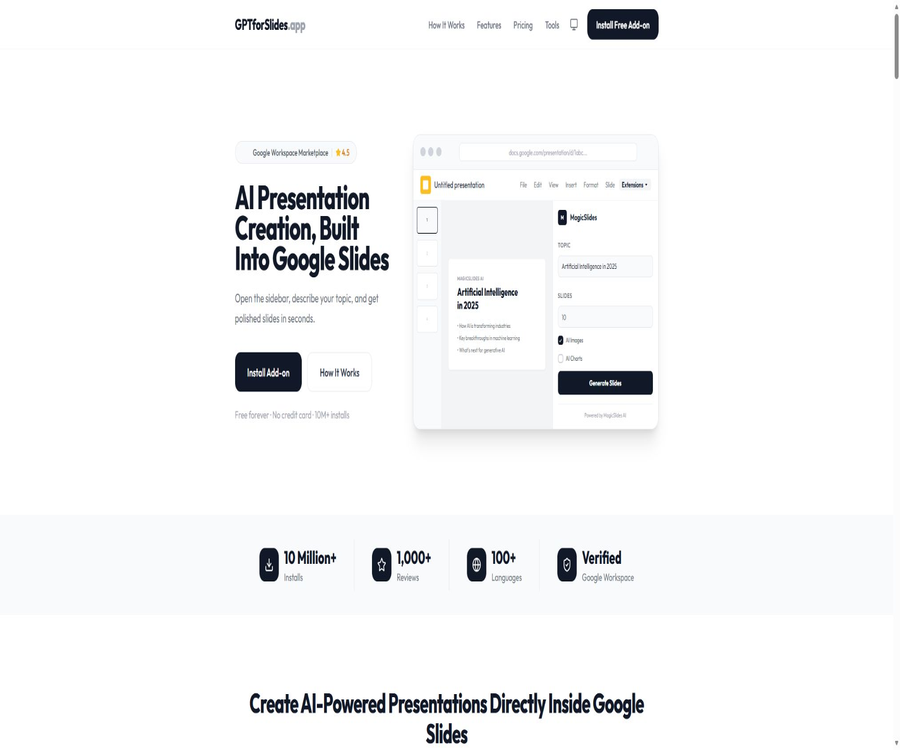
GPT for Slides is an AI-powered presentation tool that runs directly in the sidebar of Google Slides; it allows users to transform topics, documents, web pages, videos, or images into editable slides that include content, visuals, and layout.
Tool Introduction
GPT for Slides is operated by IndianAppGuy Tech Private Limited and is offered under the MagicSlides brand. It can be installed through the Google Workspace Marketplace, without the need to download any separate desktop software.
Users can create, edit, and further develop presentations within the familiar Google Slides interface. The official website and app store both use the name MagicSlides; therefore, GPT for Slides should be regarded as a separate entry point for the same product, along with its old name, rather than as another independent plugin.
Main functions
Generate a presentation on a theme
After the user enters the topic, target audience, language, and number of pages, the AI generates a title, structure, key points, layout, and visual elements. The resulting content is directly imported into Google Slides, making it easy to make further adjustments.
Convert text to slides
Long texts can be summarized, grouped, and distributed across multiple slides. It is advisable to define the objectives, logical sequence, and the data that must be retained before generating the content, in order to prevent the AI from over-compressing important information.
Convert YouTube videos to PPT
After pasting the URL of a public video, the tool will extract the key points from the available transcript and create a presentation. Videos without subtitles, those that are restricted, private, or inaccessible may not be processed correctly.
Convert web pages to slides
The tool can extract the main content of public web pages and restructure it into a format suitable for presentations. However, when a webpage requires login, employs anti-scraping measures, contains dynamic content or complex tables, the extracted information may be incomplete.
Converting PDF and Word documents to PPT
Users can choose PDF reports, papers, e-books, or Word documents so that the AI can extract titles, paragraphs, and key conclusions. Scanned PDFs, complex formulas, annotations, and multi-column layouts require additional manual verification.
Convert images and video files to PPT
After uploading images, diagrams, or video files, AI can analyze the visual or audio content and create slides based on it. Sensitive media should not be uploaded until the data policy has been reviewed.
AI image generation
The Pro and Premium plans allow for the creation of images that match the theme of the slides, thereby reducing the time required to search for appropriate materials manually. Users still need to check for visual issues, as well as potential problems related to trademarks and copyright.
MagicChart charts
Users can describe data relationships in natural language and create bar charts, pie charts, or line charts. Charts are merely visual representations; the original values, units, time ranges, and calculation methods must be verified manually.
Quiz generation
The tool can generate quiz-based slides from topics or teaching content, which are suitable for use in classroom reviews and interactive training sessions. The answers to the questions should not be considered as authoritative conclusions; this is especially true when dealing with professional or high-risk topics.
Presentation translation
The official website states that the entire set of slides can be translated into more than 100 languages, with an effort to maintain the original layout and format. After translation, it is still necessary to check for technical terms, text that overflows the frame, right-to-left text, and appropriate localized expressions.
Cloned layout and PPT enhancements
Clone Slides allows for the creation of new pages by utilizing the colors, layout, and structure of existing slides, while PPT Enhancer is used to restructure presentations that contain too much text or have a poor layout. Brand teams should have authorized templates and visual guidelines ready.
Supported inputs and outputs
| Input method | Processing content | Typical output | Main limitations |
|---|---|---|---|
| Theme prompt words | Theme, audience, language, and number of pages | Complete draft of the presentation | It depends on the clarity of the prompt. |
| Long text | Notes, articles, and outlines | Summary-style multi-page slides | Limited by the character count of the package. |
| YouTube videos | Public transcripts and video information | Video summary presentation | Affected by subtitles and access status. |
| Public web page | Page title and main text | Web content presentation | Dynamic or restricted pages may fail. |
| Reports, papers, and e-books | PPT summary of the document | Scans and complex layouts require verification. | |
| Word document | Title and text structure | Convert documents to presentations | Format conversion can simplify things. |
| Image | Photos, illustrations, or diagrams | Slides explaining the image | Visual understanding may be incorrect. |
| Video files | Visual and audio content | Video content presentation | There are limits on duration and file size. |
| Refer to the slide. | Current layout and style | New page with a matching style | Legal template permissions are required. |
| Google Sheets data | Tables explicitly selected by the user | Abstract, Analysis, and Charts | Currently, only read-only access is requested. |
The main output is an editable presentation in Google Slides, allowing users to make use of Google Slides’ own features for downloading and sharing. After downloading it in formats such as PPTX or PDF, it is necessary to check again the font substitutions, animations, charts, line breaks, and page proportions.
Usage tutorial
Install and create the first PPT.
- Open the Google Workspace Marketplace and locate the GPT for Slides add-on by MagicSlides.
- Complete the installation after verifying the developer’s name, privacy policy, and requested permissions.
- Create or open a Google Slides presentation.
- Launch the MagicSlides sidebar from the extensions menu.
- Choose theme, text, document, video, or another input method.
- Fill in the topic, target audience, language, number of pages, and key points that must be included.
- Choose whether to generate AI images, charts, or other enhanced content.
- Click Generate and wait for the slides to be added to the current presentation.
- Check each page for accuracy in facts, structure, images, brand guidelines, and logical flow of the presentation.
- Continue editing, collaborating, presenting, or exporting in Google Slides.
Convert the document into a presentation.
- Remove sensitive data, annotations, keys, and irrelevant appendices from the document.
- Ensure that the document’s title hierarchy is clear, and identify the data and conclusions that must be retained.
- Select PDF, Word, or text input in the sidebar.
- Upload a file or paste content, and set the target number of pages and the audience.
- The AI is required to retain the core arguments, key figures, and chapter order.
- After generation, compare each item in the original text – numbers, quotes, charts, and conclusions.
- Simplify duplicate pages and add source pages along with speaker notes.
- Preview fonts, layout, animations, and readability using real demonstration devices.
Which users are it suitable for
- Student: Organize class notes, papers, and research materials into a presentation for the class.
- Teacher: Create lesson plans, quizzes, reviews, and multilingual teaching presentations.
- Marketer: Transform event briefs, blogs, and reports into presentation PPTs.
- Sales team: Quickly generate product descriptions, proposals, and materials for client meetings.
- Consultant: Convert the analysis framework, reports, and data into a draft presentation.
- Content creators: Repackage videos, articles, and web pages into slides.
- Training team: Create course structures, quizzes, and internal knowledge presentations.
- International team: Translate the presentation while preserving most of the original layout.
Typical use cases
- Quickly generate an initial structure for a proposal or presentation based on a topic.
- Compress long PDF reports into executive summary PPTs.
- Convert public videos into lesson materials or summaries of the content.
- Transform web articles into materials for team sharing.
- Automatically generate practice questions and quiz pages for classroom content.
- Generate descriptions and basic charts based on Google Sheets data.
- Translate the existing presentation into multiple language versions.
- Clone the layout using the brand template and expand it into a new page.
- Redesign the visual hierarchy for old PPTs with dense text.
Product advantages
- It can be embedded directly in Google Slides, and once created, native editing and collaboration are still possible.
- There are a wide range of input types, including topics, text, web pages, documents, images, and videos.
- It also offers capabilities for content creation, image addition, chart creation, quizzes, and translation.
- The free version does not require a credit card and is suitable for testing the actual quality first.
- The limits on the number of demonstrations, pages, and characters that can be entered in paid plans are clearly defined.
- It supports over 100 languages, making it suitable for international and educational use.
- New pages can be created by referring to the style of existing slides.
- The output remains in Google Slides, facilitating further collaboration among the team.
Usage restrictions and precautions
- The facts, figures, quotes, and conclusions generated by AI may be incorrect or outdated.
- The free version allows for the creation of only 3 presentations per month, and these presentations come with watermarks.
- Different packages impose limits on the number of demonstrations per month, as well as on the number of pages and characters that can be entered.
- Video and web page conversion depends on whether the content can be accessed and parsed properly by the system.
- Complex PDFs, scanned documents, formulas, tables, and multi-column layouts may not be recognized completely.
- AI-generated images may contain text errors, distorted objects, as well as copyright and portrait rights issues.
- Automatic translation faces issues with terminology, text overflow, and cultural context.
- Google Workspace administrators may restrict the installation of third-party add-ons.
- The plugin needs access to the content of Slides, Drive, or Sheets that has been explicitly selected by the user.
- The terms of service do not guarantee that the generated results will be accurate, reliable, or meet expectations.
Prices and packages
GPT for Slides offers four tiers: Free, Essential, Pro, and Premium. As of August 23, 2026, the monthly subscription costs were 0, 8, 16, and 29 dollars respectively; the annual subscription option showed a discount of around 17%.
| Package | Monthly payment | Annual payment | Monthly generation volume | Number of pages per sheet and input | Main differences |
|---|---|---|---|---|---|
| Free | $ | $ | 3 presentation slides | Up to 10 pages, 2,500 characters | Slides have watermarks. |
| Essential | $ | $ | 10 presentation slides | Up to 10 pages, 8,000 characters | Remove watermark |
| Pro | 16 dollars per month | $ | 50 presentation slides | Up to 15 pages, 12,000 characters | AI-generated images, 50 pages of cloning per month |
| Premium | $ | $ | Unlimited basic generations, plus 50 advanced generations per month | Up to 50 pages, 100,000 characters | AI-generated images and priority support |
All packages currently include options for theme creation, YouTube integration, web page generation, PDF import, translation, quiz creation, and MagicChart. The unlimited options in the Premium version differ from those in the Advanced version; it should not be assumed that all high-cost models and functions are completely unlimited.
How to choose a package
| Usage requirements | Recommended package | Reason for selection | Verification before upgrade |
|---|---|---|---|
| Occasionally create short PPTs | Free | Core processes can be tested. | Are watermarks and 3 copies per month acceptable? |
| A few formal demonstrations per month | Essential | Remove watermarks with a higher input limit | Is 10 pages enough? |
| AI images are generated frequently and are in demand. | Pro | 50 copies per month and cloning quota | 15 pages and a character limit of 12,000 |
| Long reports and high-frequency generation | Premium | Up to 50 pages and longer inputs | Advanced generation quota and model rules |
| Enterprises or sensitive data | Contact sales | It is necessary to verify security, keys, and contracts. | DPA, SLA, permissions, and deletion |
Subscriptions, Refunds, and Cancellations
The official refund policy allows for a refund to be requested within 5 calendar days after the initial purchase of a particular paid plan; refunds are not available for renewals or upgrades. If a refund is approved, it is issued back to the original payment method, and it usually takes 5 to 10 business days for the funds to arrive.
For annual subscriptions, a proportional refund can be requested within the first 30 days after purchase; following the refund, the account is downgraded to the free version. The official statement also says that the data in the account remains intact for 30 days after the downgrade, so users should export any important information in advance.
- A refund for a first purchase must be requested within 5 calendar days.
- Regular refunds do not apply to renewal payments and plan upgrades.
- A proportional refund for annual payments must be requested within the first 30 days.
- Refunds may be denied if there are suspicions of misuse or fraud.
- When submitting an application, the account email address and the reason for the refund are required.
- Cancellation, uninstallation, and refund are not the same actions; they need to be verified separately.
Privacy and Google permissions
The plugin handles technical data such as account email addresses, information related to installation and usage of functions, as well as device and IP addresses. It accesses Google account data only within the scope authorized by the user, and it is stated that personal information and Google user data will not be sold or leased.
The privacy policy states that Drive accesses only those files that the user has explicitly chosen to import; the Sheets function requests read-only access and does not modify or delete any tables. The plugin also captures slide images for preview in the sidebar, but it is specified that this process does not alter the presentation itself.
| Data or permissions | Uses | Public restrictions | User control |
|---|---|---|---|
| Basic information | Log in and view account | Required information such as name and email address | The account can be disconnected or requested to be deleted. |
| Content of Google Slides | Create, edit, and format slides | Process content selected or generated by users | Uninstall and revoke authorization |
| Google Drive files | Import PDF or document | Only access files that the user has chosen voluntarily. | Do not select sensitive files. |
| Google Sheets data | Analysis, summaries, and charts | Read-only; no writing back or deletion of tables. | Select a specific table and revoke access. |
| Slide images | Display a preview in the sidebar | Do not modify the content through the preview process. | Delete the account or request its deletion. |
| OAuth token | Maintain authorized session | Uninstall, disconnect, or remove/withdraw after it is no longer in use | Permissions on the Google account page can be revoked. |
Users can request the deletion of their accounts and associated data. According to the policy, active accounts are typically deleted within 30 days, with exceptions for legal records; backups are cleared on a regular basis. Organizational users should also have their permission levels and DPA reviewed by administrators.
AI models and data processing
The terms state that certain functions currently send queries to OpenAI; Gemini is labeled as soon-to-be-launched, and it is specified that the plugin does not use DeepSeek, OpenRouter, or Claude models. The names of the models mentioned on the marketing page cannot match those actually used by the plugin.
According to the terms of service, OpenAI may temporarily store data for up to 30 days; it is stated that such data will not be used for purposes other than providing the service. Corporate or team accounts may use their own OpenAI API keys, but it is necessary to verify at the time of purchase whether such access is included in the current package.
- Do not describe the upcoming Gemini features as already fully available.
- DeepSeek, OpenRouter, and Claude are explicitly excluded by the terms currently in effect.
- The input content may be processed by Google, OpenAI, and hosting services.
- A built-in API key is available only to eligible enterprise or team accounts.
- Confidential materials must first be de-identified, and organization-approved accounts and contracts must be used.
- The generated results cannot replace manual verification of the original documents and data.
APIs, GitHub, and open source status
The main way in which GPT for Slides is made available to ordinary users is through a Google Workspace add-on; the official website does not provide any independent developer APIs or SDKs. It connects to Google’s and third-party AI interfaces, but this does not mean that users can use public interfaces to invoke its generation services.
No official GitHub repository was found, one that could be verified through the website or the developer information on Marketplace; projects for creating slides with the same name belong to other developers, and therefore GPT for Slides cannot be considered open source.
| Project | Current status | Conclusion |
|---|---|---|
| Google Slides add-on | Officially available | Main product forms |
| Independent public API | Not disclosed | It is not possible to follow the promises made by the developer’s API. |
| Official SDK | Not disclosed | There are no verifiable software development packages available. |
| Official GitHub | The official website does not provide confirmation regarding the warehouse location. | Do not associate projects with the same name. |
| Core source code | Not disclosed | Commercial closed-source services |
| Self-hosting | Not provided | Reliance on Google Workspace and cloud-based processing |
Supported platforms
| Platform | Support status | Main method | Precautions |
|---|---|---|---|
| Google Slides web version | Support | Marketplace Add-ons Sidebar | Core usage environment |
| Google Workspace account | It is necessary. | Installation and Authorization | Organizing accounts may require administrator approval. |
| Windows and macOS | Indirect support | Use Google Slides through a desktop browser | It is not a native desktop application. |
| ChromeOS | Support | Through a browser and Google Slides | Account permissions must be compatible. |
| Mobile phones and tablets | It is not described as a core scenario. | It may be possible to use only some of the features available in Google Slides. | Do not equate it with the desktop sidebar experience. |
| PowerPoint file | It can be exported or converted using Google Slides. | Save as PPTX after generation | Check the layout after exporting. |
| Supports input and export. | Convert documents to PPT or export as slides | Scanned documents have limited recognition capabilities. | |
| Public API | Not disclosed | There is no separate development interface. | Not suitable for batch calls in the backend. |
Basic information
| Project | Content |
|---|---|
| Tool name | GPT for Slides |
| Current brand | MagicSlides |
| Operating company | IndianAppGuy Tech Private Limited |
| Tool type | AI presentation generator and Google Slides add-on |
| Main inputs | Themes, text, web pages, YouTube, PDF, Word, images, and videos |
| Main output | Editable Google Slides presentations |
| Price pattern | Free version versus monthly or annual subscriptions |
| Is a Google account required? | Yes |
| AI images | Pro and Premium support available |
| Translate | Officials state that it supports over 100 languages. |
| Public API | Not disclosed |
| Official GitHub | Not found |
| Is it open source? | No |
| Verification date | August 23, 2026 |
Recommendation score
Recommendation score: 4.4 / 5. GPT for Slides offers a wide range of input options; it allows for generating content, performing translations, creating charts, setting up quizzes, and adding AI-generated images directly into Google Slides – making it suitable for users who need to quickly create a draft of an editable PPT.
The main shortcomings are the limited free quota, the need to verify the quality of the generated content page by page, and the fact that the plugin processes the Google content selected by the user. In sensitive scenarios, it is necessary to first conduct assessments regarding permissions, DPA, and data retention.
Frequently Asked Questions
What is the relationship between GPT for Slides and MagicSlides?
GPT for Slides is a Google Slides add-on as well as a dedicated entry point under the MagicSlides brand. The Marketplace currently uses the name MagicSlides; the entity behind it is the same.
Is GPT for Slides free?
There is a free version that allows the creation of 3 presentations per month, with each presentation having up to 10 pages and a character limit of 2,500; these presentations come with watermarks. The paid version increases these limits and removes the watermarks.
Can PDF be converted to PPT?
Yes, the tool can extract the main content from PDF files and create Google Slides presentations. Scanned documents, formulas, complex tables, and multi-column documents require manual review.
Can videos be converted into slides?
It can handle YouTube links and video files, but the quality of the result is affected by subtitles, audio quality, accessibility status, file size, and duration.
Is Chinese supported?
Officials state that the translation feature supports over 100 languages, with Chinese being one of the languages that can be used for generation and translation. Professional terminology, sentence segmentation, and formatting still require manual verification.
Can PowerPoint be exported?
The generated result is available in Google Slides, and its download function can be used to export it as a PPTX file. After exporting, it is necessary to check the compatibility of fonts, layout, animations, and charts.
Which AI models are used?
The terms state that certain functions make use of OpenAI, while Gemini is still labeled as upcoming; it is clearly specified that DeepSeek, OpenRouter, or Claude will not be used. The actual versions of these models have not been fully made public.
Are APIs provided?
No separate public API or SDK for developers was found. The product itself uses Google’s and AI services’ interfaces, but this does not mean that users have the ability to make programmed calls to those interfaces.
Is GPT for Slides open source?
It is not open-source. No official source code repository confirmed on the official website was found; GitHub projects with the same name cannot be linked to this commercial plugin.
How long is the deadline for a refund?
A standard refund can be requested within 5 calendar days after the first purchase of a paid plan; no refunds are available for renewals or upgrades. For annual subscriptions, a proportional refund can be requested within the first 30 days.
Will it read the entire Google Drive?
The privacy policy states that only the Drive files that the user explicitly chooses to import are accessed; the entire Drive is not read automatically. Users should still check the actual scope of permissions granted and avoid selecting sensitive files.
Can PPTs generated by AI be used directly for presentations?
It is not recommended to use it directly. One should verify each page for accuracy of facts, data, logic, images, copyright issues, brand guidelines, and speaking duration before presenting a formal report.
Summary
GPT for Slides is suitable for those who already use Google Slides and wish to turn themes, documents, web pages, or videos into a preliminary draft of a presentation quickly. Its value lies in reducing the time required for structuring the content and handling basic formatting, but it does not replace the need to research the content and design the presentation itself.
The free version is suitable for testing processes; for frequent use, it is possible to choose a plan based on the number of months, pages per copy, characters entered, and the requirements regarding AI-generated images. When dealing with corporate or sensitive materials, it is necessary to first examine Google’s permissions, as well as the mechanisms for third-party AI processing and deletion.
Tools similar to GPT for Slides





 Guigong Network Security Registration No. 45132202000164