






Expression Editor AI
Expression Editor AI – makes AI-driven programming more efficient and simpler.
Tags:AI programming toolsWhat is Expression Editor AI?
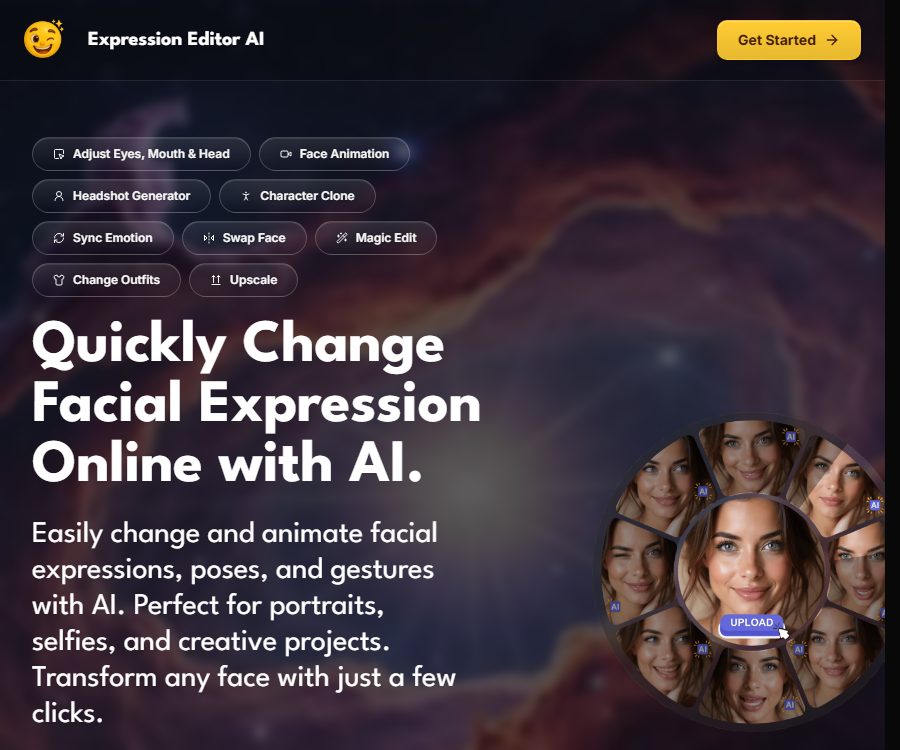
Expression Editor AI is an online platform for portrait editing and creating short animations, operated by Aivio Studio, LLC. Originally named Expression Editor, it was renamed in 2025; its purpose is to work on facial expressions, postures, and visual content, and it is not a development tool for writing program expressions.
It combines slide-bar-based facial adjustment, text caption generation, reference image transfer, and short-video animation in a single web workspace. Users can start with a single portrait to create new images, short videos, or individual video frames.
Core functions
Fine adjustment of facial expressions
Face Edit allows for adjusting the position of the eyes, mouth, and head using visual controls; it is useful for correcting issues such as blinking, misaligned gaze, forced smiles, or unsuitable shooting angles. The system first displays a 3D preview to show the desired adjustments, and then generates the actual photo.
- Head control: Adjusts pitch, yaw, and roll.
- Eye control: Handles blinking, unilateral eye blinking, eyebrow position, and the horizontal and vertical movement of the pupils.
- Mouth control: Adjust the intensity of the smile, and use mouth shapes such as AAA, EEE, WOO to determine the degree of opening of the mouth.
- Custom presets: Save frequently used combinations to apply similar processing methods to multiple portraits.
Convert photos into short animations
Animate converts static portraits into short videos with expressions and movements; it allows users to enter custom prompts or use suggested prompts for optimization. Users can also choose the frame size, duration, and resolution, and preview or export individual frames at 5 frames per second.
The Creator mode allows for video generation up to 5 seconds long at a resolution of up to 720p, while the Pro mode supports up to 10 seconds of video at a resolution of up to 1080p. The animation may exhibit issues such as shifting facial features, abnormal hand movements, or changes in identifying characteristics; it is therefore necessary to check each frame individually before exporting the video.
Generation of expressions, postures, and gestures
Expression Changer, Pose Changer, and Hand Gesture Changer are used to modify facial expressions, body postures, and hand movements respectively. They are suitable for creating variations of avatars, thumbnails, character concepts, and as references for shooting poses.
Different tools offer default, automatic, generic, or customized versions of models; the names of the underlying models are not disclosed on the page. The model options represent the processing methods used within the site, and they should not be equated with open-source models or downloadable weights.
Face swapping, cloning, and emotion synchronization
Face Swap applies one face to another image, while Face Clone and Character Clone create different poses, compositions, or scenarios based on the identity of a person. Emotion Sync transfers similar emotions from a reference image to the target portrait.
- Face Clone enables realistic enhancement and anti-blur features, while the Pro version adds control over posture and custom dimensions.
- Character Clone supports positive and negative prompts, multiple frames, aspect ratios, and reasoning parameters.
- Face swapping and cloning change the way one’s identity is presented; it is necessary to obtain the person’s consent and to avoid impersonation.
- The reference images are merely used as generation criteria; they cannot automatically address issues related to portrait rights and image copyrights.
Scenes, costumes, and local editing
Scene Swap reconfigures the background based on textual instructions; Clothes Swap can handle tops, bottoms, and one-piece outfits. Magic Edit allows elements to be added or modified through text, while Erase and Replace involves covering an area first before removing or redrawing it.
These features are suitable for creating ad drafts, design previews, and social media content, but aspects such as the fit of the clothing, coverage of the hands and feet, consistency of lighting, and authenticity of the product still need to be checked. The results of virtual try-ons cannot replace actual size measurements or fabric testing.
Merging, style, and composition replication
Magic Merge combines multiple visual elements into a single image, while Replicate allows the use of style reference images and composition reference images separately. Users can control certain generation tasks by adjusting hints, the level of guidance, and the number of reasoning steps.
Image enlargement, coloring, and quality improvement
Smart Expand allows the canvas to be expanded in square, vertical, or horizontal format, and reference images can be used to guide the style. Colorize adds colors to black-and-white photos, while Upscale and Upscale Video are used to increase the resolution of images or videos.
- Creator images can be enlarged by up to 2 times, while videos can be enhanced to 1080p.
- Pro mode allows up to 4x magnification for images, and 4K resolution is available for video targets.
- For video enhancement, the target frame rate can be set to 16, 24, 30, or 60 frames per second.
- Zooming in and using complementary colors can infer missing information, but this does not mean that the true original details and colors are restored.
Video extension and action templates
Extend Video adds about 4 seconds of content to existing clips, offering square, vertical, and horizontal formats as well as 480p and 720p options. Motion Effects converts static photos into short videos using preset actions such as hugging and kissing.
Synthetic videos depicting interactions between two people require authorization from all the individuals involved, and their synthetic nature must be clearly indicated. When such videos are shared publicly, it is important to prevent viewers from believing that the events depicted actually took place.
Input and output
| Category | Publicly available format or controls | Typical output |
|---|---|---|
| Image input | JPG, PNG, WebP | Edited portraits, image enlargement, composite images |
| Video input | MP4 | Extend or enhance videos |
| Text input | Custom prompts, negative prompts, prompt optimization | Expressions, actions, scenes, or partial modifications |
| Refer to the diagram | Expressions, characters, clothing, style, or composition | Migration or cloning results |
| File output | JPG, PNG, MP4 | Images, short videos, or exported frames |
The public page does not list in detail the maximum size of uploaded files, the pixel limits, the transparency channel, the encoding settings, and the rules regarding audio preservation. It is necessary to use actual material before starting a formal project to verify compatibility with the input data and the export parameters.
Basic usage process
- Register an account to obtain available trial points; the number of free points is indicated on the account profile.
- Depending on the task, go to Face Edit, Animate, Magic Edit, or other dedicated workspaces.
- Upload clear, well-lit portraits, videos, or reference images that you have the rights to use.
- Use sliders, presets, text prompts, or reference images to set the desired expression, pose, and scene.
- First, view the 3D preview or the low-cost preview, and then confirm the creation of the product by using the corresponding credits.
- Check for identity consistency, facial edges, hands, clothing, background, frame-by-frame stability, and clarity.
- Download JPG, PNG, or MP4 files, and complete the authorization and content disclosure process before using them publicly.
Recommended workflow
Fix portrait expressions
- Choose an original image that is positive in tone, clear, and has enough space for the face.
- First, make slight adjustments to the tilt of the head and its movement from side to side, then adjust the gaze and eyebrows.
- Use smile and lip shape controls to create expressions, avoiding pushing multiple parameters to extreme values at once.
- It is created after confirming the direction via a 3D preview, allowing for closer inspection of the teeth, eyes, and edges of the skin.
- When multiple consistent outputs are required, save the preset and review the character features for each one individually.
Producers create short animated films
- First, complete the static expressions and head orientation in Face Edit.
- Enter Animate and describe the rhythm of the actions, the direction of gaze, head movements, and the desired emotions.
- Choose the frame size, duration, and resolution; the Creator version allows a time limit of 5 seconds, while the Pro version permits up to 10 seconds.
- Use frame preview to locate flickering or distortion, and if necessary reduce the amplitude of the movement to regenerate it.
- Download the full video or the individual frames you need, and then add subtitles, voiceovers, and brand packaging.
Which users are it suitable for
- Photographer: Corrects blinking, gaze, and expressions in headshots, wedding photos, or group photos.
- Content creators: Create avatar animations, short videos, covers, and exaggerated reaction images.
- Marketer: Generate draft ad versions with different expressions, backgrounds, and compositions.
- Small businesses and personal brands: Creating licensed professional headshots and brief introduction materials.
- Designers and animation learners: Quickly create references for characters, poses, and movements.
- Regular users: For processing selfies, family photos, and non-sensitive entertainment content.
Price packages
The product uses a subscription-point system, with different generation actions requiring varying amounts of points. The page offers the possibility to top up additional points, but there is no publicly available table indicating the points required for each function or the price per point.
| Package or version | Price | Billing cycle | Core benefits or quota | Suitable for users |
|---|---|---|---|---|
| Register for a trial experience | Free points | Issued after registration | The specific quantity and expiration date have not been made public yet. | First test |
| Creator monthly plan | 19.99 dollars | Monthly | 500 points per month, 10 preset options, 720p animations lasting 5 seconds, 2x zoom | Individual creators |
| Creator annual plan | 119.94 US dollars | Every year | The benefits are the same as those for Creators; page promotion equates to a waiver of 6 months’ fees. | Long-term mild to moderate use |
| Pro monthly plan | 59.99 US dollars | Monthly | 1500 points per month, unlimited presets, 1080p animations at 10 seconds per frame, 4x zoom, and advanced controls | High-frequency professional creation |
| Pro annual plan | 359.88 US dollars | Every year | The benefits are the same as those in Pro; the promotional offer amounts to a waiver of the fees for 6 months. | Stabilize high-frequency teams or individuals |
| Recharge via points | Display by account | Per use | Used to top up the subscription quota | Temporary excess users |
Both Creator and Pro plans include access to core functions, permanent cloud storage, unlimited exports, flexible top-up options, and the ability to cancel at any time. Prices, taxes, discounts, and previous prices may vary depending on the region and account; the final amount due should be checked before making a purchase.
Key differences between Creator and Pro
| Project | Creator | Pro |
|---|---|---|
| Monthly points | 500 | 1500 |
| Custom presets | There are 10 in total. | Infinity |
| Maximum number of animations | 5 seconds, 720p | 10 seconds, 1080p |
| Image zooming | Up to 2 times | Up to 4 times |
| Video zoom | Up to 1080p | Up to 4K |
| Face Clone pose and custom size | Not included | Includes |
Cancellation and refund
- The price page indicates that cancellation is possible at any time, but the action must be taken before the renewal date and the status confirmed.
- Refunds are generally not granted if there is simply a change of mind or if the item is not used after purchase.
- In the event of serious technical issues and the platform fails to provide a reasonable solution, an application for individual review can be submitted.
- In the event of repeated deductions, you can contact the support team and have it handled through the original payment provider.
- After the refund is approved, it is returned to the original payment method; the policy does not specify a fixed time frame for approval.
- Before making a purchase, use your experience points to check the type of portrait, the output quality, and the amount of points that will be used.
Platform, API, and open-source status
| Project | Verify status | Explanation |
|---|---|---|
| Web application | Confirmed | Register, upload, generate, and download in the browser |
| Native mobile apps | Not confirmed yet | The policy uses the standard definitions from app stores, but the current store page has not been verified. |
| Public API | Not yet made public | No developer interface documentation or billing information was found. |
| SDK | Not yet made public | No downloadable development kit or integration instructions were found. |
| Official GitHub | Not confirmed yet | The product page does not have a specific official code repository associated with it. |
| Product source code | Not disclosed | It is currently delivered as a hosted web service, but this does not mean that the underlying models or services are open source. |
Product advantages
- Face sliders, generative editing, and short animations are all available in one workspace.
- The 3D preview allows users to understand the expressions and the direction of head adjustments before using points to create them.
- It has evolved from expression correction to costume changes, scenes, poses, image enlargement, and video enhancement.
- The public package clearly distinguishes between points, animation duration, clarity, and zoom level.
- It provides tutorials, demonstration libraries, and update logs, making it suitable for learning specific workflows through examples.
Capacity boundaries
- AI may change the details of a person’s identity, and it cannot guarantee perfect accuracy compared to the original photo.
- Exaggerated parameters, occlusion, side views, low clarity, and complex gestures tend to cause artifacts more easily.
- The 3D preview shows the direction of the composition, but it is not a real-time, lossless preview of the final photo.
- The duration of the animation is up to 10 seconds, making it more suitable for short clips and segments rather than the creation of full videos.
- The amount of points required for generation varies depending on the tool used, and the public price cannot be used to determine a fixed number of images.
- The service is provided as it is, without any guarantees of uninterrupted operation, complete accuracy, or suitability for specific purposes.
Privacy and data storage
The platform may collect names, email addresses, device information, IP addresses, browser details, pages visited, and diagnostic data; it also uses cookies and web beacons to analyze usage patterns. Users can also log in using listed third-party social accounts and authorize the sharing of information from those accounts.
- Data can be used to provide services, manage accounts, process purchases, contact users, conduct marketing, and improve products.
- Personal data may be shared with service providers, affiliated companies, and business partners, and may be processed across borders.
- The privacy policy specifies the duration for which data is stored only as required by business and legal obligations; it does not indicate the exact dates on which portraits, videos, and generated content will be deleted.
- The indication of permanent cloud storage on the pricing page means that users should not assume that the uploaded content will be deleted immediately after it is created.
- Users can update or delete certain information in their accounts, and they can also submit requests to access, correct, or delete that information.
- The policy does not specify whether the uploaded content is intended for model training; sensitive or confidential materials should be avoided.
- The platform does not guarantee absolute security for data transmission over the network or its electronic storage; users should keep local copies and control the scope of sharing.
Content guidelines and commercial use
Users must be at least 18 years old and are responsible for the content they upload, generate, or create. The platform prohibits pornographic, explicit, graphically violent, and other inappropriate content; it may filter, monitor, delete such content, or restrict access to it.
- It is necessary to have the proper rights to the original portraits, videos, reference images, costume designs, and other materials.
- Face swapping, cloning, anonymization, and interactive actions require the informed consent of the person being photographed.
- The product guide states that the content generated by the paid plans can be used for commercial purposes and serves as a royalty-free asset, but the public terms do not provide detailed rules regarding the rights associated with such output.
- Third-party characters, roles, brands, clothing designs, and reference styles may still be protected by independent rights.
- Advertisements, news reports, political content, medical information, and identity-related materials should clearly indicate when they have been edited using AI, so as to avoid misleading people.
- Before launching a commercial project, it is necessary to confirm with the platform the appropriate package, obtain the necessary licenses, define the rules for storage and processing, as well as outline the boundaries of responsibility.
Frequently Asked Questions
Is Expression Editor AI a programming tool?
No, it is used to edit expressions, eye looks, head angles, postures, and backgrounds in photos, and it can also create short animations from portraits. The word “Expression” in its name refers to facial expressions.
Is it possible to try it for free?
Registering an account earns experience points, but the specific amount and validity period are not indicated on the current public page; the actual amount will be shown in the new account.
What is the biggest difference between Creator and Pro?
Pro users earn three times as many points per month as Creator users; it allows for animations of up to 10 seconds in 1080p resolution, offers 4 times greater image zoom, 4K video zoom, and more controls for face cloning.
What input and output formats are supported?
The product guide lists JPG, PNG, WebP, and MP4 as acceptable input formats, while the package page specifies JPG, PNG, and MP4 as the output formats. Other encoding options, size limits, and pixel constraints should be checked beforehand before uploading.
Can points be purchased?
The subscription plan allows for flexible top-ups, but the prices of these top-up packages are not displayed uniformly on the public page. Different functions may require different amounts of resources, so it is necessary to check the cost associated with each task in the account.
Can the generated content be used for commercial purposes?
The product guide states that the content of the paid plans can be used for commercial purposes, but users still need to ensure that the characters, original images, brands, and reference materials have the necessary authorization. For important commercial projects, it is necessary to obtain a formal contract approval.
How long does the platform keep the uploaded photos?
The privacy policy does not specify a fixed deadline for deleting uploaded content; the package also includes permanent cloud storage. Do not upload highly sensitive information, and manage or request the deletion of any content that is no longer needed in your account.
Are there APIs, SDKs, or open-source versions available?
At present, no public API documentation, SDKs, official code repositories, or open-source models have been identified. The product provides its services primarily through hosted web applications.
Summary
Expression Editor AI is suitable for portrait-focused expression correction, as well as the creation of creative images and short animations; its advantage lies in the ability to combine slider controls with various generation tools in a sequential manner.
When making a purchase, choose a package based on points, video duration, clarity, and advanced controls; pay special attention to the points required, character licensing, cloud storage options, commercial licensing terms, and refund policies.
Tools similar to Expression Editor AI



 Guigong Network Security Registration No. 45132202000164