






Appy Pie
Appy Pie makes AI programming more efficient and simpler.
Tags:AI programming toolsWhat is Appy Pie?
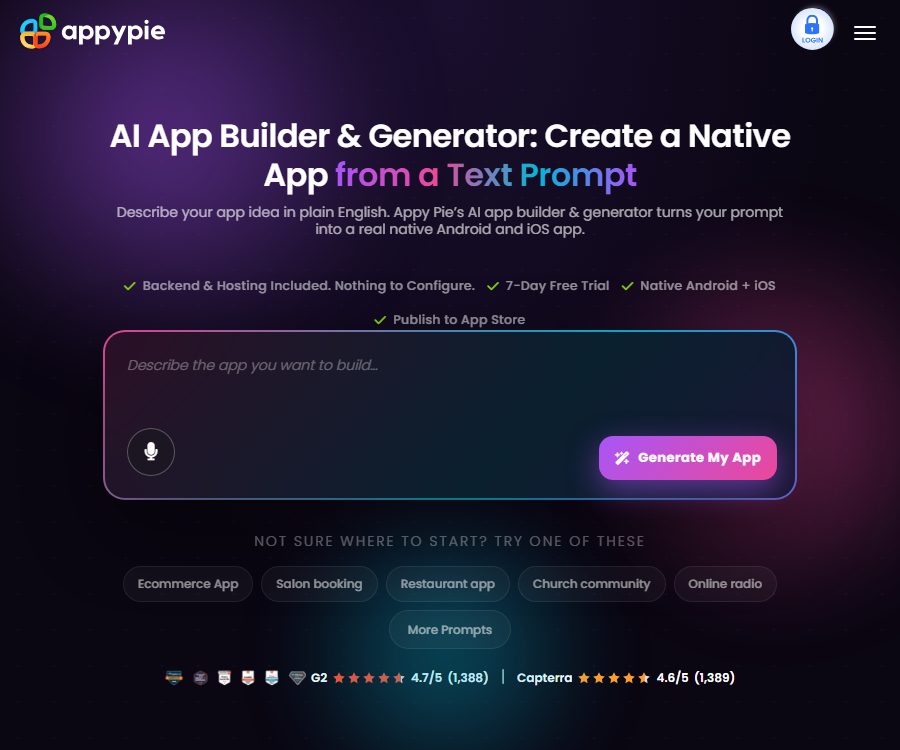
Appy Pie is an AI-based no-code application generation platform operated by Appy Pie LLP. Users can describe their ideas for applications, and the system will create the interface, navigation structure, content, data structures, as well as the basic backend components.
After it is generated, it can be further modified using prompts and the visual editor, after which an Android, iOS, or PWA application can be created. The platform also offers other services such as websites, automation tools, chatbots, and design features; this article focuses on App Builder.
Main features of Appy Pie
Prompt generation application
Users describe restaurants, booking services, fitness facilities, e-commerce platforms, educational tools, or community applications in natural language; the AI selects the appropriate structure and creates an initial version. Common applications can be previewed quickly, while more complex processes require multiple rounds of iteration.
Multiple rounds of prompt revisions
After it is created, you can request to add more pages, adjust colors, incorporate membership features, or translate the content. Each iteration can be kept within the same project.
Local regeneration
If you are only unsatisfied with a particular page, you can ask the AI to redo just that section while keeping the rest of the content unchanged. This makes it easier to control the changes compared to restarting the entire project.
Drag-and-drop editor
The visual editor is used to adjust pages, components, icons, colors, navigation, and functional modules. Non-technical users do not need to write Swift, Kotlin, or backend code directly.
AI-generated content
The platform can generate application icons, launch screens, and guidance illustrations, and allows for further editing. Before releasing them to the public, it is necessary to check the copyright status of the materials, ensure brand consistency, and meet the size requirements specified by the store.
Speech to prompts
Users can state their ideas for an application, which are then transcribed by the system to be used in its creation. The languages supported for entering such ideas include English, Spanish, Arabic, Hindi, French, Portuguese, Italian, and German.
Built-in backend and database
Appy Pie offers hosted databases, authentication services, REST interfaces, and cloud infrastructure, thereby reducing the need to configure the backend manually. However, complex business logic may still go beyond the capabilities of the pre-built modules.
Push notifications
The paid plans offer different numbers of push notifications for delivering updates, marketing messages, and reminders. User consent must be obtained before sending these notifications, and a way to turn them off should be provided.
Payment and business functions
Applications can include modules such as e-commerce, subscriptions, advertising, or in-app purchases. Transactions, taxation, refunds, and platform fees are also subject to the rules set by payment services and store policies.
Application analysis
The platform allows integration with Google Analytics to monitor user behavior. Before conducting analyses, it is necessary to set up policies for privacy disclosure, consent management, and data retention.
Version history
Each iteration of AI creates checkpoints, allowing users to revert to a previous state. It is still necessary to save separate copies of the materials, text content, and business configurations before going live.
Supported application types
- Restaurant ordering, food delivery, and customer loyalty app.
- An application for scheduling appointments, managing events, handling tickets, and organizing the daily schedule.
- E-commerce, product catalogs, and retail store applications.
- Applications for fitness, education, quizzes, and content learning.
- Community, member, news, and podcast apps.
- Applications for real estate, churches, non-profits, and small businesses.
- Projects that convert websites into mobile applications.
Appy Pie usage guide
- Identify the target users, core issues, and essential functions for the first version.
- Enter specific prompts to describe the pages, roles, data, and operational procedures.
- Check the AI-generated navigation, content, databases, and login methods.
- Modify the page using subsequent prompt words, and then fine-tune it with the drag-and-drop editor.
- Add a brand icon, colors, privacy policy, and contact information.
- Configure advanced features such as payment, push notifications, and analysis.
- Test logging in, network errors, permissions, and different screens on a real device.
- Select the appropriate subscription plan based on whether the target is Android or iOS.
- Create your own Google Play or Apple developer account.
- Prepare the store copy, screenshots, age rating, and privacy disclosure before submitting it for approval.
How to write high-quality prompts
- Describe the target audience, such as restaurant customers, gym members, or school parents.
- List the main pages and the core operations for each page.
- Describe the login roles and the data they can view and modify.
- It explains integrations such as payment, booking, maps, messages, and push notifications.
- Specify brand colors, tone, language, and accessibility requirements.
- Break down complex products into an MVP and subsequent versions to avoid including too many features at once.
Which users are it suitable for
- Small businesses and individual entrepreneurs who do not have a professional development team.
- Product teams that need to quickly test ideas for mobile applications.
- Operators in the food and beverage, retail, education, events, and community sectors.
- Organizations that already have a website and wish to add a mobile version.
- Non-technical users who need assistance with hosting the backend and launching a store.
Product advantages
- The process from the prompt to the preview of the mobile app is short.
- Building for Android and iOS and submitting to stores are all handled within a single platform.
- Databases, authentication, hosting, push notifications, and payments are integrated by the platform.
- You can continue to use prompts, drag-and-drop editing, and version history for iteration.
- Multiple subscription tiers are available based on the application, suitable for various deployment goals.
Clear boundaries of capabilities
- Exporting the complete source code or obtaining the Git repository is not supported.
- It is not possible to create entirely new server-side logic arbitrarily; reliance is mainly placed on pre-existing modules.
- It is not suitable for directly creating fully autonomous AI agent products.
- It does not generate 3D games using Unity, Unreal, or native OpenGL.
- There is no guarantee of automatic approval for app reviews by Apple or Google.
- Currently, no standalone Apple Watch app is being created.
Usage restrictions and precautions
- Platform hosting implies a continuous reliance on a subscription; once it is canceled, the application will be locked.
- A single account can create multiple projects, but each official application requires a separate subscription.
- Downloads, push notifications, and support methods vary depending on the plan.
- The publisher is responsible for app store reviews, policy violations, and the risk of rejection.
- Regulated applications in areas such as health, finance, and children require additional compliance preparations.
- AI-generated text, processes, and permissions may contain errors, so functional and security tests are necessary.
- There is no export of source code, so rebuilding may be necessary if it needs to be migrated to another platform later.
Appy Pie prices
As of August 26, 2026, the official U.S. product page shows that the annual subscription costs for Basic, Gold, and Platinum are 16, 36, and 60 dollars per app per month respectively; there is also an enterprise-customized option available.
The official website displays the local currency based on the region; the monthly payment is usually higher than the equivalent annual price. The table below does not include taxes, additional packages, fees for re-submission, or costs related to developer accounts on app stores – the final amount will be as indicated on the settlement page.
| Plan | Annual equivalent price | Platform | Push and download | Support |
|---|---|---|---|---|
| Basic | 16 dollars per app per month | Android and PWA | 500 pushes, 500 downloads per month | |
| Gold | 36 dollars per app per month | Android | 1,000 pushes, 1,000 downloads per month | Email and Chat |
| Platinum | 60 dollars per app per month | Android and iOS | 2,000 pushes, 2,000 downloads per month | Email, chat, and phone calls |
| Enterprise | Custom quote | Enterprise needs | No restrictions on applications or push notifications; API calls can be customized. | Dedicated account managers and corporate support |
Basic, Gold, and Platinum all include unlimited bandwidth, hosting, and application editing, as well as the ability to publish applications under one’s own developer account. Features such as removing the Appy Pie brand may require additional packages.
Free trial and refund
It is possible to create, preview, and make iterations for free; however, publishing content and using advanced features require payment. The paid plan offers a 7-day trial period during which payment information is collected, and if it is not canceled before the end of that period, a charge will be applied on the 8th day.
After the first trial period with a pay-as-you-go option, a refund can be requested within 7 days from the date of deduction; the refund amount will be reduced by 3%, or by the actual processing fee, whichever is higher. Refunds are generally not provided for subsequent renewals – it is necessary to cancel them before the renewal date.
App store fees
- Google Play developer account: A one-time fee of $25, charged by Google.
- Apple Developer Program: 99 dollars per year, charged by Apple.
- Each application requires its own Appy Pie subscription; store fees are not included.
- The first submission is assisted by the platform, but subsequent submissions may incur additional fees.
What happens when you cancel a subscription?
The official price FAQ states clearly that after canceling the subscription, the application will be locked and will no longer be able to make use of that hosting service. It is possible to request its restoration after re-subscribing.
The risks associated with such platforms should be taken into consideration before making a purchase. For critical operations, it is necessary to retain the ability to export customer data, as well as various materials, configurations, and alternative solutions; moreover, a plan for migration after the service ends must be established.
Privacy and security
The privacy policy states that Appy Pie processes data related to accounts, transactions, devices, usage, as well as data generated by customer applications; it also makes use of service providers for tasks such as payment processing, hosting, support, and analysis. Customers are usually the ones in control of their end-user data.
The official security page states that the application is hosted on AWS, and it makes use of a multi-tenant data model, encryption, regular backups, and vulnerability scanning. A compliance statement does not automatically ensure that the applications created by each user are compliant; the publisher still needs to set up permissions, agree to relevant terms, and prepare privacy documents.
Open source and source code status
The Appy Pie business platform is not an open-source project; the developers explicitly state that hosted applications do not come with access to the source code or a Git repository. Users receive the compiled version of the application that is ready for deployment, but they do not own the complete source code.
There are many Appy projects on GitHub with similar names, and they are not the same product as Appy Pie. To determine whether a project is open source, it is necessary to check the official organization, domain name, and license.
Frequently Asked Questions
Can Appy Pie be used for free?
Applications can be created, previewed, and iterated on free of charge. Publishing to app stores, removing the brand identity, and using advanced features require a paid plan.
Can Appy Pie create Android and iOS apps?
Yes. The official version claims to be able to generate Android AAB and iOS IPA builds, while the Platinum version allows for distribution on both Android and iOS app stores.
How many applications can each account publish?
Multiple applications can be created within an account, but each official application requires its own separate subscription; Enterprise plans allow for more flexible arrangements.
Can the app still run after unsubscribing?
According to the official FAQ, the application will be locked after cancellation. It is necessary to assess the platform dependencies prior to long-term operation and to export business data on a regular basis.
Does the price include Apple and Google developer fees?
It is not included. Google Play charges $25 one-time, while the Apple Developer Program costs $99 per year; both fees are collected directly by the respective stores.
Can Appy Pie export the source code?
No. The authorities have made it clear that the application runs on hosted infrastructure, and no Git repositories or full source code are provided.
Tools similar to Appy Pie



 Guigong Network Security Registration No. 45132202000164