






Animate Old Photos
Animate Old Photos – makes AI programming more efficient and simpler
Tags:AI programming toolsWhat is Animate Old Photos?
Animate Old Photos is an AI-based tool for creating images and videos, using old photographs as its main material. It enables static portraits to blink, smile, or turn their heads; it can also repair damaged photos, create videos of people hugging each other, and carry out various creative editing tasks.
The platform handles photo processing, animation creation, and downloading all on the web interface, so ordinary users do not need to learn video editing. Developers and AI agents can also automate the process of converting photos into videos using MCP services, API access codes, or official Agent Skills.
Main functions
Old photos turned into animations
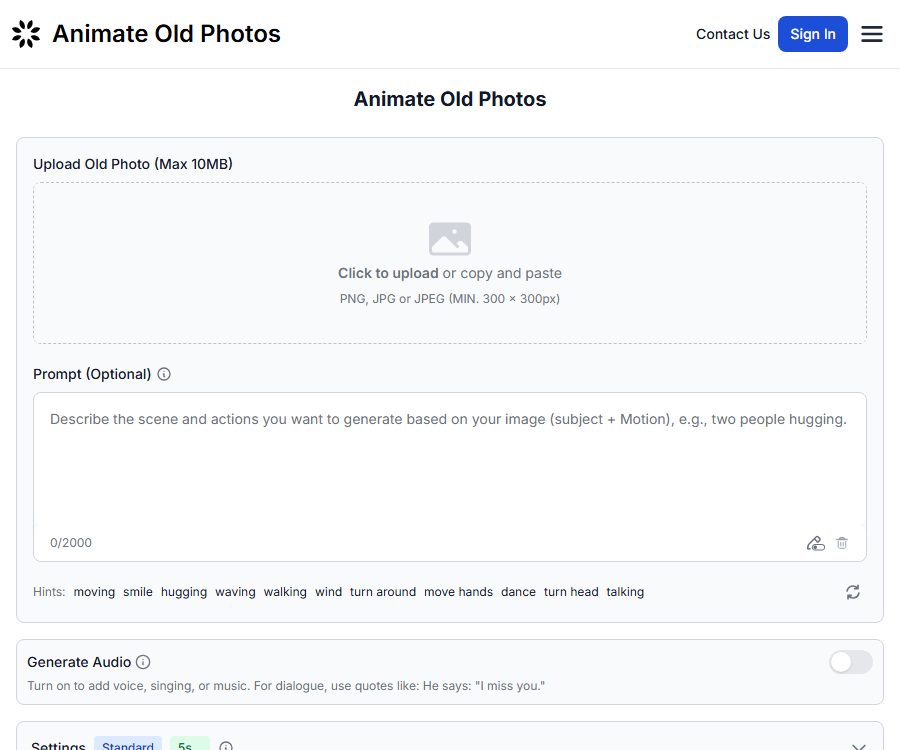
After a user uploads a static photo, it is possible to make the person in the photo perform natural actions such as smiling, blinking, nodding, or turning slightly. Prompt texts can be used to describe the desired movements; if no such prompt is provided, the system can automatically generate the animation.
Restoration of old photographs
The photo restoration feature is used to address issues such as scratches, fading, blurriness, and low resolution. The number of points required for standard and advanced modes differs; it is recommended to keep the original file of important photos, so that one can compare the facial details before and after restoration.
AI embraces video
AI Hug can transform photos of people into videos showing them embracing, making them suitable for family memorials and sharing on social media. The creation of such synthetic relationships does not reflect real events, and care should be taken to avoid any misunderstandings regarding identities or facts when such content is made public.
Add family members to photos
The platform offers a feature for combining images, allowing deceased relatives or other family members to be added to existing photos. Given the emotional nature of such content, it is recommended to obtain permission from the owners of the photos and the relevant family members first.
High-definition output, with audio and without watermarks
The price page on the official website lists options such as original audio, 1080p video, 2K images, and watermark-free outputs. The clarity, sound quality, and amount of points consumed vary between the standard mode and the advanced or Pro modes; it is necessary to refer to the instructions displayed before generation.
Browser extensions
The official extension can be used in Chrome and Microsoft Edge; it allows users to upload images through the sidebar and initiate animation tasks. The access code for the extension is stored locally in the browser, while the images are uploaded to the server for processing.
MCP, API, and Agent Skills
Users can create API access codes in their accounts and connect the official MCP service to compatible clients such as Cursor, Claude Desktop, Claude Code, Windsurf, etc. MCP offers tools for checking balances, submitting animations, and polling task status.
The official GitHub page also provides portable Agent Skills and scripts, licensed under the MIT license. The files related to agent integration as well as the example scripts are available under an open-source license; however, this does not mean that the Animate Old Photos commercial platform or its generation models are open source.
Guide to Using Animate Old Photos
- Register and log in to your account, and prepare JPEG or PNG photos.
- Choose features such as old photo animation, restoration, AI embrace, or portrait synthesis.
- Upload a clear photo of the subject, making sure that there is no significant obstruction of the person’s face.
- Enter brief action instructions as needed, such as a gentle smile, a blink, or a slow nod.
- Select Standard, Advanced, or Pro mode to see the point cost displayed before generation.
- Submit the task and wait for it to be processed; once completed, preview the consistency of the characters and the naturalness of their movements.
- After downloading the result, verify the requirements regarding portraits, copyrights, and content identifiers before sharing it publicly.
Input requirements and generation suggestions
- The official agent workflow supports JPEG and PNG formats, with files not exceeding 10MB in size.
- The image size should be at least 300×300 pixels; a clear front-facing image generally yields more stable results.
- The prompt should describe actions rather than re-describing the character’s appearance, and it should be brief and specific.
- Group photos, covered faces, extreme side views, and severe damage can reduce the quality of the animation.
- The standard process carried out by the agent generates a video of about 5 seconds in length; the typical processing time is between 2 and 5 minutes.
Which users are it suitable for
- Home users: Add slight natural movements to old photos to preserve family memories.
- Historical and archival content creators: Restore and animate authorized historical footage.
- Short-video creators: Produce content with nostalgic themes, commemorative themes, or stories about individuals.
- Design and marketing professionals: Quickly create emotionally resonant visual prototypes.
- AI agent users: Process compliant photos in bulk via MCP or Agent Skill.
Product advantages
- Its functions are centered around integrating old photo scenes, and the barrier to using it is low.
- It also offers animation, repair, hug videos, and character synthesis.
- The advanced mode supports high-definition output and audio, making it suitable for direct sharing.
- It supports web versions, Chrome extensions, and Edge extensions.
- It provides official MCP and API access codes, as well as open-source Agent Skills, offering a fairly complete set of automation options.
Usage restrictions and privacy considerations
- AI may alter a person’s facial features, age appearance, clothing, or historical details; generated videos cannot be considered as authentic historical records.
- Before uploading, it is necessary to verify the copyright of the photos, the rights related to personal portraits, and whether permission exists to use any sensitive family-related content.
- According to the official expansion of the privacy policy, images uploaded and videos created are retained on the servers for 30 days; users can also delete them manually from their accounts.
- The policy also states that the images uploaded in this expanded format are used solely for animation creation; they are not utilized for model training, nor do they retrieve content from regular web pages or browsing history.
- Different modes require 2 to 18 points, respectively; the exact cost will be displayed before generation.
- Subscriptions and point packages are generally non-refundable; in special cases such as fraud, major technical issues, or complete non-use, you can contact the authorities for review.
Price of Animate Old Photos
As of August 26, 2026, the official website’s settlement page offers one-time credit packages, with the option to choose between monthly or annual payment. The options displayed on this public page are for one-time purchases; prices, taxes, and promotions may change, so it is necessary to refer to the settlement page before making a purchase.
| One-time solution | Integration | Price | Validity period |
|---|---|---|---|
| Lite | 30 points | 14.99 dollars | 6 months |
| Plus | 50 points | 24.99 dollars | 6 months |
| Pro | 110 points | 49.99 dollars | 6 months |
Additional points package
| Number of points | Regular price | Price for subscribed users |
|---|---|---|
| 200 points | 90 dollars | 81 dollars |
| 500 points | 220 dollars | 198 dollars |
| 1,000 points | 430 dollars | 387 dollars |
Subscribers can get a 10% discount when purchasing additional point packages; monthly and annual subscriptions grant points that are carried over and remain valid for 12 months from the date of receipt. One-time purchases of points are valid for 6 months from the date of purchase.
Consumption of points for various functions
| Functions | Standard mode | Advanced or Pro mode |
|---|---|---|
| Animated old photos | Each paragraph is worth 2 to 4 points. | Advanced: 3 to 8 points; Pro: 5 to 18 points |
| AI embraces video | 3 points per paragraph | Based on the generated page. |
| Restoration of old photographs | 1 point per piece | 2 points per premium ticket |
| Add family members to photos | 2 points per piece | 3 points per premium ticket |
Frequently Asked Questions
Can Animate Old Photos be used for free?
The official website used to offer a certain amount of free access for historical updates, but the real-time settlement page relies mainly on paid credits. As for whether there are any rewards for logging in or a free trial available, it depends on what is displayed on the actual page.
How many points are required to create a video from a photo?
On the web interface, the cost ranges from 2 to 18 points, depending on the model used and whether audio is included; the standard 5-second animation process for official MCPs and Agent Skills costs 3 points. The exact cost is displayed on the page before submission.
Which image formats and sizes are supported?
The official documentation supports JPEG and PNG formats; each image should not exceed 10 MB in size, with a minimum dimension of 300×300 pixels. Clear images of people with complete facial features tend to result in more natural movements.
How long are uploaded photos stored?
The official extended privacy policy states that uploaded images and generated videos are retained for 30 days before being automatically deleted; users can also delete them manually from their accounts in advance.
Can it be automatically generated using an AI agent?
Yes. The platform offers MCP services, API access codes, and official Agent Skills, which enable compatible clients to check balances, upload data, generate content, perform polling, and download data.
Is Animate Old Photos an open-source tool?
The commercial website and the generation models have not been declared as open source. What is available on the official GitHub repository are the Agent Skills and scripts that allow access to APIs, and the MIT license applies only to the code in that repository.
Tools similar to Animate Old Photos



 Guigong Network Security Registration No. 45132202000164