






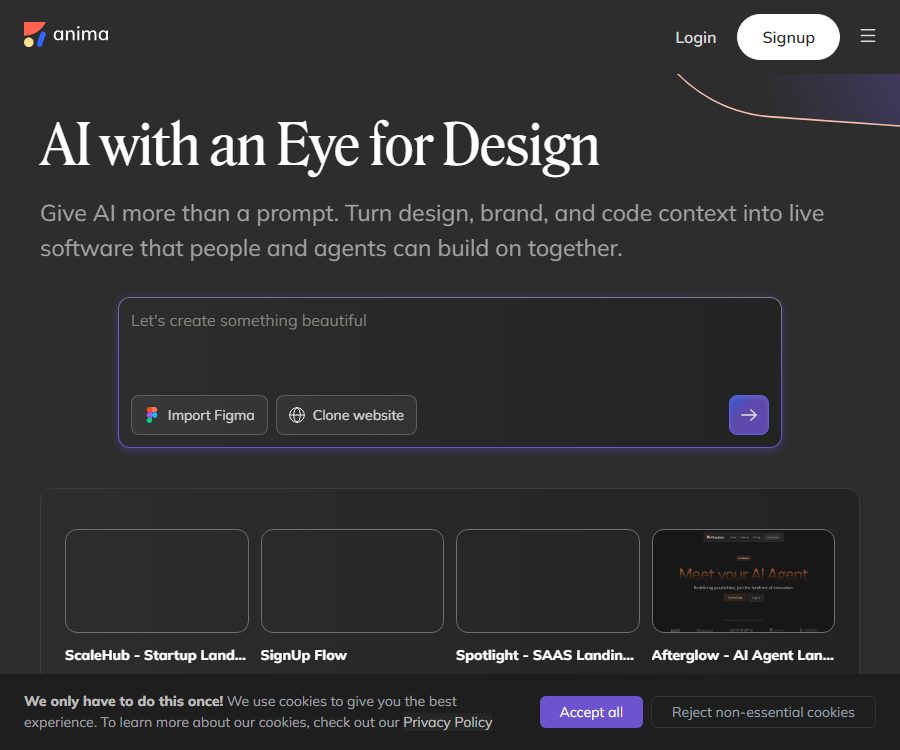
Anima
Anima – makes AI programming more efficient and simpler.
Tags:AI programming toolsWhat is Anima?
Anima is an AI platform that converts product designs into front-end code to build web applications. Users can start from Figma designs, textual descriptions, screenshots, existing websites, or code repositories to create applications that are ready to be used, editable, and exportable.
Initially, it focused on tools for converting designs from Figma to React, Vue, and HTML; today it has expanded to include Anima Playground and Agent Grid. Its new capabilities cover the creation of AI applications, real-time previews, Git repositories, hosted publishing, databases, design systems, and collaboration through coding agents.
Main functions
1. Convert Figma to code
Users can paste a Figma link or use the Anima Figma plugin to import designs. This plugin is able to capture variables, design tokens, component information, and automatic layout details, providing a more complete import process compared to using only the Figma API.
- Generate code from individual frames, components, or multi-screen workflows.
- Convert Auto Layout to a responsive layout.
- Identify colors, fonts, spacing, and reusable components.
- It supports importing Figma variables and design tokens.
- View and export in the browser or Figma Dev Mode.
The design structure has a direct impact on the quality of the code. Using automatic layout, standardized naming, componentization, and consistent breakpoints generally leads to more maintainable code than relying on a large number of absolute positioning techniques.
2. Text generation web application
In Anima Playground, users can describe the product’s objectives, target audience, and core functions, allowing the AI to generate a functional web page or application. Subsequently, it is possible to modify the content, layout, components, and interactions through chat.
The prompt should focus on outlining the product’s purpose and the structure of the information, rather than merely emphasizing pixels and colors. For complex applications, it is best to develop them in modules and test them step by step.
3. Converting websites and images into code
Anima allows you to enter the address of a public web page or an image in order to generate a front-end implementation. It can convert websites into code in HTML or React format, making it suitable as a starting point for creating prototypes, conducting migration assessments, and carrying out internal restructuring.
The technical ability to replicate public websites does not imply ownership of the content on those pages, nor of any trademarks, images, or designs. It is not allowed to clone other people’s websites without authorization, nor to use them for deception, phishing, or commercial purposes.
4. React, Vue, and HTML output
The Figma workflow supports React, Vue, and HTML, and offers JavaScript, TypeScript as well as a variety of styling options. Choices include CSS, Tailwind, Styled Components, CSS Modules, SASS, and SCSS.
- React components and JavaScript or TypeScript.
- Vue front-end code.
- Separate HTML and CSS, with no mandatory use of a framework.
- Options for component libraries such as MUI, Ant Design, and Shadcn.
- Responsive pages and multi-breakpoint output.
The combinations supported by different import options are not exactly the same. The limitations on code conversion on this website are greater than those in Figma; it is necessary to check the actual settings before generating the code.
5. Playground preview and editing
Playground offers sections such as Preview, Code, Database, and Flow. Users can run applications, view or edit code, manage data and users, and check navigation between pages.
Each AI operation generates editable code, which developers can modify directly. The resulting application must undergo tests for dependencies, accessibility, performance, and security before it can be put into use.
6. Databases, users, and backend capabilities
Anima can add databases and user authentication to applications, as well as manage data in Playground. It is suitable for quickly creating prototypes with state or internal tools.
When it comes to logging in, permissions, and sensitive data, it is necessary to test access control, session management, data isolation, and deletion mechanisms. The backend systems created automatically by AI cannot bypass security evaluations.
7. Hosting, publishing, and custom domain names
Users can deploy their projects to the address provided by Anima, or they can use a custom domain name as part of a paid plan. Sharing a Playground link is different from publicly releasing an application; public release makes the application accessible on the Internet.
Before going live, it is necessary to ensure that environment variables, keys, databases, and test data are not exposed. For custom domain names, DNS and HTTPS must also be configured correctly.
8. Agent Grid and Git workflow
Agent Grid is an environment provided by Anima for creating, hosting, publishing, and sharing applications for AI agents. Each Artifact represents a real Git repository within the team workspace, allowing agents to clone, commit, and push changes.
- Create an app from prompts, a website, or Figma.
- Import existing code or create an empty repository.
- Continue to edit and maintain the Artifact using Git.
- Generate multiple variants and compare them.
- Publish or remove public applications.
The operations of creation and replication via agents may not be idempotent; after a timeout, it is necessary to check the workspace list before attempting again. Publishing constitutes a change in external state, and explicit authorization is required.
9. Anima MCP and CLI
The official MCP can be connected to Claude Code, Codex, Cursor, VS Code, and other compatible clients, allowing coding agents to access Figma, Playground, and team design systems directly. The Anima CLI can also be used in the absence of an MCP client.
To establish a connection, an Anima account is required along with authentication in the browser; for Figma features, corresponding authorization files are needed as well. The code generated by MCP is also counted toward the code generation quota.
10. API and backend SDK
The Anima API and backend SDK can convert Figma files or public websites into front-end code, making them suitable for use in automated systems, AI agents, and developer tools. The SDK allows for the specification of frameworks, programming languages, styles, and UI component libraries.
To access the API, it is necessary to contact the official team; the public pricing page does not specify a fixed price for the interface. Backend keys must not be included in browser code.
11. Built-in models and BYOK
Users can connect a ChatGPT subscription, an OpenAI API key, or an Anthropic API key to use their own model quota for conversations in Playground. Once this is enabled, chat messages do not consume Anima AI credits.
Website cloning, design to code conversion, image to code conversion, hosting, publishing, and team capabilities may still require an Anima subscription plan or usage fees. The subscription costs and API fees associated with model providers also need to be calculated separately.
Which users is it suitable for?
- Designers who need to convert Figma designs into front-end code quickly.
- Front-end developers who handle design delivery and component implementation.
- Product teams that aim to create functional prototypes from text.
- Users who use coding proxies such as Claude Code, Codex, or Cursor.
- Platforms that offer the capability to convert designs into code need to be integrated into the application.
- An organization that manages enterprise design systems, permissions, and compliance.
How to generate code from Figma?
- Organize Figma components, Auto Layout, variables, and breakpoints.
- Copy the frame link, or install the Anima Figma plugin.
- Log in to Playground and connect your corresponding Figma account.
- Choose React, Vue, or HTML, along with the language and styling scheme.
- Import a single screen or import multi-screen processes via a prototype link.
- Check the layout, fonts, interactions, and responsive behavior in the preview.
- Edit the code directly or continue to make corrections using prompts.
- Export to the code repository, run the tests, and then merge and release.
Price and plan
As of August 26, 2026, the official options available are Free, Starter, Pro, Business, and Enterprise; payments can be made on a monthly or annual basis. The dynamic package options listed on the pricing page are not fully displayed in the publicly available data, so the table below shows only those quotas and starting prices that can be verified in real time.
| Plan | Publicly verifiable prices | Monthly code generation quota | Main differences |
|---|---|---|---|
| Free | Free | 5 times | 5 Playground chats per day, 5 Figma imports or website clones per day; multi-screen workflows are restricted. |
| Starter | The settlement page shall prevail. | 50 times | Supports paid features, multi-screen workflows, and custom domain names. |
| Pro | The settlement page shall prevail. | 200 times | Higher generation limits and team development capabilities |
| Business | The settlement page shall prevail. | 600 times | Designed for large-scale teams, offering enhanced governance and support capabilities. |
| Enterprise | $ | In accordance with the contract | SSO, MFA, enterprise SLAs, security and compliance options |
A single code generation process includes exporting from a Figma plugin, importing designs from Playground, cloning websites, generating prompts, or creating MCPs. The information above was verified on August 26, 2026; specific prices for individuals and teams, as well as rules regarding quotas, hosting, and excess usage, should be referred to on the official real-time pricing page.
Cancel and pay
According to the official information, subscriptions can be changed or canceled at any time; once canceled, they remain valid until the end of the current billing cycle. When upgrading, one usually only has to pay for the remaining time in that cycle.
Payments can be made using credit cards, Apple Pay, and Google Pay; business customers can also opt for bank transfer or invoices. Before making a purchase, it is necessary to check the taxes, the date of automatic renewal, and any annual payment requirements.
Code copyright and the boundaries of open source
The Anima terms state that the code generated by the platform is compatible with Apache 2.0 or MIT, and it comes without any licensing requirements related to dependencies. However, this does not remove the rights restrictions associated with the design elements, images, fonts, trademarks, and third-party components used in it.
The Anima core platform, code generation engine, and hosting services are commercial products. The official GitHub repository provides MCP guidelines, SDKs, and some examples, but the fact that these repositories are available does not mean that the entire Anima platform is open source.
Safety and usage precautions
- Only authorized agents are granted access to the Figma files and repositories required to complete the task.
- Do not paste API keys into chats, screenshots, or front-end code.
- Check for dependency vulnerabilities, input validation, and access control before deployment.
- Cloned websites must obtain licenses for the use of their content and design.
- The generated code must pass visual, responsive, accessibility, and performance tests.
- The team should maintain audits for Git commits, releases, and deletions.
Product advantages
- It provides access via various means such as Figma, tooltips, images, websites, and code.
- It generates editable front-end code in React, Vue, HTML, and other formats.
- Integrate previewing, databases, Git, and publishing into the same process.
- It provides MCP, CLI, API, and backend SDKs.
- It supports using a ChatGPT subscription or a model API key of your own.
Product limitations
- The generated code still needs to be cleaned up and tested by developers.
- The framework and style options supported by different entry points are not exactly the same.
- The free version has limited capabilities for generating content and handling multi-screen workflows.
- The dynamic content on the public pricing page is not easy to verify completely.
- The core platform is not an open-source, self-deployed product.
Frequently Asked Questions
What kind of code can Anima convert Figma into?
The Figma workflow supports React, Vue, and HTML, and it is possible to choose from JavaScript, TypeScript, Tailwind, as well as various CSS solutions; the actual options depend on the entry point and framework used.
Can applications be created directly from text?
Yes. Anima Playground allows for the creation of runnable web applications from prompts, with further iteration possible through chatting, code editing, and Git workflows.
How many generations are available in the free version?
According to the official statements, the Free version includes 5 code generation sessions, as well as 5 conversations in the Playground per day and 5 opportunities to import designs into Figma or clone websites.
Does Anima support Codex and Cursor?
Supported. The official MCP guidelines list clients such as Codex, Claude Code, Cursor, and VS Code; users need an Anima account and must complete authentication.
Are all functions free once you have your own API key?
No. BYOK allows chat to use one’s own model quota, but services such as website cloning, design-to-code conversion, hosting, publishing, and team features may still incur costs.
Is Anima an open-source tool?
The core platform is not an open-source product. The official team has made available MCP guidelines, SDKs, and some projects, but the commercial code generation and hosting services cannot be labeled as open source.
Tools similar to Anima



 Guigong Network Security Registration No. 45132202000164