






aiPDF.ai
aiPDF.ai – makes AI programming more efficient and simpler.
Tags:AI programming toolsWhat is aiPDF.ai?
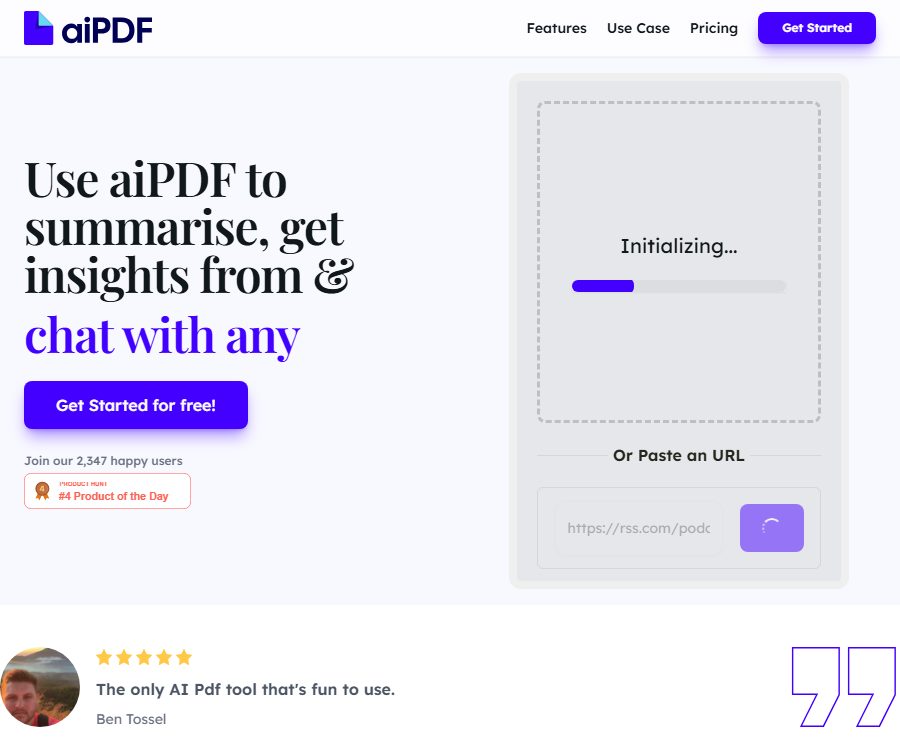
aiPDF.ai is an online AI tool designed for reading, summarizing, and answering questions about PDF documents. After uploading a document, users can pose questions, extract key information, and receive answers along with the locations of the relevant references in the document.
The platform is operated by British company LUMINATION AI LTD.; it supports single-document and multi-document conversations, as well as the ability to paste content URLs. It is useful for assisting with reading, but it cannot replace manual verification of contracts, papers, and professional documents.
Main functions
PDF Summary and Q&A
Users can ask the AI to summarize documents, explain terms, search for data, or organize sections. Answers are generated based on the uploaded content, which helps to save time spent on repeated searches within long reports and e-books.
References in the document
The official website states that the responses will include detailed citations from the original text, allowing users to return to the document for verification. The location of these citations can help with validation, but it is still necessary to ensure that the AI has understood the context, tables, and negative expressions correctly.
Multi-document dialogue
Multi Document Chat enables the use of multiple files within a single session, while Multi Document Joins is used to link different documents together. It is suitable for comparing versions of contracts, research papers, and multi-issue reports.
OCR text recognition
Different plans offer varying amounts of OCR capacity per page, and they can process scanned PDFs as well as image-based pages. Blurry, tilted, handwritten, or complex two-column pages may lead to recognition errors.
Import website content
The home page provides a field for pasting URLs, allowing supported web pages or online content to be imported for analysis. Pages that are subject to login requirements, anti-scraping measures, paywalls, or dynamic loading may not be able to be accessed successfully.
Document saving and management
Logged-in users can manage and upload content on the document page; different plans offer storage options of 1 month, 6 months, or unlimited duration. Users can also delete documents at will, but important documents should still be kept in their original form locally.
Which users are it suitable for
- Students and researchers who read papers, textbooks, and research materials
- Business users who analyze annual reports, industry reports, and market data
- Experts in comparing contract, policy, and regulatory documents
- Users who extract text and key information from scanned PDFs
- Knowledge workers who need to search through multiple documents and synthesize information.
- Ordinary readers who can quickly understand e-books, manuals, and long documents
AIPDF.ai Usage Guide
- Register an account and select a plan based on the file size and OCR requirements.
- Upload a PDF, or paste the URL of the public content you wish to analyze.
- Wait for the system to parse text, tables, and scanned pages.
- First, let the AI generate a structured summary to identify the document’s topic and sections.
- Pose specific questions and require answers based solely on the current document.
- Click or view the reference location to return to the original text and verify the key conclusions.
- When comparing multiple files, give the documents clear names and define the scope of the issues.
- After completion, export the required information and delete sensitive or no longer needed files.
Effective methods for asking questions
- Request that the key points and evidence be listed by chapter.
- Specify page numbers, time ranges, individuals, or metrics to avoid vague responses.
- It is required to distinguish between the facts in the original text, the author’s opinions, and AI-generated conclusions.
- When comparing documents, it is essential to identify the similarities and differences that need to be noted.
- When dealing with a contract, it is necessary to specify the obligations, deadlines, conditions for breach, and conditions for termination.
- When working on a paper, it is necessary to verify the research methods, sample, limitations, and conclusions.
Prices and packages
The prices listed below were verified on August 25, 2026, based on the official price page, which shows the average monthly cost under the annual billing option. Taxes, the total annual cost, and any promotions may change; the information on the settlement page shall prevail.
| Plan | Price | PDF upload | Number of issues | Maximum size for a single file | OCR page count |
|---|---|---|---|---|---|
| Playful | Free | 2 copies | 50 times | 35MB | 50 pages |
| Dynamic | 9 dollars per month | 120 pieces | 500 times | 50MB | 500 pages |
| Flagship | 19 dollars per month | No restrictions | No restrictions | 65MB | 3000 pages |
| Enterprise | Contact for a quote | No restrictions | No restrictions | In accordance with the contract | In accordance with the contract |
The Playful format documents are stored for 1 month, those in the Dynamic format are stored for 6 months, while there is no time limit for storing documents marked as Flagship. Enterprise offers commercial use and various other unlimited benefits; the details regarding data processing, support, and related terms need to be confirmed separately.
Multiple document limit
| Plan | Number of multi-document chats | Number of associated documents per instance |
|---|---|---|
| Playful | 1 | 3 pieces |
| Dynamic | 5 | 5 pieces |
| Flagship | No restrictions | 10 pieces |
| Enterprise | No restrictions | Configure by enterprise |
The “unlimited” option listed on the pricing page is still subject to fair use policies, technical capabilities, and service terms. Before carrying out frequent and large-scale usage, it is necessary to verify with the authorities the limits regarding speed, concurrent usage, and automation.
What is the free version suitable for?
The free plan allows for the uploading of two PDF files, the submission of 50 questions, and the processing of up to 50 pages of OCR text; it is suitable for testing the quality of text extraction as well as for occasional reading. The 35MB file limit may be insufficient for scanned books or reports that contain a large amount of images.
If long-term storage, comparison of multiple files, or scanning a large number of pages is required, Dynamic or Flagship should be considered. Before making an upgrade, test the table formatting, formula handling, and Chinese character recognition using representative files.
Document privacy and data processing
The official privacy policy states that the platform collects data related to accounts, usage, payments, and content submitted by users. The service makes use of the OpenAI API to process the content provided by users, and it relies on infrastructure such as Firebase Cloud Firestore.
The privacy page states that data may be processed in different countries, and the duration for which it is stored depends on the purpose of the service, as well as contractual and legal requirements. The official website also indicates that users can delete documents manually, but such deletion actions should be understood in the context of the account policies and those of third-party processors.
- Do not upload ID cards, medical records, unpublished financial statements, or customer confidential information.
- Before uploading contracts or research data, verify that the organization permits the use of third-party AI.
- Mask the data in the files by removing names, account numbers, and contact information.
- Delete the documents and shared links once they are no longer needed.
- Important summaries and citations are saved locally, while the original PDF is retained.
- Enterprises should sign appropriate data processing and confidentiality agreements prior to use.
Accuracy of answers and verification of references
AI may miss marginal notes, misinterpret tables, confuse different sections, or present assumptions as facts. The inclusion of citations does not guarantee the accuracy of the responses; it merely provides a basis for manual verification.
- Numbers, dates, and amounts must be matched item by item with the original text.
- Legal provisions should be read in their entirety and reviewed by professionals.
- When citing academic works, it is necessary to verify the author, year, page numbers, and the original paper.
- For scanned documents, first check the OCR text and then determine the results of the question-and-answer process.
- In multi-document conversations, it is necessary to ensure that the answers cite the correct version.
Product advantages
- Combine the summary, Q&A, information extraction, and citation verification in a single interface.
- It supports OCR for scanning PDFs, and indicates the exact number of pages according to the specified scheme.
- Offers multi-document chatting and cross-file linking.
- The free version allows testing two files and 50 queries.
- The paid plans clearly specify the limits on uploading, number of issues, file size, and storage capacity.
- Users can actively manage and delete uploaded documents.
Usage restrictions and precautions
- In the free version, the size of a single file cannot exceed 35MB, and only two PDF files can be uploaded.
- Importing web addresses may be affected by page permissions, format, and dynamic loading.
- OCR may be inaccurate for low-quality scans, formulas, and complex layouts.
- The answer will cite the original text, but errors or omissions may still occur.
- Enterprise explicitly includes commercial use; for other options, it is necessary to check the licensing terms.
- User content is processed by third-party AI and cloud infrastructure.
Open-source status and API
As of the time of verification, no official repository in which the core services of the aiPDF.ai commercial website are released under an open-source license was found. There are projects with the same name on PyPI and GitHub, but there is no evidence indicating that they constitute the source code for that website.
The official price page also does not provide information regarding the developer API solutions or key management procedures. Third-party articles state that APIs cannot replace the official documentation, and the status of such APIs should be indicated in the catalog as \"not yet available.\"
Frequently Asked Questions
Can aiPDF.ai be used for free?
Yes, the Playful option allows for the upload of two PDF files, the submission of 50 questions, and the inclusion of 50 pages in OCR format. The files are retained for one month.
Will the answer show the source?
Yes, the official website states that the answers include citations extracted from the uploaded documents; users still need to open those documents to check the context and numbers.
Can multiple PDFs be queried at the same time?
Yes. The free version allows for multi-document chatting with up to 3 files that can be attached, while the paid versions increase this limit or offer unlimited chatting.
Can PDFs be scanned and recognized?
OCR can be used, but each option has a limit on the number of pages. Blurry images, tilted text, handwritten content, and complex tables may reduce accuracy.
Will the document be saved permanently?
Different plans have varying retention periods, and users can also delete files manually. Sensitive files should not rely solely on the platform’s automatic saving or deletion mechanisms.
Is aiPDF.ai an open-source tool?
No official open-source repository that can be verified as corresponding to the commercial website was found. Python packages with the same name cannot be considered as the source code for this platform.
Summary
aiPDF.ai is suitable for quickly summarizing, searching, and comparing PDF files; its key advantages lie in document referencing, OCR functionality, and support for handling multiple files at once. When using it, it is necessary to choose the appropriate option based on the file size and retention period, and to manually verify references, numbers, scanned text, as well as sensitive data.
Tools similar to aiPDF.ai



 Guigong Network Security Registration No. 45132202000164