






MakeUGC
MakeUGC, an intelligent tool focused on AI programming.
Tags:AI programming toolsWhat is MakeUGC?
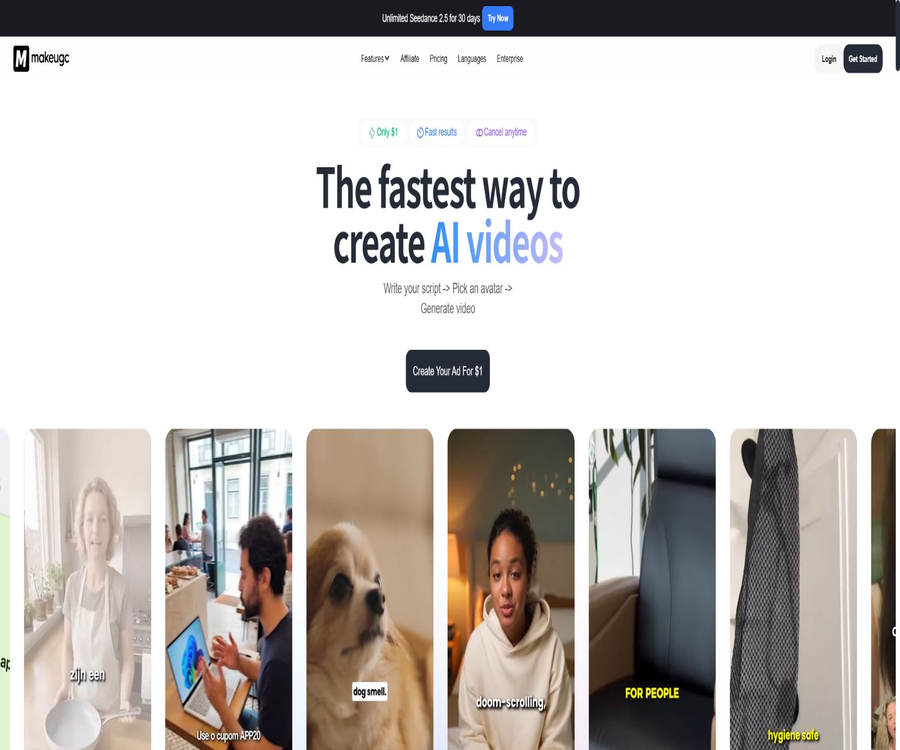
MakeUGC is an AI-powered UGC video platform designed for the creation of advertising and social media content; it combines scripts, product materials, reference videos, and virtual avatars to produce voice-over ads, product demonstrations, and short videos. The service is operated by a company registered in the UK, and it is suitable for e-commerce brands, application promotion teams, advertising agencies, as well as creators who need to publish content on a regular basis.
It is not a single text-to-video model; rather, it is a commercial platform that includes scripts, virtual avatars, audio, generation models, a material library, editing tools, batch processing capabilities, and automation interfaces. The conversion rates, production speeds, and advertising returns mentioned on the marketing pages are based on specific examples and promotional results, and they do not mean that these outcomes can be achieved by every account.
Main functions
- Script to virtual voiceover: Enter a custom script or let the system generate ad hooks and text, then select a virtual avatar, voice, and language to create a voiceover video. The output can be used as a draft for product descriptions, application demonstrations, review-style ads, or social media videos; the duration, resolution, and model used affect the amount of points consumed.
- Virtual avatar library: The platform offers over 1,000 virtual avatars, and it is possible to select the appropriate ones based on their appearance and style. Different subscription plans may provide access to different numbers of models and characters; the API package allows access to more than 500 virtual avatars.
- Custom virtual avatars: Users can upload images of themselves or of authorized individuals, and combine them with voice samples to create custom characters. This feature is useful for maintaining consistency in the brand’s representative images, but it is necessary to obtain permission for the use of portraits, voices, and performance footage; it is not allowed to clone real people without their consent.
- Videos of the product in hand and being displayed: After uploading the product images, it is possible to have a virtual avatar hold, display, or explain the product naturally; it is also possible to create scenes showing the unboxing process, lifestyle scenarios, and reviews. The quality of the images, any obstructions, hand movements, and the text on the packaging all affect the credibility of the resulting videos. Important details of the product should be checked frame by frame.
- Action replication: After uploading a reference action or video, the system analyzes its structure, rhythm, and movements, and then uses the selected characters and assets to recreate a similar sequence. This method is suitable for testing different versions of an ad with various characters, but users must have permission to use the reference materials; they cannot copy protected creative ideas or character designs.
- Video Agent: Using a reference ad as a sample, it analyzes its structure, pacing, and style, and then creates an editable version based on the user’s product and character assets. This feature reduces the need to start from scratch, but manual verification of marketing messages, subtitles, brand guidelines, and platform advertising policies is still required.
- Content Library: Browse templates by industry, style, and ad format; add product images and copy to create test versions. Templates speed up the creation of creative variations, but just because a template is available does not mean that all its elements are suitable for any region, industry, or business purpose.
- Built-in video editor: After creation, it is possible to add or modify subtitles, music, and B-roll, as well as to perform cropping and basic adjustments. Users can carry out initial editing in the same workspace, and then check the frame dimensions, safety zones, subtitle readability, and audio rights according to the target platform.
- Batch and workflow modes: Growth and higher tiers offer batch processing capabilities, and the platform also allows multiple generation steps to be combined into custom workflows. This is suitable for testing different hooks, characters, languages, and scenarios at once; however, the number of parallel tasks, queues, and specific models are still subject to the constraints imposed by the subscription plan and fair usage rules.
- Multilingual generation: The platform offers over 50 languages, allowing users to select voices suitable for different markets and create localized versions. While a wide range of languages is available, the quality of voice synthesis for each accent, pronunciation, and mouth movement is not always the same; brand names, numbers, abbreviations, and compliance statements need to be reviewed by native speakers.
Input and output
| Input type | User-provided content | Platform processing | Output |
|---|---|---|---|
| Text | Theme, advertising hooks, voiceover scripts, product highlights, and scenario descriptions | Generate or rewrite scripts and drive virtual voiceovers. | Video with sound synchronized to lip movements |
| Product materials | Product images, brand logos, application screenshots, or materials that are publicly accessible | Generate handheld displays, scene images, B-roll, or template content. | Product demonstrations and advertising footage |
| Characters and Voices | Platform roles, custom avatars, character images, voice samples, or audio | Create virtual avatars, synthesize voices, and match actions. | Custom or template role videos |
| Reference video | Advertising samples or footage with legitimate usage rights | Analyze structure, rhythm, visuals, and actions. | A creative version rebuilt using new products and characters |
| Edit materials | Requirements for subtitles, music, supplementary videos, and edits | Overlay, crop, and adjust in the editor | Downloadable advertisement videos |
| API request | Character ID, voice, script, images, scenes, templates, and callback parameters | Create tasks asynchronously and return their status. | Video task ID, processing status, and the resulting file |
Tutorial for web version
- Register an account and visit the settlement page to check the cost of the subscription after the trial period, as well as the billing cycle, points, and available models; do not make payments based solely on the time limit countdown or discount labels.
- For a new project, first determine the platform on which it will be launched, the target audience, the format, duration, and the marketing message; then enter the script or let the system generate several different versions of it.
- Select the virtual avatar, language, and voice; if using a custom avatar or voice, first save the rights holder’s authorization and the scope of usage.
- Upload clear product images or application materials, choose from the voiceover, product-handheld, template reconstruction, or reference video workflow options, and check the estimated points that will be used for this task.
- Generate a low-cost test version, focusing on checking the characters’ hands, the text on the packaging, the proportions of the product, mouth shapes, pronunciation, subtitles, and factual statements.
- In the editor, add subtitles, music, and B-roll, remove awkward shots, and adjust the proportions and pacing of different ad segments.
- Export the content only after confirming the advertising disclosures, portrait rights, music rights, trademarks, product claims, and regional regulations; do not consider the resulting output to be compliant with all requirements.
- Record the scripts, characters, models, and assets used in each version, and iterate based on actual deployment data, rather than estimating returns based on platform examples.
Methods for creating videos of highly trustworthy products
- Use positive, clear product images without any obstructions; avoid relying on the model to interpret small text, transparent packaging, or complex hand movements.
- A video should highlight only one main selling point, and any unverifiable claims, absolute statements, and fake reviews should be removed from the script.
- Pronunciation tests are conducted for brand names, drug names, numbers, and foreign words, after which the sound and speech pace are determined.
- When multiple short variations of the same idea are created by changing just one key variable, it becomes easier to determine the impact of certain elements such as hooks, characters, or scenes on the overall outcome.
Price packages
| Package or version | Price | Billing cycle | Core benefits or quota | Suitable for users |
|---|---|---|---|---|
| Start up | 59 dollars | Monthly | 500 points per month, selected models, over 1,000 avatars, more than 50 languages, up to 10 videos and 10 images can be processed in parallel | Individuals and small brands that create ads at low frequencies |
| Growth | 79 dollars | Monthly | 1,000 points per month, all models, batch mode, up to 10 videos and 10 images in parallel | Marketing teams that continuously test multiple creative ideas |
| Pro | The current page shows $1 for the initial subscription and $149 for renewals. | Monthly | By default, 2,000 points are awarded per month; it is possible to choose a higher amount of points. Options include product handouts, Video Agent, and PDF to video conversion. | Frequent users and growing teams |
| Enterprise | Custom quote | Flexible billing | Pro benefits, exclusive support, creative strategies, customized workflows, APIs, capacity, and service commitments | Brands that require team support and customized processes |
| API Starter | 99 dollars | Monthly | 2,000 points per month, API access, over 500 virtual avatars, batch processing, product-handling virtual avatars, and custom virtual avatars | Prototype and low-volume integration |
| API Pro | 299 dollars | Monthly | 6,000 points per month, 5 times concurrent processing, priority queue, and priority handling | Production systems and large-scale tasks |
| API Enterprise | Contact sales | Customization | Volume discounts, white-label licensing, custom integration, and developer support | Large-scale or white-label scenarios |
The pricing page offers options for monthly and annual payments, time-limited discounts, and a 1-dollar trial version; the amounts displayed vary depending on promotions, account type, region, and payment cycle. The initial price for the Pro version is based on the current promotions, and before making a payment, it is necessary to refer to the renewal cost, taxes, and benefits listed on the payment page.
Points, Unlimited, and Renewal
- Subscription points are refreshed at the end of each billing period; unused points are not carried over and become invalid at the end of the month or when the current billing period concludes.
- Different models, durations, resolutions, and functionalities result in varying amounts of points: some image generations require around 0.1 point, while videos or more advanced models may need from 0.5 points to several points.
- Additional point packages can be purchased, but no unified price is listed on the public pricing page; the cost must be checked within the account.
- Unlimited covers only the specific models listed in the package; it does not require any points, but the speed and concurrency may vary during peak times, and standard queues are used.
- Unlimited is not available during the 1-dollar trial period; this feature becomes available only after the trial ends and the first full paid billing cycle begins.
- Automatic renewal of subscriptions can be canceled in the account settings; upgrades take effect immediately, while downgrades take effect at the end of the current billing period.
Precautions for the 1-dollar trial
- The trial is a paid promotion, not a permanently free version; it can only be used once by each individual or legal entity.
- Attempting to receive the benefits repeatedly by using different email addresses, shared payment methods, multiple accounts, proxies, or hidden technical identifiers may result in the account being suspended and the full monthly fee for the selected plan being charged immediately.
- The trial eligibility, duration, available credits, and the amount required to convert it to a regular plan should be confirmed on the payment page, with records of orders and cancellations kept.
Refund rules
- A full refund can be requested within three business days after purchase or renewal, provided that the points have not been used up in large quantities.
- When the usage score is below 50%, only 50% of the subscription amount may be approved; no refund is given when the usage score is 50% or higher.
- If the account has been in use for more than two weeks, the subscription plan has been purchased for over a month, or if a multi-month subscription is in its third month, the rules regarding refunds become stricter.
- No refunds are provided for manual editing and other manual creative services; if a refund is approved, it will be issued to the original payment method, possibly after deducting processing fees, and it may take up to ten working days.
- Once the refund is confirmed, the account will be permanently deleted, its points will be revoked, and the videos and projects will be permanently removed with no possibility of restoration; it is therefore necessary to export any files that need to be retained first.
- The terms of service state that payments are generally non-refundable, but an independent refund policy sets out the aforementioned limitations; in case of any conflicts, it is necessary to consult customer service before making a purchase to determine which rules apply to that order.
Suitable for users and scenarios
- E-commerce brands: Create multiple versions of short videos for new products, promotions, unboxing experiences, review-based introductions, and product details.
- Application and SaaS teams: Combine product interfaces, scripts, and virtual voiceovers to create advertising materials aimed at attracting users.
- Advertising agencies: Conduct batch testing of various opening hooks, characters, languages, and scenarios, and establish workflows for multiple clients.
- Content creators: When it is not possible to shoot footage, they can use custom virtual avatars to maintain a regular update schedule, or localize the same content into multiple languages.
- Development team: Integrates virtual avatar videos, product listings, template libraries, and asynchronous callbacks into the internal system via APIs or MCP.
Advantages
- Bring scripts, characters, product displays, template reconstruction, and basic editing together in one workspace to reduce the need to switch between multiple tools.
- It supports a large pool of characters, custom characters, and over 50 languages, making it suitable for creating creative variants for various markets.
- Both web-based products and platform APIs offer specific point packages, allowing teams to choose between manual handling and automated generation.
- The API supports querying task status and handling callbacks, while MCP enables compatible clients to utilize the platform’s capabilities, facilitating the creation of automated workflows.
- The output terms permit compliant users to use, modify, distribute, and commercialize the generated content, without requiring the inclusion of the “MakeUGC” label.
Capacity limits and risks
- Virtual avatars may exhibit errors in mouth shapes, finger movements, product appearance, text display, and physical interactions; they cannot replace full-scale review processes.
- The platform does not guarantee ad conversions, content accuracy, intellectual property clearance, regulatory approval, or uninterrupted service.
- The output of templates or models may be influenced by public or licensed materials; MakeUGC does not guarantee that third-party elements are free from copyright violations, and a rights check is still necessary before using them in commercial contexts.
- The fair use policy may limit the number of orders that can be processed simultaneously, as well as concurrent operations and automation; abuse, use of multiple accounts, or attempts to bypass these restrictions can result in a suspension.
- “Unlimited” does not mean that all functions are unlimited, nor does it guarantee fast speeds during peak times; tasks that earn points are usually placed in a priority queue.
- Different pages may not present the information regarding promotions, the operating entities, and certain benefits in exactly the same way; it is necessary to check the contract party, the merchant responsible for billing, and the actual settlement terms before making a payment.
Platforms and integration
| Platform or interface | Usage method | Key capabilities | Restrictions |
|---|---|---|---|
| Web workspace | Login with a modern browser | Scripts, virtual avatars, generation, editing, batch processing, and project management | A paid plan and an internet connection are required. |
| Platform API | API key authentication | List roles and voices, generate videos, customize roles, product handling, template library, status polling, and callbacks | An API package is required; points and concurrent usage are limited by the plan. |
| MCP | Configure keys or authorizations on compatible clients | Allow the AI client to discover and invoke the MakeUGC workflow and models. | A valid subscription and a platform API key are required. |
| Shopify app | Install store apps | Import or upload videos, product tags, carousel and overlay displays, interactive analytics | This is an e-commerce display component; it is not equivalent to a full video creation workspace. |
| Native desktop and mobile apps | Not confirmed yet | The main services are available via a web page. | Do not consider web pages or third-party services with the same name as official native clients. |
API and MCP integration
The Platform API relies on API keys for authentication, and it offers interfaces for managing roles, generating audio and video, handling products, creating custom characters, using content templates, and tracking task status. Video generation is an asynchronous process; applications should save the task identifier and use polling or callbacks to determine whether the task was completed, failed, or timed out.
- Purchase API Starter, API Pro, or the Enterprise plan, and create a platform API key in your account settings.
- First, read the list of roles, voices, or templates, and save the required numbers as well as the mandatory fields of the templates.
- Submit scripts, roles, voices, product images, scenes, and optional callback addresses; do not expose keys in front-end code or public logs.
- Follow the documentation’s recommendations for polling task status, or verify callback requests and handle the success, failure, and timeout cases.
- Download the completed video and keep track of tasks and points; set parameters for concurrency, retries, timeouts, idempotency, and budget control.
- When using MCP, add a connection to a compatible client and complete the key authorization; thereafter, test by listing the available processes to verify that subscriptions and permissions are functioning properly.
API restrictions
- The script length for the basic virtual voice broadcasting interface is limited to 1,500 characters; external audio clips can be up to 120 seconds long.
- For some product hand-held models, the audio duration is up to 30 seconds; the points are calculated based on the duration, the number of scenes, or the dynamics of the model.
- In the API examples, the basic audio outputs may be charged at 1 point per item, but other endpoints do not have a fixed price; the actual cost should be determined by referring to the instructions provided in the current document and account details.
- API Pro offers 5 times higher concurrency and a priority queue, but it does not disclose specific figures regarding the number of requests per minute or the service availability; these details need to be confirmed before making a production purchase.
Open-source status
The MakeUGC platform, model weights, algorithms, datasets, user interface, API infrastructure, and documentation are all proprietary assets; there is no official product source code repository or open-source license available. The public APIs and MCP interfaces merely provide integration capabilities, and they do not mean that the product itself is open source.
Privacy, training, and data storage
- The platform collects information such as accounts, bills, uploaded content, communication records, devices, logs, usage patterns, role selections, and template usage.
- Users’ scripts and creative inputs can be used to improve the services and to train future models; users can contact the support team to request that they be excluded from this training process, but this may affect the personalization or accuracy of the predictions.
- The privacy policy does not specify a fixed retention period for various project documents; it only states that they should be kept in accordance with the business purposes, level of sensitivity, and legal requirements, before being deleted or anonymized.
- The data may be processed in the UK or in other jurisdictions where the service provider is located, and cross-border protection mechanisms such as standard contract clauses are employed where applicable.
- The platform claims to use measures such as encryption, access control, firewalls, and secure storage, but it also acknowledges that no method of transmission or storage can guarantee 100% security.
- Refund records may be retained for up to six years due to accounting and tax requirements; even if the projects and accounts are deleted after a refund, it does not mean that all statutory records disappear at the same time.
Copyright, portraits, and commercial use
- Users retain the right to their input materials, but they grant the platform a global license necessary for hosting, storing, processing, analyzing, transforming, and improving those materials; content that must be retained in accordance with the law can continue to be kept even after it is deleted or the account is closed.
- Compliant users have access to the outputs generated during the validity period of their subscription, and they enjoy the rights to use, modify, distribute, relicense, and commercialize them.
- Having output rights does not mean that the rights of third parties have been resolved; users need to check trademarks, music, reference ads, portraits, sounds, and marketing statements.
- To create a virtual human based on a real person, it is necessary to have permissions for the use of images, voices, performances, and for their dissemination; it is not allowed to reproduce public figures or ordinary individuals without their consent.
- It is prohibited to create content that is fraudulent, deceptive, misleading, infringing on rights, hateful, pornographic, violent, or otherwise illegal, nor is it allowed to bypass security and usage restrictions.
- In platforms and regions that require disclosure of synthetic media or advertising relationships, AI-generated content must be clearly identified, and local advertising and consumer protection regulations must be complied with.
Summary
The value of MakeUGC lies in its ability to integrate AI avatars, product displays, ad templates, video editing tools, and automated interfaces into a single workflow for creating UGC content. It is suitable for teams that need to test numerous versions of ads on a continuous basis; however, it is necessary to check the terms related to renewal discounts, expiration of points, and refund policies before making a purchase. Before publishing any content, it is also essential to ensure that all aspects related to character licensing, copyright, and compliance with advertising regulations have been addressed.
Tools similar to MakeUGC



 Guigong Network Security Registration No. 45132202000164