






Ishi
Ishi, an intelligent tool focused on AI programming
Tags:AI programming toolsA one-sentence summary
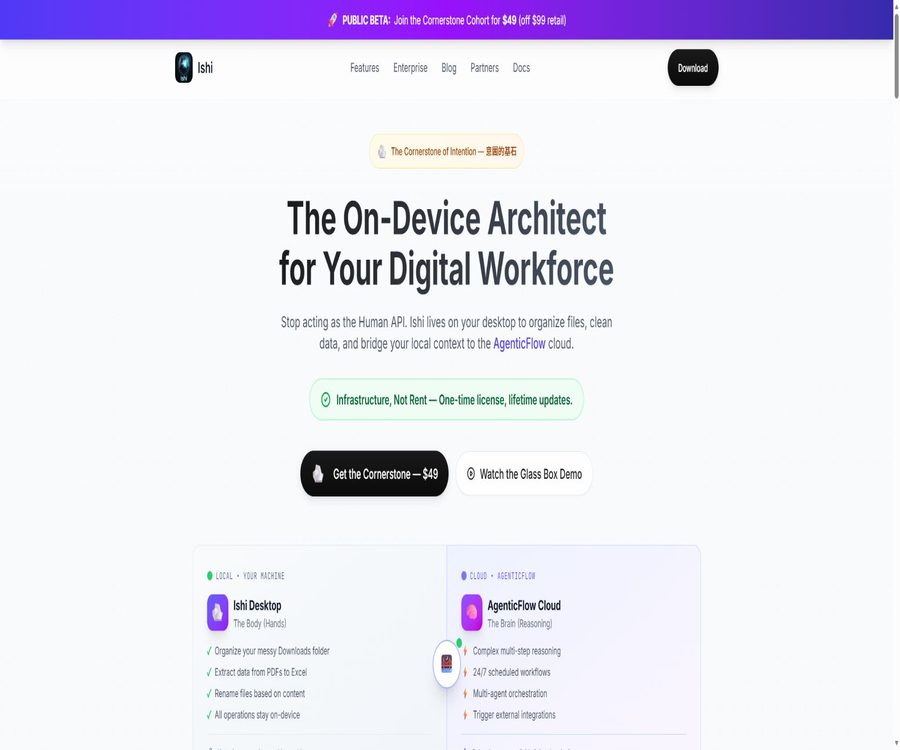
Ishi is a locally-focused AI agent that runs on personal computers; it allows users to read, create, search for, rename, and modify files with their approval, and it can also connect to models, MCP tools, and cloud-based workflows.
Tool Introduction
Ishi was developed by Ishi Technologies and the Pixel ML team; it compares the local desktop environment to a \"hand\" that carries out tasks, while the external large models and AgenticFlow cloud services are seen as the \"brain\" that handles reasoning and task orchestration. It is primarily intended for technicians who need to automate file handling, data management, and various daily operational tasks.
Local priority does not mean that all processing must be done offline. File operations are carried out on the device, but when choosing cloud models, online searches, remote MCP, AgenticFlow delegation, or session sharing, the relevant requests are still sent to the corresponding services.
Main functions
| module | Key capabilities | Suitable for tasks | Key controls |
|---|---|---|---|
| File Tools | Read, search, create, edit, and organize files | Download directories, invoices, screenshots, and project materials | Project directory and operation permissions |
| Ghost Files | Show a preview and the differences before execution | Batch renaming and document modification | Approve or reject |
| System Commands | Execute local commands and automated scripts | Open the application, convert files, and handle batch processing. | Allow, Ask, or Deny |
| AI Providers | Access to over 75 model services and local models | Reasoning, classification, generation, and coding tasks | Use your own key or a unified gateway |
| MCP | Add local or remote tool services | Integration of databases, development tools, and business systems | Activation scope and authentication |
| AgenticFlow | Delegate multi-step, scheduled, and cross-application processes | 24/7 operation and external integration | Explicit user authorization |
| Skills | Reusing specialized task capabilities | Documents, research, and operational processes | The benefits of Free and Pro are different. |
| Enterprise | Centralized configuration, SSO, and internal AI gateway | Controlled team deployment | Customized by seat |
Automation of local files
Ishi allows users to view directories, read documents, search for content, create new files, and edit existing ones. Typical tasks include organizing invoices by supplier and date, renaming screenshots based on their content, extracting data from PDFs, and writing the results into tables.
- Scan the download directory and suggest new file names and folder structures.
- Extract fields from PDFs, documents, and tables to generate summary files.
- Search for keywords, company names, or data patterns in multiple files.
- Modify document text, dates, format, or metadata in bulk.
- Compare the local table with external business data to identify discrepancies.
- Remove unnecessary metadata before sharing the image.
Glass Box execution mechanism
Ishi emphasizes a four-stage process: Draft, Plan, Simulate, and Execute. The agent first understands the requirements and forms a plan, then uses Ghost Files to display the modified virtual results; execution takes place only after the user gives approval.
- Describe the objectives, the directories to be processed, and the contents that must not be touched in natural language.
- Check the steps generated by Ishi, the file scope, and the expected results.
- View the current status, the proposed changes, and the differences in Ghost Preview.
- Approve item by item, approve in bulk, or reject the request.
- After execution, open the history record to check the actual changes.
- Use Undo to restore when the result does not meet expectations.
Ghost Files and undoing
Ghost Files displays unscheduled renaming, moving, and content modification tasks as semi-transparent previews. For batch tasks, it is possible to view samples first or to examine each file individually.
- When renaming, both the old name and the new name are displayed.
- When editing a document, the diff view is used to show the deleted and added content.
- Rejecting the preview will not change the original file.
- Once approved, the operation will be recorded in the history.
- Actions that have been performed can be undone on the history page.
- Important directories should still be backed up first; undoing actions should not be the only mechanism for recovery.
Permissions and security slider
Permissions can be controlled on three levels: Allow, Ask, and Deny. It is recommended that new users set all file edits, system commands, network access, and access to directories outside the project to the \"Ask\" level first, and gradually grant permission for tasks with lower risk.
| Permission items | Allow | Ask | Deny | Recommended starting point |
|---|---|---|---|---|
| Edit file | Modify directly | Preview and wait for approval | I can only offer suggestions. | Ask |
| System commands | Run directly | Approve after displaying the command | Running is prohibited. | Ask |
| Network access | Direct request | Confirm before requesting | Completely disable | Ask or Deny |
| External project directory | Accessible directly | Every time a query is made | Access is prohibited. | Ask |
Command permissions can also be divided into different modes: for example, allowing the opening of files, requiring confirmation before moving items, enabling deletion, and outright denying administrator commands. Project-specific configurations take precedence over global settings, so sensitive projects can have stricter rules applied to them.
Built-in tools
| Tool type | Default setting | Tasks that can be completed | Main risks |
|---|---|---|---|
| Read | Enable | Read PDFs, documents, and tables | Sensitive content is incorporated into the model context. |
| Edit | Enable | Modify existing files | Overwrite or modify the original data |
| Write | Enable | Create reports, tables, and catalogs | Generates erroneous content or a large number of files. |
| Search | Enable | Cross-file keyword and pattern search | An overly broad scope affects privacy. |
| List | Enable | Browse folders and directories | Expose directory structure |
| Web | Enable | Query real-time information and documents | The request will leave the device. |
| Commands | Enable | Call local programs and scripts | It may cause changes to the system or files. |
| Task Tracking | Enable | Maintain a list of multi-step tasks | Incorrect plans may be executed sequentially. |
The fact that a capability is enabled by default does not mean that sensitive actions will be carried out automatically; the actual behavior is still determined by the permission settings. After installation, it is necessary to check the tool’s switches and permissions right away, rather than relying on the default values.
Models and BYOK
Through its AI SDK and Models.dev, Ishi supports over 75 different model services; it can also be connected to local inference solutions such as Ollama, LM Studio, and llama.cpp. Users can use their own keys for services like Anthropic, OpenAI, Google, OpenRouter, or they can make use of the Pixel ML unified gateway.
| Access method | Data path | Costs | Suitable situations |
|---|---|---|---|
| Built-in cloud API key | The device directly requests the selected model provider. | Charged by the model provider | Existing corporate or individual API accounts |
| Pixel ML Gateway | The request passes through the unified model gateway. | Pay-as-you-go, including a $1 trial credit | Hope for unified billing and automatic routing. |
| Local model | Inference on local machine or intranet model services | It is mainly related to hardware and operational costs. | High privacy or offline scenarios |
| Enterprise internal gateway | Infrastructure that only requires approval from the organization | Cost of the enterprise’s own models | Controlled team deployment |
The model key is stored in the Ishi authentication file of the user’s device. It is still necessary to restrict access to this key, to rotate it regularly, and to avoid storing such credentials in ordinary project files or shared sessions.
MCP extension
Ishi supports both local and remote Model Context Protocol services; once these services are added, the corresponding tools are made available to the models. Remote services can make use of request headers, API keys, or OAuth, and they support dynamic client registration.
- The local MCP is started via a command, and the necessary environment variables can be passed in.
- Remote MCP connects via the service address, and authentication request headers can be configured.
- MCP can be enabled globally or made available only to specific agents.
- Services that are not used frequently can have their configurations retained but be disabled temporarily.
- Each MCP consumes context, and too many tools may exceed the model’s limits.
- Third-party MCPs have their own permissions and data policies, which must be reviewed separately before installation.
AgenticFlow cloud delegation
Ishi can delegate tasks that have been prepared locally to AgenticFlow, which is capable of carrying out complex reasoning, managing scheduled workflows, coordinating multiple agents, and integrating with external applications. The product page claims that it can connect to more than 2500 different applications.
Local files are not automatically uploaded upon installing Ishi, but cloud synchronization requires explicit authorization from the user. Before proceeding, it is necessary to check which texts, file contents, and credentials will be sent to the cloud, as well as to determine the associated costs for using cloud services.
Multi-agent and skills
Ishi supports isolated multi-agent sessions, enabling different agents to handle various tasks simultaneously. Skills are used to encapsulate repetitive tasks, and the Pro page lists over 100 advanced skill-related benefits available in the market.
- Create independent agents for research, finance, document organization, and content processing.
- Limit the directories, MCPs, and commands visible to each agent.
- Include team guidelines in the project rules document to avoid repeated explanations.
- First, test third-party skills on a copy, and then grant access to work with actual data.
- Parallel tasks should avoid modifying the same file or directory at the same time.
Installation and support platform
| Platform | Current available status | Installation method | Minimum requirements or instructions |
|---|---|---|---|
| macOS Apple Silicon | GitHub has installation packages. | DMG | macOS 12 or later |
| macOS Intel | GitHub has installation packages. | DMG | macOS 12 or later |
| Windows x64 | GitHub has installation packages. | EXE | Windows 10 64-bit or later versions |
| Windows ARM64 | The download page indicates that it will be released soon. | No installation package confirmed yet. | Do not use x64 instructions as a substitute. |
| Linux | It still indicates that it is about to be released. | No official table covers available yet. | The fact that the page lists the requirements of glibc does not mean it has been released yet. |
| Command line | Provide npm packages | Install @pixelml/ishi | A Node.js environment is required. |
The download page still lists several desktop buttons as upcoming, but the documentation and the GitHub release section already provide files for Mac and Windows x64. When installing, it is important to check the released assets, digital signatures, system architecture, and version date first.
Installation and initial configuration
- Confirm the computer architecture and system version, then download the appropriate installation package for Mac or Windows.
- Verify the release page, file name, and signature before proceeding with the installation.
- During the first startup, choose between the Pixel ML gateway, a built-in cloud model key, or a local model.
- Set file editing, commands, networking, and external project directories to Ask.
- Create a test directory to store copies of the documents and tables that can be restored.
- Perform one test each for reading, previewing, approving, canceling, and exporting.
- When external tools are needed, add MCP or AgenticFlow connections one by one.
- Confirm the actual model and cloud service costs before proceeding with the official project.
Free version and Pro pricing
| Version | Page price | Primary interests | Additional fees | Suitable for users |
|---|---|---|---|---|
| Ishi Free | $ | Core desktop capabilities of Mac and Windows, differences in preview functions, local file handling, BYOK, a 1-dollar trial quota, and options for cloud delegation | Models provided by the user are included; usage in the cloud is charged separately. | Personal trial and basic automation |
| Ishi Pro public beta test | The page still shows $49 as a one-time fee. | Full Free capabilities, shared knowledge base, over 100 advanced skills, priority support, 24/7 cloud-based assistance, and subscription-based access. | External models and cloud services may incur additional costs. | High-frequency individuals and early users |
| Ishi Pro standard price | The page states $99 as a one-time fee. | Lifetime desktop license; current commitment includes updates for V1.x and subsequent versions. | The scope of the major version is not specified. | Users who wish to avoid a monthly fee for the desktop version |
| Enterprise | Quotation tailored according to seat numbers | Centralized configuration, SSO, internal AI gateway, and implementation support | No additional model token fee is charged when using a custom gateway. | Organization and Compliance Team |
The promotional offer of $49 states that it is valid until February 28, 2026; however, the current page still displays this price along with the purchase link, while referring to $99 as the standard price. Before making a purchase, it is necessary to check on the settlement page the actual amount, currency, taxes, and license benefits.
The boundaries of a lifetime license
The one-time Pro license covers Ishi Desktop, but it does not mean that all AI models, AgenticFlow tasks, and third-party services will be available for free indefinitely. The official statement only mentions future V1.x updates; no commitments are made regarding all subsequent major versions.
- The cost of inference using an API key of one’s own is charged by the respective model provider.
- The Pixel ML gateway operates on a pay-as-you-go basis.
- The AgenticFlow cloud service may incur consumption-based fees.
- Third-party MCPs and business applications may have additional subscription fees.
- The enterprise version is priced per seat and is not included in the individual Pro license.
- Refunds, license transfers, and the number of devices are not fully explained on the pricing page.
Enterprise Edition
Enterprise offers centralized configuration, SSO, and access via an internal AI gateway; it is possible to block other model services to ensure that requests are directed only to the infrastructure approved by the organization. The pricing is customized based on the number of seats, and no fees are charged to Ishi based on model tokens when using one’s own LLM gateway.
| Corporate capabilities | Current status | Function | Precautions |
|---|---|---|---|
| Central Config | Available for provision | Unified model, permission, and tool configuration | Governance processes need to be implemented. |
| SSO | Can be integrated | Use the existing identity system to obtain internal gateway credentials. | The specific terms need to be confirmed with the sales team. |
| Internal Gateway | Support | Only models approved by the organization are allowed. | Still subject to the internal gateway logging policy. |
| Conversation Share | It can be disabled. | Prevent sessions from being sent to sharing services. | It is recommended to keep it disabled by default during the trial period. |
| Self-hosted sharing page | Roadmap | It can be integrated into organizational infrastructure in the future. | It cannot be considered a feature that is currently available. |
| Private npm registry | Support | Install dependencies from the enterprise package repository | The terminal must first complete authentication. |
Privacy and data pathways
The privacy policy states that Ishi will not upload, access, or store the contents of local files and folders; file operations are carried out on the device itself. However, account-related data such as email addresses, names, user identifiers, payment information, IP addresses, device details, usage statistics, error reports, and performance data may still be processed.
| Operation | Is it possible for the data to leave the device? | Control recommendations |
|---|---|---|
| Local file movement and renaming | The operation itself is carried out on the device. | Keep Ask and check the preview. |
| Cloud model inference | The context required to complete the task will be sent. | Select a trusted service and perform data masking first. |
| Local model inference | It can be kept on the local device or within a private network. | Turn off networking and unnecessary MCPs. |
| AgenticFlow delegation | Enter the cloud-based process after authorization. | Review the file content, connectors, and credentials. |
| Remote MCP | The request is sent to the MCP service. | Review service permissions and save policies |
| Share session | Sessions and related data are sent to the sharing service and cached in the edge network. | Sharing is disabled for sensitive items. |
| Product analysis | Collect usage and performance data | You can exit analysis in the application settings. |
Local priority can only reduce part of the risk associated with data exposure; it cannot replace data classification, the principle of minimum permissions, or the review process carried out by model providers. In particular, when the content of a file is included in a cloud-based model, the relevant text leaves the device even if the original file has not been uploaded.
Code, output, and license
The terms of use state that the user remains the owner of their files, and Ishi does not claim any ownership over the processed data or the outputs generated. The user is still responsible for ensuring that the input materials, the code produced by the models, and any third-party components comply with copyright laws, licensing agreements, and customer contracts.
The official GitHub repository is accessible to the public, but its LICENSE specifies a proprietary software license that prohibits copying, modifying, distributing, reselling, or reverse engineering it without written permission. The fact that the repository is public does not mean it is open source; it also does not allow one to release modified versions of it on their own.
GitHub and document consistency
The current repository contains published assets, installation links, documentation, and proprietary licenses; it is not a complete open-source project that can be freely built and redistributed. The licenses still bear the old product name “Claw”, indicating that there are unresolved elements in the migration documentation.
The phrase “Ishi is open source” appears in the company’s documentation, which is in direct conflict with the statement that the software is proprietary as indicated in the repository license and the README file. The directory information should reflect the actual license status; the product should be marked as proprietary, and adjustments should be made only after the team updates the documentation.
Which users are it suitable for
- Technical operations staff who need to organize in bulk download directories, invoices, screenshots, and project documents.
- Users who prefer caution and want to see the file differences before execution, as well as maintain manual approval.
- Developers who already possess large-model API keys and wish to switch providers freely.
- Automated users who need to connect local tools, databases, and business services via MCP.
- Teams that wish to use local models or internal gateways to handle sensitive projects.
- Organizations that require centralized configuration, SSO, and an enterprise AI gateway.
Product advantages
- File operations are carried out locally, with simulation and difference preview available before execution.
- Allow, Ask, and Deny can be applied at the tool, command, and directory levels.
- It supports over 75 model services as well as various ways of running local models.
- Local and remote MCPs can expand databases and business tools.
- Pro uses a one-time license, and there is no fixed monthly fee for its desktop features.
- Assets are available for Mac Intel, Apple Silicon, and Windows x64.
- The enterprise version allows for unified control of model gateways as well as integration with SSO.
Usage restrictions
- The product is still in the public testing phase, so its interface, installation process, and documentation may change rapidly.
- Official installation packages for Linux and Windows ARM64 have not yet been confirmed.
- The web pages, download pages, npm packages, and licenses still contain remnants of the old Ishi and Claw naming conventions.
- The 49-dollar promotion period has ended, but the price information on the page has not been updated accordingly.
- External models, unified gateways, and cloud delegation fees are not included in the lifetime desktop license.
- Local file operations do not mean that the cloud model, remote MCP, and sharing sessions remain local.
- System commands and batch file tools can be destructive, and improper authorization may still lead to data loss.
- Public GitHub repositories use proprietary licenses and cannot be labeled as open source.
- Self-hosted sharing pages are still on the roadmap; they are not part of the current capabilities available.
Suggestions for safe use
- First, use a recoverable test directory to verify reading, editing, moving, and undoing.
- All sensitive permissions start with Ask or Deny; fully automatic mode is not enabled.
- Explicit denial rules are set for deletion, administrator commands, and directories outside the project.
- Minimize the files, texts, and directories provided to the model based on the task.
- For confidential projects, local models or approved internal gateways are preferred.
- Review the permissions of the MCP, skill, and AgenticFlow connectors one by one.
- Create separate backups for important directories, and regularly test the recovery process.
- Retain operation logs; in the event of an anomaly, revert the changes immediately and rotate the relevant keys.
Frequently Asked Questions
Is Ishi free?
There is Ishi Free, which is available for free on a long-term basis; it offers core desktop functions, file preview, local operations, BYOK, as well as a limited amount of access to Pixel ML features. Using external models or cloud services may still incur costs.
Is Ishi Pro truly a lifetime license?
The page describes Pro as a one-time, lifetime desktop license that includes the V1.x update; it does not mean that all future major versions, model tokens, AgenticFlow, or third-party services will be available permanently at no cost.
Is the current price 49 dollars or 99 dollars?
The page still shows a public test price of $49, as well as the standard price of $99; however, the deadline for the $49 discount has passed. The final amount displayed on the payment page should be taken as the applicable price.
Will Ishi upload my files?
Local file operations are carried out directly on the device, and the product does not store the content of those files. When cloud models, remote MCP, AgenticFlow, or session sharing are used, the data required to complete a task may be sent to the corresponding services.
Which systems are supported?
GitHub already provides installation packages for macOS Apple Silicon, macOS Intel, and Windows x64. No official desktop versions have been released yet for Linux and Windows ARM64.
Can local models be used?
Local model services such as Ollama, LM Studio, and llama.cpp can be configured. Whether full offline operation is possible depends on whether the networking tools, MCP, cloud delegation, and model configurations are all disabled.
Is MCP supported?
It supports local and remote MCPs, as well as OAuth authentication for remote services. Too many tools can consume a large amount of context; therefore, only the services that are truly needed by the current agent should be enabled.
Is Shi an open-source project?
No. Although the GitHub repository is public, the LICENSE and README files specify that it is proprietary software, and copying, modifying, or distributing it without permission is prohibited; the claims of being open source in the corporate documentation are inconsistent with the license terms.
Can the Enterprise version be deployed privately?
The enterprise version offers centralized configuration, SSO, and an internal AI gateway; it is also possible to disable external model services. Self-hosting of the sharing page is still part of the roadmap, and it cannot be considered a complete solution – private deployment is available at present.
Summary
Ishi is suitable for technical operators who wish to have AI handle local files directly, while still retaining control over previewing, approving, and reverting changes. It enables the extension of desktop-based operations to more complex automation processes through free model selection, MCP, and AgenticFlow connections.
It is still necessary to be cautious regarding the discrepancies between the status of public testing, pricing terms, the installation page, and the information provided regarding open source usage. It is appropriate to first conduct security tests using Free in a copy directory, and only after that to verify the settlement price, cloud service costs, and data pathways, before moving on to long-term or enterprise-level use.
Tools similar to Ishi



 Guigong Network Security Registration No. 45132202000164