






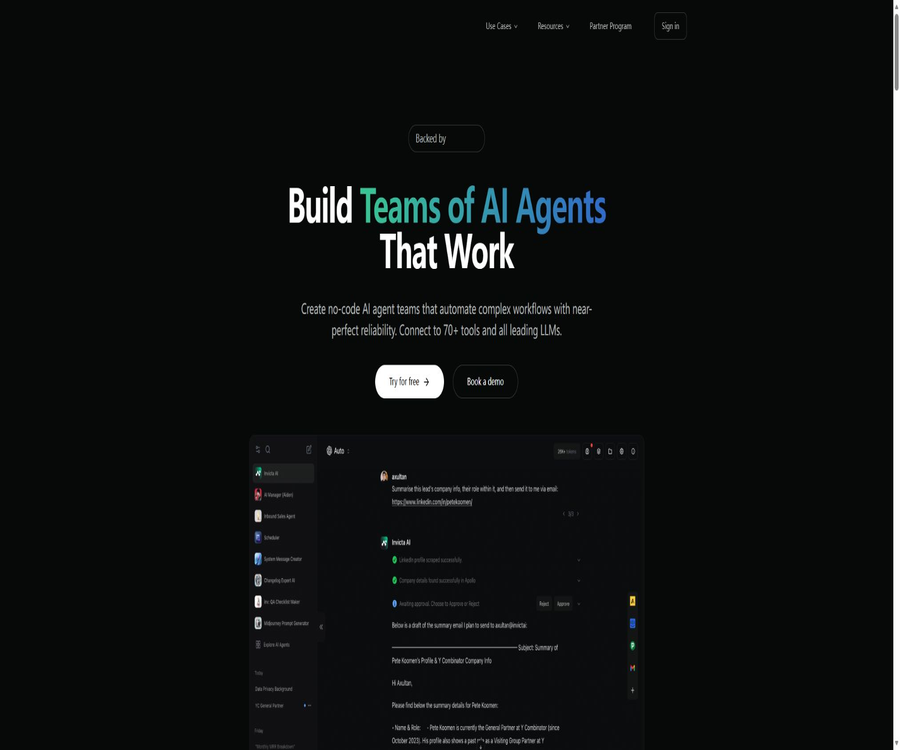
Invicta AI
Invicta AI: an intelligent tool focused on AI programming.
Tags:AI programming toolsA one-sentence summary
Invicta AI is a code-free platform for AI agents; it enables the organization of agents with different responsibilities into collaborative teams, and allows for the execution of multi-step business processes through knowledge bases, tools, triggers, and external applications.
Tool Introduction
Invicta AI is operated by Invicta AI Ltd in the UK, and it is aimed at individuals, developers, and corporate teams who wish to set up AI workflows quickly without having to manage the underlying model infrastructure. Users can either describe their requirements using a conversational builder or manually configure the various components of the intelligent agents.
The platform focuses on multi-agent collaboration and the use of various tools, rather than simply creating a question-answering robot. Its core value lies in enabling specialized agents to divide tasks among themselves, delegate work to one another, and save the results in emails, calendars, CRM systems, spreadsheets, and other business applications.
Core components of the agent
| Components | Main function | Configuration priorities |
|---|---|---|
| Knowledge Base | Save files, links, memories, and connection data | Only enable the materials required by the current agent. |
| System Message | Define roles, behaviors, tones, and hidden instructions | Specify the goals, boundaries, and procedures for handling failures. |
| Tools | Calling external services, performing searches, as well as executing code and business actions | Grant permissions with the minimum level of access required. |
| Triggers | It starts automatically when the event or condition is met. | Prevent repeated execution and trigger of loops |
| AI Teammates | Delegate sub-tasks to other specialized agents. | Define responsibilities and handover procedures |
| LLM | Select the model and parameters for processing the task. | Balance mass, speed, tool capability, and score |
| Variables | Allow the user to enter reusable parameters. | Control type, default values, and sensitive information |
| Memory | Save and reuse long-term facts from conversations | Identify what content is allowed to be retained for a long time. |
Create an agent
When creating it, you can inform the Agent Builder about the tasks you wish to automate; it will then generate the initial configuration. It is also possible to start from a blank template. Once completion is achieved, it is still necessary to check each item related to system instructions, models, tool permissions, and the scope of knowledge available.
- Ensure that the agent is responsible for only one clear goal, and specify the successful outcomes.
- Start with a template or a blank configuration, and set the name, description, and system instructions.
- Add the necessary knowledge base entries and remove irrelevant materials.
- Select models, tools, triggers, variables, and long-term memory.
- When division of labor is required, connect with AI teammates and define the delegation and return formats.
- Use low-risk samples to test normal scenarios, those with missing information, and situations where the tools fail.
- Sensitive actions such as sending, modifying, refunding, or deleting are protected through manual approval.
- After a limited rollout, check the logs, points, and results from external systems.
Multi-agent team
AI Teammates enables an agent to assign tasks to more suitable teammates, thus facilitating hierarchical, sequential, or circular collaboration. In a typical setup, the coordinator breaks down the tasks, after which the agents responsible for research, writing, data handling, and review take care of each task respectively.
| Structure | Operation mode | Suitable for tasks | Main risks |
|---|---|---|---|
| hierarchical | The supervising agent assigns and aggregates sub-tasks. | Complex research and cross-system operations | The coordinator becomes a bottleneck. |
| Sequential | The previous output becomes the subsequent input. | Content creation, approval, and data pipeline | Early errors gradually amplify. |
| Parallel | Multiple dedicated agents handle different parts simultaneously. | Batch analysis and multi-angle evaluation | Merge conflicts and rapid depletion of points |
| cyclic | Revise or supplement repeatedly based on the results. | Quality improvement and anomaly recovery | Runs indefinitely in the absence of a stop condition. |
The product update records specified a maximum limit of 10 tools and 10 collaborators per agent. Platform rules may change, so it is necessary to check the actual restrictions in the current workspace when working with large teams.
Knowledge base
The knowledge base supports PDF, CSV, TXT, web links, as well as other structured or unstructured materials, and its content can be kept up to date through connections such as Google Drive. Different agents can be used to manage different entries, thereby preventing sensitive information from being shared unintentionally among team members.
- Large files are searched by their relevant segments by default, rather than having the entire text read each time.
- If a complete file is needed, it can be attached directly in the chat or the corresponding entry can be mentioned explicitly.
- Folder management, batch moving, deletion, and start/stop functions make it easy to handle large amounts of materials.
- Companies should create separate data silos for each agent, and regularly review the scope of access.
- The updated materials need to be verified using representative questions to assess the search and response results.
Model selection
The platform integrates models from various providers such as OpenAI, Anthropic, Google, DeepSeek, Meta, Mistral, and xAI, and it continuously updates the available versions. The static list of models provided in the documentation may not be up to date with the latest product changes; therefore, the model selector in the workspace should be used as a reference.
| Selection method | Features | Suitable for tasks | Cost impact |
|---|---|---|---|
| Auto | Finding a balance between stability and overall performance | Daily General Purpose Agent | It is usually quite balanced. |
| Smartest | Automatically use the current high-performance model. | Complex reasoning and high-quality output | Generally, the consumption is high. |
| Efficient | Give priority to models with higher cost efficiency. | Batch and simple processes | It helps to control the integral. |
| Specify model | Fix the supplier and model version | Processes that require specific capabilities or consistency | Calculated based on the integration rate of this model. |
The capabilities of the models are not exactly the same; visual inputs, tool calls, context length, and the cost of reasoning can all vary. After switching to a different model, it is necessary to retest the structured outputs and tool parameters.
Tools and Integration
Invicta AI claims to be able to connect to more than 70 different tools; notable examples of such connections include Gmail, Outlook, Slack, Google Calendar, Google Drive, Google Sheets, Airtable, HubSpot, Intercom, Pipedrive, Notion, Stripe, and Apollo.
| Category | Representative capabilities | Example scenario |
|---|---|---|
| Emails and communication | Reading, sending, responding to, and triggering agents | Customer service diversion and sales follow-up |
| Calendar | View, create, and manage events | Automatic scheduling and meeting coordination |
| CRM | Search for contacts, companies, and transactions and update records. | Lead research and sales operations |
| Tables and databases | Read, add, update, and analyze data | Task tracking and batch data processing |
| Websites and searching | Query web pages, scrape content, and obtain real-time information | Competitor monitoring and market research |
| Payment | Query customer subscriptions and perform certain Stripe operations | Invoice support and subscription process |
| Image | Use Flux and similar tools to generate visual content. | Marketing materials and creative workflows |
| Code and data analysis | Execute Python tasks in an isolated environment | Cleaning, calculation, and chart generation |
Triggers and automatic execution
Triggers can initiate agents in response to emails, HubSpot, Intercom, or other events, eliminating the need for users to start conversations manually. Before running automatically, issues such as idempotency, retries, timeouts, and duplicate events must be addressed.
- Create a unique identifier for each business event to prevent duplicate writes.
- Constraints define the range of data that triggers can read and modify.
- Set the maximum number of execution rounds, budget, and failure termination conditions.
- When external services experience speed limits or interruptions, they are added to the retry queue.
- Approval is required for payments, deletions, external transmissions, and permission changes.
Human in the Loop
The team can set up pre-approval based on the tools used, and receive notifications of pending tasks via email or in the sidebar. Approvers can reject a request and provide a reason, thereby ensuring that high-risk steps are not entirely left to AI.
| Action type | Recommended strategy | Check during approval |
|---|---|---|
| Read public information | It can be executed automatically. | Query range and frequency |
| Read internal data | Limit by role | Identity, purpose, and minimum fields |
| Send an email or message | Important external shipments require approval. | Recipient, facts, tone, and attachments |
| Update CRM or forms | Key fields require approval. | Record the identity, old value, and new value. |
| Refund or subscription modification | Mandatory approval | Customer authorization, amount, and irreversible effects |
| Delete data | Mandatory approval with log retention | Exact objects, as well as methods for backup and recovery |
Batch mode
In Batch Mode, CSV files can be uploaded, and the agent will process each row as a separate request. Each row can still utilize tools and AI assistants, making this mode suitable for data completion, batch analysis, content generation, and web research.
- Select the agent that has passed a single test and proceed to batch processing.
- Upload a CSV with clear column names, correct encoding, and no irrelevant sensitive data.
- Select the columns to be read and the starting and ending rows for this processing.
- Enter the commands to be executed uniformly for each row.
- First, run a small number of rows to check the format, facts, and any side effects of the tools.
- Expand the scope and monitor points, speed limits, spam, as well as account risk management.
- After completion, download the CSV or PDF and check for failed rows and empty results.
CSV output adds an \"Invicta Output\" column at the end, while PDF places each result on its own page. Large-scale tasks can quickly consume points and may also trigger request limits on external platforms.
Web components and embedding
Pro, Business, and Enterprise versions allow agents to be placed as chat windows or embedded windows on websites, enabling visitors to engage in conversations without needing to register. These components support answering questions, using tools, and invoking AI assistants.
- First, adjust the agent’s visibility to Widget or Unlisted.
- Set the accent color and preview whether it matches the website’s brand.
- Copy the corresponding script and integrate it into the web page code.
- The points consumed by visitors are the responsibility of the creator of the agent.
- The component does not display intermediate steps such as knowledge retrieval, the use of tools, and summoning teammates.
- Plans Pro and above allow access to chat logs, while advanced analytics are used to assess quality and risks.
Developer API
Invicta AI provides developers with an API that allows them to send prompts to specified agents and receive structured responses. Requests are authenticated using API keys, and it is also possible to pass in variables, session identifiers, and model names.
| Ability | Support status | Development notes |
|---|---|---|
| Send a reminder | Support | Specify the target agent and verify the input. |
| Variables | Required array; it can be empty. | Only key-value pairs permitted by system commands shall be transmitted. |
| Multiple rounds of context | Maintained through threadId | Prevent excessive scoring resulting from endless sessions. |
| Model coverage | The modelName can be passed on. | Verify that the model is available and supports the required tools. |
| Authentication | API key request header | It is stored only in server-side key management. |
| Error handling | Standard success and error status codes | Implement timeout, backoff retry, and log masking. |
The public API page primarily describes individual endpoints; it does not provide complete information regarding rate limits, asynchronous tasks, batch interfaces, or service levels. Before using it in production, it is necessary to verify things using a test account and confirm the applicable limits with the support team.
Integral billing rules
The price information was verified on August 23, 2026; the actual amounts, taxes, exchange rates, and discounts may vary, and the final figures will be those displayed on the settlement page.
Every chat, trigger execution, web component invocation, and agent request consumes points. The amount used depends on the input and output tokens as well as those used for reasoning, the length of system instructions, calls to AI teammates, the model pricing, and the fixed costs associated with certain tools.
- Free users earn 25 points per day, which are reset the following day.
- The monthly points earned through a subscription are not carried over at the end of the cycle.
- The 1000-point package purchased separately can be carried over without expiring.
- Business and Enterprise members share the organization’s monthly points pool.
- When both organizational and personal quotas are available, the organizational points are used first.
- Long conversations process more context repeatedly, which can significantly increase consumption.
Package price
| Package | Price | Points limit | Primary interests | Suitable for users |
|---|---|---|---|---|
| Free | $ | 25 points per day | Infinity Agents, 50 knowledge base entries, mainstream models, and agent tools | For experience and light personal use |
| Plus | 30 dollars per month | 6,000 points per month | All Free features, an unlimited knowledge base, and opportunities to test new functions | Individual professional users |
| Pro | 100 dollars per month | 20,000 points per month | All Plus features, web chat component, Embeddings, and advanced analytics | Team responsible for deploying external intelligent agents |
| Business | $ | 60,000 points per month | 10 seats, workspace, administrator management, and hassle-free getting started | Enterprises that require collaboration and governance |
| Enterprise | Contact sales | As agreed per requirements | More capacity, capabilities, and enterprise support | Large or custom deployments |
The public price list shows the monthly fee in dollars, while the old version of the terms of service specified that payments were to be made in pounds; there is therefore a difference in the currency indicated. Before making a purchase, it is necessary to refer to the currency, taxes, points, and renewal amount shown on the account settlement page.
Comparison of package features
| Functions | Free | Plus | Pro | Business |
|---|---|---|---|---|
| Number of agents | Infinity | Infinity | Infinity | By organization usage |
| Knowledge base | 50 items | Infinity | Infinity | Infinity |
| Web components | Not included | Not included | Includes | Includes |
| Advanced analysis of chat logs | Not included | Not included | Includes | Includes |
| Organize seating | Individuals | Individuals | Not specified | 10 seats |
| Work area and administrator | Not included | Not included | Not specified | Includes |
| Getting started with white gloves | Not included | Not included | Not included | Includes |
Subscriptions and refunds
The terms of service state that a paid subscription can be canceled within the account, and this cancellation takes effect at the end of the current payment period. In principle, no refunds are provided for any purchases, and prices may change depending on the product.
- First, use the free version to verify whether the model, tools, and knowledge base meet your requirements.
- Estimate the total score for chats, triggers, teammates, and batch processing before upgrading.
- On the settlement page, confirm the currency, taxes, cycle, and auto-renewal details.
- Export the necessary business data in advance and disable external triggers.
- After the account is suspended, check whether the API keys, OAuth connections, and web components have been revoked.
Data security and privacy
Invicta AI states that data is encrypted both during transmission and when stored statically; uploaded files are kept in encrypted S3 storage, and it adopts a zero-data-retention policy with some model providers. The platform also says that it does not use user conversations or data to train models, nor does it sell user data.
| Matters | Current instructions | Enterprise inspection |
|---|---|---|
| Model training | User conversations and data are not used for training. | Verify whether all the selected models and tools are equally applicable. |
| External model retention | Some suppliers adopt a zero-reserve arrangement. | Request the complete list of suppliers and exceptions. |
| File storage | Encrypted S3 bucket | Verify area, key, backup, and deletion |
| Google data | Not used for training general AI or machine learning models | Restrict authorization based on OAuth scopes |
| Profile | Processing account, marketing, usage, and security data | Provide notification and handle requests regarding data rights. |
| Hosting location | The terms state that the service hosting is located in the UK. | Evaluate cross-border data transfer and corporate policies |
The help page describes zero retention as the deletion of data from the server after processing, but the platform itself still needs to retain account information, knowledge base data, chat records, and analysis data in order to function. When confidential information is involved, it is necessary to establish clear distinctions regarding the retention periods for different types of data.
Industry and legal restrictions
The existing terms of service state clearly that the website was not designed in accordance with industry-specific regulations such as HIPAA and FISMA, and it must not be used in a manner that violates GLBA. Medical, governmental, and financial institutions cannot upload regulated data simply by following general security guidelines.
- Verify whether the task contains health, financial, identity, or other regulated information.
- Include industry contracts, data processing agreements, and security attachments in the procurement review.
- Restrict agents from accessing customer and employee data that is not related to the task.
- Mandatory manual approval is required for operations such as sending out messages, making payments, modifying accounts, and deleting accounts.
- Maintain audit records of prompts, tool calls, approvals, rejections, and the final business outcomes.
GitHub and the open-source status
Invicta AI has an official GitHub organization that matches the domain name of its products; this organization includes public documentation repositories, an introduction to the organization, and archived status monitoring repositories. The status monitoring projects are licensed under the MIT license.
These public repositories do not contain the source code of the core agent platform; therefore, Invicta AI cannot be classified as an open-source product or one that can be deployed in a private environment. The ability to programmatically call APIs does not equate to having open backend code.
Which users are it suitable for
- The operations and product teams aim to build business intelligence agents in a no-code manner.
- Organizations that need multiple specialized agents to work together in order to handle complex tasks.
- An automated team that aims to connect emails, calendars, CRM systems, spreadsheets, and knowledge bases.
- Analysts who need bulk data completion, web research, or content generation.
- Companies that wish to deploy customer service or booking assistants with callable tools on their website.
- Developers who need to connect existing applications to hosted agents must do so through an API.
Product advantages
- It supports both single-agent operations as well as multi-agent collaboration in hierarchical and sequential formats.
- Place knowledge, instructions, tools, triggers, variables, memory, and models within a unified Builder.
- It offers over 70 types of connection tools, covering major office, CRM, search, and payment use cases.
- Batch processing allows agents to be run line by line, with the results exported as CSV or PDF.
- Human in the Loop can protect high-risk tool actions.
- It offers web components and developer APIs, with a flexible deployment method.
- The free version allows the creation of an unlimited number of agents, making it suitable for testing workflows first.
Usage restrictions
- The amount of points consumed is determined by the model, context, teammates, and tools; complex processes make it difficult to estimate accurately in advance.
- The points awarded daily and monthly are not carried over, and bulk processing can quickly deplete the quota.
- Web components and advanced analytics require a Pro or higher plan.
- The model tables, terminology, and the update dates of certain clauses in the document are not consistent; the information on the workspace and settlement page should take precedence.
- Third-party tools may have their own speed limits, permissions, costs, and account risk control measures.
- The platform is not designed for specific compliance scenarios such as HIPAA or FISMA.
- The core product is not open source, and there are no public instructions for its private deployment.
Go-live checklist
- Complete the minimal task using a single agent, and create a reproducible test set.
- Check each item individually: knowledge entries, model capabilities, tool permissions, and point consumption.
- Define task boundaries, handover formats, and maximum number of iterations for multi-agent teams.
- Manual approval is required for actions such as sending out, making payments, making changes, and deleting.
- Small-batch validation triggers and Batch Mode are used to prevent duplicate operations or external bans.
- Check the API keys, OAuth, web components, and organizational member permissions.
- Confirm data retention, model suppliers, industry restrictions, and contract terms.
- After going live, continuous reviews are carried out based on logs, business results, and costs.
Frequently Asked Questions
Is Invicta AI free?
There is a free version that provides 25 points per day, allowing the creation of an unlimited number of agents and access to 50 knowledge base entries. The free points available each day are not carried over to the next day.
Is it possible to create multiple agents to work together?
Yes. AI Teammates enables task delegation between agents, allowing for hierarchical, sequential, and cyclic collaboration structures.
Which models are supported?
The platform integrates with various leading model providers and offers dynamic categories such as Auto, Smartest, and Efficient. The specific versions are subject to updates, so it is necessary to check them in the current model selector.
How does batch processing work?
After uploading the CSV, each row will trigger a separate request to run the same agent, and the results can be downloaded as a CSV file with additional output columns or as a paginated PDF.
Can it be embedded on a website?
Yes, Pro, Business, and Enterprise versions can use chat components or embedded windows. Visitors do not need to register, but their usage will consume the credits of the agent’s creator.
Is an API provided?
Available. Developers can use API keys to send prompts to a specified agent, providing variables, session identifiers, and model names.
Will the purchased points expire?
The 1,000-point package purchased separately can be carried over without expiring, whereas the monthly points included in the subscription and the free daily points cannot be carried over.
Is Invicta AI open source?
The core platform is not open source. What is available on the official GitHub account are auxiliary repositories containing documents, introductions, and status monitoring tools; these cannot be used for private deployments.
Summary
Invicta AI is suitable for users who wish to quickly combine knowledge, models, tools, and business systems to create intelligent agent teams. Features such as multi-agent delegation, batch processing, manual approval, web components, and APIs enable it to handle both internal automation tasks and external services.
When adopting it, it is important to verify the integration costs, third-party permissions, failure recovery mechanisms, and data compliance, rather than focusing solely on the speed of setup. It is safer to conduct low-risk tests using the free version first, and then upgrade to a more advanced package based on the needs related to knowledge management, integration, analysis, and team governance.
Tools similar to Invicta AI



 Guigong Network Security Registration No. 45132202000164