






InteraxAI
InteraxAI, an intelligent tool focused on AI programming.
Tags:AI programming toolsA one-sentence summary
InteraxAI is a code-free, white-label AI component platform that allows website operators to create chat, text generation, and image generation tools, which can then be integrated into their own websites via embedded code.
Tool Introduction
InteraxAI is designed for individuals and businesses that wish to quickly add AI interaction features without having to develop backend and frontend services. Users can use the model keys provided by the platform, or they can add their own OpenAI keys.
The components can be provided to visitors for free, or they can be integrated with Stripe to generate charges per usage. The platform also offers features such as style editing, document context, prompt variables, access control, usage limits, analytics, and team member management.
Types of components that can be created
| Components | Main inputs | Main output | Suitable scenarios |
|---|---|---|---|
| Chat Completion | Visitor questions and conversation context | Continuous chat responses | Website Assistant, Frequently Asked Questions, and Queries |
| Text Completion | Form fields and prompt variables | Articles, copy, or structured text | Content tools, titles, and marketing copy |
| Image Generation | Text description and custom options | AI-generated images | Creative tools, visual inspiration, and paid generation |
The official website highlights chatbots and image generators, while the documentation also explains the text generation components. The available templates, models, and component types may change as the console is updated.
Creation method
Use existing examples
The platform offers pre-made examples that users can copy to their own component lists once selected. It is suitable for understanding the relationship between forms, prompts, and styles before making adjustments for specific business needs.
Start from zero
To create a custom version, one must first select the type of component, enter the basic information, decide on the payment method, adjust the appearance, configure the backend parameters, and then proceed with the publication. The entire process is carried out through a visual interface.
- Select the chat, text, or image component and define a clear purpose for the project.
- Enter basic information such as name, language, and access scope.
- Choose free access for visitors or payment per generation.
- Add input controls in the style editor and adjust the visual effects.
- Configure the model, system prompts, document context, and generation parameters.
- After testing the results, checking usage limits, and going through the payment process, copy the embedding code and publish it.
Style and white-label configuration
The style editor allows users to change the appearance of components, add input fields, and tailor the page to match their brand. The settings page also enables adjustments to the name, language, visibility, domains that can be embedded, as well as the InteraxAI brand identifier.
- The Free plan retains the basic styling and configuration options.
- Versions Pro and above allow switching to the InteraxAI brand display.
- Entering the component’s ID can automatically make it a prompt variable.
- Allowing a domain list can reduce the likelihood of components being referenced by unauthorized websites.
- Visibility can be set to private, with a non-public link, or to public access.
Prompt and generation parameters
Components allow for the configuration of system prompts, user prompt templates, maximum output length, Temperature, Top P, frequency penalty, existence penalty, and termination conditions. These different parameters together determine the stability, length, and diversity of the output.
| Configuration items | Function | Usage suggestions |
|---|---|---|
| System Prompt | Define roles, tasks, and response boundaries | Specify the scope of questions that may be answered and those that must not be answered. |
| Prompt | Combine the visitor inputs into a final request. | Use explicit variables and avoid implicit assumptions. |
| Max Tokens | Limit the length of each output. | Set tasks accordingly to avoid unnecessary consumption. |
| Temperature | Regulating randomness and creativity | Lower values are used for fact-based questions, while creative tasks can result in higher values. |
| Top P | Control the probability range of candidate words | It is usually not adjusted significantly simultaneously with Temperature. |
| Frequency Penalty | Reduce repeated phrases and sentences | Slight increase when repetition in long texts is obvious |
| Presence Penalty | Encourage the introduction of new content. | Open-ended creation can be used in moderation. |
| Stop | Stop generation once the specified content is encountered. | Used for structured output and boundary control |
Prompt variable
The ID of the form input controls becomes a custom variable, allowing the values such as theme, tone, and color entered by visitors to be incorporated into the prompt. The system also retains variables for date, time, datetime, and search context.
- The text generator can combine fields for theme, audience, tone, and length.
- Image generators can combine subjects, colors, styles, and lens descriptions.
- The chat component relies primarily on the conversation context and system prompts.
- Document search results can be included in model requests via context variables.
The values of these variables come from website visitors, and therefore cannot be regarded as reliable instructions. Designers should limit their length, filter out dangerous content, and prevent visitors from overriding the core rules through system prompts.
Document context
The Pro and Business plans allow users to upload documents as context for their responses, and the system selects relevant excerpts from the vector search results. The Vector Count setting determines how many relevant items are used in each response.
| File type | Document marking limit | Common uses |
|---|---|---|
| TXT | 10MB | Plain-text knowledge and instructions |
| 10MB | Manuals, reports, and policies | |
| CSV | 10MB | Tabular data and catalogs |
| DOCX | 10MB | Internal documents and operation instructions |
| JSON | 10MB | Structured entries and configuration data |
The file size limits may change, and the document pages have not been updated for some time. Before uploading, it is necessary to verify the format, quantity, and total capacity in the current console, and to check whether the searches are accurate using actual questions.
Dialogue memory
| Memory pattern | Working method | Suitable scenarios |
|---|---|---|
| Standard | Use the full conversation history within the maximum token limit. | Short conversations and sequential inquiries |
| Recent Context | Rely only on the last three contexts | Questions and answers aimed at reducing the impact of historical factors |
| Limited Recall | Use a specified number of preceding messages. | Customer service components that require a controllable window |
| Tokenized Summary | Once the limit is reached, summarize the history and retain the most recent messages. | Longer sessions and persistent assistants |
The more memory there is, the higher the cost of the model and the risk of context contamination. Website assistants should avoid mixing the sessions of different visitors and provide a way to restart the conversation.
Model and Generation deductions
The model configurations listed in the existing documents are outdated; GPT-3.5 Turbo, GPT-3.5 Turbo 16k, GPT-4, and DALL-E are still the examples given. The models available in the current console may have changed, so this table should not be considered a permanent list of available options.
| Models listed in the document | A deduction is applied each time a reply is sent. | The maximum output limit specified in the document | Precautions |
|---|---|---|---|
| GPT‑3.5 Turbo | 1 Generation | 4096 Tokens | Example of the old model: first, check whether it is still available as an option. |
| GPT‑3.5 Turbo 16k | 2 Generations | 16384 Tokens | Old long context example |
| GPT‑4 | 20 Generations | 8192 Tokens | The single deduction is significantly higher. |
| DALL‑E | 2 Generations | By image task | The image models and specifications may have changed. |
Generation is an internal unit of measurement used by InteraxAI; it is not equivalent to the tokens used by model providers. When using one’s own API key, costs associated with the model provider may also arise, and these need to be calculated separately.
Shared key and proprietary API key
When no custom key is configured, the component uses the OpenAI key shared by InteraxAI, and the Generations quota is deducted as a result. Users can also save their own OpenAI key to achieve better control over their own quotas and performance.
- Once the key is saved, it will not be displayed in plain text again; if forgotten, it must be revoked and replaced.
- The platform states that API keys are stored in an encrypted format.
- Keys should not be included in the frontend code, prompts, or public documentation.
- Keys should be rotated regularly, and budget and usage alerts on the provider’s side should be set up.
- Before revoking a key, it is necessary to confirm which components are still using it.
The built-in model key is not part of the public developer API; it merely allows the InteraxAI components to access the model services using the credentials provided by the user, while the management and integration of these components remain the responsibility of the InteraxAI platform.
Web embedding
At the time of publication, it is possible to copy script components or iframe code and insert them into the website. With the script method, the core of the component is loaded from a public CDN, while the iframe method involves embedding the separate component page in a specified area.
| Method | Features | Suitable situations | Precautions |
|---|---|---|---|
| Script embedding | Load components and styles on the page | Hope to be more closely integrated with the webpage layout. | Check script permissions, version, and style conflicts. |
| Iframe | Display components in an independent framework | Hope to isolate styles or enable quick access. | It is necessary to set the height, enable responsiveness, and define allowed permissions. |
| Public or private links | It can be accessed without modifying the webpage. | Testing, sharing, and internal review | Not making links public does not equate to strong authentication. |
All packages support an unlimited number of websites, but each component allows the restriction of allowed domain names through Allowed Hosts. It is necessary to test loading, mobile layout, and cross-domain behavior in a testing environment before the official release.
Webflow, Bubble, and Memberstack
The document provides instructions on how to embed Webflow and Bubble, and it also allows control over component access for subscribed users through Memberstack. These are part of the website integration process; they do not mean that InteraxAI is an official native application for these platforms.
- Webflow is suitable for placing components on visual website-building pages.
- Bubble is suitable for combining AI capabilities with business interfaces in code-free applications.
- Memberstack allows access to be controlled based on member status and subscription plans.
- Regular HTML websites can use scripts or iframes directly.
Stripe monetization on a per-use basis
Components can be set to be available for free to visitors, or a price can be specified for each generation. To charge per use, it is necessary to connect to a Stripe Express account; the generation process takes place only after the visitor makes the payment.
- The free mode is funded by the Generations balance of the component owner.
- Under the pay-per-use model, the visitor is responsible for making a payment each time generation occurs, and the owner does not bear the cost of that particular generation.
- InteraxAI states that it does not charge any additional platform fees for direct payments.
- Stripe’s own payment processing fees, as well as rules regarding refunds and disputes, may still apply.
- Direct payment is enabled when Stripe is not connected; the funds may be transferred to InteraxAI for processing.
The monetization components need to clearly display the price, the content that will be generated, the refund policies, and the procedures for handling failures. Digital products, AI-generated images, and services intended for minors may also be subject to local consumer protection regulations and payment rules.
Clue collection
A modal pop-up can display a title, instructions, and action buttons once the specified number of visits has been reached. Administrators can set the number of times it should appear, its expiration date, as well as identify certain members who are exempt from this requirement.
Pop-ups are suitable for guiding users through registration, booking, or upgrades, but they should not deliberately hide important information. When collecting email addresses or other personal data, it is necessary to provide clear information and a legitimate basis for such processing.
Usage and access control
| Controls | Function | Application suggestions |
|---|---|---|
| Hard Limit | Set the maximum monthly usage for the component. | Prevent the balance from being depleted accidentally |
| Soft Limit | Send an email reminder when the threshold is reached. | Used to top up the balance in advance or to detect abnormalities. |
| Request Limit | Limit the number of requests within a time period | Reduce abuse and automated volume manipulation |
| Prompt Filter | Prevent inputs that contain specified words or phrases. | It should be used only as a basic filtering mechanism and cannot replace thorough security audits. |
| Allowed Hosts | Websites that restrict the embedded components. | Only domains that undergo controlled production and testing are included. |
| Visibility | Set to private, not public, or public. | Select by test, member, and public use. |
Result saving and analysis
By default, the results of the components are stored in the visitor’s browser’s local storage; by enabling Auto Save, the inputs and results can be saved to the cloud-based History. The Pro and Business versions also offer the ability to save and export results.
The free plan includes basic analysis, while the pricing page lists advanced analysis as an additional feature. Before enabling cloud storage, it is necessary to define the scope of storage, access rights, deletion procedures, and how visitors will be informed.
Team collaboration
Pro includes 3 team members, while Business offers an unlimited number of team members. Registered users can join directly, whereas unregistered users will receive an invitation to complete registration.
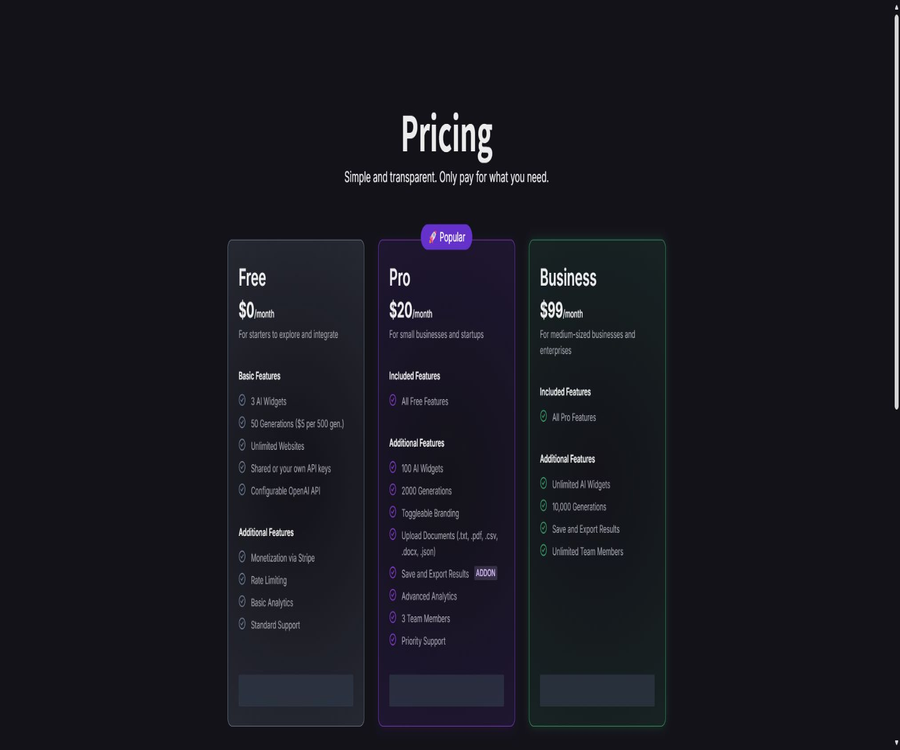
| Collaborative projects | Free | Pro | Business |
|---|---|---|---|
| Team members | No additional members are listed. | 3 people | Infinity |
| Number of AI components | 3 | 100 pieces | Infinity |
| Analysis | Foundation | Basic with optional advanced analysis | Inherits Pro and higher capacity versions |
| Support | Standard | Priority | Builds on Pro and is designed for larger scales |
Price packages
The price information was verified on August 23, 2026; the actual amounts, taxes, exchange rates, and discounts may vary, and the final figures will be those displayed on the settlement page.
| Package | Price | Billing cycle | Core benefits or quota | Suitable for users |
|---|---|---|---|---|
| Free | $ | Free for a long time | 3 components, 50 generations, unlimited websites, shared or proprietary API keys, Stripe-based monetization, rate limits, and basic analytics | Testing and a few components |
| Pro | $ | Monthly subscription | 100 components, 2000 generations, hidden brand, document upload, result saving and export, 3 members, and priority support | Small businesses and startup teams |
| Business | $ | Monthly subscription | Unlimited components, 10,000 generations, unlimited team members, and Pro features included | Medium-sized enterprises and multi-project teams |
| Generation Add-on | $ | Buy as needed | Top up the usage for existing accounts | Those with insufficient quota but no need for an upgrade |
The price field for Free shows 50 Generations, and it is possible to top up the account at a cost of $5 per 500 generations. The amount deducted per generation varies; 2000 Generations does not necessarily correspond to 2000 responses.
Subscription, cancellation, and refunds
- The paid subscription is charged on a monthly basis, and users can cancel it at any time.
- Each response from the component reduces the number of Points, also known as Available Generation.
- Points that have already been used are non-refundable.
- The terms do not clearly state whether the unused balance remains after cancellation.
- The issues and disputes related to direct payments are primarily influenced by Stripe’s rules.
Before subscribing officially, it is necessary to confirm the date when cancellation will take effect, any unused Generations credits, the validity period of additional packages, and whether a fee will be charged in case of failure to generate something. The current terms were updated in 2023, so they may not cover all details of the current packages.
Privacy and data processing
InteraxAI may collect names, email addresses, and wallet addresses for account management, verification, product improvement, personalization, and marketing communications. Stripe requires names and email addresses for direct payments, but the payment details are not stored on InteraxAI’s servers.
- Users can request access to, correction of, or deletion of the personal information held by the platform.
- Users may also have the right to restrict or object to the processing of certain personal information.
- Marketing emails can be stopped by using the unsubscribe option included in the email.
- Internet transmission and electronic storage cannot guarantee absolute security.
- Third-party websites, Stripe, and model providers each have their own privacy policies.
Auto Save, document uploading, and chat memory may handle data entered by visitors or business-related information. Website operators should avoid uploading sensitive data, and they should inform visitors about the AI provider, the way in which data is stored, and the payment procedures.
API, GitHub, and open-source status
InteraxAI has an official GitHub organization, and it offers a CDN repository for distributing the core components and styles of its embedded solutions. This repository contains only a copyright notice; no explicit open-source licenses such as MIT or Apache are provided.
| Project | Current situation | Conclusion |
|---|---|---|
| Embedded script | Publicly loadable | Used to display components on a website |
| Public CDN repository | It exists. | It includes the core of the built components as well as their styles. |
| Clarify the open-source license | None | Being publicly visible does not mean it is allowed to be modified and redistributed. |
| Core platform code | Not disclosed | InteraxAI products cannot be labeled as open source. |
| Public Management API | Not confirmed | The document does not provide a complete description of the developer API interfaces. |
| Includes an OpenAI key. | Support | Used for model invocation; it is not part of InteraxAI’s public API. |
Which users are it suitable for
- Code-free creators who wish to quickly add AI chat or generation tools to their websites.
- Website operators who need to adjust forms, prompts, and appearance according to the brand.
- I hope to create AI-generated content products that are charged on a per-use basis, as well as a membership website.
- Teams that use Webflow, Bubble, Memberstack, or regular HTML websites.
- Small businesses that wish to manage model keys, usage levels, security, and visitor data.
Product advantages
- It is possible to create and integrate various components without having to develop a complete AI backend.
- All packages support an unlimited number of websites, making them suitable for testing multiple sites.
- You can choose either a shared key or a custom model key, offering a balance between simplicity and control.
- It supports Stripe’s pay-per-use pricing model and allows website owners to set prices for visitors.
- It offers detailed configurations such as hint variables, document context, memory, and generation parameters.
- The free version allows for testing of embedding, payment processing, rate limiting, and basic analysis functions.
Usage restrictions and risks
- The help documentation has not been updated for a long time, so the model names, limitations, and deduction rules may be outdated.
- The public CDN repositories do not specify an open-source license, so they cannot be used as open-source SDKs freely.
- Using your own OpenAI key may incur costs both for InteraxAI and the model provider.
- Prompt filtering is only a basic mechanism; it cannot on its own prevent unauthorized input and abuse.
- Enabling cloud storage increases the responsibilities related to visitor data, results, and compliance management.
- AI responses and images may be incorrect or subject to copyright issues; external services require an approval mechanism.
Go-live checklist
- In the current console, check the available models, Generation deduction, file limits, and package benefits.
- Configure system prompts, variables, and document context using test keys and simulated data.
- Set Allowed Hosts, request frequency, monthly hard limits, and balance alerts.
- Test the free and paid processes separately to verify Stripe transactions, failure handling, and refund processing.
- Check the style, loading speed, and accessibility of the component on both desktop and mobile devices.
- Issue a privacy notice and establish procedures for handling complaints, deletions, misuse, and corrections of content.
Frequently Asked Questions
Is InteraxAI free?
There is a free plan that includes 3 AI components and 50 generations of processing, and it can be integrated on an unlimited number of websites. If more capacity is needed, additional generations can be purchased or a higher-tier package can be opted for.
What components can it create?
Support is available for chat generation, text generation, and image generation components. For each of these components, it is possible to adjust the input, appearance, prompts, and methods of access.
Can I use my own OpenAI key?
Yes, it is also possible to use platform-shared keys. Once a custom key is saved, it is not displayed in plain text; it is necessary to set a budget for its use, to rotate it regularly, and to prevent any leaks.
Can visitors pay to generate content?
Yes. The component owner can set up pay-per-use payments through Stripe Express; the platform states that no additional fees are charged for direct payments, but Stripe fees may still apply.
Can PDFs be uploaded as knowledge?
Pro and Business plans support TXT, PDF, CSV, DOCX, and JSON document formats; for older documents, a single file is allowed up to 10MB in size. The current limits need to be confirmed again within the account.
Is InteraxAI open source?
The core platform is not an open-source product. The official CDN repository is accessible to the public, but no explicit open-source license is provided; therefore, it cannot be concluded that the entire product or the embedded code can be freely redistributed.
Summary
InteraxAI is suitable for teams that wish to quickly incorporate chat, text, or image generation capabilities into their own websites, and to generate business value through free trials, membership plans, or pay-per-use models. The no-code setup, embedding options, usage limits, and Stripe integration constitute a complete framework for easy deployment.
The main issue with it is the slow updating of documents and model lists. Before going live, it is necessary to verify the models, usage levels, payment settings, and data storage rules using the current console, and to take AI security, budget management, and visitor privacy into account as part of daily operations.
Tools similar to InteraxAI



 Guigong Network Security Registration No. 45132202000164