






InsertChat
InsertChat, an intelligent tool focused on AI programming.
Tags:AI programming toolsWhat is InsertChat?
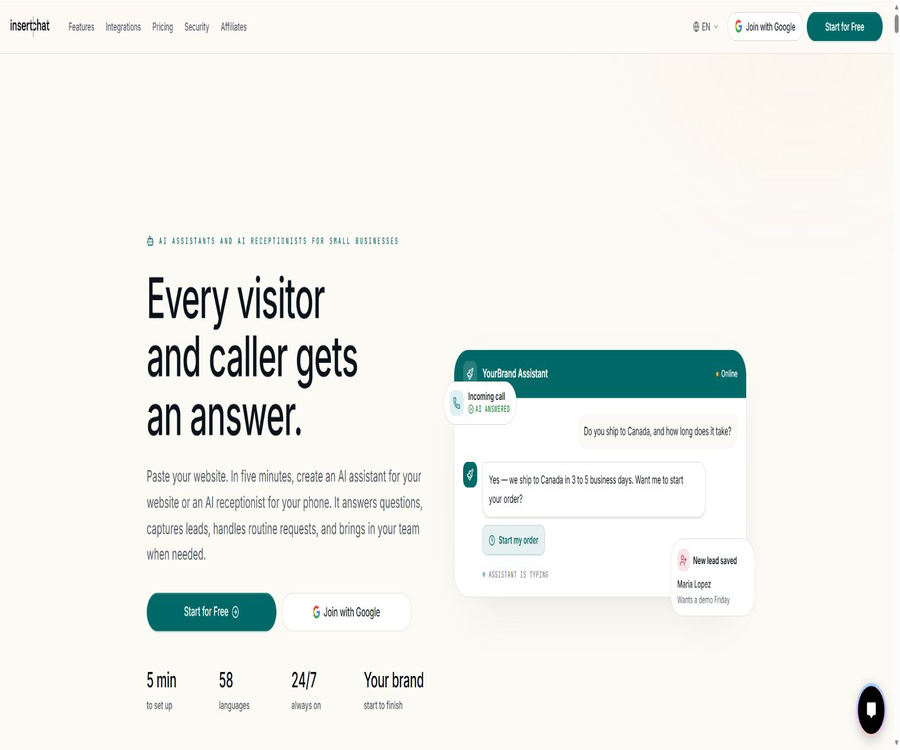
InsertChat is an AI assistant for websites and an AI-based phone reception platform designed for businesses. It reads web pages, documents, videos, FAQs, product information, and business rules approved by the company, and uses a unified knowledge base to answer questions from visitors and callers.
The platform can also collect leads, handle reservations, process payments, check orders, create tickets, and transfer complex conversations to human agents. It is suitable for creating an AI front desk for businesses, rather than serving as a general chat model for individuals.
A one-sentence summary
InsertChat integrates website chat, phone support, knowledge base queries, business tools, and human intervention to create a 24/7 AI front desk that can be deployed with a custom brand.
One knowledge base serves two channels.
Companies can opt to use only the website assistant, only the AI receptionist, or both of these tools simultaneously. Business information, services and FAQs, booking rules, calendars, CRM systems, upgrade policies, shared inboxes, and result analysis can all be shared among them.
| Channels | Main entrance | What can it handle? | Human intervention methods |
|---|---|---|---|
| Website Assistant | Chat bubbles, page embedding, full pages, and share links | Q&A, tables, images, forms, buttons, clues, and actions | Live Inbox: real-time takeover or automatic upgrade |
| AI receptionist | Corporate phone numbers and call handling procedures | Natural voice responses, information collection, scheduling, and routing | Join the call in real time or transfer it according to the rules. |
| Voice component | Speak via buttons or voice mode on the website | Visitors can communicate verbally with the assistant directly. | Switch to text or manual support |
| Shared inbox | Chat, email, WhatsApp, and phone contexts | Unified viewing, assignment, notes, and AI-generated draft responses | Manual editing, sending, and taking over |
Main functions
Corporate knowledge base Q&A
InsertChat retrieves answers from approved business materials and can display tables, images, forms, and buttons within conversations. Teams should only connect to content that they have permission to use and that is suitable for presentation to customers.
Website AI assistant
The website assistant can answer questions regarding products, delivery, returns and exchanges, opening hours, and service procedures 24/7, as well as guide visitors through the next steps. Its appearance, avatar, color, and tone can be customized according to the brand’s specifications.
AI phone reception
The paid plan includes AI-powered phone reception along with a phone number that can automatically answer calls, speak, record requests, and arrange appointments. Teams can join real-time conversations, and call forwarding as well as fallback options can be configured.
Clues and CRM
The platform can collect names, contact information, requirements, and scheduling intentions during chats or calls, and save this data in a CRM system or an external system. The fields used for collection should be limited to those that are truly necessary, and visitors should be informed about the purpose of such collection.
Reservation and payment
Assistants can connect to calendars to check times, collect reservation details and determine the next steps; they can also use Stripe to process payments within chats. For high-value transactions, refunds, and dispute resolution, human verification is still required.
Orders, forms, and work orders
The built-in tools allow for querying orders from Shopify and WooCommerce, filling out forms, creating tickets, or initiating external processes. For each of these actions, permissions, confirmation messages, and error handling mechanisms should be in place.
Live Inbox and manual takeover
AI can draft responses, which can then be sent directly by the team, edited, or used to take over the conversation. The shared inbox allows for task assignment, setting priorities, adding team notes, storing previously drafted responses, and enabling automatic escalation.
Dialogue analysis
The platform organizes conversations by theme and sentiment, and provides analyses on satisfaction levels, leads, purchases, team performance, and content gaps. Monthly reports can be sent by email, but companies still need to verify them using actual sales and customer service data.
What types of content is supported by the knowledge base?
| Data type | Uses | Management recommendations |
|---|---|---|
| Website and sitemap | Import service, product, policy, and help pages | Exclude background pages, privacy pages, and expired activities. |
| PDF and documents | Include manuals, price lists, contract details, and operation guides | Delete any content that should not be disclosed to customers before uploading. |
| Video | Add YouTube video information to the Q&A. | Check the accuracy of subtitles and the licensing of the content. |
| FAQs and text | Quickly access standard answers and business rules | Specify the effective date and the team responsible. |
| Product catalog | Answer questions regarding specifications, prices, inventory, and purchasing. | Synchronize with e-commerce systems and handle variants. |
| Cloud storage | Sync large-scale data from S3 or R2 | Restrict bucket permissions and monitor deletion synchronization. |
| Images and files | Allow visitors to upload materials for multimodal understanding. | Restrict sensitive data, file size, and malicious files |
The system can read web pages again as scheduled, and some packages allow for automatic updates in case of changes to the content. Before going live, it is necessary to designate a person responsible for managing the data, to establish rules regarding update times, and to put in place mechanisms for withdrawing updates, so as to prevent the assistant from using outdated policies.
Supported operation tools
- Collect and store information on potential customers;
- Check the calendar and schedule meetings or service appointments;
- Collect payments through Stripe during chats;
- Query Shopify or WooCommerce orders;
- Fill out forms, create customer service tickets, and initiate external processes;
- Search for a webpage and load the specified page;
- Send conversation records and trigger automations;
- Upgrade to live chat or phone transfer when needed.
Process for launching a website assistant
- Create an account and choose Website Assistant as the first channel to use.
- Paste the company’s website and wait for the system to retrieve the services, products, policies, and FAQs.
- Review each item of the imported content and remove any materials that are not accessible, have expired, or should not be made public.
- Set the assistant’s name, avatar, color, tone, welcome message, and response boundaries.
- Connect to forms, calendars, CRM, tickets, or e-commerce tools.
- Testing is carried out using common questions, ambiguous questions, sensitive questions, and malicious prompts.
- Configure manual escalation for responses that cannot be provided, low confidence levels, and high-risk operations.
- Copy component code, use plugins, or publish separate pages, then monitor actual conversations.
Process for launching telephone reception services
- Enable the AI receptionist in the paid account and assign a phone number.
- Fill in the business hours, service area, booking rules, and transfer conditions.
- Select the voice, speaking style, opening phrase, and the information that needs to be collected.
- Connects calendars, CRM, and phone business processes that need to be carried out.
- Test accent, noise, interruptions, silence, repeated questions, and number entry.
- Configure fallback paths for emergencies, complaints, sensitive operations, and identification failures.
- Ensure that call recordings, notifications, consent, and data retention comply with local regulations.
- First, conduct a trial operation over a limited period of time or with a small number of calls, and then gradually expand it.
Manual takeover and upgrade design
A good AI customer service system should not leave all conversations to the algorithm. Companies need to determine which issues can be resolved automatically, which require human intervention, and how to inform customers when no one is available to assist them.
| Trigger conditions | Suggested actions | Information that needs to be retained |
|---|---|---|
| The knowledge base does not have an answer. | Acknowledge uncertainty and switch to manual handling. | User questions and retrieved information |
| Refund or cancellation | After collecting the order information, it is handed over to the authorized personnel. | Order number, reason, and policy version |
| Complaints or strong negative emotions | Increase priority and inform the supervisor | Complete sessions and emotional changes |
| Medical, legal, or financial advice | Restrict automatic responses and direct users to professional channels. | User requests and disclaimer |
| Payment or sensitive account operations | Requires secondary confirmation or identity verification. | Confirmation steps and operation logs |
| Phone recognition failed. | Repeat once, then transfer or leave a message. | Transcription, number, and reason for failure |
| Hint: Injection or unauthorized request. | Reject and log security incidents | Input, tool invocation, and model response |
Deployment method
| Deployment method | Suitable scenarios | Features | It is necessary to pay attention. |
|---|---|---|---|
| Chat bubbles | Ordinary corporate website | Suspension inlet – easy to install | Avoid blocking the buttons on mobile devices. |
| Embedded in page | Product, Help, or Booking Page | Displayed along with the page content | Set an appropriate height and loading status. |
| Full page | Independent customer service or event entry point | Immersive dialogue | Configure brand domain names and access control. |
| Share link | Emails, social media, and short-term activities | There is no need to modify the website. | Link distribution and permission control |
| Platforms such as WordPress | Common website building systems | It can be installed via plugins or code. | Confirm plugin maintenance and version compatibility |
| White-label domain names | Agent and multi-brand delivery | Use your own domain name and email branding | Growth and higher tiers offer more comprehensive features. |
| REST API | Custom-developed products and complex processes | You can create assistants, manage materials, and handle conversations. | Development, certification, and error handling are required. |
Integrated ecosystem
InsertChat offers built-in connections, an automation platform, Webhooks, REST APIs, MCP, and other methods for integration. The specific features, package requirements, and third-party fees should be checked before activation.
| Integrated categories | Representative tool | Primary uses |
|---|---|---|
| E-commerce | Shopify, WooCommerce | Product FAQs, order inquiries, and purchase guidance |
| Build a website | WordPress, Wix, Webflow | Installation components and release assistant |
| CRM and customer service | HubSpot, Zendesk | Synchronize leads, tickets, and manual processing |
| Gmail, Outlook, and custom SMTP | Unified inbox and branded emails | |
| Message | Expand channels for customer communication | |
| Automation | Zapier and Webhook | Connect tables, notifications, and business processes |
| Developer | REST API, MCP, and Chrome extensions | Custom assistants, materials, sessions, and tools |
| Analysis | Google Tag Manager and data export | Track usage effects and external reports |
Supported languages and AI models
The platform supports 58 languages, enabling text or voice services for visitors from different regions. The availability of a language does not mean that it offers the same quality in terms of accent recognition, knowledge retrieval, and tool invocation; each language must be tested separately.
InsertChat supports multiple model providers; users can choose a model for their assistant based on quality, speed, and cost, or they can use their own keys. The available models are constantly changing, so it is necessary to keep track of the model version, cost, and rollback settings in a production environment.
| Model or processing method | Function | Points to note regarding data |
|---|---|---|
| Platform-hosted model | Simply select the available models and pay based on usage. | Tips, dialogues, and necessary information snippets will be sent to the selected supplier. |
| BYOK | Use the company’s own model keys. | Model invoices and supplier accounts are managed by the enterprise. |
| Model Gateway | Route the request to the selected model. | It is necessary to understand gateways, model providers, and log pipelines. |
| Professional handling services | Restructuring, transcription, document extraction, and media generation | Different tools may use different processors. |
| Zero retention option | Reduce model-side prompts and response retention | The applicable models and enterprise configurations require a security review. |
Which users is it suitable for?
- E-commerce businesses that need to answer questions regarding delivery, prices, returns and exchanges, as well as product details, on a 24/7 basis;
- Local service businesses that require reservations, telephone reception, and call forwarding;
- Small and medium-sized teams hope to reduce redundant customer service staff and maintain human intervention.
- Customer operations departments that need to manage websites, emails, messages, and phone calls in a unified manner;
- Agents and service providers that deliver white-label AI assistants to multiple clients;
- Development teams that have their own proprietary products and need API, Webhook, or MCP integration;
- Companies that need multilingual customer service and information on cross-regional operations.
In what situations is it not very suitable?
- Only users who need a permanent, free personal chat robot;
- Teams that are unable to organize accurate business information and policies;
- Organizations that require a completely offline setup, local models, and an isolated network for deployment;
- It is hoped that AI can be used to handle high-risk refund, medical, or financial decisions without supervision;
- Projects that aim to collect sensitive customer data without any legal basis;
- Purchasers who cannot accept changes in points, phone minutes, and costs associated with third-party models.
Product advantages
- The website and phone share the same knowledge base and business configurations;
- Start from a website to quickly create testable assistants;
- Supports web pages, documents, videos, FAQs, catalogs, and cloud storage files;
- It includes built-in tools for tasks such as leads, appointments, payments, orders, and tickets;
- A shared inbox enables a seamless transition from AI drafting to human intervention;
- 58 languages are available for cross-regional customer service;
- White-labeling, customer accounts, and multi-assistant capabilities are suitable for agents;
- REST API, Webhook, MCP, and various integration options support expansion.
Usage restrictions
- The quality of the responses depends on the accuracy, completeness, and frequency of updates of the imported data.
- The model may still misinterpret the question, overlook constraints, or produce incorrect answers;
- Complex complaints, exceptional policies, and high-risk transactions require manual handling.
- Third-party models, telephone services, payment options, and integration services have their own policies and fees;
- Monthly points are consumed based on the length of the conversation, as well as by the use of models, data processing, and various tools.
- Speech recognition is affected by accent, noise, the quality of the connection, and proper nouns.
- The package imposes restrictions on assistants, data, seats, file size, and advanced features;
- The service is provided as it is, without any guarantee of uninterrupted operation or absolute security.
Prices and packages
InsertChat offers a 7-day free trial, with monthly plans starting at $98; opting for an annual payment gives a discount equivalent to two months’ worth of service. All paid plans include a website assistant, an AI receptionist, and a phone number, and the main differences lie in capacity, white-labeling options, integration capabilities, and operational controls.
| Package or version | Price | Billing cycle | Core benefits or quota | Suitable for users |
|---|---|---|---|---|
| 7-day trial | Free | 7 days | Test the website or the AI receptionist over the phone; the actual limitations for testing are specified on the registration page. | Evaluate the user for the first time |
| Pro | $ | Monthly payment; annual payment with a 2-month discount | 3 assistants, 1000 documents, 3 seats, 5000 points per month, 20MB files, removal of platform identifiers, BYOK | Individual companies and small teams |
| Growth | $ | Monthly payment; annual payment with a 2-month discount | 20 assistants, 5,000 documents, 5 seats, 10,000 points per month, 25MB file size, full white-labeling option, custom domain name, API access, and data export functionality | Growth teams, multi-location enterprises, and partners |
| Scale | $ | Monthly payment; annual payment with a 2-month discount | 50 assistants, 25,000 documents, 10 seats, 25,000 points per month, 50MB of file storage, Webhook, cloud synchronization, comprehensive analysis, and priority support | Established companies and agents |
| Enterprise | Custom quote | contract | 100 assistants, 50,000 documents, 25 seats, 50,000 points per month, 200K in context, deployment review, dedicated support and SLA options | Deployment in high-capacity and governed enterprises |
Phone numbers and additional numbers
The additional phone numbers listed by Growth and Scale cost $10 per month each; the pricing for enterprise deployments is determined based on the specific plan. In addition to the cost of these numbers, calls also consume voice credits as well as possible fees imposed by the service provider.
How is the score calculated?
The cost of website conversations depends on their length, the model chosen, the data imported, and the tools used; as a rough estimate, 10 points are required for each conversation. For AI calls, 12 points are charged per billing minute, which is equivalent to a cost of $0.12 per minute.
| Quantity items | Public conversion | Factors affecting it | Control method |
|---|---|---|---|
| Website conversation | The example costs about 10 points per attempt. | Message length, model, context, and tools | Shorten prompts, limit history, and select the appropriate model |
| Telephone reception | 12 points per billing minute | Call duration and procedures before routing | Simplify the questions and answers, and complete the appointment or make the transfer as soon as possible. |
| Data import | Based on the actual processing consumption | Pages, files, videos, and retraining | Remove duplicate and unnecessary content. |
| Multimodal and tools | By call variation | Images, files, searching, creation, and integration | Enable it only for necessary scenarios. |
| BYOK model | Model vendor invoices may be generated simultaneously. | Supplier prices and token quantity | Set budget, model routing, and usage alerts. |
Prices, points, and benefits may change; it is necessary to verify once again the currency used, taxes, the total annual cost, the rules regarding excess usage, and automatic renewal before completing the payment. The current terms consider purchases to be non-refundable, and cancellations generally take effect at the end of the paid period.
White-labeling and agent capabilities
| Ability | Pro | Growth | Scale | Enterprise |
|---|---|---|---|---|
| Remove the platform identifier | Support | Support | Support | Support |
| Complete white-labeling | Finite | Support | Support | Support |
| Custom domain name | Not listed as core rights and interests | Support | Support | Support |
| Custom sending domain | Not listed as core rights and interests | Support | Support | Support |
| Export customer data | Not listed as core rights and interests | Support | Support | Support |
| Resale by agents | Not suitable as a standard resale program. | The license needs to be verified. | Explicitly aimed at reselling | Contractual agreement |
| Centralized customer management | Capacity is limited. | Can be used for multiple teams | Supports combined management | Advanced governance |
The terms of service impose restrictions on commercial resale and customer deployment; agents should choose subscriptions that permit resale and inform end users of the applicable terms. Do not assume that unlimited resale rights are granted just because a white-label feature is available.
Privacy and data processing
The materials uploaded by enterprises remain the property of those enterprises. InsertChat declares that it does not sell personal data, nor does it allow third-party models to use customer content for training purposes. To generate responses, prompts, conversations, uploaded files, and other relevant data fragments may be transmitted via the model gateway to the selected model provider.
| Data matters | Processing instructions | Suggestions for going live |
|---|---|---|
| Account information | Collect email addresses, authentication details, and necessary payment information. | Enable multi-factor authentication and restrict administrators. |
| Visitor and usage data | It may handle IP, device, interaction, and session logs. | Publish the privacy notice and set the retention period. |
| Knowledge base | Only connect to web pages, files, and media approved by the company. | Exclude confidential, personal, and expired content |
| Third-party models | Transmit prompts, conversations, and text snippets based on the selected function. | Review each model vendor and processing region. |
| Telephone service | Use telephone infrastructure to handle numbers, audio, and transcription. | Comply with the rules regarding recording, consent, and marketing calls. |
| Payment | Processed by payment services such as Stripe. | Do not allow the model to have access to complete card credentials. |
| International transmission | Utilize safeguards such as standard contract clauses. | Companies should verify the actual processing chain and where the data is stored. |
| Delete and rights | Supports access, correction, deletion, export, objection, and restriction. | Establish a process for handling user requests and account deletion |
Safety and compliance
The platform states that it has undergone a SOC 2 Type II control audit, and its products are described as complying with the GDPR and CCPA requirements as well as being suitable for use in HIPAA environments. Being HIPAA-ready does not mean that all accounts will automatically meet the requirements; medical applications require specific corporate solutions, security audits, and appropriate contracts.
- Data is encrypted both during transmission and when stored statically;
- Role-based permissions determine who can manage materials and workspaces;
- Activities, points, and session logs are used for auditing;
- The data and session data provide paths for deletion;
- Companies can review the zero-model data retention settings;
- Large-scale deployment enables DPA, security, and procurement assessments;
- Any electronic transmission and storage still cannot guarantee absolute security.
API, Webhook, and MCP
InsertChat offers a REST API that enables the creation of assistants, integration with corporate content, management of guest sessions, and invocation of responses based on approved materials. Access to this API is included as part of the Growth package; the Scale and Enterprise packages provide additional features such as Webhooks and higher capacity.
| Development capability | Current status | Suitable uses | Precautions |
|---|---|---|---|
| REST API | Support | Create assistants, manage materials and conversations | Authentication, permissions, and plan capacity |
| Webhook | Scale and above explicitly include it. | Receive business events and trigger external processes | Verify signatures, remove duplicates, and retry |
| MCP | Support | Allow compatible AI clients to call the InsertChat function. | Limit the range of available tools and data. |
| Zapier | Support | Low-code integration with tables, CRM, and notifications | Task cost and failure monitoring |
| Chrome extensions | Support | Using the assistant in the browser workflow | Verify page permissions and account access. |
| Official SDK | Not confirmed | Public capabilities are primarily based on REST APIs. | Do not assume that a specific language pack exists. |
| Core open source | No | Platforms and models are orchestrated as commercial managed services. | It is not possible to download the complete system for self-deployment. |
Pre-launch checklist
- Confirm the ownership, validity period, and scope of application for each piece of knowledge material;
- Provide manual escalation for issues related to prices, refunds, complaints, and sensitive matters;
- Testing reveals issues such as injection attacks, unauthorized use of tools, and data leakage.
- Check the website, mobile versions, phone noise, and multilingual experience;
- Configure roles, as well as set policies for deletion, logging, export, and retention;
- Verify model providers, telephone service providers, payment processors, and other sub-processors;
- Set up alerts for monthly points, model billing, and phone minutes;
- Record the rate of manual intervention, the resolution rate, conversion rates, and incorrect answers;
- Re-test high-frequency issues after the policy update.
Basic information
| Project | Content |
|---|---|
| Tool name | InsertChat |
| Tool type | AI website assistants, AI phone reception, and automation of customer service |
| Core channels | Websites, phone calls, emails, WhatsApp, and shared inboxes |
| Knowledge materials | Websites, documents, videos, FAQs, product catalogs, and cloud storage |
| Supported languages | 58 species |
| Free trial | 7-day trial |
| Starting price | $ |
| API | Yes |
| Webhook | Yes, the packages are limited. |
| White label | Yes, the benefits of the packages vary. |
| Core open source | No |
Frequently Asked Questions
Is programming required for InsertChat?
The basic website assistant allows one to start by pasting a website, and it can be published using component code or platform integrations – no programming skills are required. However, for more complex operations, as well as API usage and custom data synchronization, development is still necessary.
Is it possible to have both a website and phone lines at the same time?
Yes. The paid plan includes two channels and one phone number, which allow them to share a knowledge base, calendar, CRM, upgrade rules, and analytics.
How many languages are supported?
The current annotation system supports 58 languages. Companies should use actual business scenarios to test text retrieval, speech recognition, accent handling, and proper nouns.
How long is the trial period?
The self-service trial lasts for 7 days, allowing you to test the AI-based front desk process before making a payment. The specific points, phone number limitations, and restrictions on advanced integrations are specified on the registration page.
How much is the lowest package?
The monthly Pro plan costs 98 dollars and includes 3 assistants, 1000 data entries, 3 seats, as well as 5000 points per month. The annual payment option offers a discount equivalent to 2 months’ worth of service.
Can the InsertChat identifier be removed?
Pro already includes the removal of the platform identifier, while Growth offers more comprehensive white-labeling options, custom domain names, and branded email addresses. Resellers must also have the appropriate subscription license to do so.
How are phone calls billed?
Each paid plan includes one phone number; additional numbers are available at a cost of $10 per month in some packages. AI calls consume 12 points per billing minute.
Are customer data used to train large models?
The platform states that it will not allow third-party foundation models to use customer content for training their models. When generating responses, necessary prompts, conversation details, and text snippets are still sent to the selected model provider.
Is InsertChat open source?
No. It offers development tools such as APIs, Webhooks, and MCP, but its core platform is a commercial hosted service; the complete source code is not made available publicly.
Summary
InsertChat is suitable for businesses that wish to use a knowledge base to serve both website visitors and callers over the phone. With features such as Q&A systems, action tools, a shared inbox, human intervention options, and brand customization capabilities, it represents a more comprehensive AI front-end than a simple chat component.
The quality of the service depends on data management, tool permissions, manual upgrades, and ongoing testing – not just on the choice of model. Before making a purchase, it is necessary to calculate the costs associated with calls based on the actual volume of conversations, and to review the terms related to packages, privacy, resale, and third-party services.
Tools similar to InsertChat



 Guigong Network Security Registration No. 45132202000164