






Imrsivo
Imrsivo, an intelligent tool focused on AI programming.
Tags:AI programming toolsA one-sentence summary
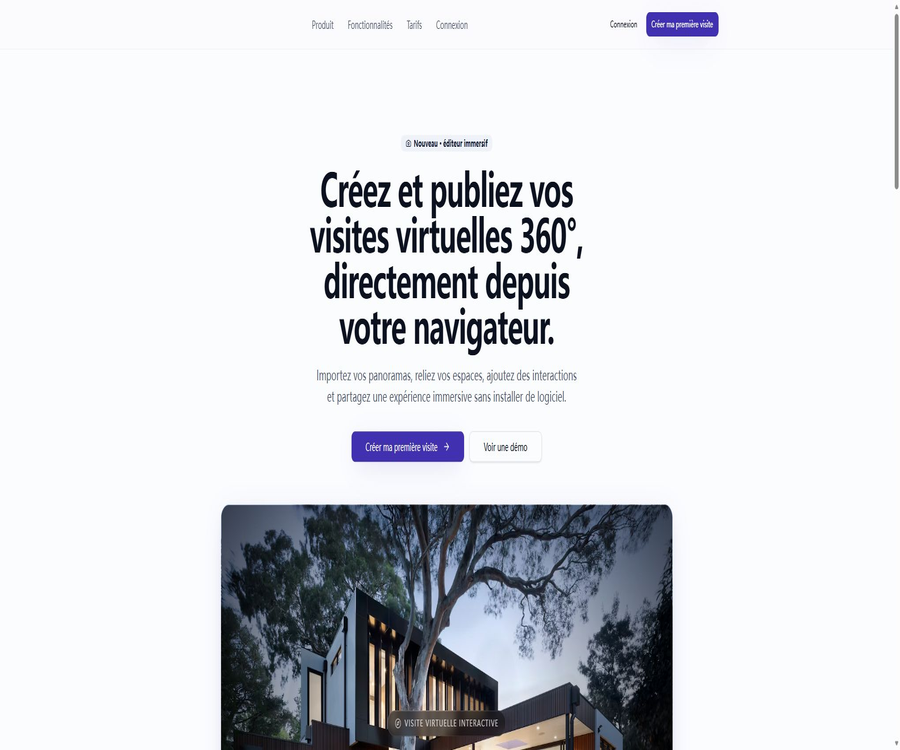
IMRSIVO is a browser-based platform for creating 360° virtual tours, designed for professional presentation purposes. Users can import panoramic images, connect different spaces together, add interactive elements, and publish the resulting tours via public links or web embeds.
What is IMRSIVO?
IMRSIVO brings together functions such as organizing panoramic content, establishing spatial connections, editing hotspots, publishing online, and tracking access statistics in a single web-based workspace. It is designed to assist creators who do not have a development team in turning the 360° panoramic images they have already captured into interactive online viewing experiences.
The current focus of the product has shifted to 360° virtual tour creation, and generative AI is not listed as a core capability on the public website. The descriptions in the old index regarding the AI-based no-code marketing suite should no longer be used as descriptions of the current functions.
Main functions
Import 360° panoramic images
Users can drag and drop 360° panoramic images in isometric bar chart format, and organize multiple spaces based on specific projects. The platform is responsible for displaying these immersive visuals in the browser, allowing users to view them by dragging around.
Connecting the space with the designed tour routes
The editor allows hotspots to be placed within the interface, and it enables connections between entrances, rooms, or exhibition areas. By clicking on these hotspots, visitors can move from one space to another, thus creating a continuous path for exploration.
Add rich-media interactions
Hotspots can be used not only for navigation but also to display additional content such as text, images, and videos. Real estate teams can use them to describe the layout and facilities of a property, while museums and brands can use them to share information about their exhibits or products.
Visual drag-and-drop editing
The entire production process is carried out within a web editor; there is no need to install any desktop software or write code. Creators can directly adjust the relationships between elements in the scene as well as the interactive aspects, making it suitable for client projects that require frequent revisions.
Public links and web page embedding
After the guide is published, a public access link can be generated, or it can be embedded in existing websites using iframes. Web embedding is part of the features available in the paid plan; the free trial version does not include this functionality.
Custom domain names and brand presentation
The Studio plan allows for the use of custom domain names and a less prominent display of the IMRSIVO brand, while the Agence plan enables the removal of the platform’s branding so that a custom brand can be used. Studios and agencies that want a completely personalized brand experience should compare these two options carefully.
Access statistics
Trial offers basic statistics, while versions Studio and above include advanced statistics. Not all metric categories are listed on the public page; therefore, it cannot be assumed that these versions necessarily provide features such as attribution analysis, heat maps, or conversion funnels.
Multilingual, mobile, and VR viewing
The platform lists multilingual support, compatibility with mobile devices, and VR optimization as its product features, which enable the creation of guides tailored for different users. This refers to the adaptation of the online experience; it does not mean that native editing applications for iOS, Android, or VR are already available.
The complete process from raw materials to publication
- Use a 360° camera or panoramic stitching tools to prepare equidistant cylindrical projection images.
- Register an account and create a new virtual tour project.
- Import panoramic views of various rooms, locations, or exhibition areas into the project.
- Name each space, and check the orientation of the image and the viewing experience.
- Place navigation hotspots to connect related spaces into a tour route.
- Add text, images, or video hotspots to include supplementary explanations and marketing information.
- Preview the interactive experience on smartphones, computers, and the target VR device.
- Publish the guide and choose between a public link, web embedding, or a custom domain name.
- After going live, check the access statistics to further adjust the route and content.
What needs to be prepared before production?
| Prepare the project | Suggested content | Why is it important? |
|---|---|---|
| Panoramic footage | One or more isometric cylindrical panoramic views per space | Determines image clarity and spatial coverage |
| Space list | Room, floor, exhibition area, or store name | Facilitates project organization and route planning |
| Hotspot planning | Entrance, exit, jump points, and introduction points | Avoid chaotic tour routes. |
| Rich media | Simplify text, images, and playable videos | Information that cannot be conveyed directly in supplementary scenarios |
| Brand materials | Name, domain name, and customer brand guidelines | Used for the branded launch of paid plans |
| Publication location | Official website pages, property listing pages, or marketing campaign pages | Decide whether to use a public link or an iframe. |
Input and output
| Stage | Confirmed content | Details that have not yet been clarified |
|---|---|---|
| Image input | 360° panoramic image in isometric cylindrical projection | Specific file extensions, maximum pixel count, and maximum file size |
| Interactive input | Text, image, and video content | Specific rules for video uploading or external media |
| Project structure | Multiple spaces are connected to hotspots. | Floor plans, automatic connection, and batch import capabilities |
| Online output | Interactive 360° virtual tour | Offline packages and standalone executables |
| Share output | Public access method | Access validity period and detailed sharing permissions |
| Website output | iframe embedding | Advanced embedding parameters and event callbacks |
For undisclosed document specifications, a trial transfer should first be carried out using a small amount of representative material. Large-scale commercial projects should not be migrated all at once without first verifying clarity, loading speed, and memory usage.
Prices and packages
The price information was verified on August 23, 2026; the actual amounts, taxes, exchange rates, and discounts may vary, and the final figures will be those displayed on the settlement page.
IMRSIVO offers a 14-day free trial, subscription options for individuals or small teams, agency subscriptions, and custom enterprise solutions. No bank card is required for the trial; payment can be made on a monthly or annual basis, with the annual option indicating approximately 17% savings.
| Package | Monthly price | Annual price | Projects and Spaces | Storage and Members | Primary interests |
|---|---|---|---|---|---|
| Trial | 0 euros, valid for 14 days | Not applicable | 1 project; 5 spaces per project | 500MB; 1 member | Basic statistics; retain the IMRSIVO brand |
| Studio | 29 euros per month | 290 euros/year | 3 projects; 20 spaces per project | 10GB; 1 member | Advanced statistics, custom domain names, iframes, low-profile branding |
| Agence | 49 euros per month | 490 euros/year | 10 projects; 100 spaces per project | 100GB; 5 members | White label, brand removal, password protection, priority support |
| Business | Custom quote | Custom quote | Set according to the organization’s needs | Custom capacity and members | White-labeling, advanced statistics, custom domain names, priority support and customized quotas |
How much is actually saved with an annual payment?
| Package | Monthly payments for one year in a row | Annual total amount | Annual equivalent monthly price | Approximate savings |
|---|---|---|---|---|
| Studio | 348 euros | 290 euros | 24.17 euros per month | 58 euros |
| Agence | 588 euros | 490 euros | 40.83 euros per month | 98 euros |
The figures above represent the current euro-based pricing; taxes, the currency used for settlement, and the account’s location can affect the final amount. For corporate projects, it is also necessary to clarify the number of units to be provided, the level of service support, the data-related terms, and the payment schedule.
How to choose a package
- First, use a 14-day trial to test the panoramic view display, key function operations, and loading performance on the visitor side.
- When there is only one short-term testing project, first check whether 5 spaces and 500MB are sufficient.
- When a freelance photographer needs to embed content on a client’s website or use a custom domain name, they should choose Studio.
- When agents need multiple users, password protection, a white-label option, and a larger storage capacity, they should choose Agence.
- When the number of projects, spaces, or storage/organization processes exceeds the set limits, contact the Business solution team.
- Before choosing the annual payment option, complete the verification of a real project and review the rules regarding cancellation, refunds, and renewal.
Which users are it suitable for
- A 360° photographer who is required to deliver panoramic photography works to clients.
- Real estate agents who offer remote property viewings and online tours are welcome.
- Architects and interior designers who need to demonstrate the spatial layout, materials, and design outcomes.
- The hotel team hopes to allow potential guests to visit the rooms and common areas in advance.
- Retail and marketing teams that need to create stores, exhibition halls, or brand experience spaces.
- Museums and cultural institutions that wish to present exhibitions, historical spaces, and descriptions of artifacts online.
- Creative studios and agencies that manage multiple client projects simultaneously and require white-label delivery.
Typical use cases
| Scene | Production method | The value it can bring |
|---|---|---|
| Virtual house viewing | Connect the living room, bedrooms, and common areas and add facility hotspots. | Have customers in different locations complete the remote screening first. |
| Hotel preview | Show the rooms, restaurant, conference room and views. | Reduce the problem of photos failing to convey spatial relationships. |
| Building delivery | Organize panoramic records by floor or functional area | To enable customers to view the progress at various stages remotely |
| Store marketing | Add product and event information to the display area | Combine space tours with content introductions. |
| Exhibition guide | Set up text, image, and video hotspots for the exhibits. | To provide an online experience for viewers who cannot be present in person. |
| Portfolio | Turn multiple filming projects into branded guided tours. | Improve the completeness of the presentations by photographers and studios. |
Main advantages
- Import, edit, and publish directly in the browser; no desktop software is required.
- Lower the barriers to creating virtual tours through drag-and-drop editing and hotspot connections.
- It supports text, images, and videos; the content is not limited to page transitions.
- Public links and iframe embedding represent the two common methods of delivery: independent sharing and embedding on official websites.
- Studio offers custom domain names, while Agence provides a full white-label solution.
- The package specifies the items, space, storage, and member limits, making it easier to estimate costs.
- Optimizations for mobile devices and VR help to cover various types of access terminals.
- The 14-day trial does not require a bank card, making it suitable for carrying out initial, small-scale testing.
Usage restrictions and precautions
- The platform does not take panoramic photos on behalf of users; the quality of the images still depends on the camera, the process of stitching them together, and the post-processing steps.
- The public page does not specify all file formats, resolutions, maximum file size, and compression rules.
- Trial comes with only one project, five spaces, and 500MB of storage, making it unsuitable for full-scale commercial complexes.
- Studio remains a single-member solution and is not suitable for managing projects with multiple people at the same time.
- White labeling, removing the platform’s brand identity, and bypassing password protection require an Agence or Business account.
- The specific metrics of advanced statistics are not fully made public, and they cannot replace specialized marketing analysis platforms.
- Mobile and VR optimization primarily refer to viewing from an external perspective; it should not be construed as a native mobile editor.
- The current public demo entry indicates that no guide is available; before making a formal purchase, it is necessary to create a test project for verification.
- The product is in the newer 360° tour version; the old descriptions may not match the current interface.
Privacy, security, and customer materials
Panoramic photos may capture residents, employees, visitors, license plates, computer screens, or proprietary business information. It is necessary to obtain the required authorization before uploading such photos, and any information that should not be made public must be obscured, cropped, or retaken.
- Public links should be managed in accordance with public content policies; they must not contain access controls, identification details, or internal security information.
- For customer projects whose access needs to be restricted, a password-protected solution should be chosen, and the permissions should be tested in practice.
- After integrating third-party websites, the navigation services must also be included in the website’s privacy and Cookie assessment.
- The client’s project should specify in the contract the rights to the materials, the duration of storage, the method of delivery, and the responsibilities regarding deletion.
- When working together in a team, each member should be assigned their own account; shared login credentials should not be used.
- The public page currently only displays the terms and the name of the privacy section; it does not provide a complete policy page that can be accessed.
- Until the complete policy is available, it is not advisable to upload data that is subject to strict regulations or is highly sensitive.
Copyright and commercial usage suggestions
| Content type | Rights that need to be confirmed | Suggestions |
|---|---|---|
| Panoramic photo | Photographer’s copyright and customer usage license | Save the original files, authorization details, and delivery records. |
| Indoor space | Site licensing and privacy boundaries | Obtain written consent before filming and releasing it publicly. |
| People and license plates | Portraits, Privacy, and the Handling of Personal Information | Avoid being photographed or use irreversible obstructions. |
| Hot topics in images and videos | Material copyright and music licensing | Use content that is owned or explicitly authorized. |
| Customer brand | Trademark and brand guidelines | Display only as specified in the project contract. |
| Embed in website | Website compliance and disclosure of third-party services | Synchronously update the privacy policy and content guidelines. |
Platform and device support
| User side | Support status | Explanation |
|---|---|---|
| Desktop browser | Support | Mainly used for creating, editing, and managing project environments. |
| Mobile browser | Supports viewing | The page emphasizes mobile optimization; the editing capabilities need to be tested in practice. |
| VR devices | Supports optimized viewing. | The specific headset models and list of browser compatibilities have not been made public. |
| Windows and macOS | Use via a browser | No desktop client that needs to be installed was detected. |
| iOS and Android | Access via web page | No official native app was detected. |
| Website embedding | Supported on Studio and above | Integrated using iframe |
| Custom domain name | Supported on Studio and above | Suitable for customized and branded releases |
API, GitHub, and open-source status
- No public API documentation for developers has been identified.
- No official SDK, command-line tools, or webhook documentation were found.
- No official GitHub open-source repository for the current IMRSIVO platform has been found.
- There are no public self-hosted servers, offline deployment packages, or source code licenses available.
- Iframe is a proven method for integrating websites, but it is not equivalent to a data API.
- The platform’s core editor and hosting services should be regarded as proprietary online products.
- When batch processing, automatic publishing, or enterprise system integration is required, written confirmation must be obtained prior to making the purchase.
Basic information
| Project | Content |
|---|---|
| Tool name | IMRSIVO |
| Current product type | 360° virtual tour creation and hosting platform |
| Core input | Isometric cylindrical 360° panoramic image |
| Core Editor | Spatial connections, navigation hotspots, and rich-media interactions |
| Publication method | Public access and iframe embedding |
| Primary users | Photographers, real estate, architecture, hotels, retail, and cultural institutions |
| Free method | 14-day trial, no bank card required |
| Paid plans | Studio, Agence and Business |
| Monthly pricing starts at | Studio costs 29 euros per month. |
| Starting price for annual subscription | Studio costs 290 euros per year. |
| White label | Agence and Business support |
| Password protection | Agence and Business support |
| Public API | Not confirmed |
| Open-source status | Not open source |
Frequently Asked Questions
Is IMRSIVO an AI tool?
The core of the currently available products is 360° panoramic tour creation and management; generative AI is not listed as a key feature. The tool catalog should reflect the current state of these products, and it is no longer appropriate to use descriptions from the older AI marketing kits.
Is it necessary to install software?
It’s not necessary. Importing panoramic images, editing hotspots, and publishing them can all be done directly in the browser.
Can it be used for free?
A 14-day free trial is available, and no bank card is required. The trial allows for one project, five spaces per project, 500MB of storage space, and one user; it is not a permanent free solution.
What type of panoramic images are supported?
Currently, 360° panoramic images with equal-distance barometric projection are explicitly supported. The specific file extensions, pixel requirements, and maximum file size limits have not been fully disclosed; it is recommended to attempt uploading such files before starting a formal project.
Can it be embedded on my own website?
Iframes can be used for embedding, but this feature is available starting with Studio. The Trial version does not include iframes, while the Business version can be customized according to an organization’s needs.
What is the difference between Studio and Agence?
Studio is suitable for individuals and small-scale projects; it offers three projects, 10GB of storage, a custom domain name, iframe functionality, and advanced statistics. Agence provides an increased limit on the number of projects and storage space, support for up to five members, 100GB of storage, a white-label option, password protection, and priority support.
Is multi-person collaboration supported?
Agence explicitly supports five members, while Business allows for customizing the number of members. Both Trial and Studio have only one member each.
Can the IMRSIVO brand be removed?
Agence and Business allow the removal of the platform’s branding and the use of a white-label solution. Studio offers a less prominent brand display, but this does not mean that the branding is completely removed.
Is password protection supported?
Agence and Business come with password protection, while Trial and Studio do not. When dealing with unreleased properties, customer inspections, or internal areas, it is necessary to choose the appropriate option and test the access controls.
Is an annual payment cheaper?
Yes. The annual fee for Studio is 290 euros, while the annual fee for Agence is 490 euros; this represents savings of 58 euros and 98 euros respectively compared to paying on a monthly basis for a year, which is about 17%.
Are API or open-source versions available?
No public API, official SDK, GitHub open-source repository, or self-hosted version has been identified. The only external integration method available at this stage is the iframe provided by the paid solution.
Summary
IMRSIVO is suitable for teams that already possess 360° panoramic content and wish to create virtual tours of websites, hotels, buildings, stores, or online exhibitions quickly. Its advantages lie in browser-based editing, hotspot linking, rich media support, online hosting, and branded delivery options.
When selecting a solution, it is important to take into account the number of projects, the amount of space required per project, storage needs, the number of users, the use of iframes, password protection, and any requirements related to branding. Before final adoption, it is also necessary to verify the specifications of the materials used, the performance in mobile and VR environments, the available statistical metrics, the way customer data will be handled, as well as the terms of the contract.
Tools similar to Imrsivo



 Guigong Network Security Registration No. 45132202000164