






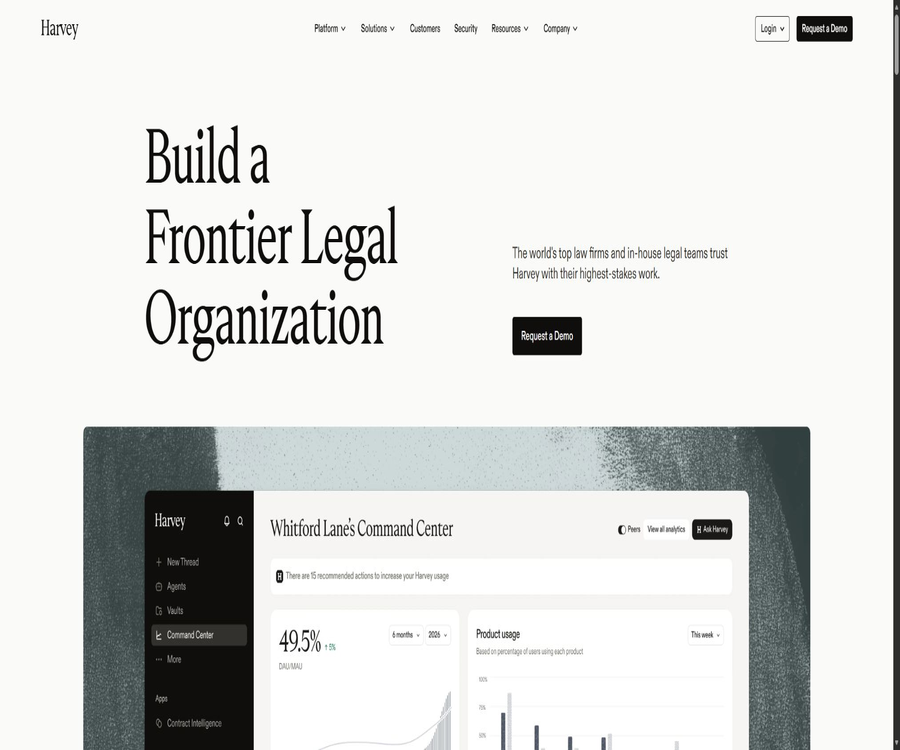
Harvey
Harvey: an intelligent tool focused on AI programming.
Tags:AI programming toolsA one-sentence summary
Harvey is an enterprise-level legal AI platform designed for law firms, corporate legal departments, and other professional service teams; it helps with research, document drafting, contract review, batch document analysis, and the execution of reusable workflows.
Tool Introduction
Harvey is operated by Harvey AI Corporation, and its primary users are not ordinary consumers, but rather professional organizations that require functions such as access management, internal knowledge management, auditing, and data isolation. The platform integrates general dialogue, legal document retrieval, document storage, review forms, and workflow agents within a single corporate environment.
It employs a multi-model architecture, and the models available in the workspace vary depending on the region, administrator settings, and product updates. Harvey does not replace lawyers, accountants, or other professionals; critical conclusions and final deliverables still need to be reviewed by qualified individuals.
Main components of the platform
| module | Primary uses | Typical input | Main results |
|---|---|---|---|
| Assistant | Research, Q&A, drafting, and multi-step tasks | Questions, instructions, files, or workspace knowledge | Answers with citations, analyses, drafts, and editable documents |
| Vault | Centralized management of case, transaction, or project documents | Contracts, evidence, due diligence materials, and internal documents | Document Q&A, cross-file analysis, and project knowledge space |
| Review Tables | Batch extraction, comparison, and verification of fields | A large number of documents in Vault | Structured tables, difference comparisons, and review records |
| Workflow Agents | Reusing institutional methods and complex procedures | Natural language flows, templates, rules, and playbooks | The results of research, review, or drafting carried out following established procedures |
| Harvey for Microsoft | Working in office documents and email environments | Word documents, Outlook emails, and related attachments | Suggestion for revisions, drafts, summaries, and formatted documents |
| API | Integrate Assistant and Vault capabilities into internal systems. | Prompt words, files, knowledge, or project requests | Flow-based responses, citations, file handling, and form management |
Main functions
Legal research and answered questions with citations
The Assistant can plan the search steps for legal issues, accessing regional legal materials, regulatory documents, public online resources, internal vaults, or authorized third-party databases, and it can include verifiable citations in its responses. The scope of available materials and access rights depend on the region, subscription status, and workspace settings.
The citation feature improves the efficiency of verification, but it does not guarantee that the conclusions are necessarily complete or correct. Users still need to consult the original materials to check the jurisdiction, date, validity, context, and whether there are any opposing authorities.
Contract drafting, modification, and red line analysis
Harvey can generate contract clauses based on instructions, modify existing Word documents, analyze red lines and identify risks, and it can also apply preferred positions and alternative clauses by utilizing institutional templates or negotiation playbooks. The final text should be reviewed by a professional; it cannot be considered formal legal advice.
Multi-step tasks and parallel work
Assistant is able to break down complex requests into multiple steps and confirm with the user when a decision is needed. Some tasks can be processed in parallel using various analysis approaches, making it suitable for due diligence, case preparation, regulatory comparisons, and bulk drafting.
Vault project document space
Each Vault can hold up to 100,000 documents, which are used to organize materials by customer, case, transaction, or research project. Users can pose questions, conduct searches, generate summaries within a particular project, and save the analysis results back to their workspace.
Review Tables – Batch review
Review Tables allows for the extraction of fields from thousands of documents, the comparison of clauses, the identification of anomalies, and the creation of structured tables. Reviewers can modify, verify, and track the content of these tables, but they should still conduct sampling or individual checks on the key fields.
Workflow Agents and custom workflows
Workflow Agents encapsulate the repeated steps of research, review, translation, or drafting into executable processes. Users can use pre-defined agents, or they can create custom processes by describing steps, conditional rules, templates, and output requirements in natural language.
Internal knowledge and organizational standards
Knowledge Sources allow precedents, templates, policies, research materials, and playbooks to be integrated into responses or workflows. Internal knowledge helps to ensure consistency within an organization, but administrators must continuously manage permissions, versions, and outdated materials.
Document, table, presentation, and audio processing
The current Assistant can handle common office documents, and it allows for the creation or editing of PDF, Word, PowerPoint, and Excel files. The platform can also accept audio for transcription, as well as process PST email files; however, the specific formats, file sizes, and available functions depend on the workspace in use.
Notepad and editable drafts
Notepad offers a separate editing area, allowing users to keep multiple drafts, format emails, and convert content into Word files. It is suitable for writing while conducting research, but version control and official archiving should still follow the organization’s own document management procedures.
Which users are it suitable for
- Large and medium-sized law firms: used for research, litigation preparation, contract review, due diligence, and knowledge management.
- Corporate legal team: used for the contract lifecycle, regulatory analysis, internal policies, and collaboration with external lawyers.
- Tax, accounting, and consulting firms: Used for handling professional tasks that involve large volumes of documents, complex rules, and the need for audit records.
- Finance and Investment Team: Used for reviewing transaction documents, comparing terms, conducting compliance research, and organizing project-related materials.
- Knowledge and Innovation Team: Used to transform organizational templates, precedents, and working methods into standardized agents.
- Development and operations team: Utilize REST APIs to integrate legal AI capabilities into internal portals, case management systems, or automated processes.
Typical use cases
- Cross-jurisdictional research: Compare rules, regulatory requirements, and public legal materials, while retaining citations for lawyers to review.
- Contract portfolio review: Extract terms related to duration, responsibilities, changes in control rights, and termination from a large number of agreements.
- Due diligence: View transaction documents using standardized fields, consolidate risks, and track items awaiting confirmation.
- Red lines and negotiations: Identify deviations based on the organization’s playbook, and propose preferred and alternative phrasings.
- Organizing litigation materials: summarizing facts, timelines, evidence, and key issues to assist in preparing memoranda or lists of questions.
- Internal knowledge Q&A: Utilizes precedents, templates, and policies within the permitted scope to reduce repeated searches.
- Professional document creation: Drafts of memos, emails, presentations, and tables are generated and then submitted to the responsible person for approval.
Basic usage tutorial
- The organization is responsible for contacting sales teams to conduct a needs assessment, determining factors such as the scale of the user base, location, data residency requirements, product modules, and contract terms.
- The administrator configures the workspace, identity login, role permissions, model access, knowledge base, retention period, and allowed additional features.
- Select Assistant, Vault, Review Tables, or Workflow Agents, and upload the files you have permission to process or connect to the authorized systems.
- Describe the task objectives, jurisdiction, time frame, output structure, required knowledge, and assumptions that are prohibited.
- Check the quotations in the responses, the locations of documents, the fields in tables, and the results of model inference, and correct any omissions or errors.
- A final review is carried out by a lawyer or a qualified professional, after which it is exported, archived, or shared in accordance with the organization’s procedures.
Batch contract review process
- Create separate Vaults for each customer or transaction, and define members, collaborators, and access boundaries.
- Upload the contracts and verify the status of file parsing; organize scanned documents, attachments, and duplicate versions.
- Create a Review Table to define the fields to be extracted, the criteria for risk assessment, and the locations of the evidence.
- After running the review, check the original text corresponding to each field, giving priority to reviewing items with high risk and low confidence.
- Apply the organization’s playbook to deviation clauses to generate a list of issues, red-line recommendations, or negotiation summaries.
- Record the manual modifications and approval results, then deliver the final data to the case system or in a formal report.
Models and availability
Harvey will offer multiple third-party models on the same platform and continuously adjust the selection of these models. Official updates have listed OpenAI, Anthropic, Mistral, as well as other model series, but the specific models are not considered to be permanent rights available to all customers.
| Project | Current principles | It needs to be confirmed at the time of purchase. |
|---|---|---|
| Model selection | Multi-model platform with continuously updated models | Whether the region, workspace, and administrator are available. |
| Task routing | You can select the appropriate model or platform capabilities based on the task. | Whether users are allowed to manually switch policies or use the default ones. |
| Preview model | It may be available upon application or on a limited basis. | Stability, retention rules, and production usage limitations |
| Expand AI capabilities | To be enabled by the administrator. | Data location, storage, human review, and third-party terms |
Price and purchase methods
Harvey does not disclose any standard monthly fees, prices per seat, or fixed free-tier options; instead, it provides customized quotes based on the size of the team, the scope of deployment, and the product modules utilized. A formal order can only be placed after going through a demonstration or evaluation process, and any unofficial prices should not be considered as current quotes.
| Project | Public price | Billing method | Main content | Suitable for users |
|---|---|---|---|---|
| Product demonstration and evaluation | Contact sales | Confirm according to the evaluation process | Needs analysis, product demonstration, and deployment discussions | Professional agencies prepared for procurement |
| Enterprise platform | Custom quote | In accordance with the terms of the contract and order | Assistant, Vault, Review Tables, workflows, and management capabilities | Law firms, legal departments, and professional service teams |
| Completion API | Purchase separately | In accordance with the contract, permissions, and usage arrangements | Capabilities are enabled through API calls to Assistant. | Enterprises that require system integration |
| Vault and management APIs | Customization range | In accordance with the terms stipulated in the work area contract | Projects, documents, review forms, and management interfaces | Organizations that need to automate their document processing workflows |
What factors usually influence quotes?
- Number of users, team structure, and whether external collaborators are needed.
- Scope of activation for Assistant, Vault, Review Tables, Workflow Agents, and Microsoft integrations.
- Requirements regarding data residency locations, identity management, security audits, and deployment support.
- API permissions, call volume, knowledge integration, and other enterprise integrations.
- Purchase cycle, contract duration, training, and scope of customer success services.
The public pages do not provide a unified refund policy, as costs, deadlines, renewal procedures, and termination terms are usually specified in the corporate order and platform agreement. The purchaser should obtain written confirmation prior to signing the contract regarding the minimum number of seats required, any additional fees, the notice period for renewal, data export options, and the procedures for deletion after termination.
APIs and developer capabilities
Harvey offers REST APIs that use Bearer tokens for authentication; these tokens are created by authorized workspace administrators. If a workspace does not have an API token or the necessary Completion permissions, it is necessary to contact the Customer Success team to obtain them. Subscribing via the web interface does not equate to automatically having access to the API.
| Interface category | Key capabilities | Organizational-level public release rate | Precautions |
|---|---|---|---|
| Assistant Completion | Hint-, file-, or knowledge-driven streaming responses and citations | 20 times per minute | A single prompt can be up to about 20,000 characters long; there are constraints regarding the combination of files and knowledge parameters. |
| Vault API | Operations on projects, files, and Review Tables | 10 times per minute | Appropriate Vault permissions and data boundaries are required. |
| Audit Logs | Export audit events | 60 times per minute | Applicable only to administrators with access to audit data. |
| History Export | Export user history | 60 times per minute | It is necessary to comply with the organization’s retention and privacy policies. |
| Client Matters | Manage customer matter data | 150 times per minute | Availability depends on the contract and permissions. |
API integration steps
- The administrator verifies that the contract includes the required APIs and creates a token with minimal permissions in the workspace settings.
- Select an endpoint environment such as the United States or Europe that meets the organization’s requirements regarding where the data is stored.
- First, use non-sensitive test data to verify requests, streaming responses, citations, error handling, and rate limiting.
- Store tokens securely on the server; do not include them in frontend code, public repositories, or shared documents.
- Establish processes for access logging, retry attempts, rate limiting, manual review, and data deletion, before integrating the official case materials.
Platforms and integration
| Platform or integration | Key capabilities | Usage conditions |
|---|---|---|
| Web page version | Complete workspace, Assistant, Vault, and workflows | Corporate accounts and approved browsers |
| Microsoft Word | Draft, modify, analyze, and format documents | Install add-ins permitted by the enterprise. |
| Microsoft Outlook | Process emails, attachments, and draft replies | Configured according to the tenant and administrator. |
| Microsoft 365 Copilot | Calling the Harvey capabilities in a Microsoft work environment | Appropriate corporate licenses as well as integrated openness are required. |
| iOS and Android | Mobile Q&A, voice input, Vault search, scanning for upload, and history synchronization | Mobile management policies may restrict certain functions. |
| Document management system | Connect to iManage, NetDocuments, SharePoint, Google Drive, or Box | Permissions and connection scope are configured by the administrator. |
| REST API | Integration into internal systems, automation, and data processes | Separate authorization, tokens, and rate limiting |
Mobile capabilities
- Ask questions through Assistant and view the history on your phone.
- Use voice dictation and prompts to enter complex tasks more quickly.
- Search Vault, scan paper documents, and upload photos or files.
- Upload audio for transcription, and share the results within the permitted scope.
- It supports enterprise login and mobile device management; the actual functions are determined by the organization’s policies.
Data privacy and security
Harvey has publicly pledged not to use the data, queries, or outputs uploaded by customers to train general AI models, nor to utilize such information to improve products intended for other customers. Its AI service providers are typically subject to requirements of no data retention and a ban on training; customer-specific models are created only when explicitly requested by the customer, and they are kept isolated.
| Security projects | Public explanation | Companies need to conduct verification. |
|---|---|---|
| Hosting and Residency | Based on Azure, arrangements can be made for regions such as the United States, Europe or Switzerland, and Australia. | The actual storage and processing locations specified in the contract |
| Transmission and storage encryption | AES-256 is used for static data, while TLS 1.2 or a higher version is used for transmission. | Keys, backups, and system integration boundaries |
| Identity and Access | Supports SAML SSO, role-based permissions, IP restrictions, and workspace isolation. | Minimum permissions, offboarding procedures, and control of external collaborators |
| Audit and monitoring | Provides audit logs, continuous monitoring, and security testing mechanisms. | Log range, retention duration, and alarm integration |
| Compliance certification | It publicly lists SOC 2 Type II, ISO 27001, ISO 27701, and ISO 42001, among others. | Certificate scope, validity period, and applicable products |
| Accessibility | Issue a public statement in support of relevant accessibility standards. | Compatibility between the actually deployed version of the organization and supporting technologies |
Special risks associated with expanding AI capabilities
Some of the optional AI enhancements may employ different rules for data storage, manual review, storage location, or third-party processing, and they are usually activated by the administrator. Organizations cannot apply the zero-retention policy of the core platform automatically to all such enhancements; it is necessary to examine the relevant instructions and contracts individually before activating them.
Confidentiality and access management
Before uploading client materials, the firm must verify the requirements regarding authorization, confidentiality, lawyer’s professional ethics, cross-border data transfer, and third-party handling. Vault systems, knowledge bases, document management systems, and external collaborators must be granted permissions that are in line with the rules governing case isolation.
Product advantages
- It is designed around legal and professional service workflows, rather than just providing a generic chat window.
- Bring together citation research, document processing, batch table review, and custom agents on the same platform.
- It can integrate with internal precedents, templates, playbooks, and mainstream document management systems.
- It supports Word, Outlook, mobile devices, and REST APIs, making it easy to integrate with an organization’s existing tools.
- It provides enterprise identity management, permissions, auditing, data residency, and security controls.
- The multi-model architecture allows organizations to choose different model capabilities based on tasks and availability.
Usage restrictions and precautions
- There is no fixed public price or universal self-service trial; the costs associated with evaluation and procurement need to be confirmed with sales.
- AI may generate fictitious facts, incorrect citations, missed exceptions, or outdated legal conclusions, and therefore manual verification is necessary.
- The translation provided is not a certified translation; qualified translators may be required for official submissions or legal documents.
- Models, knowledge databases, mobile functions, and integration vary depending on region, contract, and administrator settings.
- 100,000 documents represent the maximum capacity of a single Vault; this does not mean that all documents can be reviewed without errors in one go.
- The quality of internal knowledge depends on permissions, version control, metadata, and whether the materials remain valid.
- Extended AI functions may require different retention and processing rules, and cannot inherently follow the policies of the core platform.
- The preview feature is usually provided as it is, and should not be used in critical production processes in the absence of verification mechanisms and contingency plans.
- The client must ensure it has the authority to upload, process, and share all materials, as well as control access by external collaborators.
Is it open source?
The Harvey platform is not an open-source product, and no official code repository for hosting a complete version of it has been found. The public REST APIs, development documentation, and integration features merely provide programmable access; they do not imply that the product’s code or model weights are available for use.
To date, no official SDK available for public use has been identified; developers typically integrate the services by following the REST interface documentation. If the sales or customer success teams provide toolkits for specific customers, those tools shall be determined in accordance with the contract and the materials provided in the workspace.
Basic information
| Project | Content |
|---|---|
| Tool name | Harvey |
| Operating entity | Harvey AI Corporation |
| Tool type | Enterprise-grade legal AI and professional services work platform |
| Core module | Assistant, Vault, Review Tables, Workflow Agents, Microsoft integration |
| Price pattern | Custom quotes are provided for enterprises; API access and certain features are enabled in accordance with the contract terms. |
| Is registration required? | Institutional procurement is required, as well as the creation of a corporate account. |
| Whether API is provided | Yes, REST APIs that are subject to permission and contract controls are provided. |
| Is it open source? | No |
| Supported platforms | Web, Word, Outlook, iOS, Android, and enterprise integration |
| Primary users | Law firms, corporate legal departments, tax services, financial services, and professional service teams |
Frequently Asked Questions
Is there a free version of Harvey?
No long-term free version available for the general public, nor any fixed free quota. Companies usually need to contact sales to request a demonstration, conduct an evaluation, and obtain a customized quote.
Can Harvey replace a lawyer?
It’s not possible. It is a supplementary platform for professional work, and its outputs may contain errors regarding facts, laws, citations, and scope of application; therefore, the final decision should be made by qualified professionals who are familiar with the specifics of the case.
Will Harvey use customer files to train the model?
The core platform publicly commits not to use customer data, nor to use such data for training general-purpose models; it also requires AI service providers to refrain from training models and to avoid any data retention. Optional AI enhancements may be subject to different rules, and administrators must verify these rules separately before enabling them.
Does Harvey support APIs?
It supports REST APIs, which enable access to functions such as Assistant, Vault, and certain management features. Generally, these APIs require contractual authorization, workspace permissions, and security tokens; the Completion interface may need to be purchased separately.
Is Harvey a single large model?
No. Harvey is a multi-model application platform that provides various models and integrates legal knowledge, documents, workflows, and enterprise controls; the specific models available may vary depending on the region and the settings defined by the administrator.
Is Harvey suitable for individual lawyers?
Functionally, it can handle the needs of individual lawyers, but the current methods of sales, deployment, and pricing are geared more towards purchases by organizations. Individual users should first determine the minimum order quantity, the data management requirements, and the total cost involved.
Summary
The core value of Harvey lies in integrating legal research, document drafting, bulk review, institutional knowledge, and workflow agents into a controlled corporate environment. It is suitable for professional teams that deal with large volumes of data, have repetitive processes, and require proper permissions as well as audit capabilities.
Before making a purchase, it is essential to verify the coverage of actual models and databases, custom pricing, API permissions, data retention policies, terms related to the expansion of AI functions, as well as the processes for manual review. Only by placing the outputs of AI within a clear framework of professional responsibilities and quality control can the capabilities of such platforms be transformed into reliable production efficiencies.
Tools similar to Harvey



 Guigong Network Security Registration No. 45132202000164