






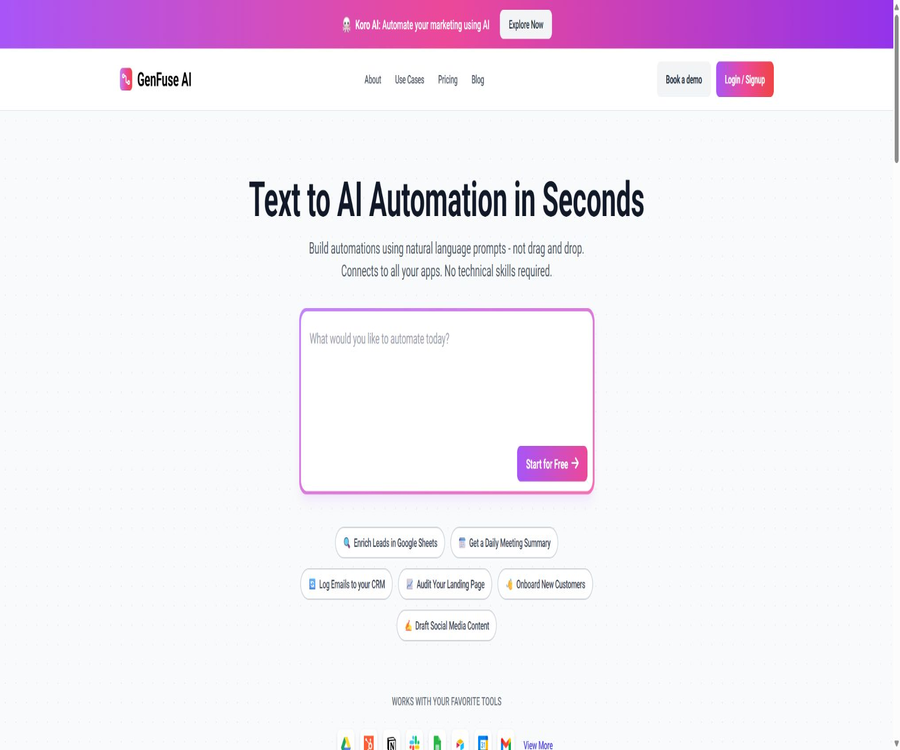
GenFuse AI
GenFuse AI, an intelligent tool focused on AI programming.
Tags:AI programming toolsA one-sentence summary
GenFuse AI is an AI workflow platform designed for business teams and developers; it enables the conversion of natural language tasks into automated processes that consist of triggers, specialized agents, application nodes, and custom tools.
Tool Introduction
GenFuse AI emphasizes describing the goal in text first, after which Gen generates an initial workflow. Users can still examine the nodes on the visual canvas, select models, connect applications, and adjust the way data is transferred.
It is suitable for linking together the repetitive tasks involved in research, sales, marketing, recruitment, document processing, and customer support. The entity listed on the legal page is NextFuse AI Private Limited, with its headquarters located in Bangalore, India.
Main functions
Natural language generation workflow
Users can directly describe the tasks they wish to have automated, such as drafting an email after researching a company, or rating resumes and entering the ratings into a table. Gen will use this information to create the initial nodes and the sequence of operations, thereby reducing the time needed to set everything up from scratch.
Visual workflow canvas
The resulting process can be further edited on the canvas, rather than only accepting a one-time result. Users can examine the inputs, outputs, connection relationships, and configuration settings of each node before deciding whether to put it into formal use.
Professional AI agents
A workflow can include multiple agents that carry out different tasks, such as research, analysis, writing, and review. For each agent, it is possible to specify task instructions, tools, and language models.
Loop patterns and structured output
Agent nodes can process multiple inputs in a loop and generate structured outputs based on predefined fields. This capability is suitable for handling large quantities of leads, candidates, web page information, or table records.
Application integration
The current public page shows integrations with Google Drive, Google Sheets, Gmail, Google Calendar, HubSpot, Notion, Slack, and Airtable. The scope of connectivity and the actions that can be performed are affected by the plan selected, the permissions granted, and any changes in third-party interfaces.
Core node
In addition to AI agents and application nodes, the canvas also provides core nodes such as data loading, conditional branching, and output display. Users can use these to control the flow of the process and pass the results of one step to the subsequent nodes.
Custom Python tools
Users can write custom logic in Python, call external services, and define input and output fields. Once developed, such tools can be saved in a tool library for reuse in other workflows.
Testing, operation records, and sharing
Before releasing a workflow, it is possible to run a trial version and see the steps taken by the agent; past execution results can be viewed in the Use section. By default, workflows remain private, but it is also possible to create sharing links that allow other users to clone copies of them.
Nodes and workflows make up the structure.
| Node type | Main function | Typical uses |
|---|---|---|
| Trigger | Determines when the workflow should be initiated and provides the initial inputs. | Manual tasks, scheduled tasks |
| AI agent | Understand the task, invoke tools, and generate results | Research, classification, writing, scoring |
| Application integration | Read from or write to external business applications | Emails, forms, CRM, collaboration notifications |
| Core node | Load data, set conditions, and display the results | Data transfer, branching, and final output |
| Custom tools | Execute Python logic written by the user or call external services | Internal interfaces, dedicated computing, and data conversion |
The core value of GenFuse AI lies not in generating text on its own, but in enabling multiple nodes to exchange data in sequence and carry out tasks. The quality of the process design depends on input fields, permissions, error handling, and rules for manual review.
Trigger method and online status
| Trigger method | Current status | Explanation |
|---|---|---|
| Manual trigger | Already provided | It runs automatically after the user enters the parameters, making it suitable for testing and on-demand tasks. |
| Timed trigger | Already provided | It operates according to a set time schedule, making it suitable for daily reports, reminders, and regular summaries. |
| Event trigger | Coming soon | The official trigger page still shows “Coming Soon”; it should not be considered a current, official feature. |
| Webhook trigger | Coming soon | The current document does not list it as an official trigger that can be used directly. |
The documentation explains the concept of automation using an event-driven approach, but the dedicated trigger page still lists events and Webhooks as features that will be released in the future. Teams that need to respond in real time to external events should first check whether such functionality is already available in their accounts.
Templates and use cases
The template library covers categories such as sales, marketing, document processing, research, customer support, web page data extraction, human resources, education, and finance. Templates can help speed up the getting-started process, but connecting accounts, mapping fields, and setting approval conditions still require manual configuration.
- Rich in leads: Read corporate leads from Google Sheets, supplement them with public information, and write them back into structured fields.
- Meeting summary: Aggregate calendar or meeting-related data on a daily basis, create summaries, and send them to the team.
- Customer Relationship Management: Identify the content of Gmail emails and record the relevant information in HubSpot.
- Landing page review: It captures the content of the page and provides an assessment based on criteria such as information completeness, presentation quality, and conversion pathways.
- Customer onboarding: Connects forms, emails, documents, and internal notifications to create a repeatable onboarding process.
- Content management: Draft social media content based on research materials, and then have it reviewed and published by human staff.
- Call analysis: Organize the transcribed text, transfer the key information to CRM, and generate draft emails for follow-up.
- Initial recruitment screening: Read PDF resumes, score them according to defined criteria, record the results in a table, and inform the responsible person.
Usage tutorial
Create the first workflow in natural language
- Register and enter the workspace, create a new workflow, and then describe the goal, inputs, and desired output in complete sentences.
- Check the nodes generated by Gen to verify the triggering mechanism, execution order, and the data transmitted between various nodes.
- Provide clear task instructions for each agent, select the appropriate model, and activate only the necessary tools.
- Connect to the required applications, check the authorized accounts, read/write permissions, and field mappings, and avoid using production accounts with overly broad permissions.
- Run the process with a small amount of test data to observe the actual actions and outputs at each step, and then adjust the prompts and conditional branches.
- Enable scheduled execution only after confirming that the results are stable; manual approval is required for tasks involving external sending, deletion, payment, or personnel decisions.
Set up corporate research and email draft processes
- Set the company website or name to manual entry; first use the data loading node to receive the user parameters.
- Create a research agent and configure web scraping and search tools to enable it to extract information on businesses, products, and target audiences.
- Add an intelligent writing agent to convert research results into well-structured, personalized email drafts.
- When adding a Gmail node, save it as a draft first; do not send it automatically to actual contacts during the testing phase.
- Run multiple samples to check whether the facts, tone, and variables are correct, before deciding whether to submit them to sales staff for approval.
Create reusable Python tools
- Clarify the purpose of the tool, and define the required inputs, optional parameters, and structured output.
- Write minimal Python logic; use controlled credentials when calling external services, and set timeouts as well as error handling mechanisms.
- Test it with normal inputs, null values, and abnormal inputs respectively; ensure that no erroneous data is written when a failure occurs.
- Save it to the tool library before adding it to the agent, and grant only the minimum permissions required to complete the task.
- Track version changes and dependency updates; conduct regression testing in a copy before upgrading the tool in the official workflow.
Which users are it suitable for
- Sales team: Used for lead research, CRM updates, and drafting personalized emails, thereby reducing the need for repeated data entry.
- Marketing team: Used for content research, review of landing pages, drafting of social media messages, and organizing event information.
- Operations staff: Connect forms, email, calendars, and collaboration tools into scheduled or on-demand workflows.
- Recruitment team: Organizes resumes and candidate information based on clear criteria, but the final decision is made by the hiring staff.
- Research and consulting personnel: Organize web page research, extract information, classify it, and produce structured outputs.
- Developers and technical operations: Custom tools built with Python are used to address those business logic aspects that cannot be handled by existing nodes.
- Small and medium-sized enterprises: Test AI automation across applications without having to develop a complete backend from scratch.
Product advantages
- Generate an initial process from textual descriptions, thereby reducing the complexity of configuration when dealing with an empty automated canvas.
- The visual editing capability is retained, allowing users to examine and modify the nodes generated by AI, rather than having to accept the results as they are without any ability to make changes.
- It supports arranging multiple specialized intelligent agents within the same process, and allows different models and tools to be selected for various tasks.
- It offers looping, conditional, structured output, and application writing capabilities, enabling coverage of a more comprehensive business workflow than that of a single round of conversation.
- Python custom tools can connect to dedicated interfaces and internal logic, offering both a no-code way to get started and a certain level of scalability.
- The free plan offers a monthly data limit, allowing individual users to test whether the workflow meets their actual needs before deciding to pay for it.
- Workflows are private by default, and cloning-based sharing is provided to allow the original workflow to be retained while the template can be distributed.
Usage restrictions and precautions
- Event-triggered and Webhook-triggered options are still marked as upcoming; at present, no guarantees can be provided regarding their ability to offer seamless real-time automation.
- AI may misinterpret web pages, resumes, emails, and business rules; therefore, human review should be conducted before automatically entering data into CRM or sending messages.
- Different actions and operations consume points, but the public pricing page does not show the exact formula for the cost associated with each action.
- The free version and the Starter plan offer only a limited set of tools; more than 2,500 tools and over 10,000 actions are available as part of the Pro package.
- Third-party integration relies on OAuth permissions and interfaces with external platforms; excessive authorization, invalid tokens, or changes in fields can all lead to risks and failures.
- Custom Python tools can invoke external services, and error codes, uncontrolled input, and exposed credentials can increase security risks.
- High-risk tasks such as recruitment, finance, legal matters, and customer communication should not be handled entirely through automated decisions; it is necessary to assign clear responsible persons for them.
- Enterprise local deployment is a feature supported by Enterprise; it does not mean that the source code is available publicly or that any user can deploy it on their own.
Prices and packages
The following shows the monthly payment options as displayed on the official pricing page as of August 22, 2026. Prices, the range of tools available, and the rules regarding points may change; the actual details should be based on those shown on the account settlement page.
| Package | Price | Monthly points | Core rights and interests | Suitable for users |
|---|---|---|---|---|
| Free | $ | 500 | Unlimited use of Gen to create workflows; all nodes and models; limited tools; scheduled workflows; community support | Personal trials and small-scale process validation |
| Starter | $ | 5,000 | Unlimited use of Gen; all nodes and models; limited tools; scheduled workflows; email support | Continuously operate lightweight, automated solutions for individuals and small teams |
| Pro | $ | 50,000 | All nodes and models; over 2,500 tools; more than 10,000 actions; scheduled workflows; priority support | Teams that require a high degree of integration and significant levels of operation. |
| Enterprise | Custom quote | No fixed upper limit is set. | Custom functions and integration; dedicated experts; local deployment support; dedicated Slack support | Organizations that require governance, customization, and deployment support |
According to the official information, the package is billed on a monthly basis and can be canceled at any time. Points do not correspond to a fixed number of executions; when a complex process involves multiple steps, it is necessary to determine the amount of resources used per execution in the actual account in order to estimate the monthly capacity.
Platform support and integration
| Category | Support status | Explanation |
|---|---|---|
| Web page version | Support | The main interface for creating, editing, testing, and running workflows |
| Windows and macOS | Through a browser | No independent desktop client was detected. |
| iOS and Android | Independent applications not verified | The experience in mobile browsers is based on the actual pages. |
| Google services | Partial integration is supported. | Publicly display Drive, Sheets, Calendar, and Gmail |
| CRM | Partial integration is supported. | Display HubSpot publicly |
| Collaboration and knowledge management | Partial integration is supported. | Publicly display Slack, Notion, and Airtable |
| Custom external services | It can be connected using Python tools. | Users are required to handle the interfaces, authentication, and errors on their own. |
| Enterprise local deployment | Enterprise support | Contact sales for an evaluation; it is not a free self-hosted version. |
The official website uses the phrase “Connect all applications” to describe the product’s vision, but the list of available connectors should reflect those that are currently displayed publicly and those that are actually usable within the account. Before making a purchase, it is advisable to check whether the key applications have the necessary read and write capabilities.
APIs, SDKs, and open-source status
| Project | Current conclusion | Explanation |
|---|---|---|
| Public platform API | No official documentation was found. | It should not be assumed that invoking custom tools against external APIs means that GenFuse provides public APIs. |
| Official SDK | Not found | The currently available documentation does not list the platform SDKs that can be installed. |
| Python extensions | Supports custom tools | It is used to write the logic within workflows, and does not represent the platform SDK. |
| Official GitHub | There is a document repository. | Public warehouses are primarily used to store the content of document pages that have been edited. |
| Product source code | Not open source | The public source code of the workflow platform as well as its product license could not be identified. |
| Local deployment | Corporate support | It is a custom service; it is not equivalent to open-source self-hosting. |
The public GitHub repository does not prove that the GenFuse AI platform itself is open source, nor does it show any information regarding a stable product SDK license. Teams that need to use this platform programmatically should verify with the official team beforehand the available interfaces, authentication procedures, rate limits, and service commitments.
Privacy and data security
The privacy policy states that the platform may process account information, data entered by users, uploaded files, product outputs, search results, communication records, IP addresses, as well as information related to browsers and devices. The workflow may also come into contact with business data stored in emails, spreadsheets, CRM systems, and other third-party applications.
- The authorities state that they will not sell personal data, and they also claim that they will not collect users’ contact lists; the extent to which such data can be accessed depends on the user’s permissions.
- Data can be used to improve products, develop new features, facilitate communication, support marketing efforts, as well as ensure security and compliance; internal policies should be assessed before uploading sensitive information.
- The data licensing provisions in these policies are quite comprehensive, covering usage, modification, display, distribution, and the creation of materials based on such data; companies should conduct a legal review before making any purchases.
- The platform claims to use controlled facilities and encrypted transmission, but it also states that no method of network transmission or storage can guarantee absolute security.
- Users may request corrections, restrictions on disclosure, withdrawal of consent, deletion, or anonymization; the actual scope is governed by applicable laws and retention obligations.
- The service is not intended for children under 13; users under 18 must use it under the supervision of a parent or guardian.
- When authorizing third-party applications, use accounts with the minimum necessary permissions, regularly revoke connections that are no longer in use, and avoid including keys directly in prompts or code.
Basic information
| Project | Content |
|---|---|
| Tool name | GenFuse AI |
| Operating entity | NextFuse AI Private Limited |
| Tool type | AI agents, code-free workflows, and application automation |
| Primary mode of use | Natural language generation plus visual canvas editing |
| Price pattern | Free version, monthly subscription, and custom enterprise quotes |
| Free quota | 500 points per month |
| Is registration required? | It is necessary. |
| Main platforms | Web |
| Run at scheduled times | Support |
| Events and Webhook triggers | It is still indicated as upcoming at the moment. |
| Public API | No official documentation was found. |
| Official SDK | Not found |
| Is the product open source? | No |
| Enterprise local deployment | Support is provided; an assessment on customization is required. |
| Date of information verification | August 22, 2026 |
Recommendation score
Recommendation score: 4.1 / 5. GenFuse AI brings together natural language modeling, multi-agent systems, visual nodes, application integration, and Python extensions in a single workspace, making it suitable for individuals and teams who wish to quickly test business automation solutions.
The deductions are mainly due to the fact that events and Webhook triggers have not yet been officially made available; the rules regarding point consumption are not clear enough, and there are no complete documentation files for the public platform APIs and SDKs. It is advisable to test key processes using the free quota first, and then select a suitable package based on the scope of the connectors and the relevant governance requirements.
Frequently Asked Questions
Is GenFuse AI free?
A free plan is available at 0 dollars, offering 500 points per month. With this free plan, it is possible to use Gen to create workflows, as well as all types of nodes and language models; however, the range of tools and the level of support are limited.
Is it a completely code-free tool?
Common workflows can be carried out using natural language and visual nodes. When specialized logic is required, it is also possible to write custom Python tools; thus, a better approach is to prioritize no-code solutions while still allowing for code-based extensions.
Can it run automatically on a scheduled basis?
Yes, the current packages all include scheduled workflows. Event-triggered and Webhook-triggered options are still indicated in the official documentation as upcoming features.
Which applications are supported?
Currently, Google Drive, Sheets, Calendar, Gmail, HubSpot, Notion, Slack, and Airtable are available for public viewing. The specific actions permitted, the scope of authorization, and the availability of various packages should be checked within the workspace.
Is an API provided?
At present, no complete and publicly available API documentation for the GenFuse platform can be found. Custom tools are able to call external APIs, but this does not mean that the platform itself provides public APIs.
Is GenFuse AI open source?
The product itself is not an open-source platform. The content available on GitHub is primarily in the form of documentation repositories; this does not mean that the source code for the workflow services, execution engines, or agents is open source.
Can enterprises deploy it locally?
The Enterprise package lists support for local deployment, but it is necessary to contact sales for an evaluation. It belongs to enterprise services, and there is no open-source deployment package available for download on one’s own.
How are points spent?
The official pricing lists the monthly points associated with each package, but the current public page does not show the exact calculation formula for the costs associated with each step. It is recommended to first test representative processes and estimate the actual costs based on the results of those tests.
Can the generated results be used directly in business operations?
It can be used for research, classification, and drafting purposes, but manual verification should not be skipped. Actions such as sending emails, updating CRM records, evaluating candidates, and handling financial and legal matters particularly require approval and traceable records.
Can workflows be shared?
Others can clone a workflow by sharing a link. Workflows are private by default, so real data, internal prompts, and sensitive credentials should be removed before sharing.
Is it suitable as a replacement for professional automation platforms?
It is suitable for quickly establishing AI-driven processes, but whether it can replace existing platforms depends on factors such as connectors, event triggering, error recovery, auditing, and API requirements. Complex production systems should first undergo small-scale testing.
Summary
GenFuse AI is suitable for combining research, content creation, sales, recruitment, and operational tasks into testable multi-agent workflows. Natural language generation lowers the barrier to getting started, while the visual canvas along with Python tools provide room for further customization.
Before making a choice, it is essential to carefully verify the required connectors, the points awarded per execution, the triggering mechanisms, and the data licensing terms. For critical operations, it is recommended to use the principle of minimum permissions, test data, manual approval, and operation logging, in order to prevent AI-generated outputs from leading to irreversible actions.
Tools similar to GenFuse AI



 Guigong Network Security Registration No. 45132202000164