






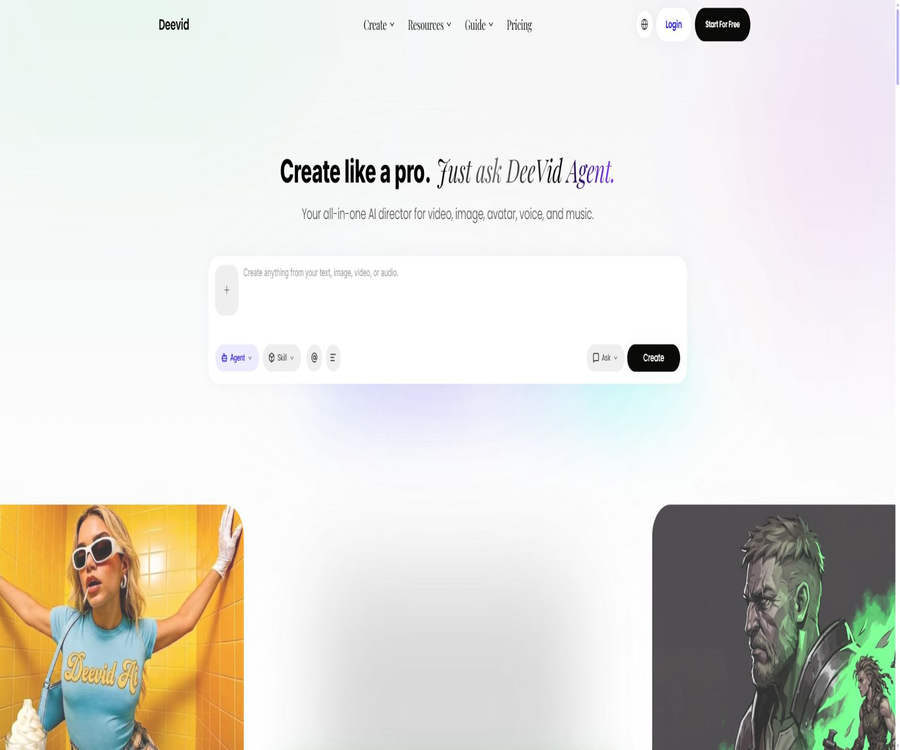
Free AI Video Generator
Free AI Video Generator, an intelligent tool focused on AI programming
Tags:AI programming toolsWhat is DeeVid AI?
DeeVid AI is an AI-based platform for creating videos and images, designed for individual creators, marketing teams, and e-commerce users. Users can use text, photos, videos, or audio as input to generate videos, images, digital avatars, voiceovers, and music.
The current product integrates the Creation Agent, Canvas, and Editor into a single workflow: the agent is responsible for planning and generating content, Canvas is used for placing and adjusting elements, while the Editor is used to make further modifications.
A one-sentence summary
DeeVid AI can convert text, images, and existing videos into short videos, and it offers capabilities for adding advertisements, using digital avatars, handling audio and music, providing templates, utilizing multiple models, and enabling visual editing.
Core creative workflow
| Phase | Tools | Main function | Typical output |
|---|---|---|---|
| Conceptualization | Creation Agent | Understand the goals, plan the content, and iterate. | Creative concepts and initial materials |
| Generate | Video and Image Generator | Invoke the model suitable for the task. | Video clips and images |
| orchestration | Canvas | Drag and drop, placement, and partial adjustment | The combined creative canvas |
| Improve | Editor | Continue to modify and finalize the final version. | Videos can be published. |
| Expansion | Avatar, Voice, and Music | Add characters, voices, and music. | Complete audiovisual content |
Text to video generation
Text to Video generates scenes, actions, camera angles, and visual styles based on natural language descriptions. The more specific the instructions are, the more likely it is that the characters, environment, camera movements, and pacing will meet the desired outcomes.
What should be included in the prompt?
- Subject: People, animals, products, or objects.
- Environment: location, time, weather, and background.
- Action: How the subject moves or interacts with its environment.
- Camera lens: shot size, camera position, movement, and focus changes.
- Style: Realistic, animation, film, advertising, or social videos.
- Light and color: warmth and coolness, brightness and darkness, and atmosphere.
- Restrictions: Objects, text, or distortions that are not desired.
Convert images to videos
Image to Video converts a static image into a short video with motion; it allows adding actions, camera shots, and transitions to people, products, landscapes, or illustrations. High-quality original images generally preserve the details of the subject more easily.
Suggestions for preparing the original image
- The subject is clear and well distinguished from the background.
- Avoid severe compression, blurring, and over-sharpening.
- The hands, face, and limbs of the figures should be as complete as possible.
- Select landscape, portrait, or square format in advance on the final platform.
- Do not upload unauthorized portraits, trademarks, or copyrighted materials.
Video-to-video conversion and reference generation
Video to Video allows for changing the style, visual appearance, or content of existing footage, while Reference to Video uses reference materials to help maintain the characters and visual direction. The outcome is still influenced by the model, the length of the materials, and the complexity of the movements.
Contents suitable for modification
- Convert live-action footage into an animated or visual style.
- Create different creative versions for existing lenses.
- Create short sequential videos using reference characters.
- Multiple materials are created in accordance with the brand’s visual consistency.
- Expand product images into demonstration and advertising clips.
AI-generated ads
AI Ads is designed for product presentation and social advertising; once users upload product materials, it generates promotional videos suitable for various channels. Batch variations allow for testing different openings, visuals, copy, and target audiences.
Points to consider when creating ads
The appearance, functionality, price, and performance of the product must match those of the actual product. AI-generated models, usage scenarios, or results cannot replace compliance with advertising regulations and fact-checking.
Consistency between AI digital humans and characters
AI Avatar can transform a photo of a person into a digital character on screen; the package also includes the feature of Cross-Video Character Consistency. It is suitable for regular programming, virtual characters, and brand content created in multiple scenarios.
Role consistency does not guarantee that every frame will be exactly the same; complex movements, occlusions, multiple characters, and different viewing angles can lead to changes in the face, clothing, or body. It is necessary to check each frame individually before release.
Text-to-speech and AI music
Text to Speech can convert scripts into natural speech, while AI Music can generate music based on the desired emotion. The platform integrates sound and music into a single creation process, reducing the need to transfer files back and forth between different tools.
Suggestions for the use of sound and music
- The script breaks sentences according to the actual pauses and standardizes the way numbers are pronounced.
- Proper nouns, abbreviations, and foreign words should first be listened to for their pronunciation.
- The volume of the background music should not drown out the narration.
- Do not imitate a recognizable individual’s voice without permission.
- Keep the generation records before commercial use and verify the rules of third-party platforms.
AI image generation and editing
DeeVid AI offers text-to-image generation, reference image creation, and AI-based image editing; it can be used to prepare characters, backgrounds, product scenarios, and storyboard elements for videos. Image generation also consumes credit points on the platform.
Canvas and Editor
Canvas offers functions for dragging and adjusting positions, allowing users to place elements where they wish and make further modifications. The Editor is used to refine the resulting output within the same workflow, preventing the need to rely on a single set of instructions to complete the entire project.
Tasks that are suitable for being completed on a canvas
- Arrange reference images, characters, backgrounds, and video clips.
- Replace the theme while preserving the original creative structure.
- Local modifications are requested for individual elements.
- Compare multiple versions and choose the direction for further iteration.
- Combine generation, modification, and final assembly into a single project.
Templates and popular special effects
The paid package offers over 100 AI video templates and effects that can be used for popular short videos, animations, photo edits, and social media content. These templates help increase efficiency, but it is still necessary to avoid copying the identity of others or protected works without authorization.
Supported mainstream models
On the home page, the following models are currently listed: Seedream, Sora 2, Veo 3.1, DALL-E 2, Wan 2.1, Runway, Kling, Hailuo, Stable Diffusion, Vidu, Haiper, Luma, Nano Banana Pro, and Pika.
The list of models and the available versions change as partnerships, regions, and products evolve; the fact that a particular model is displayed on the home page does not mean it is available in all packages, for all duration periods, and at all resolutions.
| Model or series | Main types | Uses in DeeVid | Choose to pay attention. |
|---|---|---|---|
| Veo 3.1 | Video generation | High-quality video tasks | The quota usage and availability are subject to the details on the creation page. |
| Sora 2 | Video generation | Text or visual video | The capabilities of different modes may vary. |
| Kling, Hailuo, Vidu | Video generation | Action and short video generation | Measured by language and camera footage |
| Runway, Luma, Pika | Video and creative generation | Style, motion, and special effects | The actual version is subject to the model selector. |
| Wan 2.1, Haiper | Video generation | Diverse video tasks | Complex characters still require review. |
| Seedream, DALL-E 2 | Image generation | Characters, scenes, and storyboards | Errors may occur in the text and handwriting. |
| Stable Diffusion | Image generation | Visual materials in various styles | The specific models and licenses are not specified. |
| Nano Banana Pro | Image generation and editing | Refer to diagrams and make creative modifications | For commercial use, it is also necessary to check the input rights. |
Create text-based video tutorials
- Register and access the video generation tool to check your remaining credit points.
- Select Text to Video and the appropriate model.
- Specify the subject, scene, action, shot, lighting, and style.
- Select the frame size, duration, resolution, and other available advanced parameters.
- Generate a low-cost test version first and check the main functions.
- Make modifications one by one to address a specific issue; do not rewrite all conditions at once.
- Once satisfied, the final version is generated and the final video is completed in the Editor.
Tutorial on creating video from images
- Prepare high-quality images with clear ownership and usage rights.
- Select Image to Video and upload the original image.
- Use cues to describe the actions and camera movements that are desired.
- Avoid having body parts that are not visible in static images perform complex movements.
- After generation, check the continuity of the face, hands, background, and objects.
- When a series of content is needed, save the character and utilize consistency features.
- Before exporting, verify the watermark, resolution, and status of the commercial license.
Tutorial on creating product advertisements
- Prepare materials of the product’s front, side, details, and actual usage scenarios.
- Specify the brand, target audience, channels, proportions, and video length.
- Select AI Ads or an appropriate template to create multiple opening versions.
- Check whether the product’s color, packaging, labels, functions, and price are accurate.
- Add approved copy, narration, and music.
- Adjust the position of subtitles and the main content according to the secure area of the target platform.
- It is only published after manual review and confirmation of ad compliance.
Create video tutorials for digital avatars
- Obtain the subject’s consent and prepare a clear, front-facing photo.
- Select the AI Avatar and upload the character assets.
- Enter the script and select a voice that matches the language and tone.
- Set the background, camera angle, frame size, and character actions.
- Generate short videos to test lip movements, pronunciation, and facial stability.
- Expand after correcting proper nouns, pauses, and unnatural actions.
- When releasing content to the public, AI-generated content must be disclosed in accordance with the requirements of different regions and platforms.
Which users are it suitable for
- Short-video creators: Turn ideas, photos, and templates into content quickly.
- Marketing team: Creates product advertisements, promotional materials, and various test versions.
- E-commerce sellers: Use product images to create display, scenario, and demonstration videos.
- Designer: Creates storyboards, backgrounds, visual effects, and dynamic concepts.
- Independent entrepreneurs: Preparing promotional videos in the absence of a complete production team.
- Virtual character operator: Maintains the characters and creates regular content.
- Educators and trainers: Create explanatory visuals, narration, and background music.
- Regular users: Make photos move or create personal memory videos.
Typical use cases
- Convert product photos into vertical social media ads.
- Generate short videos, narration, and background music based on the script.
- Create natural movement in characters, pets, or illustrated photos.
- Convert existing videos into a new visual style.
- Generate in bulk ad versions with different openings, visuals, and target audiences.
- Create content for virtual hosts, digital employees, or brand characters.
- Create animated concept videos for stories, games, or proposals.
- Use popular templates to quickly get involved in the trends on social media platforms.
Product advantages
- A single platform that covers videos, images, digital avatars, audio, and music.
- It supports various types of input, including text, images, videos, and audio.
- Creation Agent, Canvas, and Editor form a continuous workflow.
- It aggregates multiple mainstream video and image models, making it easy to select the appropriate one for a given task.
- The paid plan offers role consistency, quick mode, and over 100 templates.
- The same account is used for Web, iOS, and Android.
- New users can use 20 free credit points to test the core features first.
- Paid generation offers watermark-free options, private creation, and full commercial use.
Usage restrictions and precautions
- The free registration offer provides only 20 credit points, which is enough to create about 4 basic videos.
- Different models, durations, resolutions, and modes may require different amounts of credit points.
- The “maximum number of videos” listed on the pricing page is estimated based on low-energy usage scenarios; it does not apply to all models.
- Videos created by free users come with watermarks.
- Lite supports up to 720P; 1080P requires Pro or Premium.
- AI characters, hands, text, physical movements, and continuity can still make mistakes.
- The generated results are not guaranteed to be distinct from third-party works; rights should be checked before commercial use.
- For automatic renewal subscriptions, payments made and credit points used are generally non-refundable.
- The content policy prohibits impersonation without consent, fraud, infringement of rights, and non-consensual intimate content.
- No public developer API, official SDK, or official GitHub was found.
Annual package price
| Plan | Monthly price equivalent to annual payment | Annual total price | Monthly credit points | Resolution | Suitable for users |
|---|---|---|---|---|---|
| Lite | 10 dollars per month | 120 dollars per year | 200 | Up to 720P | Introduction and lightweight content |
| Pro | $ | $ | 600 | Up to 1080P | Continuous creators and small teams |
| Premium | $ | $ | 3,000 | Up to 1080P | High-volume professional users |
Price of monthly subscription plan
| Plan | Monthly price | Monthly credit points | Official estimated production volume | Additional support |
|---|---|---|---|---|
| Lite | 14 dollars per month | 200 | Up to 40 videos or 100 images | Standard features |
| Pro | 35 dollars per month | 600 | Up to 120 videos or 300 images | 1080P |
| Premium | $ | 3,000 | Up to 600 videos or 1,500 images | Priority support |
The price verification date is August 22, 2026. The annual page indicates a savings of around 29% compared to monthly payments; taxes, the local currency, in-app purchases, and promotional prices may vary.
Comparison of package features
| Functions | Free | Lite | Pro | Premium |
|---|---|---|---|---|
| Registered credit points | 20 o’clock | 200 points per month | 600 points per month | 3,000 points per month |
| Video watermark | Yes | None | None | None |
| Highest resolution | The creation page is the standard. | 720P | 1080P | 1080P |
| Video and image models | Limited experience | Support | Support | Support |
| Over 100 templates and special effects | Not listed | Support | Support | Support |
| Consistency across video characters | Not listed | Support | Support | Support |
| AI advertising, digital humans, and music | Limited experience | Support | Support | Support |
| Quick generation mode | Not listed | Support | Support | Support |
| Private creation | Not listed | Support | Support | Support |
| Full commercial use | Not listed | Support | Support | Support |
| Priority support | Not supported | Not supported | Not supported | Support |
Credit point rules
Credit points can be used to create videos, images, or audio; the actual amount consumed depends on the model and parameters chosen. New users receive 20 points upon registration, while paid users can purchase additional credit packs as needed.
The price page states that the credit points purchased are valid for one year from the date of purchase. A membership upgrade takes effect immediately; the original plan ceases to be renewed, and any unused credit points are transferred to the new plan, with its own validity period applying.
| Task variables | Why does it affect the credit score? | Savings suggestions |
|---|---|---|
| Model | High-quality or high-cost models usually consume more. | First, verify the composition using a low-cost approach. |
| Video duration | Longer segments require more computing power. | Break it into short shots and edit them. |
| Resolution | 1080P usually has a higher cost than 720P. | Use low resolution during the draft stage. |
| Regenerate repeatedly | A new generation will result in another charge each time. | Modify only one variable at a time. |
| Images and audio | The same credit point system is also used. | Include the total cost of the project in the budget. |
| The model failed. | Whether a refund is given depends on the platform’s rules. | Retain task records and contact support promptly. |
Subscriptions, automatic renewal, and refunds
Both monthly and annual subscriptions are automatically renewed. The account can be canceled on the account page, and the service will continue until the end of the current billing cycle; according to the refund and fraud policies, cancellation must be requested at least 7 days before the renewal date, while the terms of service require it to be done at least 24 hours in advance. Therefore, it is advisable to carry out the cancellation earlier.
Under normal circumstances, subscriptions, credit points, and other paid services cannot be refunded once they have been provided; subjective dissatisfaction does not constitute a service failure. Complete unavailability for 72 consecutive hours, obvious repeated charges, or situations dictated by law may be considered on a case-by-case basis.
Commercial rights and content ownership
The pricing page lists full commercial use as part of the features available in the Lite, Pro, and Premium tiers; the content generated can be used for advertising, social marketing, and promotional purposes. The free tier does not specify the full range of commercial rights, and commercial projects should opt for a paid subscription plan.
Between the user and DeeVid AI, the rights to input data remain with the user or the original rights holder, while the rights to the content that is generated belong to the user. The legal framework regarding the ownership of AI-generated content is still evolving, and the platform cannot guarantee that the output will not infringe upon the rights of third parties.
Portraits, Copyright, and Content Policy
Users must have the necessary rights to upload images, videos, and other materials. It is not allowed to use someone else’s portrait or biological data for purposes of impersonation without consent, surveillance, fraud, or creation of non-consensual intimate content.
- Document portrait permissions, material licenses, and brand approvals.
- Do not use AI-generated characters to create fake professional endorsements.
- Political, health, and high-risk content must not be used to deliberately mislead people.
- Do not claim that AI-generated content is entirely created by humans in order to deceive others.
- When creating ads, verify the products, their performance, and all promotional claims.
- The platform can remove illegal content and suspend or close accounts.
Supported platforms
| Platform | Support status | Primary uses |
|---|---|---|
| Web browser | Support | Complete creation, Canvas, and Editor workflows |
| Windows | Available via Web | Creation with desktop browsers |
| macOS | Available via Web | Creation with desktop browsers |
| iOS | Provide an official app | Creation of mobile videos and images |
| Android | Provide an official app | Creation of mobile videos and images |
| Cross-device account | Support | The same account can be used on both computers and mobile phones. |
| Public API | No findings were detected. | It is not possible to connect using the official development interfaces. |
| Standalone desktop application | No findings were detected. | Based primarily on the Web and mobile apps |
API, SDK, and open-source status
As of the time of verification, the official website does not disclose information regarding developer APIs, SDKs, pricing for these interfaces, or any relevant documentation; nor is there an official GitHub organization that can verify identity. The capabilities claimed by third-party websites regarding these interfaces cannot be considered as official information.
| Project | Current status | Conclusion |
|---|---|---|
| DeeVid AI platform | Managed business services | The product is not open-source. |
| Public API | No findings were detected. | One should not claim to support it. |
| Official SDK | No findings were detected. | There is no public list of available languages. |
| Official GitHub | Not confirmed | Warehouses with the same name cannot be considered official. |
| Third-party models | Aggregated use on the platform | It doesn’t mean that the DeeVid source code is open. |
| Private deployment | Not disclosed | It cannot be deployed manually through the existing page. |
Privacy and data collection
The platform may collect email addresses, usernames, encrypted passwords, information used for third-party logins, transaction records, billing addresses, prompts, uploaded materials, data from AI interactions, and communications with customer service. The system also collects data related to the device, browser, IP address, pages visited, clicks made, and the use of various functions.
Payments are processed by third parties, and DeeVid AI does not store the full credit card numbers. Personal data is primarily stored in data centers in North America, though it may also be processed in other locations as required by law.
Face data processing
The privacy policy states that when images containing faces are uploaded, it is only done to determine the position and outline of the face during the processing stage; no biological database that can identify an individual’s true identity is created, and such data is not used for identification, tracking, or advertising purposes.
Face images and related data are processed temporarily and deleted immediately after the task is completed; they are not shared with any third parties. Users can also choose not to upload face images, and they will still be able to use all the other core functions.
AI training and data retention
The privacy policy specifies that users’ suggestions, uploaded images or videos, as well as the data used to train AI models, are not utilized. Third-party AI services are also required, in accordance with the agreement, to process requests only, not to retain any data after completion, and to comply with applicable data protection rules.
| Data type | Public reservation rules | Precautions |
|---|---|---|
| Account information | 30 days from the end of the account’s validity period until it is deleted | Legal requirements may allow for exceptions. |
| Transaction records | Usually 7 years | Used for financial and legal obligations |
| Using data | Usually 12 months | It can be used to summarize performance analysis. |
| User input and output | Delete it as soon as possible, unless the user saves it intentionally. | You need to check the save status of the project yourself. |
| Logs | Usually 90 days | May include device and access records. |
| Face images and related data | Delete it immediately after the task is completed. | Applicable only to the facial processing described in the policy. |
Basic information
| Project | Content |
|---|---|
| Tool name | DeeVid AI |
| Tool type | AI platforms for video, image, digital human, voice, and music generation |
| Core input | Text, images, videos, and audio |
| Core output | Videos, images, digital avatars, voiceovers, and music |
| Price pattern | Free registration for credit points, monthly payment, annual payment, and additional purchase of credit points |
| Free quota | Register to get 20 credit points, which is equivalent to about 4 basic videos. |
| Is registration required? | Creating and saving content requires an account. |
| Main platforms | Web, iOS, and Android |
| Highest paid resolution | Lite: 720P; Pro and Premium: 1080P |
| Commercial use | Lite and later versions explicitly support it. |
| Public API | No findings were detected. |
| Official SDK | No findings were detected. |
| Is the product open source? | Not open source |
| Official GitHub | Not confirmed |
| Applicable Law to the Terms | Singaporean law |
| Price verification date | August 22, 2026 |
Recommendation score
Recommendation score: 4.4 / 5. DeeVid AI integrates multiple types of content such as videos, images, digital avatars, voice recordings, music, and editing tools into a single workflow, making it suitable for users who need to generate various visual materials quickly.
The main drawbacks are that the amount of credit points consumed varies depending on the model, the free quota is limited, a higher plan is required for 1080P resolution, and the refund policy is strict. It is not suitable for teams that need to develop interfaces or have a platform that can be deployed privately.
Frequently Asked Questions
Is DeeVid AI free?
New users who register receive 20 free credit points, which are sufficient to view approximately 4 basic videos according to the official estimates. The videos generated in this free capacity come with watermarks; once those credits are used up, it is necessary to subscribe or purchase more credit points.
How much is the Lite plan?
The monthly fee is 14 dollars; the annual cost is 120 dollars, which equals 10 dollars per month. This plan includes 200 credit points per month and a maximum output of 720P.
How much is the Pro plan?
The monthly fee is 35 dollars; the annual cost is 300 dollars, which amounts to 25 dollars per month. This package includes 600 credit points per month and a video output resolution of up to 1080P.
How much is the Premium plan?
The monthly fee is 159 dollars; the annual cost is 1,428 dollars, which equals 119 dollars per month. This package includes 3,000 credit points per month, 1080P resolution, and priority support.
How many credit points does a video consume?
There is no fixed value; it depends on the model, duration, resolution, and mode. The maximum number of videos that can be displayed on the pricing page is estimated based on low resource consumption.
Do credit points expire?
The price page states that the credit points purchased are valid for one year from the date of purchase. The quota included in the subscription and the deadline for upgrading shall be as indicated in the account details.
Is there a watermark in the free version?
Yes. Videos created after upgrading to a member account come without watermarks.
Can the generated content be used for commercial purposes?
Lite, Pro, and Premium all include full commercial rights, which can be used for advertising, social marketing, and promotion; however, users still need to have the rights to provide the input materials and to check for any potential copyright issues in the output.
Are Chinese prompts supported?
The platform is designed for users in various regions, but different models have varying levels of proficiency in understanding Chinese. Complex scenarios can be tested using both Chinese and English prompts.
Which models are supported?
The home page lists Veo 3.1, Sora 2, Kling, Runway, Hailuo, Luma, Pika, Seedream, and Nano Banana Pro, etc.; the actual available versions are subject to those on the creation page.
Can it be used on a mobile phone?
Yes, official iOS and Android apps are available, and the same account can be used in a computer browser as well.
Can I cancel my subscription?
Cancellation can be done on the account page; once cancelled, it remains valid until the end of the current period. To avoid automatic renewal, it is recommended to cancel at least 7 days in advance.
Can I request a refund?
Generally, this is not possible; payments and the credit points delivered constitute the final settlement of the transaction. Circumstances such as complete unavailability for 72 consecutive hours, repeated charges, or legal requirements may be handled on a case-by-case basis.
Will the data be used to train AI?
The privacy policy clearly states that user prompts, uploaded images or videos, as well as the outputs generated, are not used to train AI models.
Will face images be stored for a long time?
According to the policy, the location and outline of facial features are processed only on a temporary basis for the current task; they are deleted immediately after the task is completed, and no permanent database of facial features is created.
Does DeeVid AI have an API?
As of the time of verification, no public official API or development documentation was found; therefore, developers cannot consider the website’s functions as supported interfaces.
Is DeeVid AI open source?
It is not open source, and no official GitHub repository that can verify the identity exists. The fact that the platform aggregates third-party models does not mean that its own code is made available publicly.
Summary
DeeVid AI is suitable for creators who wish to carry out AI-based video, image, digital avatar, voice, and music production on a single platform. The various model options, Creation Agent, Canvas, and Editor enable coverage of all the key stages, from concept to the final product.
It is recommended to use the 20 free credit points to test the stability of the commonly used models and characters first; thereafter, choose between Lite, Pro, or Premium based on resolution and monthly output volume. Before making a purchase, it is necessary to understand the rules regarding automatic renewal and refunds, and before using them for commercial purposes, check the policies related to portraits, copyrights, facts, and platform regulations.
Tools similar to Free AI Video Generator



 Guigong Network Security Registration No. 45132202000164