






Dubbah
Dubbah, an intelligent tool focused on AI programming.
Tags:AI programming toolsA one-sentence summary
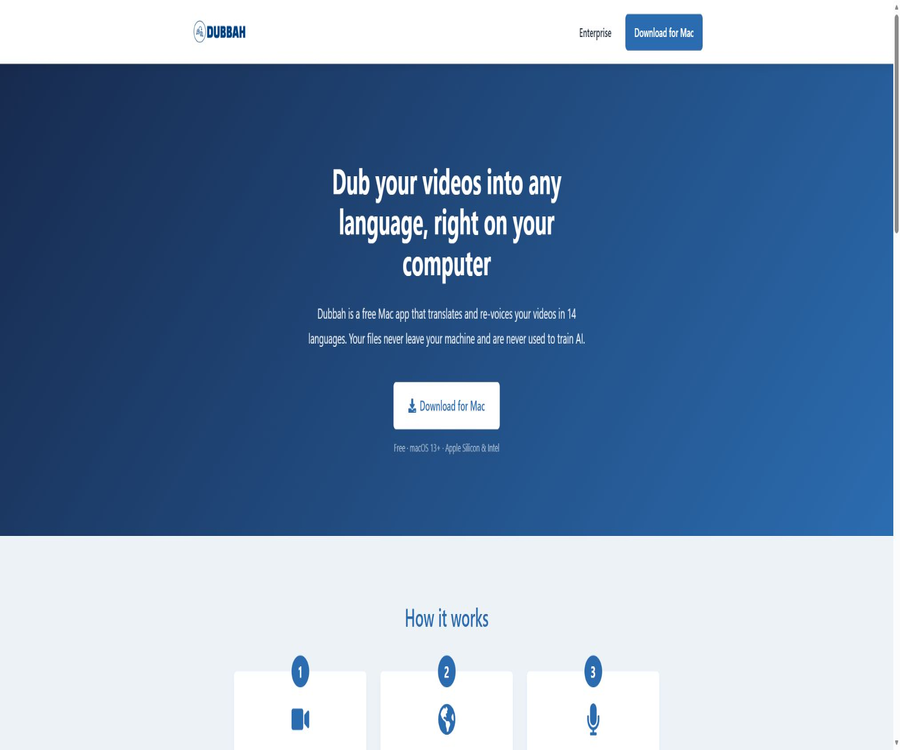
Dubbah is a free local AI video dubbing application for Mac; it allows for translating dialogue on the device itself, matching the original speaker’s voice tone, adjusting text and timing line by line, and exporting the result in multiple languages. There is no need to upload videos or audio to external servers.
Tool Introduction
Dubbah was developed by Dubbah Inc., and it is intended for video creators, educators, and small teams. It integrates transcription, translation, text-to-speech synthesis, and video/audio editing into a desktop application, addressing the issues associated with pay-per-minute pricing in cloud services as well as the problem of transferring sensitive content outside those platforms.
The application is compatible with macOS 13 or later, and is available in both Apple Silicon and Intel Mac versions. Initial setup requires an internet connection to download or update the AI models; once this is done, the application can be used offline.
Core working method
| Phase | User operations | Local processing | Results |
|---|---|---|---|
| Import video | Drag in MP4, MOV, or other common video formats | Read track and timing information | Projects awaiting voiceover |
| Select language | Select one or more target languages. | Transcribe and translate the dialogue. | Target text sentence by sentence |
| Voice matching | Use the audio of the speaker from the original video. | Generate target speech that is close to the original audio tone. | Dubbing clip |
| Manual review | Modify the translation, timing, or specified segment. | Regenerate individual segments | A more accurate voice-over track |
| Local export | Preview and confirm | Synthesize audio and video on the device | Target language in segments |
Main functions
Local video translation
Video translation and redubbing are carried out on the Mac, so there is no need to send the materials to Dubbah’s servers. For unreleased courses, interviews, and internal videos, this approach makes it easier to control data boundaries compared to the typical cloud upload process.
Original audio matching and voice cloning
Dubbah will maintain a voice that is similar to that of the speaker in the original video, in the target language. Similarity in voice does not mean that emotions, accent, and pronunciation are exactly the same; it is still necessary to listen to each segment individually before the final release.
14 publicly available target languages
The official website currently lists Spanish, English, Hindi, Mandarin, Arabic, Japanese, Portuguese, French, German, Korean, Italian, Polish, Turkish, and Tamil. Users can select one or more target languages at a time.
Sentence-by-sentence text editing
After it is generated, each line of the translation can be checked and revised directly; this approach is suitable for correcting names, brands, terms, and cultural expressions. After making changes to the text, it should be listened to again to avoid irregular speech patterns caused by changes in sentence length.
Time adjustment
Users can adjust the timing of each segment to make the target audio more in line with the rhythm of the original video. The product’s official page does not indicate whether professional-level timelines, frame-by-frame synchronization, or lip-syncing are available.
Single-segment regeneration
When not satisfied, there is no need to redo the entire video; it is possible to regenerate only specific sentences. This design helps save local computing time and makes it easier to make gradual adjustments to pronunciation and tone.
Work offline
After the initial model has been downloaded, the application can process videos without an internet connection. Offline mode is suitable for travel, filming locations, and situations with limited internet access; however, the speed depends on the Mac’s processor, memory, and the length of the video.
No account is required.
Once it is downloaded and installed, it can be used right away – no registration, email address, or login is required. It reduces the need to manage account data and passwords, but the user is responsible for backing up projects, accessing devices, and ensuring file security.
Language support
| Code | Language | Public support status |
|---|---|---|
| ES | Spanish | Listed on the official website |
| EN | English | Listed on the official website |
| HI | Hindi | Listed on the official website |
| ZH | Mandarin | Listed on the official website |
| AR | Arabic | Listed on the official website |
| JA | Japanese | Listed on the official website |
| PT | Portuguese | Listed on the official website |
| FR | French | Listed on the official website |
| DE | German | Listed on the official website |
| KO | Korean | Listed on the official website |
| IT | Italian | Listed on the official website |
| PL | Polish | Listed on the official website |
| TR | Turkish | Listed on the official website |
| TA | Tamil language | Listed on the official website |
How to understand 14 types and 23 languages
According to the latest updates from Dubbah, the default voice model Chatterbox Multilingual v3 is capable of maintaining a consistent voice tone in 23 different languages; however, the application page on their official website lists only 14 available target languages. The capabilities of this model do not necessarily mean that all 23 languages are available through the user interface.
Input and output
| Project | Current public capabilities | Restricted or undisclosed information |
|---|---|---|
| Video input | MP4, MOV, and common video formats | The complete container and the coding list are not made public. |
| Audio input | Read the original dialogue and voice tone from the video. | Import of separate audio files is not specified. |
| Target language | One or more can be selected. | The interface currently displays 14 types. |
| Translation editing | Modify line by line | No terminology database, no instructions for bulk replacement |
| Time editing | Adjustable short time period | The frame-level timeline or automatic lip-syncing has not been confirmed. |
| Fragment regeneration | Support | Local speed is related to the device’s performance. |
| Video output | Export the video with the dubbed audio. | The container, encoding, resolution, and subtitle output are not disclosed. |
Usage tutorial
Complete the first local voiceover.
- Make sure your Mac is running macOS 13 or a later version, and download the installation package that is suitable for either Apple chips or Intel processors.
- Ensure sufficient network connection and disk space during the first startup, so that the application can download the required AI models.
- Drag a shorter video with clear dialogue into the application, and use low-risk material for testing first.
- Select a target language and wait for the transcription, translation, and voice generation to be completed locally.
- Check the translation sentence by sentence, as well as character names, numbers, brands, and technical terms.
- Preview the sound, rhythm, and background music, correct the problematic lines, and regenerate them separately.
- Export the file only after confirming that there are no mistranslations or audio/video issues, and keep a backup of the original video.
Create multiple language versions
- First, carry out a thorough proofreading in a familiar target language to establish a glossary of terms and names.
- Copy or keep the stable project, and then add other target languages.
- For each language, native speakers are assigned to review the meaning, tone, and cultural expressions.
- Adjust the duration of the segment according to the length of the sentence in the source language; do not mechanically strive to maintain the same number of words.
- Check the numbers, currency, dates, product names, and call to action separately.
- Create separate folders using language codes to prevent overwriting the original files and other versions.
Fix issues with voice tone and rhythm.
- First, determine whether the problem stems from an overly long translation, pronunciation errors, an inappropriate voice tone, or insufficient time.
- Rewrite overly long sentences into shorter, more natural ones; don’t just increase the speaking speed.
- Try using spellings or transliterations that are more appropriate for the target language for names and brands.
- Move the start and end times of the segments to leave room for pauses, breaths, and scene transitions.
- Only regenerate the problematic segment and listen to it in context with the surrounding sentences.
- Check once with headphones and once with speakers to ensure a balanced level of voice, music, and ambient sounds.
Which users are it suitable for
- Mac video creators: Can create versions in multiple languages without having to pay per minute.
- Educators: Translate courses, demonstrations, and teaching videos locally.
- Interview and documentary team: Handles material that has not yet been made public and is not suitable for uploading to the cloud.
- Small marketing teams: Quickly create localized voiceovers for product demonstrations and social media videos.
- Travel and on-site production staff: Once the model is ready, work can be carried out without an internet connection.
- Users who are sensitive to privacy: prefer that videos, audios, and transcripts remain on the device at all times.
Typical use cases
- Pair the English courses with Mandarin, Spanish, French, or other supported languages.
- Generate multiple market versions for product demonstrations, while preserving the original speaker’s voice.
- Process short videos offline on set or in the airplane, without relying on cloud uploads.
- The sections are regenerated by correcting the technical terms sentence by sentence, rather than recreating the entire video.
- Localize the individual interviews while keeping the original sensitive materials on the Mac.
- Test the dubbing in small batches first, before deciding whether to have it refined by professional translators and voice actors.
Price and usage quota
As of August 22, 2026, the Dubbah Mac app is completely free – there are no subscriptions, no charges per minute, and no hidden fees. The official website states that an unlimited number of videos can be used, but local processing is still affected by the device’s performance, available disk space, and time constraints.
| Project | Current official explanation | It is necessary to pay attention. |
|---|---|---|
| Application price | Free | Policies may still be adjusted in the future. |
| Subscribe | None | There are no monthly or annual payment options. |
| Charged per minute | None | Local computing is not charged on a per-minute basis in the cloud. |
| Number of generations | No restrictions | Subject to the actual constraints of local hardware and storage. |
| Account | It’s not necessary. | There is no cloud-based project synchronization or account recovery. |
| Model download | Initial setup requires an internet connection. | It may consume a large amount of disk space and download bandwidth. |
Supported platforms and devices
| Platform | Support status | Explanation |
|---|---|---|
| macOS | Support | Requires macOS 13 or later. |
| Mac with Apple chip | Support | Provide the corresponding version. |
| Intel Mac | Support | Provide the corresponding version. |
| Windows | No official version was found. | Mac applications cannot be written as cross-platform desktop software. |
| Linux | No official version was found. | There is no public installation package available. |
| iPhone and iPad | No official apps were found. | It’s not a mobile editing tool. |
| Android | No official apps were found. | No description available for the Google Play version. |
| Online voiceover for the web | Not supported | The official website is used for introduction and downloading; the processing is carried out on the desktop. |
Local processing and privacy
Desktop applications do not collect, transmit, or store user data on external servers; videos and audio remain on the device. Translation and speech synthesis are carried out locally, and the applications do not contain any usage analysis, crash reporting, advertising, or telemetry SDKs.
User-generated content is not used to train AI models. The application connects to the internet only to download models during initial setup or model updates, and it does not upload any personal content as part of this process.
Local security responsibilities
- Enable disk encryption on the Mac and use a strong password to protect local accounts.
- Reserve sufficient space for projects, model caches, temporary files, and export files.
- Do not store sensitive videos in shared directories that are accessible to all family members.
- External hard drives and backups should also be encrypted, to prevent the data stored locally from being secure while the backups end up exposed.
- Before installing updates, verify the source and code signature; do not download modified versions from third parties.
- Upon completion of the project, temporary files and unnecessary exports are removed in accordance with the internal retention policy.
Differences between website privacy and desktop applications
| Range | Data processing | Users should pay attention. |
|---|---|---|
| Dubbah desktop application | User data is not collected, transmitted, or stored externally. | The security of local devices is the responsibility of the user. |
| Model download | Only retrieve or update AI models | Do not upload video or audio content. |
| Analysis of the official website | Use Google Analytics to collect aggregated access data. | Cookies can be managed through a browser. |
| Visitor identification | Website partners may link access activities to information such as email addresses. | The exit mechanism provided by the policy can be utilized. |
| Contact form | Collect emails and messages to respond to inquiries | Do not submit unnecessary sensitive information. |
| International visits | Website data may be processed in the United States. | European users can exercise the applicable right to withdraw. |
\"All assets are local\" refers only to the media processing that takes place within desktop applications; it does not mean that there are no analysis or marketing cookies when accessing the official website. Using the application offline after downloading it can further reduce tracking by the website.
Voice authorization and ethics
- Only the speaker’s own voice should be cloned, or explicit consent from the speaker along with authorization for a specific purpose is required.
- It is forbidden to use similar voices to impersonate others in order to carry out fraud, provide false endorsements, or mislead as to identity.
- Translations and synthesized voices should be included in the recording permissions for interviews, employee training, and customer cases.
- At the time of publication, it is necessary to indicate whether it is AI-generated voice or synthetic media, in accordance with the rules of the platform, industry, and region.
- When children’s voices are involved, the consent of their guardians must be obtained and the scope of public disclosure must be limited.
- For political, financial, medical, and legal content, enhanced authentication and manual review are necessary.
Limitations on the quality of translation and dubbing
- Accents, multiple voices speaking at the same time, background music, and environmental noise can reduce the quality of transcription.
- Names, brands, abbreviations, numbers, and technical terms are prone to being misidentified or mistranslated.
- Voice cloning can only approximate the voice tone; emotions and cross-lingual pronunciation may not be natural.
- Differences in sentence length across different languages can lead to an excessive speaking speed, abnormal pauses, or a mismatch between the audio and the visuals.
- The current public page does not confirm automatic lip-sync and professional multi-track mixing.
- The application does not make any explicit commitment to real-time processing; the speed of playing long videos depends on the local hardware.
- AI translation should not be used directly in medical, legal, contractual, or high-risk safety documentation.
Methods to improve the quality of the finished product
- Give priority to videos with clear voices, low background music, and no overlapping speakers.
- First, use a short segment to test the target language and voice tone, and then process the entire video.
- Create a reference table of names, brands, products, and technical terms to standardize each sentence.
- Have a native speaker review the meaning, level of formality, regional expressions, and cultural risks.
- Shorten overly long translations while preserving natural pauses; do not compress the text by using an extremely fast speaking pace.
- Compare the audio before and after each local regeneration to avoid volume and tone jumps.
- Listen to the final output on a phone, a computer, and headphones respectively.
APIs, SDKs, and open-source status
| Project | Verification results | Explanation |
|---|---|---|
| Public API | No findings were detected. | There are no documentation documents for cloud-based calls or batch processing interfaces. |
| Official SDK | No findings were detected. | No language packs available. |
| Plugin | No findings were detected. | No instructions for video editing software or browser plugins |
| Official GitHub | No findings were detected. | The repositories with the same name as Dub that are being searched have nothing to do with Dubbah. |
| Open-source product | Not confirmed | Being free and runnable locally does not mean that the source code is available publicly. |
| Default voice model | Company updates state that Chatterbox Multilingual v3 is being used. | The open-source nature of the upstream model does not mean that the Dubbah application is also open source. |
Product advantages
- Videos, audio, translations, and voice generation are all kept locally on the Mac.
- It is completely free and not charged per minute, making it suitable for frequent small-scale localizations.
- No account, email, or login is required, reducing the barriers related to account data and usage.
- Both Apple chips and Intel Macs are supported, covering a large number of existing Mac devices.
- It supports sentence-by-sentence rewriting, time adjustment, and partial regeneration, while preserving manual control.
- Once the initial model has been downloaded, it can be run offline, making it suitable for use on business trips and in field environments.
- 14 open-source languages cover a variety of common international markets.
Usage restrictions and precautions
- Currently, it is only supported on macOS 13 and later; Windows, Linux, and mobile users cannot use it.
- Local models can consume a large amount of disk space, and long videos further increase temporary files as well as the computation time.
- The official website lists 14 languages that the application supports; it is therefore not possible to promote it based on the 23 capabilities of the speech recognition model.
- The complete input encoding, output container, subtitles, or professional timeline details are not made public.
- There are no public APIs, SDKs, batch commands, or team collaboration features.
- Local processing does not automatically resolve issues related to audio licensing, translation copyrights, and synthetic media identifiers.
- The official website still uses analysis and visitor identification technologies; page privacy differs from that of desktop applications.
- Key commercial, legal, and educational content still requires manual proofreading by native speakers.
Basic information
| Project | Content |
|---|---|
| Tool name | Dubbah |
| Development company | Dubbah Inc. |
| Tool type | Local AI video translation and dubbing on Mac |
| Number of public languages | 14 types |
| Core competencies | Translation, voice matching, sentence-by-sentence editing, timing adjustment, and partial regeneration |
| Operation mode | Processing is done locally; once the model is ready, it can be used offline. |
| Account requirements | No account is required. |
| Price | Completely free |
| System requirements | macOS 13 or later |
| Processor | Apple chips and Intel Macs |
| Public API | No findings were detected. |
| Official SDK | No findings were detected. |
| Is it open source? | It has not been confirmed whether the application’s source code is available. |
Recommendation score
Recommendation score: 4.5 / 5. Dubbah combines local processing, unlimited free use, original audio matching, and sentence-by-sentence editing, making it very attractive to video creators on Mac.
The main shortcomings are that it is only compatible with Mac, offers few options in terms of public formats and professional editing features, and lacks development interfaces. It is suitable for localizing content where privacy is a top priority, but before official release, translation, audio licensing, and quality checking of the final product are still necessary.
Frequently Asked Questions
Is Dubbah free?
It’s completely free – there are no subscriptions, no charges per minute, and no hidden fees. The official website states that an unlimited number of videos can be processed.
Does Dubbah require an account?
It’s not necessary; the software can be used right after downloading, without the need for registration, an email address, or logging in. Users manage the projects and backups locally.
Is it compatible with Windows?
It is not supported; only the macOS version is available at present. macOS 13 or higher is required, and both Apple Silicon and Intel Macs are supported.
Will the video be uploaded to the cloud?
No, in desktop applications, video, audio, translation, and text-to-speech functions are all processed on the device itself. The internet is used mainly for downloading or updating the initial models.
How many languages does Dubbah support?
The official website currently lists 14 target languages. Official updates state that the default voice model supports 23 languages, but this does not mean that the application is available in all 23 of those languages.
Which video formats are supported?
The official website gives MP4 and MOV as examples, stating that common formats are supported. A list of all available container formats, video encodings, and audio encodings is not made public; special files should first be tested using short videos.
Can the translation be edited?
Yes, users can modify the text line by line, adjust the timing, and generate new segments. Public pages do not offer features for confirming term lists or performing bulk replacements.
Is automatic lip-sync support available?
The official website does not confirm automatic lip-syncing. What can be verified at present are translation editing, time adjustment, and re-generation of segments.
Can it be used for commercial purposes?
The official website does not disclose the complete terms of the commercial license. Users must also possess the appropriate rights to the original videos, music, audio, and translation content.
Does Dubbah provide an API?
No public API or official SDK has been found; it is currently a local Mac application intended for end-users.
Is Dubbah open source?
There is no evidence to show that the Dubbah application itself is open source. The fact that it is free, runs locally, or uses open-source speech models does not mean that the complete source code of the application is available.
Summary
Dubbah offers Mac users a cost-effective and privacy-friendly solution for video localization; all tasks, from importing the video, translating it, matching voices to it, making sentence-by-sentence adjustments, to exporting the final version, are carried out on the device itself. The 14 available languages cover a wide range of common markets.
Before use, it is necessary to check the compatibility of the system, disks, and formatting; before release, native language proofreading, audio licensing, and review of the synthesized media must be completed. For projects that require Windows, team collaboration, or APIs, another platform should be chosen.
Tools similar to Dubbah



 Guigong Network Security Registration No. 45132202000164