






Drawings Alive
Drawings Alive: an intelligent tool focused on AI programming.
Tags:AI programming toolsA one-sentence summary
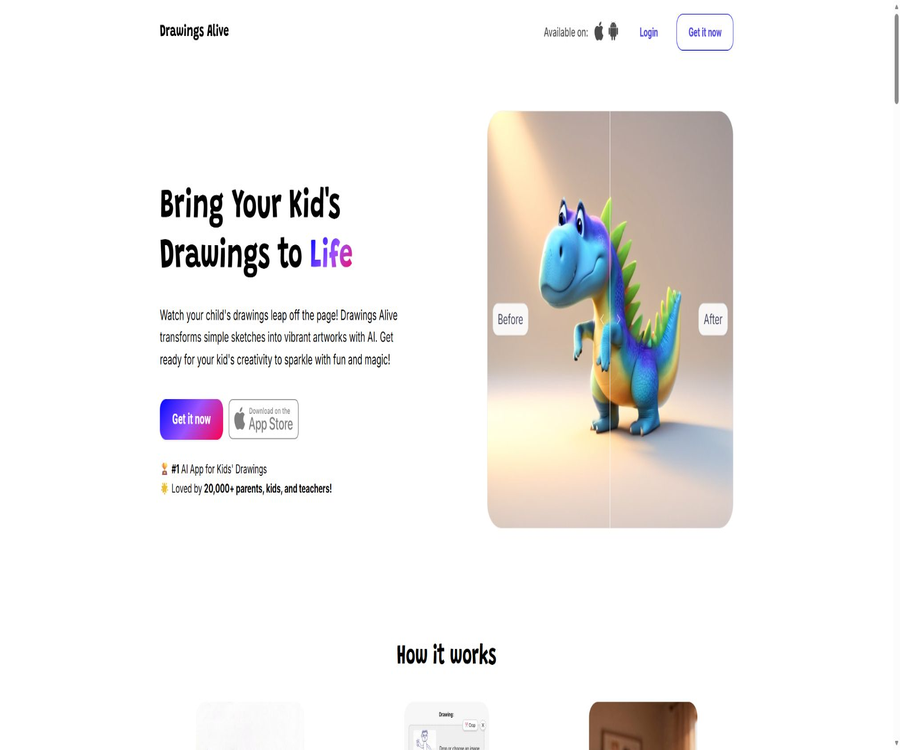
Drawings Alive is a tool designed for children, parents, and teachers that converts sketches into AI-generated content; it allows paper drawings or drawings made within the app to be turned into images in various styles, short animations, and 3D models that can be used for augmented reality displays.
Tool Introduction
Drawings Alive is operated by Optimistic Invent, LLC. Its focus is not on creating art from blank prompts, but rather on preserving the main elements and composition of the child’s original drawings, with AI being used to add colors, textures, lighting effects, and motion.
Users can use web-based applications, or they can install apps for iPhone, iPad, or Android. Mobile stores classify these applications in the education category; they are suitable for creative activities at home, for telling stories in class, and for keeping records of one’s creations.
Core working method
| Phase | User operations | System processing | Main results |
|---|---|---|---|
| Prepare the original artwork | Shoot, scan, or draw directly | Read the outline, subject, and composition. | JPG or PNG input |
| Additional description | Describe the characters, settings, and details that wish to be retained. | Reduce misunderstandings regarding abstract lines | Guidelines for image generation |
| Select style | Choose from realistic, cartoon, 3D, painting, and other styles. | Redisplay in the specified visual direction | Styled images |
| Continue creating. | Use the results for video or 3D creation | Increase in movement or spatial structure | 6-second animation or 3D model |
| Save and Share | Download, print, or display the works | Retain the final outcome | For use at home, in the classroom, or as creative material |
Main functions
Convert children’s drawings into AI images
Users can take photos of or scan drawings on paper, or draw directly within the application. The system creates a more complete digital version based on the original drawing and the textual descriptions provided; it is suitable for turning simple characters, animals, and fantasy creatures into visual artworks.
Various visual styles
The current available styles include realistic, cartoon, 3D, painting, and coloring pages; new styles such as building blocks, stuffed toys, and board games have also been added. Different styles result in varying materials and details, and the degree to which the original lines are retained can also differ.
Drawing Power similarity control
The web-based workflow offers Drawing Power control, which is used to adjust the degree of similarity between the resulting image and the original one. Increasing this intensity tends to emphasize the original composition, but it does not guarantee that every detail will be preserved accurately.
Generate short animations from images
The generated image can be further converted into an AI video lasting 6 seconds, allowing the character to move, dance, or perform actions within the scene. Animation is part of a separate package; it cannot be understood in terms of the number of images generated.
3D models and augmented reality
Tools can convert drawings into 3D models, which can then be viewed in the real world on compatible smartphones. The model formats listed in mobile stores include GLB and USDZ; for augmented reality to work, the device’s operating system and hardware must be compatible.
Generate the result and then edit it.
The update history of mobile apps shows that it is possible to modify the colors of existing results and add details to them. It is better suited for minor iterations, and should not replace professional drawing software that offers layers, masks, and precise selection tools.
Weekly Drawing Challenge
The mobile app offers weekly drawing challenges and notifications once a piece is completed, providing children with continuous topics for creation. Before participating, guardians should check whether the works will be made public, what is the scope of sharing, and what the settings for the account are.
Trimming and preparation for generation
The application allows for the cropping of uploaded images, helping to remove the desktop, hands, shadows, and other irrelevant background elements. Images that are clear, well-centered, and have intact borders tend to yield more stable results compared to blurry or tilted photos.
Input and output formats
| Type | Support has been confirmed. | Uses and limitations |
|---|---|---|
| Image input | JPG, PNG | Upload photos or scans of paper drawings. |
| Canvas input | Direct drawing on the web page or within the app | Ideal for quick sketching when no existing images are available |
| Text input | Short, natural-language description | Add characters, scenes, actions, and key features. |
| Image output | Styled digital images | It can be saved, printed, or used to continue creating. |
| Video output | 6-second animation | The monthly quantity is limited by the package. |
| 3D output | GLB, USDZ | Used for 3D viewing and augmented reality displays on compatible devices |
Usage tutorial
Generate images from paper drawings
- Place the artwork on a surface with even lighting, making sure the subject is fully visible and free from any obvious shadows or obstructions caused by the hands or the table surface.
- Take a photo of or scan the original artwork, trim the edges, and save it in JPG or PNG format.
- Upload an image and write a short description outlining the subject, the features you wish to preserve, and the intended use case.
- Select a realistic, cartoon, 3D, painting, or other suitable style, and adjust the Drawing Power as needed.
- After generation begins, check whether the number of main elements, expressions, limbs, and key contours match those of the original artwork.
- Save the version that meets your requirements; if there are significant discrepancies, modify the description or make cuts first, rather than making successive adjustments to the incorrect results.
Convert images into animations
- First, create an AI image with a clear subject and a background that is not overly complex.
- Go to the video creation feature, select the image, and describe in one sentence the action you want to see take place.
- Try to include only one main action, such as waving, dancing, or walking slowly.
- After generating a 6-second video, check the structure of the characters, the continuity of their movements, and whether the background is distorted.
- Download only after confirming that the content is suitable for sharing; failed or subpar outputs may still consume your monthly quota.
Create and view 3D models
- Choose painting results with clear outlines, a single main subject, and minimal obstruction.
- Start the 3D model generation and wait for the system to create the GLB or USDZ file.
- On compatible devices, examine the model’s outline, back side, and material from different angles.
- When augmented reality is needed, it allows applications to use the camera and place models on surfaces with good lighting.
- After the presentation is over, disable any unnecessary camera permissions and properly save the original artwork and the generated files.
Methods to improve generation quality
- Use clear, centered original illustrations, ensuring that the main characters are at an appropriate distance from the edges of the page.
- Try to avoid strong reflections, folds, tilted shots, and shadows that cover lines.
- The description specifies the most important colors, number of limbs, expression, posture, and setting.
- Abstract paintings should come with more specific textual descriptions; otherwise, the AI might reinterpret the subject.
- Change only one style or action variable at a time, so it is easier to determine which setting is responsible for the change.
- Complex group characters can be broken down into individual characters for testing, with a decision then made as to whether to combine them in the final creation.
Which users are it suitable for
- Parents and guardians: Turn children’s drawings into family memorials, short videos, or printable artworks.
- Teacher: Create classroom presentations focused on story characters, animal adaptations, scientific topics, and creative writing.
- Organizers of children’s art activities: Add digital elements to painting challenges, art exhibitions, and themed events.
- Illustration beginners: Quickly compare the differences of the same sketch in realistic, cartoon, 3D, and painting styles.
- Family content creators: They create before-and-after drawings and short animations, but must protect children’s personal information before publishing them.
Typical use cases
- Transform the monsters, animals, or fictional characters drawn by children into more complete illustrations for storybooks.
- Generate character images and 6-second action clips for creative writing in the classroom to help students tell stories.
- Convert annual paintings into digital albums, printed souvenirs, or materials for home display.
- Convert 2D characters into 3D models for augmented reality viewing on compatible smartphones.
- Carry out creative activities such as drawing, description, creation, comparison, and reflection around the weekly theme.
- Use the same original artwork to compare visual styles such as cartoon, realistic, plush toys, and building blocks.
Prices and packages
As of August 22, 2026, the official website offers subscriptions in US dollars and presents three annual payment options; the monthly amount indicated on the page is an estimate based on the annual fee, not the actual price per month. Cancellation can be done at any time, but once AI generation has begun, a refund is generally not provided.
| Web package | Annual fee for the official website | Monthly average display | Monthly images | Monthly videos | 3D models every month |
|---|---|---|---|---|---|
| Starter | 59 dollars | About $5 | Up to 50 pieces | Up to 1 | Up to 1 |
| Hobby | 99 dollars | About $8 | Up to 200 pieces | Up to 5 | Up to 5 |
| Artist | 199 dollars | About 17 dollars | Up to 500 pieces | Up to 10 | Up to 10 |
In-app purchase prices on the App Store in the United States
Apple apps can be downloaded for free, but the developers specify that image conversion requires a valid subscription. The prices in the app store differ from those on the website; it is necessary to refer to the location of your account and the final payment page when making a purchase.
| Package | Monthly payment | Annual payment | Explanation |
|---|---|---|---|
| Starter | 9.99 dollars | 69 dollars | Basic subscription within the app |
| Hobby | 19.99 dollars | 119 dollars | Mid-tier subscription within the app |
| Artist | 39.99 dollars | 219 dollars | Premium subscriptions within the app |
Key points on free access, subscriptions, and refunds
- The fact that the application can be downloaded for free does not mean that it is possible to create content for free; currently, official responses indicate that an active subscription is required in order to convert drawings.
- The official website does not indicate any permanent free generation quota, nor is there any confirmed promise of a free trial period.
- Images, videos, and 3D models each have their own monthly limits; they cannot be considered as part of the same quota.
- Once AI generation begins, refunds are generally not provided; it is necessary to confirm the package and purchase channel before making the first purchase.
- Prices, taxes, and benefits may vary depending on whether the purchase is made through a website or via Apple or Android platforms; therefore, it is not appropriate to make direct comparisons between these different channels.
Supported platforms and systems
| Platform | Support status | Current requirements or instructions |
|---|---|---|
| Web page version | Support | Accessed via modern browsers; connectivity is required. |
| iPhone | Support | iOS 15.1 or higher is required. |
| iPad | Support | Requires iPadOS 15.1 or later. |
| Apple Vision | Compatibility | VisionOS 1.0 or a later version is required. |
| Android phones and tablets | Support | Install via Google Play |
| Augmented reality | Conditional support | The official website specifies that iOS 12 or higher, or Android 7.0 or higher is required, though compatible hardware is still necessary. |
| Windows, macOS, and Linux | Web page usage | No standalone desktop client was found. |
Language support
The Apple app currently lists English, Japanese, Portuguese, Simplified Chinese, Spanish, and Traditional Chinese. Just because the interface supports Chinese, it does not mean that every Chinese phrase can be understood accurately; made-up words and abstract characters used in children’s works should be expressed in more concrete terms.
APIs, SDKs, and open-source status
| Project | Verification results | Explanation |
|---|---|---|
| Public API | No findings were detected. | No keys, API documentation, or pricing information for calls |
| Official SDK | No findings were detected. | There are no verifiable language development packages available. |
| Official GitHub | No findings were detected. | Warehouses with the same name cannot be considered as the official product codes. |
| Open-source product | No | Websites and mobile applications are considered hosted business services. |
| Third-party integration | Not disclosed | No information available on plugins, Webhooks, or automation platforms |
The ability to download GLB or USDZ files is merely a feature for output; it does not imply the provision of development interfaces. It is more suitable for individual use or in classroom settings, but not for businesses that rely on automated bulk generation.
Product advantages
- Starting from the child’s existing drawings makes it easier to preserve their individual creative style, as compared to using only text.
- Images, short videos, and 3D models create a continuous creative pathway, offering a variety of ways of presentation.
- It offers web, iOS, and Android access points, with relatively comprehensive coverage for home and classroom devices.
- The style selection is intuitive; parents and children do not need to learn complex professional drawing parameters.
- The monthly limits for images, videos, and 3D models are listed publicly, making it relatively easy to compare the different packages.
- Generating images grants full commercial licensing and ownership rights, facilitating their use in various creative projects.
Usage restrictions and precautions
- There is no confirmed free generation quota; even after downloading the app, a subscription may still be required first.
- The prices for in-app purchases on websites and within apps differ; it is necessary to check whether the benefits obtained can be used across different platforms before making a purchase.
- Paintings with low clarity, that are too abstract, or those with too many elements may be misinterpreted by AI.
- Images, videos, and 3D models all have separate monthly limits, and repeated attempts to test different options will consume these quotas.
- In 6-second videos, there may be sudden changes in movement, distortions of the limbs, and shifts in the background; these need to be checked by parents or teachers.
- 3D models may lack accurate information regarding their back side, thickness, and topology, making them unsuitable for use as engineering-grade assets.
- Once AI has started generating the content, a refund is usually not possible; therefore it is necessary to verify everything once more before making the purchase and submitting the request.
- It lacks public APIs, SDKs, or enterprise management capabilities, making it unsuitable for automated production and complex team approvals.
Children’s privacy and data security
During use, children’s drawings, photo backgrounds, textual descriptions, and account identifiers may be uploaded. Guardians should first remove any unnecessary information such as names, schools, classes, addresses, and facial features, and avoid including sensitive content in the prompts.
The Android version indicates that personal information, financial data, and other types of data may be collected, and that financial information as well as device identifiers might be shared with third parties; the transmission of this data is encrypted, and it is possible to request its deletion. The Apple version states that purchase information and identifiers may be collected, but they are not linked to any individual identity; the actual situation varies depending on features, region, and age.
Safety advice for parents and teachers
- Adults should supervise children when they use accounts, subscriptions, cameras, and sharing functions.
- Before uploading, check whether the drawing paper contains the name, school, phone number, address, or social media accounts.
- Before using it in the classroom, verify the school’s policies, parental consent, and the rules regarding the storage of works.
- Do not assume that a rating of 4+ years old in the app store means that no supervision is required or that the app is suitable for independent use by children.
- After generation, check the sharing settings promptly and submit a request to delete the data as needed.
Copyright and Commercial Use
The official website states that users have the right to create images and are granted a full commercial license; they are also allowed to save and print these images. This provision applies primarily to the images that are created, and it should not be extended automatically to third parties, brands, materials, or other people’s original works.
If the original artwork features protected characters, trademarks, or works created by others, the resulting output may still be subject to copyright, trademark, and image rights regulations. It is necessary to conduct a separate verification of these rights before selling the product publicly, using it in advertising, or printing it in large quantities.
Basic information
| Project | Content |
|---|---|
| Tool name | Drawings Alive |
| Mobile app name | Drawings Alive AI: Doodle Art |
| Developer | Optimistic Invent, LLC |
| Tool type | Converting children’s drawings into AI images, animations, and 3D models |
| Main inputs | JPG, PNG, in-app drawing, and text description |
| Main output | Styled images, 6-second videos, GLB and USDZ models |
| Price pattern | Paid subscription with a monthly limit on the number of images, videos, and 3D models. |
| Free case | The application can be downloaded for free; the free generation quota has not been confirmed. |
| Chinese support | Supports Simplified Chinese and Traditional Chinese interfaces. |
| Main platforms | Web, iPhone, iPad, Apple Vision, and Android |
| Public API | No findings were detected. |
| Official SDK | No findings were detected. |
| Is it open source? | No |
Recommendation score
Recommendation score: 4.0 / 5. Drawings Alive offers an integrated platform that provides images, short animations, and 3D presentations of children’s original drawings; it is easy to use, and it has good coverage on both web and mobile devices.
The main shortcomings are the lack of a confirmed free generation quota, varying prices across different channels, and the need for privacy management when uploading children’s works. It is suitable for families and classrooms that are willing to subscribe and have adult supervision, but it is not appropriate for teams that require access to APIs, precise editing capabilities, or engineering-grade 3D assets.
Frequently Asked Questions
Is Drawings Alive free?
The application can be downloaded for free, but there is no confirmed limit on the number of free conversions available; the developers have stated that a valid subscription is required to perform such conversions. Do not label the free download as permanently free.
Which image formats are supported?
The official website explicitly accepts JPG and PNG formats. Photo files should have any irrelevant background removed so that the main subject remains clear and intact.
Can I draw directly in the app?
Yes, users can either upload works created on paper or draw directly on the web page or within the application. Existing paper-based works are usually suitable to be imported by taking photos of them or scanning them.
Can paintings be turned into videos?
Yes, it is currently possible to create AI animations of 6 seconds duration from a given artwork. The monthly quota for videos is lower than that for images; it is necessary to specify the action details before generating the video.
Can 3D models be created?
Yes, the mobile app lists GLB and USDZ outputs and supports augmented reality viewing on compatible devices. It is still necessary to check the integrity of the generated results as well as device compatibility.
Is Chinese supported?
The Apple app offers versions in Simplified Chinese and Traditional Chinese. It is necessary to test actual children’s works to determine whether the Chinese prompts can accurately capture complex details.
Can the generated images be used for commercial purposes?
The official website grants users a full commercial license and ownership rights to create images. If the images include characters from third parties, brands, or works created by others, it is still up to the users to handle the related rights.
Are APIs or SDKs available?
No public API, official SDK, key management system, or pricing information was found. The current methods of use confirmed are web browsers and mobile applications.
Is Drawings Alive open source?
It is not open source, and no official source code repository or open source license has been identified. The ability to download 3D files does not mean that the product’s code is available publicly.
Can I get a refund after subscribing?
The official website states that refunds are generally not provided once AI generation has begun. Prices vary between the website and the apps; it is necessary to check the package details, usage quota, renewal period, and delivery method before making a payment.
Can children use it independently?
The age rating assigned by the app store does not mean that children can handle accounts, subscriptions, and sharing on their own; supervision by parents or teachers is required when it comes to uploading content, using the camera, making purchases, or publishing something publicly.
Summary
Drawings Alive transforms children’s drawings into digital forms, gives them a specific style, adds animation elements to them, and creates 3D versions – all within a user-friendly creation process. For family memorials, classroom stories, and children’s art activities, it is more tailored than general AI drawing tools.
Before making a choice, it is important to verify the subscription method, the three types of generation quotas, the refund policies, and the way in which child data is handled. First, conduct tests on a small scale with works that do not contain any personal information, before deciding whether to use them in regular classes or for public dissemination.
Tools similar to Drawings Alive



 Guigong Network Security Registration No. 45132202000164