






Code Language Converter
Code Language Converter, an intelligent tool focused on AI programming
Tags:AI programming toolsWhat is a Code Language Converter?
Code Language Converter is an AI-based code conversion tool that runs in the browser; its user interface also uses the name CodeConverter. After the user selects the source language and the target language and pastes the code, the system generates the version in the target language, while also providing the converted result for easy copying and review.
The service is operated by the Austrian company AMVestment GmbH, and it is designed to handle the task of rewriting code snippets across different languages. It is useful for learning syntax, creating prototypes, and assisting with small-scale migrations; however, it is not a compiler, a platform for migrating entire repositories, or a tool for automatic quality checking.
A one-sentence summary
The Code Language Converter supports 30 different languages, including JavaScript, Python, Java, TypeScript, C++, C#, Go, and Rust, allowing users to obtain AI-generated translation results quickly by specifying the source language, target language, and the code to be converted.
Name and differentiation from similar products
What is described here is the CodeConverter service available on the Code Language Converter website; it is not CodeConvert AI, AI Code Convert, or any other products with similar names. The number of languages supported, the packages offered, the privacy policies, and account details for different services cannot be mixed together.
The current official website does not list third-party desktop packages, browser directories, or GitHub repositories with the same name as official products. When downloading the so-called desktop version or accessing the source code, it is necessary to first verify whether there is an official connection between the operating entity and the site in question.
Main functions
Conversion between programming languages
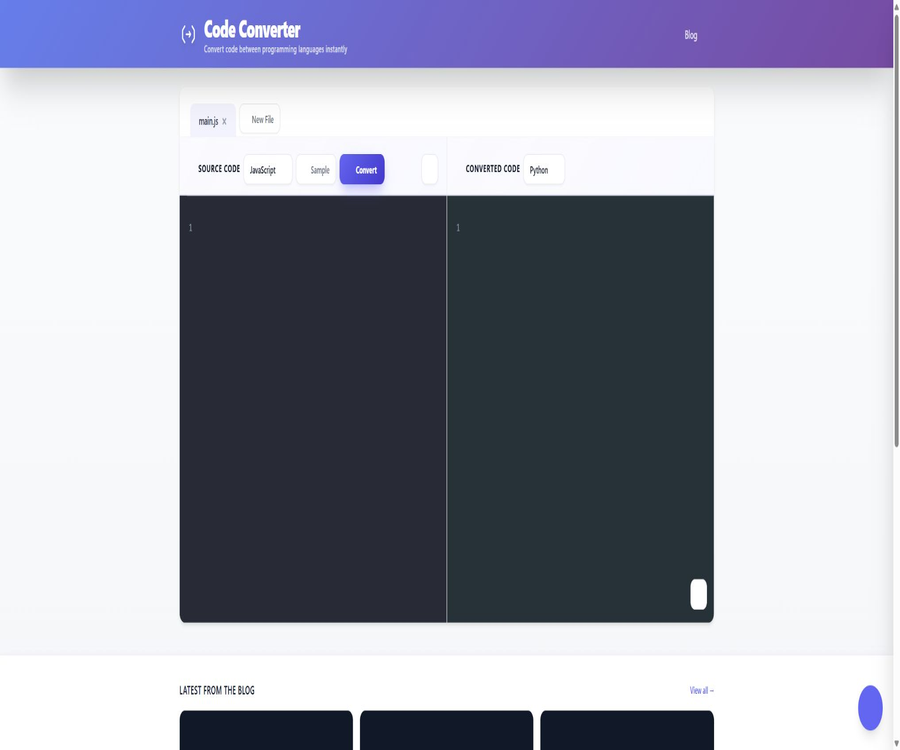
In the main workspace, the source code and the code after conversion are displayed on either side; users can select one of the two languages. The system generates a draft of an equivalent implementation based on the structure of the source program and the syntax of the target language.
- Select the actual language of the existing code from the source language list.
- Specify the desired language version from the list of target languages.
- Paste the code snippet and submit it for AI conversion.
- View the transformed code and syntax structure in the results area.
- Copy the output with one click, and then continue to review and test it in the local editor.
30 language options
The current converter interface lists 30 languages, whereas the pricing page still indicates more than 20. The text content is based on what is shown on the tool’s interface, but the list of languages and the capabilities of the models may change in the future.
| Language categories | Available languages currently |
|---|---|
| Web and Scripts | JavaScript, TypeScript, PHP, Python, Ruby, Perl, and Lua |
| General and Systematic | C, C++, C#, Java, Go, Rust, Swift, and Kotlin |
| Mobility and the Apple ecosystem | Dart, Swift, Kotlin, and Objective-C |
| Data and Science | R, MATLAB, and Julia |
| Functional and Concurrency | Haskell, Elixir, Erlang, Clojure, Scala, and F# |
| Enterprises and traditional languages | COBOL, Fortran, Visual Basic, and Groovy |
The presence of a language name in the selector only indicates that it is possible to carry out that conversion; it does not guarantee that all language combinations will achieve the same level of accuracy. The greater the differences in the library ecosystem, runtime environment, type system, and platform APIs, the more manual restructuring is required.
Syntax highlighting and two-column editing
The editing area offers code-oriented fonts, syntax highlighting, and a two-column layout for displaying source code alongside the resulting output code. Highlighting facilitates reading, but it does not automatically ensure that the code is syntactically correct or that it can be compiled successfully.
Conversion history
By logging in to an account, it is possible to save the history of conversions; users can then view previous versions of the source code and target code, as well as the corresponding time and language settings. This historical record enhances efficiency in ongoing work, but it also means that sensitive code is stored in the platform’s database.
Copy to clipboard
The generated results can be copied directly to the clipboard and then pasted into an IDE, a code repository, or a testing environment. The platform does not provide features for exporting entire projects, creating pull requests, or synchronizing repositories at the repository level.
Advanced models and larger contexts
The Pro plan offers advanced model options as well as a larger context window, making it suitable for more complex or longer codes. The vendor does not disclose the names of the models, the exact length of the context, or the maximum number of characters that can be processed; it is necessary to test these aspects during the trial period before making a purchase.
Input and output capabilities
| Project | Currently supported | Explanation |
|---|---|---|
| Input method | Paste code | Enter code snippets in the source code editing area. |
| Source language | 30 options available | The language that matches the input code should be selected. |
| Target language | 30 options available | Select the conversion direction on the same interface. |
| Output content | Target language code | AI generates drafts, which require manual review. |
| Display method | Two-column layout and syntax highlighting | Facilitates comparison between source code and target code |
| Result copy | Support | Can be copied to a local editor for editing |
| Conversion history | Support | The account stores the source code and the generated code. |
| File upload | No clear indication was found. | Do not assume that compression packages or the entire project are supported. |
| Warehouse import | No findings were detected. | The connection to the GitHub or GitLab project has not been confirmed. |
| Code execution | No findings were detected. | After it is generated, testing must be carried out in the user’s own environment. |
Working principle
The user’s code, along with information regarding the source and target languages, is sent to the platform, where it is processed by external AI hosting services; the resulting code in the target language is then returned. According to the official guidelines, external AI services can store the code temporarily for up to 1 hour, while the platform’s own database stores the source code and the translation results in an encrypted form.
- The user selects the source language and the target language, and pastes the code into the editor.
- The platform checks the login status and the remaining number of conversion attempts.
- The code is sent to an external AI hosting service for conversion.
- AI generates a draft of the code in the target language and sends it back to the platform.
- The platform displays the results and writes the source code, output, and language combination to the conversion history.
- The user copies the results and completes the necessary dependencies, configurations, testing, and performance optimizations locally.
Basic usage tutorial
- Open the converter and select the language for the input code from the left side.
- Select the target language from the right side, to avoid mistaking the framework name for a programming language.
- Paste only a function, class, or module with clear boundaries; do not submit the entire project at once.
- Remove keys, passwords, customer information, and undisclosed business logic.
- Submit the conversion and wait for the target language code to appear.
- Copy the results to your local IDE and install the dependencies required for the target language.
- Run formatting, static analysis, compilation, and unit testing.
- Compare with the original program’s input and output, and manually correct any issues related to error handling, data types, and performance differences.
How to improve conversion quality
- First, have the original code pass tests in the existing environment, and save the expected input and output.
- Break large files down into small modules with single responsibilities and clear dependencies.
- Retain the necessary function names, types, comments, and boundary conditions.
- Specify the target runtime version, framework, and alternative third-party libraries.
- Compile and test after converting each section separately; do not wait until the entire project has been converted before debugging.
- Developers familiar with the target language check the standard ways of writing, security, and resource management.
Upgrade from the free version to Pro
- First, create a free account to test actual code snippets using a limit of 5 attempts per day.
- Record the code length, conversion direction, result quality, and the proportion that requires manual modification.
- If a higher frequency or more context is required, activate the 7-day Pro trial.
- Before the trial period ends, confirm the payment method, the date of the next deduction, and the cancellation option.
- If you stop using it, cancel it in the account settings to prevent automatic renewal after the trial period.
Which users are it suitable for
- Programming learners: Compare the syntax and type expressions of the same logic in different languages.
- Full-stack developer: Moves small utility functions between the frontend, backend, and scripting languages.
- Mobile developers: Helps compare the differences between Java and Kotlin, Swift and Kotlin, etc.
- Data analysts: Convert R, MATLAB, Julia, or Python code snippets into preliminary implementations.
- Legacy system maintainers: Create drafts for the migration to COBOL, Fortran, or Visual Basic.
- Technical interviews and instructors: Quickly prepare multilingual examples and provide manual explanations.
- Prototype team: Compare different language versions of the same algorithm before deciding on the technology stack.
Typical use cases
- Rewrite a Python data processing function as JavaScript for a browser prototype.
- Convert the Java data model into a Kotlin draft and add null safety handling.
- Convert JavaScript modules to TypeScript, and then manually add precise types.
- Rewrite C or C++ algorithms as Rust prototypes and examine memory and ownership semantics.
- Convert the MATLAB or R analysis code to Python and re-verify the numerical results.
- Understand legacy COBOL or Fortran functions before migrating them to modern services.
- Prepare multilingual example pairs of the same algorithm for technical articles and courses.
- Convert small scripts into a language that the team is more familiar with, thereby reducing the need for manual rewrites.
Product advantages
- The web interface is straightforward: the source language, target language, input, and output are all on the same page.
- The current selector covers 30 mainstream, scientific, functional, and traditional programming languages.
- Free accounts allow 5 conversions per day, making them suitable for ongoing small-scale testing.
- Pro costs $4.99 per month, with a straightforward pricing structure.
- Syntax highlighting, history, and one-click copying reduce the number of basic operations required.
- The 7-day Pro trial can be used to determine whether advanced models and larger contexts are valuable.
- The privacy policy clearly outlines the procedures for storing code, processing it with external AI systems, and deleting accounts.
Usage restrictions and precautions
- The AI-generated translation may contain grammar errors, logical flaws, hallucinations, and the use of outdated libraries.
- The platform does not execute or test the generated code; users must compile and verify it themselves.
- Complex projects involve frameworks, building, deployment, and data migration, and cannot be completed in a single step through partial conversions.
- Semantics such as closures, concurrency, memory management, reflection, and macros may not be directly mapped.
- Free accounts are allowed 5 requests per day, and logged-in visitors are allowed a total of 5 requests as well.
- The unlimited conversions in Pro are still subject to constraints such as fair use, service stability, and undisclosed context.
- After the trial period ends, charges will be deducted automatically on a monthly basis; no refund will be given after the trial period, nor will any amount be refunded for partial months.
- All conversion codes are stored encrypted in the platform’s database; they are not suitable for submitting as confidential source code.
- The code is also sent to external AI hosting services, where it can be stored temporarily for up to 1 hour.
- The authorities have not disclosed the specific AI models, external service providers, data centers, or training policies.
- Malicious code, services designed for attacks, data scraping, or the creation of multiple accounts to bypass limits are not allowed.
- It lacks public API, warehouse import, and automatic pull request functions, making it unsuitable for batch migration in pipelines.
Prices and packages
The following are the dollar prices as of August 21, 2026. The Free account is available indefinitely at no cost, while the PRO account offers a 7-day free trial; after that, subscription is automatic on a monthly basis.
| Package | Price | Billing cycle | Conversion limit | Core rights and interests | Suitable for users |
|---|---|---|---|---|---|
| Try without logging in | $0 | Do not subscribe | 5 times in total | The count is stored locally in the browser. | First quick experience |
| Free | $0 | Free for a long time | 5 times a day, reset at midnight UTC | Language translation, history, grammar highlighting, and copying | Learning and low-frequency use |
| PRO trial | $0 | 7 days | Unlimited trials during the trial period | Advanced model selection and larger context | Evaluate long codes and high-frequency requests |
| PRO | $ | Automatic monthly renewal | Unlimited times per day | 30 languages, history, grammar highlighting, advanced models, and larger context | Ongoing development and frequent changes |
Auto-renewal, cancellation, and refunds
After the 7-day trial period of PRO ends, the subscription automatically becomes priced at $4.99 per month. Users can cancel at any time through the settings, but no refund will be given for payments made after the trial period ends, nor will any amount be refunded if cancellation occurs.
The platform can notify of price adjustments 30 days in advance. Taxes, payment methods, eligibility for trials, and the date of the final deduction shall be as indicated in the settlement and account settings.
Supported platforms
| Platform or method | Support status | Explanation |
|---|---|---|
| Web browser | Support | Main conversions, history, and account entry |
| Windows | Through a browser | No official native desktop applications were found. |
| macOS | Through a browser | Third-party Web wrappers are not the same as the official client. |
| Linux | Through a browser | Access using a modern browser |
| iOS and Android | You can try moving the browser. | No official native applications were found. |
| IDE extensions | No findings were detected. | The VS Code or JetBrains plugins have not been confirmed. |
| Integration with GitHub and GitLab | No findings were detected. | It is not possible to import the entire repository directly. |
| Developer API | No findings were detected. | There are no public API documentation or key entry points. |
Privacy and data security
When creating an account, the platform collects the name, email address, username, and the hashed password, while also recording the history of such conversions, timestamps, and language combinations. Payments are processed by third-party payment services, and the company states that it does not store any details related to bank cards.
The source code and the code after conversion are stored encrypted in the platform’s database. External AI hosting services process the code temporarily and store it for a maximum of 1 hour. Users can delete their accounts through the settings; the company states that such deletion results in the permanent removal of account data.
- Delete API keys, passwords, tokens, certificates, and connection strings before submission.
- Do not upload customer data, trade secrets, unpublished algorithms, or code subject to confidentiality agreements.
- Reduce the code to the smallest snippet that can reproduce the issue, and replace real identifiers and data.
- When confidentiality is required, first confirm with the operation team the policies regarding external AI service providers and data training.
- Export the historical data that needs to be retained before deleting the account, and confirm that the subscription has been canceled.
- When using the team feature, do not share accounts; the terms require one account per person.
- Before the generated results are placed in the warehouse, they must undergo manual review, dependency scanning, and security testing.
- Encrypting a database does not mean that the code will not be processed or stored by the platform.
Safety Conversion Checklist
- Verify whether the code belongs to you or if you have permission to submit it to a third-party AI service.
- Create a sanitized version by removing keys, personal information, and customer names.
- Only the functions and types necessary to complete the current conversion are retained.
- After conversion, check dependencies, input validation, error handling, and permission boundaries.
- Run static analysis, unit testing, and security scans.
- Once satisfied, delete the conversion history or account data that is no longer needed.
APIs, SDKs, and open-source status
As of the time of verification, the official website does not provide developer APIs, Webhooks, command-line tools, language SDKs, or self-service API keys. The use of AI for conversion within the website does not mean that external developers have access to such interfaces.
The official page does not provide any links to a GitHub organization, the source code of the product, or an open-source license for verification; therefore, Code Language Converter should be labeled as non-open source. Code conversion repositories with the same name available on the Internet cannot be automatically considered official projects of AMVestment GmbH.
How to verify the results of the conversion
| Inspection items | Contents to be verified | Frequently Asked Questions |
|---|---|---|
| Grammar and Construction | Formatting, static analysis, compilation, and dependency installation | Non-existent packages, version incompatibilities, and syntax errors |
| Functional consistency | Use the same input to compare the output of the source program with that of the target program. | Boundary conditions, null values, and changes in abnormal paths |
| Type semantics | Integer ranges, floating-point values, sets, nullable types, and generics | Implicit conversion can lead to precision or runtime errors. |
| Concurrency and resources | Threads, async operations, locks, files, and network connections | Deadlocks, leaks, and lifecycle differences |
| Safety | Input validation, authentication, authorization, logging, and secret management | Directly passing untrusted input into execution or queries |
| Performance | Baselines, memory, databases, and network calls | Translate line by line, preserving inefficient structures |
| License | Permissions available for source code, dependencies, and the generated implementation | Copying restricted implementations or introducing conflicting dependencies |
Basic information
| field | Content |
|---|---|
| Tool name | Code Language Converter |
| Interface name | CodeConverter |
| Operating company | AMVestment GmbH |
| Company location | Austria |
| Tool type | Online AI programming language converter |
| Number of languages | The current selector lists 30 options. |
| Main inputs | Source language, target language, and code snippets |
| Main output | Draft of target language code |
| Price pattern | Trial without login, free account, and monthly PRO plan |
| Free quota | 5 consecutive times without logging in; free accounts allow 5 attempts per day. |
| Minimum payment amount | $ |
| Main platforms | Web |
| Chinese interface | No findings were detected. |
| Public API | No findings were detected. |
| Official SDK | No findings were detected. |
| Official GitHub | No findings were detected. |
| Is it open source? | No |
| Save code | The source code and the results of the conversion are stored in an encrypted form. |
| External AI processing | Temporary storage is available for up to 1 hour. |
Recommendation score
The recommendation score is 4.0 out of 5. The Code Language Converter has a simple interface and supports 30 different languages; the free account is suitable for occasional conversions, while the Pro version costs 4.99 dollars per month, which is a reasonable price.
The main shortcomings are the lack of public models, limited context length, no API support, and no capability for migration at the repository level; furthermore, all conversion codes are stored in the platform’s database. It is suitable as a draft tool for code migration, but not as an automatic converter that can operate without further review.
Frequently Asked Questions
Is the Code Language Converter free?
It can be used for free. Unlogged visitors can perform 5 conversions in total, while users with a Free account can do 5 conversions per day; the count is reset at midnight UTC.
How much is the PRO package?
PRO costs $4.99 per month, with a 7-day free trial available. Subscription renews automatically after the trial period, and no refund is given for payments made after the trial.
How many programming languages are supported?
The current converter selector lists 30 languages, covering mainstream, scientific, functional, and traditional languages. The pricing page states that there are over 20 languages, which represents a rather conservative or outdated figure.
Is it possible to convert the entire project?
No instructions are provided for importing from warehouses, uploading compressed files, migrating dependencies, or converting files in bulk. It is more suitable for converting functions, classes, and small modules one by one.
Can the converted code be deployed directly?
It is not possible to go live directly by default. The terms clearly state that errors may occur in the output, and users must review it, test it, and carry out thorough verification before using it in production.
Will the platform save the code?
Yes. The source code and the results of the conversion are stored encrypted in the platform’s database, while external AI hosting services also process the code temporarily and store it for up to 1 hour.
Will the code be used to train AI?
The public privacy policy does not specify whether the data is used for training purposes. Before submitting proprietary code, it is necessary to obtain in writing from the service provider information regarding the model supplier, the intended use of the training, and the procedures for withdrawing from such use.
Can the conversion history be deleted?
Users can view their history and delete their accounts; the official statement is that deleting an account results in the permanent removal of all data. The ability to delete individual entries from the history depends on the settings available in the current interface.
Are APIs provided?
No public API documentation, self-service keys, or pricing information was found. At present, the product allows users to manually convert code through a web interface.
Is there an official desktop application?
No native official applications for Windows or macOS were found. Third-party WebCatalog wrappers merely place web pages within a desktop interface; they cannot be considered official clients.
Is the Code Language Converter open source?
It is not open source; no official source code repository or open source license provided by the operating company has been found. There is no verifiable connection between the GitHub project with the same name and the current commercial service.
Is Chinese supported?
The main interface is in English, and the tool is used for processing programming languages rather than translating natural language. Whether Chinese comments in code can remain accurate should be tested within the free tier.
Summary
Code Language Converter provides an easy way to rewrite small code snippets across different languages; its range of supported languages along with its affordable Pro version make it suitable for use in learning, prototyping, and assisting with migrations. The conversion history and syntax highlighting also facilitate repeated reference.
When actually migrating a project, it is still necessary for the developers working in the target language to restructure the dependencies, types, concurrency aspects, as well as the platform APIs. When private code is involved, it is also essential to assess the data-related risks associated with storing historical data on the platform and using external AI services.
Tools similar to Code Language Converter



 Guigong Network Security Registration No. 45132202000164