






AutomateClips
AutomateClips, an intelligent tool focused on AI programming.
Tags:AI programming toolsWhat is AutomateClips?
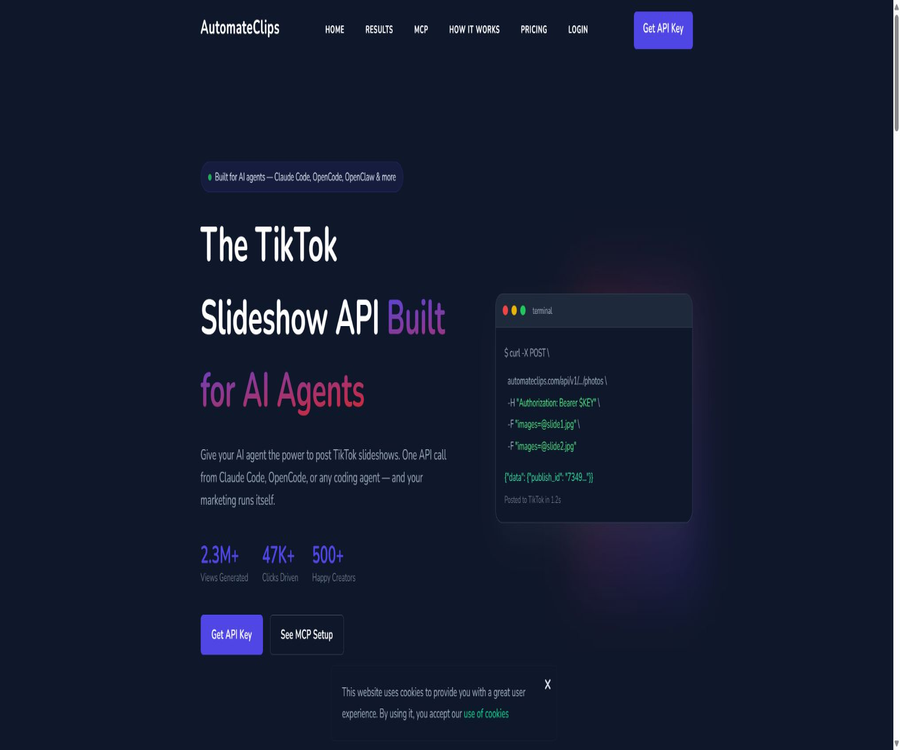
AutomateClips is currently an API for posting content on TikTok, designed for AI agents, developers, and automation teams. After connecting to a TikTok account and obtaining an API key, users can use REST interfaces or MCP tools to upload image slideshows and videos.
It is not a traditional AI video editing tool, nor does it generate all the necessary materials automatically for the user. The focus of this product is to pass the already prepared images, titles, and videos to TikTok’s official publishing process, and to provide a task identifier that can be used for tracking subsequent steps.
Current product positioning
| Project | Current AutomateClips | Confusing old materials |
|---|---|---|
| Primary uses | Automatically publish TikTok content via API and MCP | Generating complete AI short videos from text |
| Core input | 2 to 35 images, video files, titles, and accounts | Themes, scripts, AI characters, and voiceovers |
| Primary users | AI agents, developers, marketing automation teams | Ordinary video creators and editing users |
| Main platforms | TikTok | Short videos on TikTok, Instagram, and YouTube |
| Billing unit | Number of posts that can be published per month | Points earned for video generation or the number of videos produced |
Information about the early AI video generation tool AutomateClips can still be found online, but this data does not match the current details on the official website, including pricing and interfaces. The list of available tools should be presented in accordance with the current TikTok Slideshow API.
Core functions
- TikTok account connection: Authorization is handled through OAuth, so there is no need to provide login credentials to the platform.
- Image slide release: One request can submit 2 to 35 images.
- Video upload: Supports either initializing the video upload process or proceeding with the direct publishing process.
- REST API: Any language or automation tool that can send interface requests can connect to it.
- MCP server: Provides structured, callable tools for compatible AI agents.
- Agent tip: You can use natural language to instruct the programming agent to prepare and carry out the publication.
- Multiple account management: All packages include an unlimited number of TikTok accounts.
- Data analysis: Obtain account and content performance data from the console or tools.
- Video list: View the video recordings that have been published or initialized.
- Token authentication: All interfaces use user-generated Bearer tokens.
Start using it in three steps
- Register for an AutomateClips account and access the application console.
- Use TikTok OAuth to connect to the account that needs to be managed and complete the authorization process.
- Generate an API key in the console, copy it, and save it in a secure key management location.
- Choose REST API, MCP server, or proxy prompt as the calling method.
- Use a test account to create a slideshow with 2 to 35 images.
- Record the identifier of the returned publishing task and check its processing status in the background.
- Verify the title, image order, account details, and posting results before proceeding with the official process.
TikTok OAuth connection
The user goes to TikTok’s authorization page from the console, confirms the permissions, and then connects their account to AutomateClips. According to the official instructions, the TikTok official API is used, and the user’s TikTok login credentials are not stored.
- Before granting permission, verify that the correct TikTok account is currently logged in.
- Check whether the permissions for publishing requests, managing accounts, and conducting analyses are appropriate for the intended use.
- Establish clear identifiers for testing, brand, and customer accounts respectively.
- Terminate the relevant accounts promptly when employees leave or the cooperation comes to an end.
- Regularly review the authorization settings in TikTok’s backend and delete any connections that are no longer in use.
Generate and protect API keys
API keys are used to identify the origin of each request; the person who possesses such a key can publish content on behalf of the account to which they are connected. They must not be included in public code, screenshots, history of prompts, or browser scripts.
- Place the key in an environment variable or a professional key management service.
- Different keys are used for development, testing, and production, as well as for TikTok accounts.
- Do not submit it to Git repositories, shared documents, or public automation templates.
- Restrict the persons, agents, and operating environments that can access the keys.
- Once a leak is detected, it should be revoked immediately and a new key generated.
- Record the key creator, purpose, rotation time, and last usage.
Publish image slides
Each slide can support 2 to 35 images; you can provide online image addresses or upload local files directly. Upon successful execution, a task identifier is returned, which is used to track the processing results on TikTok’s side.
- Arrange the images in the order in which they will be displayed, and check their size, clarity, and copyright status.
- Prepare concise titles, necessary topic tags, and compliant action guidelines.
- Verify the target TikTok account identifier to prevent posting to the wrong brand.
- Submit the image URL or file, title, and authentication token to the slide interface.
- Save the returned publication task identifier and query the status of the task or account.
- Open TikTok to check the image order, cropping, title, and visibility.
- Record the release date and version of the material to facilitate subsequent analysis and withdrawal.
Number of images and requirements for materials
| Project | Public restrictions or capabilities | Practical suggestions |
|---|---|---|
| Number of images per slide | 2 to 35 pieces | First, use 5 to 10 cards to test the narrative rhythm. |
| Source of materials | Online address or direct upload | Ensure a stable address and accessible files. |
| Image order | In the order of the array or files specified in the request | Generate a sequence preview before publishing. |
| Title | It can be submitted along with the release request. | Check the brand’s tone, labels, and sensitive words. |
| Result identifier | Return the task ID for publishing. | Writes to the task log for status tracking. |
Video uploading and direct publishing
In addition to image slides, the current package page also allows for the uploading of photos and videos; the MCP tool provides functions for initializing video uploads as well as for directly publishing those videos. The specific limits regarding file size, duration, encoding, and approval processes are determined by the settings in the console and by TikTok’s current APIs.
- Use the vertical aspect ratio supported by the platform and common video encoding before uploading.
- Check the licensing for the use of audio, characters, trademarks, and third-party materials.
- For large files or unstable networks, a recoverable upload process should be preferred.
- Direct release is intended only for content that has already passed the review process.
- Maintains the relationship between uploaded tasks, published tasks, and TikTok content identifiers.
MCP server
AutomateClips provides a remote MCP server that enables compatible AI programming tools to discover and utilize publishing capabilities in a structured manner. To configure it, the server address and authentication token are required; thereafter, the proxy can list accounts, publish content, or read and analyze data.
| MCP tool | Primary uses | Risk control |
|---|---|---|
| list_tiktok_accounts | List the connected TikTok accounts | Only return the accounts authorized for the current user. |
| post_photos | Publish image slides | Check the account, title, and images before submitting. |
| get_analytics | Obtain account or content analysis | Limit the scope of access to customer data |
| list_videos | List video or posting records | Handle pagination and avoid duplicate tasks. |
| init_video_upload | Initialize video upload | Verification file and upload status |
| init_video_direct_post | Initialize video for direct publishing | Only content that has been reviewed is allowed to be used. |
How to connect to an AI agent
- Confirm that the proxy client supports remote MCP servers and token authentication.
- Add the AutomateClips server configuration to the client’s MCP settings.
- Provide tokens through environment variables; do not write them directly into shared configurations.
- Restart the client and verify that only the six expected tools appear.
- First, call the account list to verify permissions and the identifier of the target account.
- Use the test materials to invoke the publishing tool, and require the agent to display the parameters before submission.
- After confirming that the log does not contain keys, add the tool to the long-term workflow.
REST API
The REST interface is suitable for Python, JavaScript, the command line, server tasks, and various automation platforms. Requests are authenticated using Bearer tokens, and images can be uploaded as an array of online addresses or as multi-part files.
- Server-side application: The backend selects the materials on a scheduled basis and submits them for publication.
- Content Management System: Triggers a TikTok posting task once approval is granted.
- Automation platform: Retrieves materials to be sent from tables, databases, or cloud storage.
- AI programming agent: Generates the code needed to carry out a task and executes it.
- Batch script: Iterates through multiple accounts and records the result of each publication.
- Monitoring task: Regularly read the video list and analyze the data.
How to choose between REST API and MCP
| Method | Suitable for users | Advantages | Precautions |
|---|---|---|---|
| MCP | Those who use AI-compatible agents | The tool can be discovered by proxies, and its parameter structure is clear. | The publishing permissions of agents must be restricted. |
| REST API | Developers and backend systems | Universal, testable, and easy to integrate into existing architectures | One must handle retries and status manually. |
| Agent’s reminder | Rapid prototyping and one-time tasks | Describe the target in natural language. | The generated code and parameters still require manual inspection. |
| Scheduled script | Fixed-frequency batch publishing | It can operate entirely automatically. | It is necessary to prevent duplicates, incorrect accounts, and uncontrolled postings. |
Analyze data
All packages include analysis dashboards, and MCP also provides analysis tools. The public pages do not list all metrics, refresh delays, or historical retention periods, so it should not be assumed that they can replace TikTok’s built-in analysis tools or professional marketing attribution systems.
- View the basic performance metrics by account and post.
- Compare different image orders, titles, and publication dates.
- Record the number of releases, success rate, and reasons for interface failures.
- Combine clicks, registrations, or sales with external analysis data.
- Identify accounts with abnormal behavior and suspend automatic posting.
- Export key results regularly to avoid relying solely on a single platform’s view.
Packages and prices
AutomateClips currently offers three monthly subscription plans: Starter, Pro, and Scale, which are differentiated by the number of posts that can be published each month. All plans include unlimited access to TikTok accounts, a full REST API, the ability to upload images and videos, as well as an analysis dashboard.
| Package | Price | Posts per month | Common functions | Additional support |
|---|---|---|---|---|
| Starter | 10 dollars per month | 100 articles | Unlimited accounts, full API access, image and video uploading, analysis | Standard support |
| Pro | $ | 300 articles | Unlimited accounts, full API access, image and video uploading, analysis | Priority support |
| Scale | 39 dollars per month | 1,000 articles | Unlimited accounts, full API access, image and video uploading, analysis | Priority support |
All plans are available on a monthly subscription basis and can be canceled at any time from the control panel. The official website offers a 7-day refund guarantee, but the requirements for a refund, any usage limits, and the processing time must be checked in the terms and conditions before making a purchase.
How to choose a package
- A single brand publishes about one to three articles per day; you can start with the Starter option.
- If you manage multiple brands or produce around ten pieces of content per day, Pro might be a good option.
- When the number of articles generated by agents or high-frequency automation reaches nearly 1,000 per month, it is possible to consider scaling up.
- Do not make your choice based solely on the number of accounts, as all three tiers specify that there is no limit on the number of accounts.
- First, calculate the actual amount of content that has passed the review, in order to avoid paying too much for theoretical capacity.
- Before making a purchase, verify the actions that occur when the limit is exceeded, as well as the time for an upgrade and the date on which the limit is reset.
Which users are it suitable for
- Developers who wish to have AI programming agents publish TikTok content directly.
- Teams that already have content creation systems but lack an interface for posting to TikTok.
- Marketing agencies that need to manage multiple TikTok brand accounts.
- Use content calendars, databases, or automation platforms to schedule releases for the operators.
- It is hoped that, through MCP, the tools for publishing and analysis can be made available to the teams of agents.
- Product teams that need to upload images, slides, and videos in bulk using code.
Common use cases
- Application promotion: Organize product screenshots into slides that outline the steps or features.
- E-commerce marketing: Share product features, usage methods, and pairing suggestions.
- Knowledge content: Turn hints, lists, or tutorials into multi-page images.
- SaaS operation: Automatically publish content based on functional updates and use cases.
- Multi-account management: Distributing content from a unified database to various brand accounts.
- Proxy workflow: Allows AI to select materials from a specified folder and submit them for review.
- Effect review: Obtain analysis data and generate periodic reports.
Situations where it is not suitable
- Those who hope that entering a single sentence will automatically generate a script, voiceover, and a complete short video.
- It only requires ordinary users who occasionally post one or two TikTok videos by hand.
- Teams that primarily post on Instagram, YouTube, or other platforms other than TikTok.
- Users who lack development capabilities and do not use MCP-compatible agents.
- Organizations that cannot guarantee the copyright of materials, account authorization, or content approval.
- Companies that need a complete set of tools for advertising placement, comment management, and social listening.
Product advantages
- It offers both MCP and REST APIs, covering both AI agents and traditional development processes.
- Through TikTok OAuth connection, users do not need to provide their account passwords.
- All packages allow connection to an unlimited number of TikTok accounts.
- It supports two types of publishing processes: image slides and videos.
- The pricing structure is simple, with costs increasing based on the number of posts per month.
- Analytical data and a list of videos are provided to facilitate the creation of a closed-loop publishing process.
- Monthly payments can be canceled, and a public 7-day refund guarantee is provided.
Usage restrictions
- The current focus is on automating publishing; it does not handle the complete creation of AI-generated content or video editing.
- The public page focuses mainly on TikTok; it does not list the capabilities for posting on other social media platforms.
- The packages come with publication quotas of 100, 300, or 1,000 articles per month.
- TikTok’s review processes, account status, and API restrictions can still lead to failed postings.
- The analysis metrics and details regarding data retention are not fully explained on the public homepage.
- Once the MCP agent gains the ability to publish, it may send messages by mistake, publish them repeatedly, or select the wrong account.
- The fact that there is no limit on the number of accounts does not mean that TikTok allows unlimited distribution frequency or the mass sharing of identical content.
Content copyright and platform rules
- Only upload images, videos, and music that are your own, have been authorized, or for which a license permits their publication.
- Do not copy in bulk the content of others, trademarks, portraits of people, or protected materials.
- Comply with TikTok’s rules regarding spammy content, repetitive content, marketing, and community safety.
- Disclosure is required when it comes to advertising, affiliate links, or sponsored content.
- Additional compliance checks are conducted for health, financial, political, and content related to minors.
- Retain records of the source of the materials, authorization documents, reviewers, and publication dates.
Automatic security process deployment
- Separate content creation, review, and publication into different permission stages.
- The AI agent is required to first provide a list of materials, a title, an account name, and the planned timeline.
- Final content review is carried out by personnel or an independent rule engine.
- Short-term or restricted keys are provided for task publishing only after approval.
- Use a unique task ID to prevent duplicate posts caused by network retries.
- After publishing, read the results to verify that the actual content on TikTok matches the request.
- When an error is detected, pause the queue, revoke the key, and handle the published content.
Privacy and data security
The platform uses OAuth to handle TikTok authentication, and it states that it does not store users’ TikTok login credentials. The privacy page explains that the website processes technical access data, cookies, and analysis information; however, it does not provide detailed information on what specific content and analysis data are stored, using the current API.
- Confirm OAuth permissions, material storage, and the retention period for logs and analysis data.
- Do not include unnecessary personal information in the title, image URLs, or logs.
- Use isolated projects, keys, and access personnel for different customers.
- Audit records are maintained for API calls, account connections, and publishing operations.
- After ending the cooperation, revoke TikTok’s authorization, cancel the keys, and request that the data be deleted.
- Before making a purchase, companies should request information regarding data processing, subcontractors, and security incidents.
GitHub and the open-source status
As of this verification, no official GitHub repository or open-source SDK that is explicitly related to AutomateClips’ current services has been found. The platform offers public REST interfaces and remote MCP servers, but the hosting services, console, and code for handling deployments are not available in an open-source format.
| Development projects | Status | Explanation |
|---|---|---|
| REST API | Provide | Use Bearer tokens to publish and query data. |
| Remote MCP server | Provide | It includes six structured proxy tools. |
| Official SDK | No findings were detected. | The interface can be called directly in any language. |
| Official GitHub | No findings were detected. | The clip items being searched have no clear connection to this service. |
| Core platform | Not open source | OAuth, the console, and the publishing service are hosted by the platform. |
Basic information
| Project | Content |
|---|---|
| Product name | AutomateClips |
| Current location | TikTok slide and video publishing API for AI agents |
| Publication method | REST API, MCP tools, and automation scripts |
| Number of images | 2 to 35 slides per slide |
| Account connection | TikTok OAuth: no limit on the number of accounts for all plans |
| Authentication method | Bearer API token |
| Starting price | Starter costs $10 per month. |
| Refund instructions | 7-day refund guarantee; specific eligibility is subject to the current terms. |
| Whether API is provided | Yes |
| Is it open source? | No |
Recommendation score
The comprehensive recommendation score is 4.1 out of 5 points. AutomateClips is suitable for teams that want to delegate TikTok posting tasks to AI agents or backend systems; its interfaces and pricing are simple, but it is not a complete content creation platform – account security and posting safety must be managed by the users themselves.
Frequently Asked Questions
What is AutomateClips mainly used for now?
It uses REST APIs and MCP tools to publish image slides or videos to authorized TikTok accounts.
Will it generate a video automatically?
The current focus of the product is on providing APIs; users or upstream AI tools need to prepare images, titles, or videos first.
How many images can be placed on one slide?
According to the official information, each slide can support 2 to 35 images.
How many TikTok accounts can be connected?
All three packages specify that there is no limit on the number of TikTok accounts, but the total amount of content that can be posted is still subject to the monthly quota set for each package.
How much is the starter?
10 dollars per month, including 100 posts per month, a full API, as well as capabilities for uploading and analyzing data.
Is MCP supported?
Supported: The remote MCP server provides six tools related to accounts, publishing, videos, and analysis.
How to protect API keys?
It should be stored in environment variables or key management services, and not placed in public repositories, prompts, or client code.
Can it be canceled at any time?
Yes, the official website states that the subscription is monthly and can be canceled from the control panel.
Is there a refund guarantee?
The official website specifies a 7-day refund guarantee; the specific usage limits and eligibility requirements can be found in the terms at the time of purchase.
Is AutomateClips an open-source tool?
No, no official open-source repository has been found; currently it is used through hosted APIs and MCP servers.
Tools similar to AutomateClips



 Guigong Network Security Registration No. 45132202000164