






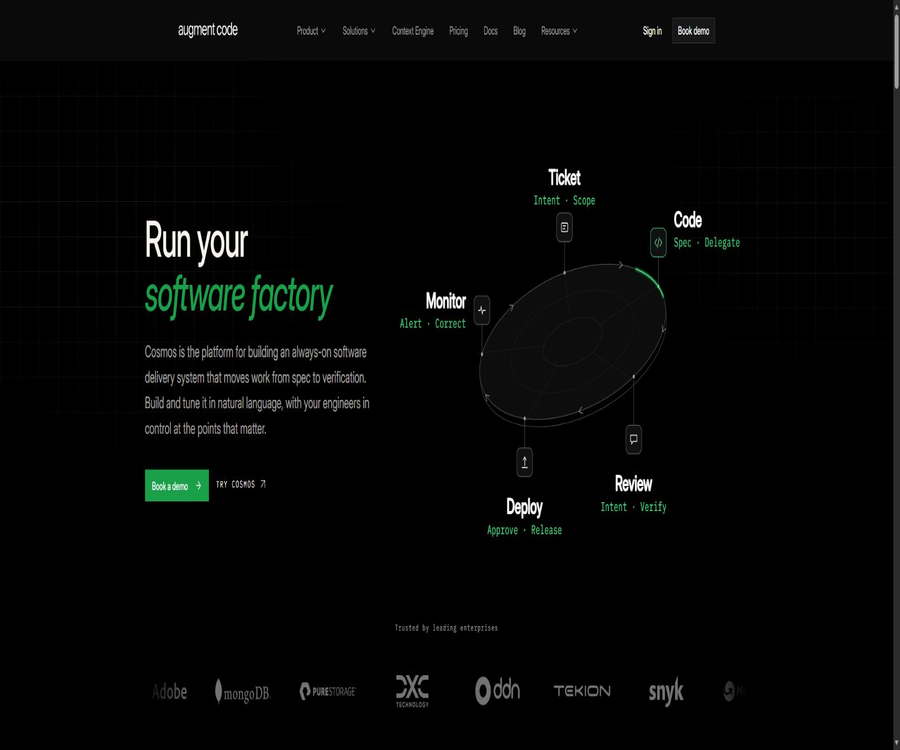
Augment Code
Augment Code, an intelligent tool focused on AI programming
Tags:AI programming toolsWhat is Augment Code?
Augment Code is a proxy-based software development platform designed for large codebases and engineering teams. It utilizes the Context Engine to retrieve information about the repository context, enabling programming agents to carry out tasks within IDEs, terminals, the Cosmos cloud environment, and code review processes.
The product no longer focuses solely on code completion; instead, it organizes tasks ranging from tickets to pull requests, large-scale projects, test coverage, fault investigation, security fixes, migrations, and repetitive automations into a software engineering cycle. Engineers are responsible for setting goals, approving plans, and ensuring quality control, while agents handle the numerous intermediate steps.
Core functions
- Context Engine: Continuously indexes the codebase and retrieves the context most relevant to the current task.
- Coding Agent: Creates, edits, and deletes code across files, as well as runs terminal tools.
- Cosmos: Runs longer-running and more complex software tasks in an isolated computing environment.
- Auggie CLI: Use agents, contexts, models, rules, and tools in the terminal.
- IDE extensions: Supports Visual Studio Code and the JetBrains series of development environments.
- Code review: Analyze changes and raise issues in GitHub pull requests.
- MCP integrates with native tools: connecting tickets, documents, code hosting, and other development tools.
- Automation: Convert repetitive engineering tasks into triggerable, auditable processes.
- Multiple models: Choose Claude, GPT, Gemini, or Prism as the routing option depending on the task.
- SDKs and protocols: Extend agents using Python, TypeScript, MCP, and ACP.
What is a Context Engine?
The Context Engine is the layer responsible for code understanding and retrieval in Augment; it creates dynamic indexes for code repositories. When an agent poses a question or prepares to make changes, it selects the relevant files, symbols, dependencies, and rules, thereby reducing the need to feed the entire repository into the model.
- Understand the relationships between code across directories, services, and repositories.
- Dynamically retrieve files, symbols, call chains, and adjacent implementations based on the task.
- Cache stable repository indexes, rules, and recent files to reduce redundant costs.
- It is allowed to add other relevant repositories as context for the main workspace.
- Provide code retrieval capabilities to other AI coding tools through MCP.
- Reduce the time required for manual searching in large single warehouses and multi-service projects.
Context Engine and regular context windows
| Comparison items | Context Engine | Place the file directly in the indicated location. |
|---|---|---|
| Context selection | Dynamically retrieve relevant code based on tasks | Selected manually by the user or loaded automatically by a tool. |
| Large warehouse | Use indexes to search across directories and repositories. | It is easy to exceed the model window or miss dependencies. |
| Update method | Maintain the index continuously after code changes | Attach files again for each conversation |
| Cost | Reuse the cache and load only the relevant segments. | Re-sending large amounts of content may increase costs. |
| Portability | It can be provided to other agents through MCP. | It is usually bound to the current chat or IDE. |
| Main risks | Searching may miss truly crucial implicit relationships. | Artificial selection may be incomplete or excessive. |
Capabilities of the Coding Agent
Augment Agent can break down development requests into plans and carry out multiple modifications, while also showing tool calls and file changes. It can make use of terminals, testing tools, version control systems, and MCP tools; however, high-risk commands and external writes require user approval.
- Read the existing architecture, conventions, and similar implementations.
- Plan cross-file functions, as well as tasks for debugging, refactoring, and testing.
- Create, modify, or delete workspace files.
- Run build, test, static analysis, and other terminal commands.
- Continue diagnosis based on the failure logs and iterate on repairs.
- Connects work orders, documents, and other contextual systems.
- Summarize the changes, verify the results, and identify the risks that still require manual handling.
How to use Augment in an IDE
- Install the Augment extension from the Visual Studio Code or JetBrains Plugin Market.
- Log in to your account and open the code workspace that needs to be processed.
- Wait for the Context Engine to complete the initial indexing and add the necessary associated repositories.
- Place the project specifications in the AGENTS, CLAUDE, or Augment rule files.
- Start with small, verifiable tasks and have the Agent first explain its plan.
- Check the files that need to be modified and the commands ready to be executed, before allowing them to run.
- View differences and run project testing, formatting, type checking, and security scanning.
- Submit or create a pull request after the manual review is complete.
Auggie CLI
Auggie CLI brings Augment’s agents and Context Engine to the terminal, allowing for interactive use as well as the execution of non-interactive tasks. It supports model switching, rules, skills, custom commands, MCP, permission policies, and multi-workspace retrieval.
- Ask for codes, modify files, and run commands in the terminal.
- List and switch between the currently available models using commands.
- Load user-level and workspace-level rules and skills.
- Configure the MCP server to connect to external tools.
- Provide code retrieval to other coding agents in the manner of an MCP server.
- Connect compatible clients such as Zed, Neovim, and Emacs via ACP.
- Use permission rules to control access to web pages, terminals, and other tools.
Rules and project agreements
Auggie and the IDE extensions are capable of reading AGENTS, CLAUDE, Augment guidelines, as well as rule directories. Teams can define coding styles, architecture rules, testing protocols, and dependency policies within the repository, so that agents adhere to the same standards in each task.
| Rule source | Scope of application | Appropriate content |
|---|---|---|
| User rules directory | All workspaces | Personal code style and general preferences |
| Workspace rules directory | Current warehouse | Project architecture, tools, and security requirements |
| AGENTS file | Directory hierarchy | Module or team-specific specifications |
| CLAUDE files | Compatibility rules and directory hierarchy | There are already established conventions for AI development. |
| Custom rule parameters | Current CLI session | Temporary tasks or specific migration requirements |
| Skill Catalog | Automatically selected based on the task | Framework, processes, and operation of professional tools |
Cosmos software engineering environment
Cosmos is used to carry out long-duration engineering tasks and development cycles that involve collaboration among multiple roles, within a controlled computing environment. After the user defines the objectives, Advisor creates a plan and an execution structure; the user approves this plan at checkpoints, after which the execution agents take over to carry out the tasks.
- Prepare an isolated code and computing environment for the task.
- Break down complex goals among engineering agents with different responsibilities.
- Execution begins after the plan is manually approved.
- Run building, testing, analysis, and iterative fixes.
- Configure mature processes as automated tasks that run repeatedly.
- Calculate the model usage and Cosmos computation time based on tasks.
Software engineering cycles suitable for automation
| Cycle | Agent tasks | Manual quality checkpoint |
|---|---|---|
| Ticket to PR | Understand tickets, modify code, add tests, and prepare PRs | Review requirements, differences, and verification results |
| Code review | Analyze PRs, identify defects, and provide comments. | Determine whether the comment is correct and whether to prevent merging. |
| Test coverage | Locate the missing paths and carry out additional testing. | Focus on verifying test quality rather than simply increasing numbers. |
| Fault management | Read alerts, logs, and code to form hypotheses. | Control production access and fix releases |
| Security fixes | Identify dependency or code issues based on vulnerability information | The security team evaluates risks and the impact of regressions. |
| Large-scale migration | Batch modify modes and conduct continuous verification. | Approve the architecture plan and implement it in phases |
| Repetitive maintenance | Run dependencies, documentation, or quality tasks as planned. | Automatic submission for approval and external changes |
GitHub code review
Augment Code Review can be installed in a GitHub organization or repository to carry out AI-based reviews of pull requests. It analyzes the changes along with the context of the codebase in order to identify errors, omissions, and implementations that do not comply with the standards.
- Automatically analyze code differences after a PR is created or updated.
- Use the warehouse context to understand cross-file impacts.
- Identify potential defects, boundary conditions, and testing gaps.
- Provide suggestions in accordance with team rules and coding conventions.
- Let developers address, explain, or ignore the issues in the comments.
- The Enterprise version offers review and analysis features, a user permission list, and multi-organization capabilities.
- The Enterprise version can be integrated into Jira, Linear, or Notion contexts via MCP.
How to evaluate AI code review
- Select multiple teams and historical pull requests of varying complexity as samples.
- Run Augment review after hiding the existing human comments.
- Senior engineers identify real defects, repeated suggestions, and false alarms.
- The recall rate for high-risk issues, the accuracy of the reviews, and the processing time are each calculated separately.
- Compare again after adding project rules and external ticket context.
- First, set AI comments as suggestions, rather than using them as a mandatory criterion for merging.
- Continuous random checks for missed and incorrect reports are carried out to prevent the team from placing blind trust in AI-generated comments.
Supported models
Augment offers a variety of Claude, GPT, and Gemini models, which are routed to the appropriate model family based on the task using Prism. The available models and their pricing may change; the account usage page provides the current prices.
| Model approach | Suitable for tasks | Cost and quality characteristics |
|---|---|---|
| Prism Claude and Gemini | It is hoped that the platform will automatically select among the strong models. | Route based on tasks, context, and system conditions |
| Prism GPT | Preference for automatic routing using the GPT model family | Choose between different GPT inference levels |
| Lightweight model | Simple queries, repeated editing, and low-risk implementation | Usually faster and cheaper. |
| Daily main model | Feature development, debugging, testing, and general refactoring | A relative balance between quality and cost |
| Deep reasoning models | Architecture, long-running tasks, and complex multi-step problems | The output cost and response time are usually higher. |
| Manual switching | It is necessary to clearly define the model to be used per request. | Each message is charged according to the actual selection made. |
IDE and editor support
| Environment | Access method | Key capabilities |
|---|---|---|
| Visual Studio Code | Official extensions | Agents, context, chat, tools, and project indexing |
| JetBrains IDE | Official plugins | Supports IntelliJ, PyCharm, WebStorm, and others. |
| Terminal | Auggie CLI | Complete Agents, Models, Rules, Skills, and Automation |
| Vim and Neovim | Official plugins or ACP clients | Context and agent integration |
| Zed and Emacs | ACP-compatible clients | Connect to Auggie Agent |
| Other AI coding tools | Context Engine MCP | Provides code search for Claude Code, Codex, Cursor, and others. |
Code completion status
In the past, Augment offered code completion within the IDE, but the official documentation states that this feature will no longer be supported for non-Enterprise versions starting from March 31, 2026. Current Business users should rely on Agent, Cosmos, CLI, and Context Engine as their main tools; they should not consider the old version of code completion to be a standard feature available today.
| Ability | Business | Enterprise | Explanation |
|---|---|---|---|
| Coding Agent | Support | Support | Designed for multi-step development tasks |
| Context Engine | Support | Support | Code library indexing and retrieval |
| Cosmos | Support | Support | The calculation time is included in the usage amount. |
| Auggie CLI | Support | Support | Terminal agent |
| IDE inline completion | Non-Enterprise has been deprecated. | Continue to provide support | It should not be confused with Agent editing. |
| Code Review | Support | Includes additional enterprise features | Used for GitHub pull requests |
MCP and external integration
- Provide the Context Engine as an MCP tool to other AI coding clients.
- Allow the Augment Agent to call external MCP servers and achieve native integration.
- Connect to Jira or Linear to retrieve tickets and acceptance criteria.
- Connect to document systems such as Notion to add product and architecture information.
- Using tools for searching reduces the cost associated with constantly inserting large numbers of MCP definitions into the context.
- Set minimum permissions, confirmation policies, and auditing for each connection.
Auggie SDK
The official providers offer TypeScript and Python SDKs, allowing developers to integrate Auggie into custom tools, CI tasks, and internal agents. These SDKs support code library indexing, stream-based output, structured results, custom tools, as well as various authentication methods.
- Call the agent from TypeScript or Python programs.
- Specify the workspace, model, timeout, and maximum number of attempts.
- Parse the output as a string or a specified structure type.
- Monitor stream-based events and the progress of tool execution.
- Add internal APIs, databases, or business system tools.
- Use service accounts and controlled credentials in production automation.
Appropriate use cases
- Understanding large codebases: Identifying cross-service implementations, dependencies, and historical patterns.
- Functional development: Implementation and testing across files, starting from design or ticket creation.
- Bug fixing: Identify the root cause through error reading, logging, and testing.
- Code migration: Upgrade frameworks, APIs, language versions, or dependencies in batches.
- Test completion: Add unit, integration, and regression tests for the missing paths.
- Security remediation: Addressing vulnerability alerts, dependency risks, and repeated fixes.
- Accident investigation: Aggregate alerts, codes, and operational information to form diagnostic hypotheses.
- Onboarding for developers: Explaining the architecture, module boundaries, and common working practices.
- Code review: Add a first round of contextual review to all GitHub PRs.
- Team automation: Turning repetitive maintenance tasks into approved engineering cycles.
Which teams are suitable?
- Engineering organizations that possess large single warehouses or multiple related services.
- Companies that wish to share their AI usage within a team without having to pay based on the number of seats.
- Platform teams that need to integrate AI into ticketing systems, documents, GitHub, and CI processes.
- Teams that are carrying out long-term restructuring, migration, or testing improvement plans.
- Companies that place emphasis on SOC 2, identity management, and customer key control.
- Organizations that wish to have code retrieval available to their existing Claude Code, Codex, or Cursor users.
Current package price
On its current website, Augment offers two main plans: Business and Enterprise. The older plans of Indie, Developer, and Max, as well as the plan based on message volume, should no longer be considered as available options at current prices for new users. The Business plan allows team members to share a budget; up to 50 users can be included in this plan without any additional fee.
| Package | Base price | Included content | Suitable for |
|---|---|---|---|
| Business | 100 dollars per month | Up to 50 seats, a monthly usage fee of $100, Cosmos, CLI, MCP, native tools, and code review | Small to medium-sized project teams |
| Enterprise | Custom quote | Customized users and usage levels, bulk annual payment discounts, SSO, OIDC, SCIM, CMEK, ISO 42001, and dedicated support | Large or regulated organizations |
| Trial and Beta | The registration page shall prevail. | Community support is provided, with no formal SLA in place. | Functional assessment and early experience |
| Excess usage | Pay based on actual resources used | The same model, service fees, and calculation rates remain in use; there is no need to switch to a different package. | Teams that exceed the shared quota for the package |
How to calculate the dosage
The $100 credit included in Business each month is shared among team members and is used for model inference, Augment service fees, and Cosmos computations. Any usage beyond this amount is charged on a pay-as-you-go basis, without the need to manually upgrade the plan.
| Billing components | Billing rules | Precautions |
|---|---|---|
| LLM input and output | Based on the API prices published by the model provider | Different models have varying input, output, and caching rates. |
| Cache input | Choose the provider with the lower caching price | Stabilizing the warehouse context can reduce redundant costs. |
| Augment service fee | An additional 40% is added to the cost for using LLMs. | Used for Context Engine and Cosmos platform services |
| Cosmos computing | Charged based on calculation time | No 40% model service fee will be charged. |
| Team balance | Up to 50 seats can be shared. | Severe and mild users have their deductions made from the same balance. |
| Top up by amount | Purchased on demand and can be used continuously | Recharges that are not part of a package are valid for 12 months from the date of purchase. |
Suggestions for cost control
- Simple tasks use lightweight models, while complex architectures and debugging require more powerful inference models.
- Break down extremely large objectives into tasks with clear boundaries that can be verified independently.
- Maintain accurate rules and warehouse indexes to reduce the need for the agent to explore repeatedly.
- Set time limits, rounds, and budget caps for long-running Cosmos tasks.
- View expenses by user, model, and workflow on the usage dashboard.
- Regularly remove worthless automated tasks and those that fail frequently.
- Include both manual rework and error correction in the overall cost of AI development.
Safety and privacy
Augment has publicly confirmed that it meets SOC 2 Type II standards, and it pledges not to use the proprietary code of its paid customers to train AI models. Enterprise also offers various enterprise-level controls such as CMEK, ISO 42001, SSO, OIDC, and SCIM.
- Use transmission and storage encryption to protect codes and indexes.
- The payment plan contract excludes the use of customer data for AI training.
- Companies can use customer management encryption keys to enhance data control.
- Centralized management of logins, groups, and offboarding is achieved through identity providers.
- Set minimum permissions for Agent terminals, MCP, and external tools.
- Contractual verification is carried out regarding the scope of code distribution, data retention, as well as the rules for keeping data and deleting it.
- Before putting a sensitive warehouse into operation, it is necessary to conduct assessments of the supplier’s security and of the model provider.
Product advantages
- The Context Engine optimizes context selection for large codebases.
- It covers IDEs, terminals, cloud execution, code review, and external AI clients.
- Multi-model and Prism routing enable teams to strike a balance between quality and cost.
- Up to 50 seats can share one Business plan, which is suitable for teams with varying levels of usage.
- Rules, skills, MCP, ACP, and SDK together form an expandable development framework.
- Cosmos is suitable for long-running tasks and repetitive software engineering cycles.
- The enterprise’s security capabilities include SOC 2, CMEK, identity management, and AI governance.
Usage restrictions
- The current starting price for Business plans is $100 per month for teams; there are no longer any low-cost individual plans available.
- A 40% service fee is added to the cost of using LLMs; complex intelligent agent tasks may quickly exceed the allocated quota.
- Cosmos computing time is billed separately, and budget control is required for long-running tasks.
- Traditional inline code completion for non-Enterprise solutions is no longer supported.
- Search engines may overlook implicit constraints, and agents may produce incorrect implementations.
- Cross-file writing and terminal permissions increase the risks of accidental deletion, key leakage, and destructive commands.
- The prices and availability of multiple models can change, and previous articles can easily become outdated.
- The hosting platform and the core Context Engine are not fully open-source products.
Team implementation suggestions
- Select a non-critical warehouse and an actual task to establish baselines for quality, time consumption, and cost.
- Organize AGENTS, test commands, architecture descriptions, and security restricted areas.
- Run the first-phase pilot using read-only or confirmation-required terminal permissions.
- Compare the accuracy rates, rework, and review times for tasks completed by humans and agents.
- Configure usage monitoring for each user, model, and Cosmos task.
- Use AI code review as supplementary advice; it does not replace the approval of the responsible person.
- After verification, it will be expanded to automation, MCP, and more production warehouses.
GitHub and open source
The core business platform of Augment Code, as well as Cosmos and the hosted Context Engine, have not been fully made available under an open-source license. The official GitHub repository provides the SWE-bench agent, Vim plugins, Context Engine plugins, and some example tools.
| Official projects | Uses | Open-source assessment |
|---|---|---|
| augment-swebench-agent | Official agent implementation for software engineering benchmark tasks | Public warehouse |
| augment.vim | Integrating Augment in Vim and Neovim | Public plugins |
| context-engine-plugin | Integrate the Context Engine as a plugin into AI tools. | Public integration section |
| Auggie SDK | Build custom agents using TypeScript or Python | Provided via official packages and documentation |
| Cosmos and Context Engine server side | Orchestration, indexing, managed execution, and billing | Not fully open source |
| IDE Business Expansion | Using Agents in VS Code and JetBrains | It does not mean that the core backend is open source. |
Basic information
| Project | Content |
|---|---|
| Product name | Augment Code |
| Tool type | Proxy-based software development and platforms for large codebase contexts |
| Core products | Context Engine, Coding Agent, Cosmos, Auggie CLI and Code Review |
| Supporting environment | VS Code, JetBrains, terminal, Vim, Neovim, and ACP clients |
| Model approach | Automatic routing for Claude, GPT, Gemini, and Prism |
| Business price | $ |
| Enterprise security | SOC 2 Type II, Enterprise includes CMEK and ISO 42001 |
| Train customer code or not | Paid plans are not intended for AI training. |
| Is it open source? | The core platform is not open source; however, some plugins, agents, and integrations are available publicly. |
Recommendation score
The comprehensive recommendation score is 4.6 out of 5 points. Augment is suitable for organizations that need to run multiple intelligent agents and carry out team automation within large codebases; however, it is necessary to accurately assess the 40% service fee, the associated costs, and any changes in the capabilities related to non-Enterprise features before using it.
Frequently Asked Questions
What is Augment Code mainly used for?
It uses a code library context to drive programming agents, which carry out engineering tasks in IDEs, terminals, Cosmos, and PR reviews.
What is a Context Engine?
It is the code indexing and retrieval layer, which dynamically selects the most relevant codes and rules for each task.
How much is the Business package?
Each team receives $100 per month, up to 50 slots, along with a $100 shareable credit.
How is the fee calculated for exceeding the limit?
Charging is continued on a pay-as-you-go basis, based on the API pricing specified by the model, a 40% service fee, and Cosmos.
Which IDEs does Augment support?
Official support is available for VS Code and JetBrains, with access to other editors via CLI, Vim plugins, and ACP.
Is code autocompletion also provided?
Traditional inline completion for non-Enterprise plans was discontinued on March 31, 2026.
Can different models be used?
You can choose automatic routing via Claude, GPT, Gemini, or Prism; the cost is calculated based on the specific model used.
Will the model be trained using customer codes?
The authorities state that all paid plans prohibit the use of customer data for AI training.
Is Augment Code open source?
The core platform is not open source, but the developers have made some agents, plugins, and integration projects available to the public.
Is it suitable for individual developers?
The feature can be used by individuals, but the currently available Business version at a higher price is more suitable for teams that need shared quotas.
Tools similar to Augment Code



 Guigong Network Security Registration No. 45132202000164