






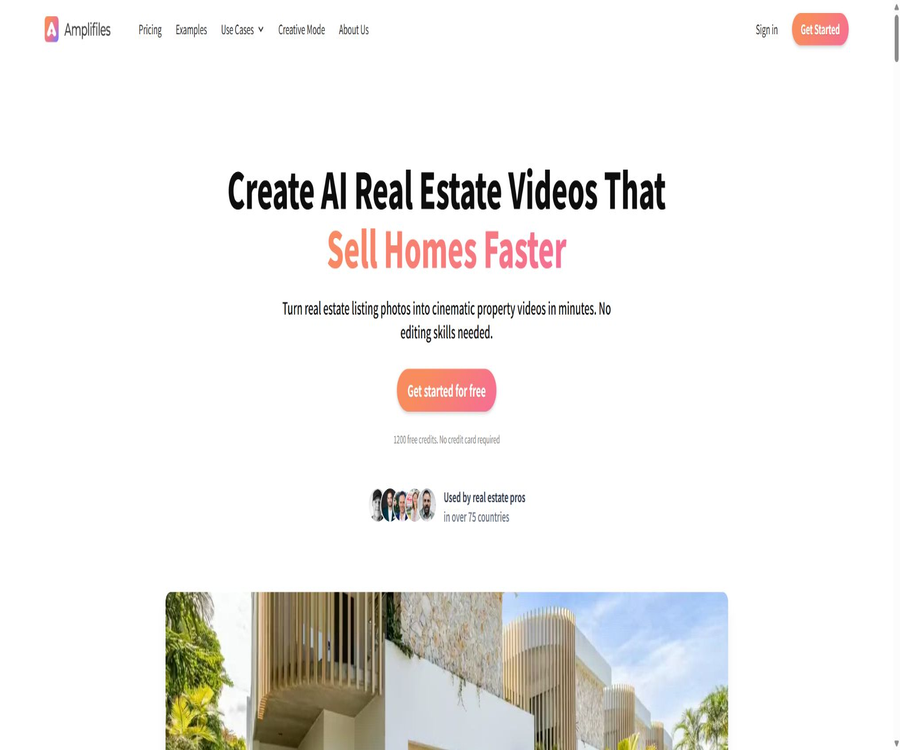
AI Real Estate Video Maker & Editor
AI Real Estate Video Maker & Editor – an intelligent tool focused on AI programming
Tags:AI programming toolsWhat is Amplifiles?
Amplifiles is an AI-powered service for creating real estate videos, offered by Aava AI Oy. It transforms photos of properties into marketing videos that include camera movements, transitions, music, subtitles, and brand information. According to official information, the company was established in Tampere, Finland, in 2023; its products are available in over 75 countries, and more than 50,000 videos have been created so far.
It is designed for real estate agents, photographers, agencies, and marketing coordinators who lack professional video editing skills. Users can upload photos or import property information, and then download MP4 files suitable for use on property platforms and social media.
A one-sentence summary
Amplifiles can turn a set of property photos into a 1080p real estate marketing video in about 5 minutes, generating versions in landscape, portrait, and square formats.
Core functions
- Convert photos to videos: Add camera movements such as panning, zooming, and pushing/pulling to static property photos.
- Quick Animations: Apply camera movements, environmental effects, and time changes with one click.
- Creative Mode: Generate virtual layouts, characters, elements, and close-ups using prompts.
- Transition control: Adjust the type, direction, and speed of transitions without having to regenerate the original animation.
- AI voiceover: Generates multilingual narration automatically for property descriptions.
- Auto subtitles: Converts the narration into subtitles, suitable for viewing with the sound off.
- Brand template: Include the agent’s profile picture, name, contact information, company logo, and brand colors.
- Licensed music: Choose background music that suits the style of different properties.
- Multiple frame export: One animation can be exported in 16:9, 9:16, and 1:1 formats.
- High-definition output: Standard 1080p is available for free; enhanced 1080p or 4K options are available for a fee.
Quick Animations – Fast animations
- Camera movement includes advancing, rotating, moving left and right, translating, scaling, and panning.
- Environmental effects can depict dynamic details such as fireplaces, ceiling fans, water surfaces, and televisions.
- The cleanup feature can help reduce the clutter in the image.
- The passage of time and the changes between day and night are suitable for exterior scenes, landscapes, and main visual shots.
- Fast animation is suitable for processing large numbers of photos of ordinary indoor and outdoor properties.
Creative Mode – Creative mode
Creative Mode is used to create key scenes that last between 3 and 15 seconds; its pricing mechanism differs from that of regular animated illustrations. It is particularly suitable for covers, living room visuals, landscapes, and other images that require a strong visual impact.
- Virtual layout: Creates furniture and decorative elements for empty rooms.
- Add characters: Include characters that fit the marketing narrative in the visuals.
- Add elements: Use the prompts to add details regarding specific objects or the environment.
- AI Close-Up: Creating a more detailed close-up from the original image.
- Speed variation: Use speed gradients to enhance the rhythm of the footage.
- Start and end frames: Control the visual state at the beginning and end of the animation.
- Custom prompt: Describe the camera movement, atmosphere, and the elements that should be preserved.
Transitions, voiceovers, and subtitles
- Transitions include hard cut, fade, black screen fade, white screen fade, push in, erase, and scale fade.
- The speed and direction of the transition can be adjusted; there is no need to recreate the image animation just to change the transition.
- The AI narration is available in over 30 languages, and can be used to promote properties in different regions.
- Automatic subtitles that are synchronized with the narration improve the delivery of information when watching on mobile devices in silent mode.
- The narration script still requires manual verification of facts such as area, address, price, and facilities.
Brands, music, and export
- It is possible to set the broker’s name, profile picture, contact number, and company details.
- Multiple video styles for property listings can be used, featuring the company’s logo and brand colors in a consistent manner.
- The built-in background music is licensed for use, but it is still necessary to check the review rules of the target platform.
- The standard output is in MP4 format, and it can be used on property listing platforms, social media, emails, and for client presentations.
- 16:9 is suitable for property listing pages and long videos, 9:16 is suitable for short videos, and 1:1 is suitable for information streams.
- No additional fee is charged for standard 1080p; extra points are applied for enhanced 1080p and 4K.
- The final video will not have the Amplifiles watermark.
Tutorial on creating property videos using photos
- Register an account and receive free points for new users.
- Upload the photos of the properties, organized in order by room.
- Remove duplicate, blurry, overly dark images, or those containing sensitive information.
- Select either quick animation or creative mode for each photo.
- Set transitions, narration, subtitles, music, and brand elements.
- Check whether the address, area, key features, and contact information are accurate.
- Generate the video and download the three required resolutions.
- Check the layout of the visuals, music licensing, and platform guidelines before the official release.
Create videos using the property listing page
- Copy the address of the publicly accessible property page.
- Select to import property information when creating a project.
- Wait for the system to retrieve the photos and the public description.
- Check each photo individually for sequence, duplicates, and completeness of information.
- Rewrite property descriptions that may be exaggerated or outdated.
- Set the brand, narration, subtitles, and target aspect ratio.
- After it is generated, it is compared item by item with the original property details before being published.
Tutorial for Using Creative Mode
- First, select a key photo with a clear composition and sufficient resolution.
- Identify the walls, doors, windows, floors, and fixed installations that need to be retained.
- Use brief prompts to describe camera movement, layout style, and additional elements.
- Select a clip duration of 3 to 15 seconds and estimate the cost per second.
- After creation, check the spatial structure, furniture proportions, character limbs, and reflections.
- If modifications are needed, adjust the prompt first before deciding whether to regenerate it.
- Provide clear explanations regarding virtual arrangements and AI-generated images to prevent misleading buyers.
Suggestions for preparing photos
- Sorted by appearance, entrance, common areas, bedrooms, bathrooms, and landscape.
- Try to use photos that are straight and aligned, have even exposure, and show no significant distortion.
- Keep a small number of complementary perspectives in the same room to avoid continuous repetition.
- Do not upload identification documents, license plates, key codes, or private photos of residents.
- Ensure that you have the rights to use the photos or that you have obtained permission from the photographer.
- Virtual layouts cannot conceal cracks, damage, or other significant conditions of the building.
Which users are it suitable for
- Real estate agent: Quickly add brand videos to each property listing.
- Real estate photographer: Use videos as an added value service to photographs.
- Agency: Standardizes the opening/closing sequences and visual guidelines for different agents.
- Marketing coordinator: Manages multiple properties and materials from various channels in bulk.
- Short-term rental operators: Create promotional videos for vacation homes and short-term rental properties.
- Commercial real estate team: Create presentations for office, retail, and industrial properties using existing images.
Typical use cases
- Quickly convert photos of new properties into social media previews.
- Create a horizontal video introduction with narration for the property page.
- Generate a vertical subtitle version for short-video platforms.
- To demonstrate the marketing capabilities of the brokerage team during pre-sales presentations.
- Create clearly labeled virtual layout demonstrations for empty rooms.
- Create basic animated presentations when there is no budget for video recording.
- Create preliminary content for the renderings of the development project.
Jobs that are not suitable for direct replacement
- Professional filming that requires real-world movement and continuous pathways.
- Projects that require a drone license for aerial photography or for documenting the appearance of a neighborhood.
- High-end customized videos for luxury homes, buildings, and commercial projects.
- Inspection evidence showing the actual condition of the property and legal evidence are necessary.
- Advertising production that requires frame-by-frame refinement, complex sound design, and team review.
- Properties with a small number of photos, poor image quality, or severely distorted images.
Free quota and billing units
New users receive 1200 points; no credit card is required. The cost is 150 points per regular image, which allows for the processing of around 8 photos. Points are key to understanding the pricing structure, as different charging methods apply for export quality, re-generation, and Creative Mode.
| Project | Official billing | Explanation |
|---|---|---|
| New user quota | 1200 points | About 8 regular animated photos |
| Pay-as-you-go regular animation | 1.50 dollars per piece | Which is equivalent to 150 points per piece. |
| First regeneration | 1 free use per ticket | The pay-as-you-go plan applies. |
| Regenerate additionally | 50 points per time | About 0.50 dollars |
| Standard 1080p | No extra charges | Included in video production |
| Enhanced 1080p | 5 points per second | Deduction is made based on the duration of the entire clip. |
| 4K | 10 points per second | About 2 dollars for 20 seconds |
Comparison of packages and versions
Official information confirms that the subscription cost starts at $29 per month, though the full range of options is displayed dynamically on the payment page. To avoid any confusion, only the verifiable initial details are listed here; the actual amount of storage space and prices are subject to those shown on the purchase page within the account.
| Plan | Price | Images or points | Primary interests | Suitable for users |
|---|---|---|---|---|
| Free trial | $ | 1200 points, approximately 8 cards | No credit card required to experience a basic video. | First test |
| Pay-as-you-go | 1.50 dollars per piece | Purchase by processing images | 1080p, voiceover, subtitles, branding, and three-frame format | Made occasionally |
| Subscribe | Starting at $29 per month | Starting at about 23 sheets | The unit price starts at around 1.26 dollars, with 10 free regenerations per image. | New items are added continuously. |
| Higher subscription tiers | The account page is displayed in real time. | Higher image quota | The price per sheet can be as low as around 1 dollar. | Photographer and team |
| Enterprise solutions | Contact sales | Configure by scale | High-frequency creation and corporate-level deployment | Agency |
Cost of Creative Mode
| Cost items | Price | Calculation method |
|---|---|---|
| Animation generation | $ | By seconds of segment generation |
| Image editing | 0.20 dollar per piece | Editing operations on the input image |
| Example snippet | 3 to 15 seconds | The longer the duration, the higher the cost of the animation. |
| Try again | It is possible that charging will occur again. | Optimize the prompt before generation. |
Subscription rules and cost control
- Subscription plans offer a lower price per unit compared to purchasing on a pay-as-you-go basis.
- Subscribers can get 10 free regenerations per photo.
- Unused points can be carried over, but they become invalid 12 months after the date of acquisition.
- Subscriptions can be canceled; the date on which the cancellation takes effect should be confirmed on the account page.
- Creative Mode, enhanced clarity, and 4K will increase the cost of the project.
- Before starting the production, determine the number of photos, the duration of the final video, and the desired level of clarity.
- According to official sources, the cost of videos for regular properties can usually be kept below 15 dollars.
How to choose a solution
- When you only want to test the effect, use the 1200 free credits to process 8 photos first.
- When there are only a few properties available each month, pay-as-you-go pricing makes it easier to control expenses.
- When creating content on a monthly basis, compare the subscription image quota with the total cost based on usage.
- When testing shots frequently, the free regeneration attempts included in the subscription are even more valuable.
- When a large amount of Creative Mode and 4K is required, additional fees shall be calculated separately.
- Before using the team, it is necessary to inquire about the company’s permissions, brand templates, and capabilities for managing team members.
Rights for output and commercial use
According to the official price details, users can use the final video through any channel, and real estate photographers can also resell this video as part of their services. Before using it for commercial purposes, it is necessary to ensure that the photos, logos, music, narration text, and information related to the properties all have the appropriate rights.
- Do not upload photographs that do not have authorization.
- Permission must be obtained to use the company logo and the agent’s image.
- Do not describe AI-generated layouts as the actual configuration of a house.
- The prices, sizes, school districts, and facilities of the properties must be based on the most up-to-date information.
- Different property listing platforms may restrict watermarks, contact information, or generative content.
- Retain the original photos, authorization records, and the manually reviewed version before publishing.
Privacy and data security
Amplifiles is operated by a European company that complies with the GDPR and states that it does not sell personal information. Its privacy policy specifies that the data of inactive users is usually deleted after two years, although legal obligations may require it to be retained for longer or may lead to the anonymization of such data.
- Photos of a house can reveal the identity of its residents, their possessions, and details of its security measures.
- Obtain the address numbers, license plates, identification documents, photo walls, and information related to alarm devices before uploading.
- Only property pages and media materials that are authorized to be made public are imported.
- Access rights to accounts should be revoked promptly after team members leave.
- When stopping use, check the options for deleting items and deleting accounts.
- The privacy policy may be updated, so it should be reviewed again before making a formal purchase.
Product advantages
- The process for designing property photos is more straightforward compared to general video editing software.
- The basic video ready for download can be obtained in about 5 minutes.
- One generation allows for the free output of three common image formats.
- 1080p, subtitles, voiceovers, and brand elements are included in the basic version.
- Quick Animations are suitable for mass production, while Creative Mode is ideal for key scenes.
- Subscription points can be carried over, making them suitable for users with a variable number of properties.
- Photographers can use videos as an added value to their existing services.
Usage restrictions
- AI motion can cause deformation in walls, doors, windows, furniture, and surfaces that reflect light.
- Virtual arrangements and additional characters may lead viewers to misjudge the actual condition of the house.
- Creative Mode is charged per second, and redoing tasks multiple times will quickly increase the cost.
- The free quota is only sufficient to test a video with about 8 photos.
- The full subscription plan needs to be checked on the dynamic billing page.
- The quality depends heavily on the composition, clarity, and exposure of the original photo.
- Automatic narration may misinterpret addresses, brand names, numbers, and technical terms.
- It cannot replace actual photography, property inspections, legal disclosures, or professional post-production.
APIs and team capabilities
The official website and support materials do not provide any open API documentation that would allow developers to submit requests on their own. Teams that need to carry out bulk system integrations, automate the import of property listings, or have company-level permissions should first consult the authorities to find out about the interfaces and management capabilities available for corporate solutions.
GitHub and the open-source status
No official product code repository that can be verified in conjunction with the Aava AI Oy or Amplifiles websites was found. The projects with similar names that were identified are not related to this property video service; therefore, such products should be classified as closed-source SaaS solutions.
Basic information
| Project | Content |
|---|---|
| Tool name | Amplifiles |
| Development company | Aava AI Oy |
| Date of establishment | 2023 |
| Location of the company | Tampere, Finland |
| Tool type | AI conversion of real estate photos into videos |
| Supported languages | The narration is available in over 30 languages. |
| Output format | MP4, 16:9, 9:16 and 1:1 |
| Output clarity | 1080p, Enhanced 1080p and 4K |
| Free trial | 1200 points, no credit card required |
| Public API | No findings were detected. |
| Open-source status | Not open source |
Recommendation score
Recommendation score: 4.3 / 5. It provides a comprehensive set of outputs including property photos, animations, voiceovers, subtitles, brand elements, and three-view formats, making it suitable for frequent real estate marketing. However, the authenticity of the AI-generated images, the costs associated with Creative Mode, and the prices of dynamic subscriptions need to be carefully examined.
Frequently Asked Questions
Is Amplifiles free?
New users can receive 1200 points for free, without the need to link a credit card; these points are sufficient to process around 8 ordinary animated photos.
How long does it take to create a video?
The typical time given by the officials is around 5 minutes; the actual speed, however, is affected by the number of photos, the generation mode, and the queue.
Is experience in video editing required?
It’s not necessary; the basic process involves uploading, selecting a style, generating, and downloading.
Is it possible to create vertical videos?
Yes, the same animation can be output in three aspect ratios: 16:9, 9:16, and 1:1.
Is standard 1080p charged?
There is no additional charge for standard 1080p; for enhanced 1080p and 4K, points are deducted based on the number of seconds of the video.
How is Creative Mode priced?
Animation is charged at $0.30 per second, while image editing is charged at $0.20 per image.
Is there a watermark on the video?
The downloaded video ultimately has no Amplifiles watermark, and it is possible to include the brand information of the broker or company.
Can it be used for commercial purposes or resold?
According to the official statement, the final video can be used across various platforms, and photographers can resell it as a service; however, the user remains responsible for the rights related to those materials.
Are open APIs provided?
No public API documentation is available at the moment; for enterprise integration needs, it is necessary to contact the official parties directly.
Is Amplifiles open source?
It is not open source, and there is no verifiable official repository for the product’s source code.
Tools similar to AI Real Estate Video Maker & Editor



 Guigong Network Security Registration No. 45132202000164