






AI for Backend & Frontend Code Development
AI for Backend & Frontend Code Development – intelligent tools focused on AI-driven programming
Tags:AI programming toolsWhat is Workik?
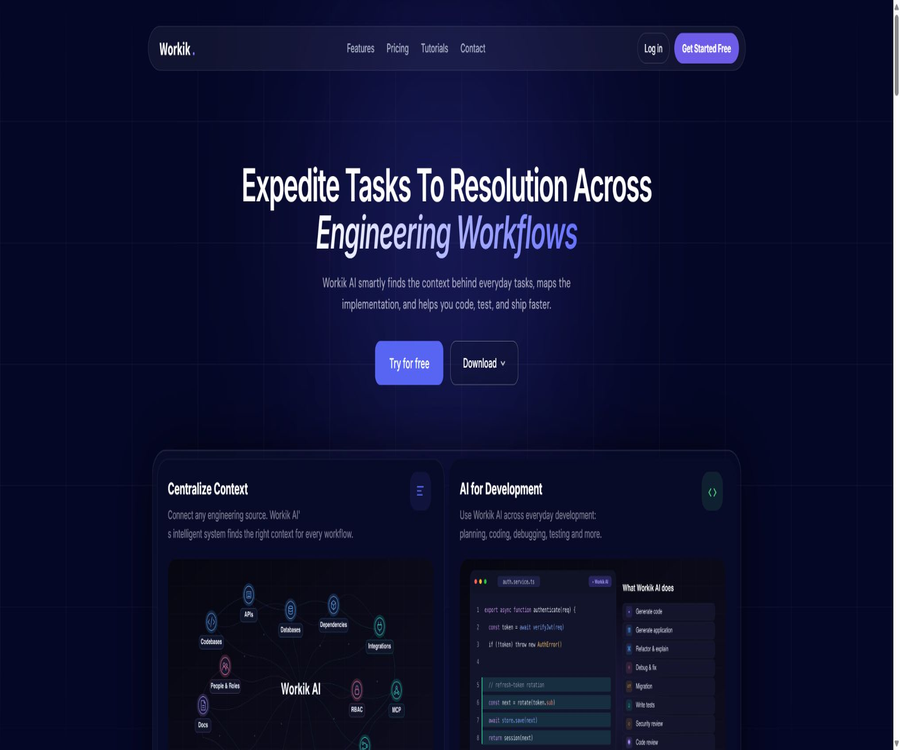
Workik is a context-aware AI development platform designed for developers and engineering teams. It connects code repositories, databases, API specifications, technical documentation, task management systems, and team knowledge, providing a project-level context for code generation, debugging, testing, documentation, and automated tasks.
Unlike standard chat tools that only read the current file, Workik focuses on maintaining a reusable engineering context, and brings relevant information to web interfaces, desktop applications, editors, terminals, as well as AI tools that support MCP.
A one-sentence summary
Workik brings together code, data structures, APIs, documentation, and tasks within a team context, enabling AI to carry out coding, documentation, automation, and security tasks related to actual projects.
Core functions
- Context-driven programming: Generates project-related code based on coding style, dependencies, databases, and APIs.
- Code repository connection: Synchronize with GitHub, GitLab, Bitbucket, and other code sources.
- AI code generation: Creating functions, interfaces, utility functions, services, and application structures.
- Debugging and refactoring: Explaining errors, identifying the relevant files, and proposing solutions for modifications.
- Test generation: Unit or integration tests are created based on real interfaces and data structures.
- Code repository documentation: Generates maintainable documentation for files, modules, classes, and the entire repository.
- Database documentation: Connect to relational or document databases and explain tables, fields, and relationships.
- AI processes: Combine repetitive development, documentation, or analysis tasks into automated workflows.
- Team AI bots: Create Slack or Discord bots using project-specific knowledge.
- Engineering task execution: Generating plans and code from requirements or tickets, along with performing checks prior to submission.
- Code security inspection: identifies vulnerabilities, sensitive information, dependency risks, and unsafe implementations.
- MCP context output: Provides the background information of the filtered items to other AI programming tools.
What does a context system include?
- Code repositories, branches, folders, and code snippets.
- Language, frameworks, package versions, and internal coding standards.
- Database connection, table structure, ERD, JSON, or CSV format.
- Information on OpenAPI, Swagger, Postman, and REST interfaces.
- Product requirements, technical specifications, configuration files, and design references.
- Tasks in project and collaboration systems such as Jira and Linear.
- Team history hints, AI-generated outputs, and manually revised results.
- Knowledge bases and search indexes created on a project basis.
Context-driven AI programming
Workik uses vector retrieval to select content from the project materials that is relevant to the current task, and then submits it to the selected AI model. This reduces the cost associated with transmitting the entire codebase each time, while also ensuring that the output conforms to the existing naming conventions, module boundaries, and data structures.
- Generate code that is compatible with existing technology stacks.
- Explain cross-file calls and business logic.
- Create queries or interfaces based on the database schema.
- Restructure the old code in accordance with team standards.
- Generate synthetic data, as well as testing and validation rules.
- Ask consecutive questions within the same context.
Tutorial on creating a project context
- Register for Workik and create a standalone project or team workspace.
- Select the language, framework, dependencies, and AI model to be used.
- Only authorize the necessary GitHub, GitLab, or Bitbucket repositories and branches.
- Import database schemas, API specifications, technical documentation, and coding rules.
- Check the index range and exclude keys, customer data, and unrelated directories.
- Use a known task to test whether the AI can correctly reference the project structure.
- Correct the erroneous context and save it as a configuration that can be reused by the team.
- It will then be gradually opened up to more members and automated processes.
AI code generation and task execution
- Generate front-end, back-end, or full-stack code based on textual requirements.
- Create CRUD interfaces, authentication logic, data transformation, and utility functions.
- Break down the PRD into development tasks and implementation plans.
- Collect the relevant code from the ticket and prepare for the modification session.
- Generate tests, descriptions, and release records for the change.
- Verify some fixes in an isolated environment.
- Submit the completed results to the developer for approval before proceeding.
Code repository documentation
Workik can generate documents in bulk for a single file or multiple files, and it allows users to choose the layout, add additional context, and continue the conversation with the AI. By connecting to code hosting platforms, teams can also ensure that the documents are updated as the code changes.
- Generate documentation for functions, classes, modules, and architectures.
- Output in Javadoc, Docstring, JSDoc, or a custom layout.
- Select multiple files in bulk to generate a document uniformly.
- Manually edit, download, and share the generated results.
- Explain asynchronous processes, dependencies, and complex algorithms.
- Generate API documentation using Swagger or Postman.
- Reduce document expiration through warehouse synchronization.
Tutorials for generating code documentation
- In the project panel, access the AI code documentation feature and create a document set.
- Connect to a repository, upload folders, or add code that requires explanation.
- Select a single file, or use the batch document feature to select multiple files.
- Choose a built-in layout or a custom document structure for different file extensions.
- Add target readers, terminology, examples, and formatting requirements.
- After generating the document, check whether the parameters, return values, exceptions, and dependencies are accurate.
- The person in charge of the code fixes the errors and saves the final version.
- Set up warehouse synchronization and review the documents again after any significant changes.
Database design and documentation
- It supports databases such as MySQL, PostgreSQL, Microsoft SQL Server, MariaDB, and MongoDB.
- Connect to external databases or import structured data in formats such as SQL, JSON, and CSV.
- View and modify the schema using ERD, SQL, or forms.
- Generate, optimize, explain, and execute SQL queries.
- Generate database documents in batches based on a table or the entire schema.
- Create business-relevant simulated data based on field relationships.
- Communicate with AI to understand table relationships, indexing, and query logic.
AI automated processes and robots
Workik’s workflow allows for the combination of multiple AI tools with various engineering steps; it is suitable for tasks such as processing repetitive documents, handling data, checking code, and facilitating team discussions. Teams can also create Slack or Discord bots that make use of the project context.
- Select workspace knowledge, code, or a database as the robot’s context.
- Choose a model that is suitable for the task’s speed, cost, and level of reasoning required.
- Test the robot’s responses before publication and refine its knowledge scope.
- Monitor answer quality and costs continuously by using records.
- Use a workflow to automatically carry out multi-step generation or verification tasks.
- Provide common engineering knowledge for reference by those in non-development roles.
Code security capabilities
- Identify common vulnerabilities and insecure implementations in scan codes.
- Discover configuration files, environment files, and keys in the repository.
- Check dependencies and known vulnerabilities.
- Analyze the security risks in submission or pull requests.
- Prepare fixes for the issues and generate regression tests.
- Verify some of the recommendations in an isolated environment.
- Manual approval is retained to prevent automatic fixes from altering business behavior.
Platform support and integration
| Category | Public support | Primary uses |
|---|---|---|
| User side | Web, Windows, macOS, Linux, VS Code, Terminal | Calling the same context in different development environments |
| Code hosting | GitHub, GitLab, Bitbucket, Azure DevOps, and others | Synchronize repositories, branches, and changes |
| Task collaboration | Jira, Linear, Slack, Teams, etc. | Import tasks, notifications, and team Q&A |
| Data and APIs | PostgreSQL, MongoDB, MySQL, Swagger, Postman, etc. | Provide database and interface context. |
| AI tools | MCP client and various external AI programming tools | Output a concise context related to the task. |
| Model services | Various models from OpenAI, Anthropic, Gemini, and Bedrock | Select speed, capability, and cost based on the task. |
Which users are it suitable for
- Individual developers who need AI to understand the entire project.
- Engineering teams that manage multiple code repositories.
- An engineering manager responsible for development processes, delivery efficiency, and technical governance.
- Technical leads who are responsible for standardizing documents and onboarding materials for new employees.
- Backend teams that frequently work on database and API design.
- Organizations that wish to share project knowledge via Slack or Discord.
- Teams that need to share context across various AI programming tools.
- Security professionals who wish to move security checks earlier in the development process.
Typical use cases
- New feature development: Implementation is created by integrating real warehouses, patterns, and interfaces.
- Legacy system understanding: Explaining unfamiliar modules, dependencies, and cross-file calls.
- Code migration: Converting frameworks, languages, databases, or interface versions.
- Troubleshooting: Identify the issue by examining error logs and relevant code.
- Test completion: Generate unit and integration tests based on existing business rules.
- Document management: Create code and database documents in bulk and keep them synchronized.
- New employee onboarding: Answering questions regarding the architecture and processes by leveraging unified project knowledge.
- Ticket execution: Prepare plans and code sessions from Jira or Linear tasks.
- Security fixes: Scan for vulnerabilities, secret information, and dependency risks, and verify patches.
- Cost control: Only transmit to the model those segments of data that are relevant to the task.
Package price
Currently, Workik offers several packages based on the number of AI tokens, the number of knowledge base files, and the number of times a process is executed; it also allows users to use their own model API keys. According to the information provided on the site, 1,000 tokens are sufficient to process around 750 English words, though the actual consumption varies depending on the context and the length of the output.
| Package | Monthly price | Platform AI quota | Knowledge base and processes | Team capabilities |
|---|---|---|---|---|
| Trial | Free | 10 requests upon registration; unlimited requests possible with a custom API key | 100 knowledge documents; 50 free process executions upon registration, 20 per month | Up to 3 users; unlimited AI robots |
| Starter | 15 dollars | 20 million standard AI tokens | 5,000 knowledge documents; 1,000 processes | Requests for unlimited users, bots, and custom keys |
| Premium | 30 dollars | 40 million standard tokens and 4 million premium tokens | 15,000 knowledge documents; 3,000 processes | Unlimited users, usage logs, and dedicated support |
| Elite | 80 dollars | 100 million standard tokens and 10 million premium tokens | 100,000 knowledge documents; 10,000 processes | Usage reports and priority support |
| Tailored | Page example: starting at $62 | Based on the selected criteria and advanced token configuration | Inherit Premium and adjust as needed | Suitable for customizing limits. |
| Enterprise | Contact sales | Determined in accordance with the contract | Customizable constraints, support, and security implementation | Suitable for compliance, SSO, and SLA requirements. |
How to choose a package
- Short-term trials can start with a trial version, but the offers provided by the platform are not refreshed on a daily basis.
- Small teams that continuously use the standard model can prioritize comparing Starter.
- Choose Premium when you need advanced models, more processes, and logs.
- Large knowledge bases, high-frequency automation, and usage reporting are suitable for Elite.
- Compare the total cost of Tailored plans with fixed packages when the usage pattern is special.
- Organizations that require SSO, SLA, DPA, or custom security controls should inquire about corporate solutions.
- The cost of models that have their own API keys is usually charged separately by the service provider of those models.
Tokens, requests, and process quotas
- Standard tokens are used for everyday coding, documents, and quick tasks.
- Advanced tokens are used for more complex analysis and reasoning models.
- Each request consumes both the input context and the model output tokens.
- Vector retrieval can reduce the amount of irrelevant code that enters the model.
- The execution of a process is counted based on the number of automated runs, which is different from ordinary chat requests.
- When the limit of the package is reached, the platform will prompt the user to upgrade or adjust the way of use.
- Although proprietary keys can relieve the restrictions on AI requests imposed by the platform, they are still subject to the limits set for third-party accounts.
Data security and privacy
The Workik terms state that user content or personal data will not be used to train or fine-tune AI models, and users retain the right to control the content they input and the content that is generated. The platform makes use of third-party model services such as OpenAI, Anthropic, Google Gemini, and Amazon Bedrock to process certain requests.
- The official website states that it has passed independent SOC 2 Type II certification.
- Enterprise capabilities include SAML or OAuth single sign-on.
- It provides role permissions such as viewer, editor, and administrator.
- Project isolation is used to limit the access scope of different teams.
- AI token logs can be viewed by user and project.
- Enterprise clients can apply for a DPA and negotiate an SLA.
- The permission to connect to third-party services can be revoked.
- Sensitive items can be evaluated using VS Code’s local context approach.
Checklist before accessing the code repository
- Only the target repository and necessary branches are authorized; the entire organization is not made accessible by default.
- First, remove the keys, tokens, and customer data from the history.
- Exclude environment files, production configurations, certificates, and large generation directories.
- Confirm the storage location, retention period, and deletion method for index data.
- Review third-party model service providers and data processing terms.
- Configure members, bots, and automated accounts with the minimum required permissions.
- For AI modifications, retain the code review, testing, and rollback processes.
- Before leaving the platform, check whether the context, documents, and usage records can be exported.
Product advantages
- The types of context are diverse and not limited to the files in the current editor.
- It covers various aspects such as coding, testing, documentation, databases, automation, and security.
- It supports teams in sharing project knowledge and AI interaction history.
- It can be connected to mainstream code hosting, task, communication, and data tools.
- The MCP approach allows the context to be carried to external AI programming tools.
- Code and database documentation support layout, batch generation, and synchronization.
- It offers multiple model options as well as a mode using custom API keys.
- Multiple packages explicitly list the quotas for tokens, files, and processes.
- Enterprise security capabilities include SOC 2 Type II, SSO, and RBAC.
Usage restrictions and precautions
- AI-generated code may contain logical errors, security vulnerabilities, or missing dependencies.
- Errors, expired contexts, or overly permissive permissions can reduce the quality of the answers.
- Connecting the entire warehouse to the database increases the risk of sensitive information being exposed.
- The data pathways and retention rules of different model service providers may vary.
- Using your own API key incurs costs related to external models; therefore, it is not sufficient to consider only the Workik subscription price.
- Tokens, knowledge documents, and process execution represent quotas in different dimensions.
- Automatically synchronized documents still require review by developers, and their accuracy cannot be guaranteed at all times.
- Security scanning cannot replace professional audits, governance, or penetration testing.
- The fixes and submissions prepared by AI must undergo code review and testing.
- Some of the new homepage features coexist with the traditional tutorial pages, and the actual account functions may be made available in stages.
GitHub and open source
Workik is a commercial, closed-source service; its terms explicitly state that no rights are granted regarding the underlying software, source code, or AI models, and extracting the platform’s source code is prohibited. The official website does not provide any links to verifiable official open-source repositories.
Connecting to a GitHub repository merely means that Workik can read the authorization codes; it does not imply that the platform itself is open source. The rights to use the code created by users also do not change the license of Workik’s underlying system.
Basic information
| field | Content |
|---|---|
| Tool name | Workik |
| Development entity | Workik Technologies LLP |
| Tool type | Context AI programming and engineering collaboration platform |
| Key capabilities | Encoding, debugging, testing, documentation, databases, automation, and security |
| Platform | Web, Windows, macOS, Linux, VS Code, Terminal, and MCP |
| Model | Supports various services such as OpenAI, Anthropic, Gemini, and Bedrock. |
| Price pattern | Free trial, subscription, customization, and enterprise quotes |
| Is registration required? | Yes |
| Is it open source? | No; commercial closed-source services |
Recommendation score
4.4 / 5. Workik is suitable for engineering teams that need a unified project context, the ability to collaborate across different tools, and features for handling large volumes of documents; its pricing options are clear. However, permissions after integrating it with a code repository, the paths where model data is stored, and the overall cost associated with tokens all require careful management.
Frequently Asked Questions
What does Workik mainly do?
It organizes code, databases, APIs, documentation, and tasks into AI-searchable project contexts, thereby assisting with the development process.
Is Workik free?
A Trial plan is available; upon registration, it includes a limited number of AI requests, 100 knowledge documents, and a certain amount of usage rights for running processes.
How much is the paid version of Workik?
Currently, the Starter plan costs $15 per month, the Premium plan costs $30, and the Elite plan costs $80; there are also custom and enterprise solutions available.
Can it be connected to GitHub?
Yes, it also supports sources such as GitLab and Bitbucket; only the necessary repositories and branches should be authorized.
Which databases are supported?
The listed public functions include MySQL, PostgreSQL, Microsoft SQL Server, MariaDB, and MongoDB, among others.
Can I use my own model API key?
Yes, the package allows using one’s own keys to send AI requests, but the service provider for the relevant models will calculate the costs and quotas separately.
Will you use code to train the model?
The official terms state that AI models will not be trained or fine-tuned using user content or personal data.
Is MCP supported?
Yes, it is possible to provide the project context related to a task to editors, terminals, or AI tools that are compatible with MCP.
Is Workik open-source software?
No, the core services of the platform are closed-source, and connecting to open-source repositories does not change this fact.
Tools similar to AI for Backend & Frontend Code Development



 Guigong Network Security Registration No. 45132202000164