






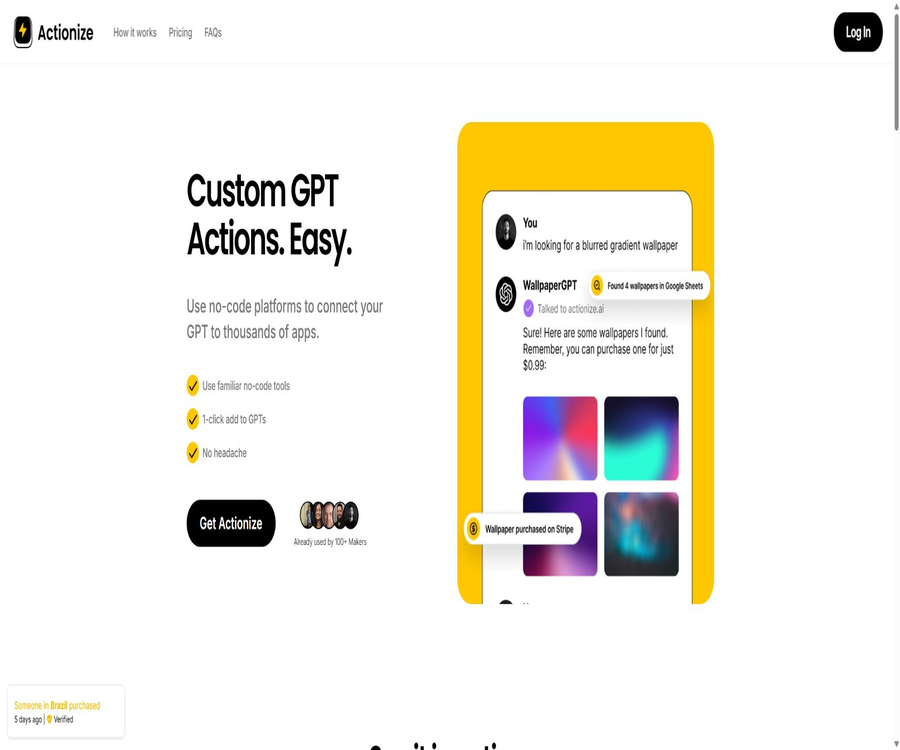
Actionize
Actionize, an intelligent tool focused on AI programming.
Tags:AI programming toolsWhat is Actionize?
Actionize is a lightweight, code-free tool designed for creating external actions for Custom GPT. It acts as a bridge between GPT and automation platforms such as Zapier, Make, and n8n, helping users transform existing workflows into Actions that can be invoked by GPT.
Its core value lies not in replacing automation platforms, but in reducing the effort required to manually create OpenAPI specifications and to perform repetitive configuration tasks. Users still need to set up processes within the automation platforms, as well as create accounts for ChatGPT, model interfaces, and third-party services.
Product status
As of this verification, the Actionize official website and its login application are still accessible; the website indicates that the product is in the Alpha early stage. The public pages currently promote a limited lifetime license, while subscription options are listed as being available at a later time. Therefore, it is necessary to check the status of delivery, updates, and compatibility before making a purchase.
| Verification items | Current status | It is necessary to pay attention. |
|---|---|---|
| Product stage | Early version of Alpha | Functions and interfaces may change frequently. |
| Official website | Accessible | The page’s copyright and some of the descriptions are current as of 2024. |
| Log in to the app | Loadable | Full functionality requires an account. |
| Main sales plan | $ | Limited edition; taxes and fees may apply separately. |
| Subscription plans | $ | It cannot be considered as a package available for purchase at the moment. |
| Official source code | Not disclosed | Commercial services are not open-source projects. |
Main functions
- Connect the workflows in the automation platform to Custom GPT.
- Centralized management of a GPT requires carrying out multiple actions.
- Enter a name and description that are easy for the model to understand for each connection.
- Code snippets that can be used in the GPT Creator are generated based on the configuration.
- Avoid manually writing complex OpenAPI operation specifications from scratch.
- It supports connecting to more services via Webhook.
- Reuse similar connection and configuration approaches for multiple GPTs.
- During the Alpha phase, feedback channels are provided to early users.
Three-step working method
- First, create a data query or task workflow in Zapier, Make, n8n, or another platform.
- In Actionize, add a connection by entering the action name, inputs, and a clear description.
- Generate the configuration with one click, and add the resulting settings to the Custom GPT Creator to conduct testing.
Supported automation platforms
The official website lists a variety of popular no-code automation platforms, stating that as long as a service can provide Webhooks, it has the opportunity to be integrated. The specific actions that can be performed, the authentication methods, and the data formats are determined by each respective platform.
| Platform | Typical effect | Key implementation points |
|---|---|---|
| Zapier | Connects a large number of commercial applications and pre-defined actions | Task quotas, authentication, and action permissions |
| Make | Create visual multi-step scenarios | Data mapping, error branches, and number of executions |
| Activepieces | Create automated workflows | Deployment method, connectors, and keys |
| n8n | Flexible workflows and self-hosting | Public access points, access control, and operation and maintenance |
| IFTTT | Simple triggering and connection to consumer-grade applications | Action depth and latency |
| Albato | Cross-application business automation | Connector coverage and package restrictions |
| Pabbly | Linking marketing with business processes | Task volume and error handling |
| Universal Webhook | Connect to custom interfaces or other platforms | Authentication, signing, field validation, and rate limiting |
The division of roles between Actionize and automation platforms
- GPT is responsible for understanding natural language and deciding when to request an action.
- Actionize is responsible for describing, organizing, and exposing callable actions.
- The automation platform is responsible for connecting applications and carrying out specific processes.
- The target application is responsible for data storage, business rules, and the final results.
- Authentication may exist at each layer separately.
- Logs, retries, quotas, and error messages need to be checked across systems.
- Actionize cannot fix the permission or data issues inherent in the downstream applications themselves.
Which applications can be connected?
The range of connections available depends on the automation platform chosen, rather than on a fixed list of applications built into Actionize. In theory, email, spreadsheets, calendars, CRM systems, project management tools, databases, payment services, and notification systems can all serve as targets for actions.
- Read from or write to spreadsheets such as Google Sheets.
- Create calendar events and check available times.
- Search for, create, or update contacts in CRM.
- Add tasks and comments to the project management tool.
- Send emails, text messages, or team messages.
- Retrieve business data from databases or internal systems.
- Trigger payment, order, or file processing workflows.
- Call a custom-built Webhook to execute specialized logic.
Appropriate use cases
- Sell GPT leads and enter qualified contacts into CRM.
- Content GPT synchronizes the selected topics and drafts to a table or project board.
- GPT is used to read orders and create internal processing tasks.
- The customer service GPT retrieves the customer’s information and submits a request for an upgrade.
- The meeting assistant checks the calendar, creates events, and sends notifications.
- The Data Assistant retrieves the latest metrics from tables or business interfaces.
- The personal assistant converts natural language requests into fixed automation.
- The prototype team quickly tested the feasibility of the business process for invoking GPT.
Which users are it suitable for
- No-code creators who are already able to use Zapier, Make, or n8n.
- Individual developers who wish to add external actions to Custom GPT.
- Product and operations staff who do not want to write OpenAPI specifications by hand.
- Independent developers who need to quickly create prototypes of connected applications.
- Automated users who can understand Webhooks, authentication, and data permissions.
- Early adopters who are willing to accept changes in the Alpha product and troubleshoot issues on their own.
Which scenarios are not suitable?
- Critical systems that require mature service levels and corporate support commitments.
- Teams that are unable to manage third-party keys, permissions, and privacy risks.
- Unsupervised processes involving large payments, data deletion, and irreversible actions.
- Users who only want to install and use things immediately, without wanting to set up an automation platform.
- Enterprise processes that require complex approvals, long-running transactions, and deterministic orchestration.
- Organizations that seek complete self-hosting and require open-source code.
- Ordinary chat users who do not use Custom GPT or model interfaces.
Create the first Action tutorial
- Choose a low-risk action, such as adding text to the test table.
- Create a workflow triggered by a Webhook in the automation platform.
- Define required fields, field types, and allowed values.
- Run the workflow using test data and check the returned results.
- Add a connection in Actionize and describe the purpose of the action accurately.
- Generate the configuration and add a custom GPT for testing.
- Test with normal, missing, incorrect, and malicious inputs respectively.
- Expand the scope of use only after confirming permissions, logs, and error messages.
Tutorial for Building Multi-Action GPT
- First, list the external systems that GPT must read from and write to.
- Design each action as a single, clear, and easy-to-verify task.
- Use distinctly different names for query actions and modification actions.
- In Actionize, the prerequisites, inputs, and outputs are described separately.
- It is required that GPT display the parameters to the user and obtain confirmation before performing important write operations.
- Create test accounts and sample data for each action.
- Record the action version, automation platform process, and responsible person.
- After going live, check the failure rate, duplicate calls, and unintended executions.
Recommendations for webhook design
- Only the minimum fields required to complete the task are accepted.
- Validate the field type, length, format, and enum values.
- Use random keys, signatures, or platform authentication to secure the entry point.
- Set rate limits and implement idempotent handling for repeated requests.
- Avoid returning the full key and sensitive customer data in the response.
- Return distinct results for success, user errors, and service failures.
- Record the request identifier rather than unnecessary, full details of privacy information.
- Regularly rotate credentials and disable Webhooks that are no longer in use.
How to write action descriptions
The action description determines whether the model can select the appropriate tool for a given scenario. The name should reflect the business purpose, while the description should outline the prerequisite conditions, required inputs, possible outcomes, and situations in which its use is prohibited.
- Use terms such as “query order status” instead of technical names like “call an interface”.
- Indicate whether the input is an order number, email address, or internal customer identifier.
- Distinguish between read-only queries and write operations that modify data.
- Indicate the situations in which user confirmation is required first.
- It explains the differences between data not being found, insufficient permissions, and service failures.
- Avoid using similar names and overlapping purposes for multiple actions.
- Provide a few typical use cases; avoid stacking contradictory rules.
Security and permissions
Actionize means that the application integration is carried out by the respective automation platform, which transfers data between GPT and workflows; it claims not to store or record such business data. The actual level of security still depends on the combined configuration of GPT, Actionize, the automation platform, and the target application.
- Create a dedicated account with the minimum necessary permissions for each connection.
- Try to use different credentials for read operations and write operations.
- Manual confirmation is required before deletion, payment, sending, and publishing.
- Do not write the administrator key directly into the prompt or action description.
- Check the data retention, logging, and model training policies of each platform.
- It protects against the injection of prompt inputs and unauthorized parameters.
- Set limits, allowlists, and approval processes for high-risk actions.
- Regularly audit to ensure that the Actionize configuration is consistent with the downstream workflows.
Testing and go-live checks
- Verify that normal input can trigger the correct actions and return understandable results.
- When a field is missing, GPT will ask follow-up questions instead of guessing.
- Invalid accounts, empty results, and timeouts are all provided with clear feedback.
- Submitting the same request repeatedly should not result in multiple orders or tasks.
- External content injected with hints cannot change the permissions of the tool.
- High-risk write operations require the display of parameters and confirmation.
- The Action should fail safely after the downstream workflow is disabled.
- After going live, keep the manual cancellation and emergency shutdown methods.
Price and purchase methods
The official website currently shows a lifetime license price of $47; the original price was $97, with an emphasis on the limited number of units available in the initial batches. The subscription option for future use is priced at $29 per month, but it is indicated on the page that this option will be available later. In addition to the dollar amount, value-added tax or other fees may apply.
| Plan | Reference prices on the official website | Current status | Restrictions or rights |
|---|---|---|---|
| Early lifetime license | $ | Currently the most promoted | No limits on GPT, no limits on Actions, no limits on usage volume |
| Indicate the original price | $ | Compare prices | When making a purchase, the settlement page should be taken as the reference. |
| The first batch of lifetime licenses | 17 dollars | Sold out | Only the historical early-bird price |
| Second batch of lifetime licenses | 37 dollars | Sold out | Only the historical early-bird price |
| Future subscriptions | $ | Not yet available | There are limited projects, actions, and usage amounts. |
Additional costs
| Sources of funding | Is it included in the Actionize price? | Explanation |
|---|---|---|
| ChatGPT paid subscription eligibility | Not included | Creating and using related GPT features may require compliance with the requirements of the current plan. |
| Platforms such as Zapier or Make | Not included | The free quota, the number of tasks, and advanced connectors are billed separately. |
| Target application | Not included | CRM, databases, email, and other services may incur fees. |
| Model interface | Not included | When using it through the developer interface, billing is based on the model and usage volume. |
| Taxes and fees | It may be charged separately. | The settlement page calculates value-added tax or other taxes based on the region. |
| Carry out maintenance | Bear the cost yourself. | Process design, testing, monitoring, and troubleshooting require time. |
It is necessary to confirm before making a purchase.
- Does a lifetime license refer to the product’s life cycle or to a specific range of functions?
- Current compatibility between Custom GPT and model interfaces.
- Is it truly necessary to have no restrictions on actions, or is the capacity of the automation platform the bottleneck?
- Terms regarding refunds, service suspension, data export, and account transfer.
- Team members, sharing, permissions, and workspace support.
- Will there be any differences between future subscription plans and the features available to lifetime users?
- The method of support and response in the event of a failure with the Alpha product.
Product advantages
- Lower the barriers to following coding standards when creating GPT Actions.
- You can continue to use the familiar no-code automation platforms.
- A GPT can manage multiple external actions in a centralized manner.
- It supports generic Webhooks, and the connection range is not limited to fixed directories.
- It is suitable for quickly testing ideas related to natural language-based business process invocation.
- The current lifetime plan is straightforward in terms of the cost for users who frequently use prototypes.
- The official website clearly outlines the division of responsibilities between Actionize and the automation platform.
Usage restrictions and precautions
- The product is still in the Alpha stage and not suitable for being used in critical business applications.
- The content on the official website is updated slowly, and future plans do not equate to features that have already been implemented.
- It is necessary to master both Custom GPT and the configuration of the automation platform.
- Overall reliability is influenced by multiple layers, including Actionize, workflows, and the target application.
- A lifetime license does not guarantee that the product will remain operational or compatible indefinitely.
- The costs for automation platforms and models need to be paid separately.
- The model may select the wrong action, use incorrect parameters, or make repeated calls.
- High-risk actions require confirmation, setting limits, and manual oversight.
- The official website does not demonstrate mature corporate governance, auditing, and service level capabilities.
GitHub and the open-source status
During this verification, no public source code repositories, SDKs, or fully self-hostable platforms that can be attributed to Actionize were found. The GPT Actions examples and OpenAPI specification repositories that came up in the search are not the same as Actionize’s commercial products.
| Project | Status | Explanation |
|---|---|---|
| Actionize platform | Closed-source commercial services | Use it through the official website account. |
| Official complete source code | No findings were detected. | No verified self-hosted version is available. |
| GPT Actions specifications | Open standards and documentation | Standard public release does not imply that Actionize is open source. |
| Third-party example repository | A large quantity | It cannot be used as the official implementation by Actionize. |
| Webhook workflow | Owned by the user | It can be managed independently on various automation platforms. |
Basic information
| field | Content |
|---|---|
| Tool name | Actionize |
| Tool type | Custom GPT Actions – a code-free connection tool |
| Developer | Rafal |
| Primary users | Code-free creators, automation users, and independent developers |
| Supported platforms | Web version |
| Main connections | Zapier, Make, Activepieces, n8n, IFTTT, Albato, Pabbly, and Webhook |
| Product stage | Alpha |
| Current price | $ |
| Is it open source? | No |
Recommendation score
3.8 / 5. Actionize reduces the complexity of setting up connections to automated platforms using a clear three-step process, making it suitable for prototyping and individual workflows; however, its Alpha status, slow page update speeds, external dependencies, and risks associated with lifetime licensing mean it is not appropriate for untested critical production processes.
Frequently Asked Questions
What is Actionize mainly used for?
It organizes code-free automation workflows into Actions that can be invoked by Custom GPT, and generates configurations that facilitate their inclusion in the GPT Creator.
Will Actionize replace Zapier or Make?
No, the actual applications, connections, and workflows are still executed on the automation platform; Actionize serves primarily as a bridge between GPT and these processes.
Is programming required?
Generally, there is no need for handwritten specifications, but users still need to understand the basic concepts of Webhooks, fields, authentication, permissions, and automation platforms.
Is n8n supported?
The official website lists n8n as a supported platform; it is also possible to connect to other services using standard Webhooks.
How much does Actionize cost?
The official website currently offers a one-time lifetime license for $47; a monthly subscription plan at $29 is not available yet, and the final price will be indicated on the settlement page.
Are there any other fees that need to be paid?
It is necessary; ChatGPT or the model interfaces, as well as the automation platforms and target applications, may each generate subscription fees or costs based on usage.
Will the data be saved?
Actionize claims to only forward data between GPT and the automation platform, without storing or recording it, but users should still check the privacy policies of all services involved.
Is it suitable for payment and deletion operations?
Unattended execution by default is not recommended; parameters should be verified, limits should be set, allowlists should be used, idempotency should be ensured, and a mechanism for manual cancellation should be in place.
Is a lifetime license worth buying?
It is suitable for users who are willing to accept the risks associated with early-stage products and who frequently create animations; before purchasing, it is necessary to check the terms regarding refunds, updates, compatibility, and service discontinuation.
Is Actionize open source?
It is not an open-source product; no official GitHub repository or self-hostable complete source code has been identified this time.
Tools similar to Actionize



 Guigong Network Security Registration No. 45132202000164