






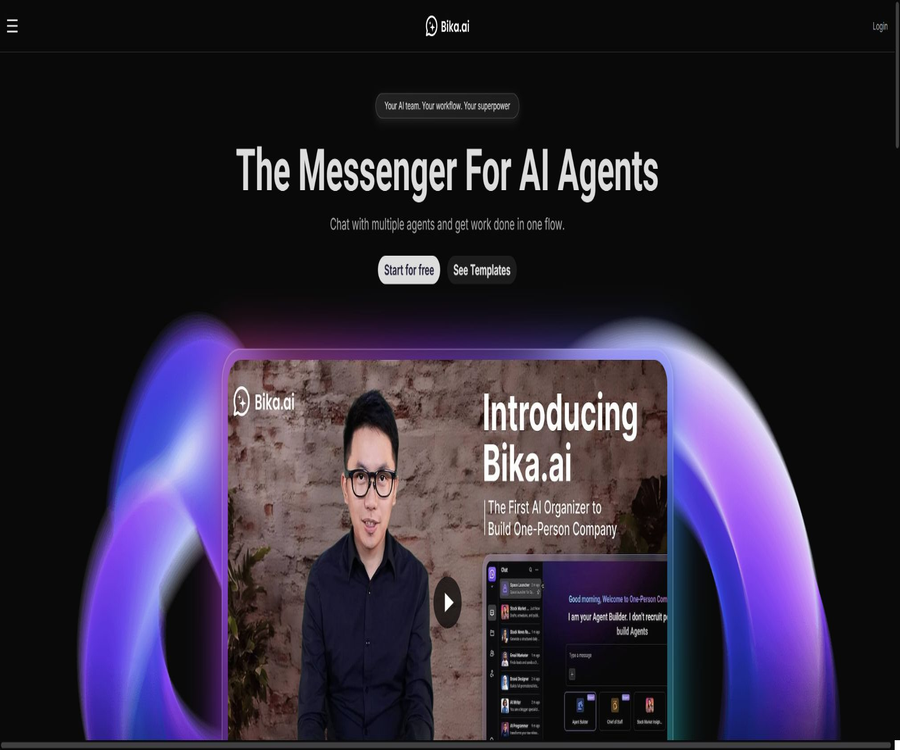
bika_ai
bika_ai, an intelligent tool focused on AI programming.
Tags:AI programming toolsWhat is Bika.ai?
Bika.ai is a business platform that integrates AI agents, automated workflows, multi-dimensional databases, dashboards, forms, and documents. It organizes multiple agents into an interface similar to team chat, allowing users to assign tasks within a process, view reports, and manage business data.
The product is aimed at individuals, companies, entrepreneurs, as well as marketing and sales teams; it is also suitable for organizations that need to set up CRM, project management, recruitment, or operational systems without writing any code. Bika’s focus is on enabling tasks to be carried out automatically in accordance with plans and data changes, rather than waiting for users to ask questions repeatedly.
Positioning of AI Organizer
Bika positions itself as an AI Organizer – a workspace for organizing and managing a set of AI agents, tools, and business resources. Users can collaborate with multiple agents in a manner similar to that used in communication software, with databases and automation serving as the foundation for their operations.
- Create and manage multiple AI agents in the same space
- Configure different responsibilities, data, and tools for agents.
- Receive task progress updates, reminders, and AI reports on a periodic basis
- Retain a human decision-making step before implementing important recommendations
- Place humans and AI agents within the same business process to work together.
Core functions
- Multi-agent chatting, task assignment, and result reporting
- Code-free automation based on triggers and actions
- A multi-dimensional table database that supports a large number of records.
- Forms, documents, dashboards, and resource directories
- AI text generation, summarization, analysis, and structuring
- Template market and reusable Agentic Apps
- Integration of MCP tools with third-party applications
- OpenAPI and development using JavaScript and Python
AI Agent Team
Bika allows users to create intelligent agents with different roles, such as programmers, writing assistants, brand design specialists, email marketing experts, stock news reporters, and document drafting assistants. These agents can utilize workspace resources and external tools to carry out multi-step tasks.
- AI Programmer: Turns ideas into publishable web pages
- AI Writer: Generates marketing copy, articles, and social media content
- Brand Designer: Develops the brand concept, slogan, and visual direction.
- Email Marketer: Research leads and carry out email follow-up processes
- Stock News Reporter: Regularly compiles market news and structured reports
- Requirements Writer: Generates requirement specifications and acceptance criteria
Active automation
The platform can initiate workflows automatically based on time, data changes, form submissions, incoming emails, or button clicks. Tasks do not need to be triggered by chat messages each time, which makes it more suitable for repetitive operations and periodic reporting.
- Generate daily and weekly reports as well as send reminders at fixed intervals
- Automatic classification, notification, or assignment upon creation of a new record
- Trigger subsequent actions when the conditions are met.
- Process data after receiving emails or web callbacks
- Iteratively process lists of contacts, orders, or tasks
- In the event of failure, choose to terminate the process or proceed with handling other tasks.
Multidimensional database
Bika’s database organizes business data using fields and records, and it supports views such as grids, galleries, and dashboards. Multiple views can share the same data source, with separate settings for filtering, grouping, field display, and card layout.
- Use the grid view to manage clients, products, and task lists.
- Use the gallery view to display images and card information.
- Use the Kanban view to track status and process stages.
- Maintain the data structure through relationships, formulas, and field types.
- Pass database records directly to automated and AI-driven processing.
Database capacity
The authorities emphasize that the underlying architecture is suitable for handling large volumes of data, but each cloud package still has defined limits on the total number of records as well as the number of records in a single database. The claim of being able to handle billion-level volumes of data does not mean that all SaaS users can store one billion records using the current packages.
| Package | Maximum total records | Maximum per database |
|---|---|---|
| Free | 100,000 items | 10,000 pieces |
| Plus | 5,000,000 items | 50,000 items |
| Team | 50,000,000 items | 500,000 items |
| Business | 100,000,000 items | 1,500,000 items |
Forms, documents, and dashboards
- Forms are used to collect leads, applications, feedback, and business data.
- Documents are used to store instructions, knowledge, and collaborative content.
- The dashboard converts database data into charts and metrics.
- The pivot component is used to aggregate values across different dimensions.
- The resource directory provides a unified organization for databases, automation elements, and pages.
Automated trigger
| Trigger method | Typical uses |
|---|---|
| Scheduled tasks | Send daily reports, reminders, and content at scheduled times |
| New record created | New clues are automatically assigned once they are entered. |
| Records that meet the conditions | Start the next process after the status changes. |
| Date of arrival | Reminders for contracts, birthdays, and deadlines |
| Form submission | Collect data and inform the responsible person. |
| Received email | Parse emails and write them to the database |
| Webhook received | Respond to other system events |
| Run manually | Check the parameters first before starting the batch task. |
Loops and variables
The variable selector in a workflow can reference objects, arrays, text, and numerical values generated by previous steps. Loop actions can process records one by one or be executed in parallel when the tasks are independent of each other.
- Read the array of contacts from the database.
- Retrieve the current contact field within the loop.
- Use AI to generate personalized content.
- Send an email or update the corresponding record.
- Aggregate the results of each iteration for use in subsequent steps
Template Center
Bika offers intelligent agent applications and automation templates that can be copied and modified; after installation, users can replace the account details, data tables, and trigger conditions. These templates help to reduce the time required for setup, but they should not be used in production without first checking the permissions and external actions involved.
- Three-day outreach email campaign
- Project management and client project tracking
- Recruitment candidate database and reminders
- Scheduled notifications via Telegram, Lark, and DingTalk
- Sales data analysis and periodic reports
- Batch generation of third-party AI videos
- Identification and recording of VAT invoices
- Equipment and IT asset management
MCP and application integration
The official documentation states that the platform can connect to or customize more than ten thousand MCP tools, and it offers predefined functions for searching, researching, and working. The actual number of available tools, the authentication methods, and the costs associated with making calls vary depending on the provider of those tools.
- Connects search, pages, images, and research tools
- Capabilities for accessing documentation, presentations, and spreadsheets
- Collaborate with GitHub, social platforms, and communication tools
- Add external services to agents or automation steps
- Expand internal corporate systems through custom tools
Common third-party integrations
- GitHub login and workflow collaboration
- Content publishing on X platform
- Messages from Telegram bots
- Slack channel notifications
- Lark, DingTalk, and WeCom group robots
- Custom SMTP email sending
- Third-party AI text, voice, and video services
OpenAPI and SDK
Bika’s open interfaces enable the management of spaces, databases, records, and automation; the documentation includes examples in command line, Python, and TypeScript. The platform also offers a beta interface compatible with APITable, facilitating the reuse of some existing SDKs.
- List the spaces accessible to the current user.
- Query records in the database
- Create, update, and delete records
- Invoke automation or read/write workspace resources
- Use tokens for authentication.
How to create the first automation
- Register and create a Space, specifying the participating members and their permissions.
- Select a template from the center of the templates that is similar to the target process and copy it.
- Check the databases, forms, automations, and external integrations included in the template.
- Replace the sample data with real fields, statuses, and responsible persons.
- Configure trigger conditions such as time, changes in records, or form submissions.
- Connect to emails, messages, AI models, or other accounts as needed.
- Run the tests step by step and check the inputs and outputs of each action.
- After enabling it in small batches, you can view the operation history, failure records, and quota usage.
How to set up a sales lead process
- Create a lead database and define the fields for name, company, source, status, and responsible person.
- Create forms or use open interfaces to insert new leads into the database.
- Set up a new record trigger to perform AI-based summarization and basic classification of leads.
- Assign sales staff based on region, product, or priority.
- Send internal notifications and the first compliance-related outreach email.
- Schedule follow-up actions within loops and scheduled tasks.
- Automatic sending stops when the recipient replies, unsubscribes, or the status changes.
- View the response rate, conversion stages, and failed tasks through the dashboard.
Which users are it suitable for
- A one-person company that hopes to use AI assistants for operations
- Start-up teams that need to manage leads, marketing efforts, and projects in a unified manner
- Managers who want to reduce repetitive reminders, aggregations, and notifications
- Business departments that require a combination of multi-dimensional databases and automation
- Development teams that wish to connect their own systems via interfaces
- Enterprises that require private deployment, white labeling, and advanced permissions
Typical use cases
- Batch email marketing and multi-day follow-up sequences
- Lead collection, allocation, and periodic reporting
- Project tasks, client communication, and progress dashboard
- Resume extraction for recruitment, candidate tracking, and interview reminders
- Invoice recognition, contract management, and expiration alerts
- Generation, approval, and scheduled publication of social media content
- Records of inventory, equipment, and IT asset maintenance
Product advantages
- Multi-agent systems, automation, and databases are located in the same workspace.
- The templates cover marketing, sales, project, HR, and operational use cases.
- Triggers, loops, variables, and external actions are fairly comprehensive.
- A free package is available, offering up to 5 seats.
- Supports large-scale recording, open interfaces, and team permissions.
- It can be continuously expanded through MCP and third-party integrations.
- Supports private deployment and white-label business solutions.
Usage restrictions
- AI and automation outputs can still contain errors, and they require review by business staff.
- Debugging complex processes, handling exceptions, and designing permissions require experience.
- Third-party models, SMS, emails, and integrations may incur additional costs.
- Free and lower-tier plans are subject to restrictions on logging, number of executions, APIs, and history retention.
- Some features are still listed in the price table as upcoming.
- The capability of handling billion-level databases in marketing exceeds the actual maximum size per database allowed by regular plans.
- Parallel loops and bulk operations may lead to repeated transmissions or interface throttling.
Security and Automation Governance
- First, validate the workflow using a test environment and small datasets.
- External accounts are granted only the minimum permissions required to carry out the actions.
- Batch emails, deletions, and financial transactions require additional manual approval.
- Use a unique task identifier to prevent repeated triggering and sending.
- Regularly check the operation history, failed retries, and abnormal data.
- Leaving members and expired tokens should be revoked promptly.
Prices and packages
Bika uses a subscription and seat-based billing model. The current pricing page shows the monthly cost per seat, but it also offers the option to pay either on a monthly or annual basis; the actual billing cycle, any promotional points, and taxes are determined according to the settlement page.
| Package | Currently displayed price | Storage | Single database record | Automated operation/month |
|---|---|---|---|---|
| Free | $ | 5GB | 10,000 pieces | 200 times |
| Plus | 16 dollars per seat per month | 20GB | 50,000 items | 30,000 times |
| Team | $ | 200GB | 500,000 items | 60,000 times |
| Business | $ | 800GB | 1,500,000 items | 100,000 times |
Differences in package features
| Project | Free | Plus | Team | Business |
|---|---|---|---|---|
| Total visitors | 5 | 50 | 100 | 1,000 |
| Number of resources | 100 | No restrictions | No restrictions | No restrictions |
| Operation history | 7 days | 14 days | 90 days | 365 days |
| Spatial integration | 3 | 10 | 100 pieces | 500 pieces |
| Interface rate limiting | 2 QPS | 5 QPS | 10 QPS | 10 QPS |
| API requests/month | 100 | 100,000 | 500,000 | 2,500,000 |
| Audit logs | 2 hours | 30 days | 60 days | 180 days |
| Support | Community and Help Center | Basic resources | Instant messaging or email | Higher-level services |
Precautions regarding the calculation of AI points
The summary on the price page states that the Free plan provides 3,000 AI points per day, while the detailed comparison table shows 100,000 points per seat for the Free plan; the paid plans also offer both basic points and additional points available for a limited time. Since the criteria are not clearly unified on the same page, it is necessary to refer to the quota panel after logging in as well as the settlement confirmation details.
| Page location | Expression of Free points | Risk |
|---|---|---|
| Package Summary | 3,000 per day | It might be the daily refresh limit. |
| Detailed comparison table | 100,000 per seat | The refresh cycle is not clearly specified. |
| Promotion details | The paid plans come with additional points. | It might be a time-limited offer. |
Private deployment and white labeling
The help center offers a quick start guide for self-hosting, and the pricing page lists Self-hosted and White-label as enterprise services; however, no fixed prices are provided. Companies need to contact sales to discuss licensing, deployment architecture, upgrades, support, data migration, and the scope of white-labeling.
- Confirm whether it is a single-tenant deployment or a full delivery of the source code.
- Clarify who is responsible for maintaining databases, object storage, and model services.
- Agreed timelines for version upgrades, security patches, and fault support
- Confirm the white-label scope for domain names, brands, emails, and application interfaces.
- Include backup restoration, monitoring, and termination of migration in the contract.
GitHub and the open-source status
Bika’s official GitHub repository provides product descriptions and multilingual documentation; it does not specify an open-source license, and thus the complete source code of the platform cannot be obtained from it. The repository has few stars and the most recent submission dates back to April 2025.
| Project | Verification results |
|---|---|
| Official warehouse | bika-ai / bika.ai |
| Main content | README and product instructions |
| License | Not declared |
| Complete platform source code | Not disclosed |
| Recently submitted | April 2025 |
| Whether to mark as open source | No |
| Self-hosting | Providing business and document access does not equate to open source. |
Basic information
| field | Content |
|---|---|
| Tool name | Bika.ai |
| Positioning | AI Organizer and business automation platforms |
| Core components | Agents, automation, databases, documents, and dashboards |
| Primary users | Individual companies, startup teams, and corporate departments |
| Free package | Yes, up to 5 seats. |
| Minimum payment amount | 16 dollars per seat per month |
| Whether OpenAPI is provided | Yes |
| Is MCP supported? | Yes |
| Is self-hosting supported? | Yes, it is necessary to confirm the business terms. |
| Is it open source? | No |
Recommendation score
4.3 / 5. Bika.ai is suitable for individuals and small to medium-sized teams that wish to centralize the management of their AI teams, business data, and automation processes; its free tier and templates are quite useful. However, the pricing structure is not clear, some features are still under development, and large-scale automation requires careful planning.
Frequently Asked Questions
Is Bika.ai free?
There is a permanent free plan that offers up to 5 seats, including 5GB of storage, 10,000 records per database, and 200 automated executions per month.
How much is the lowest pricing plan at Bika.ai?
The current price page shows that Plus costs $16 per seat per month; the specific details regarding monthly/annual payments as well as taxes are indicated on the settlement page.
What is the difference between Bika.ai and ordinary chatbots?
It places more emphasis on automatically executing tasks based on certain conditions, and integrates AI with databases, forms, dashboards, and workflows, rather than merely handling question-and-answer interactions.
How many pieces of data can be supported?
The upper limit for the cloud-based package list ranges from 10,000 to 1,500,000 entries, with an even higher total limit for records. A scale of one billion in terms of promotional activities does not mean that all packages are provided with the same amount of resources.
Is it possible to send emails in bulk?
Batch processes can be carried out using the platform’s email service or a custom SMTP server, but it is necessary to comply with anti-spam rules, unsubscribe requirements, and the limitations set by the email service providers.
Are open interfaces provided?
It offers managed spaces, database records, and automation capabilities, with compatibility for Python, TypeScript, and APITable.
Is MCP tool support available?
Supported. The official statement says that it is possible to connect to more than 10,000 MCP tools, but the actual availability, permissions, and costs depend on the specific tools in question.
Can it be deployed privately?
The help center provides an entry point for self-hosting; for enterprise and white-label solutions, it is necessary to contact sales to determine the price, licenses, and scope of support.
Is Bika.ai open source?
It should not be labeled as open source. The official GitHub page contains only product descriptions; it does not provide the complete source code of the platform nor an open source license.
Is it suitable for a one-person company?
It’s suitable. Individuals can use templates to create processes for marketing, sales, projects, and reporting, but they should start with a small number of key automations in order to avoid introducing too much complexity at once.
Tools similar to bika_ai



 Guigong Network Security Registration No. 45132202000164