






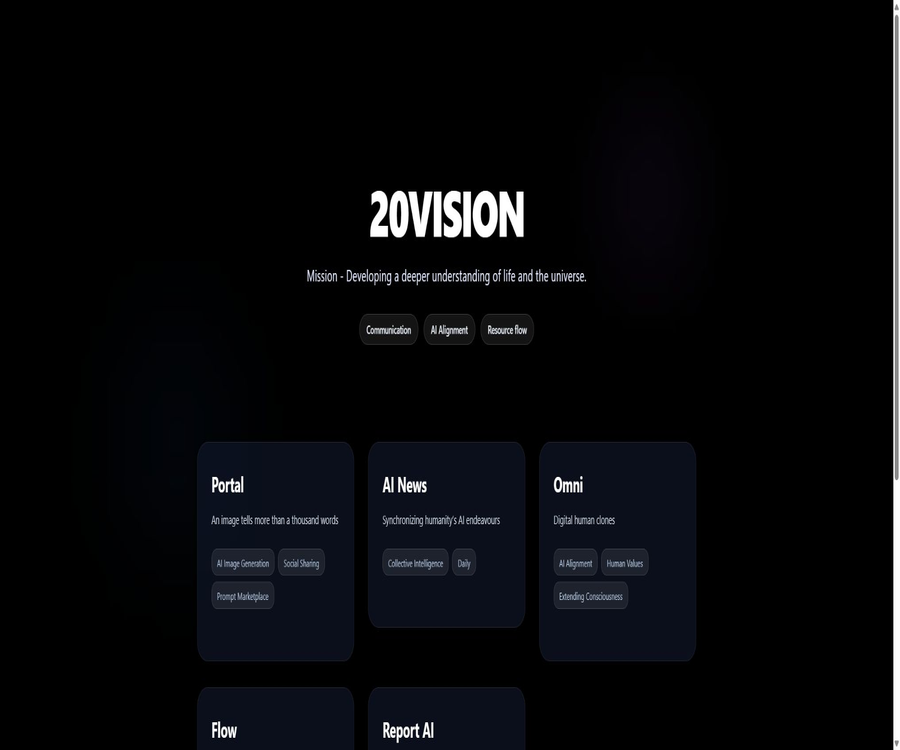
20Vision
20Vision, an intelligent tool focused on AI programming
Tags:AI programming toolsWhat is 20Vision?
20Vision is an AI product company based in Vienna, Austria; its website highlights various projects under the themes of “communication, AI alignment, and resource flow.” The most complete product available at present, one that can be registered for and used by paying, is the professional AI image editing platform P20V.
The 20Vision homepage also lists AI News, Omni, Flow, and Report AI. Their levels of maturity vary; the catalog should separate those services that are already available, the media projects, from those that still lack a public access point.
20Vision product portfolio
| Project | Positioning | Current public status |
|---|---|---|
| P20V | AI image generation, precise editing, and collaboration platform | It is now available, with public packages offered. |
| AI News | Daily AI Research and Industry News Brief | It is now available online and can be read. |
| Omni | Directions for digital human cloning, value creation, and the expansion of consciousness | The homepage display lacks details about the available products. |
| Flow | A blockchain-based funding platform that integrates information, voting, and transactions | The homepage display lacks public usage instructions. |
| Report AI | A blockchain-based reward system for AI news and development monitoring | The homepage display lacks public usage instructions. |
What is P20V?
P20V, whose full name is Portal by 20Vision, is an AI image editor designed for professional creators, real estate professionals, e-commerce brands, and design teams. It focuses on enabling controlled modifications of existing images, rather than creating a new image from scratch.
The platform is maintained by the 20Vision team; official information indicates that it will be launched in 2025. Users can use natural language or selection tools to modify objects, backgrounds, and the overall layout of the image, and they can share their projects with clients through a dedicated collaboration space.
Core functions of P20V
- Generate a new visual concept based on the textual description.
- After uploading an image, use natural language to adjust the objects, colors, and environment.
- Local redrawing is performed using the brush selection area.
- Expand the content beyond the frame while maintaining perspective and consistency in lighting.
- Remove clutter, replace the background, or add furniture.
- Fix artifacts in hands, figures, text, and other aspects related to AI.
- Performs image-to-image conversion for products, buildings, and people.
- Standard 2K images are output, with 4K exports available depending on the package chosen.
- Create a customer collaboration space and set limits on budget creation.
- Customize a style for team training.
Precise local editing
P20V considers local redrawing to be a key feature that sets it apart from ordinary generators. Users can select the areas that need to be modified, replacing only the sofas, walls, background, or any defects, while trying to preserve the structure of the other parts.
- Adjust the color, material, or style of an object.
- Remove unwanted objects and distracting elements from the image.
- Fill in the missing, distorted, or failed-to-be-generated details.
- Replace the environment surrounding the product or character.
- Iterate on customer feedback without having to redo the entire image.
- Reduce overall drift through multiple small-scale edits.
Image enlargement and canvas extension
The image expansion feature allows for the creation of coherent content beyond the original boundaries; it is useful for transforming square images into horizontal banners, vertical posters, or by providing a safe area for text. It is still necessary to check the perspective, texture, repeated elements, and how the edges fit together.
- Add left and right padding to the advertisement banner.
- Adjust product images to fit the proportions of different social media platforms.
- Expand architectural, interior, and natural scenes.
- Reserve space for titles, buttons, and price information.
- Maintain the position of the main object stable across various sizes.
Virtual real estate set design
Real estate is one of the key application areas for P20V; it allows furniture to be added to unfinished or empty rooms, as well as helps to remove clutter from existing rooms. Virtual setups cannot change the actual structure of a building, and when listing a property, it is necessary to disclose that the images have been digitally processed in accordance with local regulations.
- Add furniture in modern, traditional, or other styles to empty rooms.
- Remove clutter and old furniture that affect the display.
- Simulate changes in walls, floors, lighting, and soft furnishings.
- Generate multiple decoration options for the same space quickly.
- Create property cover images, brochures, and advertisement photos.
- Keep the original photos so that the buyer can verify the actual condition.
E-commerce and marketing visuals
Brands can upload photos of their existing products, then replace the background, adjust the lighting, or create seasonal scenes. Before mass production, it is necessary to establish manual quality control standards for the product’s appearance, packaging text, colors, and proportions.
- Place the products in a lifestyle or studio background.
- Create versions themed around holidays, seasons, and events.
- Generate different ad sizes and layout configurations with spacing.
- Fix flaws in the edges of products, as well as reflections, shadows, and the background.
- Create multiple versions of content for product detail pages and social media.
- Test creative directions without having to shoot new footage.
Customer collaboration space
The Spaces feature of P20V allows users to create isolated spaces for individual clients or projects and share links. Clients do not need to have access to the main account password, nor will they be able to see other projects, bills, or generation histories.
- Create a separate project space for each customer.
- Set the available generation budget or maximum limit.
- Invite customers to view and try it out by sharing a link.
- Retain the generation results and feedback in the same space.
- The owner can increase the quota or close the space at any time.
- Avoid the security issues that arise from multiple people using the main account.
How to use P20V to edit images
- Register an account and choose a free trial or a suitable subscription.
- Upload the original photo for which you have usage rights, or create a blank project.
- Choose to generate, make local edits, enlarge the image, or use professional scene tools.
- Mark the area to be modified with a brush, or describe the target in natural language.
- Generate multiple candidate versions and compare their structure and details.
- Continue to use localized edits to fix characters, objects, text, and edges.
- Select the size, resolution, and file format based on the distribution channel.
- Manually check the authenticity, brand compliance, and third-party rights.
- Download the final file, and keep the original image along with the editing history.
How to establish a customer collaboration process
- Create separate Spaces for clients and projects.
- Fill in the project name, objectives, and brand requirements clearly.
- Only materials authorized for use by that customer should be uploaded.
- Set up budget generation to prevent the quota from being exhausted unexpectedly.
- An independent collaboration portal is sent to the client; the password for the main account is not shared.
- Allow customers to create, select, or propose changes within the space.
- The designers are responsible for carrying out checks on the details, dimensions, and compliance.
- Export the high-resolution version after customer approval.
- Close the spaces that are no longer in use and handle the data in accordance with the contract.
Price of monthly subscription plan
P20V currently offers three subscription plans, with a 50% discount on the first month’s fee. This promotion may end at any time, and renewals will be charged at the regular monthly rate indicated on the page.
| Package | Special price for the first month | Normal renewal | 2K generated per month | 4K benefits |
|---|---|---|---|---|
| Starter | 14.50 dollars | $ | 50 times | Pay-per-use export |
| Pro | 39.50 dollars | $ | 200 times | Pay-per-use export |
| Studio | 99.50 dollars | $ | Generated without any constraints. | 500 times per month |
Comparison of package features
| Ability | Starter | Pro | Studio |
|---|---|---|---|
| Standard resolution | 2K | 2K | 2K |
| Monthly standard generation | 50 times | 200 times | No restrictions |
| 4K ultra-high-definition rendering | Additional payment | Additional payment | 500 times/month |
| Generation speed | Standard | Standard | Priority to Turbo GPU |
| Concurrent generation | The page is not marked. | The page is not marked. | 4x concurrency |
| Custom style training | The page is not marked. | The page is not marked. | Includes |
| Priority support | The page is not marked. | The page is not marked. | Includes |
| Commercial use rights | Includes | Includes | Includes |
Annual fee and additional usage
The pricing page allows for switching to an annual payment plan, and it shows how much money can be saved each year for the Starter, Pro, and Studio plans: 120, 240, and 600 dollars respectively. The actual annual cost, any initial discounts, and taxes should be based on the information provided on the settlement page; it is not advisable to rely solely on the figures given in the promotional material.
| Project | Public rules | Precautions |
|---|---|---|
| Annual payment discount | All three gears are available. | Check the amount of the one-time deduction before settlement. |
| Savings per year with Starter | The page indicates $120. | The terms related to activities and renewals may change. |
| Pro year savings | The page indicates $240. | The terms related to activities and renewals may change. |
| Annual savings on Studio | The page indicates $600. | The terms related to activities and renewals may change. |
| Top-Up Pack | It can be purchased when the quota is insufficient. | The specific quantity and unit price will be confirmed in the account. |
| Starter and Pro 4K | Pay by export | The public card does not list the individual price. |
Subscription, points, and refund policies
- Web subscriptions are processed through Stripe, with automatic renewal as the default setting.
- Users can cancel subsequent renewals in their account settings.
- The purchased points or credits are non-refundable.
- If an account remains inactive for twelve months in a row, its points may expire.
- Mobile subscriptions are managed by Apple or Google.
- To request a refund on mobile devices, you need to apply through the respective app store.
- The platform can adjust, suspend, or take offline certain models and functions.
- Prices, taxes, and promotions are subject to the actual payment page.
How to choose a package
- For the first testing of a single project, it is possible to assess its quality using the Starter version.
- Freelancers or those who constantly create content can compare this with Pro’s 200 usage quota.
- For teams that require high concurrency, 4K resolution, and custom styles, Studio is a good option to consider.
- Calculate the normal renewal cost; don’t focus only on the discount for the first month.
- When exporting in 4K frequently, include the additional export costs in your budget.
- Teams with high usage levels should determine the boundaries for fair use that allow unlimited generation.
- Before purchasing an annual subscription, test the appearance of people, products, and buildings using real footage first.
AI News project
AI News Online is an independent AI news initiative presented by 20Vision, offering daily analyses of research findings and industry news. Its coverage includes topics such as research papers, agents, robots, model security, multimodality, as well as healthcare and finance.
- Keep track of advancements in AI research and engineering.
- Organize technical content in language that is relatively easy to understand.
- External sources are retained to enable readers to verify the information further.
- Public editing principles, error correction, and advertising policies.
- Provides links for advertising, donations, and editorial inquiries.
Omni, Flow, and Report AI
On its homepage, 20Vision describes Omni as a platform for creating digital human clones, Flow as a blockchain-based funding platform, and Report AI as an AI-driven news and monitoring system with reward mechanisms. The homepage does not provide information regarding the full range of functions, pricing, documentation, or official ways to use these platforms.
| Project | Official website keywords | Suggestions for catalog labeling |
|---|---|---|
| Omni | Digital human cloning, AI alignment, human values | Concept or development direction |
| Flow | Information, voting, trading, automated market-making, and liquidity | Concept or development direction |
| Report AI | AI news awards, development monitoring, and security safeguards | Concept or development direction |
Which users are it suitable for
- Real estate agents and photographers who need virtual set designs.
- E-commerce teams that need to create product scene images quickly.
- A design studio that repeatedly modifies visual concepts for clients.
- Marketers who need to make local repairs to AI-generated images.
- The content team needs to adapt the same image to various sizes.
- Freelancers who want clients to be involved in the creation process but do not want to share their accounts.
- Professional teams that require batch rendering in 2K or 4K resolution.
- Readers who follow daily news on AI research.
Typical use cases
- Add furniture to property photos and create different styles.
- Clear the clutter from the room and improve the presentation.
- Replace product backgrounds and create seasonal ads.
- Fix artifacts in hands, faces, text, and edges of characters.
- Expand the horizontal diagram into a web banner or a vertical poster.
- Create various concepts for decoration, packaging, or events.
- Collect feedback and suggestions through the customer area.
- A dedicated style for training teams to enhance visual consistency.
Product advantages
- It also provides capabilities for generation, partial redrawing, and image expansion.
- It emphasizes the retention of unmodified areas, making it suitable for precise iterations.
- It covers business scenarios such as real estate, e-commerce, and marketing.
- It provides independent collaboration spaces for customers as well as quota control.
- The three packages clearly specify the 2K generation quota.
- Studio offers 4K, concurrent processing, style training, and priority support.
- Paid outputs permit commercial use as permitted by the terms.
- Both web pages and mobile devices fall under the scope of the terms of service.
- The platform can select appropriate third-party models for different tasks.
- 20Vision also offers services related to AI news and other similar topics.
Usage restrictions and precautions
- AI may generate extra objects, incorrect text, and unnatural details.
- Local editing can still alter the lighting or structure of unselected areas.
- Virtual set designs cannot replace the disclosure of the actual condition of a property.
- Medical illustrations and technical images cannot be used directly as a basis for diagnosis.
- 4K export for Starter and Pro versions requires an additional payment.
- After the discount for the first month expires, the subscription will continue at the regular monthly fee.
- Points are non-refundable, and they may expire if there is no activity for an extended period.
- The platform relies on various third-party AI services to process inputs.
- A commercial use license does not guarantee that the content does not infringe on third-party rights.
- The level of copyright protection for purely AI-generated works varies across different judicial jurisdictions.
- For Studio’s unlimited generation feature, it is still necessary to ensure reasonable use and address any abnormal limitations.
- Omni, Flow, and Report AI should not be recommended as mature tools at present.
Commercial use and content rights
According to the terms of service, provided that these terms are complied with and the applicable fees are paid, users have the right to create images and videos within the limits permitted by law. The P20V documentation also includes marketing, packaging, real estate listings, and customer deliveries as examples of commercial use scenarios.
- Before uploading content, make sure you have the copyright or authorization to do so.
- Avoid using portraits of people, trademarks, and protected characters without permission.
- Maintain the authenticity of the images of properties and products by disclosing them as they are.
- Check the text, labels, packaging, and product specifications before launching an official advertisement.
- It is determined based on the region of publication whether AI-generated works can be protected by copyright.
- The input and output rights for the customer’s project should be specified in the contract.
Privacy and data processing
20Vision handles accounts, payments, logs, usage data, as well as the images, videos, and prompts uploaded by users. The privacy policy also lists AI service providers such as OpenAI, Replicate, RunwayML, and Google.
- Do not upload sensitive photos of customers or individuals for whom you do not have permission to handle.
- The input may be sent to a third-party model for generation.
- The policy states that no authorization will be given to those entities that use commercial personal data to train foundational models.
- Third parties may retain inputs temporarily for security monitoring, usually for up to about thirty days.
- Cloud, analytics, payment, and subscription services are also involved in data processing.
- On mobile devices, access to the album, camera, and ad identifiers may be granted after authorization.
- Sensitive industries should confirm the data areas and processing protocols prior to procurement.
- Users can apply to access, correct, or delete their information based on their location.
GitHub and the open-source status
As of this verification, no official GitHub organization or open-source repository that can be confirmed through the 20Vision or P20V official websites was found. P20V is a commercial online service that relies on official accounts, subscriptions, and various third-party models; it should not be classified as open source or suitable for self-deployment.
| Project | Open state | Explanation |
|---|---|---|
| P20V web platform | Not open source | Use through the official service |
| Image and video processing backend | Not disclosed | Combine multiple third-party AI services |
| Official GitHub | No findings were detected. | No identifiable organizations or warehouses. |
| Public API | No official documents were found. | The enterprise’s automation capabilities need to be verified with the authorities. |
| Self-hosting | Not provided | Relies on cloud accounts and generation services |
Basic information
| field | Content |
|---|---|
| Company name | 20Vision GmbH |
| Location of the company | Vienna, Austria |
| Main products | P20V AI Image Editor |
| Other projects | AI News, Omni, Flow, and Report AI |
| Release date of P20V | 2025 |
| Core competencies | Natural language image editing, local redrawing, image expansion, and collaboration |
| Output | PNG and 2K or 4K rendering |
| Free trial | The terms state that a free trial is available. |
| Minimum monthly public fee | The regular price of Starter is $29 per month. |
| Mobile version | The terms apply to iOS and Android apps. |
| Whether API is provided | No public documents were found. |
| Is it open source? | No |
Recommendation score
4.3 / 5. The P20V is suitable for professional users who need precise local image editing, virtual set design, and collaboration with clients; the benefits offered by this package are fairly clear. However, users should pay attention to any promotional renewals, additional costs for 4K resolution, the processing of third-party model data, and the authenticity of AI-generated images.
Frequently Asked Questions
What is the relationship between 20Vision and P20V?
20Vision is a brand for product companies and project portfolios, with P20V being its most advanced current AI-powered image editing and collaboration tool.
Can P20V be used for free?
The terms of service mention a free trial, but the official pricing page shows mainly paid plans. The amount of the free allowance, whether payment is required, and the range of functions are specified on the registration page.
How much is the monthly fee for P20V?
The regular monthly fees are $29 for Starter, $79 for Pro, and $199 for Studio; the current page also shows a 50% discount on the first month’s subscription.
How many can be generated per month?
The Starter plan allows 50 2K renders, the Pro plan offers 200 renders, while the Studio plan has no limit on 2K renders and includes 500 4K renders per month.
Can 4K images be generated?
Yes. Starter and Pro plans are priced based on the number of exports, while Studio includes 500 4K renderings per month; the specific price for additional exports needs to be checked in the account.
Can it be used for commercial purposes?
Paid plans indicate commercial usage rights, and the terms allow users who comply with the requirements and have paid the necessary fees to use the generated content; however, those users still need to address issues related to trademarks, portraits, copyrights, and authenticity.
Do customers need to register an account?
The official Spaces guide states that users can access a specific space through a dedicated sharing link, without needing the creator’s main account password.
Is it compatible with mobile phones?
The terms of service apply to the iOS and Android apps for P20V or Simple Home Design; mobile subscriptions are managed by the respective app stores.
Does 20Vision provide APIs?
No official API documentation or key management interface that can be verified publicly was found; for enterprise automation needs, it is necessary to consult the authorities directly.
Is 20Vision open source?
No official open-source repository was found; P20V is offered as a commercial cloud service, and therefore should not be labeled as open-source or suitable for local deployment.
Tools similar to 20Vision



 Guigong Network Security Registration No. 45132202000164