






Windsurf
An AI-powered programming environment that supports intelligent code completion, code understanding, and proxy-based development.
Tags:AI programming toolsWhat is windsurfing?
Windsurf is an AI-powered code editor designed for software developers; it was initially created by the Codeium team and is now further developed by Cognition. In 2026, the product will be officially renamed Devin Desktop. The existing Windsurf IDE, extensions, workflows, settings, and projects will be transferred over with this update, while the core editing experience will remain unchanged.
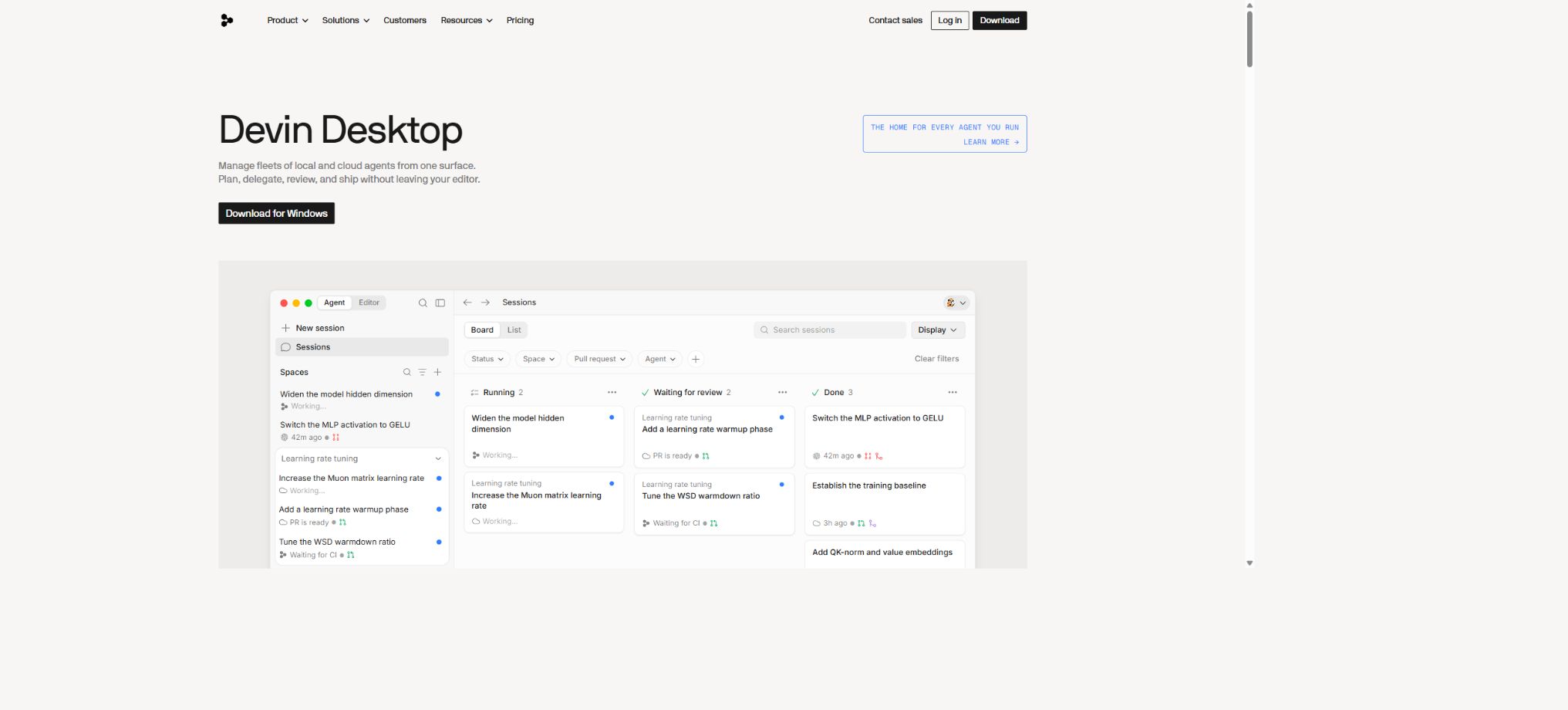
Its role has evolved from an AI code completion tool to a multi-agent development workstation: developers can use Cascade or Devin Local in the local editor, or they can delegate larger projects to the cloud-based Devin, while being able to monitor progress and review results on the same interface.
The relationship between Windsurf and Devin Desktop
Devin Desktop is the new name for Windsurf; it is not another editor that needs to be purchased. The original subscription price, extensions, settings, and any ongoing tasks will remain unchanged.
When searching the Windsurf official website, downloading and installing the software, or viewing the help documents, the Devin brand may already be displayed on the page.
Cascade remains one of the local proxies; by default, the new tabs use Devin Local, but users can also choose their preferred proxy. The names Windsurf Editor, the Cascade entry point, and Codeium directory mentioned in the older tutorials may still appear for some time.
AI-native code editor
Devin Desktop is built on the VS Code framework; it retains common development features such as the file tree, editor, terminal, debugging tools, and extensions. At the same time, it incorporates proxy operations, code differences, context information, browser controls, and task management into the editing interface. Users familiar with VS Code can get started using it quite quickly.
The editor relies on the Open VSX extension framework; therefore, it is not guaranteed that all Microsoft Store extensions can be installed or will function seamlessly. Older .NET Framework projects that depend on Visual Studio’s proprietary build process may still require Visual Studio to be used.
Cascade local programming proxy
Cascade can read code repositories, modify multiple files, execute terminal commands, interpret errors, and iterate based on the results. The selected code or terminal content is automatically included in the context, and users can also add supplementary material through file, symbol, document, and web references.
Cascade offers interactive methods such as coding, querying, and planning, and it shows the differences resulting from modifications. Developers can revert proxy changes step by step, but this process may not be reversible; therefore, for important projects it is still advisable to use Git branches and commits to create recovery points.
Devin Local
Devin Local is a next-generation software engineering agent that operates within the local workspace; it is the default agent when opening a new tab. It enables development tasks to be carried out in terminal, file, and code contexts, while also providing a unified experience in conjunction with Devin in the cloud and task management tools.
Local proxies are suitable for tasks that require low-latency interaction and immediate review; tasks that involve multiple warehouses, take a long time to complete, or can run in the background are better handled by the cloud-based Devin.
The capabilities and the customizable features offered by the two are not exactly the same; for example, some modes specific to Cascade are not available in Devin Local.
Windsurf Tab intelligent completion
Windsurf Tab is powered by Supercomplete; it uses the current file, recently viewed files, terminal commands, proxy sessions, and cursor position to predict the next piece of code or the next jump that should be made. It not only completes a single line but also suggests changes across different locations as well as sequential operations.
It has a fast completion speed, making it suitable for template code, type definition, testing, and repeated refactoring; however, it may reference non-existent APIs or ignore business constraints. After accepting significant suggestions, formatting, type checking, and testing should be carried out immediately.
Code library indexing and context
The editor indexes the local codebase and uses retrieval enhancements to feed relevant snippets into the model. The context also includes the current file, open tabs, content set by the user, past operations, and proxy sessions.
Teams and Enterprise can use remote repository indexes, covering GitHub, GitLab, and Bitbucket.
Remote indexing involves uploading or cloning code and generating embeddings. Companies should verify whether code snippets are saved, whether tenant isolation is in place, where the data is stored, and what the deletion policies are; sensitive repositories should not be connected using default settings.
Multi-file editing and differential review
When the agent modifies code, an inline diff area is displayed, allowing users to accept or reject each change individually. It is suitable for renaming files, migrating interfaces, completing tests, updating configurations, and fixing errors; it also enables semantic replacement of multiple matching locations through Vibe and Replace.
For large-scale restructuring, it is first necessary to define the directories and acceptance criteria. AI may alter the format, dependencies, or irrelevant logic at the same time; therefore, the changes should be submitted in a functional-based manner, and hundreds of unverifiable modifications should not be accepted all at once.
Terminal and command execution
Cascade is capable of generating and executing terminal commands; the JetBrains plugin offers various levels of automatic execution such as Off, Auto, and Turbo. The output from the terminal can serve as the context for subsequent processing, which helps in fixing compilation, testing, and runtime errors.
The higher the level of automatic execution, the greater the risk of accidentally deleting files, installing unknown dependencies, or altering the environment. Unrestricted automatic execution should not be enabled on production servers, environments that contain keys, or important databases.
Browser preview and web page details
The editor supports browser preview; proxies can be used for debugging local web pages, and real-time information can be obtained through web and document searches. When web references are used, the page loading is typically carried out on the user’s device within their network environment.
The information on the website may be outdated or not compatible with the current version of the project. Updates to dependencies, cloud service parameters, and security settings should be carried out in accordance with the official documentation for the respective version, and such changes must be verified through testing.
Workflows and Skills
Workflows save repetitive processes as workspace or global Markdown files, such as deployment checks, handling PR comments, and generating release notes. Workflows need to be triggered manually by the user, and the limit for a single file is 12,000 characters.
Skills are better suited for enabling agents to automatically select a set of professional steps based on a task. Teams can turn engineering standards, testing methods, and common tools into skills, but they should avoid including passwords, tokens, or customer data in files that can be shared.
Rules and Memory
Rules are used to consistently enforce coding styles, directory structures, technology stacks, and operational boundaries, while memory helps the agent retain project and user preferences. Appropriate rules can reduce the need for repeated explanations and enhance consistency across different sessions.
Too many rules, or rules that conflict with each other, can reduce the quality of execution. It is recommended to formulate the mandatory constraints in a concise and verifiable manner, and to regularly remove outdated versions of frameworks and commands.
Integration of MCP tools
Cascade supports MCP services of thestdio, Streamable HTTP, and SSE types, as well as OAuth. Users can add code hosting, databases, monitoring tools, documentation, and business system tools to their configurations; team administrators can also set MCP switches and allowlists.
MCP expands the range of data and operations that agents can access. Keys should be inserted through environment variables or secure storage; companies should permit only approved servers, and restrict permissions related to writing, deletion, and external communication.
Comparison of Arena parallel models
Cascade’s Arena mode allows multiple models to process the same prompt in parallel, within separate sessions and Git worktrees; after comparing the results, users can select the best option and proceed with it. It is suitable for complex refactoring, algorithm implementation, and the evaluation of new models.
Arena calculates the usage of each model separately, and it is only applicable to Git workspaces that have been initialized. By default, only the Git tracking files are copied; untracked configurations and data need to be prepared through a secure initialization process.
Cloud-based Devin tasks
Self-service plans such as Pro, Max, and Teams include access to Devin in the cloud. Developers can assign longer tasks to cloud agents to handle them, and then view the schedule, progress, code, and results on their desktop.
The multi-agent command center also provides Spaces, dashboards, and task management.
Cloud proxies require separate management for code, credentials, and access to external services. Long-running tasks may deviate from their intended path when unmonitored; it is appropriate to establish phased checkpoints, budgets, and revocable permissions.
Supported systems and IDEs
The desktop version is compatible with Windows, macOS, and Linux. The minimum requirements for Linux include glibc 2.28 and glibcxx 3.4.25; macOS typically supports versions that still receive security updates from Apple.
When downloading, it is necessary to distinguish between Intel and Apple Silicon.
In addition to the native desktop editors, the Windsurf plugin is compatible with environments such as JetBrains, VS Code, Visual Studio, NeoVim, Vim, Emacs, Xcode, Sublime Text, and Eclipse. However, the advanced proxy features are more fully implemented in the native editors and JetBrains’ native plugins, while the VS Code plugin is in maintenance mode.
Free version
The free version can be downloaded and installed to allow users to experience basic AI programming, code completion, and certain proxy functions; it is suitable for assessing compatibility and for light-level development tasks on a daily basis. The available models as well as the daily and weekly usage limits are displayed according to the current policies, and it is no longer possible to rely on the fixed credit values mentioned in older tutorials.
Starting from March 2026, the self-service packages will shift from using fixed points to daily and weekly quotas based on token costs, with these quotas being automatically refreshed. Some custom-developed models may not consume any quota during specified promotional periods.
Windsurf prices
| Package or version | Prices, quotas, and core benefits |
|---|---|
| Enterprise | Enterprise provides sales quotes based on the company’s size, deployment requirements, and security needs. |
| Pro | The current price for the individual Pro plan is $20 per month, and it is intended for everyday professional development; those who previously had the Pro plan at $15 per month or the developer account at $30 per month can retain their original pricing. |
| Max | The maximum amount is 200 dollars per month, offering a significantly higher usage quota. |
Currently, the Personal Pro plan costs $20 per month and is intended for everyday professional development; the Max plan costs $200 per month and offers significantly higher usage quotas.
Teams currently has a base fee of $80 per month, with an additional charge of $40 per month for each additional seat; for Enterprise versions, a quote is provided by sales based on the company’s size, deployment requirements, and security needs.
Users who subscribed to the Pro plan at $15 per month or the developer plan at $30 per month in the early stages can retain their original pricing. Regional taxes, currencies, promotions, and payment methods may affect the final amount due; the details are subject to those specified on the account purchase page.
Quotas and additional usage
The usage of the Pro, Max, and Teams models is subject to daily and weekly budget limits; the amount consumed depends on the actual number of tokens and the price of the selected model. The daily limit is one-seventh higher than the weekly limit, which allows users to use these resources intensively on certain working days.
Once the quota specified in the package is reached, additional usage can be purchased; such additional usage is charged at the publicly listed price of the model’s API plus the actual number of tokens used. Reducing session duration, minimizing irrelevant context, and sticking to the same model in order to take advantage of caching can help lower consumption.
Teams and Enterprise
Teams offers centralized payment processing, seat management, analytics, and tools for organizational collaboration. Enterprise adds SSO, SCIM, RBAC, user groups, policy control, service keys, remote indexing, as well as enhanced deployment and support options.
The enterprise API is primarily used for querying usage statistics and managing quota settings; it is available only to enterprises, and it is not an interface that allows for the generation of Windsurf code through calls to a generic model API.
Privacy and code security
The product needs to handle code snippets, prompts, terminal output, indexes, and diagnostic information. Individual users can choose to disable the telemetry of certain code snippets in their account settings, while companies can use management policies to control new features that may have privacy implications.
Rules for ignoring files using code should be employed to exclude keys, certificates, datasets, and sensitive directories; it is also necessary to check whether the Git ignore files allow proxy access. Just because a file is not committed to Git does not mean it will not end up in the AI context by default.
GitHub and the open-source status
Windsurf or the full editor of Devin Desktop, Cascade, Devin Local, as well as the cloud-based services are not open-source projects; the developers do not make available the complete source code and model weights needed to reproduce these products. The windsurf-ai repository on GitHub is mostly created by third parties.
The official Exafunction organization has made demonstration projects such as windsurf-demo available, and the documentation refers to open-source language servers and debugging tools; however, these repositories do not mean that the commercial editors themselves are open source.
Windsurf (now Devin Desktop) usage guide
Complete a basic task.
- Define the code tasks to be carried out in Windsurf (now Devin Desktop), the scope of the repository, and the acceptance criteria.
- Connect to or import the test project, and first back up the current branch;
- First, create a plan based on the relationship between Windsurf and Devin Desktop, and then verify the files that need to be modified.
- Use an AI-native code editor to make minor changes;
- Run tests, static checks, and builds; unverified code is not accepted directly.
- Manually check permissions, keys, dependencies, and handle exceptions before merging;
Create reusable professional workflows
- Select a low-risk, real-world project as a template;
- Fix the relationship between Windsurf and Devin Desktop, as well as the order in which the AI-native code editor and the Cascade local programming agent should be used;
- Record the environment, model, prompts, and failure conditions;
- Set up manual approval for write, deploy, and delete actions;
- Compare speed, cost, test pass rate, and the amount of rework;
- Expand to a team or production environment only after stability has been verified;
Which users is it suitable for?
- Programmers who wish to use proxies for the development and refactoring of multiple files;
- Teams that need AI assistance to complete tasks, as well as an integrated environment that includes endpoints, browsers, and code repositories;
- Want to delegate complex tasks to engineers located locally or as cloud agents;
- Enterprises that require remote repository indexing, SSO, RBAC, and usage analytics;
- Developers who use JetBrains and wish to gain proxy programming capabilities.
Product advantages
- Extending from code completion to multi-agent collaboration on both local and cloud platforms;
- Cascade supports modifications across files, as well as terminal and reversible steps;
- Windsurf Tab combines editing, terminal, and session contexts;
- Built-in code library index, Workflows, Skills, and MCP;
- Difference review, worktree, and Arena can be used to reduce the impact of trial and error;
- The enterprise version offers capabilities for identity management, permission control, analysis, and deployment.
Restrictions and Precautions
- AI-generated code may contain security vulnerabilities, rely on illusions, and have errors in business logic; automated commands can also modify the environment.
- All outputs require code review, testing, static analysis, and manual acceptance;
- The new version has been renamed DevinDesktop; the interface and documentation are being updated, and the points system, prices, and menu instructions from the old version may become invalid.
- Chinese users also need to take into account network and model availability, payment methods, as well as the requirements related to the cross-border transfer of corporate data.
Frequently Asked Questions
What is Windsurf called now?
The developers have renamed Windsurf to Devin Desktop; the original IDE, extensions, settings, and subscriptions will be retained.
Is Windsurf free?
There is a free version that allows users to experience basic completion and proxy functions; advanced models as well as higher quotas require Pro, Max, Teams, or Enterprise versions.
How much is Windsurf Pro?
Currently, Pro costs $20 per month, while Max costs $200 per month; existing users may retain their previous discounted prices.
Does Windsurf support Windows?
It supports Windows, as well as macOS and Linux; there are also various IDE plugins such as JetBrains.
Can Windsurf execute terminal commands?
Yes. The agent can execute commands and read the output; it is recommended to stay in review mode and limit automatic execution of high-risk tasks.
Does Windsurf have an MCP?
It supports MCP in thestdio, Streamable HTTP, and SSE formats; team administrators can enable/disable these options as well as define allowed lists.
Is Windsurf open source?
It is not open source. The official demonstration projects and the open-source tools they rely on do not mean that the source code of the editor, proxy, or cloud services is made public.
Tools similar to Windsurf



 Guigong Network Security Registration No. 45132202000164