






GPT-Store.app
GPT-Store.app: an intelligent tool focused on the training of AI models.
Tags:AI training modelsA one-sentence summary
GPT-Store.app is a free, third-party directory of customized GPT models that allows users to explore ChatGPT-based assistants suitable for various tasks, thanks to features such as curated recommendations, search functions, categorization, and detail pages.
Tool Introduction
GPT-Store.app has been providing its services since around 2023; its purpose is to select and organize the most representative items from the large number of custom GPT models available. The platform itself does not run any large models, nor does it offer separate chat accounts.
Users can view the name, developer, category, description, welcome message, and example prompts in the directory, and then use the “Try It Now” option to access the corresponding GPT. Actual conversations, file uploads, model capabilities, and pricing are determined by ChatGPT and the specific configuration of the GPT in question.
Relationship with OpenAI’s official GPT store
GPT-Store.app is not the official OpenAI website, the official GPT store, nor an official app directory; there is no evidence indicating that it is operated by OpenAI. The name “GPT Store” can lead to confusion, so it is necessary to check the domain name, the developer, and the account page when using it.
| Comparison items | GPT-Store.app | Official OpenAI GPT discovery page |
|---|---|---|
| Operating entity | Independent third-party directory | OpenAI |
| Primary use | Organize, search, and display external GPTs | Discovering aspects related to running GPT in ChatGPT |
| Chatting ability | There is no direct dialogue within the directory. | Run it within the ChatGPT account. |
| GPT submission | Submit the email address and the public GPT address for inclusion in the directory. | Settings for publishing and sharing via ChatGPT |
| Review rules | The complete review criteria are not publicly available. | Complies with OpenAI’s policies on release and use |
| Accounts and Fees | Browsing is possible without a directory account or payment. | It depends on ChatGPT’s current plan and location. |
| Privacy responsibilities | There are separate policies for catalogs, extensions, and submission forms. | Subject to OpenAI’s policies and GPT’s rules regarding external actions. |
| Official support | It is the responsibility of the directory operator. | It is the responsibility of OpenAI’s support system. |
Main functions
Manually selected GPT
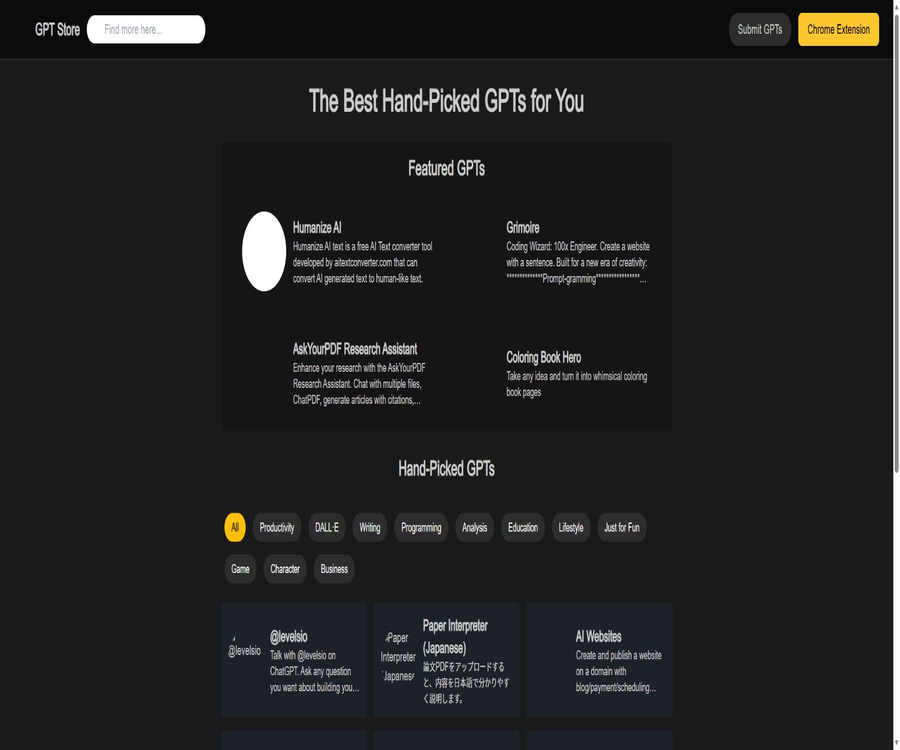
The home page is divided into Featured GPTs and Hand-Picked GPTs, showing the projects selected by the platform. These selections are made by the catalog editors and do not imply any certification from OpenAI, nor do they guarantee security or performance.
Keyword search
Users can enter a name or a keyword in the search box to go to the search results page and find relevant GPT models. In this test, the search page was able to narrow down the results by taking into account both keywords and categories.
Categorized filtering
The current page offers categories such as All, Productivity, DALL·E, Writing, Programming, Analysis, Education, Lifestyle, Just for Fun, Game, Character, and Business. These categories are maintained by the catalog and may not exactly correspond to GPT’s official categories.
Random discovery
The “New Discoveries” button allows for the updating of a list of recommended items; it is useful for exploring the tool when no specific keywords are available. Random recommendations cannot replace a thorough evaluation of the developers, permissions, update dates, and actual quality of the items.
GPT details page
The details page displays icons, the name, the developer’s identifier, the category, a description, a welcome message, and Prompt Starters. Users can first read about the scope of the task and the examples before deciding whether to try using ChatGPT.
Submitted by the creator
The submission page requires the entry of an email address and a public GPT address, in order to submit the creator’s project to the directory. The page does not specify the review period, any guarantees regarding inclusion in the directory, rules for making changes or deletions, rules regarding sorting, or information on paid promotion options.
Chrome extensions
The website offers a Chrome extension with the same name, which can serve as an entry point to GPT within the browser. The app store shows version 0.3; there are 34 users using it, and the last update was on January 18, 2024.
Information included in the table of contents
| Information field | Show currently? | Primary uses | Verification suggestions |
|---|---|---|---|
| GPT name and icon | Yes | Identify projects | Prevent counterfeiting with identical names |
| Developer identifier | Yes | Determine the creator | Check again after entering ChatGPT. |
| Category | Yes | Classification discovery | The categories can be set by the catalog itself. |
| Description | Yes | Understand the main tasks | Belongs to the developer or directory description |
| Welcome message | Yes | Preview first interaction | It does not represent full capability. |
| Examples of prompt phrases | Yes | Help to start a conversation | Check for sensitive content before running. |
| Update time | It is usually not displayed. | Determine the maintenance status | Verify separately within ChatGPT. |
| Usage and rating | The details page is not displayed stably. | Compare popularity | Do not treat missing data as zero. |
| Permissions and external actions | Not fully displayed | Assess data risks | Upon entering GPT, check the terms of service and privacy policy. |
Usage tutorial
Search for and use a GPT safely.
- Open GPT-Store.app and first verify that it is a third-party website rather than the official OpenAI page.
- Enter the specific task in the search box, such as paper, programming, SEO, or image.
- Select the appropriate category to narrow down the search results.
- Open the GPT details page to view the developer, description, welcome message, and example prompts.
- Determine whether the task involves personal information, files, payments, or high-risk decisions.
- After clicking “Try It Now”, make sure you are on the correct ChatGPT page.
- Log in to your ChatGPT account and verify the GPT name and developer.
- First, use non-sensitive test data to verify the quality of responses and external actions.
- After completing important tasks, check the conversations, uploaded files, and third-party authorizations.
Submit a custom GPT
- First, complete the GPT configuration, testing, and settings for public sharing in ChatGPT.
- Prepare an email address dedicated to project communications, and avoid using personal emails with high permissions.
- Verify that the public GPT address can be accessed normally by unauthorized visitors.
- Check that the name, icon, description, and welcome message do not infringe on third-party rights.
- Go to the submission page of GPT-Store.app, and enter your email address along with the public address of GPT.
- Save the form contents and a screenshot of the current privacy policy before submitting.
- Wait for directory review; do not assume that the submission will necessarily be included or displayed immediately.
- After adding it, verify that the details are accurate and test the Try It Now button.
- To make modifications or deletions, please submit a request through the contact page.
Which users are it suitable for
- Regular ChatGPT users: Look for pre-made, customized GPTs based on specific tasks.
- Students and teachers: Discover GPTs for education, research, testing, and tutoring.
- Content staff: Looking for writing, rewriting, SEO, and social media tools.
- Developer: Discover programming, API documentation, and automation assistants.
- Analyst: Browse GPTs for data analysis, tables, and research.
- Design and creative professionals: Look for tools such as DALL·E, Logo, and prompt generators.
- GPT creator: Submit public projects to increase visibility in the catalog.
- AI tool editing: Observe the projects in the early custom GPT ecosystem.
Typical use cases
- GPT that can summarize papers or search for academic materials.
- Search for code and API assistants under the Programming category.
- Compare the positioning of various writing GPTs and example prompt phrases.
- The recommendations are refreshed randomly, and no tools that have been searched for actively are found.
- Check the developer identifier before proceeding to run ChatGPT.
- Submit the newly created public GPT to a third-party directory.
- Quickly open the directory entry using a Chrome extension.
Product advantages
- It is possible to view most of the content without a catalog account.
- The three methods of discovery – selection, search, and classification – complement each other.
- The details page displays both a welcome message and prompt phrases that can be tried right away.
- The categories cover scenarios such as productivity, writing, programming, education, and daily life.
- Creators can submit public GPTs through a simple form.
- Browser extensions are provided to enable quick access to the directory.
- Instead of leaving chat and file processing within the directory, it is done through ChatGPT.
Usage restrictions and precautions
- The platform is a third-party directory, not OpenAI’s official GPT store.
- Selection and inclusion do not equate to security or quality certification for GPT.
- The detailed information may be outdated compared to the current configuration of GPT in ChatGPT.
- The directory does not consistently display the update date, rating, and usage volume for each GPT.
- External actions, file processing, and data policies need to be checked separately after entering GPT.
- Some GPTs may have been taken down, renamed, have restricted access, or are no longer maintained.
- The submission page does not disclose the deadline for review, sorting rules, as well as rules for making changes and deleting entries.
- There are few users of Chrome extensions, and no updates have been released in over two years.
- The search results and classification tags may contain omissions or inconsistencies.
- To actually use GPT, you may need a ChatGPT account, an appropriate plan, and regional access permissions.
Prices and pricing models
GPT-Store.app does not currently offer any paid plans, subscription pages, or a mechanism for viewing pricing; both the website and the Chrome extension are available for free in the app stores. The page where creators can submit their content also does not indicate any fees associated with such submissions.
A free directory does not mean that all GPT models available in it are free. Whether it is possible to use a specific GPT model, leverage advanced models, or access external services once you enter ChatGPT depends on the ChatGPT plan, the developers of those GPT models, and third-party services.
| Project | GPT-Store.app is paid. | Other possible costs | Confirm location |
|---|---|---|---|
| Browse directory | Free | Usually none. | Table of Contents page |
| Keyword search and classification | Free | Usually none. | Search page |
| View details | Free | Usually none. | GPT details page |
| Submit GPT | The page does not show the costs. | There is no guarantee that it will be included. | Submission and Contact Page |
| Chrome extensions | Free | Usually none. | Chrome App Store |
| Running GPT with ChatGPT | The catalog is free of charge. | It may be necessary to use the ChatGPT plan. | ChatGPT account |
| GPT external actions | The catalog is free of charge. | Third-party services may charge a fee. | Corresponding to GPT and external services |
Chrome extensions
| Project | Current information | Interpretation |
|---|---|---|
| Extended name | GPT-Store.app | Same name as the directory |
| Version | 0.3 | Early versions |
| Last updated | January 18, 2024 | No new versions have been released for a long time. |
| Number of users | 34 | The scale of use is very small. |
| Language | English | A complete multilingual interface has not been declared. |
| Size | 241KiB | Lightweight Directory Extensions |
| Process data | User activity | Check the permission details before installation. |
| Developer status | Not identified as a trader | EU consumers’ rights may be affected. |
The app store shows that the developers declare that they will not sell user data, nor will they use such data for purposes unrelated to the core functions of the app or for credit assessment. However, such declarations do not constitute an independent audit; administrators should still check the permissions and update status of the devices.
Check before expanding the installation
- Verify that the extension ID matches the project linked by the button on the official website.
- Display current permission levels and user activity data.
- Assess the compatibility and security risks resulting from the lack of updates since 2024.
- Do not install unauthorized extensions directly in your work browser.
- After installation, restrict access to certain sites and monitor for any abnormal behavior.
- Uninstall it when it is no longer in use, and remove the relevant permissions and data.
Privacy and data processing
The website’s privacy policy states that it does not collect names, addresses, or phone numbers; it does not use cookies for tracking, nor does it save any information related to searches or interactions with GPT. The platform itself does not run GPT directly, so the actual chat conversations are handled by ChatGPT and external services related to GPT.
However, the submission page explicitly requests an email address, and the contact page also includes fields for name, email address, and message, which is in conflict with the claim that no personal information is collected at all. Users should not assume that form data is not saved at all based solely on a brief privacy policy.
| Data scenarios | Public page description | Existing problems | Suggestions |
|---|---|---|---|
| Directory browsing | It states that no personal information is collected. | Lack of technical details and preservation specifics. | Avoid submitting additional information. |
| Search | It says not to save searches and interactions. | Server logs not specified. | Do not search for sensitive words or personal information. |
| GPT submission | The email address must match the GPT address. | This is contradictory to the statement that no personal information is collected. | Use the project-specific email address. |
| Contact form | Name, email address, and message are required. | The storage period is not specified. | Do not send confidential content. |
| Chrome extensions | Revealing information about processed user activities | For specific fields, please check the permission details. | Restrict permissions and install with caution. |
| Actual GPT conversation | Do not process within the directory. | Handled by ChatGPT and external action processing | Read the policy again after entering GPT. |
GPT security assessment
A custom GPT can include instructions, knowledge files, the ability to access the internet, image processing functions, and external actions. The directory cards cannot display all of these settings; users must check them again on the ChatGPT page.
- Verify that the GPT name, developer, and public status match the details in the catalog.
- Check which capabilities, files, and external actions GPT will use.
- Read the privacy policy and terms of service provided by the developer.
- First, test the responses and actions using fictional or anonymized data.
- Do not send passwords, keys, identification documents, or original customer data to GPT.
- Professional verification of medical, legal, financial, and academic conclusions is carried out.
- When it is no longer in use, delete the conversation, upload the files, and revoke any external authorizations.
APIs, GitHub, and open source status
GPT-Store.app does not provide any public APIs, SDKs, or batch data interfaces for developers, and no official GitHub repository has been identified on its official website. Submitting a GPT by its creator does not entail gaining access to any programming interfaces.
No public source code or licenses for the core website or Chrome extensions were found this time. The catalog should indicate that the product is closed-source or not publicly available; it should not be determined based on other repositories with the same name in GPT Store.
| Project | Current status | Conclusion |
|---|---|---|
| Website directory | Online | Free third-party discovery service |
| Chrome extensions | Available, version 0.3 | The source code is not publicly available. |
| Public API | Not found | Not suitable for programmed retrieval. |
| SDK | Not found | No official development package available. |
| Official GitHub | Not found | Do not associate with repositories of the same name |
| Open-source license | Not found | It cannot be marked as open source. |
| Self-hosting | Not provided | Only cloud directory |
Supported platforms
| Platform | Support status | Key capabilities | Precautions |
|---|---|---|---|
| Web page version | Support | Browse, search, categorize, view details, and submit | Core platform |
| Desktop browser | Support | Full web page functionality | It is necessary to navigate to ChatGPT in order to run it. |
| Mobile browser | Accessible | Browse and view details | The interface and navigation experience may vary. |
| Chrome extensions | Support | Quick access to selected GPTs | It is an older version with a small number of users. |
| Native iOS apps | No findings were detected. | None | Do not confuse it with apps of the same name. |
| Native Android apps | No findings were detected. | None | No official installation package confirmed. |
| Public API | Not provided | No programmed access. | Batch access is not possible. |
Basic information
| Project | Content |
|---|---|
| Tool name | GPT-Store.app |
| Tool type | Third-party custom GPT directories and discovery platforms |
| Is it from OpenAI official sources? | No |
| Core functions | Select, search, categorize, view details, submit, and expand |
| Price pattern | Free browsing; paid plans are not available publicly. |
| Directory account | Browsing requires no registration. |
| Actual chat | Go to the corresponding GPT in ChatGPT. |
| Number of categories | Current 12 filter buttons including All |
| Chrome extensions | Yes, version 0.3 |
| Public API | Not found |
| Official GitHub | Not found |
| Is it open source? | No or not publicly available |
| Verification date | August 23, 2026 |
Recommendation score
Recommendation score: 3.5 / 5. GPT-Store.app offers a clear selection system, search functions, categorization, and detail pages; it can serve as an additional resource for discovering custom GPTs, and creators are able to submit their projects for free.
The main shortcomings are that third-party identities can easily be confused with those of official stores; there is a lack of information and security features related to GPT, the Chrome extension has not been updated for a long time, and the privacy policy is inconsistent with the email addresses collected through the forms.
Frequently Asked Questions
What is GPT-Store.app?
It is a third-party custom GPT directory used for browsing, searching, categorizing, and viewing GPT details. For actual conversations, one needs to go to ChatGPT.
Is it OpenAI’s official GPT store?
No. The platform is operated by an independent third party; the responsibilities related to accounts, content, privacy, and support differ from those of the official OpenAI site.
Is GPT-Store.app free?
Directory browsing, searching, details, and Chrome extensions are currently free, with no paid plans available. The actual operation of GPT may be affected by the costs associated with ChatGPT plans and third-party services.
Is registration required?
There is no need to register in order to browse the directory. To submit a GPT, it is necessary to provide an email address and the public address of the GPT; however, to use the GPT actually, compliance with the rules of the ChatGPT account is required.
Can I chat directly on the website?
No. The “Try It Now” option on the details page is used to access the corresponding GPT; chatting does not take place within GPT-Store.app.
What are the categories?
Currently, it includes categories such as productivity, DALL·E, writing, programming, analysis, education, lifestyle, entertainment, gaming, characters, and business.
How to submit GPT?
On the submission page, enter your email address and the public GPT address, then send the submission. The platform does not provide any information regarding the time required for review or any guarantee that the content will be included; therefore, you need to check on your own to see if it has been published.
Are Chrome extensions worth installing?
Expansion allows for quick access to directories, but no updates have been released for version 0.3 since January 2024, and the number of users is only 34. It is necessary to check the permission settings and organizational security requirements before installation.
Does the platform collect data?
The privacy policy claims that no personal information is collected or searches are saved, but the submission and contact forms actually require fields such as an email address. Users should proceed with caution, taking into account the possibility that data may be collected through these forms.
Are APIs provided?
No public API or SDK was found. The website is designed for manual browsing and is not suitable as a service for providing GPT catalog data in a programmed manner.
Is GPT-Store.app open source?
If no code repository or open-source license confirmed on the official website is found, it cannot be marked as open source.
Summary
GPT-Store.app can be used as a helper directory for finding customized GPT models, allowing users to quickly filter potential options through sorting, searching, and example prompts. It cannot replace the official OpenAI platform, nor is it responsible for running the actual models.
When using it, one should recheck the developer information, permissions, external actions, and data policies after entering ChatGPT. Before submitting, creators should also pay attention to any inconsistencies between the email collection practices and the privacy policy, and save a record of the submission.
Tools similar to GPT-Store.app



 Guigong Network Security Registration No. 45132202000164