






AI Drive
AI Drive, an intelligent tool focused on the training of AI models
Tags:AI training modelsWhat is AI Drive?
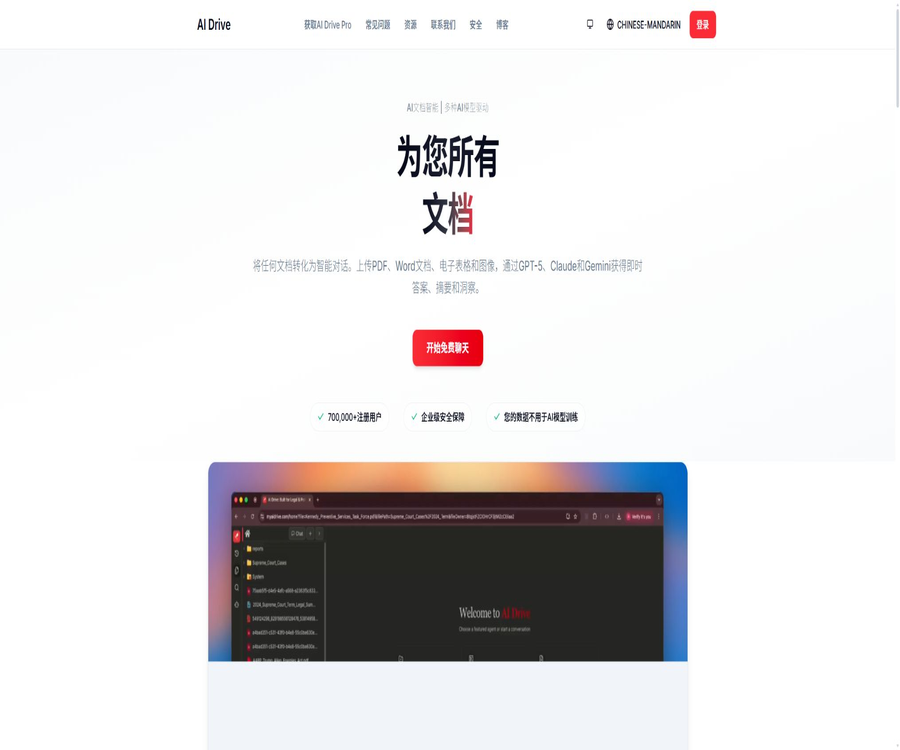
AI Drive is an AI platform designed for document analysis and back-office automation, operated by V2K AI, Inc. Users can upload PDF files, office documents, images, and audio files; they can pose questions related to individual files or entire folders, extract data, and utilize multi-step AI agents.
This product is closely linked to AI PDF services; in its early stages it attracted users through PDF storage and query answering functions. Today, AI Drive has been expanded to include file organization, OCR, structured data extraction, Agent capabilities, sharing options, scheduled tasks, and enterprise auditing functions.
A one-sentence summary
AI Drive combines file storage, document querying, OCR, data extraction, and AI Agents to help individuals and enterprises process PDFs and office documents on a large scale.
Core functions
- Document dialogue: Involves asking questions and generating summaries related to one or more files.
- Folder search: Locate information within folders that contain hundreds of files.
- OCR recognition: Reads the text in scanned PDFs and images.
- Data extraction: Organize document fields into structured results.
- File organization: Automatically classify and organize materials based on their content.
- Custom Agent: Design multi-step document workflows based on business rules.
- Pre-built Agent: Use common backend task templates directly.
- Agent tool: It provides capabilities for searching, comparing, reading, and obtaining external content.
- DOCX Editor: Edit Word documents in Business.
- Sharing and Collaboration: Sharing files, folders, and Agents.
Document dialogue
Users can select one or more files for chatting, so that the model can explain, compare, summarize, or locate the information contained in those files. The quality of the responses depends on OCR technology, the structure of the files, the search results, and the model chosen; important content still needs to be checked against the original text.
- Summarize contracts, reports, papers, and conference materials.
- Ask where a certain concept, clause, or data can be found.
- Compare multiple versions, suppliers, or alternatives.
- Extract timelines, characters, and action items from long documents.
- Generate drafts of emails, memos, or reports based on the document content.
Folder search
The Pro and higher plan versions allow for chatting and searching within folders that contain hundreds of files. The system first locates the relevant materials within those folders and then provides answers based on those specific documents; this is suitable for contract databases, research databases, and customer records.
- Search across project files for the same topics or repeated clauses.
- Summarize the common conclusions from a large number of research reports.
- Search for missing or conflicting information in the customer profile.
- Filter documents by date, entity, risk, or business issue.
- Provides a searchable range of documents for subsequent agents.
OCR and scanned document processing
OCR is used to identify text in scanned documents or images; 1 point is consumed for each page processed. Complex layouts, low resolution, handwritten content, and multi-column tables may reduce the quality of recognition, so a sample check should be performed after extraction.
Structured data extraction
AI Drive can extract names, dates, amounts, terms, tables, or other business-related fields from documents, and organize them into data that can be used later. For batches of invoices, contracts, forms, and customer information, structured extraction is a more suitable approach for automation than reading each document individually.
- Extract the supplier, amount, taxes, and payment date from the invoice.
- Extract the subject, duration, renewal, and termination clauses from the contract.
- Extract experience, skills, and educational information from the resume.
- Extract indicators, tables, and explanations of anomalies from financial reports.
- Extract the fields required for review and any missing items from the application materials.
AI Agent mode
The Agent pattern enables the planning and execution of multi-step tasks that involve multiple documents and various tools. The scoring is calculated dynamically based on the selected model, the level of reasoning used, the pages read, the tools invoked, external content retrieved, parallel sub-tasks, and retry attempts.
- First, search for the folder, then read the relevant pages and compare the results.
- Check the document according to the rules and generate a list of issues.
- A summary report is generated by extracting data from multiple files.
- Call external web pages to obtain additional information and compare it with internal documents.
- Continue to call the tool or retry in case of failure or insufficient information.
Custom and pre-made Agents
Pro supports custom agents as well as pre-built agents, while Business adds options for email notifications and scheduled triggers. Teams can establish standardized processes for repetitive tasks such as review, extraction, and organization, thereby reducing the need to rewrite prompts each time.
Emails and scheduled triggers
Business can trigger the Agent via email or scheduled tasks, making it suitable for regularly processing new files and background tasks. Before enabling automatic triggering, it is necessary to establish mechanisms for input validation, failure notification, manual approval, and output verification.
Supported file types
| Package | Publicly supported file types | Explanation |
|---|---|---|
| Basic | Basic single-file or multi-file chatting | |
| Pro | PDF, Doc, Excel, text, and images | Supports OCR, data extraction, and folder chat. |
| Business | Pro for all types, including audio | It also includes a built-in DOCX editor. |
| Enterprise | All types of Business | It can be combined with custom deployment, auditing, and high-risk workflows. |
Supported AI models
The platform offers a variety of model services; the Basic version primarily uses Gemini Flash, while users at the Pro level and above have access to models such as GPT, Claude, and Gemini. The list of available models is updated regularly, and the actual range of options depends on the package chosen and the settings defined by the team administrator.
| Model hierarchy | Example of the current page | Suitable for tasks |
|---|---|---|
| Fast and efficient | Gemini 3 Flash Preview, GPT-5 mini, Claude 4.5 Haiku, GPT-5.6 Luna, and others | Daily Q&A, summaries, and batch processing |
| High ability | Claude Sonnet 5, Gemini 3.1 Pro Preview, GPT-5.6 Terra, Kimi K3, and others | Analysis of complex documents and multi-step tasks |
| High-capability Agent | Claude Opus 5, GPT-5.6 Sol, Grok 4.5, and others | Complex reasoning, tool usage, and Agent tasks |
Which users are it suitable for
- Researchers who need to summarize and search through a large number of PDFs.
- A legal team that handles contracts, cases, and evidence materials.
- The operations team that extracts fields from invoices, forms, and reports.
- A professional service agency that manages customer records and application documents.
- Small and medium-sized enterprises that need a document-sharing Agent.
- Companies that require a HIPAA BAA, as well as requirements regarding data residency in the United States and audit logs.
- AI PDF users who wish to access long-term file data through ChatGPT.
- A backend team is needed to automatically process email attachments or regular file tasks.
Typical use cases
- Contract review: identifying responsibilities, renewal, termination, and unusual clauses.
- Due diligence: Identifying risks and evidence by reviewing a large number of documents.
- Invoice processing: OCR is used to extract the amount, date, and supplier details.
- Review of research: Summarizing themes and conclusions from papers and reports.
- Customer onboarding: Check the completeness of the application documents and generate a list of items that need to be completed.
- Compliance review: Check documents in accordance with internal rules and retain the results.
- Knowledge Q&A: Answers employees’ questions related to the company’s document library.
- Report generation: A structured summary is created based on multiple sources of information.
- Archive organization: Automatic classification, naming, and organization of files.
AI Drive Usage Guide
- Create an account and select a package based on the file type and privacy requirements.
- Create a folder and upload PDFs or other supported files.
- Run OCR on the scanned files and randomly check the recognition quality.
- First, test the answers using single-file scenarios, and then extend them to multiple files or folders.
- Choose a pre-made Agent for repetitive tasks or create a custom Agent.
- Set the fields to be extracted, the output format, and the rules for manual review.
- Run small batch tasks to check point consumption, errors, and result quality.
- Enable sharing, email, or scheduled triggers only after stability is confirmed.
How to perform multi-file analysis
- Create folders with clear boundaries by project, client, or topic.
- Delete duplicate, expired, and unauthorized data.
- Ensure that the scanned document has undergone OCR processing, so that the file name and date are readable.
- First, ask a retrieval-based question to confirm that the system can find the correct file.
- Further comparison, summarization, and risk assessment are carried out, with the corresponding pages to be indicated.
- Check the original text for key conclusions, rather than relying solely on generated summaries.
- Export the verified results or hand them over to the subsequent Agent for processing.
How to create a document Agent
- Choose a task with clear rules, stable input, and the ability to measure results.
- Define the range of folders, tools, and external content that the Agent can access.
- Specify each step’s objectives, the output structure, termination conditions, and exception handling.
- Provide correct and incorrect examples to test the model’s handling of edge cases.
- Restrict the permissions to automatically share, send, or export sensitive data.
- Run it with real small batches, and calculate the accuracy rate as well as the cost of manual modifications and scoring.
- Set up email alerts or automatic triggers at a later stage, once the threshold is reached.
How to calculate the integral
AI Drive uses a points system. OCR is assigned 1 point per page, while points are deducted dynamically for chat and Agent tasks based on factors such as the model used, input and output tokens, level of reasoning required, number of pages, tools employed, external searches, parallel processing, and retries.
- Stronger models usually consume more points than faster models.
- Reading more pages and more files increases consumption.
- Each time the Agent invokes a tool, it may incur additional costs.
- Parallel branches and retry attempts on failures are also included in the actual usage.
- Long chat histories, images, caches, and custom commands can affect consumption.
- Pro users can purchase additional points to increase their monthly quota.
Package price
| Package | Monthly price | Annual price | Monthly points |
|---|---|---|---|
| Basic | $ | $ | 2,000 |
| Pro | 39 dollars per month | $ | 50,000 |
| Business | $ | $ | 300,000 |
| Enterprise | Custom quote | Custom quote | Starting from 500,000, shared on a monthly basis |
Comparison of package features
| Ability | Basic | Pro | Business | Enterprise |
|---|---|---|---|---|
| File type | Only PDF | PDF, Doc, Excel, text, and images | Pro with audio | According to the enterprise plan |
| Folder chat | Basic multiple files | Hundreds of files | Includes | Includes |
| OCR and data extraction | Fundamental analysis | Includes | Includes | Includes |
| Custom and pre-made Agents | Not included | Includes | Includes | Includes |
| DOCX editor | Not included | Not included | Includes | Includes |
| Emails and scheduled triggers | Not included | Not included | Includes | Includes |
| Internal users | Individuals | Advanced individual use | Up to 5 people | Customization |
| Zero data retention | Not listed | Not listed | Not listed | Optional |
| HIPAA BAA and U.S. data residency | Not listed | Not listed | Not listed | Includes |
| Detailed access and export auditing | Not listed | Not listed | Not listed | Includes |
Annual payment discount
The annual subscription plan is charged for 11 months, which means one month is included free of charge. The Pro annual plan costs 429 dollars, which is 39 dollars less than the monthly payment of 468 dollars; the Business annual plan costs 2,200 dollars, which is 200 dollars less than the monthly payment of 2,400 dollars.
Trial and refund
The pricing page provides information on a 15-day risk-free trial or a full refund. Refunds are still subject to the terms of service, actual usage, and the purchase channel; the costs specified in corporate agreements are generally based on the order details, and it is necessary to check the applicable conditions before making a purchase.
Privacy and data processing
AI Drive makes use of third-party models such as OpenAI, Anthropic, and Google Gemini to handle AI tasks. The DPA stipulates that model providers are not allowed to train their models using customer data; customer data is processed and stored in the United States, and it can be deleted within 30 days following account termination or upon request.
- Do not use customer documentation to train large models.
- Enterprise can apply for zero data retention.
- Enterprise offers U.S. data residency and HIPAA BAA.
- Different plans use separate API keys, which are rotated within the key management service.
- Customers can export the data and request its deletion.
- External models and sub-processors still remain part of the complete data path.
Safety and compliance
The current official Chinese pricing page indicates that Business has completed the SOC 2 Type 2 audit, while Enterprise offers more detailed capabilities for accessing and exporting audit logs. The old page stated that the audit was about to be completed; the information listed there should be considered in line with what is shown on the current pricing page.
Product advantages
- Expanding from PDF Q&A to multi-format documents and multi-step Agents.
- It supports folder-level search, making it suitable for large volumes of long-term data.
- OCR, data extraction, and file organization cover common backend tasks.
- Multiple models are available, allowing selection based on speed and performance.
- Business supports email, scheduled triggers, sharing, and DOCX editing.
- The monthly and annual fees as well as the credit limit are clearly displayed.
- Enterprise offers zero retention, U.S. residency, auditing, and HIPAA BAA.
- An official Chinese interface and detailed FAQs are available.
Usage restrictions and precautions
- Basic supports only PDF and basic models, with 2,000 points per month.
- Chat and Agent points do not have a fixed price per page, and the cost of complex tasks is difficult to estimate.
- High-capacity models, long documents, tool calls, and retries can quickly deplete the quota.
- OCR may misread low-quality scans, tables, handwritten text, and complex layouts.
- Folder searches may miss relevant materials or return incorrect context.
- AI summarization and extraction cannot replace professional reviews in law, medicine, and finance.
- Business can include up to 5 internal users; to increase this limit, it is necessary to contact sales.
- Data residency in the United States does not necessarily meet the requirements of all countries and organizations.
- Emails and scheduled agents may amplify errors when no one is paying attention.
- The platform is closed-source; long-term use relies on hosting services and third-party models.
GitHub and open source
The AI Drive official website, pricing page, FAQ section, and legal pages do not provide any links to an official GitHub repository containing the core code. The GPT systems that appear in public searches, as well as the listings on the GPT Store and third-party projects, are not the source code for V2K AI’s products.
AI Drive, AI PDF, OCR, folder search, and the Agent platform are closed-source hosted services; they cannot be deployed in a private environment on one’s own. The provision of APIs, DPA, or ChatGPT for custom GPT connections does not mean that the core systems are open source.
Basic information
| field | Content |
|---|---|
| Tool name | AI Drive |
| Operating company | V2K AI, Inc. |
| Product type | AI document processing, file knowledge base, and document agents |
| Core competencies | Document chatting, folder search, OCR, extraction, organization, and Agents |
| Primary users | Individual researchers, legal, operational, professional service, and corporate teams |
| Billing method | Free quota, subscriptions, points, and corporate customization |
| Data area | DPA is made available publicly for use in the United States for processing and storage. |
| Is it open source? | No; no official GitHub repository corresponding to the website link was found. |
Recommendation score
4.5 / 5. AI Drive is suitable for individuals and enterprises that need to manage a large number of documents on a long term, perform searches across different files, and delegate the extraction process to agents. Its packages and security features are well structured; however, dynamic scoring, OCR errors, and the data pathways related to third-party models require thorough testing before being used in actual operations.
Frequently Asked Questions
What is AI Drive mainly used for?
It is used for storing, searching, and analyzing documents, and it handles file-related tasks automatically through OCR, data extraction, and AI Agents.
Is AI Drive free?
Basic is permanently free, offering 2,000 points per month, and it supports Gemini Flash, PDFs, as well as basic document analysis.
How much is AI Drive?
Pro costs $39 per month or $429 per year; Business costs $200 per month or $2,200 per year; Enterprise pricing is customized.
Which files are supported by AI Drive?
Basic includes only PDF; Pro adds Doc, Excel, text, and images; Business adds audio as well.
How is OCR priced?
1 point is consumed for processing each page of OCR.
Can I search the entire folder?
Pro and higher versions support chatting and searching within folders that contain hundreds of files.
Will AI Drive use documents to train the model?
The authorities state that customer data will not be used to train models, and contracts are in place to restrict the ways in which model providers can use such data.
Is zero data retention available?
Enterprise allows for zero data retention, and offers data storage in the United States along with detailed audit logs.
Is AI Drive open source?
It is not open source; the official website does not provide a link to a verifiable official core code repository.
Tools similar to AI Drive



 Guigong Network Security Registration No. 45132202000164