






OpenRouter
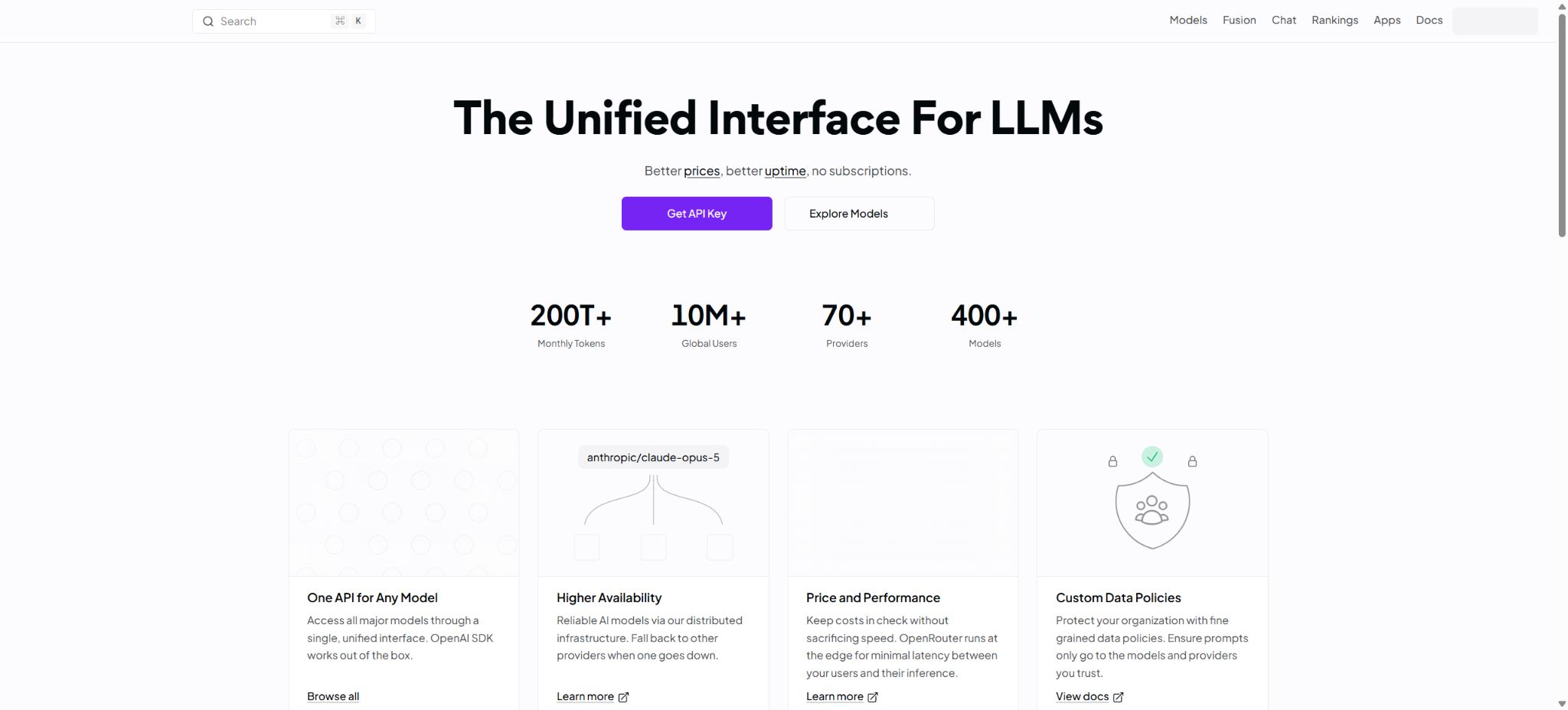
Access and compare the API platforms of various major models through a unified interface.
Tags:AI training modelsWhat is OpenRouter?
OpenRouter is a platform that unifies AI model APIs with vendor routing solutions. Developers only need to create an account and an API Key to use text, reasoning, visual, image, audio, and Embedding models from various manufacturers through a relatively unified interface; they can also view usage levels, costs, latency, and errors in the same console.
OpenRouter is not a large model in itself, nor does it guarantee that each model runs on the same infrastructure. It connects models to various inference providers and selects the appropriate endpoint based on factors such as price, throughput, latency, availability, privacy policies, and the order specified by the user.
Specific capabilities, context, content policies, regional availability, and unit prices vary depending on the model and supplier.
Core functions of OpenRouter
Unified multi-model API
OpenRouter offers interfaces such as Chat Completions, Responses, and Embeddings in the OpenAI style; it also supports the Anthropic Messages format. Many existing applications can be integrated by simply modifying the Base URL, API Key, and model ID.
The developers also provide SDKs and examples in Python, TypeScript, Go, etc., but different models do not support exactly the same tools, images, audio files, inference parameters, and structured outputs.
Model and supplier aggregation
The same model can be used for inference by multiple suppliers. The default routing mechanism balances reliability and performance among the available endpoints, allowing switching to other providers in case of throttling or failures.
Developers can also specify the order of suppliers, prohibit fallback, limit the quantization level, or select endpoints based on price, throughput, and latency.
Rolling back can increase the success rate, but it may alter latency, data processing parties, regions, and output details. For applications with strict requirements regarding compliance or result consistency, it is necessary to specify allowed suppliers and parameters, and to keep track of the actual model, endpoint, and generated ID used.
Model routing and automatic selection
OpenRouter offers automatic routing, model routing, and preset options; models can be selected based on the input content or availability. It is suitable for rapid testing among a large number of models, allowing low-cost models to be used for simple requests while more powerful models are reserved for complex tasks.
Automatic selection does not guarantee the best quality; the production system still needs to have its accuracy, stability, and cost evaluated using a test set.
BYOK comes with a supplier key.
BYOK allows users to add their own keys from providers such as OpenAI, Anthropic, Google, AWS, etc., while still being able to use OpenRouter’s unified interface for routing. These keys are stored in an encrypted form, and it is possible to set them to be used preferentially or as a fallback option when shared capacity is unavailable.
By default, it is still possible to use the OpenRouter balance even if the built-in key fails; to completely prevent such a fallback, it is necessary to enable the corresponding restrictions.
The cost of the models in BYOK is billed from the original supplier’s account, while OpenRouter also charges a platform fee in accordance with its official rules. The free usage quota is determined based on the pricing for that particular model on OpenRouter, rather than being calculated simply based on the number of requests.
Budget and usage control
The console allows you to view requests, tokens, costs, delays, and errors, and it enables you to set budget and spending limits for API keys or teams. The Management API Key can be used to automatically create and manage sub-keys.
In a formal environment, separate keys should be assigned to projects and developers, with limits, allowed sources, and rotation policies established, in order to avoid sharing the master key.
Privacy and data policy routing
Each inference provider has its own policies regarding logging, data retention, and training. OpenRouter displays the data policies of the endpoints; users can prevent routing to providers that may use prompt-based training at the account or request level, or they can request endpoints that support zero data retention.
This setting only controls the selectable suppliers; it cannot replace reading the terms provided by OpenRouter itself and by the model suppliers.
Enterprise customers can request routing within the United States or the European Union, so that requests are processed in the selected region. This regional functionality is not available by default for all accounts or models; enterprises need to activate it and check the list of available models.
Caching and cost optimization
The platform supports supplier-level prompt caching, as well as similar response caching at the OpenRouter layer. Once response caching is enabled, successful requests that use the same API Key, model, endpoint, streaming method, and request body can return the cached results directly; no charges are applied in cases of cache hits.
The default caching time is short; it can be adjusted based on requests or predefined settings.
The cache will return the original results, which makes it unsuitable for scenarios where new content must be generated each time. When account-level Zero Data Retention is enabled, response caching is not available, as the cache is needed to store the returned data on a short-term basis.
Chat and model trials
The web-based Chat feature can be used to compare models, test prompt capabilities as well as the handling of attachments. Free models are available for trial use, but there are daily request limits, and the capacity and availability of these providers may change.
Free models are more suitable for testing and development purposes; they should not be assumed to offer the same SLAs, throughput, or privacy guarantees as paid models.
Comparison of OpenRouter plans and prices
OpenRouter is currently available in three versions: Free, Pay-as-you-go, and Enterprise. The pricing for each version is determined based on the inputs, outputs, images, audio, search functions, or the cost per request as shown on their respective pages.
Platform fees and BYOK rules are charged separately.
The price of a dynamic model should not be set as a fixed value for always; the current price can be retrieved before making a call using the model’s API or the console.
| Plan | Platform fee | Models and limits | Suitable for users |
|---|---|---|---|
| Free | None | 25+ free models, 4 free suppliers, 50 requests per day | Experience models, learn APIs, and conduct lightweight testing |
| Pay-as-you-go | 5.5% | 400+ models, 70+ suppliers; no minimum spending required, charged based on the actual usage of each model | Individual developers, application and startup teams |
| Enterprise | Discounts can be negotiated based on the promised volume. | Based on the contract specifications and usage patterns, it supports invoicing, policy management, SSO/SAML, as well as SLAs. | Organizations of large scale, that are subject to regulatory requirements and need dedicated support |
Cost comparison of OpenRouter BYOK
| Plan | Monthly BYOK pricing for inference volume, with no platform fees. | Charges for exceeding the limit | Explanation |
|---|---|---|---|
| Pay-as-you-go | 25,000 dollars | 5% | Model bills are still collected by the supplier corresponding to the key provided. |
| Enterprise | 200,000 dollars | 5% | It can be combined with corporate contracts, policies, and specific limits. |
The 25,000 or 200,000 dollars mentioned here are not free credits; rather, they represent the amount of inference work that can be carried out without incurring platform fees, based on the pricing offered by the same vendor/model on OpenRouter. Once this threshold is exceeded, a 5% fee is deducted from the OpenRouter credits, so BYOK users still need to maintain sufficient balance on their account.
OpenRouter API Integration Tutorial
- Register and create a Key:Generate a project-specific API Key in the console; do not include this key in the frontend code, in public repositories, or in screenshots.
- Top up or choose a free model:During the testing phase, free models can be used; to make actual calls, it is necessary to purchase credits and set a budget limit.
- Read model list:Confirm the model ID, input/output types, context, tool capabilities, and current price; do not rely solely on the model name to make guesses.
- Modify client configuration:When using a compatible SDK, set the Base URL to OpenRouter and provide the key along with the full model ID.
- Send a test request:First, test the text and stream output, then verify each element individually: tools, images, JSON Schema, and reasoning parameters.
- Set routing policy:Specify the supplier based on business requirements, decide whether to fall back to an alternative option, sort by price or performance, and take into account the terms of the privacy policy.
- Processing error:Handle throttling, insufficient balance, content rejection, supplier failures, and context limits separately, without performing unlimited retries.
- Monitoring activated:Record the actual model, supplier, token, cost, latency, and generated ID, and set key budgets and alerts.
OpenRouter usage guide
Create reusable professional workflows
- Different keys and quotas are used for development, testing, and production environments;
- A representative evaluation set is established based on a unified multi-model API, aggregation of models and suppliers, as well as model routing and automatic selection.
- Set timeout, concurrency, retry, throttling, and budget limits;
- Perform checks on the output regarding facts, security, format, and sensitive information;
- Monitor changes in model version, price, latency, and failure rate;
- Prepare plans for downgrading the model, implementing circuit breaking, and taking manual control;
Considerations for billing and costs
- Different models may charge separately based on input tokens, output tokens, internal inference tokens, cache read/write operations, images, audio, web searches, or individual requests;
- Long contexts and reasoning models can incur significant additional costs;
- The estimate of tokens provided by the client is only intended as a reference for budgeting; the actual usage as indicated by the API and the charges shown in the console should be taken as the definitive figures.
- Top-ups, refunds, taxes, and payment methods are determined based on the location and the settlement page.
- Free models, prices, suppliers, and usage limits may be adjusted at any time;
- When providing services to users, it is necessary to establish one’s own limits, cost protection measures, and downgrade strategies.
Who is OpenRouter suitable for?
- Developers who wish to quickly compare and switch between various large models through a single interface;
- Application teams that need to switch between multiple suppliers in order to improve API availability;
- Users who wish to use an OpenAI-compatible client in order to access various text and multimodal models;
- Organizations that need unified management of budget, logs, keys, and model costs;
- Teams that already have a supplier account and wish to use a unified routing layer via BYOK.
Advantages and usage limitations
- The advantages of OpenRouter are its wide range of supported models, unified access methods, the ability to compare real-time prices and performance, as well as support for routing, fallback options, BYOK, budget controls, and data policy filtering.
- It can significantly reduce the engineering costs associated with switching between multiple model prototypes and suppliers.
- The aggregation layer also introduces an additional dependency in the data processing stage;
- Model parameters and responses are not entirely interchangeable, and changing the supplier can lead to changes in the results;
- Service availability remains affected by upstream factors;
- For sensitive data, it is necessary to define the permitted endpoints and areas, as well as to establish rules for logging and retention.
- The model’s outputs may be incorrect or violate relevant rules; OpenRouter does not replace content screening, fact-checking, or business risk management.
Frequently Asked Questions
Is OpenRouter free?
There is a free option available; currently several free models are offered, with a limit of 50 requests per day. Paid models are charged based on actual usage, and there is an additional 5.5% platform fee for the pay-as-you-go option.
Is OpenRouter a model?
No. It is a platform for model aggregation, unified APIs, and vendor routing; the responses are generated by the selected upstream models.
Is OpenRouter compatible with the OpenAI SDK?
Most chat requests can be integrated by modifying the Base URL, keys, and model ID. The advanced parameters and capabilities of different models still need to be tested according to the documentation.
Does OpenRouter support BYOK?
It is supported; users can add their own supplier keys and set priorities or fallback orders. There is a monthly threshold that exempts fees from the platform under BYOK, and beyond that threshold, a 5% fee is charged according to the current rules.
Is OpenRouter trained using prompts?
Different suppliers have different policies. Users can prohibit routing to endpoints that contain training data or request ZDR, but it is still necessary to read the terms and conditions of both the platform and the actual supplier.
Tools similar to OpenRouter



 Guigong Network Security Registration No. 45132202000164