






Intelligent restoration of old photos – Quick Images
Intelligent restoration of old photos – restoration of vintage photos, one-click colorization of black-and-white photos, renewal of old photographs
Tags:AI image optimization and repairWhat is QuickSmart for restoring old photos?
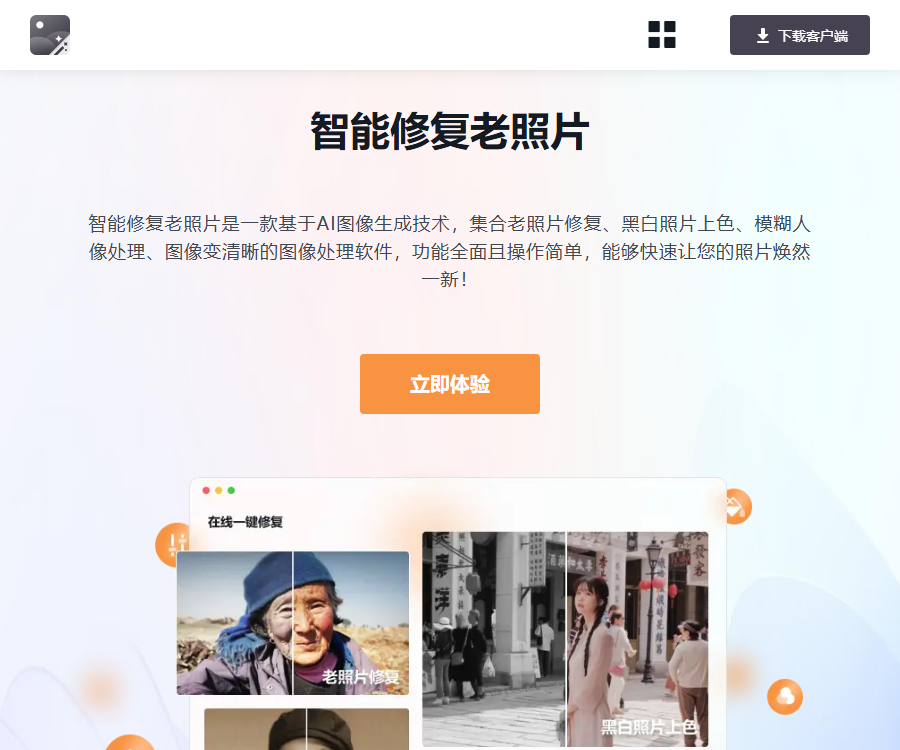
Smart Photo Restoration is an online AI photo restoration tool offered by Xunjie Pictures.
It brings together in one website functions such as restoring old photos, adding color to black-and-white images, enhancing facial features, and improving image clarity.
Main functions
- Fix blurry, low-resolution, and mottled old photos.
- Automatically colorize black-and-white photos.
- Enhance out-of-focus or low-quality portrait faces.
- Reduce image noise and artifacts.
- Improve the overall clarity of ordinary images.
- Compare the original image with the repaired version.
- Save the processed photos online.
- Process more image tasks through the PC client.
Four types of repair capabilities
| Functions | Suitable materials | Precautions |
|---|---|---|
| Restoration of old photographs | Faded, blurred, and slightly mottled photos | The missing areas can be filled in by the algorithm. |
| Colorizing black and white photos | Black and white photos of people, objects, and scenes | The color is an inference, not historical evidence. |
| Blurred face restoration | Night shooting, snapshots, and blurred portraits | The details of the facial features may change. |
| The image becomes clearer. | Images with low quality, noise, or color artifacts | Information that is not present in the original image cannot be restored. |
Supported formats and restrictions
The online old photo restoration page explicitly supports PNG, JPG, and BMP images.
| Project | Online page rules | Suggestions |
|---|---|---|
| Format | PNG, JPG, BMP | Give priority to preserving the original images in their lossless or high-quality form. |
| Size | Less than 2048×2048 pixels | If the time limit is exceeded, first create a backup and then scale down. |
| Handling method | Automatic processing after a single image is uploaded. | First, test with representative photos. |
| File retention | The page is marked to be automatically deleted after 1 hour. | Download it promptly after completion and verify it. |
| Batch requests | The capabilities of the web version are limited. | Comparable benefits of PC clients |
Preparations before repair
- Use a scanner or camera to obtain the highest possible quality original image.
- When scanning paper photos, clean the surface of any dust first.
- Retain the original, untrimmed, and uncompressed files.
- Create a read-only backup to prevent overwriting the original negative.
- Organize file names by person, era, and event.
- Confirm the ownership of the photos and the scope of use for the people’s portraits.
Tutorial for restoring old photos
- Copy the original image and create an unmodifiable backup.
- Check the image format and the 2048 pixel limit.
- Enter the old photo restoration feature and add the image.
- Wait for the system to automatically analyze and generate the results.
- Compare details of characters, clothing, background, and text.
- When changes occur in the facial features, use a weaker processing result.
- Save the repaired version immediately once you are satisfied.
- Name them separately as the original image, the repaired image, and the date.
- Check the resolution, color, and size before printing.
- Use it to indicate that the content has been processed by AI for archival or display purposes.
Colorizing black and white photos
The coloring function estimates colors based on the relationship between objects, people, and the scene, thereby adding a color element to black-and-white images.
The model is unaware of the actual colors of clothing, buildings, or objects from that period; therefore, the resulting output should be regarded as a visual representation rather than an accurate historical account.
- Complete the clarity correction first, and then compare the coloring effects.
- Retain the original black-and-white image as evidence.
- Check the colors of skin tone, uniforms, flags, and symbols.
- Historical exhibitions should indicate that the colors were estimated by AI.
- Do not use this to determine a person’s identity or the details of an event.
Blurred face restoration
Face enhancement removes noise, sharpens the image, and reconstructs local features; it is suitable for improving photos that are only slightly blurred.
- Examine the eyes, nose, mouth, and ears under magnification.
- Compare it with other photos of the same person.
- Pay attention to changes in wrinkles, hairstyle, and age-related features.
- In group photos, each individual should be checked separately.
- Identity verification and forensic evidence must not rely solely on reconstructed images.
The image becomes clearer.
Making images clearer helps to reduce noise, improve focus issues, and enhance the overall appearance.
| Problem | May improve | No guarantee can be given. |
|---|---|---|
| Light noise | Smooth the texture and enhance the edges. | Fully restore the texture |
| Mild defocus | Improve the local appearance | Restore the true focus |
| Low resolution | Enlarge and add visual details | Generate original pixel information |
| Severely damaged | Repair the missing areas. | Reconstruct the true historical content |
| The text is blurry. | Enhance the edges of strokes | Ensure the text is completely correct. |
Web version and PC client
| Version | Suitable for tasks | Main differences |
|---|---|---|
| Online web pages | Rapid repair of a small number of photos | No installation required; there are size limitations. |
| Quick Image Converter PC Version | Batch and comprehensive image processing | More formats, editing options, and member benefits available |
The PC client is a more comprehensive set of image tools, and not all of its functions can be considered to be those of an online repair page.
Free trial and prices
The information below was verified on August 31, 2026; the online repair page does not provide publicly available, stable, and complete pricing for the packages.
| Version or entitlements | Verified price | Explanation |
|---|---|---|
| Online web experience | Can be accessed directly. | The export count is based on the real-time page. |
| Ordinary PC users | Free basic benefits | Some of the outputs may have watermarks or quantity limits. |
| PC Lifetime Membership Campaign | 58 yuan | The price offered through these time-limited channels does not represent the standard price for long-term use. |
| Batch processing | Member benefits | The specific quantity and version are subject to the purchase page. |
| Photo restoration and special effects | Included in member benefits | Different versions may vary. |
Before making a purchase, it is necessary to check on the real-time settlement page the system version, the absence of watermarks, the maximum batch size, as well as the rules regarding updates and refunds.
Member purchase verification
- Confirm whether you are purchasing a Windows client or an online subscription.
- Confirm the number of products and devices associated with the lifetime membership.
- Are there any limits on the number of times or the size for nuclear image restoration?
- Verify that there are no watermarks in the output.
- Check the number of tasks in the batch and the file size.
- Check the countdown to the discount and the scope of the offer.
- Reserved orders, linked phone numbers, and service details.
Privacy and file security
The page indicates that uploaded files will be automatically deleted after 1 hour, and it is stated that no one can view or download them during processing.
This is part of the platform’s official guidelines; users should still decide whether to upload a file based on its sensitivity level.
- ID cards, passports, and private images should not be used as test images.
- Remove irrelevant ID numbers and addresses before uploading.
- For family photos, the consent of the relevant individuals or supervisors is required.
- Clean up download records after using public computers.
- After the download is complete, check whether the file is intact.
- Important photos are saved on two separate media at the same time.
Authenticity and copyright
- The AI restoration results may contain fabricated textures.
- Automatic coloring cannot prove the true colors of history.
- Face enhancement may alter identity features.
- For someone else’s photos, permission for both the portrait rights and copyright must be obtained.
- The original images of archives, news, and evidence must be retained.
- It is recommended to indicate AI restoration or coloring when displaying it publicly.
API and open-source status
| Project | Current public status | Explanation |
|---|---|---|
| Official public API | No findings yet. | It is not possible to use the interfaces of other image platforms. |
| API price | Not yet made public | Web page members are not the same as developed APIs. |
| Official GitHub | No findings yet. | Similar open-source repair projects are not related to this product. |
| Complete product source code | Not open source | Online services do not imply open source. |
Frequently Asked Questions
What functions does Quick Intelligent Photo Restoration support?
It supports the restoration of old photos, colorization of black-and-white photos, restoration of blurred faces, and improvement of image clarity.
Which image formats are supported for online repair?
The official page states that PNG, JPG, and BMP formats are supported, with image dimensions having to be less than 2048×2048 pixels.
How long are the uploaded photos stored?
The page description file is automatically deleted 1 hour after it is uploaded; sensitive photos should still be uploaded with caution.
Is Quick Old Photo Restoration free?
The website can be experienced directly, but the specific number of uses and the export privileges are subject to those indicated on the page in real time; the desktop version offers additional member benefits.
Is 58 yuan the fixed price for a lifetime membership?
No, that price is from a limited-time offer page; the final amount and the benefits applicable shall be those indicated on the actual settlement page.
Can AI restoration restore the true details of a photo?
There is no absolute guarantee; the algorithm may estimate features such as facial features, textures, and colors, and it is necessary to retain the original image for archival purposes.
Is QuickSmart for restoring old photos open source?
It is not open source; no official GitHub repository or public API documentation for this product has been found at present.
Tools similar to Smart Photo Restoration – Quick Image editor


 Guigong Network Security Registration No. 45132202000164