






Bonsai
Bonsai, an intelligent tool focused on the evaluation of AI models
Tags:AI model evaluationA one-sentence summary
Bonsai is a set of algorithmic trading analysis tools that run on TradingView; it utilizes trend indicators, the Bonsai OS oscillator, the Bonsai BX backtester, alerts, and beta-version trading automation features to assist traders in studying and testing their strategies.
Tool Introduction
Bonsai.trade is aimed at technical analysts and strategy traders who use TradingView; its core tools are Pine Script scripts that can be added to charts on an invitation basis. Users must have a valid TradingView account, and Bonsai is not a product affiliated with TradingView nor does it receive any official endorsement from it.
The official website states that the team has been developing trading algorithms since 2017, but the available public information does not reveal any details regarding the specific machine learning models, large language models, or training data used. A more accurate classification would be algorithmic technical analysis, strategy backtesting, and automated trading tools, rather than generative AI capable of predicting market trends.
Product composition
| Tools | Primary uses | Enter | Output | Package status |
|---|---|---|---|---|
| Bonsai Indicator | Identify trends, dynamic thresholds, and trading signals | TradingView market data and chart timeframes | Chart markers and alert conditions | Basic and Pro |
| Bonsai OS | Switch between four types of oscillators in a script and identify deviations. | Price data and oscillator settings | Oscillator curves, overbought/oversold coloring, divergences, and alerts | Basic and Pro |
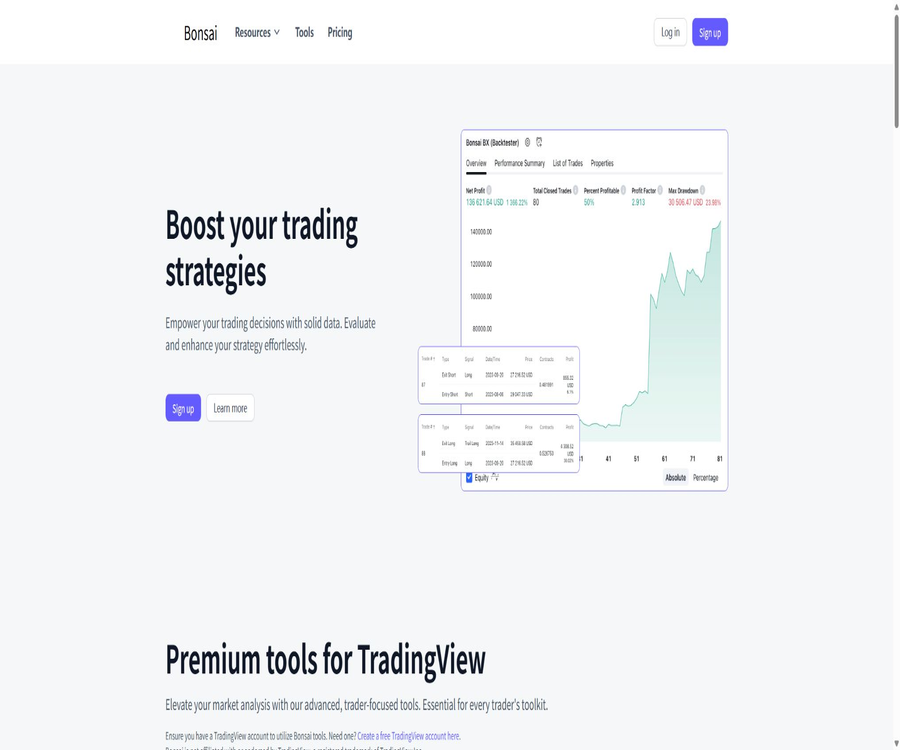
| Bonsai BX | Combine built-in or custom indicator signals for historical backtesting | Bullish/bearish signals, date range, position size, and risk management parameters | Net value, position, trading, and backtesting metrics | Pro |
| Superhook | Send signals from TradingView or other programs to the Bonsai Bot | JSON messages with tokens, robots, varieties, and directions | Issue commands to the connected trading robot. | Pro,Beta |
| Bots | Execute transactions based on the received strategy signals. | Superhook messages and robot configuration | Actions such as placing orders, closing positions, or canceling orders | Pro,Beta |
| Weekly trading outlook | Provide community-based market monitoring. | No user input required | Regular opinion content | Basic and Pro |
Main functions
Bonsai trend indicator
The Bonsai Indicator uses dynamic thresholds to monitor market trends, providing intuitive indications and alerts on TradingView charts. It generates technical analysis signals, but these do not represent the value of an asset, any guarantee of transactions, or future profits.
Bonsai OS 4-in-1 oscillator
Bonsai OS allows switching between four types of oscillators: RSI, CCI, Stochastic, and MACD, which reduces the need to have multiple scripts displayed on the chart at the same time. It can also change its color depending on whether the market is in an overbought, oversold, or neutral condition.
The official documentation lists divergence between buy and sell signals, combination divergence, price strength indicators, as well as real-time alerts; it also allows users to choose a default data source or to use high and low values. Some of the output data is provided in the form of hidden sequences of 1s and 0s, which can be used as input for other indicators or strategies.
Bonsai BX General Backtesting
Bonsai BX can receive long/short signals from Bonsai tools, built-in TradingView indicators, or user-defined scripts, and it allows for backtesting using individual signals, combined conditions, or filters. Users can adjust the time range for testing, as well as the position size and risk parameters.
The backtesting panel displays information such as equity, unrealized P&L, current position size, and entry price, and it provides settings for take-profit, stop-loss, trailing stop-loss, and break-even triggers. Historical simulations merely describe given data and assumptions; they are not predictions of future performance.
Reminders and continuous monitoring
Users can use TradingView to set up alerts based on specific indicator conditions and receive notifications through TradingView’s notification channels. The timeliness of these alerts is also affected by the TradingView plan chosen, the time frame of the chart, the calculations performed by scripts, and the network condition.
Superhook automated connection
Superhook receives Webhook messages from TradingView or other applications, and then forwards those commands to the designated Bonsai Bot. The message fields in the official documentation include a private token, the robot’s ID, the trading asset, the direction of the position, the buy/sell direction, the quantity, as well as commands for canceling orders or closing positions.
This type of connection is an inbound Webhook designed for transaction signals; it is not a general developer API that covers accounts, market data, and historical data. Incorrect asset types, quantities, tokens, or strategy statuses can all result in actual orders, which is why isolation testing is even more necessary during the beta phase.
Trading robots
The Pro plan includes Bots Beta, which allows strategy signals to be integrated into the trading execution process. The official website does not list in detail on its pricing page all the supported institutions, order types, regions, and trading limits; the options available depend on those specified in the account.
Tutorial for first-time users
- First, confirm that Bonsai is available in your country or region, as well as with the broker or exchange you intend to connect to.
- Prepare a valid TradingView account and check whether the current plan meets the requirements regarding the number of scripts and alerts.
- Register for a Bonsai account, choose between Basic and Pro, and select either a monthly or annual payment plan.
- After the payment is confirmed, refresh TradingView and open Invite-Only Scripts in the indicators menu.
- Select Bonsai Indicator, Bonsai OS, or Bonsai BX according to the package and add them to the chart.
- Starting with the default parameters and a single market, observe the behavior of the signals across different time periods.
- Set reminders and conduct paper trading first; only after confirming the time zone, the trading logic, and the risk rules should you consider going live with actual transactions.
Use Bonsai BX for backtesting strategies
- Define the strategy logic, the assets to be tested, the chart time periods, and the assumptions; do not choose rules arbitrarily after looking at the results first.
- Add Bonsai BX along with the built-in or custom indicators that need to be tested, to the chart.
- If a custom indicator only displays shapes, it is necessary to output a hidden sequence of long/short values for BX to read.
- In BX’s Quick Sources, select long, short, and filtering criteria.
- Set the start and end dates for the test, as well as the initial capital, position size, fees, slippage, stop-loss, and take-profit levels.
- Evaluate the in-sample and out-of-sample periods separately, and examine the performance under different market conditions.
- Record the maximum drawdown, number of transactions, profit and loss distribution, and parameter sensitivity, rather than focusing only on the final return.
- Re-test using data that was not involved in any parameter tuning, and then verify the deviation from actual transactions through simulated accounts.
Configure Superhook and Bots
- Start the configuration only after confirming that the Pro account has Superhook and Bots Beta permissions.
- Create a robot in the Bonsai account, and save the robot’s ID and private authentication token.
- When connecting to supported brokers or exchanges, use the minimum level of permissions; if withdrawal is possible, disable it rather than allowing it.
- Generate JSON messages that meet the documentation requirements in TradingView strategies or custom programs.
- Specify the symbol, market_position, side, amount, or command fields, and avoid using vague default values.
- First, send commands to the testing robot to cancel orders, close positions, and execute small transactions, in order to verify the mapping of asset types and the units of quantity.
- After setting up Webhook alerts, observe the handling of duplicate messages, delays, failed retries, and disconnections.
- Start with a very small trading volume, and set stop-loss levels on the exchange side, as well as limits on maximum losses, daily trading amounts, and an option for manual emergency shutdown.
Which users are it suitable for
- TradingView technical analysis users: wish to add trend, oscillator, and alert tools to the charts.
- Strategy researchers: It is necessary to combine multiple indicator signals in order to conduct historical backtesting.
- Pine Script developer: Wants to add custom long/short conditions to the universal backtester.
- Cryptocurrency traders: It is necessary to connect the chart signals to the robot workflow via Webhook.
- Traders of foreign currencies, stocks, or CFDs: Use technical analysis as a tool for research, but first check whether the region and the broker offer support for such analysis.
- Traders who place emphasis on discipline: they are willing to conduct out-of-sample tests, use simulation accounts, and practice strict position control.
Typical use cases
- Trend observation: Dynamic thresholds and graphical indicators are used to assist in determining the current direction of the market.
- Momentum and divergence analysis: Comparing reversal signals among RSI, CCI, Stochastic, and MACD.
- Monitoring reminder: When you are not constantly monitoring the market, TradingView sends notifications whenever a certain condition is met.
- Strategy filtering: Combine multiple long/short signals with filters and compare them within a unified backtesting framework.
- Risk parameter testing: Modify position sizes, stop-loss levels, trailing stop-losses, fees, and slippage to assess stability.
- Custom indicator validation: Convert Pine Script conditions into a hidden sequence of numerical values and pass them to BX for testing.
- Automated experiment execution: Validated strategy signals are sent to the Beta robot via Superhook.
Product advantages
- It integrates directly into the familiar TradingView charting interface, without the need to change the main market data or drawing environment.
- Basic provides both trend indicators and a four-in-one oscillator, covering both trend and momentum analysis.
- Bonsai OS brings together four common oscillators, deviations, coloring, and alerts in a single script.
- Bonsai BX can receive external signal indicators, and is not limited to Bonsai’s own entry logic.
- The backtester provides risk parameters such as take-profit, stop-loss, trailing stop-loss, and break-even triggers.
- Superhook allows applications other than TradingView to send structured signals, offering greater flexibility in terms of automation integration.
- Both the monthly and annual pricing are available publicly, and the annual pricing page shows the total bill clearly.
Usage restrictions and risks
- The Bonsai signal does not guarantee profits, and technical indicators may fail in situations of volatility, price gaps, or insufficient liquidity.
- Historical backtesting is susceptible to overfitting, survivorship bias, future function issues, and parameter selection problems.
- Fees, slippage, funding rates, spreads, order book depth, and latency can significantly undermine the results in live trading.
- A separate TradingView account is required; additional fees may apply for related packages and the number of alerts.
- The Bonsai script is available on an invitation basis, and access rights may change according to the service rules once the subscription expires.
- Superhook and Bots are still in Beta, so there may be changes to their functions, permission restrictions, or abnormal behavior.
- Automatic trading can rapidly amplify configuration errors; it is necessary to set minimum permissions, limits, and an emergency manual shutdown mechanism.
- The official website claims that the script does not cause redrawing, but this does not mean that the signals in real time do not change, nor does it imply stable future returns.
- The website’s risk statement outlines the restrictions in certain regions, including the United States and those subject to OFAC regulations; it is necessary to verify one’s eligibility before registering.
- The public page does not clearly display the legal entities that can be independently verified, a complete privacy policy, or security audit reports.
Prices and packages
The prices listed below were verified on August 20, 2026, based on Bonsai’s official website, and are expressed in US dollars. The annual payment page shows the average monthly price, while the fee is charged as a one-time amount for the entire year; the final taxes and benefits will be as indicated on the settlement page.
| Package | Monthly price | Average monthly price for annual payment | Annual bill | Core rights and interests |
|---|---|---|---|---|
| Basic | $ | $ | $ | Bonsai Indicator, Bonsai OS, weekly trading insights, basic chat and email support |
| Pro | $ | $ | $ | Basic full equity, Bonsai BX, Superhook Beta, Bots Beta, priority support |
| Free trial | It’s not a permanent solution. | Not applicable | Not applicable | It is available only occasionally during specific promotional periods, and cannot be considered a permanent free version. |
| Refund guarantee | Within 14 days after purchase | Within 14 days after purchase | Treat it according to the actual payment amount. | The official website states that a refund can be requested, but this does not apply to those who have already used the free trial version. |
The official website states that an annual payment can save 20%, but it is still necessary to check the billing cycle, automatic renewal settings, the time when cancellation takes effect, and the process for requesting a refund before subscribing. The free trial is a temporary offer; “Get started for free” does not mean that access will be available indefinitely at no cost.
Platform and dependencies
| Platform or capability | Support status | Explanation |
|---|---|---|
| Bonsai web account | Support | Used for registration, subscription, account management, and automated configuration. |
| TradingView Web | Support | Main charts and script execution environment |
| TradingView for desktop and mobile devices | Indirect support | It depends on TradingView’s specific support for invite-only scripts, settings, and alerts. |
| Pine Script | Dependence | The Bonsai tool runs on TradingView scripts, and custom indicators can also generate signals. |
| Webhook | Pro Beta | Superhook receives structured trading orders |
| Broker or exchange | Partial support | The official website shows the integration capabilities; the specific list, regions, and account types are available after logging in. |
| Standalone Windows or macOS application | No findings were detected. | It relies primarily on web accounts and TradingView. |
| Standalone iOS or Android app | No findings were detected. | Mobile use mainly depends on TradingView. |
Data, security, and account protection
The official website only states generally that encryption and security protocols are used, without listing the specific encryption standards, certification reports, retention periods, or sub-processors on its public pages. Before connecting to an actual trading account, it is necessary to request from the service provider verifiable information regarding privacy, security, and incident response measures.
- Bonsai and TradingView use different strong passwords, and multi-factor authentication is enabled for both accounts.
- Superhook tokens should be managed as passwords and must not be included in public scripts, screenshots, chats, or code repositories.
- The exchange API key grants only the permissions necessary for trading, and it disables functions such as cash withdrawals, transfers, as well as any unnecessary read operations.
- Use IP allowlists, separate sub-accounts, and test accounts with low balances to reduce automation risks.
- Regularly rotate tokens and API keys, and revoke them immediately upon discontinuing a subscription or suspecting a breach.
- Save alert, Webhook, order, transaction, and error logs to help identify duplicate or missing commands.
- Confirm the rules regarding account deletion, retention of transaction records, sharing with third parties, and cross-border data transfer before connecting to the live account.
Backtesting and risk control in live trading
| Risk | Common manifestations | It is recommended to exercise control. |
|---|---|---|
| overfitting | The parameter performs well only within the selected historical period. | Retain out-of-sample data and perform rolling validation. |
| Redrawing or changes on the disk | The signal indicating that the trading session has not ended disappears once it appears. | Distinguish between closing confirmation and in-trading triggers, and record real-time signals. |
| Transaction costs | Backtesting ignores fees, spreads, slippage, and funding costs. | Conservative cost assumptions are used, and these are compared with the actual transaction prices. |
| Webhook repeated | The same reminder is processed multiple times. | Use status verification, frequency limiting, and anti-repetition logic on the robot side. |
| Variety mapping | The chart variety does not match the actual execution variety. | Specify the exchange, the currency used for pricing, the type of contract, and the unit of quantity. |
| Connection interrupted | The signal has been sent, but the order has not been executed or no response has been received. | Establish failure alerts, manual inspections, and default security settings. |
| Leverage loss | Slight price changes can lead to substantial losses or forced liquidations. | Limits on leverage, per-trade risk, daily losses, and total exposure |
APIs, SDKs, and open-source status
Bonsai has made public the Webhook call format for Superhook, which allows TradingView or custom applications to send JSON-based trading commands. It represents a specific interface for automation, and should not be considered a full-fledged open API; the available documentation does not specify any rate limits, versioning strategies, response structures, or service levels.
As of this verification, no official GitHub organization, SDK, or source code repository certified by the Bonsai.trade website was found. Bonsai’s TradingView scripts are available only upon invitation, and the product is considered to be closed-source; any projects with similar names such as behavior trees, visual programming tools, or those related to plants have no connection to this tool.
Whether it is an AI tool
The official website makes use of terms such as smart algorithms, technical analysis, and backtesting; it does not disclose any AI models, training processes, or interfaces for model inference that can be verified. The catalog may classify it as a tool to assist in intelligent trading, but the text on the site should not claim that it utilizes large language models, deep learning, or has the ability to predict prices.
Its actual value stems from standardized metrics, historical backtesting, alerts, and automated execution mechanisms. The use of AI does not eliminate the biases associated with technical analysis, the limitations of backtesting, or the risks of losses in live trading.
Basic information
| field | Content |
|---|---|
| Tool name | Bonsai |
| Common domain name brands | Bonsai.trade |
| Tool type | TradingView for technical analysis, strategy backtesting, and trade automation |
| Core tools | Bonsai Indicator, Bonsai OS, Bonsai BX, Superhook and Bots |
| Primary users | Users of technical analysis, strategy research, and automated trading |
| Use the platform | Bonsai web account and TradingView |
| Requirements from TradingView | A valid account is required. |
| Price pattern | Basic or Pro: monthly or annual billing |
| Free version | There is no permanent free version; trials are available only for a limited time. |
| Refund | The official website states a 14-day refund guarantee, but this does not apply to those who have used the free trial version. |
| Automation status | Superhook and Bots are in Beta. |
| Public API | Only specific Superhook Webhooks were found; there are no generic APIs. |
| Official SDK | No findings were detected. |
| Official GitHub | No certified warehouses found. |
| Is it open source? | Not open source |
| Chinese support | The official website and documentation are primarily in English; no official Chinese interface instructions were found. |
Recommendation score
The recommendation score is 3.7 out of 5. Bonsai integrates trends, oscillators, backtesting of external signals, and Webhook automation into the TradingView workflow; its paid plans are easy to compare, making it suitable for users who wish to systematically test their strategies.
It is not a profit predictor; Pro Automation is still in the Beta phase, and there is limited public information regarding regions, privacy, security audits, and specific transaction connections. Beginners should start by observing indicators and using demo accounts, and they must not overlook risk management just because the script claims to avoid redraws.
Frequently Asked Questions
What is a Bonsai tool?
It is a trading analysis suite that runs on TradingView, offering trend indicators, oscillators, alerts, backtesting, and a beta version of automatic trading capabilities.
Is Bonsai an AI trading robot?
It is not appropriate to summarize it in this way. The official website does not specify which AI models are used; the key capabilities lie in algorithmic technical metrics, backtesting, and automation. Bots are merely beta features available in the Pro version.
Is TradingView necessary to use Bonsai?
The key indicators and backtesting tools require a valid TradingView account. Superhook also receives alerts from TradingView, but the documentation indicates that other programs capable of sending compliant JSON messages can serve as source signals as well.
Is Bonsai free?
There is no permanent free version available. The official website occasionally offers a free trial during specific promotional periods; to check whether such a trial is available at the moment, one should go to the registration and payment page.
What is the difference between Basic and Pro?
Basic includes the Bonsai Indicator, Bonsai OS, weekly insights, and basic support; Pro adds Bonsai BX, Superhook Beta, Bots Beta, and priority support.
How is the annual price calculated?
The Basic plan costs $419.40 per year, which is equivalent to $34.95 per month; the Pro plan costs $719.40 per year, or $59.95 per month. The payments are not made on a monthly basis.
Can I get a refund?
The official website claims to offer a 14-day refund guarantee, but those who have already used the free trial cannot take advantage of this refund option. It is still necessary to check the application process, deadline, and rules regarding automatic renewal before making a purchase.
Will the Bonsai signal be redrawn?
The official website states that the script is designed so as to avoid repainting, but users should still test the unclosed candlesticks, the way in which alerts are triggered, and the actual recordings. The absence of repainting does not mean that the signals are accurate or that the strategy can be profitable.
Are the backtest results reliable?
Backtesting is a research tool, and its results depend heavily on factors such as the data range, transaction fees, slippage, position size, timing of signals, and various parameters. It is necessary to conduct out-of-sample testing, rolling tests, and simulations using a demo account.
Does Superhook provide an API?
It provides a Webhook endpoint for receiving structured trading instructions, but it is not a fully public API. When using it, it is necessary to protect the token and robot ID, as well as to handle cases of duplicates, delays, and failures.
Is it possible to conduct real-time trading automatically?
Pro lists Superhook and Bots Beta, which enable the connection of signals to trade execution. The specific institutions, regions, and order capabilities supported are determined by the options available after logging in; it is advisable to first test them using a simulation or with very small transaction sizes.
Does Bonsai support users in the United States?
The risk statement on the official website specifies that the services are not intended for certain countries or jurisdictions, including the United States, and it mentions the restrictions imposed by OFAC. Users in the United States and other regions should verify their eligibility with the service provider before registering or making payments.
Is Bonsai open source?
It is not open source. No official GitHub or SDK approved by the official website has been found; TradingView scripts are available through Invite-Only Scripts after subscribing.
Can bonsai guarantee profit?
It’s not possible. The official website also makes it clear that there is no tool that can guarantee a profit on every transaction; users must conduct their own research and assume the risks associated with the market, leverage, automatic execution, and potential loss of capital.
Tools similar to Bonsai



 Guigong Network Security Registration No. 45132202000164