






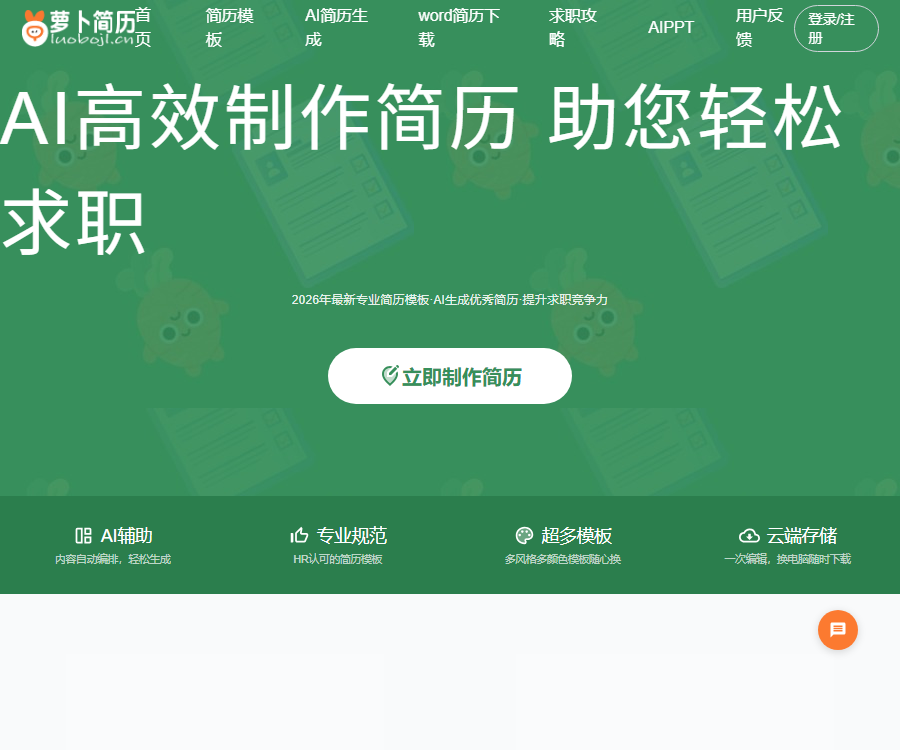
Radish resume
An AI-based online resume generator that helps you find a job easily.
Tags:AI improves efficiencyWhat is a radish resume?
Radish Resume is an online AI-based resume creation tool designed for recent graduates and professionals, provided by Guangzhou Jingminghu Information Technology Co., Ltd.
It integrates resume templates, module editing, AI-assisted content creation, diagnostics, translation, cloud storage, and file export into a single dashboard.
Main functions
- Generate resume content based on the target position.
- Continue writing and improving job experience or project descriptions.
- Diagnose issues with resume structure and presentation.
- Translate the content of Chinese or foreign resumes.
- Add, delete, and sort modules online.
- Switch templates, colors, fonts, and spacing.
- Set up the resume cover and cover letter.
- Save to the cloud and continue editing across devices.
- Export files such as PDF and PNG.
- Download editable Word resume templates.
- Browse sample job descriptions and career guidance.
AI resume generation
The AI generation feature allows for creating a preliminary draft from scratch; users can enter information regarding their career goals, educational background, experience, and skills, and thereby obtain structured content.
- First, determine a clear target position.
- Break down the skills and tasks specified in the job requirements.
- Enter your actual educational, work, and project experiences.
- Add achievements, data, and personal responsibilities.
- Let AI generate candidate content for each module.
- Remove unproven abilities and exaggerated statements.
- Adjust the order of information according to the job requirements.
- Standardize the tense, punctuation, and number formats.
AI content optimization and continuation
AI assistance can improve the way information is presented, add structural elements, or help complete descriptions of experiences, but an effective resume should still be based on genuine evidence and relevance to the position in question.
| Content module | Optimization objective | Key points of inspection |
|---|---|---|
| Personal strengths | Summary of positioning and core capabilities | Avoid vague adjectives. |
| Work experience | Highlight responsibilities, actions, and outcomes. | The data must be accurate. |
| Project experience | Explain the background, roles, and contributions. | Distinguish between team and individual achievements |
| Skill certificates | Hard requirements for the corresponding position | Accurate in terms of level and time. |
| Self-evaluation | Summarize job suitability | Do not repeat the entire resume. |
AI resume assessment
Resume diagnosis is used to identify issues related to structure, keywords, wording, and suitability for the position; it is suitable for a second round of review after the initial draft has been prepared.
- Check whether the necessary contact information is missing.
- Determine whether the experience is relevant to the target position.
- It was found that the descriptions were too long or lacked clarity.
- Suggests keywords for positions that may be missing.
- Check whether the results include specific data.
- Inconsistent timeline or format detected.
- The diagnostic conclusion should be reviewed in light of the actual recruitment requirements.
AI resume translation
The translation feature can help in creating resumes in foreign languages, and it is suitable for seeking jobs across borders, applying for studies abroad, or submitting applications for positions in English-speaking countries.
| Content | Translation focus | Common risks |
|---|---|---|
| Job title | Use the common terms used in the target market. | A word-for-word translation leads to misalignment of positions. |
| Professional skills | Retain standard terminology and product names. | The tool name was mistranslated. |
| Work results | Numbers, currencies, and units are clear. | Change the meaning of the original data |
| Educational background | Accurately state educational background and major. | Equivalent to an error in the local degree designation |
| Personal information | In line with local resume conventions | Retain unnecessary sensitive information. |
Online editor
The editor organizes resumes in a modular manner; users can adjust the content and visual style without needing to know any formatting software.
- Add modules for personal strengths, experiences, and skills.
- Drag the modules to change the order of display.
- Switch templates while keeping the existing content.
- Modify the theme color and font.
- Adjust module spacing and page layout.
- Set the cover page and cover letter.
- Preview the paging and printing effects.
Resume template
The official website offers single-column, double-column, business, creative, and industry-specific templates; some of these pages are also labeled as free templates.
| Template type | Suitable scenarios | Selection suggestions |
|---|---|---|
| Classic single column | Technical, functional, and campus recruitment positions | Highlight the reading order |
| Business two-column layout | Operations, sales, and management positions | Control the amount of information in the sidebar |
| Creative templates | Design and Content Roles | Do not sacrifice readability. |
| Industry templates | Positions in fields such as education, healthcare, and engineering | Replace all example content |
| Word template | Local in-depth editing is required. | Check font compatibility and pagination. |
Differences between PDF, PNG, and Word
The online page creator primarily supports export in PDF and PNG formats; Word files are available through a separate template download center.
| Format | Primary uses | Precautions |
|---|---|---|
| Official delivery and printing | The layout is stable, but editing is inconvenient. | |
| PNG | Preview or share via image | Text cannot be copied directly. |
| Word | Local modifications and secondary formatting | Wrong printing may occur when changing devices. |
Before submitting, check the formats supported by the recruitment platform; do not choose the file type based solely on its appearance.
Save in the cloud
The platform stores resume data in the account, making it possible to continue editing and downloading it even after changing computers.
- Use a phone number or account that is accessible in the long term.
- Create separate resume versions for different positions.
- Important versions are downloaded to the local device at the same time.
- Do not save your login status on public computers.
- Log out of your account before leaving public devices.
- Make sure to have a local backup before deleting the resume.
Tutorial for using the radish resume template
- Register or log in to your Luobo Resume account.
- Clarify the job title and target industry.
- Choose a resume template with a clear structure.
- Enter accurate basic information and educational background.
- Add work experience, internships, and project experience.
- Use AI to generate or optimize candidate content.
- Verify facts, data, and individual contributions sentence by sentence.
- Adjust keywords and sorting according to the job description.
- Standardize fonts, colors, spacing, and date formats.
- Check for spelling errors, contact information, and timeline.
- Preview the pages and then export as PDF or PNG.
- Submit applications through recruitment platforms or by email.
How to write a good work experience section
Each work experience can be structured around “tasks, actions, and results,” allowing recruiters to quickly understand what problems you have solved.
- Describe personal actions using specific verbs.
- Describe the target clients, scope of services, or scale of the project.
- List the methods, tools, and collaborators used.
- Present the results using real data.
- Place the achievements that are most relevant to the target position at the front.
- Remove any content that cannot be explained or justified.
- Control the length and focus of each description.
How to optimize a resume for a specific position
- Extract the essential skills from the job description.
- Place the relevant experiences in a more prominent position.
- Use industry-standard job titles rather than those that are invented on one’s own.
- Save separate versions for different positions.
- Do not include keywords that you do not know.
- Check whether each achievement can be explained during the interview.
- Check the company name and job title once more before sending.
Price comparison with VIP packages
The prices and benefits displayed in real time on the official website’s member page are as follows; the promotional offers included with the premium version as well as the original prices indicated with a line may change due to operational adjustments.
| Package | Current price | Validity period | Number of resume copies | Word template quota |
|---|---|---|---|---|
| Standard VIP Version | 9.9 yuan | 1 month | 10 pieces | 10 pieces |
| Premium VIP Edition | 19.9 yuan | The page currently indicates 2 years. | 50 pieces | 30 pieces |
| Lifetime VIP version | 39.9 yuan | Permanent | 100 copies | 100 copies |
The Premium Edition page shows the original price of 49.8 yuan, along with the offer of one year free when purchased for a year; the Lifetime Edition has an original price of 99 yuan. It is necessary to check the status of the promotion before making the payment.
What benefits are included in each package?
| Equity | Standard version | Premium Edition | Lifetime version |
|---|---|---|---|
| Resume download | Support | Support | Support |
| Theme color | Support | Support | Support |
| One-click template switch | Support | Support | Support |
| Custom modules | Support | Support | Support |
| Cover page and cover letter | Support | Support | Support |
| Model essay for reference | Support | Support | Support |
The main differences among the three packages lie in their validity period, the number of resume versions that can be created, and the amount of Word template space available, rather than in the basic editing functions.
Free features and paid options
The official website provides free resume templates, but the full download options, the number of resumes that can be created, and any advanced features are subject to the real-time limits set in the account.
- First, test the editing experience using free templates.
- Creating only one short-term resume is considered the standard version.
- Multiple version options are required to compare with the Premium Edition.
- Frequent creation over a long period can result in a lifetime version.
- Check whether there is enough quota for Word templates before making a purchase.
- Do not consider the promotional price as a permanent fixed price.
Rules for member upgrades and expiration
According to the FAQ on the official website, users can upgrade their plans; the validity period of the new plan is extended based on the rules specified on the page.
- The standard version is currently valid for 1 month.
- The Premium version indicates a validity period of 2 years on this page.
- The lifetime version is indicated as being valid permanently.
- Downgrading usually needs to be chosen after the current plan expires.
- Templates downloaded before the membership expires can still be used.
- Other VIP benefits will cease to be valid upon expiration.
- Read the latest membership agreement before purchasing and renewing.
Copyright and commercial usage notes
The official website states that the resume templates and portraits displayed on it are owned by the operating company, and any commercial use of them requires appropriate authorization.
- When using it for personal job hunting, the member and template licenses must be complied with.
- Do not resell, distribute in bulk, or pass off as original templates.
- Example photos of individuals cannot be used directly in resumes.
- Replace all examples and placeholder information in the template.
- Enterprise training or business projects require separate authorization.
- Downloading something does not equate to obtaining any commercial relicense.
Personal information and privacy
A resume includes contact information, educational background, and work experience; when using cloud-based tools, it is necessary to avoid exposing unnecessary information.
- Do not enter the ID number, bank card details, or home address.
- Decide whether to display photos based on delivery requirements.
- Do not include customer secrets or confidential company data.
- Project data should be anonymized and authorized.
- Use public computers with caution when editing your resume.
- Regularly check and delete older versions that are no longer needed.
- Save a local copy to prevent issues with accounts or the network.
API and open-source status
At present, Luobo Resume offers web-based services for ordinary users; no public developer API or official GitHub open-source repository has been found.
- No commitment can be made regarding the company’s system integration capabilities based on this.
- Code projects with similar names do not represent official products.
- Do not submit account and resume data to third-party scripts.
- For bulk enterprise services, you should contact the operator directly.
Which users are it suitable for
| User | Typical requirements | Recommended features |
|---|---|---|
| Recent graduates | Resumes for campus recruitment and internships | Industry templates, AI-generated content, and sample texts |
| Working professionals | Changing jobs and updating one’s experience | Content optimization and job versioning |
| Cross-border job seekers | Foreign language resume | AI translation and PDF export |
| Design position | Visual personal presentation | Creative templates and custom color schemes |
| Job search coach | Guide different students | Multiple resumes and sample texts for reference |
Product advantages
- Resume content and visual editing are integrated on the same platform.
- Supports AI generation, optimization, diagnosis, and translation.
- There is a wide variety of template styles and industry coverage.
- Templates can be switched, and multiple design elements can be customized.
- Supports cloud storage and various export methods.
- Member prices and core credit limits are displayed publicly.
Usage restrictions
- AI-generated content may exaggerate or invent experiences.
- The price of the Premium version and the duration of the free trial are part of the promotional details.
- Online resumes and Word templates are available through different interfaces.
- The lifetime rights remain subject to the continuous operation of the platform and the relevant agreements.
- Downloading a template does not imply obtaining any commercial license.
- No public APIs or official open-source code were found.
Frequently Asked Questions
What are the main functions of a radish resume?
It supports AI-powered resume generation, content improvement and editing, diagnosis, translation, template switching, online editing, cloud storage, and file export.
Can the radish resume be used for free?
The official website offers some free templates; the specific restrictions regarding editing, downloading, and the number of copies that can be created are indicated in real time on the account page after logging in.
How much is the VIP version of the radish resume?
The official website shows that the standard version costs 9.9 yuan, the premium version 19.9 yuan, and the lifetime version 39.9 yuan; the actual prices during promotions are subject to those displayed on the payment page.
What formats can a radish resume be exported in?
The online page creation tool supports PDF and PNG formats; Word files must be obtained from a separate center that provides Word resume templates.
Can the template still be used after the membership expires?
The FAQs on the official website state that templates once downloaded can still be used, but other VIP benefits will cease to be available after the membership expires.
Can the template for radish resumes be used commercially?
The template for statements on the official website and the copyrights related to personal portraits belong to the operating company; any commercial use other than individual job applications requires separate authorization.
Does Luobo Resume provide APIs or open-source code?
To date, no developer API related to the Radish resume has been found, nor has an official GitHub open-source repository for this product been identified.
Tools similar to the radish resume



 Guigong Network Security Registration No. 45132202000164