






Doodle Dreams
Doodle Dreams: leverages AI to make work more efficient and simpler.
Tags:AI improves efficiencyWhat is Doodle Dreams?
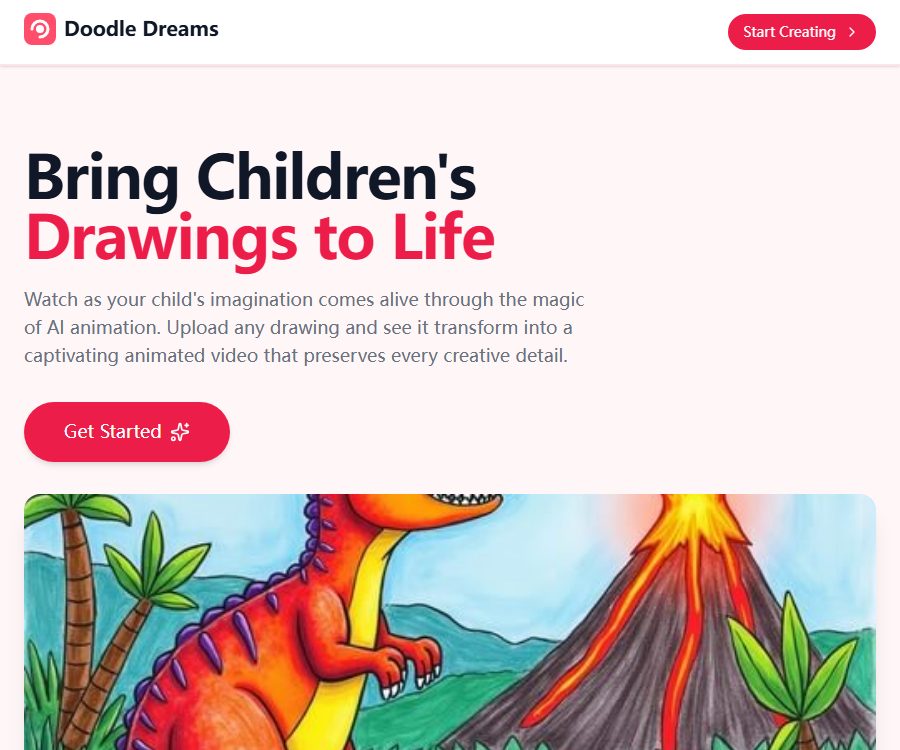
Doodle Dreams is an online AI tool that converts children’s drawings into short animations. Parents or teachers upload photos of the hand-drawn drawings or scanned versions along with a description, and the system generates a 5-second video that preserves the original line work and color style.
It is suitable for creating family memorials, creative presentations in classrooms, electronic greeting cards, and content for sharing on social media. The product is currently available primarily as a web page; it is not certain whether the mobile app with the same name belongs to the same team as this website.
Overview of main functions
| Functions | Main inputs | Output | Suitable uses |
|---|---|---|---|
| Painting turns into animation | Children’s hand-drawn photos or scanned images | 5-second animated video | Bring the characters and scenes to life. |
| Text description | Action, scenario, or creative inspiration | A clearer direction for the animation | Control character behavior and the intent behind the visuals |
| Video download | Animation completed. | High-quality video files | Save family memories and play offline |
| Share | Generate video | Content that can be sent to relatives and friends | Communication between home and classroom |
| Doodle Hub | Theme coloring template | Paintings suitable for being animated again | Use when lacking inspiration for drawing. |
| Animation tokens | Single purchase limit | Number of animations that have not expired | Users who do not wish to continue with a subscription |
How to use drawing to create animations
- Have the child create a hand-drawn illustration or choose a coloring template from Doodle Hub.
- Take photos in an environment with even lighting, or use a scanner to obtain clear images.
- Remove the desktop, fingers, shadows, and irrelevant backgrounds.
- Upload JPG, PNG, or HEIC files.
- Provide a brief description of the characters, actions, and scene, without including any personal identification information.
- Submit it for generation and wait for about 3 to 5 minutes.
- Preview the 5-second video; once you’re satisfied, download it and keep a backup for yourself.
AI will interpret the characters and descriptions in the image on its own, and it cannot be guaranteed that the output will meet expectations. If the result does not correspond to the intended outcome, try again by simplifying the description, sharpening the outlines, or reducing the number of objects in the image.
What kind of painting effect is better?
It is recommended that the pages use illustrations with clear elements and thick outlines, similar to the line drawings in coloring books. Both colored and black-and-white works can be used, but clarity, as well as the degree of separation between the background and the characters, will affect the animation quality.
- A scene first highlights a main character or action.
- Use thick, continuous lines to separate the figures, animals, and background.
- Avoid paper wrinkles, reflections, strong shadows, and tilted shooting.
- Point the camera at the paper, making sure all four edges are clear and there are no fingers blocking the view.
- Describe using simple verbs, such as running, waving, flying, or turning one’s head.
- Do not ask for too many consecutive story events to be completed within 5 seconds.
Fine pencil lines, low-contrast colors, dense text, and a large number of overlapping characters can reduce stability. Keep the original image before generation to avoid uploading only the compressed version.
Creation time and video length
| Project | Current instructions | Usage tips |
|---|---|---|
| Processing time | It usually takes about 3 to 5 minutes. | It may take longer during busy times. |
| Video length | Fix for 5 seconds | Suitable for single actions and short demonstrations |
| Download | Supports high-quality downloads | Files can be stored for an extended period of time on your own. |
| Share | Support sharing with family and friends | Check children’s privacy before making it public. |
| Successful guarantee | No guarantee of complete compliance with the description. | It may be necessary to modify the input and try again. |
The page does not disclose technical specifications such as resolution, aspect ratio, frame rate, audio quality, and file size. If it is to be used for large screens, printing of QR codes, public events, or video editing projects, it is necessary to first create a sample to conduct verification.
Doodle Hub theme painting pack
Doodle Hub offers coloring packs optimized for animated effects, with themes ranging from animals to fantasy worlds; new packs are added on a monthly basis. It is suitable for children who don’t want to start from a blank sheet of paper, as well as for use in classroom activities.
- The Doodler package gives access to 3 drawing packs.
- Sketcher and Animator have access to all drawing packs.
- The template is suitable for coloring, taking a photo of it, and then submitting it to create an animation.
- There are no fixed commitments regarding the number of new packages, themes, or retention period.
The fact that a template is accessible does not mean that one owns the rights to it or has an unlimited commercial license for its use. Before using such a template in paid courses, products, advertisements, or for public publication, it is necessary to verify the scope of the permitted usage.
Monthly and annual plans
| Package or version | Price | Billing cycle | Core benefits or quota | Suitable for users |
|---|---|---|---|---|
| Doodler | $ | Monthly or annual payment | 5 animations per month, plus access to 3 Doodle Hub drawing packs | Occasionally created families |
| Sketcher | $ | Monthly or annual payment | 15 animations per month, access to all drawing packs | Frequently create content about families and teachers |
| Animator | $ | Monthly or annual payment | 50 animations per month, access to all drawing packs | High-frequency story creation and classroom activities |
The annual payment page converts the three price options into monthly amounts of $3.75, $7.50, and $16.58, indicating savings of 25%, 25%, and 31% respectively. Although these are presented as monthly rates, the actual payment is made in one go for the entire year.
The package page does not indicate whether unused monthly credits for animations can be carried over. Before making a purchase, it is necessary to check the date on which the credit balance is updated, whether failures in processing orders result in deduction of credits, and what access rights one still has to the drawing packages after suspending or downgrading the subscription.
One-time animation tokens
| Token bag | Price | Billing cycle | Animations can be generated. | Suitable for users |
|---|---|---|---|---|
| 5 Animation Tokens | 7.49 dollars | One-time purchase | 5 animations, with tokens that do not expire | Small-scale trial |
| 25 Animation Tokens | 24.99 dollars | One-time purchase | 25 animations, with tokens that do not expire | Phased projects |
| 50 Animation Tokens | 34.99 dollars | One-time purchase | 50 animations, with tokens that do not expire | Users with high usage who do not want to subscribe |
One-time tokens are suitable for those with irregular usage patterns, but they do not provide clear information regarding the benefits included in the painting package. When making a comparison, it is necessary to take into account the cost per use, access to templates, and monthly requirements.
How to choose a package
- I just want to try it a few times: first, compare the 5-token package with the Doodler monthly subscription.
- About 5 times per month: Doodler corresponds more to fixed demands.
- For weekly use in the classroom or at home, 15 sessions of Sketcher are more appropriate.
- Creating story or event content continuously: Animator provides a quota of 50 times per month.
- The usage is concentrated around a certain holiday or project; non-expiring tokens may be more flexible.
The price page does not disclose the amount that can be generated for free; therefore, “Start Creating” should not be considered to mean a free service. The actual amount to be paid, the currency used, taxes, and any promotions are specified on the settlement page.
Cancellation, refunds, and failed generations
The current public homepage does not display the rules regarding cancellation, refunds, automatic renewal, and regeneration in case of failures. The answers available in third-party directories cannot replace the terms of service; therefore, it is necessary to verify these details with support before making a payment.
- Whether the subscription is renewed automatically, and when cancellation takes effect.
- Whether a refund is given for unused months after annual payment cancellation.
- Are technical failures, content filtering, or empty videos deducted from the quota?
- Is it possible to redo the task for free if one is not satisfied with the results?
- Can tokens be refunded or transferred after purchase?
- What happens to the remaining tokens after the account is closed?
If it is to be used for courses or children’s activities, it is recommended to purchase a small quantity first and thoroughly test the processes of uploading, generating, downloading, as well as customer service, before deciding whether to opt for an annual subscription or a larger package of tokens.
Children’s Privacy and Parental Considerations
Doodle Dreams is designed for children’s drawing, but the current website does not provide any privacy policy or information regarding child data. The page does not explain how long images, descriptions, videos, account details, and generation logs are stored, what purpose the models are used for, or how they can be deleted.
- Accounts should be created and managed by adults, so that children cannot submit personal information on their own.
- When taking photos, only the drawing paper should be included; the children’s faces, school uniforms, the room, or family photos should not be captured.
- Do not include real names, ages, schools, addresses, or contact information in the file names and descriptions.
- Avoid uploading works that contain signatures, class information, QR codes, or location details.
- After downloading, check promptly whether your account allows you to delete the original images and videos.
- Schools and institutions must obtain parental consent, conduct supplier reviews, and finalize data agreements before using it.
The absence of a public privacy policy does not necessarily mean that the data is being misused, but it does imply that users are unable to verify the key rules regarding its processing. When dealing with children’s works, a more conservative approach based on minimal disclosure should be adopted.
Copyright and sharing boundaries
The page states that the generated videos can be downloaded in high quality, shared with friends and family, and retained by users for long periods. It does not clearly specify the ownership and scope of commercial use regarding the input drawings, the generated videos, the Doodle Hub templates, and the underlying models.
- Only upload drawings of yourself, your children, or those for whom you have authorization.
- Do not use protected characters, brand logos, or someone else’s works to create commercial videos.
- Obtain the consent of the guardian and the creator of the work before posting it on social media.
- Used for prior written confirmation of commercial licensing for school promotions, advertisements, or products.
- Keep the original image and the date of creation to facilitate an explanation of the creative process.
Platform, application, and open-source status
| Project | Current status | Explanation |
|---|---|---|
| Web application | Already provided | Upload, generate, download, and account access |
| iOS native apps | Not confirmed yet | A similar app was released by other developers. |
| Android native apps | Not confirmed yet | The identities of the applications with the same name found are inconsistent. |
| Browser extensions | Not confirmed yet | No official expansion page was found. |
| Public API or SDK | Not yet made public | No development documentation was found. |
| GitHub and product source code | Not confirmed yet | No official repository or open-source license was found. |
Suitable for users and scenarios
- Parents: Turn children’s drawings into digital family memorials.
- Teacher: Create short animations for art classes, story sessions, and classroom presentations.
- Child activity organizer: Use the coloring results for an activity review.
- Content creators: Produce short video materials that retain a hand-drawn style.
- Family and friends: Turn the child’s drawings into birthday or holiday greetings.
Advantages and capabilities boundaries
Main advantages
- The workflow is simple; no animation or editing skills are required.
- It supports common mobile phone image formats as well as scanned images.
- Generally, a downloadable short video is generated within a few minutes.
- Two payment options are available: subscription and non-expiring tokens.
- Doodle Hub provides children with a starting point for creative drawing.
Main limitations
- The video is only 5 seconds long, so it’s not suitable for complex narratives.
- AI may misinterpret characters, actions, and textual descriptions.
- There are no publicly available information regarding the free quota, the number of failures, or the technical parameters for output.
- Lacks privacy policies, child data protection information, terms of service, and a refund page.
- The operating entity, the model provider, and the data retention rules are not disclosed.
- No official mobile apps, APIs, SDKs, or open-source code have been confirmed.
Frequently Asked Questions
What can Doodle Dreams do?
It converts children’s hand-drawn photos or scanned images into 5-second AI animations, and allows the results to be downloaded and shared.
Which image formats are supported?
Currently, JPG, PNG, and HEIC are explicitly supported. There are no publicly specified limits on the size of a single file or its resolution.
How long does it take to create an animation?
It usually takes about 3 to 5 minutes. The waiting time can be affected by queue lengths, the complexity of the images, and the service load.
Can black and white line drawings be used?
Yes, both color and black-and-white images are supported. Clear elements and thick outlines generally help to produce better results.
Can videos be saved permanently?
Once generated, it can be downloaded and saved for long-term use by the user. The platform does not specify how long such data is retained, so it is necessary to download a backup in a timely manner.
Is the annual price deducted on a monthly basis?
No. The page shows the monthly rate after conversion; in reality, the annual fee is charged at 45, 90, and 199 dollars respectively.
Do animation tokens expire?
The page indicates that the token packages with counts of 5, 25, and 50 do not expire. It is not specified what happens to these packages in case the account is closed or the service is discontinued.
Is the credit refunded in case of generation failure?
There are no public rules currently in place. Before making a purchase, it is necessary to consult support regarding the methods used to handle technical failures, content filtering, and re-generation.
Will children’s drawings be used to train AI?
There is currently no available public policy that addresses this issue. It is necessary to avoid uploading images containing children’s personal information, and to obtain written approval before using such images in any institution.
Is there a mobile app for Doodle Dreams?
It cannot be confirmed at the moment. The products with the same name available in app stores were developed by other developers, and therefore cannot be considered official clients of this site.
Can the generated video be used for commercial purposes?
The public page does not provide a clear commercial license; prior written confirmation from the service provider is required before using advertisements, products, paid courses, or publications.
Summary
Doodle Dreams allows for the quick conversion of clear children’s drawings into shareable 5-second animations; the options related to packages and tokens are also easy to understand. Before deciding to pay, it is necessary to check the resulting output first, and to pay close attention to rules regarding children’s data, the number of failed attempts, refunds, and copyright issues.
Tools similar to Doodle Dreams



 Guigong Network Security Registration No. 45132202000164