






BeanBook
BeanBook: Enables AI to make work more efficient and simpler.
Tags:AI improves efficiencyWhat is BeanBook?
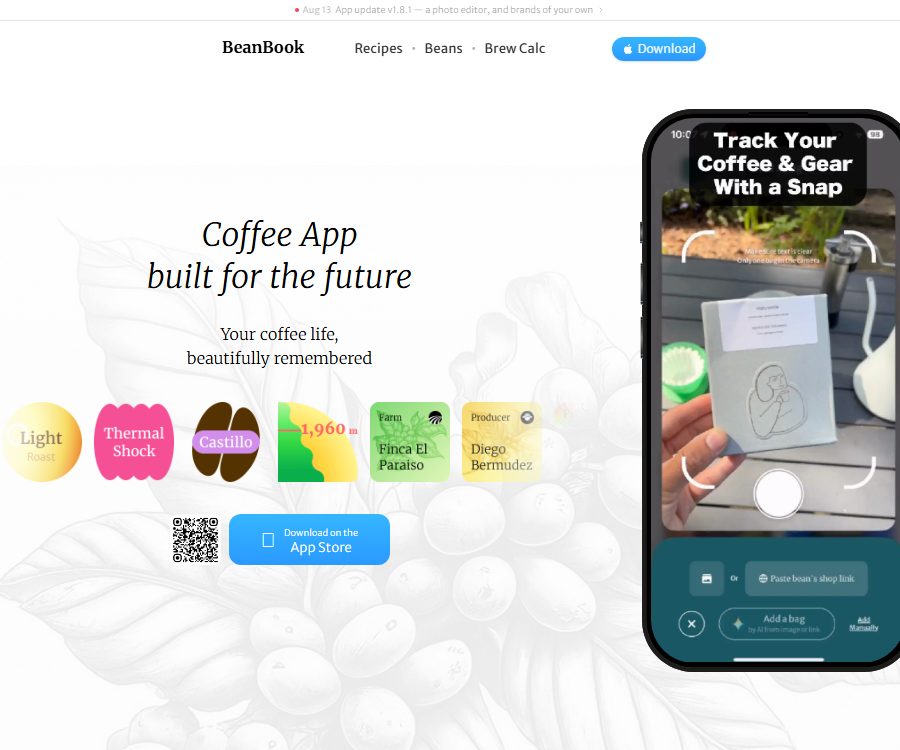
BeanBook is a premium coffee tracking and discovery application developed by Bitlever, LLC; it helps users manage coffee beans, brewing recipes, equipment, and tasting notes in one place. By combining AI recognition with a coffee diary, it is suitable for home coffee enthusiasts, baristas, and those who frequently purchase high-quality coffee beans.
BeanBook is not a general-purpose note-taking or productivity tool; its functions are centered around organizing information related to coffee bags, reviewing brewing processes, discovering different coffee beans, and providing answers to questions about coffee knowledge. Currently, the official app store offers only an iPhone version of this application.
Main functions of BeanBook
AI for identifying coffee bags
After the user takes a photo of the coffee packaging, AI can assist in filling in information such as the roaster, place of origin, processing method, variety, roasting date, and flavor profile. The accuracy of the automatic recognition may be affected by the quality of the photo and the design of the packaging; therefore, manual verification is necessary before saving the information.
Coffee bean shelves and bean maintenance records
The application allows users to save photos of the bean bags, purchase information, ratings, grinding parameters, and flavor notes, as well as keep track of the roasting date and the time spent storing the beans. Once the coffee beans are marked as frozen, the system pauses the timing associated with their roasting.
Brewing formula management
A recipe can record the amount of powder used, the ratio of powder to water, the water temperature, the degree of grinding, the steps involved in adding water, and the total time taken. Users can also associate a recipe with specific coffee beans, grinders, and filters, which makes it easier to reproduce the desired taste profile.
Extract recipes from various sources
BeanBook can extract step-by-step brewing methods from videos, web pages, screenshots, or handwritten notes. When dealing with content created by others, it is necessary to respect copyright rights and verify whether the AI has correctly identified the dosage, time, and temperature.
Brewing calculator and timer
The built-in calculator can determine a phased water addition plan based on the amount of powder and the proportions involved, and it supports multiple stages of water addition. The timer keeps track of the process during actual brewing, thereby reducing the need to switch between different tools.
Management of coffee-making equipment
Users can register coffee grinders, filter cups, kettles, electronic scales, and coffee machines, and save photos, ratings, purchase prices, and notes. A wish list is useful for keeping track of the devices they intend to buy.
Discover new products and offers
BeanBook brings together information on new beans, limited editions, and discounts from various bakers; it allows users to browse products by origin, processing method, and flavor. The prices and stock levels are provided by external sellers, so it is necessary to verify them on the seller’s website before making a purchase.
BeanBook AI Q&A
Users can ask about the place of origin, processing methods, the roaster, flavor profile, bean growing period, and brewing techniques; they can also receive advice regarding grinding, water temperature, and extraction. The answers provided by AI serve as a starting point for adjustments, but they should not replace actual taste testing and parameter testing.
Annual Coffee Review
The app aggregates data on annual brewing amounts, consumption levels, common origins of coffee beans, and beans with high ratings. The completeness of this data depends on whether the user keeps a record of each purchase and brewing session.
BeanBook Usage Guide
- Install an app on the iPhone and create an account.
- Take photos of coffee bags or attach product information to create profiles for coffee beans.
- Check the fields for baker, origin, variety, processing method, date, and flavor.
- Record the current status of the beans being stored; change the corresponding marker promptly when freezing.
- Select an existing brewing recipe, or import one from videos, web pages, and images.
- Additional factors include powder quantity, water temperature, degree of grinding, the water addition process, and the equipment used.
- Use a calculator to adjust the ratio of powder to water, and start a timer when brewing.
- After tasting, record the flavor profile, assign a score, and determine the directions for further adjustments.
- Regularly check your personal statistics to identify your preferred origins and parameters.
Methods to improve record quality
- For each bag of beans, the baking date, the date it was opened, and the freezing time are recorded uniformly.
- Indicate the model of the bean grinder along with the degree of grinding, so as to prevent the numbers from losing their reference value.
- Change only one variable at a time to make it easier to determine the cause of any changes in flavor.
- Distinguish between the flavor indicated on the bakery’s label and one’s own actual taste experience.
- After AI imports the recipe, it compares each item with the original content, paying special attention to the units.
- Important formulas are kept in external backups to avoid relying entirely on a single application.
Which users are it suitable for
- Enthusiasts of specialty coffee who wish to create a visual archive of coffee beans.
- Users who frequently adjust the recipes for devices such as the V60, AeroPress, and Origami for drip brewing.
- Home coffee enthusiasts who need to monitor the grinder’s scale and the parameters of different filters.
- Coffee professionals who wish to document menu items and the performance of seasonal beans.
- Consumers who enjoy discovering new bakers, limited-edition beans, and coffee discounts.
- Beginners who want to use AI to quickly learn about coffee origins and processing methods.
The advantages of BeanBook
- Place the coffee beans, recipes, equipment, and tasting notes within the same structure.
- AI-powered photo recognition reduces the time needed to manually enter information on coffee bags.
- It supports organizing step-by-step recipes from various content sources.
- The parameters for bean cultivation, freezing, and grinding are more in line with the actual requirements of high-quality coffee.
- It also provides personal records, discoveries of new beans, and professional questions and answers about coffee.
- The brewing calculator and timer can be used directly in daily operations.
Usage restrictions and precautions
- So far, only the iPhone app has been verified; it requires iOS 15.1 or a higher version.
- The App Store shows that the language of the app is English; a Chinese interface is not yet available.
- AI may misidentify the name of the coffee, the date, the dosage, or the unit, so it is necessary to verify these details.
- The brewing suggestions provided by BeanBook AI are influenced by the age of the beans, water quality, the equipment used, and individual taste preferences.
- The free version has limits on the number of items such as coffee beans, and these limits may change depending on the version.
- The prices, inventory levels, and product information from third-party bakers may be delayed.
- After the account is deleted, some data may be retained temporarily for legal or security reasons.
- Photos, accounts, and usage data may be linked to the user’s identity.
BeanBook price
The following are the subscription prices shown on the App Store in the United States as of August 26, 2026. Prices may vary depending on the region, any promotions in effect, taxes, and trial options; the details are subject to those listed on the in-app purchase page.
| Plan | Reference price | Main explanation |
|---|---|---|
| Free version | $ | It is possible to start tracking coffee beans and using some basic tools; the amount of resources available for this purpose is limited. |
| BeanBook Pro monthly plan | $ | Suitable for short-term use or monthly subscription |
| BeanBook Pro annual plan | $ | Unlock an unlimited number of Pro features, including coffee beans, recipes, and equipment. |
The stores in the United States also display other in-app purchases for BeanBook Pro, which may include historical prices or promotional rates. Since the names of these items do not indicate the corresponding time period, they are not considered as separate standard packages in this article.
Privacy and AI data processing
The privacy policy was updated on July 28, 2024, and it is managed by Bitlevel LLC. The information covered in this policy includes account details, email addresses, billing information, device information, usage data, photos, approximate location data, and permissions related to push notifications.
Official statements indicate that the AI functions make use of third-party services such as Anthropic, OpenAI, and Google Cloud AI; input data, output data, and related personal information may be processed by these services in order to enable the AI functions. Do not submit unnecessary sensitive information in questions, answers, or images.
Is BeanBook open source?
No official open-source repository, open SDK, or self-deployable version available for BeanBook has been identified; therefore it should be considered a closed-source commercial application. The fact that coffee beans, recipes, and other content are displayed on the website does not mean that the source code of the mobile application is available.
Frequently Asked Questions
Can BeanBook be used for free?
It is possible to start using it for free, but the quantity of items such as coffee beans is limited; a Pro subscription is needed to unlock higher quantities or an unlimited supply.
Does BeanBook support Android phones?
As of the verification date, the official version available is only the iPhone version; an Android app has not been confirmed yet.
Can BeanBook automatically identify information about coffee beans?
Yes. After the user takes a photo of the coffee bag, AI will assist in filling in fields such as origin, processing method, roaster, and flavor profile.
Can BeanBook save brewing recipes?
Yes, it is possible to compile step-by-step recipes from videos, web pages, screenshots, or handwritten content; however, the imported results require manual verification.
How much is BeanBook Pro?
On the App Store in the United States, the monthly fee is listed as $7.90 and the annual fee as $49.90; in other regions, the pricing is determined within the app itself.
Is BeanBook an open-source application?
No. At present, no official source code repository or self-hosted version has been identified.
Tools similar to BeanBook



 Guigong Network Security Registration No. 45132202000164