






Aisance
Aisance: boosts AI efficiency to make work more efficient and simpler.
Tags:AI improves efficiencyWhat is Aisance?
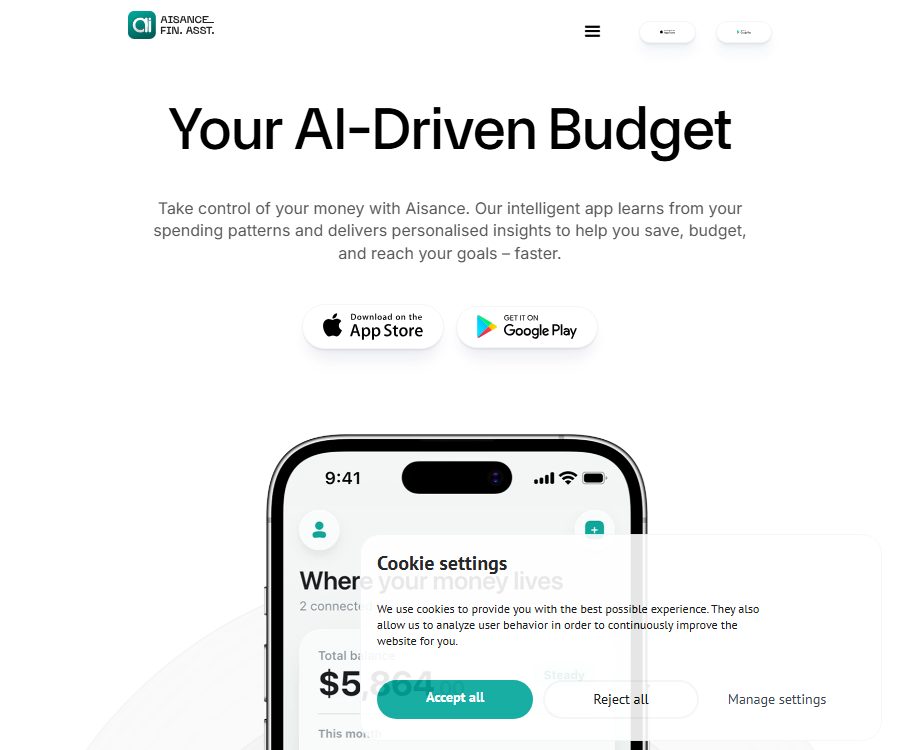
Aisance is an AI-driven application for personal budgeting, expense tracking, and savings goal setting. It analyzes the income, expenses, and goals entered by the user or retrieved with their permission, organizes the budget, and provides personalized suggestions.
The product is operated by the Luxembourg-based company EuroAFF.com, which offers apps for iOS and Android. Aisance positions itself as a \"financial partner\" rather than a financial advisor; it does not recommend stocks, investment products, or specific purchase decisions.
Main functions of Aisance
1. Income and expenditure records
Users can keep track of their salaries, fixed bills, and daily expenses; the app organizes this data into a monthly budget view. By continuing to record such information, it is possible to see what proportion each type of expenditure accounts for and to monitor changes in financial status.
The current app interface also allows for recording expenses in natural language; for example, one can describe dining expenses directly, and the system will then generate a card that can be confirmed or modified.
2. Custom budget categories
Aisance allows users to set budget categories according to their own preferences, without having to stick strictly to traditional financial categories. Users can divide their funds into more understandable groups such as housing, daily expenses, entertainment, care needs, or future goals.
3. Savings goal management
Users can set goals for travel, cars, computers, education, or emergency savings, and see how much is still needed to reach those goals. The system provides actionable budgeting steps based on income, expenses, and deadlines.
- Define the target amount and the planned completion time.
- Track the cumulative progress of each goal.
- Check the impact of current consumption on short-term and long-term goals.
- Convert suggestions into tasks that can be confirmed, modified, or abandoned.
4. AI-powered personalized budget recommendations
The application analyzes consumption habits, budgets, and goals to provide suggestions for reducing expenses, adjusting categories, or allocating funds. These suggestions are updated as user data and behavior change.
These results are provided for informational purposes only and do not constitute professional financial, investment, tax, accounting, or legal advice. It is still advisable to consult qualified professionals when dealing with debts, investments, taxes, or major purchases.
5. Conversational financial assistant
Users can directly ask whether a particular expense will affect their budget, whether they have enough funds available, or how to break down their goals. The application responds with brief answers first, and then provides more detailed information as needed.
The focus is on describing the current situation and the available options, rather than making decisions on behalf of the user. All calculation cards should allow the user to confirm, modify, or discard them.
6. Funding buffer period
Aisance can be calculated based on the existing funds and daily expenses: it shows how many months the current funds will be sufficient to cover needs if income stops. This figure helps in understanding the level of emergency reserves, but it still depends on the accuracy of the user’s data and the assumptions made.
7. Account connection and multiple devices
In some versions and regions, it is possible to connect to read-only bank accounts, which allow users to view their spending but not to transfer funds. The official source states that the app is compatible with iOS and Android, and the multi-device functionality as well as the synchronization methods depend on the specifics of the account in question.
Which users is it suitable for?
- Individual users who wish to keep track of their expenses but dislike complex spreadsheets.
- Those who need to establish emergency reserves, for travel purposes, or for making large purchases.
- Users who wish to understand the consumption structure and the capital buffer period.
- Those who need to quickly record expenses in natural language.
- Those who wish to receive gentle budget reminders but do not need investment recommendations.
Aisance usage tutorial
- Install the app and create an account; read the privacy policy, subscription terms, and data permissions guidelines.
- Set the currency, revenue cycle, and budget month, and enter steady income and fixed expenses.
- Create budget categories that suit your lifestyle, and set acceptable limits for each category.
- Set a clear goal, such as an emergency fund, a trip, or the purchase of equipment, and specify the amount and deadline.
- Track expenses transaction by transaction or through conversation records, and verify in a timely manner the amounts and categories identified automatically by AI.
- Check the budget variance, cash buffer, and AI recommendations, then choose the appropriate action for you.
- Check for unusual expenditures once a week, and adjust the budget on a monthly basis according to actual conditions, rather than sticking blindly to the old plan.
- Export or back up important information, and regularly check subscriptions, bank connections, and device permissions.
Versions and subscription plans
As of August 25, 2026, the official terms outline three package types: Free, Analytics, and Premium; however, no fixed uniform prices are listed on the official website. The actual costs, trial periods, and discounts are shown on the app store in the user’s region as well as on the in-app purchase page.
| Version | Functional positioning | Price information | Suitable for users |
|---|---|---|---|
| Free | Limited basic budgeting and recording functions | Free; the specific amount is specified within the app. | First experience and basic bookkeeping |
| Analytics | Enhanced analysis tools and resource management capabilities | Products may vary from region to region on a monthly or annual basis. | Users who need a more detailed budget analysis |
| Premium | Full features, more usage quota, and personalized AI suggestions | Subscriptions are available for weekly, monthly, and annual periods, as well as at special event prices. | High-frequency recording and continuous goal management |
Some app store pages indicate a 7-day free trial, but the eligibility for this trial, the functions available, and the price for renewal may vary depending on the region, any ongoing promotions, or previous purchases. Before starting the trial, it is necessary to check the page showing the duration, total cost, and the date when the first charge will be made.
Why isn’t a unified package price listed?
App stores in different countries and regions display various currencies, and they offer multiple options for weekly, monthly, annual subscriptions, as well as packages for Analytics, Premium services, and the number of chat sessions. The same product may be available at a promotional price or in an older version.
Therefore, listing the price of a particular SKU for a given region under the global standard price can be misleading. The most reliable approach is to check the final purchase confirmation page on your own Apple or Google account.
Subscription, renewal, and cancellation
Subscriptions are handled by the Apple App Store or other app stores; Aisance does not store any payment card data. Subscriptions are usually renewed automatically, unless the user cancels them in accordance with the store’s rules before the end of the current period.
- After the free trial period ends, it may automatically switch to a paid subscription.
- After cancellation, it is usually still usable until the end of the paid cycle.
- Refunds are determined by the relevant app store policies.
- Uninstalling an app does not equate to canceling a subscription.
- Changing the region or store account may affect prices and available options.
Data privacy and bank connections
Aisance handles data related to accounts, finances, budget targets, spending records, devices, as well as usage and diagnostic information. Information provided by app stores also indicates that certain identifiers may be used for tracking across different apps or websites.
If a bank account is connected, the official product description states that the connection is read-only: the application can view transaction details but cannot transfer funds. Users should still verify the specific connection service, the duration of authorization, the scope of data accessible, and the methods for revoking it.
- Only the accounts and data that are truly necessary for budget analysis are authorized.
- Regularly check the bank’s authorization settings and connections to third parties.
- Do not enter the full number of your bank card, its password, or verification code in chats.
- Enable multi-factor authentication for device locks and store accounts.
- Hide the balance, transaction partner, and account identifier before sharing screenshots.
What will happen after deleting the account?
The website’s frequently asked questions state that once an account is deleted, personal and financial data are permanently removed from the servers, and it is recommended to export important information first. The privacy policy may also allow for the retention of necessary records for legal, dispute-resolution, or security purposes.
Before deleting, it is necessary to cancel the subscription, download the data, and disconnect from the bank account. After completing these steps, you can check the subscription status in the app store again, to ensure that deleting the account is not mistaken for stopping the charges.
How should AI suggestions be used?
Aisance’s recommendations are based on the income, expenses, goals, and behavior data provided by the user. Omitting cash expenditures, temporary debts, or upcoming large bills can lead to inaccurate estimates of the budget and the available buffer.
- First, check whether the amount, currency, date, and category are correct.
- Treat the suggestions as alternatives, rather than mandatory instructions.
- Maintain a safety buffer for housing, healthcare, taxes, and emergency expenses.
- Do not decide on borrowing, investing, or discontinuing essential insurance based solely on the results of an application.
- Seek professional assistance when facing debt crises or complex tax issues.
How to view the performance data on the official website?
The official website displays marketing data such as the percentage of savings achieved by users, the average amount saved, and improvements in stress levels; these figures may be based on a specific sample, self-reported surveys, or active users. They do not guarantee that every user will achieve the same results.
The improvement of the budget depends on income levels, expenditure patterns, local living costs, the time taken to implement changes, and unexpected events. A more appropriate way to assess things is by comparing the completeness of records before and after making changes, the savings rate, and the progress toward set goals.
Supported platforms
- iPhone app.
- Android app.
- Some Macs with Apple chips and Apple Vision devices can run an iOS version.
- The official website is used for product introductions, policy information, and download instructions; it is not a complete web-based budgeting tool.
The current Apple app page requires that iPhones run iOS 18.0 or a later version; the device and region requirements may change with updates. It is advisable to check the relevant information on your own app store page before installing the app.
Product advantages
- Record expenses in natural language to reduce the burden of filling out complex forms.
- Bring the budget, goals, buffer periods, and AI recommendations together in the same application.
- It is recommended to present it in form of confirmable and modifiable cards, thereby preserving the user’s right to make decisions.
- The categories and goals can be adjusted according to an individual’s lifestyle.
- It supports iOS and Android, making it suitable for taking notes on the go.
Usage restrictions
- No investment, tax, accounting, legal, or other professional financial services are provided.
- AI may misinterpret spoken language, amounts, categories, or future expenses.
- Automated suggestions cannot replace a thorough review of the bill and professional judgment.
- Bank connections, automatic synchronization, and package features may vary depending on the country or platform.
- Subscription prices vary, and app stores may display both current offers and past products at the same time.
- No public APIs, official GitHub repositories, or self-hosted versions have been found at present.
Is Aisance open source?
Aisance is a commercial mobile application; the official terms specify that the software, algorithms, design, and functions belong to the operating company or the licensor. There is no evidence indicating that the core application is released under an open-source license.
Frequently Asked Questions
Can Aisance save money for me automatically?
The product can help in planning and tracking savings goals, but the bank connection described here is read-only and does not allow for direct transfer of funds; any actual transfers must still be carried out through the bank’s channels.
Does Aisance recommend stocks?
No. The current instructions for the application clearly state that it does not recommend stocks, investments, or purchases; it merely shows the financial status and the various options available for selection.
Can it be used for free?
The terms include a Free Package; in some areas, a Premium trial is also available. The free features, the number of messages that can be sent, and the eligibility for the trial are as indicated within the application.
Will deleting the app stop the renewal?
No. Users need to cancel the subscription through their Apple or Google account settings; uninstalling the app or deleting its icon generally does not stop automatic renewal.
Is Aisance suitable for handling company finances?
It is primarily aimed at individual budgets and life goals. For corporate accounting, taxation, expense reporting, and cash flow management, professional systems that comply with local regulations should be used.
Tools similar to Aisance



 Guigong Network Security Registration No. 45132202000164