






AI-powered SVG Generator, SVG Editor, and SVG Bundles
AI-powered SVG Generator, SVG Editor, and SVG Bundles – AI enhances efficiency, making tasks more efficient and simpler.
Tags:AI improves efficiencyWhat is SVGStud.io?
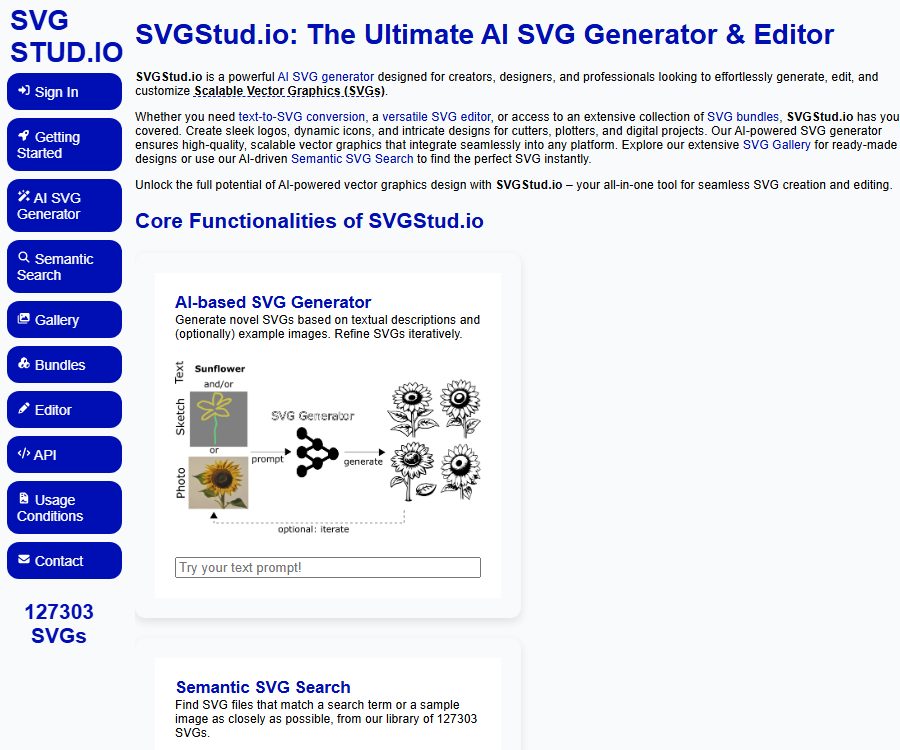
SVGStud.io is a web-based tool that combines AI-driven vector graphics creation, semantic search, online editing, and the ability to download asset packs. It is suitable for creating icons, logo drafts, illustrations, cutout patterns, and elements for web decoration.
SVG is a scalable vector format that maintains clarity at different sizes, and its colors and paths can be adjusted through code. SVGStud.io is currently in the preview phase; its core functions are available for free, but there is a daily limit on the number of times content can be generated.
Main functions
Generate SVG from text
The user enters a description of no more than 100 characters; after selecting the model, detail level, and visual style, a vector graphic is generated. Multiple samples can be requested at once, with each sample consuming its own amount of generation budget.
Convert images to SVG
In the Image-to-SVG mode, it is possible to use images or existing SVG files as a reference, and then generate a new vector version based on the given prompts. Users can also add modification marks to the reference images in order to guide the direction of the reconstruction.
Partial SVG redrawing
The Inpainting mode allows you to create a mask over an existing image, so that only the selected area is regenerated. It is useful for keeping the parts of the image that you like while adjusting the body, background, or certain decorative elements.
Various styles and levels of detail
The platform offers styles such as default, cartoon, outline, icon, line art, logo, comic, paper cut, and silhouette. The details can be adjusted across levels such as minimal, low, standard, high, and maximum.
Semantic and image search
Semantic search matches results based on the actual content of the graphics, rather than merely comparing the literal text of the search terms. Users can also upload sketches or images to find similar SVG files, and they can use options for aesthetic weighting as well as filtering for approximate similarities.
Public image libraries and asset packs
The Gallery displays public works in random order, as well as in order of recency, download volume, rating, and aesthetics. Related themes are also grouped into SVG Bundles, allowing users to download ZIP packages containing all the related assets at once.
Online SVG editor
The resulting output can be sent to a third-party SVG editor in the browser, where further adjustments can be made to paths, colors, layers, and other vector elements. AI is useful for creating drafts, but for precise icons and brand graphics, it is still recommended to manually refine the elements.
Developer API
The JSON REST API enables tasks such as generating data, performing semantic searches, and querying the remaining budget. Developers can use personal tokens for billing, but for large numbers of requests, it is necessary to first obtain a trial token and familiarize oneself with the current quota policies.
Which users are it suitable for
- Designers who need to create web icons and illustration drafts quickly
- Users looking for vector assets for cutters, plotters, and manual projects
- Content creators who wish to generate editable SVG files from sketches
- Web developers who need to download vector asset packs by theme
- Application developers who wish to automatically retrieve or generate SVGs using APIs
Tutorial for SVGStud.io
- First, browse the gallery or use semantic search to check whether there are already works that meet the requirements.
- When no suitable material is available, go to the generator and select text, image, or partial redrawing mode.
- Use brief prompts to describe the subject, action, and scene; do not repeat style settings in the text.
- Select the style and level of detail; only a small number of samples will be generated on the first attempt in order to save up the free quota.
- If the structure is close to the target, the result can be used as a reference image, and Flexibility can be adjusted to generate further variations.
- When local modifications are needed, a mask is drawn to regenerate only the areas that are not satisfactory.
- In the online editor, adjust the path, color, and size; after confirming the license, download it for use.
Prompt writing format
- First, identify the main subject, such as a specific animal, object, or the action of a person.
- Add the necessary scenarios, but avoid including too many conflicting elements.
- Leave the style and details to the page controls; there is no need to repeat them in the instructions.
- The draft logo should make use of simple shapes as much as possible, avoiding the need for a large amount of small text.
- When it is necessary to reproduce similar results, record the random seed and advanced parameters.
- After the graphics for important brands are created, they need to be redrawn manually and checked for any similar trademarks.
Comparison between Base and Premium models
The consumption rules for the models below were verified on August 25, 2026, in accordance with the official guidelines. The platform does not disclose the prices for paid subscriptions; currently, generation is controlled by the free daily quota and token budget.
| Model | Consumption per sample | Control capability | Suitable scenarios |
|---|---|---|---|
| Base | 1 unit | Supports advanced parameters such as iteration, seed, and width. | Daily trial productions, exploration of various styles, and low-cost variations |
| Premium | 10 times Base | Custom advanced settings are not available. | A better composition, better wording, and adherence to the prompt guidelines are required. |
Base is based on Stable Diffusion XL LoRA with adjustments for different styles, while Premium utilizes external, proprietary models. Premium is more expensive; the official recommendation is to try Base first and switch to Premium only if the results are not satisfactory.
Fees and usage limits
SVGStud.io is indicated as completely free during the preview phase; the gallery, material packs, and semantic search are accessible for free. The generator offers a limited number of free uses per day based on the IP address, with no publicly listed monthly fee or price per use.
When it is necessary to exceed the daily limit or to use the API on a large scale, it is possible to apply for a trial token. The generator page still shows the old indication that the token will expire at the end of December 2025; since that date has passed, the validity of the current application and the amount of budget available should be determined based on the responses from the actual form.
Work licensing and commercial use rules
All SVG files on the platform are licensed under CC BY-SA 4.0; they can be used in personal or commercial projects and can also be redistributed. It is necessary to give credit to SVGStud.io when using them, and if the files are modified or used as a basis for new creations, the resulting derivative works must also be shared under the same license.
The terms of use specify that the SVG files generated are owned by SVGStud.io, and users are granted a non-exclusive, non-transferable license to use them. Users retain the rights to the original text and images, but they grant the platform permission to use, modify, display, and distribute the generated SVG files.
- After downloading, the page containing the work, the license version, and the date of creation should be retained.
- Provide a clear SVGStud.io attribution when used publicly
- After modifying the work, provide derivative versions under the same licensing requirements.
- Do not present the generated content as unlimited, exclusive copyrighted material.
- Trademarks, characters, and third-party images still require separate verification of their rights.
Privacy and transparency
The official tutorial makes it clear that any input provided will be recorded, and all generated SVG files will be added to a public gallery. Therefore, do not include personal information, client secrets, unreleased designs, or brand materials that require confidentiality in the prompts or reference images.
Anonymous users can use most of the features; logging in with Hugging Face unlocks access to personal generation history and bookmarks. The website also uses Google Analytics and Google AdSense, and may collect visit data through cookies.
Product advantages
- It also offers functions for creation, searching, editing, and downloading of material packs.
- The output is in SVG format, which is scalable and editable.
- Supports three generation methods: text, images, and partial masking.
- Rich control over style, details, and advanced parameters.
- Semantic search can match approximate shapes based on content.
- Free previews and REST APIs facilitate learning and prototype testing
Usage restrictions and precautions
- All generated results are made public; they are not suitable for designs that require confidentiality or exclusivity on the part of clients.
- Works must be credited and shared in the same manner, which may not be suitable for closed-source material libraries.
- Paths generated by AI can be redundant, and official icons require manual cleanup.
- The prompt can contain up to 100 characters; for complex compositions, it is necessary to break them down and try different approaches.
- Premium consumes 10 times as much per sample as Base, so testing on a small scale should be carried out first.
- The daily free quota and trial token policy may change during the preview phase.
Explanation of the open-source status
The officials have released the construction instructions, stating that Base uses Stable Diffusion XL and custom LoRA, while the editor incorporates the third-party tool SVGEdit. However, the external models available in Premium, along with the entire set of online services provided by SVGStud.io, cannot be considered fully open source.
Downloading the SVG under an open content license is different from obtaining the license for the source code of the platform software. CC BY-SA 4.0 governs the use of the resulting graphics; it does not automatically grant the right to copy the backend of the website or its model services.
Frequently Asked Questions
Is SVGStud.io free?
Currently, it is available for free during the preview phase; the image gallery, search function, and material packs can be used right away, while the AI generator comes with a daily usage limit. The official party has not announced any standard paid subscription plans.
Can the generated SVG be used for commercial purposes?
Yes, but it is necessary to comply with CC BY-SA 4.0, including the requirements for attribution and sharing under the same terms. Additional permissions may be required for trademarks or third-party characters.
Will the generated content be kept confidential?
No. The officials keep a clear record of all inputs and add the resulting SVG files to a public database; sensitive or private materials should not be uploaded.
Is API support available?
Supported. The API enables SVG generation, semantic search, and budget inquiries; daily use is limited by a free quota, and a token is required for extensive usage.
Can the generated results be edited?
Yes. The resulting image can be sent to an SVG editor in the browser, where the paths, colors, and layers can be modified; masks can also be used to redraw specific areas within the generator.
Summary
SVGStud.io is suitable for finding publicly available vector assets, creating SVG drafts, and experimenting with AI-driven vector generation; it is particularly appropriate for personal and educational projects that do not involve confidential designs. The main thing to keep in mind is that all content generated is public, and it is shared under the same licensing terms that require attribution. It is necessary to verify that this licensing model meets the requirements of one’s project before using it for commercial purposes.
Tools similar to the AI-powered SVG Generator, SVG Editor, and SVG Bundles



 Guigong Network Security Registration No. 45132202000164