






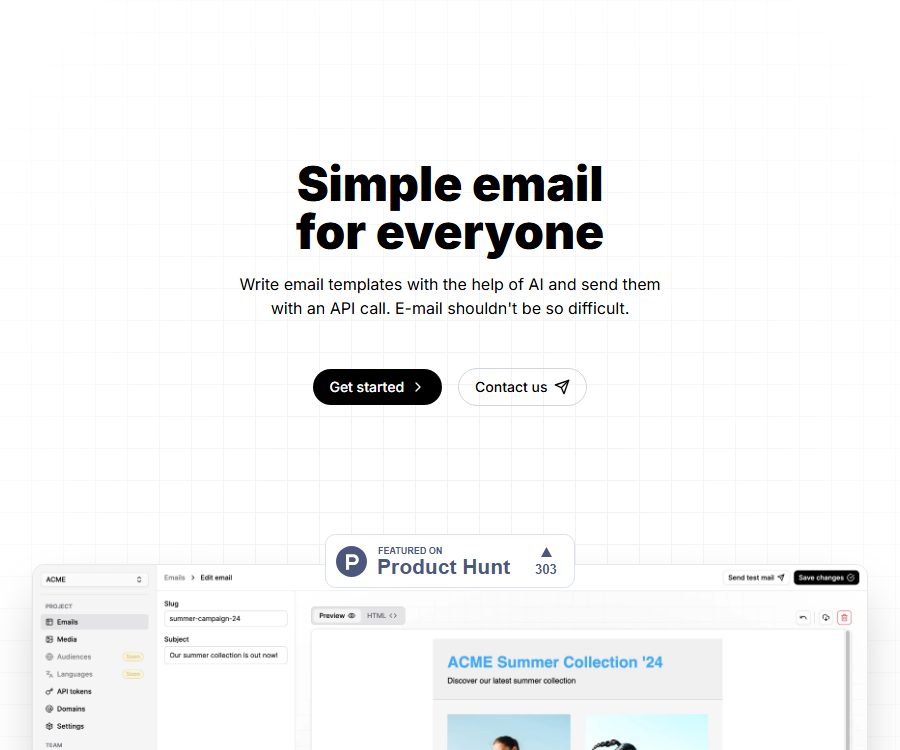
Simple email for everyone
A simple email for everyone, enabling AI to make work more efficient and easier.
Tags:AI improves efficiencyWhat is VolaMail?
VolaMail is an email platform designed for developers and product teams; it focuses on using AI to create and modify HTML email templates, followed by the sending of transactional emails via simple HTTP requests.
The project makes the source code of the application available and offers options for self-hosting; the official website also displays packages for hosted versions. However, the official repository indicates that a major migration is in progress, the production console is currently closed, and the documentation may be outdated.
Main functions of VolaMail
1. AI-assisted email editing
Users can create or modify email templates using natural language commands; they can also select individual elements so that the AI can make changes to those specific parts. The resulting drafts still need to be checked for consistency with the brand’s tone, for the correctness of links and variables, as well as for suitability in mobile layouts and compatibility with various email clients.
2. Import HTML email
The editor is based on standard HTML, allowing existing emails to be imported and gradually migrated without the need to recreate all templates at once. Complex CSS, scripts, and styles that are not supported by certain clients may require manual simplification.
3. Sending HTTP transaction emails
Developers can send emails via HTTP calls, without the need to install large-sized dedicated SDKs. For production use, it is still necessary to properly store the keys, and to handle tasks such as retrying failed attempts, ensuring idempotency, sending rejection messages, and keeping track of sent emails.
4. Hosting services
The official website shows the free and Pro hosting options provided by VolaMail, intended for trial use, small projects, and those with higher volume of messages to be sent. Due to the current migration process, it is necessary to conduct actual tests of the registration process, the control panel, and the messaging capabilities first.
5. Self-hosting
Project promotion can be carried out using one’s own infrastructure, which is suitable for teams that wish to have control over their application and data environments. Self-hosting does not automatically ensure a high email delivery rate; it is necessary to set up sending services, carry out domain name verification, manage DNS records, as well as implement monitoring and security updates.
Current service status
As of August 24, 2026, the official GitHub homepage states clearly that VolaMail is undergoing a major migration; the production environment console is currently not accessible, and the existing documentation may be outdated.
- Do not rely on the managed version to process production emails without first verifying the console.
- Before self-hosting, check the current branch, dependencies, migration scripts, and environment variable specifications.
- The commands, configuration options, and API examples in the document need to be retested in an isolated environment.
- Prepare an alternative delivery channel before going live, to prevent disruptions to password resets and order notifications during the migration process.
Which users are it suitable for
- Independent developers who need to create transaction email templates quickly.
- Product and operations teams that wish to use AI to customize HTML emails.
- Web applications that need to send notification emails via HTTP interfaces.
- Self-hosted teams that are willing to maintain infrastructure and study open-source code.
- Startups that want to test their email workflow using a low-cost hosting service.
VolaMail prices and packages
The options listed below were verified on August 24, 2026, based on the pricing information available on the official website; the currency used is the US dollar. The system is currently in the migration phase, so whether these packages can be purchased, whether there are any changes to the quotas, and what any additional fees might be will depend on the information provided on the restored console and billing page.
| Plan | Price | Email quota | Projects and storage | Main features |
|---|---|---|---|---|
| Self-hosted | $ | It depends on the own sending environment. | Configure manually | Self-deployment and operation |
| Free | $ | 500 emails per month | 2 projects, 20MB of images per project | Basic AI models, with most functions available |
| Pro | $ | 10,000 emails/month | 5 items, 50MB of images per item | Better AI models, with all features available |
| Custom | Custom price | Customization | Customization | Higher limits or different combinations of features |
The official website states that both the Free and Pro versions offer unlimited AI generation and editing capabilities, but fair use policies, model limitations, and procedures for handling excessive amounts of emails are not fully detailed in the published pricing information. Although the self-hosted version is free of charge, this does not mean that the costs associated with cloud servers, email service providers, domain names, and maintenance are zero.
VolaMail usage guide
- First, check the migration announcements on the official repository and see if the hosting console is operational again; do not proceed with deployment using old documents.
- Choose between the managed version and the self-hosted version, and define the volume of emails to be sent as well as the responsibilities for data control and maintenance.
- Create a test project and import an HTML email that does not contain any real user information.
- Use AI to modify the title, structure, and text, then manually check the variables and all interactive elements.
- Configure the test domain name and the sending identity to complete SPF, DKIM, and other necessary DNS validations.
- Send HTTP requests to multiple test email addresses to check the performance on desktop, mobile devices, and in spam folders.
- Before integrating with the production system, add processes for key management, retrying, sending back messages, handling complaints, unsubscribing, and monitoring.
Self-hosted deployment approach
- Obtain the official repository in an isolated environment to lock down the tested commit versions.
- Confirm the dependencies on Bun, SST, the database, and external services based on the current code.
- Place the key in a secure environment configuration; do not submit it to the code repository.
- Execute database migration and establish backup, recovery, and version rollback plans.
- Restrict access to the administration backend, and enable logging, alerts, and regular security updates.
- Conduct tests for pressure, retry on failure, and email delivery rate before using actual traffic.
Product advantages
- AI editing is combined with regular HTML, making the process of migrating existing templates relatively straightforward.
- Emails are sent via HTTP, with few limitations regarding the front-end and back-end technology stacks.
- It offers both managed and self-managed options, providing relatively flexible deployment choices.
- The free hosting quota is suitable for small-scale testing after the service is restored.
- Public code allows teams to examine the implementation and make modifications as needed.
Usage restrictions and risks
- The production console is currently closed; the time it will be available again and details regarding compatibility have not been confirmed yet.
- The official documentation explicitly states that it may be outdated, and the deployment and API examples must be verified again.
- AI may generate invalid HTML, incorrect variables, or non-compliant marketing copy.
- When sending marketing emails, it is necessary to address matters related to consent, cancellation of subscriptions, complaints, and the regulations applicable in the respective regions.
- Self-hosted teams are responsible for handling security patches, backups, monitoring, and availability on their own.
- A high delivery rate also depends on the domain’s reputation, the sending strategy, and the downstream email service providers.
Open-source license details
The VolaMail official website describes the project as being fully open source and allowing for self-hosting; the official GitHub repository also makes available the files related to the application, functions, migration, and deployment.
As of the verification date, GitHub did not detect any explicit license, and no license file that could confirm such a license was available in the root directory of the repository. The fact that the source code is accessible does not mean that one automatically has the right to copy it, modify it, or distribute it for commercial purposes; companies should obtain permission from the maintainers or wait for an official license before using it.
APIs and roadmaps
The official website states that transactional emails can be sent via regular HTTP requests, but this document is marked by the authorities as possibly outdated; therefore, the API endpoints, authentication methods, fields, and rate limits should not be presented as fixed guarantees.
The roadmap on the official website also lists options such as custom domain names, media uploading, image captions, HTML export, localization, marketing emails, scheduled deliveries, and dedicated IP addresses. The contents of this roadmap do not indicate that these features are already available; it is necessary to verify each one individually during procurement or development.
Frequently Asked Questions
Can VolaMail be used right away?
The official website still shows options for registration and packages, but the official repository indicates that the production console is currently closed. It is necessary to verify in person whether logging in, creating projects, and sending tests are once again possible before using it.
Is VolaMail free?
The official website offers a free self-hosted option as well as a hosted version that allows 500 emails per month to be sent. With self-hosting, there are still costs associated with servers, domain names, and the sending and maintenance of emails.
Is VolaMail an open-source project?
The official source code is made available and is labeled as open source, but the repository does not currently specify any license. Legally, it is not possible to infer all rights of use merely from the fact that the source code is available; a clear license must be obtained before using it in commercial applications.
Can it replace a full-service email provider?
It provides templates and HTTP transmission workflows, but ensuring reliable delivery also depends on the transmission infrastructure, the reputation of the domain name, as well as the management of return emails and complaints. Whether it can replace existing services on its own requires testing at a production level.
Summary
VolaMail integrates AI template editing, HTML import, HTTP sending, and self-hosting in a developer-friendly manner; the open-source nature of its code also facilitates evaluation by technical teams. At present, large-scale migrations, console suspensions, and lack of licenses represent significant limitations, so it is more suitable for research and testing at this stage – it should not be used to handle critical emails without proper validation first.
A tool similar to Simple email for everyone



 Guigong Network Security Registration No. 45132202000164