






Pinokio
Pinokio, an intelligent tool focused on improving AI efficiency
Tags:AI improves efficiencyTool Introduction
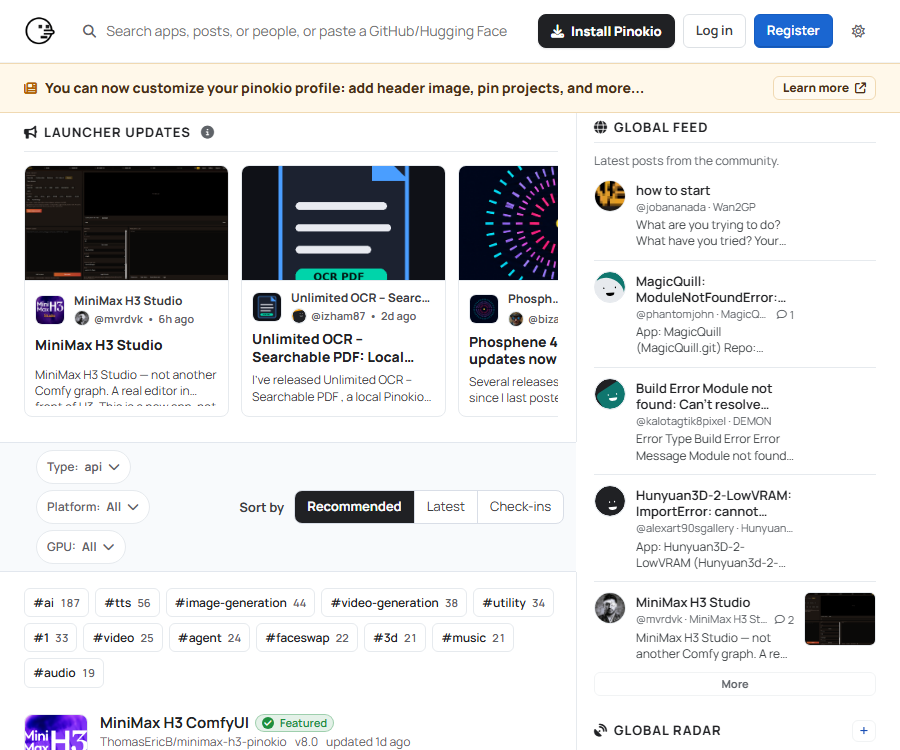
Pinokio is an open-source desktop launcher; it is officially referred to as AI Browser. It is used for installing, running, and automating local open-source applications and models. It transforms many of the steps that would normally require use of the terminal – such as downloads, installation of dependencies, and launching programs – into graphical processes.
Main functions
One-click installation and startup
Users can select projects from the application directory, and the corresponding scripts will handle the download of the repository, the configuration of dependencies, and the startup of the services. The actual level of usability still depends on the quality of the scripts, as well as the operating system and computer hardware.
- It includes common tools for execution, which helps to reduce the need for manual installation of basic environments such as Python, Git, and Node.js.
- Applications are usually stored in separate directories to facilitate the management of project files and virtual environments.
- The installation, startup, and operation logs can be viewed on the interface, which facilitates identifying the steps that resulted in failures.
Scripts and automation
The Pinokio script can execute commands, download files, and sequence tasks; it is suitable for turning repetitive local deployment processes into shareable setup procedures. As it possesses terminal-level execution capabilities, a one-click installation cannot be considered a risk-free installation.
- It allows users to write their own scripts and run them on the local machine.
- Multiple scripts can be combined to enable installation, startup, and workflow automation.
- Scripts can be shared through public code repositories, facilitating content review and collaborative maintenance.
Application discovery and community directory
The official Registry is used to discover, store, discuss, and launch public applications, as well as to display repository metadata and community updates. The third-party repositories, models, and applications listed there are not owned or guaranteed by Pinokio.
Usage tutorial
- Download the desktop version that is compatible with your operating system, and launch Pinokio for the first time after completing the installation.
- Search the application directory for the desired project, and first read the project description, hardware requirements, license terms, and the content of the scripts.
- Select to install and monitor the logs, waiting for the model, code, and dependencies to be downloaded.
- Run the application and use its functions on the local page or interface provided by Pinokio.
- When an error occurs, check the logs, the remaining disk space, the requirements regarding video memory, and any known issues related to the project repository.
Supported platforms
| Platform | Provided format | Instructions for use |
|---|---|---|
| Windows | Desktop application | Compatible projects can be installed; the specific GPU and driver requirements are determined by the project itself. |
| macOS | Desktop application | To determine whether an app supports Apple chips, it is necessary to check the specifications for each app. |
| Linux | Desktop application | Release compatibility and system dependencies must be verified on a project-by-project basis. |
Which users are it suitable for
- Ordinary users who wish to experience local text-to-image, speech, video, or language models but are not familiar with the command line.
- Creators and researchers who need to repeatedly install, launch, and switch between multiple open-source AI projects.
- Developers who wish to create locally executable installation scripts or workflows.
Prices and fees
The Pinokio desktop project is released under the MIT license; the developers have not yet announced any paid subscription plans for the desktop launcher. Downloading the installer does not mean that all applications, models, or external services available in it can be used commercially for free.
- Third-party APIs, cloud computing resources, model licensing, and asset services may incur additional fees.
- Running locally consumes storage space, memory, video memory, and electricity; larger models may require high-performance hardware.
Product advantages
- The common steps for local deployment are gathered in a graphical interface, thereby reducing the barriers to getting started with open-source projects.
- The scripts and core components are made available publicly, allowing users to review the installation process and make modifications as needed.
- It covers a variety of AI application types and offers interfaces for Windows, macOS, and Linux.
Usage restrictions and precautions
- Scripts are capable of running commands and downloading executable content; before installation, it is necessary to ensure that the author of the repository, the code changes, and the destination for downloading are reliable.
- The fact that an item is listed in the catalog does not necessarily mean that a third-party product is safe, stable, or that it receives regular maintenance; it is recommended to back up data on important devices first.
- Different applications have very varied requirements regarding graphics cards, drivers, memory, and disk space, and the cross-platform label does not guarantee consistent functionality across all of them.
- Running locally helps reduce the transfer of certain data outside the system, but the application may still connect to external interfaces; sensitive information should be subject to checks regarding privacy policies and network behavior.
APIs, scripts, and open source status
The core code of Pinokio desktop is made available publicly under the MIT license; the developers have also made the relevant backend and documentation repositories available. Its scripting framework is used to control the process of local installation and execution, but this does not mean that every application in that directory uses the same license or provides APIs for external development.
Frequently Asked Questions
Is Pinokio free?
Desktop versions of this project are available for free at the moment, and their core code is open source; the official party has not yet announced a separate subscription price. Third-party applications, models, interfaces, and computing resources may incur their own costs.
Can it be used without knowing how to program?
Common applications can be installed and launched through a graphical interface, but in case of failure it may still be necessary to read the logs and address issues related to drivers, dependencies, or hardware compatibility.
Are all the apps in the directory safe?
It shouldn’t be understood in that way; Pinokio makes it clear that scripts can be used to execute commands, and the Registry also includes third-party repositories. Users should review the scripts and the reputation of the projects before running them, and avoid granting unnecessary system permissions to unknown scripts.
Tools similar to Pinokio



 Guigong Network Security Registration No. 45132202000164