






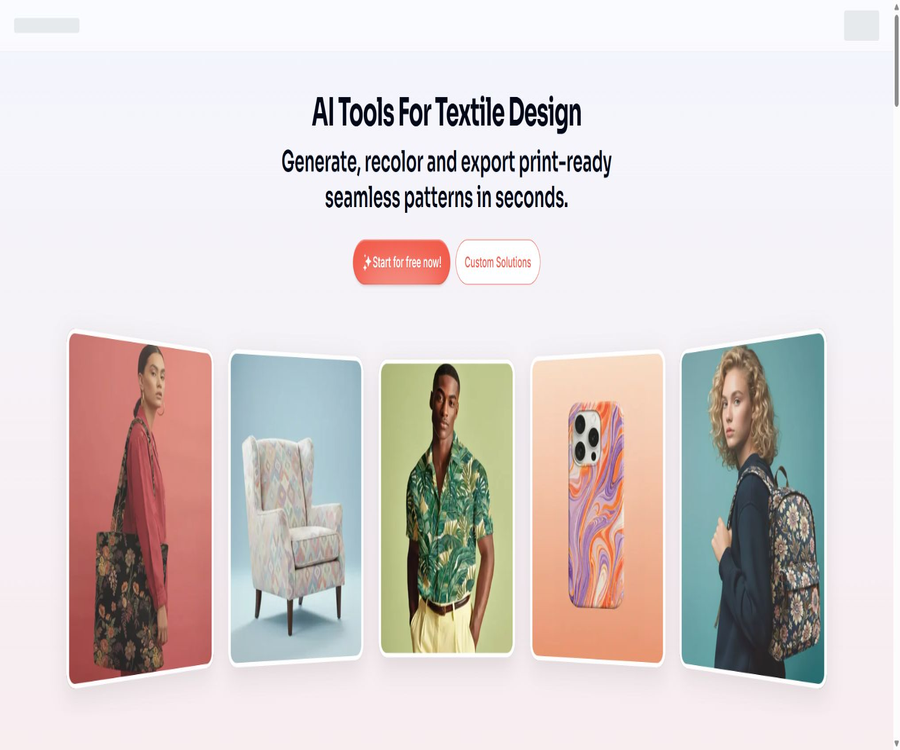
PatternedAI
PatternedAI: an intelligent tool focused on improving the efficiency of AI.
Tags:AI improves efficiencyTool Introduction
PatternedAI is an AI-based platform for seamless pattern design, launched by PatternedAI Ltd; it is primarily used in the fields of textiles, clothing, home furnishings, wallpaper, packaging, and surface design.
It integrates pattern creation, color adjustment, seamless repair, printing scaling, vectorization, and product prototype preview within the same workflow, facilitating a rapid transition from the conceptual stage to the production files.
Main functions
Generate patterns from text, images, or elements.
Users can describe floral, geometric, abstract, or narrative patterns in any language; they can also upload reference images or combine elements to create seamless, repeating patterns.
- Text generation enables quick exploration of different pattern directions from creative descriptions.
- Image extraction allows fabric scans, product photos, or hand-drawn sketches to be transformed into repeatable patterns that can be tiled.
- Elements can be created by combining independent materials; using AI to generate new elements consumes points.
Recoloring, reshaping, and remixing
Designers can create different color schemes for the same pattern, adjust its style, or combine two patterns to develop a new visual design.
- Automatic recoloring is available in all three packages, while custom color schemes are available for the Pro and Business versions.
- Restyle is suitable for quickly trying out different styles, while Remix allows combining two existing patterns.
- Color changes should be reviewed in conjunction with the actual fabric, ink, color gamut, and sample results.
Seamless repair and inspection
The platform is capable of fixing seams in AI-generated patterns, hand-scanned images, or damaged repetitive images, and it provides a check for seamless quality.
- It is suitable for handling patterns obtained from other generation tools whose edges do not connect smoothly.
- Even after automatic repair, it is still necessary to preview the layout based on the actual repeat dimensions, in order to check the edges and the visual rhythm.
Magnification, vectorization, and printing color separation
PatternedAI can enlarge patterns and export them as PNG files at 300 DPI; it can also convert them into vector or separation files suitable for production, depending on the package chosen.
- Standard offers a maximum magnification of 2 times, Pro provides up to 4 times, and Business allows for a maximum magnification of 16 times.
- Pro and Business support SVG; Business also offers AI files with color separation layers as well as separate TIFF files for color separation.
- Color separation and vector files are suitable for digital, rotogravure, or screen printing, but the final specifications must be confirmed by the manufacturer.
AI product prototypes
Users can preview patterns on products such as clothing, home furnishings, accessories, and packaging, in order to compare proportions and visual effects before creating physical samples.
- It is suitable for showing various flower patterns and color combinations to buyers, clients, or the team.
- The prototype is only intended for visual assessment and cannot replace actual materials, dimensions, or printed samples.
Usage tutorial
- Create a PatternedAI account; new users receive 100 free credits for one time to test the basic generation features.
- Choose to start with text, images, or elements; when uploading images, use square PNG or JPG files and ensure that you have the necessary rights to use them.
- Enter the pattern theme, elements, color scheme, composition density, and application scenario to generate candidate seamless patterns.
- Use retouching, reshaping, remixing, stitching, or editing tools to refine the design, and check for repeated edges through a seamless inspection.
- Preview the pattern scale and color scheme on the product prototype; once a design is chosen, decide whether to enlarge it or vectorize it depending on the printing method.
- Export the PNG, SVG, AI, or TIFF files supported by the corresponding package, and submit them to designers and production teams for checking the resolution, colors, and color separation.
Supported platforms and file formats
| Platform or format | Current capabilities | Applicable scenarios | Restrictions |
|---|---|---|---|
| Web version | Complete workflows for creation, editing, scaling, vectorization, and prototyping | Professional pattern design and production preparation | Some tools are subject to package restrictions. |
| Canva app | Text generates seamless patterns and allows access to a free image library. | Background, brand, invitation letters, and personalized products | It is possible to read and modify the current content of a Canva design. |
| PNG | Standard and Pro support high-resolution export at 300 DPI. | Digital and direct printing | The magnification level varies depending on the package. |
| SVG | Supported on Pro and Business. | Scalable vector production files | Standard does not include |
| AI and color-separated TIFF | Business supports color separation layers or separate color separation files. | Circular screens, wire mesh, and specialized production | The manufacturer needs to recalibrate the colors and conduct another inspection. |
Which users are it suitable for
- Textile designers are needed to create patterns and color schemes for clothing, fabrics, and seasonal collections.
- Brands and manufacturers that need wallpaper, home textiles, packaging, and patterns for product surfaces.
- Independent creators who wish to transform hand-drawn, scanned, or other AI-generated images into seamless repeatable patterns.
- A professional team is needed to work with SVG, AI-layered, or TIFF-separated files in the production process.
- Users only need to quickly create design elements such as backgrounds and product graphics in Canva.
Points and packages
New users receive 100 free credits once, and these credits are not refreshed on a daily or monthly basis. Generating basic images typically costs 10 credits per image, while vectorized images cost 30 credits per image; the exact cost varies depending on the computational requirements of each tool.
All plans – Standard, Pro, and Business – can be subscribed to on a monthly or annual basis; an annual subscription offers a 20% discount. The exact subscription cost can be found in the account’s billing settings, as the public price page does not display the precise amount.
| Package or version | Price | Billing cycle | Core benefits or quota | Suitable for users |
|---|---|---|---|---|
| One-time trial | Free | Once, no refresh. | 100 points are available to test the basic creation functionality. | First-time users |
| Standard | Account billing settings display | Monthly or annual payment | 2,000 points per month; text and element creation, automatic recoloring, reshaping, up to 2x zoom | Personal and basic pattern design |
| Pro | Account billing settings display | Monthly or annual payment | 4,000 points per month; additional features include image generation, editing, custom recoloring, remixing, seam filling, SVG support, and up to 4x zoom. | Professional designers and business projects |
| Business | Account billing settings display | Monthly or annual payment | 20,000 points per month; up to 16x magnification, with layer-based AI and color-separated TIFF format | Manufacturers, brands, and production teams |
| Customized solutions | Contact sales | As stipulated in the project or contract agreement | At least 20 sets of custom patterns, or custom AI workflows and integrations | Mass production series and enterprise automation |
Common integral consumption
| Tools | Cost per output | Explanation |
|---|---|---|
| Text, images, AI elements, editing, recoloring, remixing, prototypes | 10 points | Each output is charged separately. |
| Remodeling and mending | 1 point | Suitable for multiple rounds of refinement |
| Vectorization | 30 points | The package permissions must be met simultaneously. |
| Element combination, seamless checking, gallery, and downloads from Free Drops | Free | It doesn’t mean that all generation tools are free. |
| Zoom in | Calculated based on the magnification level | The specific deduction amount depends on the chosen multiplier. |
Upgrades, cancellations, and quotas
- Points are reset at the start of each new billing cycle, and unused points are not carried over.
- Points can be purchased separately, but having points does not mean that one can use the features that are not available in the current package.
- Users can upgrade, downgrade, or cancel at any time; if canceled, the service can still be used until the end of the current monthly period.
- Prices can be adjusted, and existing users may also see changes in pricing; the terms state that notification is usually given at least 7 days in advance.
Commercial use and copyright
PatternedAI transfers ownership of the patterns created by users to those users, allowing for use in both personal and commercial purposes; these patterns are royalty-free and can be used on an unlimited number of products.
- A commercial license does not exempt the user from the responsibility to check the copyrights of trademarks, character designs, reference images, and third-party rights.
- Before uploading your own patterns, photos, or sketches, make sure you have the rights to use them and to utilize them for commercial purposes.
- Different pixel arrangements do not necessarily mean no infringement; a similarity and rights check should be conducted before releasing an important series.
Product advantages
- It covers the entire pattern-making process, from idea generation, color selection and seam repair to the output of printed files.
- It offers options for high-resolution bitmap, vector, and color separation files for various printing processes.
- It allows prompts to be entered in any language, and a built-in assistant helps improve the description of those prompts.
- The web version, the Canva app, and customized enterprise workflows cover use cases of varying complexity.
Usage restrictions and precautions
- Standard, Pro, and Business come with different functional permissions; points alone are not sufficient to unlock advanced tools.
- The resulting output may contain duplicate elements, distortions, or incorrect seams; it should be checked when laid out over a large area at actual sizes.
- The color of the prototype and the screen preview do not reflect the actual printing result; color management and sampling are necessary before mass production.
- For automatic color separation and vectorization, it is still necessary to check the nodes, layers, number of colors, and requirements of the production equipment.
- Platforms usually do not provide service level agreements; critical production nodes should maintain local files and alternative processes.
Privacy and Public Galleries
All uploaded files remain private and are not used for training; the patterns generated by the Pro and Business plans are also kept private. Some of the text-based designs created with the Standard plan may be included in public galleries, and the terms of service provide more permissive rules regarding the public sharing of images from non-Pro plans; sensitive projects should either be handled as potentially public or opted for a private plan.
- The platform collects data on accounts, preferences, searches, pattern generation, feedback, usage behavior, and cookies.
- Payments are processed by Stripe, and PatternedAI states that it does not collect or store payment information.
- The Canva app can read and modify the current design; it is necessary to check whether the design contains any sensitive elements before enabling it.
- Users can access, update, or delete their personal information in their account, and they can also opt out of marketing emails.
APIs, SDKs, and open-source status
PatternedAI offers the Canva app as well as customized AI workflows and integrations for businesses, but this does not equate to a public API. No documentation related to a general developer API, no SDKs, no GitHub source code, and no open-source license are available; therefore, the product cannot be considered open source.
Frequently Asked Questions
Is PatternedAI free?
New users receive 100 free credits once, as indicated on the Canva app page; these credits can be used with Canva’s various services. The full set of web tools and advanced export options, however, are available at a cost based on Standard, Pro, or Business subscriptions and the corresponding credits.
Can the generated patterns be used for commercial purposes?
Yes, the user can retain ownership of the patterns they create and use them for commercial purposes. The user must still ensure that the suggestions, the materials uploaded, and the final patterns do not violate any third-party copyrights, trademarks, or other rights.
Are the patterns of Standard accounts private?
Complete privacy should not be assumed by default. Some text-generation designs may be displayed in public galleries; for confidential projects, it is necessary to use packages that clearly indicate privacy protection and to review the account settings.
Tools similar to PatternedAI



 Guigong Network Security Registration No. 45132202000164