






Oven AI
Oven AI: an intelligent tool focused on improving the efficiency of AI.
Tags:AI improves efficiencyTool Introduction
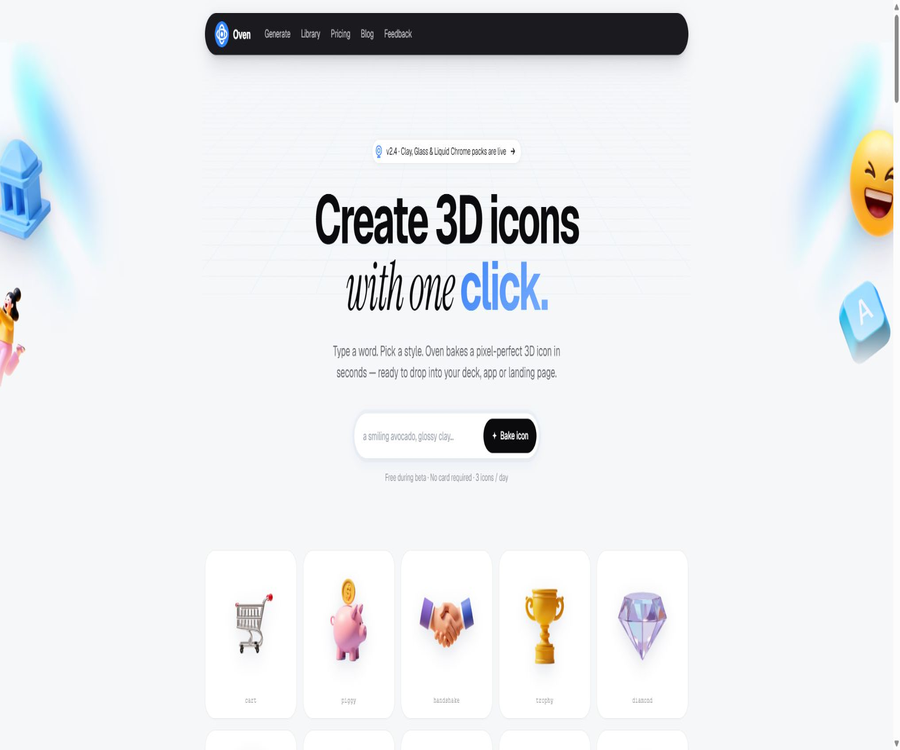
Oven AI is a generative design tool focused on creating 3D icons and visual assets; users can input a brief description and select a style to generate icons that can be used in presentations, applications, or landing pages. Its focus is not on creating complete 3D models, but rather on producing rendered visual assets that are ready for immediate use.
The product is still in the testing phase, and the official website mentions both a pay-per-generation option and monthly subscription plans. Features, quotas, and permissions may change; it is necessary to refer to the settlement page on the account before making a purchase.
Main functions
Generating 3D icons from text
Users can describe objects, materials, colors, lighting, and composition, and then select the desired visual style from pre-set options. The website states that most generations take around 6 to 10 seconds to complete, but the actual time depends on the queue status and the complexity of the instructions.
- It is suitable for creating product icons, mascots, demonstration props, marketing materials, and decorative elements for applications.
- Remixes can be chosen from existing works to build upon the existing composition.
- The generated result is a rendered asset, and it is not equivalent to a professional 3D engineering file whose geometric structure can be edited freely.
Transparent background and export in multiple formats
Oven AI offers automatic background removal, making it easy to insert icons directly into interfaces, posters, or slides. The export formats available vary depending on the package chosen.
- The Starter plan provides PNG export.
- The Studio option lists PNG, SVG, and GLB formats.
- The comparison of features on the official website also mentions APNG, but the corresponding package isn’t specified; it is necessary to check this in the account before using it.
Brand style and team collaboration
Studio provides a memory of the brand’s style, which helps to ensure that a set of icons maintains similar colors, materials, and lighting. Team offers additional features such as shared workspaces and the ability to define custom styles.
- It is suitable for continuously creating product interfaces, marketing campaigns, or brand asset libraries.
- A shared team library allows for the centralized storage and reuse of created assets.
- Style memory can improve consistency, but it cannot guarantee that the output will be exactly the same each time.
Usage tutorial
- Go to the Oven AI generation page and register or log in to an account.
- Describe the icon’s main elements, material, color, angle, and background requirements using clear and concise sentences.
- Select an appropriate style preset, and after generation compare the outline, lighting, and brand consistency.
- Use background removal or Remix as needed, then export PNG, SVG, or GLB according to the permissions granted by the plan.
- Place the icon in Figma, a presentation, or an app prototype to check its readability at small sizes and the cost of page loading.
- Before using it in commercial projects, verify the authorization of the current package and save the order and licensing records.
Which users are it suitable for
- UI and product designers who are needed to create 3D icons quickly for interfaces, landing pages, or app store materials.
- Start-up teams and individual developers who lack full-time 3D designers but need branded visual assets.
- Marketers who create highly recognizable assets for advertisements, social media, and presentations.
- Small design teams that need to share a library of assets, maintain a consistent style, and produce icons in bulk.
- Development teams that wish to integrate icon generation into their internal content workflows through APIs.
Prices and packages
The official website currently displays the free quota as well as three monthly subscription plans in dollars; the paid plans differ in terms of the number of icons, their format, permissions, and team capabilities. The site refers to the quota available under these plans as “points” and “icons”, and the information is presented below according to the number of icons listed in each plan’s benefits.
| Plan | Price | Monthly limit | Primary interests | Authorization and Objects |
|---|---|---|---|---|
| Free tier | Free of charge, no card required | At the top of the page it says 3 icons per day | Basic generation and trial use | For personal and editorial use only |
| Starter | $ | 100 icons | Standard style, PNG, email support | Individual license, suitable for occasional use |
| Studio | $ | 2,000 icons | All styles, PNG, SVG, GLB, brand style memory, priority queue | Commercial license, suitable for ongoing design |
| Team | $ | 12,000 icons | Shared workspaces, APIs, single sign-on, audit logs, custom style training | Business teams and studios |
The free plan is described in two ways: as \"3 per day\" or with points that are reset on a weekly basis. The old purchase page also showed one-time credit packs, which differ from the monthly fee displayed on the current homepage. There are differences between what is shown on public pages; the actual amount available and the pricing on the payment page should be taken as the reference.
The unused quota for Studio and Team can be carried over for up to one month; it is not specified in the current FAQs whether this carryover is available for Starter. Information regarding refunds, taxes, annual payment discounts, and the access period after cancellation is also not fully disclosed at present.
Product advantages
- Focus on 3D icons rather than generic images, with prompting and export processes that are more aligned with product design scenarios.
- Automatic transparent background eliminates the need for manual image cropping, allowing the image to be inserted directly into interfaces and presentations.
- Brand style memory and shared asset libraries help maintain visual consistency across a set of assets.
- It offers three ways of use: web pages, Figma plugins, and team APIs, covering both individual design and automated workflows.
Usage restrictions and precautions
- AI-generated results may exhibit shape errors, corrupted text, edge defects, or style deviations; they need to be manually inspected before being released officially.
- Exporting in SVG does not necessarily mean that all details are editable vector paths, and GLB does not guarantee a topology suitable for animation.
- The free tier is intended only for personal and editorial use; commercial projects should opt for a paid plan that includes a commercial license.
- It is not allowed to create and sell materials based on trademarks, characters, or reference images for which no usage rights exist; users must still handle any related copyright and brand-related risks on their own.
- The public page does not provide access to a complete privacy policy or terms of service; before uploading materials related to a private brand, it is necessary to consult the operators regarding the rules for data processing and deletion.
- The official website states that private renders are not used for training shared models and can be deleted from the console; nevertheless, it is still advisable to avoid uploading highly sensitive or confidential designs.
Platforms, formats, and interfaces
| Category | Support status | Explanation |
|---|---|---|
| Web version | Support | Create, browse, Remix, remove background, and download |
| Figma | The official website claims to offer official plugins. | Materials can be generated and placed within the design files. |
| API | Team solution | REST API and Webhooks; no public self-service documentation available at the moment. |
| Export format | PNG, SVG, GLB; APNG is also mentioned. | The specific format depends on the package and the current interface. |
| Independent client | The authorities have not made this information public yet. | Currently, it is primarily used through web pages and plugins. |
| Interface language | The authorities have not yet made the complete list public. | The linguistic effects of the generated prompts need to be tested by yourself. |
APIs, SDKs, and open-source status
The Team solution includes REST APIs and Webhooks, making it suitable for integrating icon generation, status notifications, and asset storage into internal processes. The vendor has not yet made available complete API documentation, rate limits, costs per transaction, or an official SDK.
To date, no official open-source repository or license for the Oven AI product code, generation models, or SDK has been found; therefore, it cannot be considered an open-source tool. What users download are the generated results, and this does not mean that they have obtained the platform’s models or software code.
Frequently Asked Questions
Can Oven AI be used for free?
Yes. The official website offers a free trial period without the need for a credit card; however, there are differences regarding whether the limit is reset on a daily or weekly basis, and the actual amount should be as indicated in the account.
Can icons generated for free be used for commercial purposes?
It cannot be used for commercial purposes directly according to the instructions on the current official website; the free version is intended only for personal and editorial use. For commercial use, a solution that includes a clear commercial license must be chosen.
Can Oven AI export real 3D models?
The Studio assets are listed as GLB exports and can be used to support 3D workflows that work with this format. Official support for complex modeling, animation skeletons, and mesh editing is not guaranteed.
Tools similar to Oven AI



 Guigong Network Security Registration No. 45132202000164