






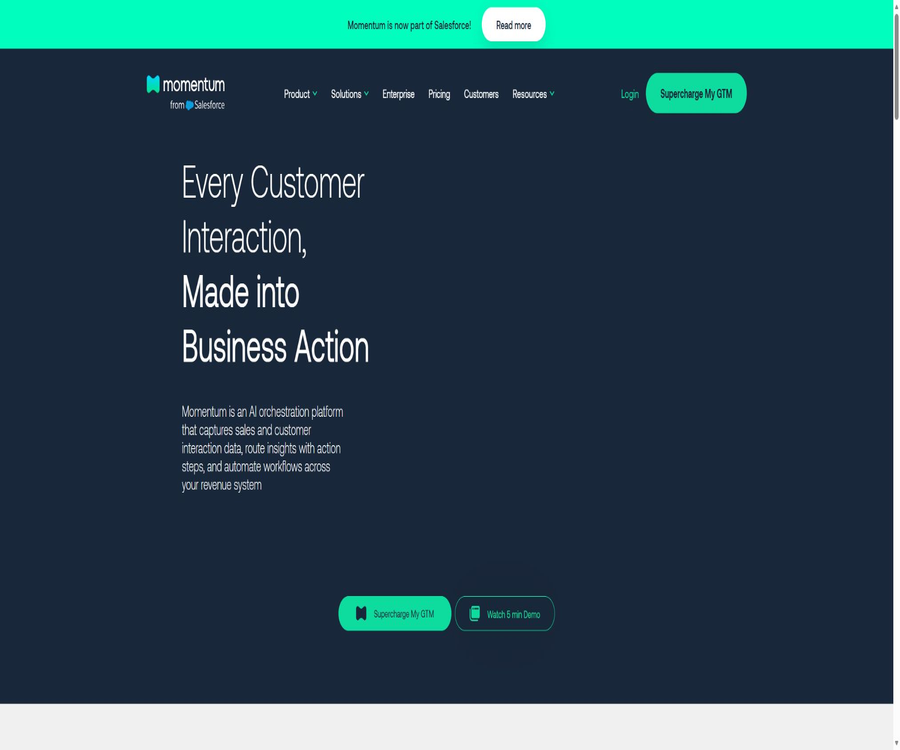
Momentum
Momentum: an intelligent tool focused on improving AI efficiency.
Tags:AI improves efficiencyWhat is Momentum?
Momentum is an AI-powered revenue orchestration and sales conversation intelligence platform developed by Momentum Labs, Inc.; it is designed for sales, RevOps, customer success, marketing, and management teams.
It converts unstructured information from meetings, emails, and CRM systems into summaries, fields, signals, and workflow actions, delivering the results in existing tools such as Salesforce, Slack, and Microsoft Teams.
Salesforce completed the acquisition of Momentum in March 2026. Momentum’s website, login page, product documentation, and pricing options are still in use, and the way it integrates with Agentforce and Slackbot may continue to evolve in the future.
Main functions
Meeting transcripts and intelligent dialogue processing
- AI Notetaker: A robot that can join Google Meet or Zoom meetings, record audio, transcribe it, and generate customizable summaries and action items.
- Integration with existing recordings: It is also possible to access calls from systems such as Gong, Chorus, Clari Copilot, and Dialpad, thereby reducing the need for repeated recording.
- Follow-up emails and tasks: Draft follow-up emails based on the content of the conversation, and convert the next steps into calendar or CRM tasks; these should still be reviewed by the responsible person before being sent.
- Video database: Allows for searching for recorded meetings, adding comments, organizing playlists, and sharing clips; Smart Clips can extract key moments from calls.
- Multilingual processing: Call insights and summaries can be translated into over 99 languages; however, specialized terms, names, and numbers still require manual verification.
Autopilot and Salesforce data updates
- Autopilot Classic: After each call or email, it extracts information based on natural language instructions, and updates in real time Salesforce fields such as the next steps, objections, emotions, or MEDDPICC.
- Retropilot: Triggered by changes in the opportunity stage, renewal date, or other Salesforce records; it generates comprehensive fields or summaries by reviewing the historical conversations of that account.
- Autopilot Batch: Enables batch processing of a large number of opportunities or accounts based on specific criteria; it is suitable for filling in historical data, cleaning up CRM records, preparing for renewals, and conducting periodic health checks.
- Write control: You can choose to confirm before writing, write only when the field is empty, or overwrite automatically; administrators should first verify field mapping and prompts in a test environment.
- Field adaptation: The extracted results are formatted according to CRM field types such as text and dropdown options, but incorrect matches can still affect sales forecasts and automated rules.
Signals, Q&A, and revenue agency
- AI Signals: Identifies pricing objections, mentions of competitors, lack of follow-up actions, product feedback, risk of customer loss, and additional sales opportunities from customer conversations, and triggers alerts accordingly.
- Ask Momentum: Users can query data related to individual calls, accounts, business opportunities, or teams using natural language, and receive immediate responses that include relevant context.
- Deal Execution Agent: It automates post-meeting tasks such as management, CRM updates, as well as task assignment and handover, thereby helping sales teams maintain data integrity.
- Customer Retention Agent: By taking into account emotions, risks, and customer feedback, this agent notifies the success team and initiates the retention process.
- Coaching Agent and AI CRO: They assess individual calls and provide coaching feedback, while also generating summary reports for management that cover multiple accounts, pipelines, and teams.
- Deal Rooms and Account Rooms: These platforms provide a centralized display in collaboration tools such as Slack of updates regarding business opportunities, risks, responsible parties, and next steps to take.
Input, processing, and output
| Objects to be processed | Main inputs | Typical output | Key controls |
|---|---|---|---|
| Customer call | Live meetings, recordings, or transcribed text | Summary, action items, signals, scores, and snippets | Audio recording consent, speaker identification, and language verification |
| Email campaigns | Communications in Gmail, Outlook, or sales tools | Follow-up suggestions, activity records, and risk alerts | Restrict email access and review automatic emails. |
| Salesforce records | Business opportunities, accounts, contacts, and custom fields | Field updates, phase actions, and historical data filling | First, configure the test fields and writing rules. |
| Team-level data | Multiple accounts, calls, CRM, and signals | Management briefings, coach analyses, and in-depth studies | Restricted by role permissions, points, and package scope. |
| Collaboration process | CRM events, conversation signals, and preset conditions | Slack or Teams notifications, tasks, and rooms | Prevent duplicate triggers, incorrect routing, and notification fatigue |
Deployment and usage process
- The sales team is responsible for confirming the plan, seats, annual contract, additional modules, and the scope of the pilot project, as well as identifying the meetings, emails, and CRM data that need to be dealt with.
- Prepare Slack or Microsoft Teams administrator credentials, Salesforce administrator rights, as well as authorization for Zoom, Google Meet, or existing recording platforms.
- Install collaborative applications and Salesforce-hosted components, grant Momentum permission to read from or write to the required objects, and adhere to the principle of least privilege.
- Choose between a meeting robot, a native meeting integration, or an existing recording platform, and configure settings for recording notifications, participant consent, and rules for exceptional meetings.
- Write prompts for summaries, field extraction, signals, and follow-up actions, clearly specifying allowed values, judgment criteria, and the requirement to leave fields blank in the absence of evidence.
- First, run it on a small number of accounts and in test fields, compare the transcription and extraction results with manually entered data, and then decide whether to confirm the entry, leave the field empty, or perform an automatic entry.
- Configure Slack or Teams notifications, Deal Rooms, tasks, and CRM triggers, and establish processes for handling failures, duplicates, false positives, and permission revocations.
- After going live, continuous monitoring is carried out on the accuracy of fields, the success rate of signals, points consumed, user permissions, and data retention settings; the prompts are updated in line with changes in business requirements.
Prices and billing
| Package or version | Price | Billing cycle | Core benefits or quota | Suitable for users |
|---|---|---|---|---|
| Business | $ | Annual plan | Call summary, action items, email follow-ups, three modes – Autopilot, personal call Q&A, signals, workflows, and collaboration rooms | Revenue teams that require CRM automation |
| Transformation | $ | Annual plan | Includes Business, along with expanded features for account inquiries, management briefings, coaching, and analysis capabilities. | Organizations that need cross-account insights and team management |
| Enterprise | Custom quote | Contractual agreement | Advanced support, professional services, white-glove setup, SSO, service commitments, and compliance capabilities | Large-scale, complex permission management and compliant procurement |
| Conversation Intelligence add-on module | 30 dollars per user per month | Along with the main plan | Meeting robots, video databases, as well as account briefings and Smart Clips that rely on this module. | Teams that need their own systems for managing recordings and videos |
| Deep Research | Annual platform license additional usage points | Annual additional charge | Run research tasks on large-scale historical business opportunities and account data. | High-volume data analysis and retrospective projects |
The public price applies to annual plans; groups of 50 or more members may be eligible for a discount, but this could also result in a minimum contract value. Startups with fewer than 10 GTM members can apply for a 50% discount on Business or Transformation plans, with the eligibility and duration to be confirmed by sales.
Custom pilot programs can be requested, but there is no public, permanent free version or a unified free self-service trial available. Professional implementation, additional points, taxes, and special integrations may incur extra costs; the final amount will depend on the order details and the actual settlement.
How to calculate the integral
| Workload | Whether to count points | Calculation method | Behavior after the quota is exhausted |
|---|---|---|---|
| Real-time call summaries, AI Signals, recording, and Autopilot Classic | Ignore it. | Under the current rules, it is included with no limit. | Not affected by the reset of bulk points |
| Retropilot | calculate | 1 point is consumed for each business opportunity or account record that is processed. | Pause the task and notify the administrator. |
| Autopilot Batch | calculate | The number of processed records is equal to the number of points consumed. | Wait for the monthly refresh or purchase additional points. |
| Executive Briefs and In-Depth Research | calculate | Calculated based on the analyzed business opportunities or account records. | There will be no automatic over-deduction. |
Points are shared at the account level, updated on a monthly basis without any carryover. The amount of points allocated per seat and the price of additional points are not publicly available; it is necessary to consult the contract or contact the account manager for details.
Integration and platform boundaries
| Category | Integration has been verified. | Primary uses |
|---|---|---|
| CRM and collaboration | Salesforce, Slack, Microsoft Teams | Field read/write, notifications, Deal Rooms, approval, and workflows |
| Meetings and dialogues | Zoom, Google Meet, Webex, Gong, Chorus, Clari, Dialpad, Salesloft | Recording, transcription, summarization, and signal extraction |
| Email and Office Work | Gmail, Outlook, Google Docs, Google Drive | Email campaigns, follow-ups, delivery of documents and briefings |
| Data and analysis | Snowflake, BigQuery | Synchronized structured GTM data is used for analysis. |
| Developer API | No general APIs or SDKs are available yet. | The existing capabilities are primarily utilized through product integration, managed components, and enterprise configurations. |
Some of the integration pages list both projects that are already available and those that will be released soon; when making purchases, one should take into account what can be installed using the current account. Momentum is a proprietary enterprise service, and the public documentation sowie third-party connectors do not represent an open-source version of the complete product.
Suitable for users and typical use cases
- Sales Representative: Automatically generates post-meeting summaries, action items, and email drafts, reducing the time required for manual data entry into Salesforce.
- RevOps: Batch cleanup of CRM data, implementation of sales methodology fields, monitoring of process triggers, and establishment of unified data standards.
- Customer Success Team: Identifies signs of churn, customer sentiment, product feedback, and opportunities for additional sales from conversations, in order to prepare for contract renewals and handovers.
- Sales Manager: View call ratings, coaching opportunities, team trends, and deal risks, without the need to replay the entire meeting one by one.
- Executive team and data team: Aggregate insights across accounts into briefings, and synchronize structured revenue data with systems such as Snowflake.
Privacy, Security, and Compliance
- The platform handles highly sensitive business data such as meeting recordings, transcriptions, emails, CRM fields, and user activities; companies should finalize the data processing agreements and conduct a review of permissions before integrating it.
- The provisions require that generative AI applications used by third parties to receive customer content be equipped with controls to prevent such content from being used to improve or train third-party products.
- The security page states that the service operates on infrastructure hosted by Google Cloud; static database data is encrypted using AES-256, and encrypted transmission is employed along with virtual private networks and a zero-trust access model.
- Momentum has passed the SOC 2 Type II audit, and it offers support for MFA, SSO, role-based permissions, as well as policies for retaining customer data; the specific scope of the zero-retention option must be specified in the enterprise configuration or contract.
- Audio recordings of meetings must comply with the regulations in force in the participants’ respective regions; the robot states that it cannot replace a company’s own legal reviews and internal policies.
- The privacy policy covers contact information, companies, devices, usage patterns, marketing activities, and cookie data, and it allows requests to access, transfer, or delete personal information where applicable.
- Subscription payments are generally final and non-refundable; upon cancellation, customer data can be exported within 30 days upon request, while the specific scope of deletion and the backup schedule must be confirmed separately.
Advantages and limitations
- It is integrated directly into Salesforce and collaboration tools, allowing insights to be converted into fields, notifications, and tasks, rather than merely generating meeting summaries.
- The three Autopilot modes – real-time, event-based, and batch – cover both daily updates and the processing of historical data; however, errors in automatic data writing can affect predictions and subsequent processes.
- Its functionality relies on various permissions within corporate systems, and its deployment requires the involvement of CRM systems, collaboration platforms, as well as teams responsible for security, legal matters, and revenue management.
- The annual pricing, additional modules, and implementation costs are clearly designed for organizational purchases, and they are not suitable for users who only need meeting minutes.
- Large-scale historical processing is subject to monthly credit limits; unused credits are not carried over, and related tasks are suspended when the credits reach zero.
- After the acquisition is completed, the product portfolio and its integration with the Salesforce ecosystem may change; it is necessary to verify the current available functions, data migration options, and support arrangements before renewing the contract.
Summary
The core value of Momentum lies in transforming customer conversations into actionable CRM data and revenue-related workflows; it is suitable for medium to large teams that are already using Salesforce and wish to collaborate via Slack or Teams.
During the evaluation, it is necessary to verify the accuracy of the fields, consent for recording, scope of permissions, points requirements, annual contracts, and the product roadmap after acquisition, rather than merely comparing the price per seat.
Tools similar to Momentum



 Guigong Network Security Registration No. 45132202000164