






Kinestex
Kinestex: an intelligent tool focused on enhancing AI efficiency.
Tags:AI improves efficiencyA one-sentence summary
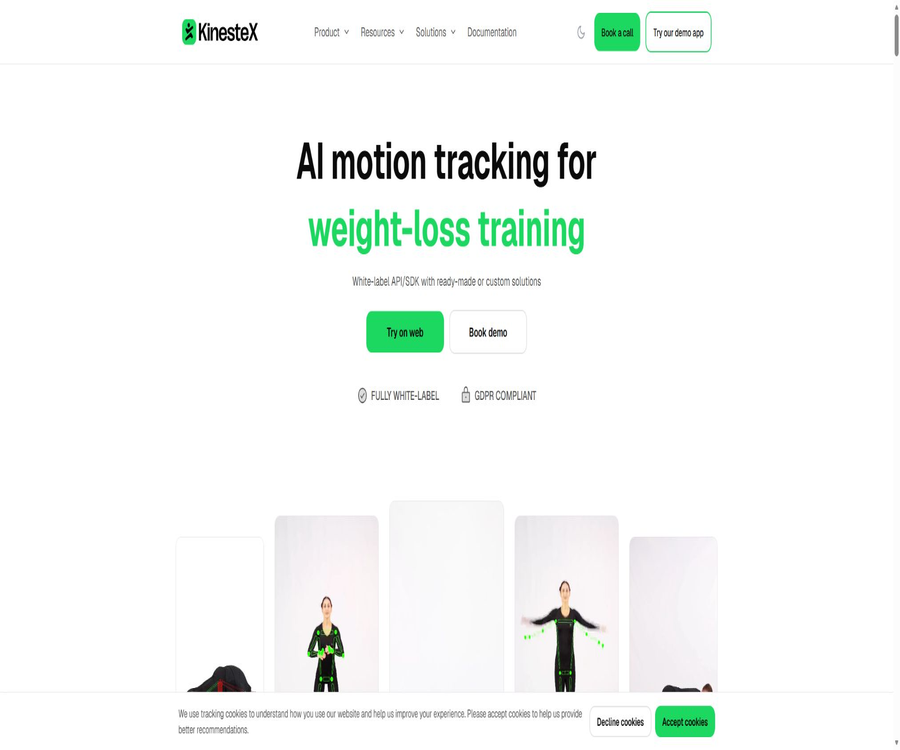
KinesteX is a white-label AI motion tracking SDK that can be integrated into fitness, health, and rehabilitation products; it uses ordinary cameras to identify key body points on the device side, and provides real-time motion counting, posture feedback, and training metrics.
What is KinesteX?
KinesteX serves primarily companies that need to integrate computer vision-based motion capabilities into their existing applications, rather than offering a standalone consumer fitness software with a fixed interface. Customers can choose from a complete ready-to-use solution, individual training modules, an AI coach, or the underlying camera component.
The product is available for iOS, Android, and the Web, and offers integration options such as Swift, Kotlin, React Native, Flutter, HTML and JavaScript, React TypeScript, and PWA. The commercial interface allows customization of colors, fonts, images, and dark/light modes to match the customer’s brand identity.
Ability to analyze movements
| Ability | System processing | Typical uses | Precautions |
|---|---|---|---|
| Action count | Identify repeated actions and count their occurrences. | Squats, push-ups, and training challenges | Obstructions and camera angle affect recognition. |
| Pose and alignment | Compare key body points with movement rules | Real-time error correction | It cannot replace professional diagnosis. |
| Range of movement | Calculate joints and range of motion | Rehabilitation and flexibility assessment | The device’s location must remain consistent. |
| Balance and stability | Analyze changes in body posture points | Assessment of health and function in the elderly | Security personnel and fall prevention measures are required. |
| Fatigue detection | Inferred based on the quality of the movements and changes in rhythm | Adjustment of training intensity | Individual differences require manual judgment. |
| Fall detection | Detecting abnormal physical movements | Safety monitoring | It cannot be used as the only emergency system. |
| Calorie estimation | Calculation based on actions, time, and user information | Training statistics | It is an estimated value rather than a medical measurement. |
| Muscle involvement | Provide feedback based on the action pattern. | Sports instruction | It is not the same as directly measuring electromyography. |
Ready-made experiences and custom integrations
The team can incorporate a complete training experience directly, or it can choose from separate views such as Plan, Workout, Challenge, Leaderboard, AI Experiences, and Personalized Plan. When a fully customized interface is needed, training content can be obtained through the Content API, and the Camera Component can be used to receive raw posture analysis data.
| Access mode | Interface control | Development workload | Suitable for projects |
|---|---|---|---|
| Complete UX | Adjust the existing experience using white-label parameters. | Lower | Quickly add a complete fitness module |
| Plan View | Use the existing planning and training interfaces. | Lower | Goal-oriented training plan |
| Workout View | Directly open the specified training. | Lower | Applications that already have a course catalog |
| Challenge and Leaderboard | Use the challenges and leaderboards interface | Lower | Activities, incentives, and community |
| AI Experiences | Ready-made games and assessments | Medium | Interactive fitness and clinical screening |
| Admin Workout Editor | Embedded content editing tool | Medium | Courses developed by the operations team itself |
| Custom Workout | Customize actions, number of times, duration, and breaks | Medium | The brand’s own training methods |
| Camera Component | Fully custom UI and workflows | Higher | Deep productization and specialized use cases |
Complete experience
Complete UX includes user surveys, the ability to choose personalized plans, a training schedule, camera-based motion recognition, real-time feedback, statistics, and a review of training progress. It is suitable for teams that want to obtain a complete fitness solution quickly without having to design each page themselves.
- Collect goals, physical information, and lifestyle details.
- Generate personalized training plans for users.
- Display the course calendar and individual training sessions.
- Identify actions in the camera feed.
- Number of real-time feedbacks, errors, and posture.
- Record the completion level, time, and calorie estimate.
- Statistics and a review of the movements are displayed after training.
AI Personal Trainer
AI Trainer Chat gains insight into the user’s goals, physical condition, injuries, and preferences through conversation; it can conduct fitness assessments, create personalized training plans, and schedule subsequent sessions. Developers can also use the Trainer API to control the processes of plan creation, modification, and confirmation.
| Phase | AI Trainer capabilities | Manual boundaries are required. |
|---|---|---|
| Understand users | Ask about goals, experience, and limitations. | Avoid using Q&A as a form of medical diagnosis. |
| Evaluation | Initiate action and function testing | High-risk users require supervision by professionals. |
| Generate plan | Combining movements, repetitions, duration, and schedule | Check contraindications and recovery plans |
| Adjustment plan | Modify the content based on feedback. | Pain, dizziness, and injuries should lead to a stop of training. |
| Execute training | Linking action recognition with real-time feedback | Ensure the safety of the environment and equipment. |
| Arrange the follow-up | Save the history and suggest the next lesson | It is not a substitute for doctors or physical therapists. |
AI fitness games and assessments
AI Experiences includes interactive games such as Balloon Pop, Color Chase, and Alien Squat Shooter; it also allows for the creation of custom challenges and motion assessments. These games convert physical movements into game inputs, making them suitable for increasing engagement or for carrying out standardized screenings.
- Use key body points to control game actions.
- Points are accumulated based on the correct movements.
- Record the number of attempts and errors in the challenge.
- Increase team participation through leaderboards.
- Establish a framework for evaluating branding actions.
- Return the results of the activity to the host application.
Game scores are useful for participation and trend tracking, but they do not equate to clinical assessment results. When used with children, the elderly, or patients in rehabilitation, it is necessary to establish safe spaces, monitoring procedures, and criteria for stopping the use of such games.
Personalized training plan
The Personalized Plan creates a training schedule based on factors such as age, height, weight, gender, lifestyle, goals, and assessment results. The application also allows users to enter their own identification details and physical data, so as to control the intensity of the training and select the appropriate exercises.
- Obtain explicit consent from the user regarding the use of the camera and the processing of health data.
- A stable anonymous user identifier is passed in.
- Fill in the necessary physical information and activity level.
- Complete the surveys on objectives, capabilities, and security issues.
- Run a basic action assessment suitable for the user.
- A plan is generated, and actions that are not suitable are filtered out using product rules.
- Start the training and collect completion and error metrics.
- Adjust subsequent plans according to the progress.
- Stop using it if pain or abnormalities occur, and seek professional assistance.
Camera Component
The Camera Component provides the host application with real-time tracking of the body, information on the number of repetitions, data on posture, and details about action events; developers can create their own training interfaces. It is suitable for products that need to integrate motion recognition into existing courses, games, rehabilitation programs, or health insurance processes.
| Data or events | Meaning | It can be used for |
|---|---|---|
| Rep Count | Number of completed actions | Training progress and challenge scores |
| Mistakes | Action error detected. | Real-time error correction and action review |
| Active Seconds | The effective time the user is present in the screen | Distinguish between training and being off-camera |
| Range of Motion | Range of motion in joints or movements | Activity trend |
| Pose Points | Coordinates of key points on the mathematical body | Custom visuals and rules |
| Camera State | Camera selection, entering and leaving the frame | Permissions and exception handling |
| Workout Events | Start, action completion, review, and end | Host application status synchronization |
| Errors and Warnings | Runtime errors and alerts | Recovery, logs, and customer service |
The host application should handle cases where the camera refuses to function, when the user leaves the view area, when the device’s performance is insufficient, when there is a network interruption, and when the SDK interface is closed. No critical health decisions should be based solely on a single posture detection event.
Content API and Trainer API
The Content API allows for the retrieval of training plans, individual workouts, and exercises, with the possibility to filter them by category or body part. The Trainer API covers aspects such as conversation-based coaching, semantic search for exercises, training history, plan generation, and subscription status controlled by the host application.
| Interface | Key capabilities | Typical applications |
|---|---|---|
| Workouts | Obtain the training list and details of individual items | Custom training directory |
| Plans | Obtain a targeted training plan | Planned browsing and recommendations |
| Exercises | Get actions and filter content | Action library and course scheduling |
| Semantic Search | Search for actions using natural language. | Fitness chatbot |
| Trainer Chat | Create, modify, and confirm training plans | Custom AI coach |
| Workout History | Read completed records and statistics | Progress page |
| Managed Subscriptions | The subscription status is sent in from the backend. | Control the trainee generation function |
| Session Auth | The server generates short-term sessions. | Prevent the client from exposing API keys. |
Swift, Kotlin, and Flutter can typically make use of the convenient methods provided by their SDKs, while React Native, React TypeScript, and HTML allow direct calls to REST interfaces. API keys should be stored on the server side, rather than being hardcoded in the client code, which could be decompiled.
Support for multiple platforms
| Platform | Access method | Minimum or basic requirements |
|---|---|---|
| iOS | Swift SDK | iOS 14.0 or higher |
| Android | Kotlin SDK | Android API 26 or higher |
| React Native | React Native SDK | Camera permissions and WebView configuration |
| Flutter | Flutter SDK | Platform camera permissions |
| Web | HTML, JavaScript, or React TypeScript | Chrome, Safari, Firefox, or Edge |
| PWA | Web application configuration | Security context and camera permissions |
| Games and custom devices | Web or custom integration | A camera and sufficient computing power are required. |
All platforms require camera permissions and an internet connection; the actual frame rate depends on the device’s performance, the browser used, the lighting conditions, and the size of the image. Before going live, it is necessary to test the functionality on low-end smartphones and tablets, as well as with both vertical and horizontal screen orientations, and using both front and back cameras.
Connection steps
- Schedule a demonstration and explain the company, products, target platforms, and use cases.
- Obtain a test account, Company Name, and API Key.
- Choose Full Experience, Single View, or Camera Component.
- Install the SDK for the corresponding platform or configure web integration.
- Securely store the keys on the server and create user sessions.
- Enter the anonymous user identifier and the necessary personal details.
- Configure brand colors, fonts, images, and dark/light mode.
- Monitor training, cameras, errors, and statistical events.
- Verify actions, occlusions, and abnormal scenarios on the testing device.
- Go live after completing the privacy and health statements as well as store verification.
White label and Partner Dashboard
The Partner Dashboard enables customers to adjust the colors, fonts, and visual elements of the interface, as well as choose between light or dark themes; it also allows them to manage training and exercise content. Once the initial integration is completed, operators can continue to modify the brand identity and course materials in the backend, without having to release new application code each time.
- Use your own brand name and visuals.
- Adjust the interface colors, fonts, and theme.
- Choose ready-made plans, training, and challenges.
- Create brand-specific actions and courses.
- Configure experiences for different business scenarios.
- View user interactions and training data.
- Synchronize the status with the host application through events.
Privacy and local processing
Motion analysis is carried out locally on the user’s device; the original video frames from the camera are not uploaded, stored, or shared, and the system does not capture audio or save actual images. The SDK relies on mathematical body keypoints to identify movements.
The training metrics that the user chooses to synchronize are encrypted during transmission and storage. The product page states that it complies with GDPR and supports scenarios related to HIPAA. Companies still need to verify whether their deployment methods, host applications, logs, third-party services, and approval processes meet the relevant requirements.
| Data type | Handling method | Product liability |
|---|---|---|
| Camera frame | Analysis on the device side, no upload required | Apply for permissions and specify the purpose. |
| Sound | Motion analysis is not collected. | If the host application needs to record audio, this must be disclosed separately. |
| Key points of the body | Used for real-time posture calculation | Restrict saving and identifying associations. |
| Training metrics | Users can choose to synchronize and encrypt it. | Set retention, access, and deletion rules |
| Physical information | Used for personalized plans | Collect only the necessary fields and obtain consent. |
| User identifier | Passed in by the host application | Give priority to using IDs that cannot be identified directly. |
| Health scenario data | It may be subject to stricter rules. | Sign the agreement and complete the risk assessment. |
Health and safety boundaries
KinesteX can assist with fitness and movement assessment, but it cannot replace doctors, physical therapists, emergency response services, or in-person physical examinations. Results such as falls, fatigue, injuries, and calorie levels should be regarded as indicators provided by the algorithm, rather than as diagnoses.
- Screen for pain, injuries, and contraindications to exercise prior to training.
- Provide supervision for children, the elderly, and users in rehabilitation.
- Ensure there is enough safe space in front of the lens.
- Stop immediately if dizziness, chest pain, or acute pain is detected.
- Fall detection cannot be used as the only mechanism for seeking emergency help.
- Professional review should be maintained for medical use.
- Do not make decisions regarding medications or medical treatment based on calorie estimates.
Prices and business solutions
The price information was verified on August 23, 2026; the actual amounts, taxes, exchange rates, and discounts may vary, and the final figures will be those displayed on the settlement page.
KinesteX does not publish fixed pricing tables on a monthly or annual basis, nor based on the number of users or the volume of usage; commercial access requires a customized quote after a demonstration. Teams can schedule a 20-minute demonstration and receive free trial access along with an API Key, after which the terms of the contract are discussed based on factors such as the platform used, the number of active users, the features available, the content provided, and the extent of customization required.
| Phase or plan | Price | Included content | Suitable uses |
|---|---|---|---|
| Online experience | Free | AI actions in the web page testing section | Quickly understand the recognition accuracy. |
| Team presentation | Free | 20-minute product demonstration and requirement discussion | Evaluate the integration scope |
| Demo Access | Free trial | Test the Dashboard, SDK, and API Key | Technical verification |
| Standard white-label SDK | Custom quote | Ready-made training, plans, challenges, evaluations, and motion tracking | Fitness and health apps |
| Custom integration | Custom quote | Camera Component, API, custom UI, and content | Deep productization |
| Corporate or clinical projects | Custom quote | Security, support, custom evaluation, and scope of implementation | Insurance, corporate health, and rehabilitation |
When placing an order, it is necessary to request a quote that specifies the number of monthly active users, the number of sessions, the number of training sessions, API calls, the content library, custom actions, support services, SLAs, data storage location, and any extra fees that may apply. When no fixed price is available on the public website, third-party estimates should not be used as a substitute for a formal contract.
GitHub and the open-source status
KinesteX has an official GitHub organization, and it makes available SDKs and examples in Swift, Kotlin, React Native, Flutter, HTML, and JavaScript. Several of these SDK repositories are licensed under the Apache-2.0 license; however, this does not mean that the action recognition models, cloud services, content libraries, or Partner Dashboard are all open source.
| Project | Current status | Correct understanding |
|---|---|---|
| Kotlin SDK | Public, Apache-2.0 | Used for Android integration |
| React Native SDK | Public, Apache-2.0 | Used for cross-platform applications |
| Flutter SDK | Public projects | The current licenses should be checked on a per-warehouse basis. |
| Swift SDK and Demo | Public; some projects under Apache-2.0 | Used for iOS integration and examples |
| HTML and JavaScript SDK | Public, Apache-2.0 | Used for web access |
| Core action model | Not disclosed | API Keys and server-side capabilities remain part of the commercial services. |
| Training content and Dashboard | Closed-source services | It is not allowed to copy or deploy it without permission. |
Even when using an open-source SDK, a commercial API key is still required in order to take full advantage of KinesteX’s capabilities. Development teams should examine the license, version, platform requirements, and update history for each repository individually; it is not possible to rely on organizational-level summaries in place of a detailed review of the specific dependencies.
Which users are it suitable for
- I would like to join a fitness app that provides real-time correction of movements.
- A platform that offers corporate health and employee fitness programs.
- Service providers that design insurance health incentive programs.
- Rehabilitation and physical therapy products that require remote assessment of movements.
- A team that develops interactive fitness games and challenges.
- Products that incorporate AI coaches and personalized plans are desired.
- A white-label interface and a brand for own courses are required.
- Developers who create their own experiences using APIs and the Camera Component.
Product advantages
- A regular camera is sufficient for performing real-time motion analysis.
- Camera frames are processed on the device side, reducing the amount of raw video that needs to be uploaded.
- It covers indicators such as coverage count, posture, mobility, balance, and fatigue.
- It offers over 500 AI actions and ready-made training materials.
- The full view and the underlying Camera Component can be selected as needed.
- It supports iOS, Android, the Web, and various cross-platform frameworks.
- The Content API and Trainer API support deep customization.
- The Partner Dashboard facilitates operators in managing brands and courses.
- The official sources provide multiple public SDKs and example repositories.
Main limitations
- The commercial price is not available publicly; it is necessary to contact the team for a quote.
- Initial integration still requires developer access and camera permissions.
- The recognition accuracy is affected by light, obstruction, the device, and the position of the lens.
- Action metrics and calorie data are not equivalent to medical measurements.
- Fall and fatigue detection cannot serve as the only safety system.
- API Keys and business services remain a prerequisite for full functionality.
- The core model, Dashboard, and content library are not fully open source.
- User physical data and health-related information must be subject to strict regulatory compliance.
- Only some platform SDKs are made public; the licenses need to be checked on a per-repository basis.
Purchase and testing checklist
- Clarify whether it is for fitness, rehabilitation, insurance, or corporate health scenarios.
- Choose Full Experience, Separate View, or Camera Component.
- Prepare the target device, users, and a representative set of action test cases.
- Test light, clothing, obstructions, body shape, and different lens distances.
- Compare the consistency of counts, error feedback, and activity levels.
- Verify the data streams for cameras, local processing, and training metrics.
- Check the SDK repository, licenses, and the minimum version required for the platform.
- Obtain a formal quote and confirm the excess charges, SLA, and support.
- Complete the review of medical, safety, privacy, and store policies.
- After going live, continuous monitoring is carried out to detect failure cases and receive feedback on any harm caused to users.
Frequently Asked Questions
Is KinesteX a consumer fitness app?
The core products are white-label motion tracking SDKs and APIs designed for businesses and developers, which can be integrated into existing fitness, health, and rehabilitation products. A web interface also offers a partial online experience.
Is it necessary to wear a device?
No specialized wearing devices are required; ordinary cameras can be used to identify key body points. The device must have a camera, the necessary permissions, and sufficient processing power.
Will the video be uploaded to the server?
Motion analysis is carried out on the device side; the product page states that original camera frames are not uploaded, saved, or shared, nor is any audio recorded. Training metrics selected by the user may be transmitted and saved.
Which development platforms are supported?
It supports Swift, Kotlin, React Native, Flutter, HTML and JavaScript, React TypeScript, and PWA; the minimum requirements are iOS 14 and Android API 26.
How much is KinesteX?
There are no fixed public commercial prices. Teams can schedule free demonstrations and obtain trial access; official SDKs, APIs, and custom projects require quotes based on specific requirements.
Are APIs provided?
It provides the Content API and AI Trainer API, and it is also possible to receive real-time actions and training events through SDKs. API calls require a valid key.
Is KinesteX open source?
Some official SDKs and example repositories are made available publicly, and some of these projects are licensed under the Apache-2.0 license; however, the core action models, services, content libraries, and management interfaces are not open-source projects as of now.
Can it be used for rehabilitation therapy?
It can serve as a component for providing feedback and assessment on remote actions, but it cannot replace doctors or physical therapists. In medical settings, it is necessary to verify accuracy, compliance, risk classification, and the need for human supervision.
Summary
KinesteX is suitable for teams that wish to quickly integrate camera motion recognition, real-time error correction, training content, and AI coaching into their existing products. The multi-platform SDKs, ready-made views, Camera Component, Content API, and Trainer API offer various options for integration, ranging from quick branding solutions to fully customized approaches.
Before adoption, it is essential to verify the accuracy of device recognition, the boundaries related to health and safety, the flow of training data, the protection of API keys, as well as the customized pricing. While public SDKs facilitate development and integration, a complete action recognition platform should not be mislabeled as open-source software.
Tools similar to Kinestex



 Guigong Network Security Registration No. 45132202000164