






JustCall
JustCall, an intelligent tool focused on enhancing efficiency through AI.
Tags:AI improves efficiencyA one-sentence summary
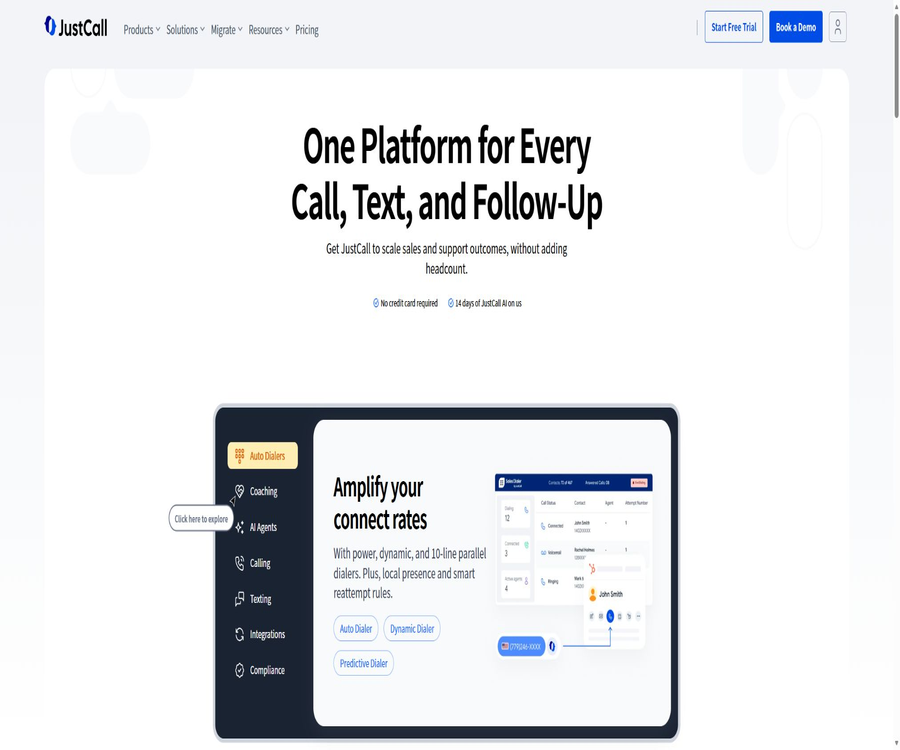
JustCall is a cloud-based phone and AI customer communication platform designed for sales, customer service, and operations teams; it allows managers to handle business numbers, calls, text messages, WhatsApp communications, sales calls, conversation analysis, and AI voice agents all within a single workspace.
What is JustCall?
JustCall is operated by SaaS Labs; its main purpose is to connect corporate phone systems with CRM systems, customer service tickets, and sales processes. Teams can use numbers available in over 70 countries and regions to conduct local communications, and the records of these interactions are synchronized back to the business systems.
The products are divided into the AI Communication Suite and the Sales Suite. The former is designed for everyday customer service and team communication, while the latter is intended for situations that involve frequent outbound sales calls; companies can also purchase the AI Voice Agent as an additional option.
Product composition
| Product module | Key capabilities | Suitable for teams | Billing method |
|---|---|---|---|
| AI Communication Suite | Cloud calling, SMS, routing, integration, and conversation analysis | Sales, customer service, and operations teams | Subscribe by seat |
| Sales Suite | Sales dialers and high-frequency outbound calling workflows | Outbound sales and lead generation team | Custom quote from SalesPro |
| AI Voice Agent | Automatic answering, eligibility screening, scheduling, and routing | Teams that require round-the-clock support | Independent minute package |
| Developer Platform | API, Webhook, Dialer SDK, and MCP | Software team and platform partners | Subject to package and usage limits |
Cloud phone calls and global numbers
Administrators can purchase local, mobile, or free numbers for the team, allowing calls to be made and received via web, desktop, and mobile devices. The availability of numbers, monthly fees, identity documents required, and available features vary depending on the country, region, and type of number.
- Choose available business numbers in over 70 countries and regions.
- Use a shared number or assign exclusive numbers to members.
- Set working hours, call rules, and procedures for handling missed calls.
- View call history, recordings, voicemails, and transcriptions.
- Automatically record phone calls in the connected CRM.
- Apply to transfer numbers in or out based on business needs.
Inbound routing and IVR
The team can assign incoming calls to the appropriate personnel using an IVR menu, working hours, queues, skills, and member status. Advanced packages also offer intelligent routing, queue callback, and more detailed permission controls.
| Routing capabilities | Specific functions | Usage suggestions |
|---|---|---|
| IVR menu | Have the caller press a key to select the department or service. | Keep the menu short and set a timeout path. |
| Ring in sequence or simultaneously | Notify one or more members in accordance with the established rules. | Combine online status to avoid idling. |
| Working hours | Distinguish between operating hours and non-operating hours | Set separate rules for holidays. |
| Queue fallback | During peak hours, customers are allowed to keep their slot and wait for a callback. | Test the callback number and time zone before going live. |
| Intelligent routing | Assign phones based on business requirements | Regularly check the paths where rules are satisfied and those where they are not. |
Sales dialer
The sales team can use automatic dialing, Power Dialer, and list workflows to reduce the time spent on manually entering numbers. Dialing records, results, and notes can be synchronized with CRM, facilitating subsequent follow-up and management of the conversion funnel.
- Make outbound calls sequentially based on the sales list.
- Display the contact and CRM context before the call.
- It automatically records the connection status, missed calls, and handling results.
- For reminders via phone calls, text messages, or task scheduling.
- Leverage local numbers to enhance the customer experience in different markets.
- Use management reports to compare member and activity performance.
Automatic dialing does not exempt companies from their obligations related to obtaining marketing consent, maintaining lists of numbers to be excluded from calls, setting time restrictions, and displaying phone numbers. Before carrying out large-scale outbound calls, companies should establish procedures for authorizing contacts and creating lists of numbers to be restricted, in accordance with the regulations of the target regions.
Text messages and WhatsApp
JustCall supports one-on-one SMS messages, batch SMS messages, automated SMS messages, as well as communication via WhatsApp; the specific features available depend on the number, region, and plan selected. Messages can be linked to customer profiles and team inboxes.
- Send and receive customer messages from the business number.
- Send batch messages for events or follow-ups.
- Use templates and automated triggers for reminders.
- Manage WhatsApp conversations in supported accounts.
- Retain delivery, response, and failure statuses.
- Synchronize message activities to CRM or customer service systems.
The use of these ten long-code numbers in the United States for personal messages usually requires registration of a brand or an event; this rule also applies even to one-to-one business messages. Companies must keep track of the method chosen by users to join such services, and they need to include clear information regarding identity and ways to withdraw from these services in the messages sent.
Integration of CRM and customer service
The platform offers over 100 CRM, customer service, data, and productivity integrations, allowing users to initiate calls from their familiar business systems and have the activities automatically saved. Advanced integrations such as Salesforce CTI require a Pro or higher plan.
| Integrated categories | Typical uses | Online inspection |
|---|---|---|
| CRM | Click on Call, Contact Recognition, and Activity Feedback. | Field mapping and duplicate contacts |
| Customer service ticket | Link phones and messages to tickets | Queue, identity, and ticket assignment |
| Automation platform | Trigger the process via call or message events | Failed retry attempts and usage fees |
| Data warehouses and analysis | Summarize communication records and performance metrics | Data latency and access permissions |
| Calendar | Schedule appointments and make callback calls | Time zones, available time, and cancellation rules |
Call transcription and AI analysis
JustCall can transcribe calls and generate summaries, as well as information regarding emotions, themes, action items, and ratings, thereby helping managers identify issues related to quality and training among a large number of conversations. Pro Plus includes the more comprehensive AI Review Assist feature along with real-time assistance capabilities.
- Automatically generates call transcripts and brief summaries.
- Rate customer service or sales calls based on custom criteria.
- Identify themes, emotions, and common objections.
- Provide coaching feedback through comments and excerpts.
- Check whether the agent follows the specified script.
- Use real-time prompts to assist members in answering questions and addressing objections.
- Multi-channel interactions are organized by AI note-taking tools.
Transcription and scoring are affected by accent, noise, language, multiple conversations, and the rules in place. Managers should not rely solely on automated scoring to handle matters related to discipline, compensation, or disputes involving high-risk customers; instead, they should resort to sampling of recordings and manual review.
AI Voice Agent
AI Voice Agent is a standalone add-on service that allows calls to be answered around the clock using JustCall numbers. It can answer questions based on a knowledge base, filter inquiries, collect information, schedule appointments, generate summaries, and transfer calls to a human agent when the appropriate conditions are met.
| Ability | Working method | Applicable scenarios |
|---|---|---|
| Knowledge quiz | Answer common questions based on the configured business information. | Product inquiries and business information |
| Clue filtering | Collect requirements and qualification information based on predefined questions. | Lead entry point |
| Reservation | Read the available time and make the arrangements. | Demonstrations, consultations, and service appointments |
| Live transfer | Route calls to members or queues according to the rules. | Complex problems and high-value customers |
| Call summary | Save the conversation results and key information. | CRM write-back and follow-up |
| Multilingual | Conduct conversations in supported languages. | Inter-regional reception |
The current help documentation indicates that custom voice cloning and Custom Actions are not yet available officially, so no guarantees can be made regarding their functionality. Test calls also consume actual minutes of call time; therefore, it is necessary to control the number of script iterations and tests before they are put into use.
AI Voice Agent configuration process
- Maintain a valid JustCall main plan and have an available number ready.
- Create a voice agent and select the call-handling tasks, language, and voice.
- Import reviewed business knowledge and common questions.
- Write the opening, identity disclosure, qualification questions, and failure responses.
- Configure reservation criteria, manual transfer, and routes for off-hours.
- Tests are conducted using different accents, noises, and abnormal issues.
- Check whether the summary, field savings, and CRM write-back are accurate.
- Launch on a small scale and continuously review data on incorrect answers, transfers, and hang-ups.
Price of the main package
The price information was verified on August 23, 2026; the actual amounts, taxes, exchange rates, and discounts may vary, and the final figures will be those displayed on the settlement page.
The main JustCall package is priced per seat, with the option to pay monthly or annually; the annual payment is made in a single installment and is converted into a monthly fee per seat. All current standard packages require at least two seats, while the Business package is intended for teams with ten seats or more.
| Package | Equivalent annual amount in US dollars | Monthly payment in dollars | Core rights and interests | Suitable for users |
|---|---|---|---|---|
| Team | $ | $ | Cloud phone, regional communication benefits, 500 SMS messages in segmented form, transcription, IVR, plus over 100 integration options and APIs | Small teams that need basic business communication tools |
| Pro | $ | $ | All Team features, 1000 message segmentation, Power Dialer, queued redialing, intelligent routing, and advanced analytics | A growing sales and customer service team |
| Pro Plus | $ | $ | All Pro features, AI Review Assist, AI notes, scoring, sentiment analysis, script compliance, and real-time assistance | Teams that need AI-based quality inspection and guidance |
| Business | Custom quote | Custom quote | Enterprise usage, SSO, SLA, compliance support, implementation, and higher API limits | Companies with 10 or more seats |
| SalesPro | Custom quote | Custom quote | Rights to make sales calls and conduct frequent outbound calls | Large-scale outbound sales team |
Prices in Australia and the UK
The billing region selected at the time of subscription determines the options related to currency, calls, text messages, and transcription services, and it is not determined solely by the actual location of the company. A single subscription does not allow for the combination of benefits from multiple regions.
| Package | Equivalent to annual payment in Australia / monthly payment | Annual GBP equivalent / Monthly payment | Explanation |
|---|---|---|---|
| Team | 45/60 Australian dollars | 25/30 pounds | Monthly, based on seats; usage varies by region. |
| Pro | 75/105 Australian dollars | 40/55 pounds | Monthly, based on seats; usage varies by region. |
| Pro Plus | 145/175 Australian dollars | 65/85 pounds | Monthly, based on seats; usage varies by region. |
| Business | Custom quote | Custom quote | Rights and interests as determined by the contract |
| SalesPro | Custom quote | Custom quote | Determined based on sales volume and region. |
The platform now also offers billing in the euro zone, but the public summary tables do not show fixed euro amounts that can be reliably verified. The European team should rely on the account settlement page and the written sales quotes, rather than converting the amounts directly into dollars.
Regional communication rights
| Packages and regions | Incoming call | Exhale | SMS segmentation | transcription |
|---|---|---|---|---|
| Team United States and Canada | Unlimited | Unlimited | 500 | Unlimited |
| Team Australia or UK | Unlimited | 1000 minutes | 0 | 2000 minutes |
| For the United States and Canada | Unlimited | Unlimited | 1000 | Unlimited |
| For Australia or the UK | Unlimited | Unlimited | 500 | Unlimited |
| Pro Plus in the United States and Canada | Unlimited | Unlimited | 1000 | Unlimited |
| Pro Plus Australia or UK | Unlimited | Unlimited | 500 | Unlimited |
The unlimited usage indicated in the table applies only to specified areas, eligible numbers, and within reasonable limits of use. International numbers, special numbers, forwarded calls, automated text messages, and communications that are not covered by the package can still consume the prepaid credit.
Prepaid limit and monthly benefits
The monthly communication credits are reset at the end of each billing cycle, while the prepaid Credits remain as part of the account balance and can be used for additional usage. These two types of free credits should not be considered as the same thing.
| Cost items | How is billing typically handled? | Common triggering scenarios |
|---|---|---|
| Package seats | Charged by member and period | New members will be charged based on the proportion of the remaining period. |
| Number | The package may include a limited number of free numbers; additional numbers are available at an extra cost. | High monthly rent or special type of numbers |
| Call | First, use the benefits included in the regional package; any excess amount will be deducted from Credits. | International, special numbers, and transfers |
| SMS | First, use SMS segmentation; messages that are additional or not included will cost Credits. | Batch, automated, and international SMS messaging |
| Automation | Certain automated messages and workflows incur Credits separately. | CRM automation, developer calls, and batch tasks |
| AI Voice Agent | Charged based on the standalone minute package and any excess fees | Both testing and actual calls take time. |
The information available for assistance currently describes the free numbers in a manner that differs from that on some older pages; the actual number of such numbers is also influenced by the monthly rental limit for these numbers and the status of the account. When making a purchase, it is necessary to check the settlement page for details regarding the numbers, seats, taxes, and Credits.
Price of AI Voice Agent
| Plan | Price | Includes minutes | premium price | Suitable for users |
|---|---|---|---|---|
| Free trial | $ | 50 minutes | Choose a paid plan after the trial period. | Verify the script and the response quality |
| Pay-as-you-go | No fixed monthly fee | 0 minutes | $ | Teams with unstable usage levels |
| Agent Lite | $ | 100 minutes | $ | Answering on a small scale |
| Agent Max | $ | 300 minutes | $ | Stable moderate dosage |
| Custom | Custom quote | Over 300 minutes | In accordance with the contract | Enterprises with high consumption levels |
The annual fees for Lite and Max are 1,188 dollars and 2,988 dollars respectively; both plans allow the creation of an unlimited number of agents. Purchase rights are usually granted only to account owners, administrators, or members with billing permissions.
The old help articles mentioned a 30-minute trial period as well as different package options of 500 or 1000 minutes; these figures have been replaced by a new 50-minute trial period and the current package options. The contents of the catalog should not present those older package options as available choices today.
Cancellation, suspension, and refund
After cancellation, the account can usually be used until the end of the current billing cycle, after which renewal for the next cycle will stop. Annual plans are charged in a single payment at the start of the cycle; regular cancellation does not result in a refund of the fees already paid or of any unused credits.
| Operation | Current rules | Precautions |
|---|---|---|
| Cancel | Submitted by the account owner and closed at the end of the period | Number transfer should be completed before closing the account. |
| Shut down immediately | You need to contact support separately. | First, export calls, text messages, and voicemails. |
| Refund | Typically, only duplicate payments or incorrect deductions are handled. | After approval, it is returned to the original payment method. |
| Credits | No refund or transfer will be provided after the account is closed. | Check the remaining balance before cancellation. |
| dormancy | It can reduce bills by about 70% while keeping the data and numbers. | Qualification and restoration rules require account confirmation. |
| Starter | Some accounts in the United States and Australia may be transferred to a restricted program. | Not all accounts are eligible. |
API and Webhook
JustCall offers development interfaces that support functions such as calls, text messages, AI, sales dialing, WhatsApp, and meetings. The APIs are available starting with the Team package, and different packages come with varying call limits.
| Package | Hourly limit | Sudden peak limit | Suitable scenarios |
|---|---|---|---|
| Team | 1800 times | 30 times per minute | Basic synchronization and lightweight automation |
| Pro and Pro Plus | 3600 times | 60 times per minute | More frequent CRM and data workflows |
| Business and SalesPro | 5400 times | 90 times per minute | Enterprise-level platform integration |
Traditional authentication relies on API Keys and Secrets; the rotation of these credentials renders the old sets invalid immediately and affects the signing of dynamic Webhooks. Production systems should use key management services to store such credentials, and implement a fallback-based deployment process for carrying out rotations.
Webhook and Dialer SDK
Webhooks can push calls, text messages, and other events to enterprise systems, and HMAC-SHA26 is used to verify the integrity of the messages. The platform will automatically retry failed attempts, but developers still need to implement idempotency, timestamp verification, and exception alerts.
The Dialer SDK is used to integrate call and SMS functionalities into CRM systems, customer service platforms, or specialized software. Those who incorporate this SDK need to design mechanisms for member mapping, number permissions, recording alerts, fallback solutions in case of failures, and determining who is responsible for the communication costs.
API integration process
- Confirm that the current package includes APIs and assess the required number of calls.
- The administrator creates dedicated credentials and restricts access to internal users.
- First, verify contacts, calls, and text messaging recipients using a test account.
- Set up Webhook signature verification, idempotent keys, and a retry queue.
- Write handling logic for 429 rate limiting, network failures, and duplicate events.
- Check for additional charges related to automated text messages, international calls, and numbers.
- Go online with the minimum flow rate and monitor the failure rate as well as Credit consumption.
- Regularly rotate keys and remove integrations that are no longer in use.
Official MCP server
SaaS Labs has made the JustCall MCP Server available on GitHub under the MIT license. This server enables compatible clients to use 66 different tools for managing calls, users, messages, contacts, analytics, Webhooks, numbers, groups, appointments, WhatsApp, AI-based analysis, and voice agents.
| MCP capability group | Representative operation | Risk level |
|---|---|---|
| Call | Search for records or initiate a call | High – it may enable actual communication. |
| Text messages and WhatsApp | Read or send messages | High; user consent and cost control are required. |
| Contacts and users | Read or manage business objects | Medium to high; involves personal information |
| Numbers and groups | View communication configuration | It affects the understanding of routing. |
| Analysis | Query call performance and AI results | It includes data on employees and customers. |
| Webhook | Manage event subscriptions | High – it may alter the data flow. |
| Voice agent | Query or manipulate AI agents | High – may trigger automatic communication. |
MCP supports OAuth 2.0 authorization codes and PKCE; it can also make use of the platform credentials approach, and it allows connections from remote clients. Since the tool enables actual calls, message sending, and configuration modifications, users must review the scope of requests and cannot treat it as a read-only search connector.
Open-source status
JustCall’s core cloud phone platform, AI services, and hosted infrastructure are not open-source products. The publicly available MCP servers are licensed under the MIT license; this merely means that the code related to those connectors can be used in accordance with that license, but it does not imply that the platform’s backend, communication networks, or AI models are open source.
Safety and compliance
The security standards announced by JustCall include ISO 27001:2022, SOC 2 Type 2, PCI DSS, CSA STAR Level 1, as well as the controls related to GDPR and HIPAA. Companies can request certain reports through the Trust Center in order to assess their data processing agreements or partnerships.
- Transmission uses TLS or SSL, and static data is encrypted with AES-256.
- The infrastructure makes use of AWS and Google Cloud.
- Perform daily backups and third-party penetration testing.
- Use role-based access and multi-layer authentication.
- The Business package offers single sign-on.
- Appropriate contracts are used to ensure the cross-border processing of data within the EU.
- Companies can apply for data processing agreements and security reports.
Certification and compliance plans cannot automatically cover the way in which customers use the services. Before enabling features such as recording, AI analysis, handling of medical data, or processing of payment-related communications, it is still necessary to ensure that the packages, contracts, user permissions, and actual data flows meet the requirements of the enterprise.
Recording and consent
Plans Pro and above include a feature that allows compliance with the recording requirements set by U.S. states; in areas where unanimous consent is required, recording is disabled by default, with a prompt to obtain such consent from the agent. This control currently applies only to outbound calls, while inbound call recordings are still determined based on the number settings.
- Identify the locations of the callers and the applicable laws.
- Play a clear prompt before recording or obtain explicit consent.
- Configure separate recording policies for incoming and outgoing calls.
- Restrict internal access to recording, transcription, and summarization.
- Set retention and deletion periods that are in line with the business objectives.
- Customers are allowed to submit requests to access or delete data in accordance with the law.
- Regularly conduct random checks on the compliance switches and the actual recording results.
Automatic communication compliance
When using an API to initiate outbound calls via AI voice agents, developers are required to ensure that they have prior written consent. SMS, automatic dialing, and WhatsApp are also subject to operators’ policies, registration requirements, template rules, and regional marketing regulations.
JustCall provides tools and certain compliance controls, but the customer remains the one who initiates the communication activities. Companies should keep records of the time of consent, the channels used, the messages sent, any withdrawals from such communications, as well as lists of individuals whose communications are restricted; they should also have legal or compliance officers review high-risk activities.
Supported platforms
| Platform | Currently supported | Primary uses |
|---|---|---|
| Web applications | Support | Numbers, calls, messages, analysis, and management |
| Desktop application | Support | Daily call and message handling by agents |
| iOS | Support | Answer calls on the go, make outbound calls, and communicate with customers |
| Android | Support | Answer calls on the go, make outbound calls, and communicate with customers |
| Browser extensions | Support | Click to call from web pages and business tools |
| Embedded in CRM | Support | Through integration or Dialer SDK operations |
| API and Webhook | Support | Automation and data synchronization |
| MCP client | Support | Communication and analysis tools are invoked by the AI assistant. |
Which users are it suitable for
- Small and medium-sized enterprises that wish to replace traditional telephone systems with cloud-based numbers.
- Sales teams that need to synchronize calls and text messages with CRM.
- A customer service team that requires IVR, queueing, and callback functions.
- Sales teams that carry out frequent outbound calls and follow up on leads.
- Managers who need AI transcription, quality inspection, and agent coaching.
- Companies that wish to use AI agents to handle calls and make appointments around the clock.
- Platforms that require embedding communication capabilities via API, SDK, or MCP.
Product advantages
- Put phones, text messages, WhatsApp, and sales calls in one platform.
- The numbers cover more than 70 countries and regions.
- Offers over 100 CRM and business integration solutions.
- API capabilities are available starting with the Team plan.
- Pro Plus offers a fairly comprehensive set of AI-based quality inspection tools and real-time assistance.
- The AI Voice Agent supports Q&A, filtering, scheduling, and transfer.
- It provides Webhooks, Dialer SDKs, and open-source MCP servers.
- The information on safety and compliance is relatively complete.
Main limitations
- The standard package requires at least two seats.
- The package price does not equal the total cost of communication.
- The region, number, and type of communication affect the usage amount.
- Partial automation, international communications, and special numbers consume Credits.
- AI Voice Agent needs to be purchased separately on a per-minute basis.
- AI transcription, scoring, and automated responses still require manual review.
- The recording compliance switch cannot replace a company’s legal judgment.
- A regular cancellation usually does not result in a refund of the subscription fee or the remaining Credits.
- The core platform is closed-source; the MIT license applies only to the MCP servers.
Pre-purchase checklist
- Identify the main calling area and select the corresponding billing zone.
- Calculate the subscription fee for at least two seats or the minimum number of seats required for a company.
- Check the monthly fee, materials, and available capacity according to the type of number.
- Estimate Credits for calls, text messages, international communications, and automation.
- Estimate separately the number of minutes for AI Voice Agent testing and for actual use.
- Verify CRM fields, activity write-back, and handling of duplicate contacts.
- Check the processes for recording consent, registration via SMS, and marketing authorization.
- Evaluate API throttling, Webhook signing, and MCP write permissions.
- Confirm the conditions for cancellation, number transfer, data export, and refund.
- Compare other cloud phone solutions based on the total monthly cost.
Frequently Asked Questions
Is there a free version of JustCall?
The main platform relies on paid subscription plans; it is not a completely free option for long-term use. AI Voice Agent offers a 50-minute trial period, and whether the main product comes with a trial period depends on the account terms displayed at the time of registration.
What is the minimum cost for JustCall?
For the USD zone, the annual subscription for Team costs $29 per seat per month, while the monthly subscription is $39; at least two seats must be purchased. Numbers, international calls, additional text messages, as well as automated and AI agents may incur extra charges.
Is unlimited calling available in all countries?
It is not applicable. The unlimited benefits are valid only in the selected areas, for eligible numbers under reasonable usage conditions; credits may still be deducted for international calls, special numbers, forwarding calls, and other types of usage that are not included.
How much does an AI Voice Agent cost?
You can opt for a pay-as-you-go rate of $0.99 per minute, or you can purchase plans costing $99 per month for 100 minutes, or $249 per month for 300 minutes. Any usage beyond the included minutes is typically charged at $0.99 per minute.
Does JustCall provide an API?
Available. The API is available starting with the Team package, and it includes Webhook and Dialer SDK; the number of hours per month as well as the limit on emergency calls vary depending on the package chosen.
Is JustCall open source?
The core platform is not open-source. The code for the official MCP server is licensed under the MIT license, but this does not mean that the backend of the cloud telephony service, the AI services, or the communication infrastructure are open to use.
Can I get a refund if I cancel my subscription?
A regular cancellation usually only stops the renewal for the next period; it does not refund the amount already paid for the subscription or the remaining credits. Refunds are generally reserved for cases of duplicate payments or incorrect deductions after cancellation.
Is the recording function automatically compliant?
It cannot be understood in that way. The platform offers some control over recording outgoing calls at the state level, but companies still need to determine the rules regarding incoming calls, calls across states, and calls to other countries, as well as handle tasks related to alerts, approvals, storage, and access management.
Summary
JustCall is suitable for sales and customer service teams that wish to integrate cloud-based calling, text messaging, sales dialing, CRM records, and AI-powered call analysis. Its global numbers, integration capabilities, AI Voice Agent, and development interfaces constitute a comprehensive set of tools for enterprise communication.
When making purchases, it is not sufficient to compare only the price per seat; companies should also take into account regional benefits, the minimum number of seats required, phone numbers, Credits, AI usage minutes, and compliance costs. The overall cost, call quality, AI accuracy, and data management should be evaluated based on actual business traffic.
Tools similar to JustCall



 Guigong Network Security Registration No. 45132202000164