






GetResponse
GetResponse: an intelligent tool focused on improving efficiency through AI.
Tags:AI improves efficiencyA one-sentence summary
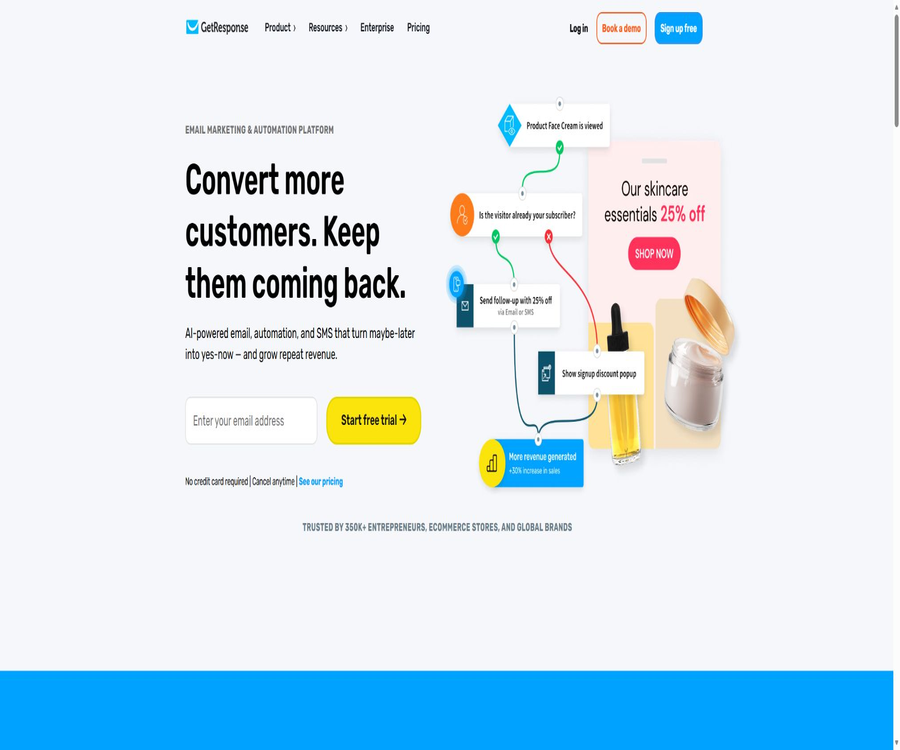
GetResponse is a platform for email marketing, customer journey automation, and monetizing content; it allows users to create emails, landing pages, forms, sales funnels, e-commerce outreach tools, webinars, online courses, and paid newsletters all within the same account.
Tool Introduction
GetResponse is aimed at entrepreneurs, e-commerce teams, content creators, and large-scale mailing companies; its core function is to connect contacts, content, communication channels, and conversion data. The self-service version is operated by GetResponse Inc. and its affiliated companies, while separate Enterprise solutions are also available.
The current package options available on the platform are Starter, Marketer, Creator, and Enterprise. The price increases as the number of contacts rises; the starting price applies to 1,000 contacts, and it should not be assumed that this is a fixed price applicable to all sizes of contact lists.
Main functions
Email marketing
Users can create newsletters, welcome emails, promotional emails, and messages tailored to different stages of a customer’s lifecycle within the visual editor; they can also use templates, custom HTML code, A/B testing, optimization of sending times, and click tracking. The specific features available vary depending on the package chosen.
AI-generated emails and subject lines
AI can generate email bodies, subject lines, and other marketing content, helping users to quickly create a preliminary draft. Some of the AI functions available in the Starter version and during the free trial are limited to 3 uses; it is still necessary to check the brand details, facts, offers, and compliance requirements before sending the email officially.
Autoresponder and welcome sequence
Users can have welcome, educational, and follow-up emails sent automatically based on the subscription period, thus creating a basic drip campaign. Free accounts are unable to send automated responses after the 14-day premium trial period ends; only drafts can be retained.
Marketing automation
Workflows can have branches defined based on events such as subscriptions, page opens, clicks, purchases, tags, ratings, page visits, and others. The Starter version comes with only 1 custom workflow, while the Marketer, Creator, and Enterprise versions offer an unlimited number of workflows and support more advanced grouping options.
Landing pages, forms, and pop-ups
The platform allows users to create lead generation pages, publication pages, forms, contact forms, pop-ups, banners, and promotional messages, as well as to connect it to their own domain name. The creation of AI-powered landing pages, A/B testing, and the amount of access allowed are subject to the constraints imposed by the chosen package or trial status.
E-commerce marketing
The higher-tier packages offered by Marketer include advanced e-commerce segmentation, tools for recovering abandoned purchases, sales funnels, discount codes, revenue reports, and product management features. Enterprise versions additionally provide AI-driven product recommendations, transactional emails, and more comprehensive mobile outreach options.
Web Push and mobile push
Marketers and Creators have unlimited access to Web Push and automation features, while Enterprise plans include mobile push notifications. Mobile push notifications are intended for companies’ own apps, and to utilize them it is necessary to use the official Android or iOS SDKs.
Webinar
Creator includes live streaming, recording, on-demand, and paid webinars; the maximum number of participants allowed for live streams under the standard package is 100. Enterprise versions can accommodate a larger number of participants, and the specific details regarding contracts and participant counts must be confirmed at the time of purchase.
Online courses
Creator allows for the creation, promotion, and sale of online courses, as well as the management of students; it shows a summary of the students, with up to 500 students listed. Enterprise offers more flexible student management capabilities, but course sales still require integration with payment systems and tax handling tools.
Premium Newsletter
Creators can set up free or paid newsletter subscriptions to turn regular email content into a source of income for their members. A free trial allows for the creation of content, but the ability to offer paid subscriptions is available only to Creator or Enterprise plans.
Websites and sales funnels
Creator includes a website generator, while Marketer is focused on sales and lead generation. Starter provides only a landing page and lacks the capabilities of a full website; it is not possible to combine the functions of different packages.
Reports and analyses
The platform allows tracking of deliveries, opens, clicks, conversions, revenue, and e-commerce activities; it can also be connected to tools such as Google Analytics. The open rate is influenced by privacy settings and the preloading of email clients, so it should not be used as the only indicator of performance.
Package positioning
| Package | Core positioning | Key differences | Team users |
|---|---|---|---|
| Free | Create small lists and trial platforms | 500 contacts, 2,500 newsletters per month; significant reduction in functionality after 14 days | For use with a basic single account |
| Starter | AI emails and basic customer acquisition | Unlimited monthly emails, 1 custom automated workflow, basic landing pages and forms | Up to 3 people |
| Marketer | Automation and growth in e-commerce | No restrictions on workflows, advanced grouping, abandoned purchases, funnels, revenue reports, and Web Push | Up to 5 people |
| Creator | Monetizing knowledge products and audiences | Add webinars, websites, courses, and paid newsletters to Marketer. | Up to 5 people |
| Enterprise | Master list and omni-channel corporate marketing | Exclusive domain names along with IP addresses, SSO, SMS, mobile push notifications, transaction emails, and priority support | No restrictions |
Complete workflow
- Create an account and verify the sender’s identity by first providing accurate company details, mailing address, and sender domain name.
- Import contacts with verifiable licenses to create lists, tags, Consent Fields, and grouping rules.
- Create landing pages, forms, or pop-ups to allow new contacts to join the list only after giving explicit consent.
- Create welcome emails and follow-up sequences, and test the key links, offers, and unsubscribe processes.
- Automate based on clicks, purchases, abandons, or tag creation, and verify each branch individually on a small sample size.
- After sending officially, check delivery status, bounce rates, complaints, clicks, and conversions, and remove invalid or inactive contacts.
- Continuously improve domain name verification, the quality of the lists, and the content; do not use the single-click rate as a substitute for genuine business metrics.
Usage tutorial
Create the first compliant newsletter
- Select the list of contacts that have marketing permissions; do not import emails that were purchased, rented, or obtained through scraping.
- Configure the From name, reply address, and sender domain authentication to enable recipients to identify the sender.
- Use an editor or AI to create a draft, then add accurate brand information, a clear theme, and a single call-to-action button.
- Ensure that each email contains a valid physical mailing address and an irreversible unsubscribe link.
- Check the mobile version, dark mode, links, variables, image alt text, and spam alerts at the internal testing address.
- Send it first to small, highly interactive groups; after observing the number of replies and complaints, expand the scope.
Establishing automation for welcome and nurturing
- Use form subscription or tag addition as a trigger, and record the time of consent along with the page.
- Send the first welcome email, outlining the content of the subscription, the frequency of deliveries, and how to cancel it.
- Set a waiting time, and then divide the subsequent paths based on whether there is an action such as opening, clicking, or no interaction.
- Add ratings or sales notifications for highly interested contacts, and set gentle reconfirmation messages for those who have not interacted.
- Add exit conditions to ensure that no more irrelevant content is sent after cancellation, purchase, or completion of the target task.
- Use test contacts to traverse all branches, then release the version and regularly check for abnormal stays.
Use Creator to publish courses or paid newsletters
- Determine the target audience for the courses and communications, as well as the frequency of delivery, pricing, and refund policies.
- Establish a content structure in Creator, and upload videos, audio files, images, and documents for which you have permission to use.
- Connect to supported payment methods such as PayPal or Stripe, and check the taxes as well as the availability in your region.
- Create a sales page, an email registration system, notifications for successful payments, and a welcome process for students.
- First, have a small number of test users go through the processes of purchasing, accessing, canceling, and getting a refund.
- After going live, monitor payment failures, cancellations, content access, and support requests; do not treat the AI-generated materials as the final course content.
Access REST API
- The API Key is generated for paid accounts or during the 14-day trial period, and it is stored only within the secure server settings.
- Use the v3 JSON REST interface, starting with low-risk operations such as reading Campaign and Contact data.
- Idempotency and duplicate detection are added to POST operations to prevent the repeated creation of contacts or newsletters as a result of network retries.
- Read the rate-limiting response headers and adhere to the basic limits of 30,000 requests every 10 minutes, 80 requests per second, and a maximum of 10 concurrent requests.
- Handle 429 errors, validation errors, and pagination; record the request ID but do not include the API Key in the logs.
- Keys are rotated regularly; unused keys expire after 90 days and need to be regenerated.
Which users are it suitable for
- Entrepreneurs and small businesses: Create a contact list, a newsletter, welcome emails, and a simple page for acquiring customers.
- E-commerce team: Responsible for product promotion, recovering abandoned purchases, managing discount codes, attributing revenue, and facilitating repeat purchases.
- Marketing team: Build a multi-step customer journey using events, tags, ratings, and segmentation.
- Content creator: Sells courses, paid newsletters, and webinars, while maintaining an audience.
- Education and training institutions: They are responsible for organizing registrations, courses, and live broadcasts, but must also handle matters related to students’ privacy and content licensing.
- Large sending companies: benefit from dedicated IPs, SSO, SMS, transactional emails, and specialized support.
- Developer: Connect to own websites, CRMs, or apps via REST APIs, PHP SDKs, and mobile SDKs.
Typical use cases
- Use landing pages and forms to collect subscribers, and automatically send welcome messages as well as lead magnets.
- Send contacts to different nurturing paths based on browsing, clicking, purchasing, and tags.
- Send reminders, product information, and discount codes to users who abandon their shopping carts.
- Hold online seminars, and then follow up with the participants separately from those who did not attend.
- Publish paid courses or Premium newsletters, connect payment processing, and automate delivery.
- Email delivery can be supplemented via Web Push, SMS, or mobile push, but only for the corresponding plans.
- Integrate GetResponse contacts, campaigns, and newsletters into the internal system.
Product advantages
- Emails, automation tools, landing pages, forms, and e-commerce functions are all gathered in one platform.
- Starter allows unlimited sending per month, and is suitable for those whose budget is determined more by the size of the list than by the number of emails sent.
- Marketer offers unlimited workflows and advanced segmentation, enabling the creation of a comprehensive customer journey.
- Creator integrates webinars, courses, websites, and paid newsletters into a marketing system, making it suitable for turning knowledge into revenue.
- It offers over 150 public integrations, as well as REST APIs and various official open-source SDKs.
- A free account allows you to keep 500 contacts for an extended period and send 2,500 newsletters per month.
- Enterprise offers dedicated sending domain names, IPs, SSO, priority support, and advanced outreach channels.
Usage restrictions and precautions
- The price increases with the number of contacts; the rate starting at 1,000 contacts does not reflect the cost for lists of 2,500, 10,000 contacts or more.
- Unlimited emails and workflows are still subject to the Fair Usage Policy; excessive use may result in a requirement to reduce usage or a suspension of services.
- Free will shut down automation, Autoresponder, Webinars, the website, courses, API, and most integrations after 14 days.
- The Starter version comes with only 1 custom workflow, and there are limits on the number of times AI-generated emails, subject lines, and AI-driven landing pages can be created.
- SMS, mobile push notifications, transaction emails, dedicated IPs, and SSO are available only in Enterprise.
- Sending requests for purchases, rentals, grabs, or unsolicited contacts is a violation of the rules, and it may result in the refusal to import such data or the termination of the account.
- If the number of contacts exceeds the limit set for a particular package, a List Extension Fee will be applied; beyond the maximum allowed scale, an additional charge per thousand contacts may also be incurred.
- Emails, courses, and recommendations generated by AI may be inaccurate; brand statements, prices, legal texts, and copyright information need to be reviewed manually.
Prices and packages
The following are the starting prices for a list of 1,000 contacts as of August 22, 2026; these are net amounts excluding taxes. The price increases as the size of the list grows, and the actual cost will depend on the level of contacts selected and the pricing details on the settlement page.
| Package | Monthly payment | Annual payment conversion | Core rights and interests | Suitable for users |
|---|---|---|---|---|
| Free | $ | $ | Up to 500 contacts, 2,500 newsletters per month; advanced features available for 14 days as a trial. | Personal trials and very small lists |
| Starter | $ | $ | Unlimited monthly emails, AI-generated content, onboarding sequences, 1 custom workflow, landing pages, and forms | Basic email marketing |
| Marketer | $ | $ | Includes automation, advanced clustering, abandoned purchases, funnels, discount codes, revenue reports, and Web Push – with no restrictions. | Marketing and E-commerce Team |
| Creator | $ | $ | Marketing skills, along with webinars, websites, courses, paid newsletters, and up to 500 students | Monetizing courses and content |
| Enterprise | Custom quote | Monthly payment is optional; periods of 12 months or 24 months are available. | Exclusive messaging, SSO, SMS, mobile push notifications, transaction emails, AI recommendations, and unlimited users | Large rosters and complex enterprises |
The standard annual payment plan comes with an 18% discount, but the full amount for the entire year must be paid in advance. An upgrade takes effect immediately and restarts the billing cycle; to downgrade or switch from annual to monthly payment, it is necessary to contact the support team.
Number of contacts and additional costs
| Project | Rules | Budget impact |
|---|---|---|
| Standard list hierarchy | 1,000, 2,500, 5,000, 10,000, 25,000, 50,000 and 100,000 | The more contacts you have, the higher the monthly fee will be. |
| Free contacts | Up to 500; unconfirmed and removed contacts are also included. | Once the limit is reached, new contacts are placed in a 32-day queue. |
| Beyond the purchased level | Charge the difference at a rate sufficient to cover the list for that month. | A List Extension Fee is generated. |
| Over 100,000 contacts | It may prevent further additions, and a fee will be charged for each thousand-unit block that exceeds the highest level. | Large lists should be sent to Enterprise for evaluation. |
| Taxes and fees | The public price is the net price. | VAT, GST, or sales tax is added separately depending on the region. |
| No restrictions on sending | Subject to the Fair Usage Policy | Abnormal overuse is not unconditional and unrestricted. |
Free and 14-day premium trial
After registration, you can retain your Free account indefinitely and use the advanced features for a 14-day trial period without needing a credit card. Once those 14 days are up, the account does not disappear; rather, functions such as automated services, webinars, websites, courses, APIs, and most integrations become unavailable.
| Functions | First 14 days | Free after 14 days |
|---|---|---|
| Contact person | Up to 500 | Up to 500 |
| Newsletter | A maximum of 2,500 emails per month, with the brand logo. | A maximum of 2,500 emails per month, with the brand logo. |
| AI emails and subject lines | Up to 3 times | Unavailable |
| Automation | Workflows can be created and published. | Only drafts can be created and viewed; published processes are unavailable. |
| Autoresponder | Available for trial | Cannot be sent |
| Landing page | Multiple pages can be published, with a total of 1,000 unique visits per month. | Only 1 published page can be retained. |
| Webinar | Up to 10 people can be included, and one 30-minute recording is possible. | Unavailable |
| Courses and paid newsletters | It can be created, but sales are restricted. | Unavailable |
| APIs and Integration | It is possible to generate a Key and establish a connection. | Key locked; integration disconnected or needs to be reconfigured later. |
| Mobile App | It can be used. | Unavailable |
Platforms and integration
| Category | Supported content | Explanation |
|---|---|---|
| Web platform | Complete marketing and content workspace | Mainly used for creating and managing entrances. |
| Mobile App | GetResponse management app | After the premium period of Free ends, it can no longer be used. |
| E-commerce | Shopify, WooCommerce, Magento, PrestaShop, etc. | Functions and recovery methods vary depending on the integration. |
| Payment | Stripe, PayPal | Used for courses, communications, and e-commerce transactions |
| CRM and automation | Salesforce, Microsoft Dynamics 365, Zapier, and others | Some premium connections are subject to package restrictions. |
| Analysis and Advertising | Google Analytics, Facebook Pixel, and advertising tools | Third-party policies must be followed separately. |
| Develop interfaces | REST API v3, PHP SDK, Android and iOS mobile SDKs | API Keys are used in paid accounts. |
| Number of public integrations | Over 150 | The actual availability depends on the integrated directory and region. |
REST API
GetResponse API v3 is a JSON REST interface that allows for the management of resources such as campaigns, contacts, newsletters, statistics, and segmentation. Retail accounts use a unified interface, while Enterprise customers need to confirm the appropriate environment with their account manager.
| Project | Current rules | Development considerations |
|---|---|---|
| Authentication | API Key in X-Auth-Token | Keys must be stored on the server side only, and cannot be embedded in web pages or mobile clients. |
| Data format | JSON | POST must specify the JSON content type. |
| Main methods | GET, POST, DELETE | POST is not idempotent; retries need to prevent duplication. |
| 10-minute limit | 30,000 times | Read the response headers to calculate the remaining quota. |
| Per-second quota | 80 times | Batch tasks need to be throttled. |
| Concurrent quota | Up to 10 requests | Queue processing if exceeded |
| Excessive response | 429 | Retry after waiting for the Reset time. |
| Key not used | Expires after 90 days | Conduct regular tests and carry out rotations. |
SDK, GitHub, and open-source status
| Project | Language or platform | License | Uses |
|---|---|---|---|
| API v3 PHP SDK | PHP 7.3 or higher | MIT | Call REST resources such as Campaign, Contact, and Newsletter. |
| MobileSDK-Android | Kotlin, Android SDK 34, and Firebase Cloud Messaging | MIT | Receive mobile push notifications and synchronize Consent data with statistics. |
| MobileSDK-iOS | Swift Package Manager | MIT | Configure mobile push notifications, tokens, and click events. |
| Old PHP API Wrapper | PHP | Abandoned | The official repository recommends using sdk-php instead. |
| GetResponse platform | SaaS | Not open source | Managed mailing, automation, and content monetization services |
| Self-hosting | Not supported | The open-source SDK is used solely for connecting to commercial platforms. |
There are several public repositories on the official GitHub, but these repositories contain SDKs, examples, or components – they do not hold the source code for the entire GetResponse platform. The open-source status indicated in those repositories is that the product itself is not open source; some of the official SDKs are available under the MIT license.
Email permission and anti-spam rules
GetResponse adopts a zero-tolerance anti-spam policy based on explicit permission; customers must obtain verifiable consent before importing, manually adding, or writing contacts via API, and cannot rely on implied permission.
- The use of email address lists purchased, rented, exchanged, or obtained through scraping is prohibited.
- It is recommended to use Confirmed Opt-in, so that contacts confirm their subscription voluntarily and complaints are reduced.
- The From, To, Reply-To fields, domain names, and subject must be accurate, clear, and free from any misleading elements.
- Each marketing email must contain a valid physical mailing address and an unremovable unsubscribe link.
- Once a contact unsubscribes, no further messages should be sent to them, and their address must not be sold or transferred.
- The platform can verify or reject the import list, and check for spam traps, spelling errors, and licensing issues.
- Uncontrolled distribution, operation in illegal industries, or a high number of complaints may lead to the suspension of the campaign, the closure of the page, or the termination of the account, with no refund provided.
Privacy, GDPR, and security
GetResponse acts as the data controller with regard to the account customer information, and as a processor regarding the contact details uploaded by customers. The customers remain responsible for determining the legal basis, the purpose of sending the data, providing privacy notices, keeping records of consent, and handling requests from the data subjects.
- The platform handles account information, contacts, marketing content, behavior events, devices, IP addresses, location data, and Cookie data.
- The official privacy policy states that personal information will not be sold to third parties, but it will be shared with processors required to provide the services.
- Customers can accept the Data Processing Agreement electronically; this applies to contacts related to GDPR.
- DPA lists measures such as transmission and static encryption, access control, backup, vulnerability scanning, penetration testing, and event management.
- Courses, webinars, forms, and chats may collect additional personal data; the fields used should adhere to the principle of minimum necessity.
- General services are not designed to handle data related to children, criminal records, or special categories of data; additional legal and security assessments are required before processing such data.
- Accounts should have two-factor authentication, roles with minimal permissions, and regular member reviews; API keys and payment keys must not appear in email templates.
- The current effective date of the Privacy Policy is June 19, 2026; customers involved in cross-border activities or those operating in regulated industries still need to review the documents specific to their respective regions.
Interpretation of data and outcomes
Reports from email platforms can help in comparing different campaigns, but they cannot automatically establish a causal relationship. Apple Mail’s Privacy Protection, image blocking, and security scans can all affect data related to opens and clicks.
- Priority should be given to monitoring delivery, hard bounces, complaints, cancellations, clicks, purchases, and revenue simultaneously.
- In A/B testing, only the key variable is changed at a time, and a decision is made after sufficient sample size is obtained.
- Reconfirm or remove contacts that have not been active for a long time, in order to prevent the list from growing and to avoid a decline in credibility.
- Revenue attribution should be cross-verified with e-commerce, payment, and analytics platforms.
- The timing of AI-generated recommendations and the product suggestions need to be compared with business benchmarks; platform predictions cannot be regarded as guarantees.
- Before the major promotion, carry out domain name verification, increase the number of recipients in stages, and prepare dedicated IPs, so as not to send messages to the entire old list all at once.
Basic information
| Project | Content |
|---|---|
| Tool name | GetResponse |
| Operating entity | GetResponse Inc. and its affiliated GetResponse companies |
| Tool type | Email marketing, automation, e-commerce marketing, and monetizing content |
| Standard package | Free, Starter, Marketer, Creator |
| Business packages | Enterprise, GetResponse MAX |
| Price basis | Based on the number of contacts and the billing cycle |
| Free account | Up to 500 contacts, 2,500 newsletters per month |
| Free premium experience | 14 days, no credit card required |
| Main platforms | Web and mobile management apps |
| Public API | REST API v3 |
| Official SDK | PHP, Android, and iOS |
| SDK license | MIT |
| Is the product open source? | No |
| Self-hosting | Not supported |
| Date of entry into force of the privacy policy | June 19, 2026 |
| Date of information verification | August 22, 2026 |
Recommendation score
Recommendation score: 4.6 / 5. GetResponse covers everything from lead generation, email marketing, automation, and encouraging repeat purchases in e-commerce, to Webinars, courses, and paid newsletters; it also offers a comprehensive range of packages and development interfaces.
The main drawback is that an increase in the number of contacts leads to higher costs; Free version shows a significant decline after 14 days, and some high-value channels are only available in the Enterprise version. The platform offers many functions, and new teams need to establish licenses, domain credibility, data governance frameworks, and testing procedures first.
Frequently Asked Questions
Is GetResponse free?
There is a free plan available for an extended period; it allows up to 500 contacts and 2,500 newsletters per month. Advanced features can be tried out for the first 14 days after registration, after which they become unavailable.
How much is the starter?
At 1,000 contacts, the cost is $19 per month; when paid annually, this amounts to $15.58 per month. The price increases as the number of contacts rises, and the figures given do not include taxes.
What is the difference between a Marketer and a Creator?
Marketers focus on areas such as automation, e-commerce, abandoned purchases, and Web Push; creators add to this scope webinars, websites, online courses, and paid newsletters.
Is it really possible to send emails without any limits?
Paid plans state that there is no limit on the number of messages that can be sent per month, but the Fair Usage Policy must be followed. Excessive use, spamming, or actions that affect the performance of the platform may result in restrictions.
Can a free account use the API?
API Keys can be generated and used only during the first 14 days of the premium experience. If the upgrade is not performed, the key will be locked, and the associated integrations will either stop working or need to be reconfigured.
Is an official SDK provided?
It provides a PHP API SDK, as well as Android and iOS SDKs for mobile push notifications; the public repository is licensed under the MIT license.
Is GetResponse open source?
The platform itself is not open source; only certain SDKs and components are open source, and they are used to integrate with GetResponse’s commercial services.
Can I import a list of purchased email addresses?
No. The anti-spam policies prohibit the purchase, rental, exchange, or acquisition of email addresses; all contacts must have verifiable permission to send messages.
How many people can a Creator host in a webinar?
The current standard Creator package allows up to 100 participants; Enterprise versions offer a higher capacity. The actual terms and additional options depend on the account settings.
Are there any fees charged for course sales?
The platform indicates a 0% fee for transactions, but payment processing fees, taxes, and costs associated with refunds may still apply via services such as Stripe and PayPal.
What happens if the contact exceeds the package limit?
The platform will charge a difference at the higher tier that is sufficient to cover the list for that month; this fee is known as the List Extension Fee. Large lists should be upgraded in advance or switched to the Enterprise version.
Is Chinese supported?
It is possible to create and send emails, pages, and course content in Chinese, but the quality of the interface, customer service, and AI features varies depending on the language. Formal campaigns should be reviewed by Chinese editors.
Summary
GetResponse is suitable for teams that want to manage list growth, email marketing, automation, e-commerce, and content monetization all within the same platform. Starter is appropriate for basic email functions, Marketer is designed for e-commerce automation, and Creator is meant for courses and paid content.
Before making a choice, it is necessary to calculate the total cost based on the actual number of contacts, and to test the key processes using a 14-day trial period. The long-term effectiveness depends on verifiable licenses, the quality of the contact lists, the reputation of the domain names, manual review, and reliable attribution – rather than simply increasing the volume of messages sent.
Tools similar to GetResponse



 Guigong Network Security Registration No. 45132202000164